2019 MASERATI QUATTROPORTE audio
[x] Cancel search: audioPage 188 of 396
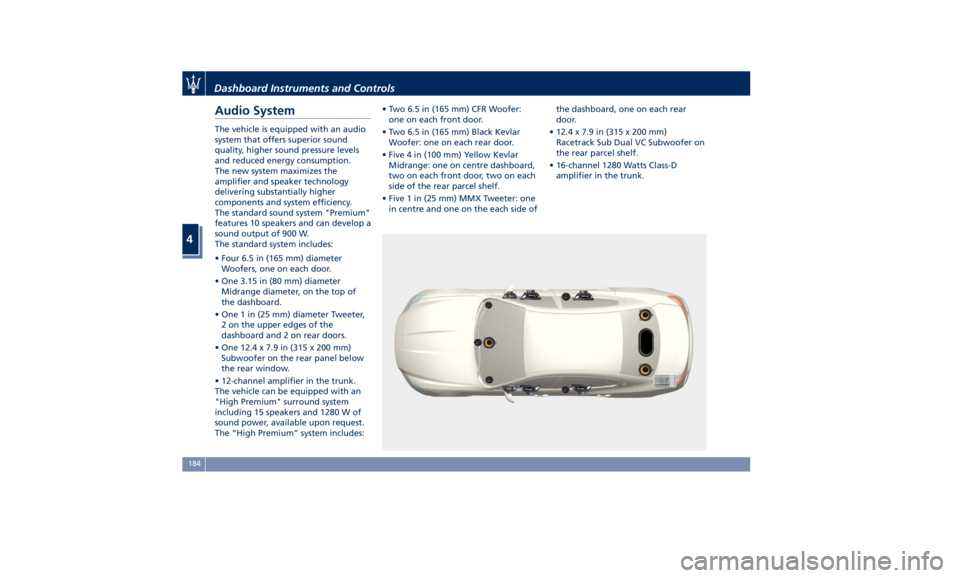
Audio System The vehicle is equipped with an audio
system that offers superior sound
quality, higher sound pressure levels
and reduced energy consumption.
The new system maximizes the
amplifier and speaker technology
delivering substantially higher
components and system efficiency.
The standard sound system "Premium"
features 10 speakers and can develop a
sound output of 900 W.
The standard system includes:
• Four 6.5 in (165 mm) diameter
Woofers, one on each door.
• One 3.15 in (80 mm) diameter
Midrange diameter, on the top of
the dashboard.
• One 1 in (25 mm) diameter Tweeter,
2 on the upper edges of the
dashboard and 2 on rear doors.
• One 12.4 x 7.9 in (315 x 200 mm)
Subwoofer on the rear panel below
the rear window.
• 12-channel amplifier in the trunk.
The vehicle can be equipped with an
"High Premium" surround system
including 15 speakers and 1280 W of
sound power, available upon request.
The “High Premium” system includes: • Two 6.5 in (165 mm) CFR Woofer:
one on each front door.
• Two 6.5 in (165 mm) Black Kevlar
Woofer: one on each rear door.
• Five 4 in (100 mm) Yellow Kevlar
Midrange: one on centre dashboard,
two on each front door, two on each
side of the rear parcel shelf.
• Five 1 in (25 mm) MMX Tweeter: one
in centre and one on the each side of the dashboard, one on each rear
door.
• 12.4 x 7.9 in (315 x 200 mm)
Racetrack Sub Dual VC Subwoofer on
the rear parcel shelf.
• 16-channel 1280 Watts Class-D
amplifier in the trunk.
Dashboard Instruments and Controls
4
184
Page 193 of 396

MTC+ Settings Customer Programmable
Features The MTC+ System uses a combination
of keys able to access and change the
customer programmable features
present in the “Settings” and
“Controls” page (see also “MTC+
“Controls” Screen” in this section).
Access programmable features
touching “Settings” soft-key in the
“Controls” screen page, or using
manual controls on central console
(refer to “Infotainment System” in this
section).
Turn the tune/scroll knob to scroll
through menus and change settings
on MTC+ display, touch the enter
upper button to confirm the selection. NOTE:
• For further details refer also to the
“Maserati Touch Control Plus
(MTC+)” guide.
• All settings must be edited with
ignition device set to RUN position.
To display the programmable features
menu on MTC+, you can also touch
soft-key to view all available
applications and then select
“Settings”. In this mode the MTC+ System allows
you to access the following
programmable features (some of them
are optional or for a specific
model/version and may not be
available on your vehicle): Display,
Units, Voice Commands, Clock, Safety
& Driving Assistant, Lights, Doors &
Locks, Auto-On Comfort & Remote
Start, Engine Off Options, Audio,
Phone/Bluetooth, SiriusXM Setup,
Restore Settings and Clear Personal
Data.
NOTE:
• Only one touch screen area/soft-key
may be selected at a time.
• Menu navigation indications refer to
the use of soft-keys on MTC+ display:
the same operations can be
performed using the manual
controls on central console.Without ADAS With ADASDashboard Instruments and Controls
4
189
Page 201 of 396
cancelled (0 seconds) or reduced to
60 or 30 seconds.
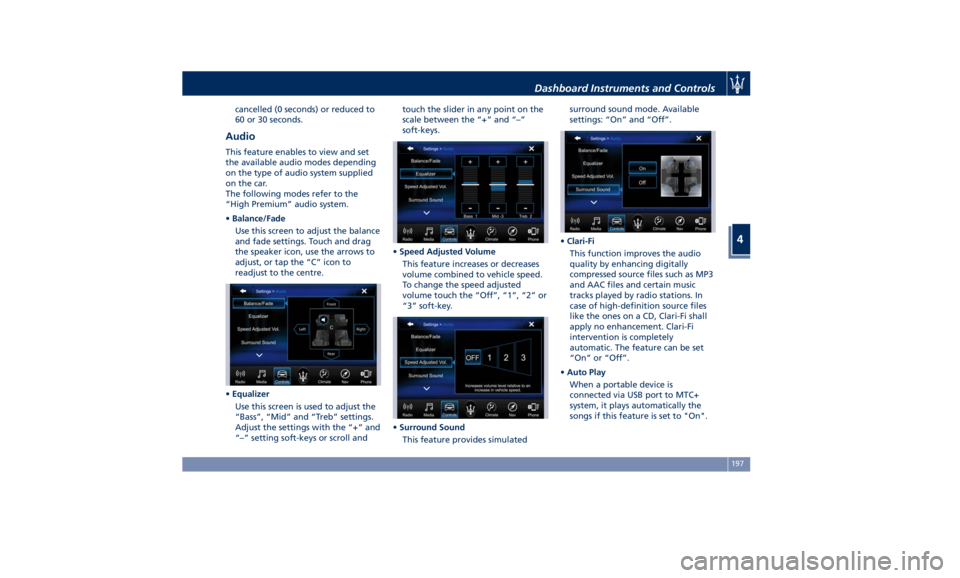
Audio This feature enables to view and set
the available audio modes depending
on the type of audio system supplied
on the car.
The following modes refer to the
“High Premium” audio system.
• Balance/Fade
Use this screen to adjust the balance
and fade settings. Touch and drag
the speaker icon, use the arrows to
adjust, or tap the “C” icon to
readjust to the centre.
• Equalizer
Use this screen is used to adjust the
“Bass”, “Mid” and “Treb” settings.
Adjust the settings with the “+” and
“–” setting soft-keys or scroll and touch the slider in any point on the
scale between the “+” and “–”
soft-keys.
• Speed Adjusted Volume
This feature increases or decreases
volume combined to vehicle speed.
To change the speed adjusted
volume touch the “Off”, “1”, “2” or
“3” soft-key.
• Surround Sound
This feature provides simulated surround sound mode. Available
settings: “On” and “Off”.
• Clari-Fi
This function improves the audio
quality by enhancing digitally
compressed source files such as MP3
and AAC files and certain music
tracks played by radio stations. In
case of high-definition source files
like the ones on a CD, Clari-Fi shall
apply no enhancement. Clari-Fi
intervention is completely
automatic. The feature can be set
“On” or “Off”.
• Auto Play
When a portable device is
connected via USB port to MTC+
system, it plays automatically the
songs if this feature is set to "On".Dashboard Instruments and Controls
4
197
Page 202 of 396
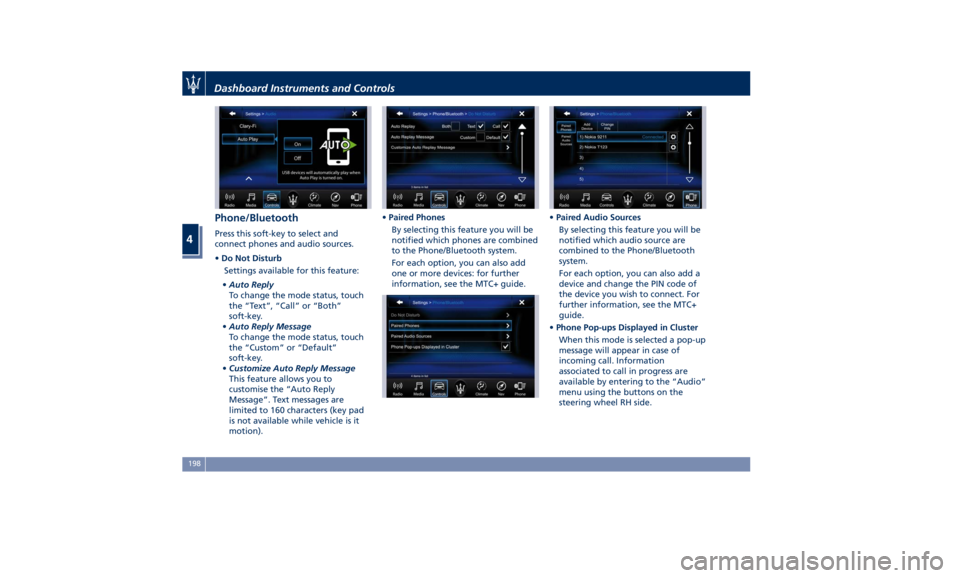
Phone/Bluetooth Press this soft-key to select and
connect phones and audio sources.
• Do Not Disturb
Settings available for this feature:
• Auto Reply
To change the mode status, touch
the “Text”, “Call” or “Both”
soft-key.
• Auto Reply Message
To change the mode status, touch
the “Custom” or “Default”
soft-key.
• Customize Auto Reply Message
This feature allows you to
customise the “Auto Reply
Message”. Text messages are
limited to 160 characters (key pad
is not available while vehicle is it
motion). • Paired Phones
By selecting this feature you will be
notified which phones are combined
to the Phone/Bluetooth system.
For each option, you can also add
one or more devices: for further
information, see the MTC+ guide. • Paired Audio Sources
By selecting this feature you will be
notified which audio source are
combined to the Phone/Bluetooth
system.
For each option, you can also add a
device and change the PIN code of
the device you wish to connect. For
further information, see the MTC+
guide.
• Phone Pop-ups Displayed in Cluster
When this mode is selected a pop-up
message will appear in case of
incoming call. Information
associated to call in progress are
available by entering to the “Audio”
menu using the buttons on the
steering wheel RH side.Dashboard Instruments and Controls
4
198
Page 203 of 396
NOTE:
On the Maserati website, at
www.maserati.com , or through an
Authorized Maserati Dealer you may
consult the list of telephones that are
compatible with the MTC+, and their
level of compatibility.
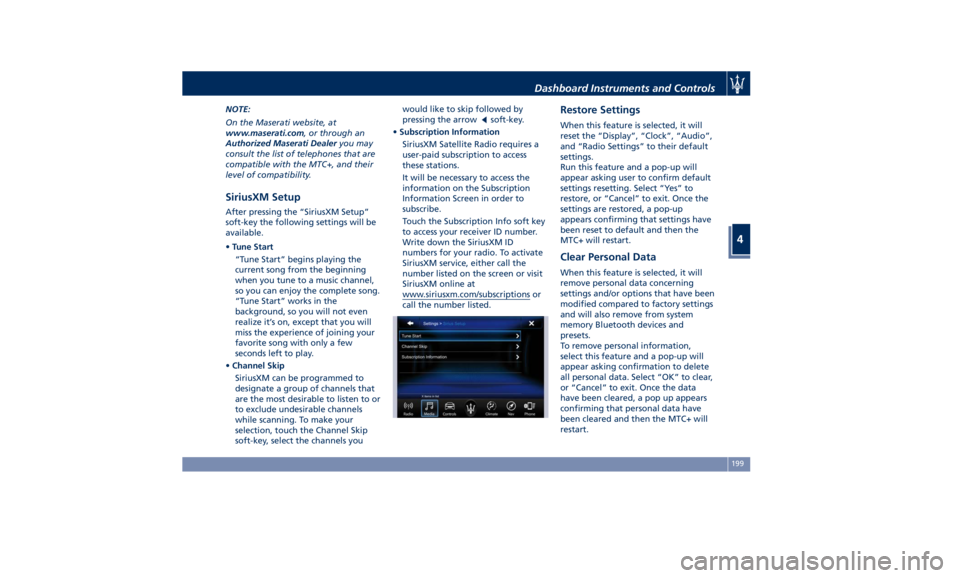
SiriusXM Setup After pressing the “SiriusXM Setup”
soft-key the following settings will be
available.
• Tune Start
“Tune Start” begins playing the
current song from the beginning
when you tune to a music channel,
so you can enjoy the complete song.
“Tune Start” works in the
background, so you will not even
realize it’s on, except that you will
miss the experience of joining your
favorite song with only a few
seconds left to play.
• Channel Skip
SiriusXM can be programmed to
designate a group of channels that
are the most desirable to listen to or
to exclude undesirable channels
while scanning. To make your
selection, touch the Channel Skip
soft-key, select the channels you would like to skip followed by
pressing the arrow
soft-key.
• Subscription Information
SiriusXM Satellite Radio requires a
user-paid subscription to access
these stations.
It will be necessary to access the
information on the Subscription
Information Screen in order to
subscribe.
Touch the Subscription Info soft key
to access your receiver ID number.
Write down the SiriusXM ID
numbers for your radio. To activate
SiriusXM service, either call the
number listed on the screen or visit
SiriusXM online at
www.siriusxm.com/subscriptions or
call the number listed. Restore Settings When this feature is selected, it will
reset the “Display”, “Clock”, “Audio”,
and “Radio Settings” to their default
settings.
Run this feature and a pop-up will
appear asking user to confirm default
settings resetting. Select “Yes” to
restore, or “Cancel” to exit. Once the
settings are restored, a pop-up
appears confirming that settings have
been reset to default and then the
MTC+ will restart.
Clear Personal Data When this feature is selected, it will
remove personal data concerning
settings and/or options that have been
modified compared to factory settings
and will also remove from system
memory Bluetooth devices and
presets.
To remove personal information,
select this feature and a pop-up will
appear asking confirmation to delete
all personal data. Select “OK” to clear,
or “Cancel” to exit. Once the data
have been cleared, a pop up appears
confirming that personal data have
been cleared and then the MTC+ will
restart.Dashboard Instruments and Controls
4
199
Page 217 of 396
the air conditioning system at idle
for about five minutes in the fresh
air by high blower setting. This will
ensure adequate system lubrication
and minimize the possibility of
compressor damage when the
system is started again.
A/C Filter The climate control system filters
outside air containing dust, pollen and
some odors. Strong odors cannot be
totally removed by A/C filter at the
entrance of the air climate system. See
“Maintenance Procedures” in section
“Maintenance and Care” for filter
replacement instructions. Phone and Voice Controls
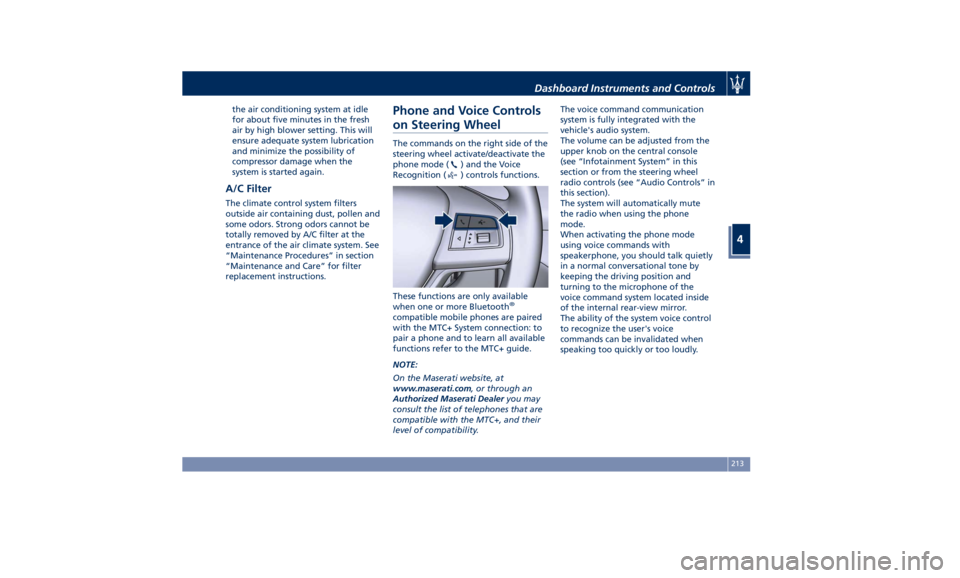
on Steering Wheel The commands on the right side of the
steering wheel activate/deactivate the
phone mode (
) and the Voice
Recognition (
) controls functions.
These functions are only available
when one or more Bluetooth ®
compatible mobile phones are paired
with the MTC+ System connection: to
pair a phone and to learn all available
functions refer to the MTC+ guide.
NOTE:
On the Maserati website, at
www.maserati.com , or through an
Authorized Maserati Dealer you may
consult the list of telephones that are
compatible with the MTC+, and their
level of compatibility. The voice command communication
system is fully integrated with the
vehicle's audio system.
The volume can be adjusted from the
upper knob on the central console
(see “Infotainment System” in this
section or from the steering wheel
radio controls (see “Audio Controls” in
this section).
The system will automatically mute
the radio when using the phone
mode.
When activating the phone mode
using voice commands with
speakerphone, you should talk quietly
in a normal conversational tone by
keeping the driving position and
turning to the microphone of the
voice command system located inside
of the internal rear-view mirror.
The ability of the system voice control
to recognize the user's voice
commands can be invalidated when
speaking too quickly or too loudly.Dashboard Instruments and Controls
4
213
Page 218 of 396
WARNING!
Any voice-controlled system should be
used only in safe driving conditions
following all applicable regulations.
Full attention should be kept on
driving.
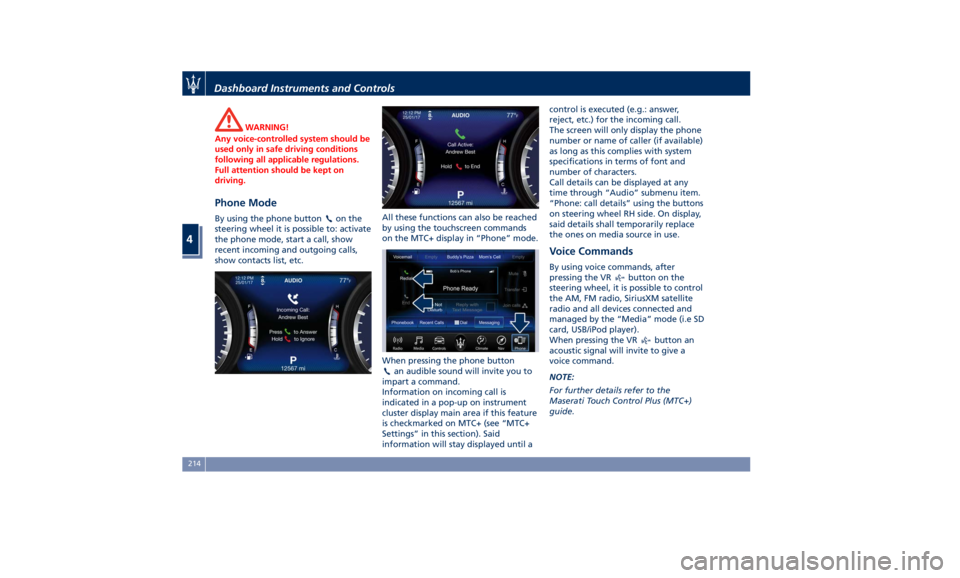
Phone Mode By using the phone button on the
steering wheel it is possible to: activate
the phone mode, start a call, show
recent incoming and outgoing calls,
show contacts list, etc. All these functions can also be reached
by using the touchscreen commands
on the MTC+ display in “Phone” mode.
When pressing the phone button
an audible sound will invite you to
impart a command.
Information on incoming call is
indicated in a pop-up on instrument
cluster display main area if this feature
is checkmarked on MTC+ (see “MTC+
Settings” in this section). Said
information will stay displayed until a control is executed (e.g.: answer,
reject, etc.) for the incoming call.
The screen will only display the phone
number or name of caller (if available)
as long as this complies with system
specifications in terms of font and
number of characters.
Call details can be displayed at any
time through “Audio” submenu item.
“Phone: call details” using the buttons
on steering wheel RH side. On display,
said details shall temporarily replace
the ones on media source in use.
Voice Commands By using voice commands, after
pressing the VR
button on the
steering wheel, it is possible to control
the AM, FM radio, SiriusXM satellite
radio and all devices connected and
managed by the “Media” mode (i.e SD
card, USB/iPod player).
When pressing the VR
button an
acoustic signal will invite to give a
voice command.
NOTE:
For further details refer to the
Maserati Touch Control Plus (MTC+)
guide.Dashboard Instruments and Controls
4
214
Page 284 of 396

BSA in Visual Mode
When operating in “Visual” mode, the
BSA system will provide a visual alert
in the appropriate side view mirror
when it detects a vehicle or an object
in the detection areas monitored by its
sensors: depending on the status of
the relative turn indicator, the warning
light can be fixed or flashing. However,
when the system is operating in RCP
mode, it will respond with both visual
and audible alerts when an oncoming
vehicle or an object approaching the
rear end side of the vehicle is detected.
Whenever an audible alert is
requested, the radio is muted (if the
radio is on).
BSA in Visual and Acoustic Mode
When operating in “Visual & Acoustic”
mode, the BSA system will provide a
visual alert in the appropriate side
view mirror based on a detected
vehicle or object. If the turn signal is then activated, and
it corresponds to an alert present on
that side of the vehicle, an audible
chime will also be sounded: in the
same moment the warning light will
start flashing.
Whenever a turn signal and detected
vehicle or object are present on the
same side at the same time, both the
visual and audio alerts will be issued.
In addition to the audible alert, the
radio volume will be reduced (if the
radio is on).
NOTE:
If the hazard flashers are on, the BSA
system will issue the appropriate visual
alert only.
When the system is in RCP mode, the
system shall respond with both visual
and audible alerts when a detected
vehicle or object is present. Whenever an audible alert is requested, the radio
(if on) is also muted.
Right/left turn/hazard signal status is
ignored; the RCP status always
requests the chime.
Blind Spot Alert Off
When this function is turned off from
the MTC+, there will be no visual or
audible alerts from either the BSA or
RCP subsystems.
NOTE:
The BSA system will store the current
operating mode when the vehicle is
shut off. Each time the vehicle is
started, the previously-stored mode
will be recalled and used.
System Temporarily Unavailable
The blind spot system will become
temporarily unavailable and the
instrument cluster display will show
the message “Blind Spot Alert
Temporarily Unavailable” when the
vehicle enters a radio quite zone
(example the areas around radio
telescopes).
The warning light on the outside
rear-view mirrors will be lit up and stay
lit until the vehicle exits the zone.Driving
5
280