2019 MASERATI LEVANTE ECO mode
[x] Cancel search: ECO modePage 213 of 436
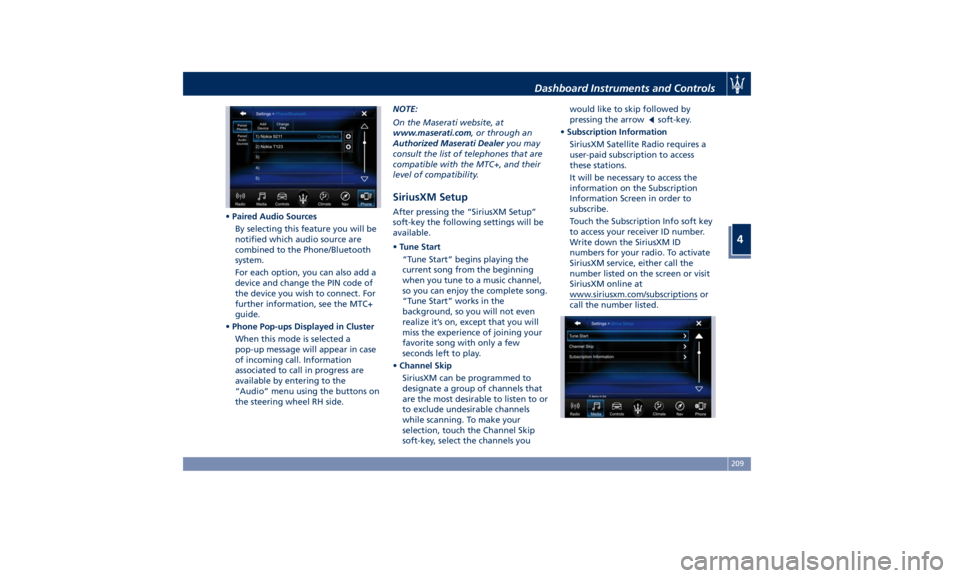
• Paired Audio Sources
By selecting this feature you will be
notified which audio source are
combined to the Phone/Bluetooth
system.
For each option, you can also add a
device and change the PIN code of
the device you wish to connect. For
further information, see the MTC+
guide.
• Phone Pop-ups Displayed in Cluster
When this mode is selected a
pop-up message will appear in case
of incoming call. Information
associated to call in progress are
available by entering to the
“Audio” menu using the buttons on
the steering wheel RH side. NOTE:
On the Maserati website, at
www.maserati.com , or through an
Authorized Maserati Dealer you may
consult the list of telephones that are
compatible with the MTC+, and their
level of compatibility.
SiriusXM Setup After pressing the “SiriusXM Setup”
soft-key the following settings will be
available.
• Tune Start
“Tune Start” begins playing the
current song from the beginning
when you tune to a music channel,
so you can enjoy the complete song.
“Tune Start” works in the
background, so you will not even
realize it’s on, except that you will
miss the experience of joining your
favorite song with only a few
seconds left to play.
• Channel Skip
SiriusXM can be programmed to
designate a group of channels that
are the most desirable to listen to or
to exclude undesirable channels
while scanning. To make your
selection, touch the Channel Skip
soft-key, select the channels you would like to skip followed by
pressing the arrow
soft-key.
• Subscription Information
SiriusXM Satellite Radio requires a
user-paid subscription to access
these stations.
It will be necessary to access the
information on the Subscription
Information Screen in order to
subscribe.
Touch the Subscription Info soft key
to access your receiver ID number.
Write down the SiriusXM ID
numbers for your radio. To activate
SiriusXM service, either call the
number listed on the screen or visit
SiriusXM online at
www.siriusxm.com/subscriptions or
call the number listed.Dashboard Instruments and Controls
4
209
Page 219 of 436
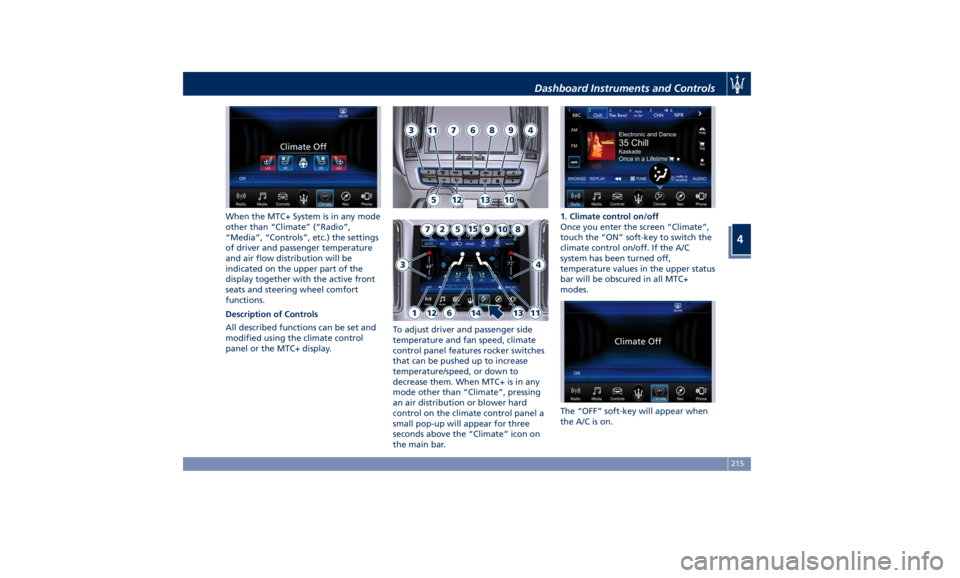
When the MTC+ System is in any mode
other than “Climate” (“Radio”,
“Media”, “Controls”, etc.) the settings
of driver and passenger temperature
and air flow distribution will be
indicated on the upper part of the
display together with the active front
seats and steering wheel comfort
functions.
Description of Controls
All described functions can be set and
modified using the climate control
panel or the MTC+ display. To adjust driver and passenger side
temperature and fan speed, climate
control panel features rocker switches
that can be pushed up to increase
temperature/speed, or down to
decrease them. When MTC+ is in any
mode other than “Climate”, pressing
an air distribution or blower hard
control on the climate control panel a
small pop-up will appear for three
seconds above the “Climate” icon on
the main bar. 1. Climate control on/off
Once you enter the screen “Climate”,
touch the “ON” soft-key to switch the
climate control on/off. If the A/C
system has been turned off,
temperature values in the upper status
bar will be obscured in all MTC+
modes.
The “OFF” soft-key will appear when
the A/C is on.Dashboard Instruments and Controls
4
215
Page 222 of 436
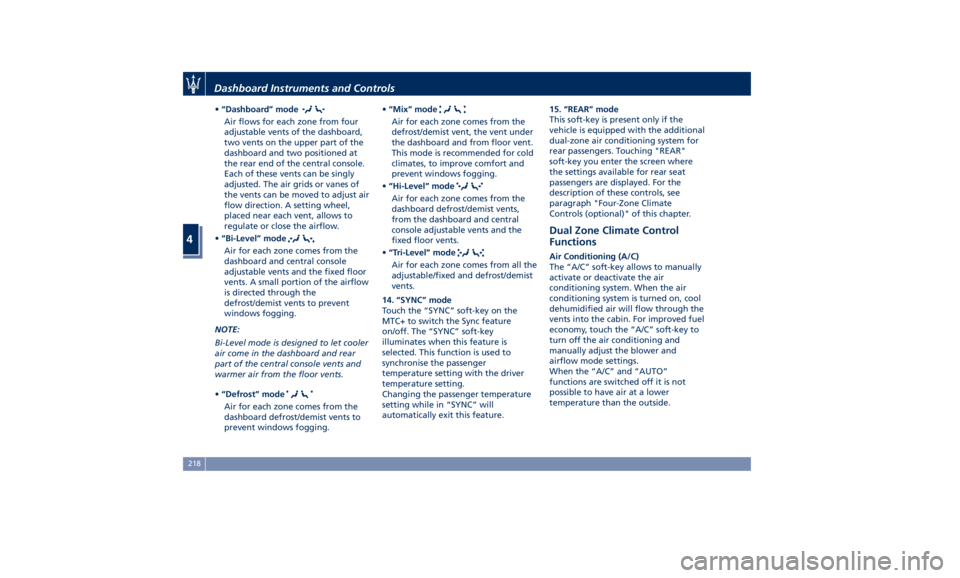
• “Dashboard” mode
Air flows for each zone from four
adjustable vents of the dashboard,
two vents on the upper part of the
dashboard and two positioned at
the rear end of the central console.
Each of these vents can be singly
adjusted. The air grids or vanes of
the vents can be moved to adjust air
flow direction. A setting wheel,
placed near each vent, allows to
regulate or close the airflow.
• “Bi-Level” mode
Air for each zone comes from the
dashboard and central console
adjustable vents and the fixed floor
vents. A small portion of the airflow
is directed through the
defrost/demist vents to prevent
windows fogging.
NOTE:
Bi-Level mode is designed to let cooler
air come in the dashboard and rear
part of the central console vents and
warmer air from the floor vents.
• “Defrost” mode
Air for each zone comes from the
dashboard defrost/demist vents to
prevent windows fogging. • “Mix” mode
Air for each zone comes from the
defrost/demist vent, the vent under
the dashboard and from floor vent.
This mode is recommended for cold
climates, to improve comfort and
prevent windows fogging.
• “Hi-Level” mode
Air for each zone comes from the
dashboard defrost/demist vents,
from the dashboard and central
console adjustable vents and the
fixed floor vents.
• “Tri-Level” mode
Air for each zone comes from all the
adjustable/fixed and defrost/demist
vents.
14. “SYNC” mode
Touch the “SYNC” soft-key on the
MTC+ to switch the Sync feature
on/off. The “SYNC” soft-key
illuminates when this feature is
selected. This function is used to
synchronise the passenger
temperature setting with the driver
temperature setting.
Changing the passenger temperature
setting while in “SYNC” will
automatically exit this feature. 15. “REAR” mode
This soft-key is present only if the
vehicle is equipped with the additional
dual-zone air conditioning system for
rear passengers. Touching "REAR"
soft-key you enter the screen where
the settings available for rear seat
passengers are displayed. For the
description of these controls, see
paragraph "Four-Zone Climate
Controls (optional)" of this chapter.
Dual Zone Climate Control
Functions Air Conditioning (A/C)
The “A/C” soft-key allows to manually
activate or deactivate the air
conditioning system. When the air
conditioning system is turned on, cool
dehumidified air will flow through the
vents into the cabin. For improved fuel
economy, touch the “A/C” soft-key to
turn off the air conditioning and
manually adjust the blower and
airflow mode settings.
When the “A/C” and “AUTO”
functions are switched off it is not
possible to have air at a lower
temperature than the outside.Dashboard Instruments and Controls
4
218
Page 223 of 436
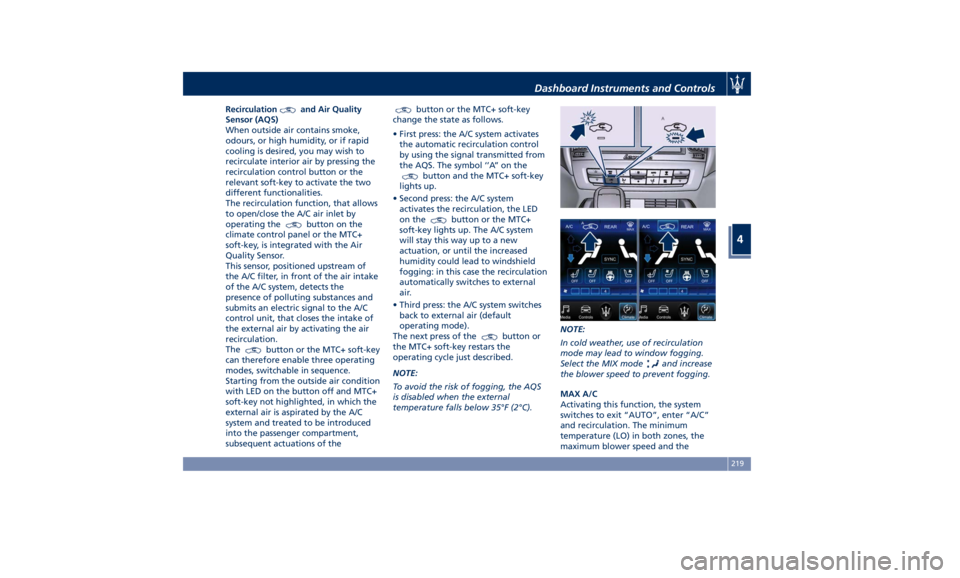
Recirculation and Air Quality
Sensor (AQS)
When outside air contains smoke,
odours, or high humidity, or if rapid
cooling is desired, you may wish to
recirculate interior air by pressing the
recirculation control button or the
relevant soft-key to activate the two
different functionalities.
The recirculation function, that allows
to open/close the A/C air inlet by
operating the
button on the
climate control panel or the MTC+
soft-key, is integrated with the Air
Quality Sensor.
This sensor, positioned upstream of
the A/C filter, in front of the air intake
of the A/C system, detects the
presence of polluting substances and
submits an electric signal to the A/C
control unit, that closes the intake of
the external air by activating the air
recirculation.
The
button or the MTC+ soft-key
can therefore enable three operating
modes, switchable in sequence.
Starting from the outside air condition
with LED on the button off and MTC+
soft-key not highlighted, in which the
external air is aspirated by the A/C
system and treated to be introduced
into the passenger compartment,
subsequent actuations of the button or the MTC+ soft-key
change the state as follows.
• First press: the A/C system activates
the automatic recirculation control
by using the signal transmitted from
the AQS. The symbol ‘’A’’ on the
button and the MTC+ soft-key
lights up.
• Second press: the A/C system
activates the recirculation, the LED
on the
button or the MTC+
soft-key lights up. The A/C system
will stay this way up to a new
actuation, or until the increased
humidity could lead to windshield
fogging: in this case the recirculation
automatically switches to external
air.
• Third press: the A/C system switches
back to external air (default
operating mode).
The next press of the
button or
the MTC+ soft-key restars the
operating cycle just described.
NOTE:
To avoid the risk of fogging, the AQS
is disabled when the external
temperature falls below 35°F (2°C). NOTE:
In cold weather, use of recirculation
mode may lead to window fogging.
Select the MIX mode
and increase
the blower speed to prevent fogging.
MAX A/C
Activating this function, the system
switches to exit “AUTO”, enter “A/C”
and recirculation. The minimum
temperature (LO) in both zones, the
maximum blower speed and theDashboard Instruments and Controls
4
219
Page 225 of 436
“SYNC” mode can also be manually
selected.
Four-Zone Climate Controls
(optional) Air conditioning controls that allow
rear passengers to adjust the
temperature in the left and right rear
part of the passenger compartment
are located at the rear end of the
central console underneath the
adjustable air outlets.
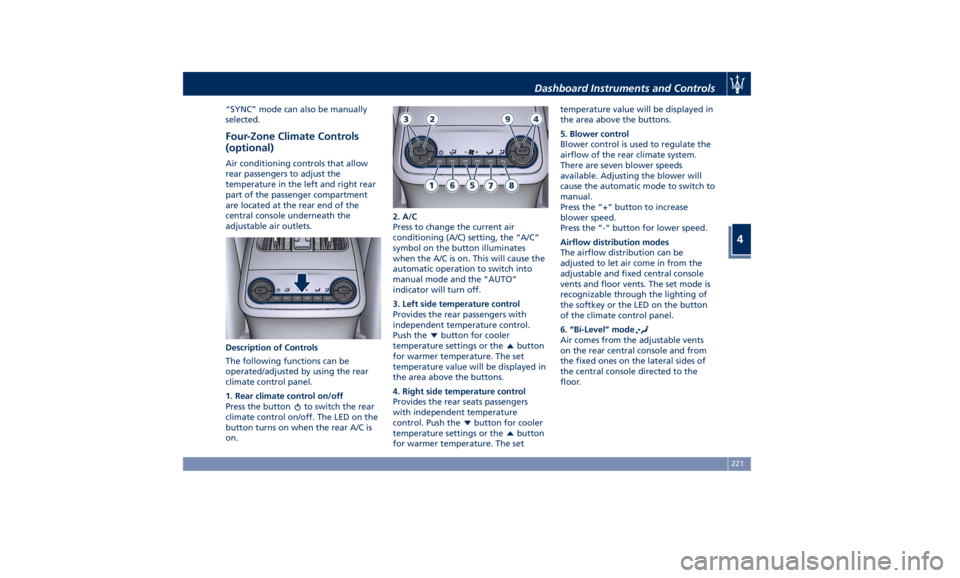
Description of Controls
The following functions can be
operated/adjusted by using the rear
climate control panel.
1. Rear climate control on/off
Press the button
to switch the rear
climate control on/off. The LED on the
button turns on when the rear A/C is
on. 2. A/C
Press to change the current air
conditioning (A/C) setting, the “A/C”
symbol on the button illuminates
when the A/C is on. This will cause the
automatic operation to switch into
manual mode and the “AUTO”
indicator will turn off.
3. Left side temperature control
Provides the rear passengers with
independent temperature control.
Push the
button for cooler
temperature settings or the
button
for warmer temperature. The set
temperature value will be displayed in
the area above the buttons.
4. Right side temperature control
Provides the rear seats passengers
with independent temperature
control. Push the
button for cooler
temperature settings or the
button
for warmer temperature. The set temperature value will be displayed in
the area above the buttons.
5. Blower control
Blower control is used to regulate the
airflow of the rear climate system.
There are seven blower speeds
available. Adjusting the blower will
cause the automatic mode to switch to
manual.
Press the “+“ button to increase
blower speed.
Press the “-“ button for lower speed.
Airflow distribution modes
The airflow distribution can be
adjusted to let air come in from the
adjustable and fixed central console
vents and floor vents. The set mode is
recognizable through the lighting of
the softkey or the LED on the button
of the climate control panel.
6. “Bi-Level” mode
Air comes from the adjustable vents
on the rear central console and from
the fixed ones on the lateral sides of
the central console directed to the
floor.Dashboard Instruments and Controls
4
221
Page 227 of 436
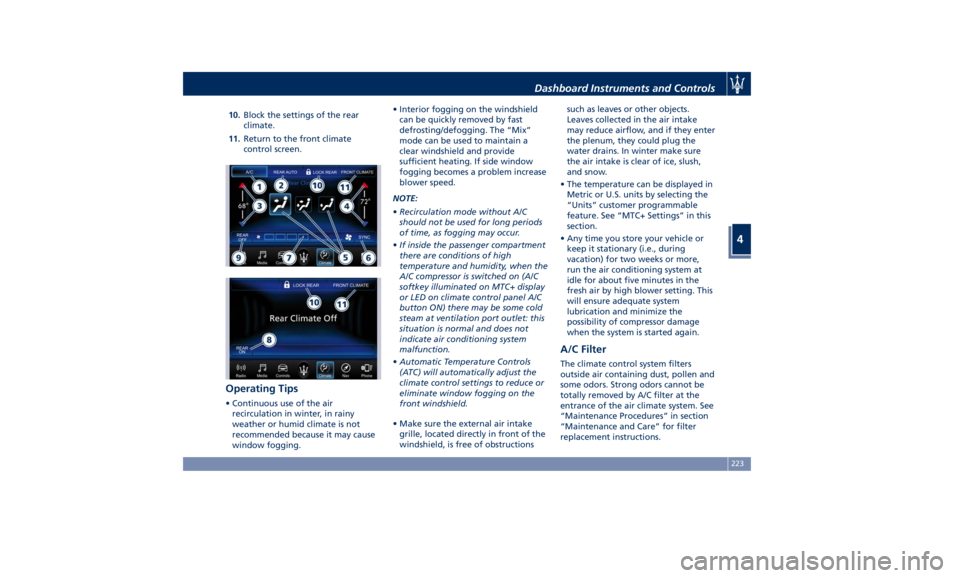
10. Block the settings of the rear
climate.
11. Return to the front climate
control screen.
Operating Tips • Continuous use of the air
recirculation in winter, in rainy
weather or humid climate is not
recommended because it may cause
window fogging. • Interior fogging on the windshield
can be quickly removed by fast
defrosting/defogging. The “Mix”
mode can be used to maintain a
clear windshield and provide
sufficient heating. If side window
fogging becomes a problem increase
blower speed.
NOTE:
• Recirculation mode without A/C
should not be used for long periods
of time, as fogging may occur.
• If inside the passenger compartment
there are conditions of high
temperature and humidity, when the
A/C compressor is switched on (A/C
softkey illuminated on MTC+ display
or LED on climate control panel A/C
button ON) there may be some cold
steam at ventilation port outlet: this
situation is normal and does not
indicate air conditioning system
malfunction.
• Automatic Temperature Controls
(ATC) will automatically adjust the
climate control settings to reduce or
eliminate window fogging on the
front windshield.
• Make sure the external air intake
grille, located directly in front of the
windshield, is free of obstructions such as leaves or other objects.
Leaves collected in the air intake
may reduce airflow, and if they enter
the plenum, they could plug the
water drains. In winter make sure
the air intake is clear of ice, slush,
and snow.
• The temperature can be displayed in
Metric or U.S. units by selecting the
“Units” customer programmable
feature. See “MTC+ Settings” in this
section.
• Any time you store your vehicle or
keep it stationary (i.e., during
vacation) for two weeks or more,
run the air conditioning system at
idle for about five minutes in the
fresh air by high blower setting. This
will ensure adequate system
lubrication and minimize the
possibility of compressor damage
when the system is started again.
A/C Filter The climate control system filters
outside air containing dust, pollen and
some odors. Strong odors cannot be
totally removed by A/C filter at the
entrance of the air climate system. See
“Maintenance Procedures” in section
“Maintenance and Care” for filter
replacement instructions.Dashboard Instruments and Controls
4
223
Page 228 of 436
Phone and Voice Controls
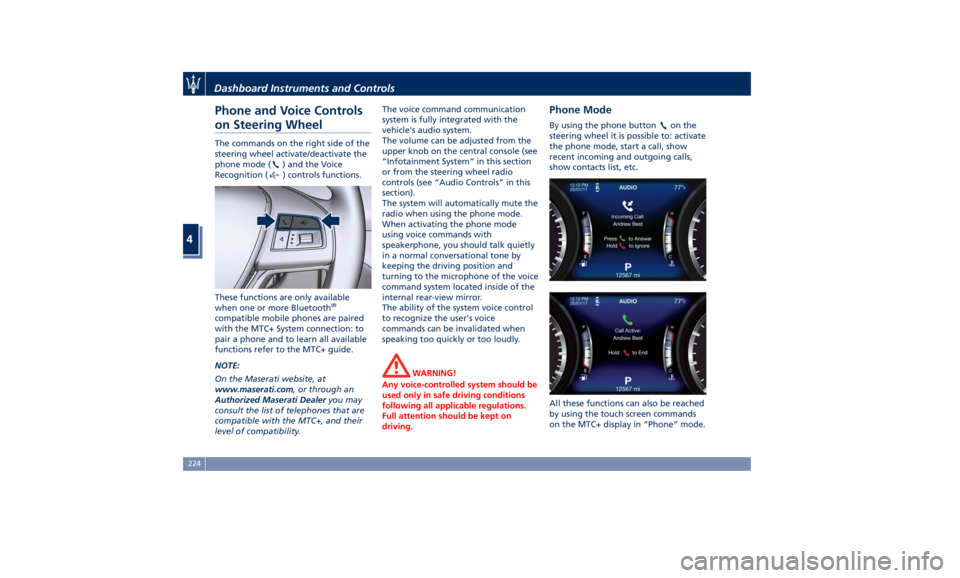
on Steering Wheel The commands on the right side of the
steering wheel activate/deactivate the
phone mode (
) and the Voice
Recognition (
) controls functions.
These functions are only available
when one or more Bluetooth ®
compatible mobile phones are paired
with the MTC+ System connection: to
pair a phone and to learn all available
functions refer to the MTC+ guide.
NOTE:
On the Maserati website, at
www.maserati.com , or through an
Authorized Maserati Dealer you may
consult the list of telephones that are
compatible with the MTC+, and their
level of compatibility. The voice command communication
system is fully integrated with the
vehicle's audio system.
The volume can be adjusted from the
upper knob on the central console (see
“Infotainment System” in this section
or from the steering wheel radio
controls (see “Audio Controls” in this
section).
The system will automatically mute the
radio when using the phone mode.
When activating the phone mode
using voice commands with
speakerphone, you should talk quietly
in a normal conversational tone by
keeping the driving position and
turning to the microphone of the voice
command system located inside of the
internal rear-view mirror.
The ability of the system voice control
to recognize the user's voice
commands can be invalidated when
speaking too quickly or too loudly.
WARNING!
Any voice-controlled system should be
used only in safe driving conditions
following all applicable regulations.
Full attention should be kept on
driving. Phone Mode By using the phone button on the
steering wheel it is possible to: activate
the phone mode, start a call, show
recent incoming and outgoing calls,
show contacts list, etc.
All these functions can also be reached
by using the touch screen commands
on the MTC+ display in “Phone” mode.Dashboard Instruments and Controls
4
224
Page 229 of 436
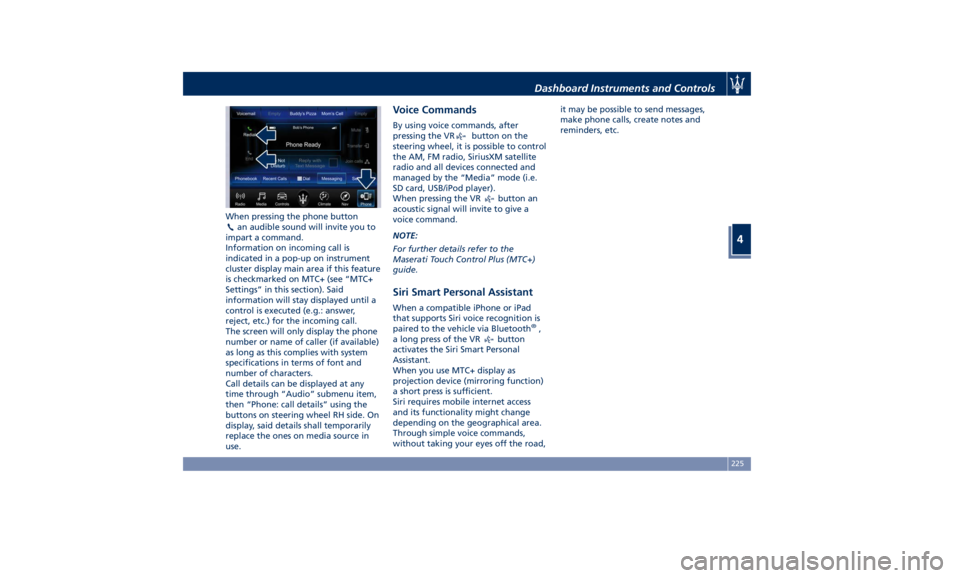
When pressing the phone button
an audible sound will invite you to
impart a command.
Information on incoming call is
indicated in a pop-up on instrument
cluster display main area if this feature
is checkmarked on MTC+ (see “MTC+
Settings” in this section). Said
information will stay displayed until a
control is executed (e.g.: answer,
reject, etc.) for the incoming call.
The screen will only display the phone
number or name of caller (if available)
as long as this complies with system
specifications in terms of font and
number of characters.
Call details can be displayed at any
time through “Audio” submenu item,
then “Phone: call details” using the
buttons on steering wheel RH side. On
display, said details shall temporarily
replace the ones on media source in
use. Voice Commands By using voice commands, after
pressing the VR
button on the
steering wheel, it is possible to control
the AM, FM radio, SiriusXM satellite
radio and all devices connected and
managed by the “Media” mode (i.e.
SD card, USB/iPod player).
When pressing the VR
button an
acoustic signal will invite to give a
voice command.
NOTE:
For further details refer to the
Maserati Touch Control Plus (MTC+)
guide.
Siri Smart Personal Assistant When a compatible iPhone or iPad
that supports Siri voice recognition is
paired to the vehicle via Bluetooth ®
,
a long press of the VR
button
activates the Siri Smart Personal
Assistant.
When you use MTC+ display as
projection device (mirroring function)
a short press is sufficient.
Siri requires mobile internet access
and its functionality might change
depending on the geographical area.
Through simple voice commands,
without taking your eyes off the road, it may be possible to send messages,
make phone calls, create notes and
reminders, etc.
Dashboard Instruments and Controls
4
225