2019 MASERATI LEVANTE tire light
[x] Cancel search: tire lightPage 13 of 436
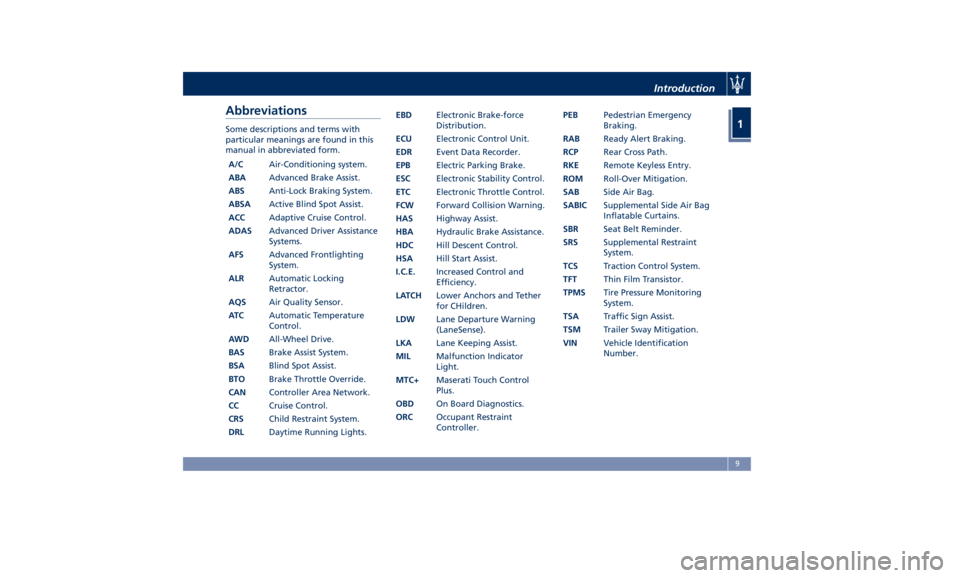
Abbreviations Some descriptions and terms with
particular meanings are found in this
manual in abbreviated form.
A/C Air-Conditioning system.
ABA Advanced Brake Assist.
ABS Anti-Lock Braking System.
ABSA Active Blind Spot Assist.
ACC Adaptive Cruise Control.
ADAS Advanced Driver Assistance
Systems.
AFS Advanced Frontlighting
System.
ALR Automatic Locking
Retractor.
AQS Air Quality Sensor.
AT C Automatic Temperature
Control.
AWD All-Wheel Drive.
BAS Brake Assist System.
BSA Blind Spot Assist.
BTO Brake Throttle Override.
CAN Controller Area Network.
CC Cruise Control.
CRS Child Restraint System.
DRL Daytime Running Lights. EBD Electronic Brake-force
Distribution.
ECU Electronic Control Unit.
EDR Event Data Recorder.
EPB Electric Parking Brake.
ESC Electronic Stability Control.
ETC Electronic Throttle Control.
FCW Forward Collision Warning.
HAS Highway Assist.
HBA Hydraulic Brake Assistance.
HDC Hill Descent Control.
HSA Hill Start Assist.
I.C.E. Increased Control and
Efficiency.
LATCH Lower Anchors and Tether
for CHildren.
LDW Lane Departure Warning
(LaneSense).
LKA Lane Keeping Assist.
MIL Malfunction Indicator
Light.
MTC+ Maserati Touch Control
Plus.
OBD On Board Diagnostics.
ORC Occupant Restraint
Controller. PEB Pedestrian Emergency
Braking.
RAB Ready Alert Braking.
RCP Rear Cross Path.
RKE Remote Keyless Entry.
ROM Roll-Over Mitigation.
SAB Side Air Bag.
SABIC Supplemental Side Air Bag
Inflatable Curtains.
SBR Seat Belt Reminder.
SRS Supplemental Restraint
System.
TCS Traction Control System.
TFT Thin Film Transistor.
TPMS Tire Pressure Monitoring
System.
TSA Traffic Sign Assist.
TSM Trailer Sway Mitigation.
VIN Vehicle Identification
Number.Introduction
1
9
Page 31 of 436

Radio Frequency RKE
Transmitter - Regulatory
Information The “Regulatory Information” for all
the radio frequency and radar devices
can be consulted by accessing the
"Services" section on the website
www.maserati.com.
Replacement Key fobs NOTE:
Only key fobs that are updated with
the vehicle electronics can be used to
start and operate the vehicle.
WARNING!
• Always remove the key fobs from
the vehicle and lock all doors when
leaving the vehicle unattended.
• Always remember to cycle the
ignition switch to OFF.
Duplication of key fobs may be
performed
by an Authorized Maserati
Dealer only .
This procedure consists of
programming a key fob that has never
been programmed to the vehicle’s
electronics. NOTE:
• When having the Sentry Key ®
Immobilizer System serviced, bring
all key fobs provided with the
vehicle with you to the Authorized
Maserati Dealer .
• When selling the vehicle, it is
necessary to provide the new owner
with all key fobs.
Vehicle Security Alarm The vehicle security alarm monitors
the vehicle doors and liftgate for
unauthorized entry and the
START/STOP button for unauthorized
operations.
The system includes a dual function
anti-intrusion sensor and vehicle
anti-lift sensor. The anti-intrusion
sensor monitors the vehicle interior
for motion.
The vehicle anti-lift sensor monitors
the vehicle for any lifting or tilting
actions (tow away, tire removal, ferry
transport, etc). A siren with battery
backup which senses interruptions of
power and communications is also
included.
While the vehicle security alarm is
enabled, interior door locks switches,
power liftgate and fuel filler door
release are disabled. If something
triggers the alarm, the vehicle security
alarm will provide the following
audible and visible signals:
intermittent buzzer, position lights
and/or turn signals and the vehicle
security light on the dashboard will
flash.
This light will fast flash for
approximately 15 seconds, when the
vehicle security alarm is being armed,Before Starting
2
27
Page 42 of 436

The message on the instrument cluster
stays active as long as the ignition
switch is in RUN position.
To enter Remote Start Mode NOTE:
On some versions, the remote start
button on the key fob RKE
transmitter is replaced by the
button.
Press and release the button
on the
key fob RKE transmitter twice within
five seconds. The vehicle doors will
lock, position lights will flash and the
horn will ring twice (if this function is
set using the MTC+ System, refer to
“MTC+ Settings” in section
“Dashboard Instruments and
Controls”). Then, the engine will start
and the vehicle will remain in the
“Remote Start” mode for a 15-minute
cycle.
WARNING!
California Proposition 65
Operating, servicing and maintaining
a passenger vehicle or off-road vehicle
can expose you to chemicals including
such as, engine exhaust, carbon
monoxide, phthalates and lead, that which are known to the State of
California to cause cancer and birth
defects or other reproductive harm. To
minimize exposure, avoid breathing
exhaust, do not idle the engine except
as necessary, service your vehicle in a
well-ventilated area and wear gloves
or wash your hands frequently when
servicing your vehicle. For more
information go to:
www.P65Warnings.ca.gov/passenger-
vehicle
NOTE:
• In
case of an engine fault or low fuel
level, the vehicle will start and then
shut down in 10 seconds.
• The position lights will turn on and
remain lighted up during “Remote
Start” mode.
• For security reasons, power window
and power sunroof operation (if equipped) are disabled when the
vehicle is in the “Remote Start”
mode.
• The engine can be started two
consecutive times (two 15-minute
cycles) with the key fob RKE
transmitter. However, the ignition
must be cycled to the RUN position
before you can repeat the start
sequence for a third cycle.
To exit Remote Start Mode
without Driving the Vehicle Press and release the button one
time or allow the engine to run for the
entire 15-minute cycle.
NOTE:
To avoid unintentional shutdowns, the
system will disable the one time press
of the button
for two seconds after
receiving a valid “Remote Start”
request.
To exit Remote Start Mode and
Drive the Vehicle Before the end of the 15-minute cycle,
press and release the button
on the
key fob RKE transmitter to unlock the
doors and disarm the vehicle security
alarm. Then, prior to the end of theBefore Starting
2
38
Page 68 of 436

Pretensioners work for all size
occupant restraint systems, including
the child restraint systems.
NOTE:
To obtain the highest degree of
protection from the action of the
pretensioning device, wear the seat
belt tight to the chest and pelvis.
Pretensioners are triggered by the
Occupant Restraint Controller (ORC). A
pretensioner may be used only once
because it is a pyrotechnic device.
Pretensioners do not require any
maintenance or lubrication: any
changes to its original conditions will
invalidate its efficiency. If, due to
unusual natural events (floods, sea
storms, etc.), the device has been
affected by water and mud, it must be
replaced. WARNING!
It is strictly forbidden to remove or
tamper with the pretensioner
components. Any service intervention
must be carried out only by qualified
and authorized personnel. Always
contact an Authorized Maserati
Dealer.
CAUTION!
Operations which lead to impacts,
vibrations or localized heating (over
212°F/100°C for a maximum of 6 hours
max.) in the area around the
pretensioners may damage or deploy
them erroneously. These devices are
not affected by vibrations caused by
uneven road surfaces or low obstacles.
Contact the Authorized Maserati
Dealer for any intervention that may
be required.
Enhanced Seat Belt Use
Reminder System (BeltAlert ®
)BeltAlert ®
is a feature intended to
remind the driver and front passenger
to fasten their seat belts.
The feature activates with engine
running. If the driver or front seat passenger is unbelted, the seat belt
reminder light
and the related
message will turn on in the instrument
cluster. Message remains on for 5
seconds.
The BeltAlert ®
warning sequence
begins after the vehicle speed is over 5
mph (8 km/h) for more than 19
seconds, by blinking the seat belt
reminder light
and message and by
sounding an intermittent chime.
Once the sequence starts, it will
continue for the entire duration. After
the sequence completes, the seat belt
reminder light
remains illuminated
until the respective seat belts are
fastened and the message remains on
for 5 seconds.
If the opened front door on the driver
or passenger side is closed and the
occupant presence sensor detects a
status change from occupant notBefore Starting
2
64
Page 96 of 436

• Check the tires (see “Tire Inflation
Pressure” chapter in section
“Features and Specifications”) for
proper cold inflation pressure.
Lights and Indicator Lights
• Have someone observe the operation
of exterior lights while you operate
the controls (see “Lights” chapter in
section “Understanding the
Vehicle”).
• Check turn signal and high beam
indicator lights on the instrument
cluster (see “Instrument Cluster”
chapter in section “Dashboard
Instruments and Controls”).
Door Latches
• Check for positive closing, latching,
and locking of doors and liftgate (see
“Unlock the Vehicle with Key fob”
chapter in this section).
Fluid Leaks
• Check area under vehicle after
overnight parking for recent fluid
leaks (oil, fuel, etc.).
• If gasoline fumes are detected or
fluid leaks are suspected, contact the
Authorized Maserati Dealer . WARNING!
California Proposition 65
Operating, servicing and maintaining
a passenger vehicle or off-road vehicle
can expose you to chemicals including
such as, engine exhaust, carbon
monoxide, phthalates and lead, that
which are known to the State of
California to cause cancer and birth
defects or other reproductive harm. To
minimize exposure, avoid breathing
exhaust, do not idle the engine except
as necessary, service your vehicle in a
well-ventilated area and wear gloves
or wash your hands frequently when
servicing your vehicle. For more
information go to:
www.P65Warnings.ca.gov/passenger-
vehicleBefore Starting
2
92
Page 166 of 436
If the indicator flashes at a rapid rate,
check for a defective exterior light
bulb.
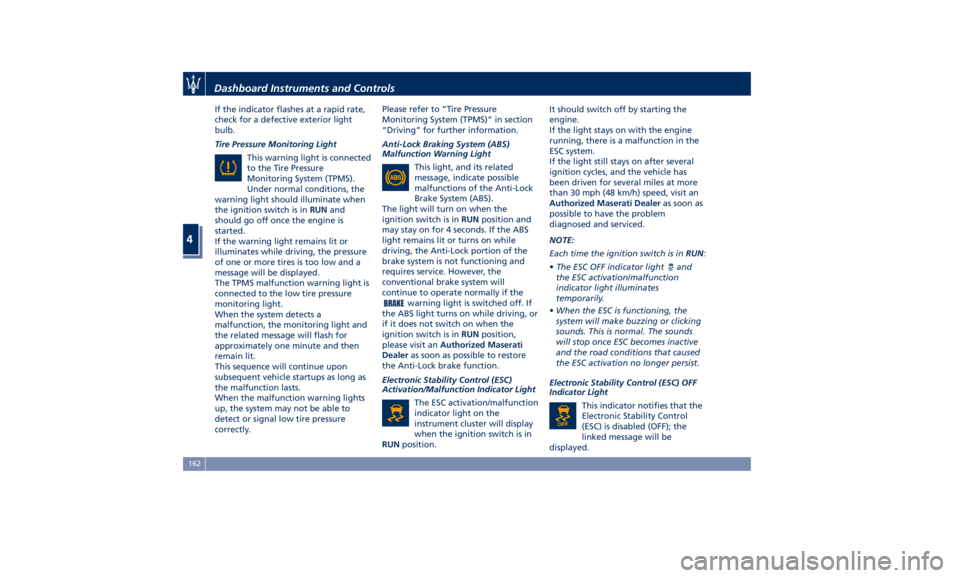
Tire Pressure Monitoring Light
This warning light is connected
to the Tire Pressure
Monitoring System (TPMS).
Under normal conditions, the
warning light should illuminate when
the ignition switch is in RUN and
should go off once the engine is
started.
If the warning light remains lit or
illuminates while driving, the pressure
of one or more tires is too low and a
message will be displayed.
The TPMS malfunction warning light is
connected to the low tire pressure
monitoring light.
When the system detects a
malfunction, the monitoring light and
the related message will flash for
approximately one minute and then
remain lit.
This sequence will continue upon
subsequent vehicle startups as long as
the malfunction lasts.
When the malfunction warning lights
up, the system may not be able to
detect or signal low tire pressure
correctly. Please refer to “Tire Pressure
Monitoring System (TPMS)” in section
“Driving” for further information.
Anti-Lock Braking System (ABS)
Malfunction Warning Light
This light, and its related
message, indicate possible
malfunctions of the Anti-Lock
Brake System (ABS).
The light will turn on when the
ignition switch is in RUN position and
may stay on for 4 seconds. If the ABS
light remains lit or turns on while
driving, the Anti-Lock portion of the
brake system is not functioning and
requires service. However, the
conventional brake system will
continue to operate normally if the
warning light is switched off. If
the ABS light turns on while driving, or
if it does not switch on when the
ignition switch is in RUN position,
please visit an Authorized Maserati
Dealer as soon as possible to restore
the Anti-Lock brake function.
Electronic Stability Control (ESC)
Activation/Malfunction Indicator Light
The ESC activation/malfunction
indicator light on the
instrument cluster will display
when the ignition switch is in
RUN position. It should switch off by starting the
engine.
If the light stays on with the engine
running, there is a malfunction in the
ESC system.
If the light still stays on after several
ignition cycles, and the vehicle has
been driven for several miles at more
than 30 mph (48 km/h) speed, visit an
Authorized Maserati Dealer as soon as
possible to have the problem
diagnosed and serviced.
NOTE:
Each time the ignition switch is in RUN :
• The ESC OFF indicator light
and
the ESC activation/malfunction
indicator light illuminates
temporarily.
• When the ESC is functioning, the
system will make buzzing or clicking
sounds. This is normal. The sounds
will stop once ESC becomes inactive
and the road conditions that caused
the ESC activation no longer persist.
Electronic Stability Control (ESC) OFF
Indicator Light
This indicator notifies that the
Electronic Stability Control
(ESC) is disabled (OFF); the
linked message will be
displayed.Dashboard Instruments and Controls
4
162
Page 171 of 436

sector 23, only the main menu number
and the scroll arrows remain displayed
in the sector 3 , left side.
Within a submenu, press and release
the switch in the
and arrow
directions to scroll the menu.
Press the
button to return to the
main menu from an item of interest or
from an information screen.
Main Menu & Submenu Content
Overview
1. MAIN MENU
• View speed in mph or km/h
2. VEHICLE INFO
• Tire Pressure
• Transmission Temperature
• Oil Temperature
• Oil Pressure
• Battery Voltage
• Maintenance 3. DRIVE MODE
• Drive Mode - Ride Height - Torque
Distribution - Powertrain status - ESC
status - Suspension stiffness status
4. Driver Assist (if equipped)
• Shows the status of any active driver
assist systems: CC, ACC, LKA and
HAS. Graphics in the main area of
TFT display only refer to ACC, LKA
and HAS systems
• LKA (LaneSense) status
5. FUEL ECONOMY
• Average, Range, Current gage
6. TRIP
• Trip A: Average, Avg. speed, Elapsed
time, Distance
• Trip B: Average, Avg. speed, Elapsed
time, Distance
7. START&STOP
• Messages relating to the Start&Stop
function
8. AUDIO
• Information concerning audio status
according to current media source,
track and station.
• Information on phone incoming call.
9. STORED MESSAGES
10. VEHICLE SETTINGS • Speed Warning: enables, disables or
sets the speed limit represented in
the dynamic icon on the TFT display
• Auto apply Off/On of the Electric
Parking Brake
• Interior Lighting
– Backlighting
– Ambient Lighting
• SCREEN SETUP
– Upper Left
– Upper Right
– Main Menu: Line 1
– Main Menu: Line 2
– Main Menu: Line 3
– MPH km/h Display On/Off
– Main Menu Navigation
– Outline Coloring
– Key-On Display
– Key-Off Display
– Defaults
Messages on Main Display Area
The main display area also displays
"pop up" messages. These pop up
messages fall into several categories:
• Five-Second Stored Messages
When the appropriate conditions
occur, this type of message appears
on the main display area for five
seconds and then returns to the
previous screen. Most of the
messages of this type are thenDashboard Instruments and Controls
4
167
Page 173 of 436
• The distance indicated under the
road name is expressed in the unit of
measure set by the user.
1. MAIN MENU
Press and release the multifunction
switch in the
or arrow directions
until this menu item is displayed.
Pressing and releasing the switch (
)
will toggle the unit of measure
between mph or km/h.
Further to speed, the main area can
indicate three lines that can be set to
the same options and in the top right
or top left area. When these three
lines are present and turn-by-turn
navigation is on, main menu area will
automatically show navigation
information. For further details, please
refer to MTC+ guide. 2. VEHICLE INFO
Press and release the switch in the
or arrow directions until this
menu item is displayed.
Press and release the switch (
)to
access the submenus.
Press and release the switch in the
or arrow directions to scroll
through the following information
displays pressing and releasing the
switch (
) to display the selected
information.
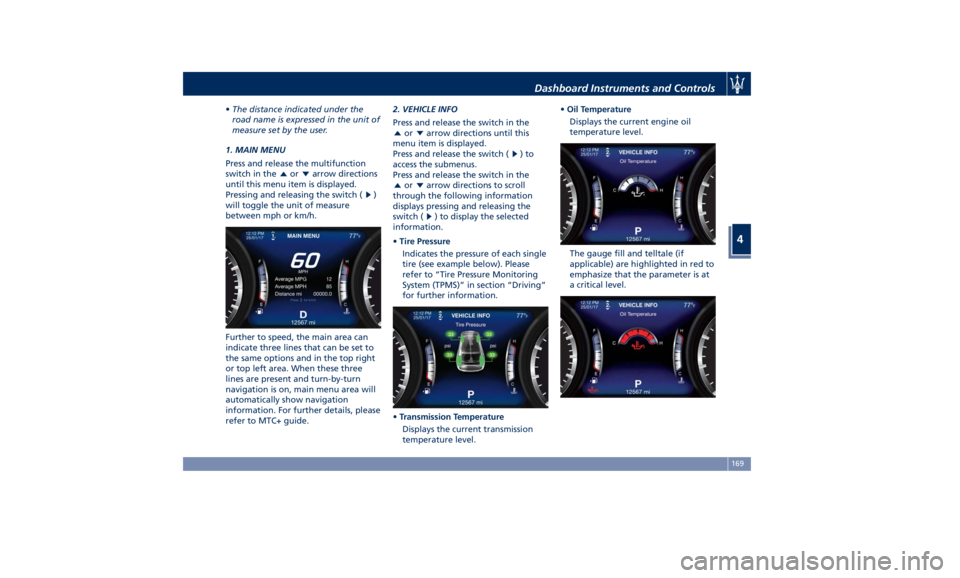
• Tire Pressure
Indicates the pressure of each single
tire (see example below). Please
refer to “Tire Pressure Monitoring
System (TPMS)” in section “Driving”
for further information.
• Transmission Temperature
Displays the current transmission
temperature level. • Oil Temperature
Displays the current engine oil
temperature level.
The gauge fill and telltale (if
applicable) are highlighted in red to
emphasize that the parameter is at
a critical level.Dashboard Instruments and Controls
4
169