2019 MASERATI LEVANTE steering
[x] Cancel search: steeringPage 306 of 436

vibration to correct the car trajectory.
The system will only show on the TFT
display when the vehicle is passing
the lane.
• "Visual & Haptic": the system will
apply steering torque when lane
departure is detected while showing
at the same time the proper cluster
indication, adding to this steering
vibration when the departure is very
imminent.
When "Visual & Haptic" is selected and
LKA is enabled then the following
menu will be used by the system.
• "LKA Sensitivity": it tunes the
distance to the lane boundary where
the system will start to apply steering
torque.
• "LKA Strength": it tunes the steering
torque value to have a stronger or
weaker trajectory correction/
deviation.
WARNING!
In rare cases, Lane Keeping Assist
(LKA) may make an inappropriate
steering torque application. LKA may
be interrupted at any time counter
steering. Lack of attention may lead to
serious injury or death. System Availability The ADAS systems (LKA, CC, ACC, FCW
and HAS) help the driver while driving.
These systems can be set and
monitored simultaneously on the
display, after opening “Driver Assist”
menu (see paragraph “TFT Display:
Menus and Settings” under
“Instrument Cluster” in section
“Dashboard Instruments and
Controls”).
LKA is designed for an attentive driver;
therefore the system is available only
when his/her hands are on the steering
wheel or with hands off only for a very
limited amount of time. When the
system is enabled it will trigger cluster
warning in case at least one hand is
not detected on the steering wheel.
The torque application as well as the
vibration are suppressed/inhibited in
case of: high driver torque in the
steering wheel, high lateral
acceleration, trailer connected to the
proper control module, hands not on
the steering wheel detected for more
than a certain time.
High dynamic driving behaviors,
driving on the lane boundary or
driving off course will prevent the
function from working. FCW braking
and stability system interventions (ESC, ABS) will also prevent the system from
operating. Changing lane results in
system inhibition for a certain time. In
addition, the driver must respect some
road characteristics such as
minimum-maximum width, lanes
clearly defined by two lane boundaries
and for a limited time, the presence of
at least one lane boundary.
NOTE:
• In case of wet road or raining
conditions the function could be
disabled by the system in order to
minimize the risks.
• With lane boundaries it is mainly
referred to painted lines,
nevertheless the system in good
conditions might properly recognize
as valid lane boundaries also other
types (for example road edges, curbs,
etc..).
Being this function used to prevent
unintentional lane change/lane drift, it
will be temporary suppressed/inhibited
by a turn indicator activation,
therefore, graphic warning, steering
torque application and vibration will
be terminated. In this condition in case
of a vehicle detected by the Blind Spot
Assist (BSA) system in the covered area
on the proper side, there can be theDriving
5
302
Page 307 of 436
transition from LKA to Active Blind
Spot Assist (ABSA) (if this latter is on
and properly configured).
Function Description and
Operating Mode Intent of the function is to prevent the
lane departure by warning the driver
through indication on the cluster and
if set applying steering torque and
vibration. Whenever the system is
enable there will be graphic on the
dedicated screen in the driver assist
page and for the others it will be
available in the left top corner of the
cluster screen. The graphic which
intent is to represent at the glance the
system knowledge of the lane in front
of the car, the system suppression
status and warning.
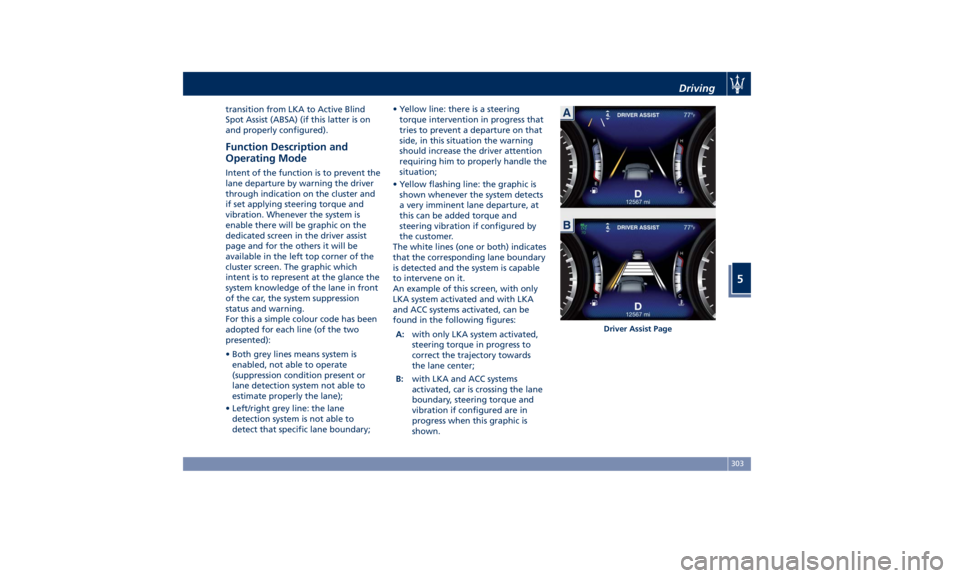
For this a simple colour code has been
adopted for each line (of the two
presented):
• Both grey lines means system is
enabled, not able to operate
(suppression condition present or
lane detection system not able to
estimate properly the lane);
• Left/right grey line: the lane
detection system is not able to
detect that specific lane boundary; • Yellow line: there is a steering
torque intervention in progress that
tries to prevent a departure on that
side, in this situation the warning
should increase the driver attention
requiring him to properly handle the
situation;
• Yellow flashing line: the graphic is
shown whenever the system detects
a very imminent lane departure, at
this can be added torque and
steering vibration if configured by
the customer.
The white lines (one or both) indicates
that the corresponding lane boundary
is detected and the system is capable
to intervene on it.
An example of this screen, with only
LKA system activated and with LKA
and ACC systems activated, can be
found in the following figures:
A: with only LKA system activated,
steering torque in progress to
correct the trajectory towards
the lane center;
B: with LKA and ACC systems
activated, car is crossing the lane
boundary, steering torque and
vibration if configured are in
progress when this graphic is
shown. Driver Assist PageDriving
5
303
Page 308 of 436

The icons that represent the status of
the ADAS systems remain displayed
even when you exit the “Driver Assist”
screen.
System Limitations Because of physical limits, in order to
properly operate, the system needs
good visibility (it might not work or
not properly operate in case of heavy rain, snow, wet roads, fog, direct sun
on the camera, etc.).
NOTE:
• The presence of the hands on the
steering wheel is detected by a logic
combination of a capacitive sensor
installed in the steering wheel and
the measured applied torque at the
steering column. This leads to a more
robust hands detection when hands
are actually on the steering wheel (at
least one).
• The sensors are not able to detect
the presence of the hands on the
steering wheel areas covered in
wood, plastic bezels or carbon inserts
(where present).
Sharp turns, slopes and change in
slopes, poor lane boundaries, as well
as construction areas and all the
scenario described in this paragraph
may challenge the system, therefore
be always ready to prevent any
unexpected behaviour of the car.
Damaged front bumper, windshield
replaced without proper technical
intervention may also lead to system
malfunction or system unavailability.
Other conditions such as fault, but not
explicitly indicated here may also prevent/interrupt the system
intervention.
WARNING!
If the driver fails to adapt his/her
driving style, Lane Keeping Assist
(LKA) can neither reduce the risk of an
accident nor override the laws of
physics. It cannot take into account
road, weather or traffic conditions.
Active LKA is only an aid. Driver is
always responsible for the distance to
the vehicle in front, for vehicle speed,
for braking in good time and for
staying in lane.
System in Fault When the LKA cannot properly
operate due to a fault of its
components or because the windshield
in front of the forward facing camera
is dirty, the amber light and/or the
corresponding message will be
displayed.Non-Driver Assist PageDriving
5
304
Page 314 of 436

System is Faulty
The BSA system cannot properly
operate due to a fault of its
components, or because the area on
the rear bumper fascia where the
radar sensors are located is dirty. In
these cases the amber warning light
and the related message will be
displayed on the instrument cluster.
In these cases avoid using the system
and have the vehicle inspected at an
Authorized Maserati Dealer .
Radar Device - Regulatory
Information The “Regulatory Information” for all
the radio frequency and radar devices
can be consulted by accessing the
"Services" section on the website
www.maserati.com. Active Blind Spot Assist -
ABSA (optional, with ACC
only) ABSA system is only available on
vehicles equipped with ACC system
and represents an addition to the BSA
previously described (see chapter
"Blind Spot Assist - BSA" of this
section).
ABSA adds to the BSA the possibility in
certain circumstances to avoid and or
mitigate side collisions with vehicles
proceeding in the adjacent lanes by
changing the car trajectory in order to
try to keep it inside the detected/
estimated lane. A steering wheel
vibration is used as further feedback to
warn the driver that the lane change is
not safe.
The main logic core is the front radar,
whereas the sense inputs are the
radars on the rear bumper fascia used
for sensing the presence of vehicle in
the blind spot areas and the forward
facing camera placed behind the
internal rear-view mirror that instead
is used for lane detection and
estimation.
ABSA is designed to help the driver to
avoid mitigate a collision. Torque and
vibration application is however available in the 37 - 112 mph (60 -
180 km/h) speed interval. All the speed
thresholds related to the BSA remain
still valid, since ABSA as mentioned is
BSA extension.
ABSA is intended as a “hands-on”
function meaning that the driver is
required to stay engaged in the
driving all the time with his/her hands
on the steering wheel, in case hands
are not on the steering wheel for a
certain time there cannot be any
steering torque application vibration
included.
System Availability ABSA is designed for an attentive
driver therefore the system is available
only when his/her hands are on the
steering wheel or with hands off for a
very limited amount of time. When the
system is enabled, it will trigger cluster
warning in case at least one hand is
not detected on the steering wheel.
The torque application as well as the
vibration are suppressed/inhibited in
case of: high driver torque in the
steering wheel, high lateral
acceleration, hands not on the steering
wheel detected for more than a
certain time.
Highly dynamic behaviours, driving on
the lane boundary, off course willDriving
5
310
Page 316 of 436

System sensitivity can be set to “Early”,
“Medium” (default mode) or “Late”.
System strength can be set to "Low",
"Medium" (default mode) or "High".
NOTE:
The ABSA system will store the current
operating mode when the vehicle is
shut off. Each time the vehicle is
started, the previously-stored mode
will be recalled and used.
Meanings of Settings
When "Visual & Haptic" is selected and
of course ABSA is enabled, then two
following menus will be used by the
system.
• ABSA "Sensitivity": it tunes the
distance to the lane boundary where
the system will start to apply steering
torque. • ABSA “Strength": it tunes the
steering torque value to have a
stronger or weaker trajectory
correction/deviation.
Blind Spot Assist in "Visual & Haptic"
Mode
When the system is on and configured
“Visual & Haptic” then the ABSA is
enabled and to the conventional visual
warnings is added the steering torque
and vibration.
When operating in this mode, the
system will provide a visual alert in the
appropriate outside rear-view mirror
when it detects a vehicle or an object
in the detection areas monitored by its
sensors. In case of turn indicator
activation on the appropriate side, the
system will react with a torque on the
steering wheel to try to prevent the
lane change and therefore to
avoid/mitigate the collision. The
torque on the steering is applied when
the car is very close to the lane
boundary as a further feedback to
warn the driver of the unsafe
maneuver.
NOTE:
• The steering torque is not supplied if
the system is not able to estimate a
lane and if the turn indicator from
the appropriate side is not inserted. • The presence of the hands on the
steering wheel is detected by a logic
combination of a capacitive sensor
installed in the steering wheel and
the measured applied torque at the
steering column. This leads to a more
robust hands detection.
WARNING!
• Risk of accident despite steering
torque application of Active Blind
Spot Assist (ABSA).
• A course-correcting steering torque
application cannot always prevent a
collision.
• The driver is always required to
steer, brake or accelerate themself,
especially if ABSA warns or makes a
course correcting steer intervention.
• Always maintain a safe distance at
the sides.
• Steering torque application may be
interrupted at any time by counter
steering by the driver.
RCP - Rear Cross Path
Operation RCP operation is the same as described
in chapter "Blind Spot Assist - BSA".Driving
5
312
Page 317 of 436

When ABSA is turned off from MTC+
"Controls" page, there will be no
visual or audible alerts from RCP
subsystem.
When ABSA is turned on with any
setting,RCP subsystem shall respond
with both visual and audible alerts
when a detected vehicle or object is
present. Whenever an audible alert is
requested, the radio (if on) is also
muted.
Right/left turn/hazard signal status is
ignored; the RCP status always
requests the chime.
System Temporarily
Unavailable The blind spot system will become
temporarily unavailable and the
instrument cluster display will show
the message “Blind Spot Alert
Temporarily Unavailable” when the
vehicle enters a radio quite zone
(example the areas around radio
telescopes).
The warning light on the outside
rear-view mirrors will be lit up and
stay lit until the vehicle exits the zone.
System in Fault The ABSA system cannot properly
operate either due to a fault of its
components, or because the area on windshield where the forward-facing
camera is located or on the rear
bumper fascia where the radar sensors
are located is dirty. In these cases the
amber warning light and the related
message will be displayed on the
instrument cluster.
In these cases do not use the system
and have the vehicle inspected at an
Authorized Maserati Dealer .
Radar Device - Regulatory
Information The “Regulatory Information” for all
the radio frequency and radar devices
can be consulted by accessing the
"Services" section on the website
www.maserati.com.Highway Assist – HAS
(optional, with ACC only) The Highway Assist (HAS) is a level 2
Autonomy system (in reference to
NHTSA standards) that is designed to
aid the driver in the steering,
acceleration, and braking functions of
the vehicle.
HAS is designed to only function on
highways or limited access freeways.
HAS centers the vehicle by controlling
the EPS system based off of lane line
information from the forward-facing
camera and data from the front radar
sensor.
HAS combines ACC and LKA to
manage the steering and speed of the
vehicle under specific conditions. The
conditions to engage HAS are listed in
the next paragraph. If a lane line cross
is imminent, the steering wheel willDriving
5
313
Page 318 of 436
vibrate and a graphic will display on
the instrument cluster.
WARNING!
• In case the vehicle approaches a
curve that is too tight in relation to
the current speed the system will
disengage, therefore the driver must
be prepared to take over control of
the vehicle immediately at any time.
To avoid this situation it is important
that the vehicle speed is not set
higher than the current speed limit
of the road.
• Highway Assist (HAS) is a hands-on
feature! You must keep your hands
on the steering wheel at all times.
The HAS system will disengage and
ACC will cancel if your hands are
removed from the steering wheels
for a set amount of time.
• HAS is intended for use only on
highways or limited access freeways
with a fully attentive driver. When
using HAS, hold the steering wheel
and be aware of surrounding traffic
and road conditions. Always be
prepared to immediately take over
control of the vehicle from the HAS
system. Failure to follow these instructions could result in serious
injury or death.
• The following list does not fully
represent all situations in which HAS
may not function as intended. Do
NOT solely rely on the HAS system
to control the vehicle. It is the
driver’s responsibility to stay alert
and safely control the vehicle at all
times.
• If the windshield is replaced, you
must have the forward-facing
camera remounted and aligned by
an Authorized Maserati Dealer.
Many factors can impact the
performance
of HAS causing
the
system to be unable to function as
intended. These include (but are not
limited to):
• Narrow, winding or curvy roads.
• Poor visibility (due to heavy rain,
snow, fog, etc.).
• Bright light (oncoming headlights or
direct sunlight) or shadows.
• Damage or obstruction caused by
mud, ice, snow, etc.
• A damaged or misaligned bumper.
• Interference from other equipment
that generates electromagnetic
waves. • Wet roads, roads covered or partially
covered by snow.
• Construction zones.
HAS Operation With ACC set (see “Adaptive Cruise
Crontrol – ACC” in this section), HAS
system activates by simply pressing the
button on the steering wheel.
Once the conditions are met, HAS will
engage.
CAUTION!
The Highway Assist (HAS) system may
take up to 5 seconds to engage once
all conditions are met.
The conditions for HAS to engage are
as
follows:
• HAS must be turned on or enabled.
NOTE:
In case of wet road or raining
conditions the function could be
disabled by the system in order to
minimize the risks.
• The vehicle must be on the highway
or limited access freeway.
• Adaptive Cruise Control (ACC) must
be engaged.
• Left and right visible lane lines.Driving
5
314
Page 319 of 436

• Vehicle speed must be between 0 to
90 mph (0 and 145 km/h).
• No faults in the forward facing
camera, radar, EPS, or MTC+.
• Lane width between 3 to 4.6 yd (2.8
and 4.2 m).
• Turn signal not activated.
• No faults related to this system.
Speed Range of Use Speed mph (km/h)
Minimum 0 (0)
Engaged/activated
(with ACC engaged) 0 (0)
Engaged/activated
(with ACC not
engaged) 18 (30)
Maximum 90 (145)
• If set above the maximum speed,
HAS will not function after the
vehicle speed will reach the
maximum speed.
• If set below the maximum speed and
the ACC target speed is increased,
HAS will function up to the
maximum speed and then the system
will turn off automatically.
• When the ACC target speed is
reduce and speed is lower than the maximum speed, the system will
start automatically.
• If the ACC target speed is set under
the maximum speed, HAS is active
and vehicle speed increases above
the maximum speed due to slope,
HAS will continue to function.
HAS Monitoring on Instrument
Cluster HAS and the other ADAS systems
conditions can be monitored on
instrument cluster display by accessing
the “Driver Assist” page with the
buttons on the steering wheel (see
“Instrument Cluster” in section
“Dashboard Instruments and
Controls”).
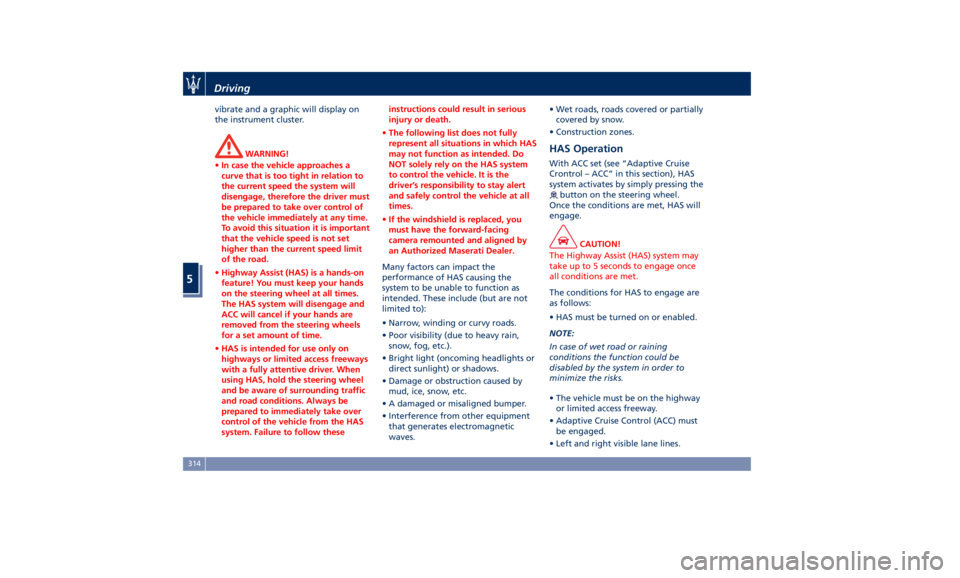
The
symbol in grey indicates that
the HAS system is active, but not
engaged and is shown at the centre of
the TFT display when the “Driver
Assist” page is displayed. When
exiting the "Driver Assist" page, on
TFT display top left corner, the
grey symbol will appear in the
multiple light of active ADAS systems. In addition to these symbols, on the
TFT top and bottom edge a coloured
glow may appear (further referred to
as "attention level colour"). Attention
level colour together with the outline
of the symbol
represent a further
indication of the system status. Driver Assist Page
Non-Driver Assist PageDriving
5
315