2019 LINCOLN MKZ brakes
[x] Cancel search: brakesPage 225 of 595

Press and release to decrease theset speed in small increments.
Press and hold either button to change theset speed in large increments. Release thebutton when you reach your preferred speed.
Press the accelerator or brake pedal untilyou reach your preferred speed. Press eitherbutton.
The system may apply the brakes to slowthe vehicle to the new set speed. The setspeed displays continuously in theinformation display when the system isactive.
Canceling the Set Speed
Press and release the button or tapthe brake pedal.
Note:The system remembers the set speed.
Resuming the Set Speed
Press and release the button.
Your vehicle speed returns to the previouslyset speed and gap setting. The set speeddisplays continuously in the informationdisplay when the system is active.
Note:Only use resume if you are aware ofthe set speed and intend to return to it.
Automatic Cancellation
Automatic cancellation can also occur when:
•The tires lose traction.
•You apply the parking brake.
Park Brake Application
Automatic parking brake application andcancellation occurs if:
•You unbuckle the seatbelt and open thedoor after you stop the vehicle.
•You hold the vehicle at a stopcontinuously for more than three minutes.
Hilly Condition Usage
You should select a lower gear when thesystem is active in situations such asprolonged downhill driving on steep grades,for example in mountainous areas. Thesystem needs additional engine braking inthese situations to reduce the load on thevehicle’s regular brake system to prevent itfrom overheating.
Note:An audible alarm sounds and thesystem shuts down if it applies brakes for anextended period of time. This allows thebrakes to cool. The system functionsnormally again after the brakes cool.
Switching Adaptive Cruise Control Off
For vehicles without Speed Limiter,press and release the button whenthe system is in standby mode orswitch the ignition off.
For vehicles with Speed Limiter,press and release the button whenthe system is in standby mode orswitch the ignition off.
222
MKZ (CC9) Canada/United States of America, enUSA, Edition date: 201805, First-Printing
Cruise Control E265298 E265299 E265297 E144529
Page 229 of 595

Switching to Normal Cruise Control
WARNING: Normal cruise control willnot brake when your vehicle is approachingslower vehicles. Always be aware of whichmode you have selected and apply thebrakes when necessary.
The cruise control indicator lightreplaces the adaptive cruisecontrol indicator light if you selectnormal cruise control. The gap setting doesnot display, and the system does not respondto lead vehicles. Automatic braking remainsactive to maintain set speed.
You can change from adaptive cruise controlto normal cruise control through theinformation display.
226
MKZ (CC9) Canada/United States of America, enUSA, Edition date: 201805, First-Printing
Cruise ControlE71340
Page 245 of 595

WARNING: The system cannot helpprevent all crashes. Do not rely on thissystem to replace driver judgment and theneed to maintain a safe distance and speed.
Using the Pre-Collision Assist System
The Pre-Collision Assist system is active atspeeds above approximately 3 mph (5 km/h)and pedestrian detection is active at speedsup to 50 mph (80 km/h).
If your vehicle is rapidly approaching anotherstationary vehicle, a vehicle traveling in thesame direction as yours, or a pedestrianwithin your driving path, the system isdesigned to provide three levels offunctionality:
1. Alert
2. Brake Support
3. Active Braking
Alert: When active, a flashing visual warningappears and an audible warning tonesounds.
Brake Support: The system is designed tohelp reduce the impact speed by preparingthe brakes for rapid braking. The systemdoes not automatically apply the brakes. Ifyou press the brake pedal, the system couldapply additional braking up to maximumbraking force, even if you lightly press thebrake pedal.
Active Braking: Active braking may activateif the system determines that a collision isimminent. The system may help the driverreduce impact damage or avoid the crashcompletely.
Note:If you perceive Pre-Collision Assistalerts as being too frequent or disturbing,then you can reduce the alert sensitivity,though the manufacturer recommends usingthe highest sensitivity setting where possible.Setting lower sensitivity would lead to fewerand later system warnings.
Distance Indication and Alert
Distance Indication and Alert is a functionthat provides a graphical indication of thetime gap to other preceding vehiclestraveling in the same direction. The DistanceIndication and Alert screen in the informationdisplay shows a graphic similar to the onethat follows.
If the time gap to a preceding vehicle issmall, a red visual indication displays.
242
MKZ (CC9) Canada/United States of America, enUSA, Edition date: 201805, First-Printing
Driving AidsE156130 E156131 E190004
Page 253 of 595

GAWR (Gross Axle Weight Rating)
GAWR is the maximum allowable weightthat a single axle (front or rear) can carry.These numbers are on the SafetyCompliance Certification label. The labelis located on the door hinge pillar,door-latch post, or the door edge thatmeets the door-latch post, next to thedriver seating position.
The total load on each axle must neverexceed its Gross Axle Weight Rating.
GVWR (Gross Vehicle Weight Rating)
GVWR is the maximum allowable weightof the fully loaded vehicle. This includesall options, equipment, passengers andcargo. It appears on the Safety
Compliance Certification label. The labelis located on the door hinge pillar,door-latch post, or the door edge thatmeets the door-latch post, next to thedriver seating position.
The gross vehicle weight must neverexceed the Gross Vehicle Weight Rating.
Safety Compliance Certification LabelExample:
WARNING: Exceeding the SafetyCompliance Certification label vehicleweight rating limits could result insubstandard vehicle handling orperformance, engine, transmissionand/or structural damage, seriousdamage to the vehicle, loss of controland personal injury.
Maximum Loaded Trailer Weight
Maximum loaded trailer weight is thehighest possible weight of a fully loadedtrailer the vehicle can tow. Consult anauthorized dealer (or the RV and TrailerTowing Guide available at an authorizeddealer) for more detailed information.
GCWR (Gross Combined WeightRating)
GCWR is the maximum allowable weightof the vehicle and the loaded trailer,including all cargo and passengers, thatthe vehicle can handle without riskingdamage. (Important: The towingvehicle’s braking system is rated foroperation at Gross Vehicle WeightRating, not at Gross Combined Weight
Rating.) Separate functional brakesshould be used for safe control of towedvehicles and for trailers where the GrossCombined Weight of the towing vehicleplus the trailer exceed the Gross VehicleWeight Rating of the towing vehicle.
250
MKZ (CC9) Canada/United States of America, enUSA, Edition date: 201805, First-Printing
Load CarryingE198828
Page 256 of 595

TOWING A TRAILER
WARNING: Do not exceed theGVWR or the GAWR specified on thecertification label.
WARNING: Towing trailers beyondthe maximum recommended grosstrailer weight exceeds the limit of yourvehicle and could result in enginedamage, transmission damage,structural damage, loss of vehiclecontrol, vehicle rollover and personalinjury.
Note:There may be electrical itemssuch as fuses or relays that can affecttrailer towing operation. See Fuses(page 277).
The load capacity of your vehicle isdesignated by weight not volume. Youmay not necessarily be able to use allavailable space when loading yourvehicle or trailer.
Towing a trailer places extra load on theengine, transmission, axle, brakes, tires,and suspension. Inspect thesecomponents before, during and aftertowing.
Load Placement
To help minimize how trailer movementaffects the vehicle when driving:
•Load the heaviest items closest tothe trailer floor.
•Load the heaviest items in the centerof the left and right side trailer tires.
•Load the heaviest items above thetrailer axles or just slightly forwardtoward the trailer tongue. Do notallow the final trailer tongue weightto go above or below 10-15% of theloaded trailer weight.
•Select a ball mount with the correctrise or drop. When both the loadedvehicle and trailer are connected, thetrailer frame should be level, orslightly angled down toward thevehicle, when viewed from the side.
When driving with a trailer or payload, aslight takeoff vibration or shudder maybe present due to the increased payloadweight. Additional information regardingproper trailer loading and setting yourvehicle up for towing is located in theLoad Carrying chapter. See Load Limit(page 248).
You can also find information in the RV& Trailer Towing Guide available at yourauthorized dealer, or online.
253
MKZ (CC9) Canada/United States of America, enUSA, Edition date: 201805, First-Printing
Towing
Page 257 of 595
RV & Trailer Towing Guide Online
http://www.fleet.ford.com/towing-guides/Website
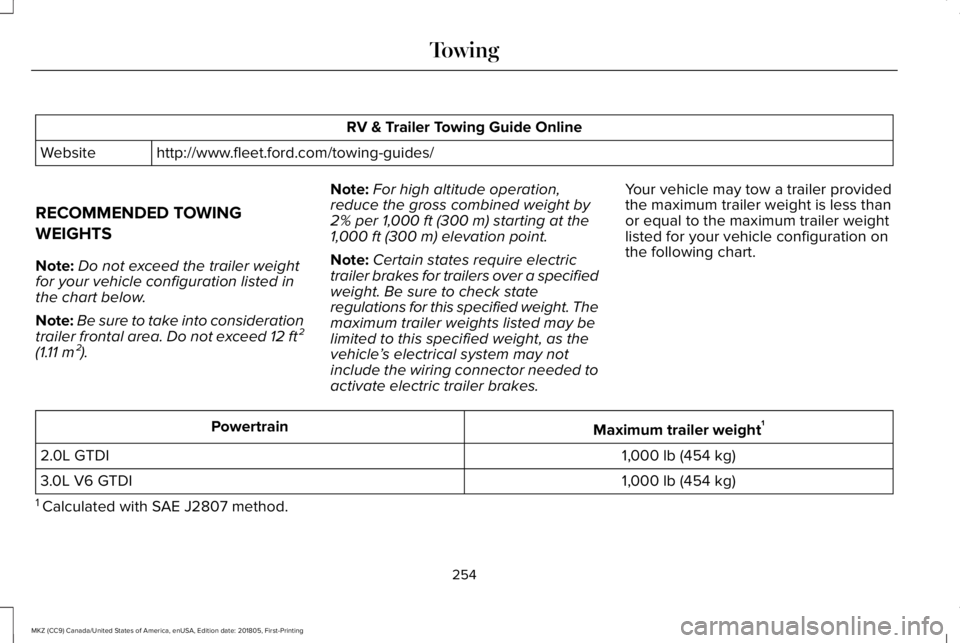
RECOMMENDED TOWING
WEIGHTS
Note:Do not exceed the trailer weightfor your vehicle configuration listed inthe chart below.
Note:Be sure to take into considerationtrailer frontal area. Do not exceed 12 ft²(1.11 m²).
Note:For high altitude operation,reduce the gross combined weight by2% per 1,000 ft (300 m) starting at the1,000 ft (300 m) elevation point.
Note:Certain states require electrictrailer brakes for trailers over a specifiedweight. Be sure to check stateregulations for this specified weight. Themaximum trailer weights listed may belimited to this specified weight, as thevehicle’s electrical system may notinclude the wiring connector needed toactivate electric trailer brakes.
Your vehicle may tow a trailer providedthe maximum trailer weight is less thanor equal to the maximum trailer weightlisted for your vehicle configuration onthe following chart.
Maximum trailer weight1Powertrain
1,000 lb (454 kg)2.0L GTDI
1,000 lb (454 kg)3.0L V6 GTDI
1 Calculated with SAE J2807 method.
254
MKZ (CC9) Canada/United States of America, enUSA, Edition date: 201805, First-Printing
Towing
Page 258 of 595
ESSENTIAL TOWING CHECKS
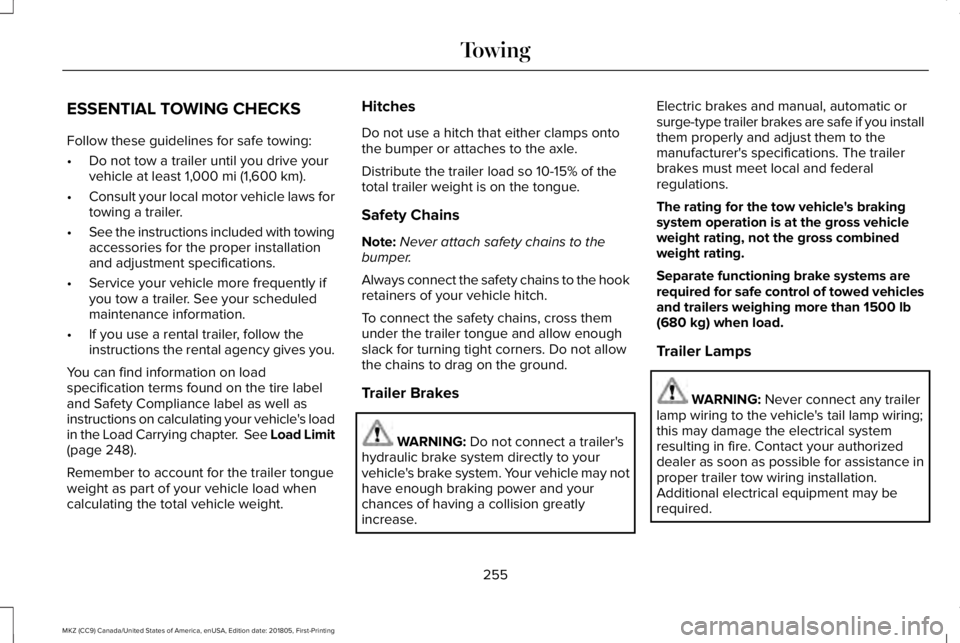
Follow these guidelines for safe towing:
•Do not tow a trailer until you drive yourvehicle at least 1,000 mi (1,600 km).
•Consult your local motor vehicle laws fortowing a trailer.
•See the instructions included with towingaccessories for the proper installationand adjustment specifications.
•Service your vehicle more frequently ifyou tow a trailer. See your scheduledmaintenance information.
•If you use a rental trailer, follow theinstructions the rental agency gives you.
You can find information on loadspecification terms found on the tire labeland Safety Compliance label as well asinstructions on calculating your vehicle's loadin the Load Carrying chapter. See Load Limit(page 248).
Remember to account for the trailer tongueweight as part of your vehicle load whencalculating the total vehicle weight.
Hitches
Do not use a hitch that either clamps ontothe bumper or attaches to the axle.
Distribute the trailer load so 10-15% of thetotal trailer weight is on the tongue.
Safety Chains
Note:Never attach safety chains to thebumper.
Always connect the safety chains to the hookretainers of your vehicle hitch.
To connect the safety chains, cross themunder the trailer tongue and allow enoughslack for turning tight corners. Do not allowthe chains to drag on the ground.
Trailer Brakes
WARNING: Do not connect a trailer'shydraulic brake system directly to yourvehicle's brake system. Your vehicle may nothave enough braking power and yourchances of having a collision greatlyincrease.
Electric brakes and manual, automatic orsurge-type trailer brakes are safe if you installthem properly and adjust them to themanufacturer's specifications. The trailerbrakes must meet local and federalregulations.
The rating for the tow vehicle's brakingsystem operation is at the gross vehicleweight rating, not the gross combinedweight rating.
Separate functioning brake systems arerequired for safe control of towed vehiclesand trailers weighing more than 1500 lb(680 kg) when load.
Trailer Lamps
WARNING: Never connect any trailerlamp wiring to the vehicle's tail lamp wiring;this may damage the electrical systemresulting in fire. Contact your authorizeddealer as soon as possible for assistance inproper trailer tow wiring installation.Additional electrical equipment may berequired.
255
MKZ (CC9) Canada/United States of America, enUSA, Edition date: 201805, First-Printing
Towing
Page 259 of 595

Trailer lamps are required on most towedvehicles. Make sure all running lights, brakelights, turn signals and hazard lights areworking.
Before Towing a Trailer
Practice turning, stopping and backing up toget the feel of your vehicle-trailercombination before starting on a trip. Whenturning, make wider turns so the trailerwheels clear curbs and other obstacles.
When Towing a Trailer
•Do not drive faster than 70 mph(113 km/h) during the first 500 mi(800 km).
•Do not make full-throttle starts.
•Check your hitch, electrical connectionsand trailer wheel lug nuts thoroughly afteryou have traveled 50 mi (80 km).
•When stopped in congested or heavytraffic during hot weather, place thetransmission in park (P) to aid engine andtransmission cooling and to help A/Cperformance.
•Turn off the speed control with heavyloads or in hilly terrain. The speed controlmay turn off automatically when you aretowing on long, steep grades.
•Shift to a lower gear when driving downa long or steep hill. Do not apply thebrakes continuously, as they mayoverheat and become less effective.
•If your transmission is equipped with aGrade Assist or Tow/Haul feature, usethis feature when towing. This providesengine braking and helps eliminateexcessive transmission shifting foroptimum fuel economy and transmissioncooling.
•Allow more distance for stopping with atrailer attached. Anticipate stops andbrake gradually.
•Avoid parking on a grade. However, ifyou must park on a grade:
1. Turn the steering wheel to point yourvehicle tires away from traffic flow.
2. Set your vehicle parking brake.
3. Place the transmission in park (P).
4. Place wheel chocks in front and back ofthe trailer wheels. Chocks are notincluded with your vehicle.
Launching or Retrieving a Boat orPersonal Watercraft (PWC)
Note:Disconnect the wiring to the trailerbefore backing the trailer into the water.
Note:Reconnect the wiring to the trailerafter removing the trailer from the water.
When backing down a ramp during boatlaunching or retrieval:
•Do not allow the static water level to riseabove the bottom edge of the rearbumper.
•Do not allow waves to break higher than6 in (15 cm) above the bottom edge ofthe rear bumper.
Exceeding these limits may allow water toenter vehicle components:
•Causing internal damage to thecomponents.
•Affecting driveability, emissions, andreliability.
256
MKZ (CC9) Canada/United States of America, enUSA, Edition date: 201805, First-Printing
Towing