2019 LEXUS UX250H high
[x] Cancel search: highPage 282 of 476

2825-3. Using the air conditioning system and defogger
In S-FLOW mode, priority for the air-
flow is given to the front seats, reducing
the airflow and air conditioning effect
on the rear seats.
The following S-FLOW modes are
available:
Automatic S-FLOW mode
When a rear passenger is determined
to be in the vehicle, S-FLOW mode will
be automatically disabled.
The indicator will illuminate on the air con-
ditioning control screen when S-FLOW
mode is enabled.
To enable/disable S-FLOW mode and
enter manual S-FLOW mode, select the S-
FLOW mode switch ( P.280).
Manual S-FLOW mode
When the S-FLOW mode switch is
selected, S-FLOW mode will be manu-
ally enabled/disabled.
The indicator will illuminate on the air con-
ditioning control screen when S-FLOW
mode is enabled.
The system does not determine whether a
passenger is in the rear seats by the open-
ing and closing of a rear door, so S-FLOW mode cannot be automatically disabled.
To automatically disable S-FLOW mode by
opening and closing a rear door, switch to
automatic S-FLOW mode.
■S-FLOW air conditioning control
Operation of S-FLOW mode changes
according to the following conditions.
However, depending on the set tem-
perature and air conditioning load is
high, the operation may not change.
Driver seat priority:
• When the system determines there is no
passenger in the front passenger seat in
manual S-FLOW mode
• When the system determines there are no passengers in the front passenger
seat and rear seats in automatic S-
FLOW mode
The airflow to the front passenger seat and
rear seat stops and the front passenger
temperature display turns off.
Front seat priority:
When the system determines there are no
passengers in the rear seats
S-FLOW disabled:
When the system determines there is a
passenger in the rear seats
■Passenger presence determination in S-
FLOW mode
The system determines that there is a pas-
senger in any of the following situations.
If a passenger is judged to be in the vehicle,
the system will retain the judgment for a
certain amount of time after the power
switch is turned off.
NOTICE
●Do not stick anything on the sensor
S-FLOW mode
Page 287 of 476
2875-3. Using the air conditioning system and defogger
5
Interior features
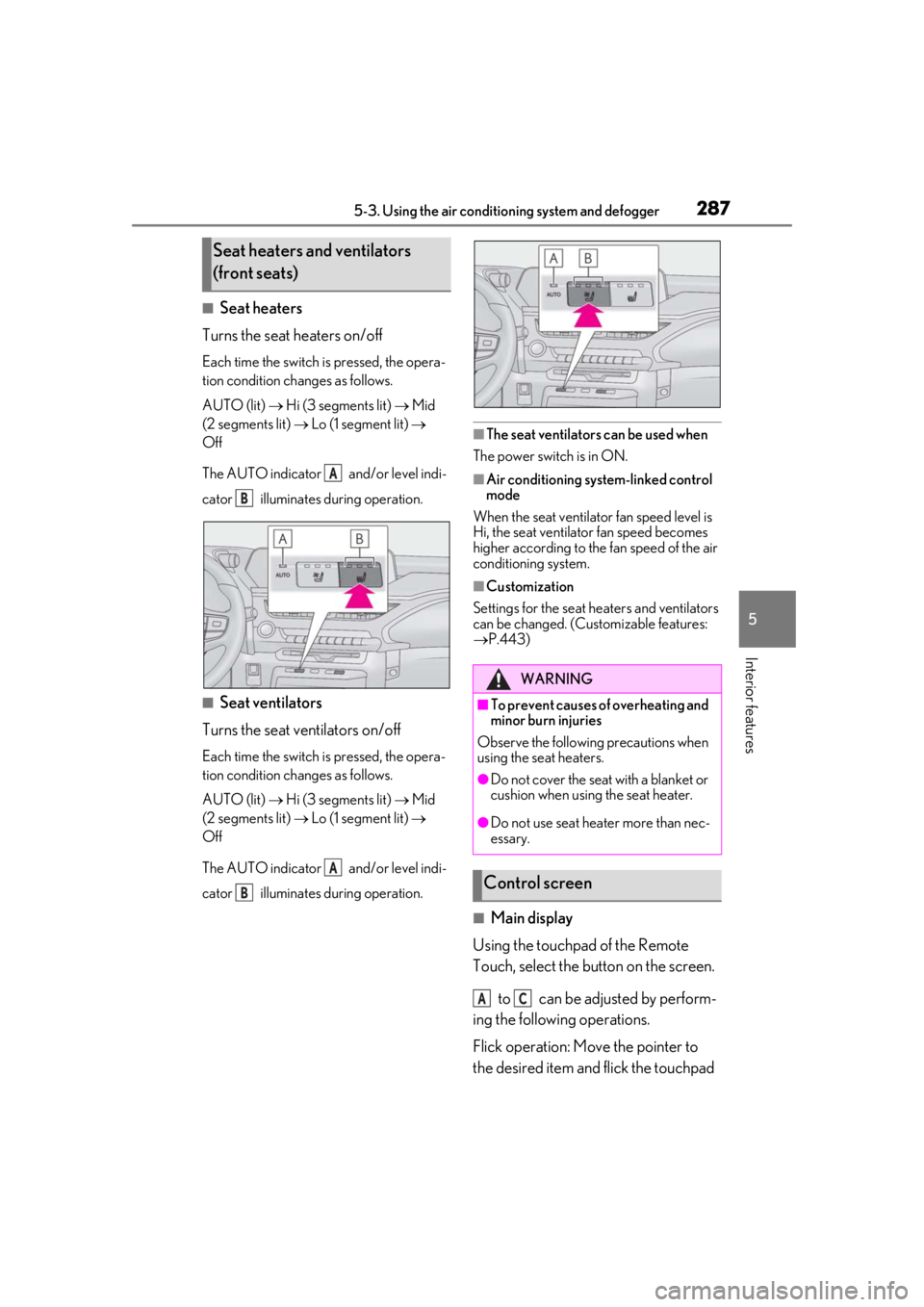
■Seat heaters
Turns the seat heaters on/off
Each time the switch is pressed, the opera-
tion condition changes as follows.
AUTO (lit) Hi (3 segments lit) Mid
(2 segments lit) Lo (1 segment lit)
Off
The AUTO indicator and/or level indi-
cator illuminates during operation.
■Seat ventilators
Turns the seat ventilators on/off
Each time the switch is pressed, the opera-
tion condition changes as follows.
AUTO (lit) Hi (3 segments lit) Mid
(2 segments lit) Lo (1 segment lit)
Off
The AUTO indicator and/or level indi-
cator illuminates during operation.
■The seat ventilators can be used when
The power switch is in ON.
■Air conditioning system-linked control
mode
When the seat ventilator fan speed level is
Hi, the seat ventilator fan speed becomes
higher according to the fan speed of the air
conditioning system.
■Customization
Settings for the seat heaters and ventilators
can be changed. (Customizable features:
P.443)
■Main display
Using the touchpad of the Remote
Touch, select the button on the screen.
to can be adjusted by perform-
ing the following operations.
Flick operation: Move the pointer to
the desired item and flick the touchpad
Seat heaters and ventilators
(front seats)
A
B
A
B
WARNING
■To prevent causes of overheating and
minor burn injuries
Observe the following precautions when
using the seat heaters.
●Do not cover the seat with a blanket or
cushion when using the seat heater.
●Do not use seat heater more than nec-
essary.
Control screen
AC
Page 293 of 476

2935-5. Using the storage features
5
Interior features
5-5.Using the storage features
Auxiliary tray/Wireless charger (if equipped) (P.303)
Glove box ( P.294)
Bottle holders ( P.295)
Cup holders ( P.294)
Console box ( P.294)
Coin holder ( P.295)
List of storage features
Location of the storage features
A
B
C
D
E
F
WARNING
■Items that should not be left in the
vehicle
Do not leave glasses, lighters or spray
cans in the storage spaces, as this may
cause the following when cabin tempera-
ture becomes high:
●Glasses may be deformed by heat or
cracked if they come into contact with
other stored items.
●Lighters or spray ca ns may explode. If
they come into contact with other
stored items, the lighter may catch fire
or the spray can may release gas,
causing a fire hazard.
Page 303 of 476

3035-6. Using the other interior features
5
Interior features
charging only. They are not designed
for data transfer or other purposes.
Depending on the external device, it
may not charge properly. Refer to the
manual included with the device
before using a USB charging port.
■Using the USB charging ports
Open the lid.
■The USB charging ports can be used
when
The power switch is in ACC or ON.
■Situations in which the USB charging
ports may not operate correctly
●If a device which consumes more than 2.1
A at 5 V is connected
●If a device designed to communicate with
a personal computer, such as a USB
memory device, is connected
●If the connected extern al device is turned
off (depending on device)
●If the temperature inside the vehicle is
high, such as after the vehicle has been
parked in the sun
■About connected external devices
Depending on the connected external
device, charging may occasionally be sus-
pended and then start again. This is not a
malfunction.
A portable device, such as a smart-
phone or mobile battery, can be
charged by just placing it on the
charging area, provided the device is
compatible with the Qi wireless
charging standard created by the
Wireless Power Consortium.
The wireless charger cannot be used
with a portable device that is larger
NOTICE
■To prevent damage to the USB
charging ports
●Do not insert foreign objects into the
ports.
●Do not spill water or other liquids into
the ports.
●When the USB charging ports are not
in use, close the lids. If a foreign object
or liquid enters a port may cause a
short circuit.
●Do not apply excessive force to or
impact the USB charging ports.
●Do not disassemble or modify the USB
charging ports.
■To prevent damage to external
devices
●Do not leave external devices in the
vehicle. The temperature inside the
vehicle may become high, resulting in
damage to an external device.
●Do not push down on or apply unnec-
essary force to an external device or
the cable of an external device while it
is connected.
■To prevent 12-volt battery discharge
Do not use the USB charging ports for a
long period of time with the hybrid sys-
tem stopped.
Wireless charger (if equipped)
Page 305 of 476
3055-6. Using the other interior features
5
Interior features
■Operation indicator light status
*: Depending on the portable device, the operation indicator light may stay illumi-
nated (orange) after charging has com-
pleted.
If the operation indicator light blinks
If an error is detected, the operation indi-
cator light will blink (orange). Take the
appropriate measures according to the
table below.
• Blinks (orange) at a one second interval continuously
• Blinks (orange) 3 times repeatedly • Blinks (orange) 4 times repeatedly
■The wireless charger can be operated
when
The power switch is in ACC or ON.
■Portable devices that can be charged
●Portable devices compatible with the Qi
wireless charging standard can be
charged by the wireless charger. How-
ever, compatibility with all devices which
meet the Qi wireless charging standard is
not guaranteed.
●The wireless charger is designed to sup-
ply low power electricity (5 W or less) to
a cellular phone, smartphone, or other
portable device.
■If a cover or accessory is attached to the
portable device
Do not charge a portable device if a cover
or accessory which is not Qi compatible is
attached. Depending on the type of cover
and/or accessory attached, it may not be
possible to charge the portable device. If
the portable device is placed on the
charging area and does not charge, remove
the cover and/or accessories.
■If interference is heard in AM radio
broadcasts while charging
Turn off the wireless charger and check if
Operation indicator lightState
OffThe Wireless char-
ger is off
Green (illuminated)
Standby (charging is
possible)
Charging is com-
plete
*
Orange (illumi-
nated)
A portable device
has been placed on
the charging area
(identifying the por-
table device)
Charging in prog-
ress
Suspected causesMeasure
Vehicle to charger
communication fail-
ure.Contact your Lexus
dealer.
Suspected causesMeasure
A foreign object
exists between the
portable device and
charging area.
Remove the foreign
object.
Portable device is
not positioned prop-
erly on the charging
area.Move the portable
device toward the
center of the
charging area.
Suspected causesMeasure
The temperature of
the wireless charger
is excessively high.Stop charging
immediately and
continue charging
after a while.
Page 310 of 476

3105-6. Using the other interior features
Fold down the armrest for use.
The coat hooks are provided with the
rear assist grips.
NOTICE
●When a portable device is not cen-
tered on the charging area
●When the vehicle is near a TV tower,
electric power plant, gas station, radio
station, large display, airport or other
facility that generates strong radio
waves or electrical noise
●When the portable device is in contact
with, or is covered by any of the follow-
ing metallic objects
• Cards to which aluminum foil is attached
• Cigarette boxes that have aluminum foil inside
• Metallic wallets or bags
• Coins
• Metal hand warmers
• Media such as CDs and DVDs
●When wireless keys (that emit radio
waves) other than those of your vehicle
are being used nearby.
If in situations other than above the wire-
less charger does not operate properly
or the operation indicator light is blink-
ing, the wireless charger may be mal-
functioning. Contact your Lexus dealer.
■To prevent failure or damage to data
●Do not bring magnetic cards, such as a
credit card, or magnetic recording
media, close to the wireless charger
while charging. Otherwise, data may
be erased due to the influence of mag-
netism.
Additionally, do not bring precision
instruments such as wrist watches,
close to the wireless charger, as such
objects may malfunction.
●Do not leave portab le devices in the
cabin. The temperature inside the
cabin may become high when parked
in the sun, and cause damage to the
device.
■To prevent 12-volt battery discharge
Do not use the wireless charger for a
long period of time with the hybrid sys-
tem is stopped.
Armrest
NOTICE
■To prevent damage to the armrest
Do not apply too much load on the arm-
rest.
Coat hooks
Page 318 of 476
3185-6. Using the other interior features
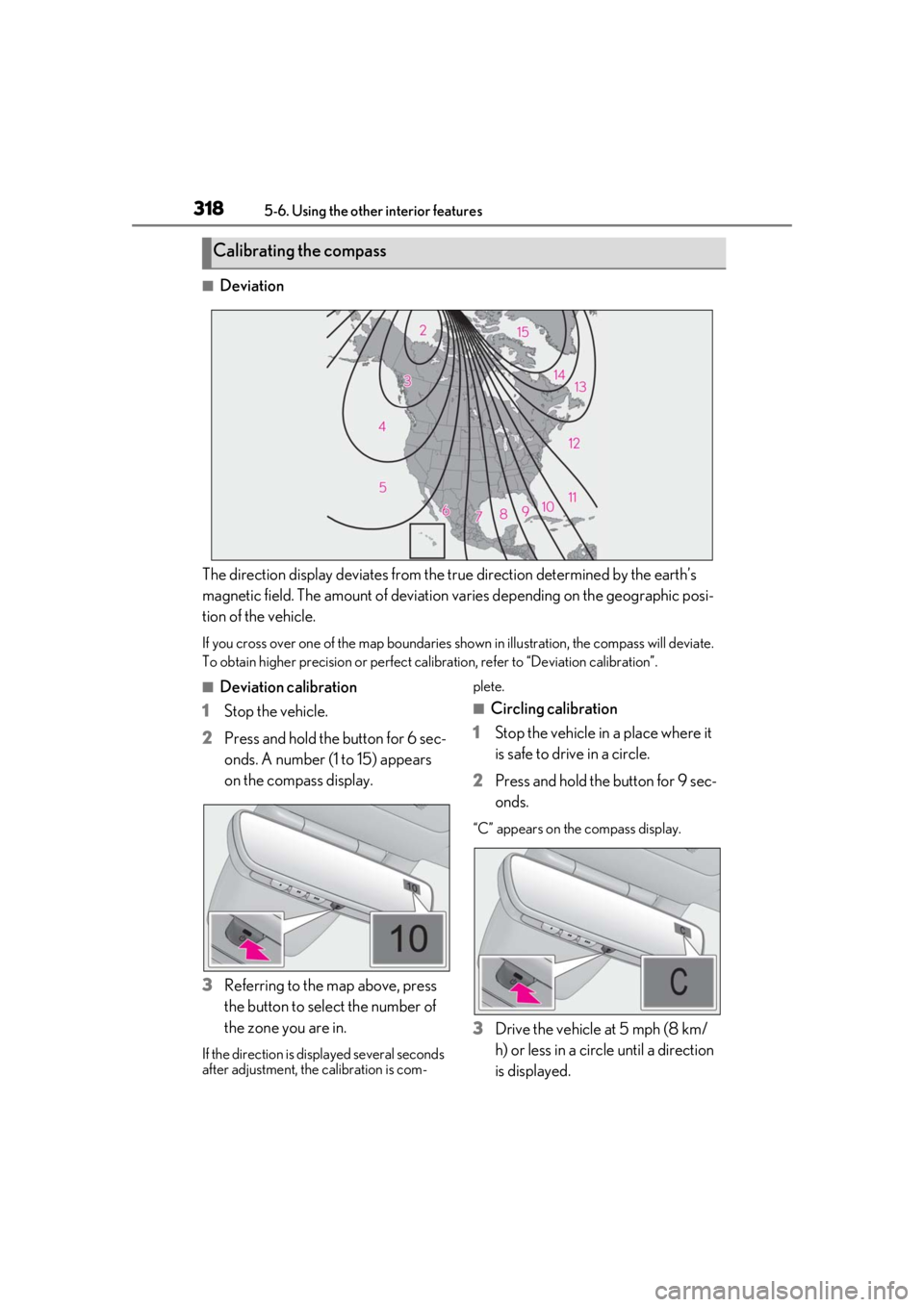
■Deviation
The direction display deviates from the tr ue direction determined by the earth’s
magnetic field. The amount of deviation varies depending on the geographic posi-
tion of the vehicle.
If you cross over one of the map boundaries shown in illustration, the compass will deviate.
To obtain higher precision or perfect ca libration, refer to “Deviation calibration”.
■Deviation calibration
1 Stop the vehicle.
2 Press and hold the button for 6 sec-
onds. A number (1 to 15) appears
on the compass display.
3 Referring to the map above, press
the button to select the number of
the zone you are in.
If the direction is di splayed several seconds
after adjustment, the calibration is com- plete.
■Circling calibration
1 Stop the vehicle in a place where it
is safe to drive in a circle.
2 Press and hold the button for 9 sec-
onds.
“C” appears on the compass display.
3Drive the vehicle at 5 mph (8 km/
h) or less in a circle until a direction
is displayed.
Calibrating the compass
Page 322 of 476

3226-1. Maintenance and care
6-1.Maintenance and care
Working from top to bottom, liber-
ally apply water to the vehicle body,
wheel wells and underside of the
vehicle to remove any dirt and dust.
Wash the vehicle body using a
sponge or soft cloth, such as a
chamois.
For hard-to-remove marks, use car
wash soap and rinse thoroughly with
water.
Wipe away any water.
Wax the vehicle when the water-
proof coating deteriorates.
If water does not bead on a clean surface,
apply wax when the vehicle body is cool.
■Self-restoring coat
The vehicle body has a self-restoring coat-
ing that is resistant to small surface
scratches caused in a car wash etc.
●The coating lasts for 5 to 8 years from
when the vehicle is delivered from the
plant.
●The restoration time differs depending on
the depth of the scratch and outside tem-
perature. The restoration time may
become shorter when the coating is
warmed by applying warm water.
●Deep scratches caused by keys, coins,
etc. cannot be restored.
●Do not use wax that contain abrasives.
■Automatic car washes
●Before washing the vehicle:
• Fold the mirrors
• Turn off the power back door (if equipped)
Start washing from the front of the vehicle.
Extend the mirrors before driving.
●Brushes used in automatic car washes
may scratch the vehicl e surface and harm
your vehicle’s paint.
●Rear spoiler may not be washable in
some automatic car washes. There may
also be an increased risk of damage to
vehicle.
■High pressure car washes
As water may enter the cabin, do not bring
the nozzle tip near the gaps around the
doors or perimeter of the windows, or spray
these areas continuously.
■Note for a smart access system with
push-button start
●If the door handle becomes wet while the
electronic key is within the effective
range, the door may lock and unlock
repeatedly. In that case, follow the follow-
ing correction procedures to wash the
vehicle:
• Place the key in a position 6 ft. (2 m) or
more separate from the vehicle while the
vehicle is being wash ed. (Take care to
ensure that the key is not stolen.)
• Set the electronic key to battery-saving mode to disable the smart access system
with push-button start. ( P.125)
●If the electronic key is inside the vehicle
and a door handle becomes wet during a
car wash, a buzzer may sound outside the
vehicle and “Key Detected in Vehicle”
may be shown on the multi-information
display. To turn off the alarm, lock all the
doors.
■Aluminum wheels
●Remove any dirt immediately by using a
neutral detergent.
●Wash detergent off with water immedi-
ately after use.
●To protect the paint from damage, make
sure to observe the following precau-
Cleaning and protecting the
vehicle exterior
Perform cleaning in a manner
appropriate to each component
and its material.
Cleaning instructions