2019 LEXUS UX250H high
[x] Cancel search: highPage 245 of 476
2454-5. Using the driving support systems
4
Driving
Brake control is operating
The system determined that emergency
braking is necessary.
Multi-information display: “BRAKE!”
PKSB OFF indicator: Not illuminated
Buzzer: Short beep
Vehicle stopped by system opera-
tion
The vehicle has been stopped by brake
control operation.
Multi-information display: “Switch to
Brake” (If the accelerator pedal is not
depressed, “Press Brake Pedal” will be dis-
played.)
PKSB OFF indicator: Illuminated
Buzzer: Short beep
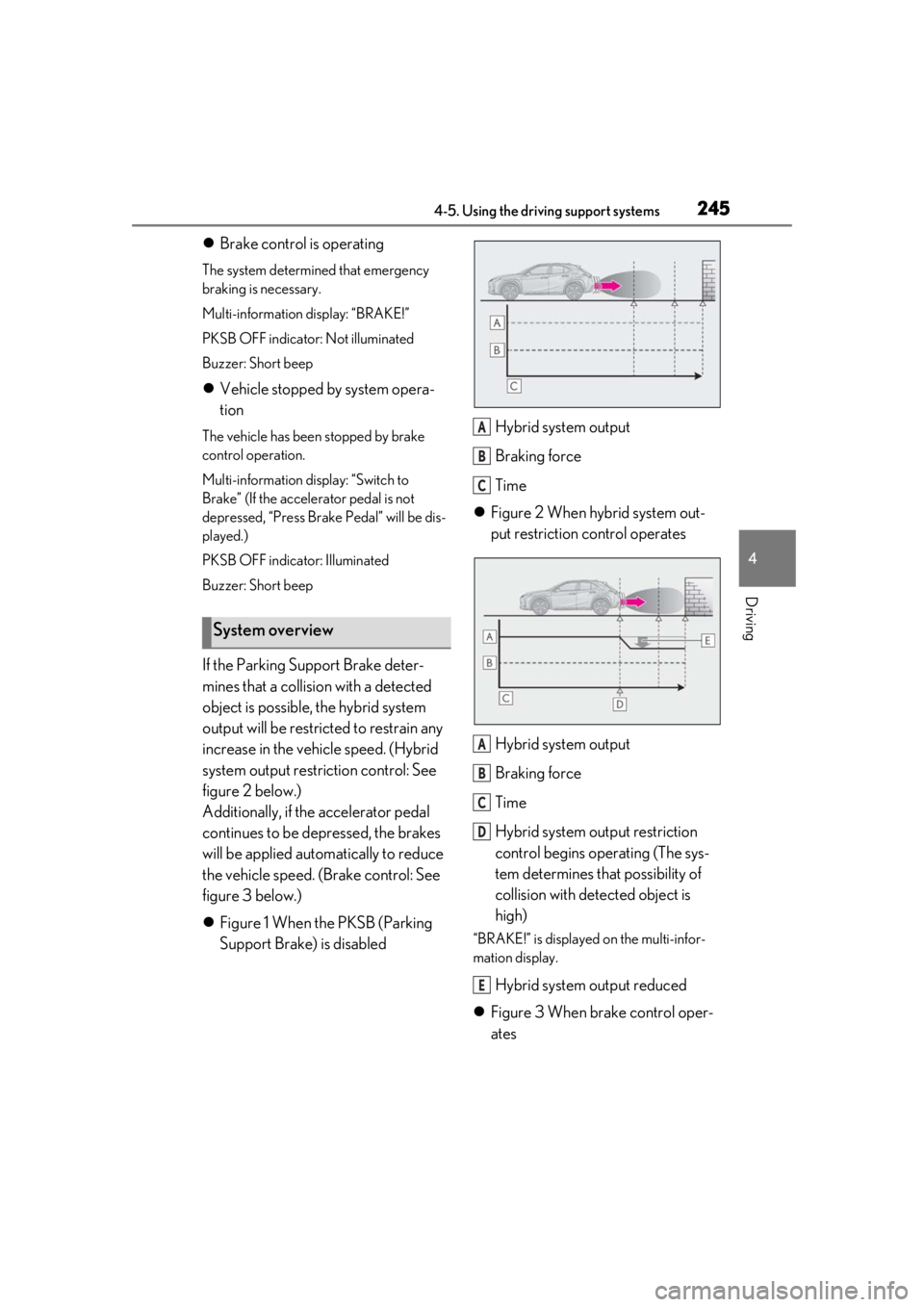
If the Parking Support Brake deter-
mines that a collision with a detected
object is possible, the hybrid system
output will be restricted to restrain any
increase in the vehicle speed. (Hybrid
system output restriction control: See
figure 2 below.)
Additionally, if the accelerator pedal
continues to be depressed, the brakes
will be applied automatically to reduce
the vehicle speed. (Brake control: See
figure 3 below.)
Figure 1 When the PKSB (Parking
Support Brake) is disabled Hybrid system output
Braking force
Time
Figure 2 When hybrid system out-
put restriction control operates
Hybrid system output
Braking force
Time
Hybrid system output restriction
control begins operating (The sys-
tem determines that possibility of
collision with detected object is
high)
“BRAKE!” is displayed on the multi-infor-
mation display.
Hybrid system output reduced
Figure 3 When brake control oper-
ates
System overview
A
B
C
A
B
C
D
E
Page 246 of 476

2464-5. Using the driving support systems
Hybrid system output
Braking force
Time
Hybrid system output restriction
control begins operating (The sys-
tem determines that possibility of
collision with detected object is
high)
“BRAKE!” is displayed on the multi-infor-
mation display.
Hybrid system output reduced
Brake control begins operating (the
system determines that possibility
of collision with detected object is
extremely high)
Brake control strength increased
“Switch to Brake” is displayed on
the multi-information display
■If the Parking Support Brake has oper-
ated
If the vehicle is stopped due to operation of
the Parking Support Brake, the Parking
Support Brake will be disabled and the
PKSB OFF indicator will illuminate. If the
Parking Support Brake operates unneces-
sarily, brake control can be canceled by
depressing the brake pedal or waiting for
approximately 2 seconds for it to automati-
cally be canceled. Then, the vehicle can be
operated by depressing the accelerator pedal.
■Re-enabling the Parking Support Brake
To re-enable the Parking Support Brake
when it is disabled due to operation of the
Parking Support Brake, either enable the
system again ( P.244), or turn the power
switch off and then back to ON. Addition-
ally, if the object becomes no longer in the
traveling direction of the vehicle or if the
traveling direction of the vehicle changes
(such as changing from moving forward to
backing up, or from backing up to moving
forward), the system will be re-enabled
automatically.
■If “Parking Support Brake Unavailable”
is displayed on th e multi-information
display and the PKSB OFF indicator is
flashing
If the vehicle is stopped due to operation of
the Parking Support Brake, the Parking
Support Brake will be disabled and the
PKSB OFF indicator will illuminate.
●A sensor may be cove red with ice, snow,
dirt, etc. Remove the ice, snow, dirt, etc.,
from the sensor to return the system to
normal.
Also, due to ice forming on a sensor at
low temperatures, a warning message
may be displayed or the sensor may not
be able to detect an object. Once the ice
melts, the system wi ll return to normal.
●The surrounding area of the sensors on
the bumper may be dirty, or a sensor may
be covered with ice, snow, dirt, etc. In this
case, remove the ice, snow, dirt, etc. from
the sensor or its surrounding area on the
bumper to return the system to a normal
state. At a low temperature, a warning
message may be displayed or an object
may not be detected due to freezing of
the sensor. Once the ice melts, the sys-
tem will return to normal.
●If this message continues to be displayed
even after cleaning the sensor, or is dis-
played even though the sensor is clean,
have the vehicle inspected by your Lexus
dealer.
●Initialization may not have been per-
formed after a 12-volt battery terminal
was disconnected and reconnected. Ini-
tialize the system. ( P.247)
A
B
C
D
E
F
G
H
Page 249 of 476

2494-5. Using the driving support systems
4
Driving
■The Parking Support Brake function
(static object) will operate when
The function will operate when the PKSB
OFF indicator is not illuminated or flashing
( P.75, 76) and all of the following condi-
tions are met:
●Hybrid system output restriction control
• The Parking Support Brake is enabled.
• The vehicle speed is 10 mph (15 km/h) or less.
• There is a static object in the traveling direction of the vehicle and 6 to 13 ft. (2
to 4 m) away.
• The Parking Support Brake determines that a stronger-than-normal brake opera-
tion is necessary to avoid a collision.
●Brake control
• Hybrid system output restriction control
is operating.
• The Parking Support Brake determines that an immediate brake operation is nec-
essary to avoid a collision.
■The Parking Support Brake function
(static objects) will stop operating when
The function will stop operating if any of the
following conditions are met:
●Hybrid system output restriction control
• The Parking Support Brake is disabled.
• The system determines that the collision has become avoidable with normal brake
operation.
• The static object is no longer 6 to 13 ft. (2
to 4 m) away from the vehicle or in the
WARNING
■Handling the suspension
Do not modify the suspension, as
changes to the height or inclination of the
vehicle may prevent the sensors from
detecting objects correctly or cause the
system to not operate or operate unnec-
essarily.
■If the Parking Support Brake function
(static objects) operates unnecessar-
ily, such as at a railroad crossing
In the event that the Parking Support
Brake function (static objects) operates
unnecessarily, such as at a railroad cross-
ing, brake control w ill be canceled after
approximately 2 seconds, allowing you
to proceed forward and leave the area,
brake control can also be canceled by
depressing the brake pedal. Depressing
the accelerator pedal after brake control
is canceled will allow you to proceed for-
ward and leave the area.
■Notes when washing the vehicle
Do not apply intensive bursts of water or
steam to the sensor area.
Doing so may result in the sensor mal-
functioning.
●When using a high pressure washer to
wash the vehicle, do not spray the sen-
sors directly, as doing so may cause a
sensor to malfunction.
●When using steam to clean the vehicle,
do not direct steam too close to the
sensors as doing so may cause a sen-
sor to malfunction.
■When to disable the Parking Support
Brake (static objects)
In the following situations, disable the
Parking Support Brake (static objects) as
the system may operate even though
there is no possibility of a collision.
●When inspecting the vehicle using a
chassis roller, chassis dynamo or free
roller
●When loading the vehicle onto a boat,
truck or other transport vessel
●If the suspension has been modified or
tires of a size other than specified are
installed
●If the front of the vehicle is raised or
lowered due to the carried load
●When equipment that may obstruct a
sensor is installed, such as a towing
eyelet, bumper protector (an addi-
tional trim strip, etc.), bicycle carrier, or
snow plow
●When using an automatic car wash
Page 252 of 476

2524-5. Using the driving support systems
*: If equipped
This function will operate in situations
such as the following if a vehicle is
detected in the traveling direction of
the vehicle.
■When reversing, a vehicle is
approaching and the brake pedal is
not depressed, or is depressed late
P.228
■The Parking Support Brake function
(rear-crossing vehicles) will operate
when
The function will operate when the PKSB
OFF indicator is not illuminated or flashing
( P.75, 76) and all of the following condi-
tions are met:
●Hybrid system output restriction control
• The Parking Support Brake is enabled.
• The vehicle speed is 10 mph (15 km/h) or less.
• Vehicles are approaching from the right or left at the rear of the vehicle at a travel-
ing speed of more than approximately 5
mph (8 km/h)
• The shift lever is in R.
• The Parking Support Brake determines
that a stronger than normal brake opera-
tion is necessary to avoid a collision with
Parking Support Brake func-
tion (rear-crossing vehicles)*
If a rear radar sensor detects a vehi-
cle approaching from the right or
left at the rear of the vehicle and the
system determines that the possi-
bility of a collision is high, this func-
tion will perform brake control to
reduce the likelihood of an impact
with the approaching vehicle.
Examples of function operation
Types of sensors
WARNING
■To ensure the Parking Support Brake
(rear-crossing vehicles) can operate
properly
Observe the following precautions
regarding the rear radar sensors
( P.228). Failure to do so may cause a
sensor to not operate properly, and may
cause an accident.
●Do not modify, disassemble or paint
the sensors.
●Do not replace a rear radar sensor
with a part other than a genuine part.
●Do not damage the rear radar sensors,
and always keep the radar sensors and
their surrounding area on the bumper
clean.
■To prevent a rear radar sensor from
malfunctioning
●If the area around a rear radar sensor
is subjected to an impact, the system
may not operate properly due to a
sensor malfunction. Have the vehicle
inspected by your Lexus dealer.
●Observe the rear radar sensor han-
dling precautions. ( P.228)
Page 259 of 476

2594-5. Using the driving support systems
4
Driving
systems are turned off, automatic re-
enabling will not occur when vehicle
speed increases.
■Secondary Collision Brake operating
conditions
The vehicle speed is approximately 6 mph
(10 km/h) or more and the airbag sensor
detects a collision. (The Secondary Colli-
sion Brake will not operate when the vehicle
speed is below approximately 6 mph [10
km/h].)
■Secondary Collision Brake automatic
cancellation
The Secondary Collision Brake is automati-
cally canceled in the following situations.
●The vehicle speed drops below approxi-
mately 6 mph (10 km/h)
●A certain amount of time elapses during
operation
●The accelerator pedal is depressed a
large amount
■Operating conditions of Active Corner-
ing Assist
The system operates in the following situa-
tions.
●TRAC/VSC can operate
●The system determines that the vehicle is
drifting to the outer side when attempting
to accelerate during cornering
●The brake pedal is released
■Reduced effectiveness of the EPS sys-
tem
The effectiveness of the EPS system is
reduced to prevent the system from over-
heating when there is frequent steering
input over an extended period of time. The
steering wheel may feel heavy as a result.
Should this occur, re frain from excessive
steering input or stop the vehicle and turn
the hybrid system off. The EPS system
should return to normal within 10 minutes.
■If a message about AWD system is
shown on the multi-information display
(AWD models)
If one of the following messages is shown on
the multi-information di splay, perform each
action.
●“AWD System Overheated Switching to
2WD Mode”
The AWD system is overheating. Reduce
load on the system by stopping the vehicle
for a while or driving the vehicle at a speed
of 6 mph (10 km/h) or more. If the message
disappears, it is possible to drive the vehicle
normally.
●“AWD System Overheated 2WD Mode
Engaged”
The AWD system has been canceled and
switched to the front-wheel drive due to
overheating. Reduce load on the system by
stopping the vehicle for a while or driving
the vehicle at a speed of 6 mph (10 km/h)
or more. If the message disappears, it is
possible to drive the vehicle normally.
●“AWD System Malfunction 2WD Mode
Engaged Visit Your Dealer”
The AWD system has been stopped and
switched to the front-wheel drive due to a
malfunction. Have your vehicle inspected
by your Lexus dealer immediately.
WARNING
■The ABS does not operate effectively
when
●The limits of tire gripping performance
have been exceeded (such as exces-
sively worn tires on a snow covered
road).
●The vehicle hydroplanes while driving
at high speed on wet or slick road.
■Stopping distance when the ABS is
operating may exceed that of normal
conditions
The ABS is not designed to shorten the
vehicle’s stopping distance. Always main-
tain a safe distance from the vehicle in
front of you, especially in the following
situations:
●When driving on dirt, gravel or snow-
covered roads
Page 262 of 476

2624-6. Driving tips
Control and maintain the vehicle at a
constant speed. Before stopping at a
toll booth or similar, allow plenty of
time to release the accelerator and
gently apply the brakes. A greater
amount of electrical energy can be
regenerated when slowing down.
Use the air conditioning only when
necessary. Doing so can help reduce
excessive gasoline consumption.
In summer: When the ambient tem-
perature is high, use the recirculated
air mode. Doing so will help to reduce
the burden on the air conditioning sys-
tem and reduce fuel consumption as
well.
In winter: Because the gasoline engine
will not automatically cut out until it and
the interior of the vehicle are warm, it
will consume fuel. Also, fuel consump-
tion can be improved by avoiding over-
use of the heater.
Make sure to check the tire inflation
pressure frequently. Improper tire infla-
tion pressure can cause poor fuel
economy.
Also, as snow tires can cause large
amounts of friction, their use on dry
roads can lead to poor fuel economy.
Use tires that are appropriate for the
season. Carrying heavy luggage will lead to
poor fuel economy. Avoid carrying
unnecessary luggage.
Installing a large
roof rack will also cause poor fuel
economy.
Since the gasoline engine starts up and
cuts out automatically when cold,
warming up the engine is unnecessary.
Moreover, frequently driving short dis-
tances will cause the engine to repeat-
edly warm up, which can lead to excess
fuel consumption.
Highway driving
Air conditioning
Checking tire inflation pressure
Luggage
Warming up before driving
Page 266 of 476
2664-6. Driving tips
Specific design characteristics give
it a higher center of gravity than
ordinary passenger cars. This vehi-
cle design feature causes this type
of vehicle to be more likely to roll-
over. Utility vehicles have a signifi-
cantly higher rollover rate than
other types of vehicles.
An advantage of the higher ground
clearance is a better view of the
road allowing you to anticipate
problems.
It is not designed for cornering at
the same speeds as ordinary pas-
senger cars any more than low-
slung sports cars designed to per-
form satisfactorily under off-road
conditions. Therefore, sharp turns at
excessive speeds may cause roll-
over.
Your vehicle is not designed to be
driven off-road. However, in the event
that off-road driving cannot be
avoided, please observe the following
precautions to help avoid the areas
prohibited to vehicles.
Utility vehicle precautions
This vehicle belongs to the utility
vehicle class, which has higher
ground clearance and narrower
tread in relation to the height of its
center of gravity.
Utility vehicle feature
WARNING
■Utility vehicle precautions
Always observe the following precau-
tions to minimize the risk of death or seri-
ous injury or damage to your vehicle:
●In a rollover crash, an unbelted person
is significantly more likely to die than a
person wearing a seat belt. Therefore,
the driver and all passengers should
always fasten their seat belts.
●Avoid sharp turns or abrupt maneu-
vers, if at all possible.
Failure to operate this vehicle correctly
may result in loss of control or vehicle
rollover causing death or serious
injury.
●Loading cargo on the roof luggage
carrier will make the center of the
vehicle gravity higher. Avoid high
speeds, sudden starts, sharp turns,
sudden braking or abrupt maneuvers,
otherwise it may result in loss of con-
trol or vehicle rollover due to failure to
operate this vehicle correctly.
●Always slow down in gusty crosswinds.
Because of its profile and higher cen-
ter of gravity, your vehicle is more sen-
sitive to side winds than an ordinary
passenger car. Slowing down will allow
you to have better control.
●Do not drive horizontally across steep
slopes. Driving straight up or straight
down is preferred. Your vehicle (or any
similar off-road vehicle) can tip over
sideways much more easily than for-
ward or backward.
Off-road driving
Page 278 of 476

2785-3. Using the air conditioning system and defogger
■When the outside temperature exceeds
75°F (24°C) and the air conditioning
system is on
●In order to reduce the air conditioning
power consumption, the air conditioning
system may switch to recirculated air
mode automatically.
This may also reduce fuel consumption.
●Recirculated air mode is selected as a
default mode when the power switch is
turned to ON.
●It is possible to switch to outside air mode
at any time by pressing the outside/recir-
culated air mode switch.
■Fogging up of the windows
●The windows will easily fog up when the
humidity in the vehicle is high. Pressing
“A/C” button or selecting “A/C” will
dehumidify the air from the outlets and
defog the windshield effectively.
●If you turn “A/C” off, the windows may fog
up more easily.
●The windows may fog up if the recircu-
lated air mode is used.
■Outside/recirculated air mode
●When driving on dusty roads such as tun-
nels or in heavy traffic, set the out-
side/recirculated air mode switch to the
recirculated air mode. This is effective in
preventing outside air from entering the
vehicle interior. During cooling opera-
tion, setting the recirculated air mode will
also cool the vehicle interior effectively.
●Outside/recirculated air mode may auto-
matically switch de pending on the tem-
perature setting or the inside
temperature.
■Registering air condit ioning settings to
electronic keys (vehicles with driving
position memory)
●Unlocking the vehicle using an electronic
key and turning the power switch to ON
will recall that key’s registered air condi-
tioning settings.
●When the power switch is turned off, the
current air conditioning settings will auto-
matically be registered to the electronic
key that was used to unlock the vehicle.
●The system may not operate correctly if
more than one electr onic key is in the
vicinity or if the smart access system with
push-button start is used to unlock a pas-
senger door.
●The doors that can recall the air condi-
tioning setting when unlocked using the
smart access system with push-button
start can be changed.
* For details, con-
tact your Lexus dealer.
*: The doors that can recall the driving posi-
tion memory are changed at the same
time.
■Operation of the air conditioning sys-
tem in Eco drive mode
●In Eco drive mode, the air conditioning
system is controlled as follows to priori-
tize fuel efficiency
• Engine speed and compressor operation controlled to restrict heating/cooling
capacity
• Fan speed restricted when automatic mode is selected
●To improve air conditioning performance,
perform the following operations
• Turn off eco air conditioning mode ( P.279)
• Adjust the fan speed
•Turn off Eco drive mode
■When the outside temperature is low
The dehumidification function may not
operate even when “A/C” is pressed or
“A/C” is selected.
■Ventilation and air conditioning odors
●To let fresh air in, set the air conditioning
system to the outside air mode.
●During use, various odors from inside and
outside the vehicle may enter into and
accumulate in the air conditioning sys-
tem. This may then cause odor to be
emitted from the vents.
●To reduce potential odors from occur-
ring:
• It is recommended that the air condition- ing system be set to outside air mode
prior to turning the vehicle off.
• The start timing of the blower may be delayed for a short pe riod of time imme-