2019 LEXUS UX250H high
[x] Cancel search: highPage 208 of 476

2084-5. Using the driving support systems
■Lane departure alert function
When the system determines that the
vehicle might depart from its lane or
course
*, a warning is displayed on the
multi-information display, and either a
warning buzzer will sound or the steer-
ing wheel will vibrate to alert the driver.
When the warning buzzer sounds or the
steering wheel vibrates, check the area
around your vehicle and carefully operate
the steering wheel to move the vehicle
back to the center of the lane.
Vehicles with Blind Spot Monitor: When
the system determines that the vehicle
might depart from its lane and that the pos-
sibility of a collision with an overtaking
vehicle in the adjacent lane is high, the lane
departure alert will operate even if the turn
signals are operating.
*: Boundary between asphalt and the side of the road, such as grass, soil, or a curb
■Steering assist function
When the system determines that the
vehicle might depart from its lane or
course
*, the system provides assis-
tance as necessary by operating the
steering wheel in small amounts for a
short period of time to keep the vehicle
in its lane.
If the system detects that the steering
wheel has not been operated for a fixed
amount of time or the steering wheel is not
being firmly gripped, a warning is displayed
on the multi-informat ion display and the
function is temporarily canceled.
Vehicles with Blind Spot Monitor: When
the system determines that the vehicle
might depart from its lane and that the pos-
sibility of a collision with an overtaking
vehicle in the adjacent lane is high, the
steering assist function will operate even if
the turn signals are operating.
*: Boundary between asphalt and the side of the road, such as grass, soil, or a curb
WARNING
●The vehicle is affected by wind from a
vehicle driven in a nearby lane.
●The vehicle has just changed lanes or
crossed an intersection.
●Tires which differ by structure, manu-
facturer, brand or tread pattern are
used.
●Snow tires, etc. are equipped.
●The vehicle is being driven at
extremely high speeds.
Functions included in LTA system
Page 216 of 476

2164-5. Using the driving support systems
currently traveled lane, such a sign exists
directly after a freeway branches, or in an
adjacent lane just before merging.
●Stickers are attached to the rear of the
preceding vehicle.
●A sign resembling a system compatible
sign is recognized.
●Side road speed signs may be detected
and displayed (if positioned in sight of the
front camera) while the vehicle is travel-
ing on the main road.
●Roundabout exit road speed signs may
be detected and displayed (if positioned
in sight of the front camera) while travel-
ing on a roundabout.
●The front of the vehicle is raised or low-
ered due to the carried load.
●The surrounding brightness is not suffi-
cient or changes suddenly.
●When a sign intended for trucks, etc. is
recognized.
●Vehicles with navigation system: The
speed information displayed on the
meter and that displayed on the naviga-
tion system may be different due to the
navigation system using map data.
■Speed limit sign display
If the power switch was last turned off while
a speed limit sign wa s displayed on the
multi-information display, the same sign dis-
plays again when the power switch is turned
to ON.
■Customization
Some functions can be customized. (Cus-
tomizable features: P.442)
■Meter display
Multi-information display
Set speed
Indicators
Dynamic radar cruise con-
trol with full-speed range
In vehicle-to-vehicle distance con-
trol mode, the ve hicle automati-
cally accelerates, decelerates and
stops to match the speed changes
of the preceding vehicle even if the
accelerator pedal is not depressed.
In constant speed control mode,
the vehicle runs at a fixed speed.
Use the dynamic radar cruise con-
trol with full-speed range on free-
ways and highways.
Vehicle-to-vehicle distance con-
trol mode ( P.219)
Constant speed control mode
( P.223)
System Components
A
B
C
Page 218 of 476
2184-5. Using the driving support systems
WARNING
●Assisting the driver to judge proper
following distance
The dynamic radar cruise control with
full-speed range determines whether the
following distance be tween the driver’s
own vehicle and a designated vehicle
traveling ahead is within a set range. It is
not capable of making any other type of
judgement. Therefore, it is absolutely
necessary for the driver to remain vigi-
lant and to determine whether or not
there is a possibility of danger in any
given situation.
●Assisting the driver to operate the
vehicle
The dynamic radar cruise control with
full-speed range does not include func-
tions which will prevent or avoid colli-
sions with vehicles ahead of your vehicle.
Therefore, if there is ever any possibility
of danger, the driver must take immedi-
ate and direct control of the vehicle and
act appropriately in order to ensure the
safety of all involved.
■Situations unsuitable for dynamic
radar cruise control with full-speed
range
Do not use dynamic radar cruise control
with full-speed range in any of the follow-
ing situations.
Doing so may result in inappropriate
speed control and could cause an acci-
dent resulting in death or serious injury.
●Roads where there are pedestrians,
cyclists, etc.
●In heavy traffic
●On roads with sharp bends
●On winding roads
●On slippery roads, such as those cov-
ered with rain, ice or snow
●On steep downhills, or where there
are sudden changes between sharp up
and down gradients
Vehicle speed may exceed the set
speed when driving down a steep hill.
●At entrances to freeways and highways
●When weather conditions are bad
enough that they may prevent the sen-
sors from detectin g correctly (fog,
snow, sandstorm, heavy rain, etc.)
●When there is rain, snow, etc. on the
front surface of the radar or front cam-
era
●In traffic conditions that require fre-
quent repeated acceleration and
deceleration
●During emergency towing
●When an approach warning buzzer is
heard often
Page 225 of 476

2254-5. Using the driving support systems
4
Driving
lane
●Vehicles with small rear ends (trailers
with no load on board, etc.)
●Motorcycles traveling in the same lane
●When water or snow thrown up by the
surrounding vehicles hinders the detect-
ing of the sensor
●When your vehicle is pointing upwards
(caused by a heavy load in the luggage
compartment, etc.)
●Preceding vehicle has an extremely high
ground clearance
■Conditions under which the vehicle-to-
vehicle distance control mode may not
function correctly
In the case of the following conditions,
operate the brake pedal (or accelerator
pedal, depending on the situation) as nec-
essary.
As the sensor may not be able to correctly
detect vehicles ahead, the system may not
operate properly.
●When the road curves or when the lanes are narrow
●When steering wheel operation or your
position in the lane is unstable
●When the vehicle ahead of you deceler-
ates suddenly
●When driving on a road surrounded by a
structure, such as in a tunnel or on a
bridge
●While the vehicle speed is decreasing to
the set speed after the vehicle acceler-
ates by depressing the accelerator pedal
Page 231 of 476

2314-5. Using the driving support systems
4
Driving
object may increase in the following situ-
ations:
• When the sensor is misaligned due to a
strong impact to the sensor or its sur-
rounding area
• When the distance between your vehicle
and a guardrail, wall, etc. that enters the
detection area is short
• When driving up an d down consecutive
steep inclines, such as hills, dips in the
road, etc.
• When vehicle lanes are narrow, or when
driving on the edge of a lane, and a vehi-
cle traveling in a lane other than the adja-
cent lanes enters the detection area
• When driving on roads with sharp bends, consecutive curves, or uneven surfaces
• When the tires are slipping or spinning
• When the distance between your vehicle
and a following vehicle is short
• When an accessory (such as a bicycle
carrier) is installed to the rear of the vehi-
cle
*: If equipped
■Intuitive parking assist
P.232
■RCTA (Rear Cross Traffic Alert)
function (if equipped)
P.239
■Adjusting the buzzer volume
The buzzer volume can be adjusted on
the multi-information display. The vol-
ume of buzzers for the intuitive parking
assist and RCTA function will be
adjusted simultaneously.
Use the meter control switches to
change settings. ( P.87)
1 Press or to select .
2 Press or to select “PKSA”
and then press “OK”.
PKSA (Parking Support
Alert)*
The Parking Support Alert system
consists of the following functions
that operate when driving at a low
speed or backing up, such as when
parking. When the system deter-
mines that the possibility of a colli-
sion with a detected object, such as
a wall is high, a warning operates to
urge the driver to take evasive
action.
PKSA (Parking Support Alert)
system
Setting the buzzer volume
Page 234 of 476

2344-5. Using the driving support systems
■The system can be operated when
●The power switch is in ON.
●Intuitive parking assist function is on.
●The vehicle speed is less than about 6
mph (10 km/h).
●The shift lever is in a position other than P.
■Setting the buzzer volume
The buzzer volume can be adjusted on the
multi-information display. ( P.231)
■If “Parking Assist Unavailable Clean
Parking Assist Sensor” is displayed on
the multi-information display
A sensor may be covered with ice, snow,
dirt, etc. Remove the ice, snow, dirt, etc.,
from the sensor to return the system to nor-
mal.
Also, due to ice forming on a sensor at low
temperatures, a warning message may be
displayed or the sensor may not be able to
detect an object. Once the ice melts, the
system will return to normal.
■Sensor detection information
●The sensor’s detectio n areas are limited
to the areas around the vehicle’s front and
rear bumpers.
WARNING
●The sensors’ detection areas and reac-
tion times are limited. When moving
forward or reversing, check the areas
surrounding the vehicle (especially the
sides of the vehicle) for safety, and
drive slowly, using the brake to control
the vehicle’s speed.
●Do not install accessories within the
sensors’ detection areas.
●The area directly under the bumpers is
not detected.
■When to disable the function
In the following situations, disable the
function as it may operate even though
there is no possibility of a collision.
●The vehicle is equipped with a fender
pole or wireless antenna.
●The front or rear bu mper or a sensor
receives a strong impact.
●A non-genuine Lexus suspension
(lowered suspension, etc.) is installed.
●Towing eyelet is installed.
●A backlit license plate is installed.
■When using intuitive parking assist
In the following situations, the system
may not function correctly due to a sen-
sor malfunction, etc. Have the vehicle
checked by your Lexus dealer.
●The intuitive parking assist operation
display flashes or shows continuously,
and a beep sounds when no objects
are detected.
●If the area around a sensor collides
with something, or is subjected to
strong impact.
●If the bumper or grille collides with
something.
●If the display flashes or is displayed
continuously and a buzzer does not
sound, except when the mute function
has been turned on.
●If a display error oc curs, first check the
sensor.
If the error occurs even when there is
no ice, snow or mud on the sensor, it is
likely that the sensor is malfunctioning.
■Notes when washing the vehicle
Do not apply intensive bursts of water or
steam to the sensor area.
Doing so may result in the sensor mal-
functioning.
●When using a high pressure washer to
wash the vehicle, do not spray the sen-
sors directly, as doing so may cause a
sensor to malfunction.
●When using steam to clean the vehicle,
do not direct steam too close to the
sensors as doing so may cause a sen-
sor to malfunction.
Page 240 of 476
2404-5. Using the driving support systems
■Outside rear view mirror indicator visi-
bility
In strong sunlight, the outside rear view mir-
ror indicator may be difficult to see.
■Hearing the RCTA buzzer
The RCTA buzzer may be difficult to hear
over loud noises, such as if the audio system
volume is high.
■When “Rear Cross Traffic Alert
Unavailable” is shown on the multi-
information display
Ice, water, snow, mud, etc., may be attached
to the rear bumper around the sensors.
( P.228) Remove the ice, snow, mud, etc.,
attached to the rear bumper around the
sensors to return the function to normal.
Additionally, the function may not operate
normally when used in extremely hot or
cold environments.
■Rear side radar sensors
P.228
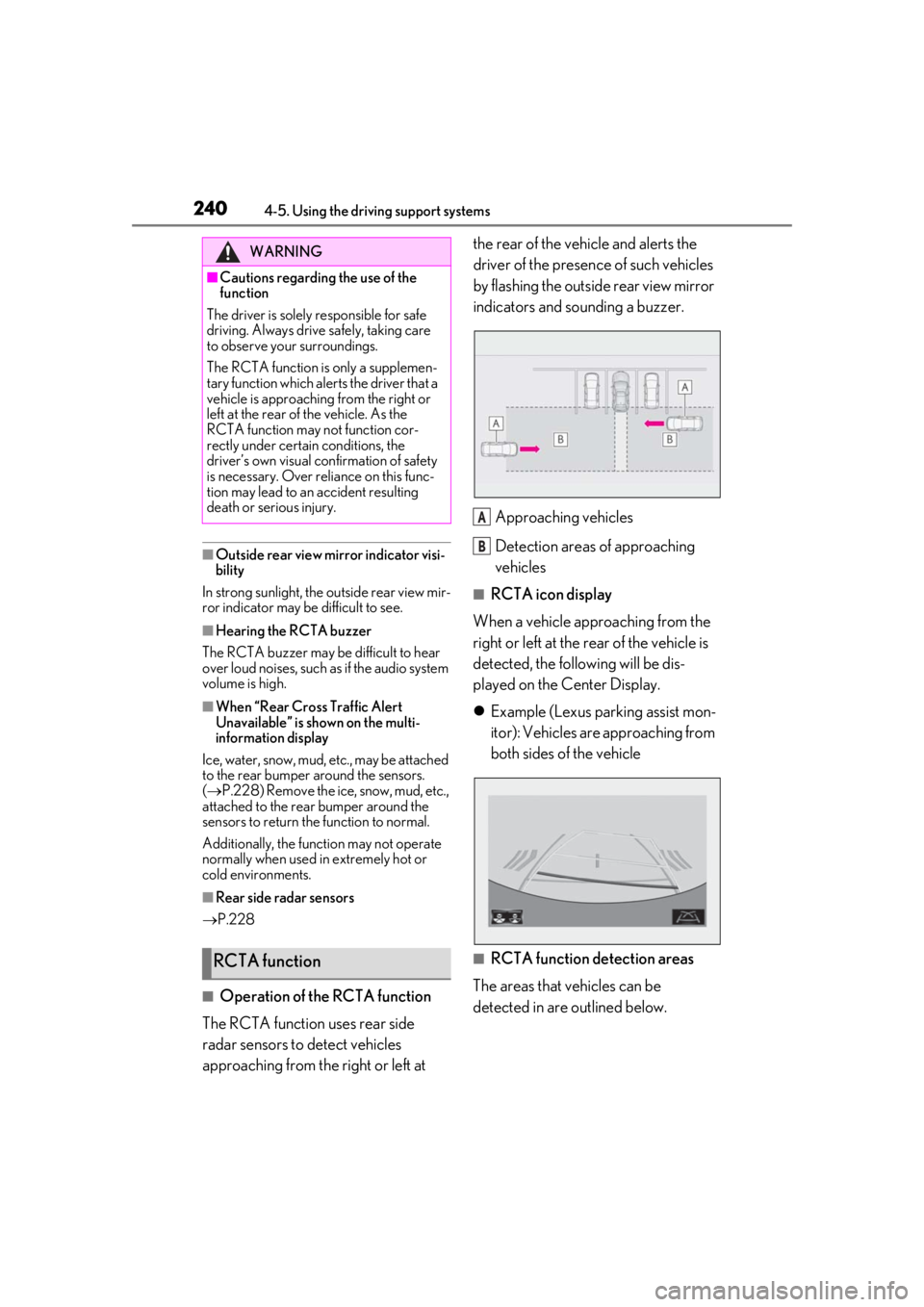
■Operation of the RCTA function
The RCTA function uses rear side
radar sensors to detect vehicles
approaching from the right or left at the rear of the vehicle and alerts the
driver of the presence of such vehicles
by flashing the outside rear view mirror
indicators and sounding a buzzer.
Approaching vehicles
Detection areas of approaching
vehicles
■RCTA icon display
When a vehicle approaching from the
right or left at the rear of the vehicle is
detected, the following will be dis-
played on the Center Display.
Example (Lexus parking assist mon-
itor): Vehicles are approaching from
both sides of the vehicle
■RCTA function detection areas
The areas that vehicles can be
detected in are outlined below.
WARNING
■Cautions regarding the use of the
function
The driver is solely responsible for safe
driving. Always driv e safely, taking care
to observe your surroundings.
The RCTA function is only a supplemen-
tary function which alerts the driver that a
vehicle is approaching from the right or
left at the rear of the vehicle. As the
RCTA function may not function cor-
rectly under certain conditions, the
driver’s own visual confirmation of safety
is necessary. Over reli ance on this func-
tion may lead to an accident resulting
death or serious injury.
RCTA function
A
B
Page 243 of 476
2434-5. Using the driving support systems
4
Driving
●When there are spinning objects near
your vehicle such as the fan of an air con-
ditioning unit
●When water is splashed or sprayed
toward the rear bumper, such as from a
sprinkler*: If equipped
■Parking Support Brake function
(static objects)
P.247
■Parking Support Brake function
(rear-crossing vehicles)
P.252
PKSB (Parking Support
B
rake)*
The Parking Support Brake system
consists of the following functions
that operate when driving at a low
speed or backing up, such as when
parking. When the system deter-
mines that the possibility of a colli-
sion with a detected object is high, a
warning operates to urge the driver
to take evasive action. If the system
determines that the possibility of a
collision with a detected object is
extremely high, the brakes are
automatically applied to help avoid
the collision or help reduce the
impact of the collision.
PKSB (Parking Support Brake)
system
WARNING
■Limitations of the Parking Support
Brake system
Do not overly rely on the system, as
doing so may lead to an accident.