2019 LEXUS UX250H high
[x] Cancel search: highPage 92 of 476

922-1. Instrument cluster
Displays suggestions to the driver in
the following situations. To select a
response to a displayed suggestion,
use the meter control switches.
■Suggestion to enable the power
back door
If the power back door system is dis-
abled on of the multi-information
display ( P.87) and the power back
door switch on the instrument panel is
operated, a suggestion message will be
displayed asking if you wish to enable
the power back door system. To enable
the power back door system, select
“Yes”.
After enabling the power back door
system, press the power back door
switch again to open or close the
power back door.
■Suggestion to turn on the head-
lights
If the headlight switch is in other than
or position, and the vehicle
speed is 3 mph (5 km/h) or higher for
a certain amount of time when the sur-
roundings are dark, a suggestion mes-
sage will be displayed.
■Suggestion to turn off the head-
lights
If the headlights are left on for a certain
amount of time with the headlight
switch in or position after the
power switch has been turned off, a
suggestion message will be displayed
asking if you wish to turn the headlights off.
To turn the headlight
s off, select “Yes”.
If a front door is opened after the power
switch is turned off, this suggestion mes-
sage will not be displayed.
■Customization
Some functions can be customized.
( P.435)
Suggestion function
Page 100 of 476

1002-1. Instrument cluster
High
Multi-information displayLow
High
These images are examples only, and may
vary slightly from actual conditions.
Press the “MENU” button on the
Remote Touch, and then select on
the screen.
■Trip information
If a screen other than “Trip Information”
is displayed, select “Trip Information”.
Resetting the consumption data
Fuel consumption in the past 15
minutes
Current fuel consumption Regenerated energy in the past 15
minutes
One symbol indicates 30 Wh. Up to 5
symbols are shown.
Average vehicle speed since the
hybrid system was started.
Elapsed time since the hybrid sys-
tem was started.
Cruising range
Average fuel consumption for the past 15
minutes is divided by color into past aver-
ages and averages attained since the
power switch was last turned to ON. Use
the displayed average fuel consumption as
a reference.
The image is an example only, and may
vary slightly from actual conditions.
■History
If a screen other than “History” is dis-
played, select “History”.
Best recorded fuel consumption
Latest fuel consumption
Previous fuel consumption record
Resetting the history data
Updating the latest fuel consump-
tion data
The average fuel consumption history is
divided by color into past averages and the
Consumption
B
A
B
A
B
C
D
E
F
G
A
B
C
D
E
Page 101 of 476
1012-1. Instrument cluster
2
Vehicle status information and indicators
average fuel consumption since the last
updated. Use the displayed average fuel
consumption as a reference.
The image is an example only, and may
vary slightly from actual conditions.
■Updating the history data
Update the latest fuel consumption by
selecting “Clip” to measure the current fuel
consumption again.
■Resetting the data
The fuel consumption data can be deleted
by selecting “Clear”.
■Cruising range
Displays the estimated maximum distance
that can be driven with the quantity of fuel
remaining.
This distance is comp uted based on your
average fuel consumption.
As a result, the actual distance that can be
driven may differ from that displayed.
Display the vehicle information on the
side display ( P.273), and then select
or to display the desired
screen.
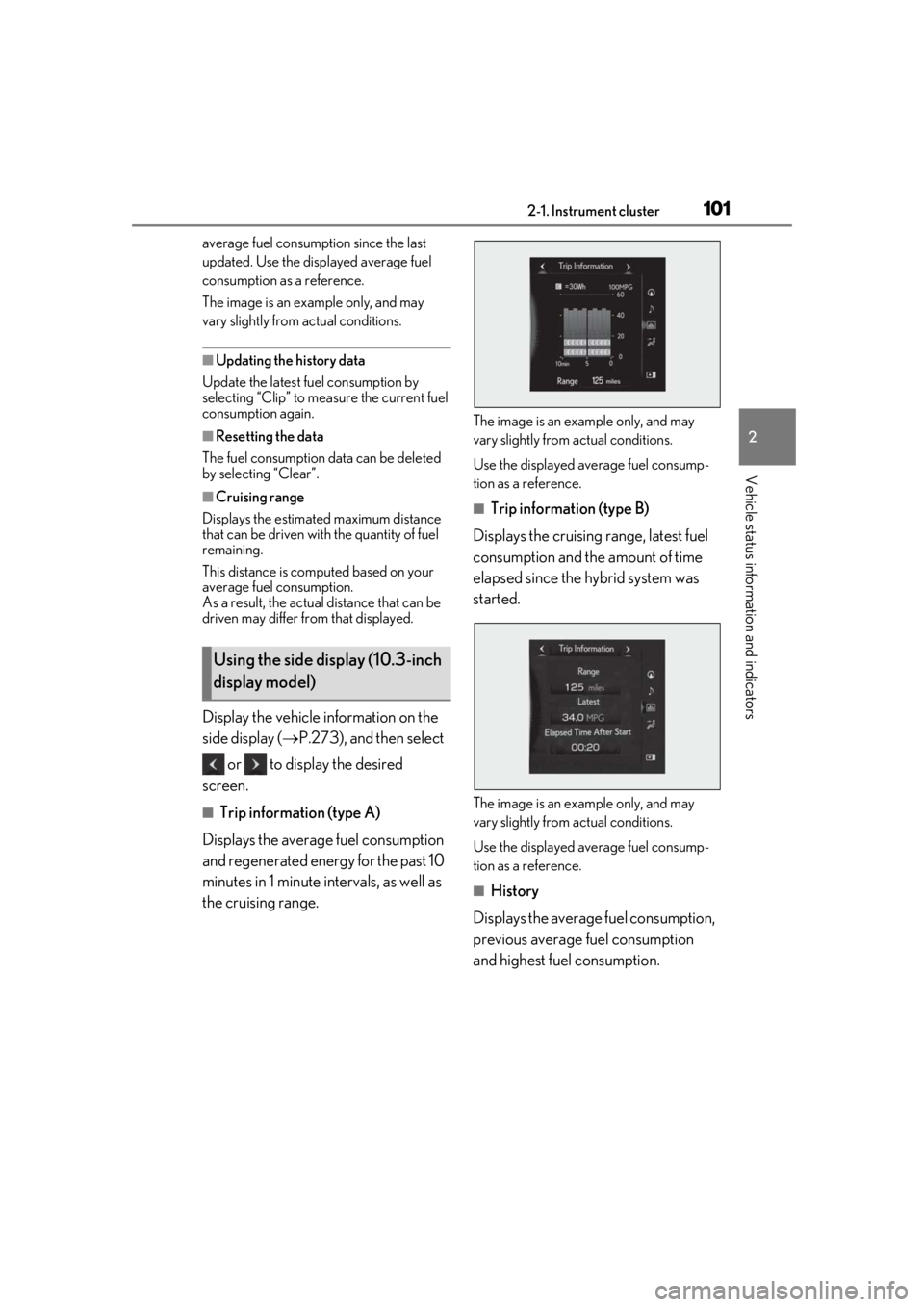
■Trip information (type A)
Displays the average fuel consumption
and regenerated energy for the past 10
minutes in 1 minute intervals, as well as
the cruising range.
The image is an example only, and may
vary slightly from actual conditions.
Use the displayed average fuel consump-
tion as a reference.
■Trip information (type B)
Displays the cruising range, latest fuel
consumption and the amount of time
elapsed since the hybrid system was
started.
The image is an example only, and may
vary slightly from actual conditions.
Use the displayed average fuel consump-
tion as a reference.
■History
Displays the average fuel consumption,
previous average fuel consumption
and highest fuel consumption.
Using the side display (10.3-inch
display model)
Page 105 of 476

1053-1. Key information
3
Before driving
You can replace the battery by yourself
( P.368). However, as there is a danger
that the electronic key may be damaged, it
is recommended that replacement be car-
ried out by your Lexus dealer.
●To avoid serious deterioration, do not
leave the electronic key within 3 ft. (1 m)
of the following electr ical appliances that
produce a magnetic field:
• TVs
• Personal computers
• Cellular phones, cordless phones and battery chargers
• Recharging cellular phones or cordless phones
• Table lamps
• Induction cookers
■Replacing the battery
P.368
■Confirmation of the registered key
number
The number of keys already registered to
the vehicle can be confirmed. Ask your
Lexus dealer for details.
■If “A New Key has been Registered
Contact Your Dealer for Details” is
shown on the multi-information display
This message will be displayed each time
the driver’s door is opened when the doors
are unlocked from the outside for approxi-
mately 10 days after a new electronic key
has been registered. If this message is dis-
played but you have not had a new elec-
tronic key registered, ask your Lexus dealer
to check if an unknown electronic key
(other than those in your possession) has
been registered.
NOTICE
■To prevent key damage
●Do not drop the keys, subject them to
strong shocks or bend them.
●Do not expose the keys to high tem-
peratures for long periods of time.
●Do not get the keys wet or wash them
in an ultrasonic washer, etc.
●Do not attach metallic or magnetic
materials to the keys or place the keys
close to such materials.
●Do not disassemble the keys.
●Do not attach a sticker or anything else
to the surface of the electronic key.
●Do not place the keys near objects that
produce magnetic fields, such as TVs,
audio systems and induction cookers,
or medical electrical equipment, such
as low-frequency therapy equipment.
■Carrying the electronic key on your
person
Carry the electronic key 3.9 in. (10 cm)
or more away from electric appliances
that are turned on. Radio waves emitted
from electric applianc es within 3.9 in. (10
cm) of the electronic key may interfere
with the key, causing the key to not func-
tion properly.
■In case of a smart access system with
push-button start malfunction or
other key-related problems
P.403
■When an electronic key is lost
P.402
■Handling the card key
●If the battery or card key terminals get
wet, the battery may corrode and the
card key may stop working.
If the key is dropped into water, or if
drinking water, etc., is spilled on the
key, immediately remove the battery
cover and wipe the battery and termi-
nals. (To remove the battery cover,
lightly grasp and pull it.) If the battery is
corroded, have your Lexus dealer
replace the battery.
●Do not crush the battery cover or use
a screwdriver to remove the battery
cover.
Forcibly removing the battery cover
may bend or damage the key.
Page 111 of 476
1113-2. Opening, closing and locking the doors
3
Before driving
When the door is unlocked, the inside lock
button will pop up.
■If a symbol indicating one or more doors
are open is shown on the multi-informa-
tion display
The hood or one or more of the doors are
not fully closed. The system also indicates
which doors are not fully closed. If the vehi-
cle reaches a speed of 3 mph (5 km/h), a
buzzer sounds to indicate that the door(s)
are not yet fully closed.
Make sure that the hood and all the doors
are closed.
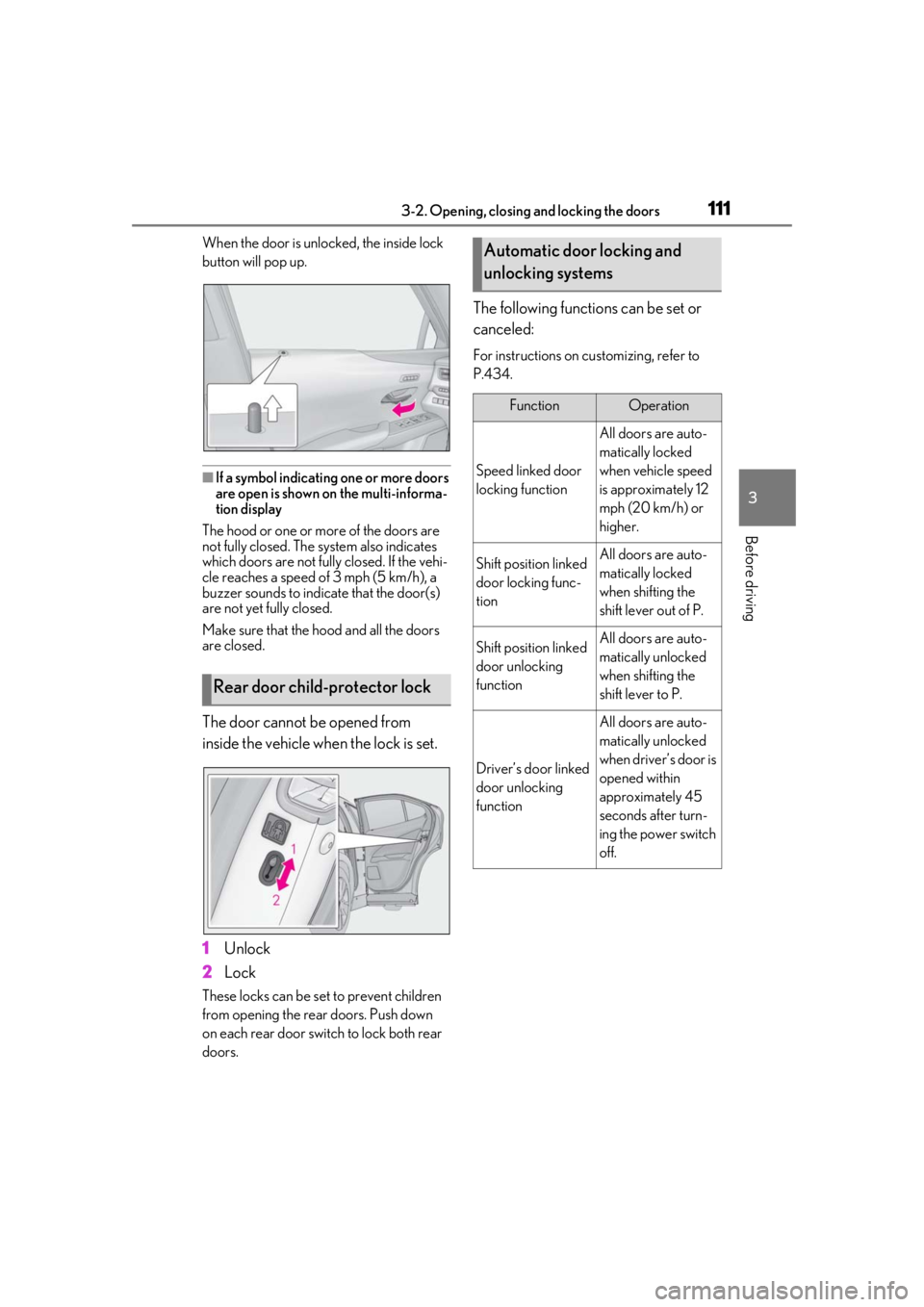
The door cannot be opened from
inside the vehicle when the lock is set.
1 Unlock
2 Lock
These locks can be set to prevent children
from opening the rear doors. Push down
on each rear door switch to lock both rear
doors.
The following functions can be set or
canceled:
For instructions on customizing, refer to
P.434.
Rear door child-protector lock
Automatic door locking and
unlocking systems
FunctionOperation
Speed linked door
locking function
All doors are auto-
matically locked
when vehicle speed
is approximately 12
mph (20 km/h) or
higher.
Shift position linked
door locking func-
tionAll doors are auto-
matically locked
when shifting the
shift lever out of P.
Shift position linked
door unlocking
functionAll doors are auto-
matically unlocked
when shifting the
shift lever to P.
Driver’s door linked
door unlocking
function
All doors are auto-
matically unlocked
when driver’s door is
opened within
approximately 45
seconds after turn-
ing the power switch
off.
Page 126 of 476

1263-2. Opening, closing and locking the doors
• Cigarette boxes that have aluminum foil
inside
• Metallic wallets or bags
•Coins
• Hand warmers made of metal
• Media such as CDs and DVDs
●When other wireless ke ys (that emit radio
waves) are being used nearby
●When carrying the electronic key
together with the following devices that
emit radio waves
• Another vehicle’s electronic key or a wireless key that emits radio waves
• Personal computers or personal digital assistants (PDAs)
• Digital audio players
• Portable game systems
●If window tint with a metallic content or
metallic objects are attached to the rear
window
●When the electronic key is placed near a
battery charger or electronic devices
●When the vehicle is parked in a pay park-
ing spot where radio waves are emitted.
■Note for the entry function
●Even when the electronic key is within the
effective range (detection areas), the sys-
tem may not operate properly in the fol-
lowing cases:
• The electronic key is too close to the win- dow or outside door handle, near the
ground, or in a high place when the doors
are locked or unlocked.
• The electronic key is on the instrument
panel, luggage room, floor, or in the door
pockets or glove box when the hybrid
system is started or power switch modes
are changed.
●Do not leave the electronic key on top of
the instrument panel or near the door
pockets when exiting the vehicle.
Depending on the radio wave reception
conditions, it may be detected by the
antenna outside the cabin and the door
will become lockable from the outside,
possibly trapping the electronic key
inside the vehicle.
●As long as the electron ic key is within the
effective range, the doors may be locked
or unlocked by anyone. However, only the doors detecting the electronic key
can be used to unlock the vehicle.
●Even if the electronic
key is not inside the
vehicle, it may be po ssible to start the
hybrid system if the el ectronic key is near
the window.
●The doors may unlock if a large amount
of water splashes on the door handle,
such as in the rain or in a car wash when
the electronic key is within the effective
range. (The doors wi ll automatically be
locked after approximately 60 seconds if
the doors are not opened and closed.)
●If the wireless remote control is used to
lock the doors when the electronic key is
near the vehicle, there is a possibility that
the door may not be unlocked by the
entry function. (Use the wireless remote
control to unlock the doors.)
●Touching the door lock sensor while
wearing gloves may delay or prevent lock
operation. Remove the gloves and touch
the lock sensor again.
●When the lock operation is performed
using the lock sensor, recognition signals
will be shown up to two consecutive
times. After this, no recognition signals
will be given.
●If the door handle becomes wet while the
electronic key is within the effective
range, the door may lock and unlock
repeatedly. In that case, follow the follow-
ing correction procedures to wash the
vehicle:
• Place the electronic key in a location 6 ft. (2 m) or more away from the vehicle.
(Take care to ensure that the key is not
stolen.)
• Set the electronic key to battery-saving
mode to disable the smart access system
with push-button start. ( P.125)
●If the electronic key is inside the vehicle
and a door handle becomes wet during a
car wash, a buzzer may sound outside the
vehicle and “Key Detected in Vehicle”
may be shown on the multi-information
display. To turn off the alarm, lock all the
doors.
●The lock sensor may not work properly if
it comes into contact with ice, snow, mud,
etc. Clean the lock sensor and attempt to
Page 151 of 476

151
4
4
Driving
Driving
4-1. Before drivingDriving the vehicle ..................... 152
Cargo and luggage ................... 157
Vehicle load limits ...................... 160
Trailer towing ............................... 160
Dinghy towing .............................. 161
4-2. Driving procedures Power (ignition) switch ............ 162
EV drive mode ............................ 165
Hybrid transmission .................. 167
Turn signal lever........................... 171
Parking brake .............................. 172
Brake Hold.................................... 175
ASC (Active Sound Control) 176
4-3. Operating the lights and wipers Headlight switch ......................... 177
Automatic High Beam ............. 180
Fog light switch ........................... 183
Windshield wipers and washer ......................................................... 184
Rear window wiper and washer ......................................................... 188
4-4. Refueling Opening the fuel tank cap...... 190
4-5. Using the driving support sys- tems
Lexus Safety System+2.0 ....... 192
PCS (Pre-Collision System).. 198
LTA (Lane Tracing Assist)..... 205
RSA (Road Sign Assist) ........... 214Dynamic radar cruise control with
full-speed range....................... 216
BSM (Blind Spot Monitor) .... 226
PKSA (Parking Support Alert) ........................................................ 231
Intuitive parking assist ............. 232
RCTA (Rear Cross Traffic Alert) function....................................... 239
PKSB (Parking Support Brake) ....................................................... 243
Parking Support Brake function (static objects) ......................... 247
Parking Support Brake function (rear-crossing vehicles) ...... 252
Driving mode select switch .. 255
Driving assist systems.............. 256
4-6. Driving tips Hybrid vehicle driving tips ..... 261
Winter driving tips .................... 263
Utility vehicle precautions..... 266
Page 152 of 476

1524-1. Before driving
4-1.Before driving
■Starting the hybrid system
P.162
■Driving
1 With the brake pedal depressed,
shift the shift lever to D. ( P.167)
2 If the parking brake is in manual
mode, release the parking brake.
(P.172)
3 Gradually release the brake pedal
and gently depress the accelerator
pedal to accelerate the vehicle.
■Stopping
1 With the shift lever in D, depress the
brake pedal.
2 If necessary, set the parking brake.
(P.172)
If the vehicle is to be stopped for an
extended period of time, shift the shift lever
to P. ( P.167)
■Parking the vehicle
1 With the shift lever in D, depress the
brake pedal.
2 If the parking brake is in manual
mode, set the parking brake
(P.172), and shift the shift lever to
P ( P.167).
3 Press the power switch to stop the
hybrid system. 4
Lock the door, making sure that you
have the electronic key on your
person.
If parking on a hill, block the wheels as
needed.
■Starting off on a steep uphill
1 Make sure that the parking brake is
set with the brake pedal depressed,
and then shift the shift lever to D.
2 Release the brake pedal and gently
depress the accelerator pedal.
3 Release the parking brake.
■When starting off on a uphill
The hill-start assist control will be activated.
( P.257)
■For fuel-efficient driving
Keep in mind that hybr id vehicles are similar
to conventional vehicles, and it is necessary
to refrain from activi ties such as sudden
acceleration. ( P.261)
■Driving in the rain
●Drive carefully when it is raining, because
visibility will be reduced, the windows
may become fogged-up, and the road
will be slippery.
●Drive carefully when it starts to rain,
because the road surface will be espe-
cially slippery.
●Refrain from high speeds when driving on
an expressway in the rain, because there
may be a layer of wa ter between the tires
and the road surface, preventing the
steering and brakes from operating prop-
erly.
■Restraining the hybrid system output
(Brake Override System)
●When the accelerato r and brake pedals
are depressed at the same time, the
hybrid system output may be restrained.
●A warning message is displayed on the
multi-information display and head-up
display (if equipped) while the system is
operating. ( P.391)
Driving the vehicle
The specified procedures should be
observed to ensure safe driving:
Driving procedure