Page 154 of 792

1543-2. Opening, closing and locking the doors
RX450h_RX450hL_U
WARNING
■Back door closer
●Use caution when using the back door closer as it still operates when the power back
door system is disabled.
■Power back door
Observe the following precautions wh en operating the power back door.
Failure to do so may cause death or serious injury.
●Check the safety of the surrounding area to make sure there are no obstacles or any-
thing that could cause any of yo ur belongings to get caught.
●If anyone is in the vicinity, make sure they are safe and let them know that the power
back door is about to open or close.
●If the power back door system is disabled ( P. 112) while the power back door is
operating, the power back door will stop operating. The power back door must then
be operated manually. Take extra care in th is situation, as the power back door may
open or close suddenly.
●If the operating conditions of the power back door ( P. 147) are no longer met, a
buzzer may sound and the power back door may stop opening or closing. The power
back door must then be operated manually. Ta ke extra care on an incline in this situa-
tion, as the power back door may move suddenly.
●On an incline, the power back door may su ddenly shut after it opens. Make sure the
power back door is fully open and secure.
●In the following situations, the power back door may detect an abnormality and auto-
matic operation may be stopped. In this case, the power back door must then be
operated manually. Take extra care in this situation, as the stopped power back door
may suddenly open or close, causing an accident.
• When the power back door contacts an obstacle
• When the 12-volt battery voltage suddenly drops, such as when the power switch is turned to ON mode or the hybrid syst em is started during automatic operation
●In the event that the power back door is left
slightly open, the back door closer will auto-
matically close it to the fully closed position. It
takes several seconds before the back door
closer begins to operate. Be careful not to get
fingers caught or anything else in the power
back door, as this may cause bone fractures
or other serious injuries.
Page 155 of 792
1553-2. Opening, closing and locking the doors
3
Operation of each component
RX450h_RX450hL_U
WARNING
●If a bicycle carrier or similar heavy object is attached to the power back door, the
power back door may not operate, causin g a malfunction, or the power back door
may suddenly shut again after being opened, causing someone’s hands, arms, head
or neck to be caught and injured. When installing an accessory part to the power
back door, using a genuine Lexus part is recommended.
■Jam protection function
Observe the following precautions.
Failure to do so may cause death or serious injury.
●Never use any part of your body to intentionally activate the jam protection function.
●The jam protection function may not work if something gets caught just before the
power back door fully closes. Be careful not to get fingers caught or anything else.
●The jam protection function may not work depending on the shape of the object that
is caught. Be careful not to catch fingers or anything else.
Page 159 of 792

1593-2. Opening, closing and locking the doors
3
Operation of each component
RX450h_RX450hL_U
■Alarms and warning messages
A combination of exterior and interior alar ms as well as warning messages shown on the
multi-information display are used to prevent theft of the vehicle and accidents resulting
from erroneous operation. Take appropriate measures in response to any warning mes-
sage on the multi-information display. ( P. 667)
When only an alarm sounds, circumstances and correction procedures are as follows.
■If a warning message is displayed indicating that there is a malfunction in the smart
access system with push-button start
P. 667
■Battery-saving function
The battery-saving function w ill be activated in order to prevent the electronic key bat-
tery and the 12-volt battery from being discha rged while the vehicle is not in operation
for a long time.
●In the following situations, the smart acce ss system with push-button start may take
some time to unlock the doors.
• The electronic key has been le ft in an area of approximately 6 ft. (2 m) of the outside
of the vehicle for 10 minutes or longer.
• The smart access system with push-button st art has not been used for 5 days or lon-
ger.
●If the smart access system with push-button start has not been used for 14 days or lon-
ger, the doors cannot be unlocked at any doors except the driver’s door. In this case,
take hold of the driver’s d oor handle, or use the wireless remote control or the mechan-
ical key, to unlock the doors.
AlarmSituationCorrection procedure
Exterior alarm
sounds once for 5
secondsAn attempt was made to lock
the vehicle while a door was
open.Close all of the doors and
lock the doors again.
Interior alarm pings
repeatedly
The power switch was turned to
ACCESSORY mode while the
driver’s door was open (The
driver’s door was opened when
the power switch was in
ACCESSORY mode).
Turn the power switch off
and close the driver’s door.
Page 161 of 792

1613-2. Opening, closing and locking the doors
3
Operation of each component
RX450h_RX450hL_U
■Note for the entry function
●Even when the electronic key is within the effective range (detection areas), the system
may not operate properly in the following cases:
• The electronic key is too close to the window or outside door handle, near the ground, or in a high place when the doors are locked or unlocked.
• The electronic key is near the ground or in a high place, or too close to the rear
bumper center when the back door is opened.
• The electronic key is on th e instrument panel, luggage co mpartment, floor, or in the
door pockets or glove box when the hybrid system is started or power switch modes
are changed.
●Do not leave the electronic key on top of th e instrument panel or near the door pockets
when exiting the vehicle. Depending on the radio wave reception conditions, it may be
detected by the antenna outs ide the cabin and the door will become lockable from the
outside, possibly trapping the electronic key inside the vehicle.
●As long as the electronic key is within th e effective range, the doors may be locked or
unlocked by anyone.
●Even if the electronic key is not inside the vehicle, it may be possible to start the hybrid
system if the electronic key is near the window.
●The doors may unlock if a large amount of wa ter splashes on the door handle, such as in
the rain or in a car wash when the electronic key is within the effective range. (The door
will automatically be locked after approx imately 60 seconds if the doors are not
opened and closed.)
●If the wireless remote control is used to lo ck the doors when the electronic key is near
the vehicle, there is a possibility that the d oor may not be unlocked by the entry func-
tion. (Use the wireless remote control to unlock the doors.)
●Touching the door lock sensor while wearin g gloves may delay or prevent lock opera-
tion. Remove the gloves and touch the lock sensor again.
●When the lock operation is performed using the lock sensor, recognition signals will be
shown up to two consecutive times. After this, no recognition signals will be given.*
●If the door handle becomes wet while the el ectronic key is within the effective range,
the door may lock and unlock repeatedly. In that case, follow the following correction
procedures to wash the vehicle:
• Place the electronic key in a location 6 ft. (2 m) or more away from the vehicle. (Take care to ensure that the key is not stolen.)
• Set the electronic key to battery-saving mode to disable the smart access system with push-button start. ( P. 160)
●If the electronic key is inside the vehicle and a door handle becomes wet during a car
wash, a message may be shown on the mult i-information display and a buzzer will
sound outside the vehicle. To turn off the alarm, lock all the doors.
●The lock sensor may not work properly if it comes into contact with ice, snow, mud, etc.
Clean the lock sensor and attempt to operate it again.
●A sudden approach to the effective range or door handle may prevent the doors from
being unlocked. In this case, return the door handle to the original position and check
that the doors unlock before pulling the door handle again.
●If there is another electronic key in the de tection area, it may take slightly longer to
unlock the doors after the door handle is gripped.
Page 167 of 792
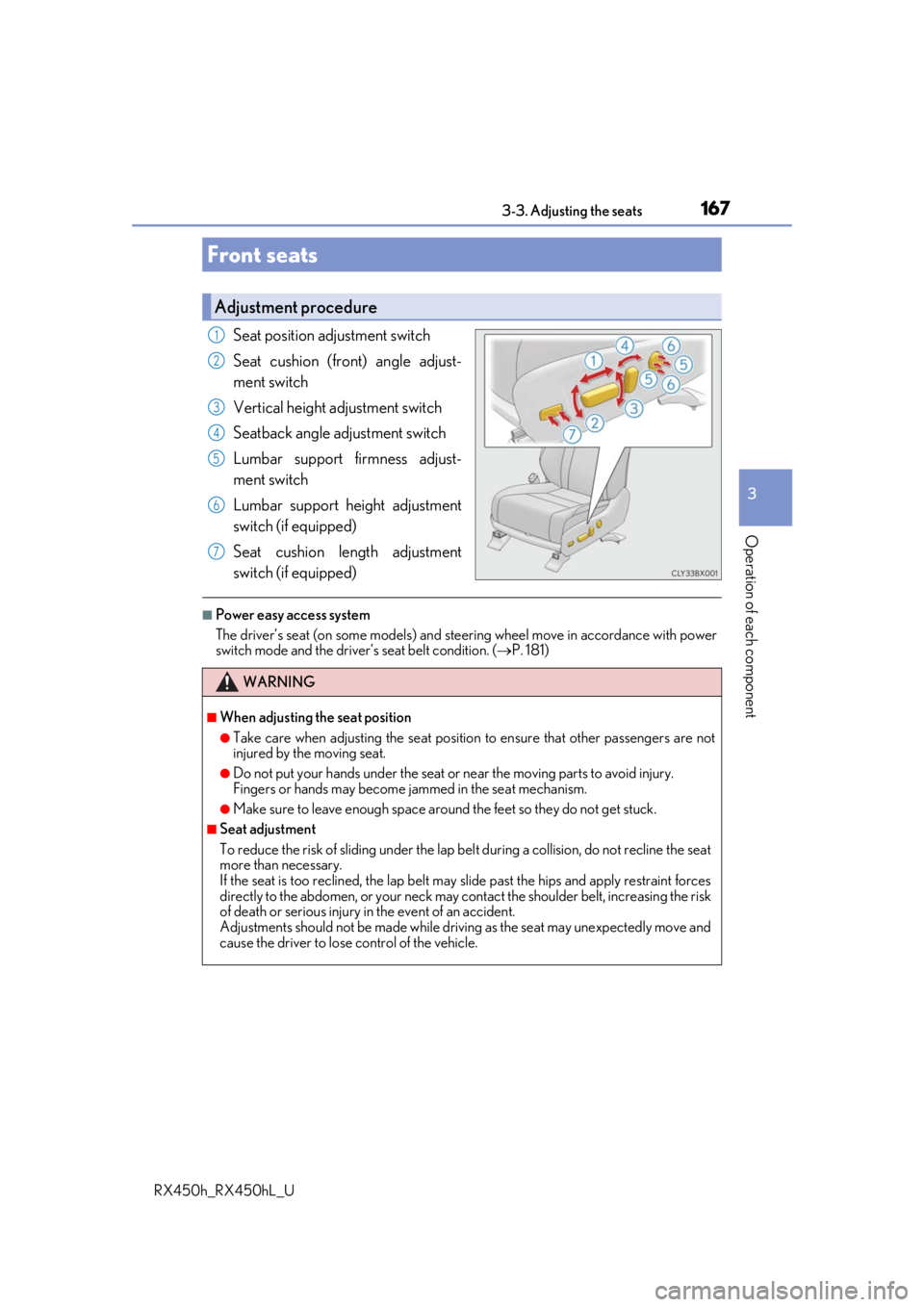
167
3
Operation of each component
RX450h_RX450hL_U3-3. Adjusting the seats
Seat position adjustment switch
Seat cushion (front) angle adjust-
ment switch
Vertical height adjustment switch
Seatback angle adjustment switch
Lumbar support firmness adjust-
ment switch
Lumbar support height adjustment
switch (if equipped)
Seat cushion length adjustment
switch (if equipped)
■Power easy access system
The driver’s seat (on some models) and stee
ring wheel move in accordance with power
switch mode and the driver’s seat belt condition. ( P. 181)
Front seats
Adjustment procedure
1
2
3
4
5
6
7
WARNING
■When adjusting the seat position
●Take care when adjusting the seat position to ensure that other passengers are not
injured by the moving seat.
●Do not put your hands under the seat or near the moving parts to avoid injury.
Fingers or hands may become jammed in the seat mechanism.
●Make sure to leave enough space around the feet so they do not get stuck.
■Seat adjustment
To reduce the risk of sliding under the lap be lt during a collision, do not recline the seat
more than necessary.
If the seat is too reclined, the lap belt may slide past the hips and apply restraint forces
directly to the abdomen, or your neck may contact the shou lder belt, increasing the risk
of death or serious injury in the event of an accident.
Adjustments should not be made while drivin g as the seat may unexpectedly move and
cause the driver to lose control of the vehicle.
Page 168 of 792
1683-3. Adjusting the seats
RX450h_RX450hL_U
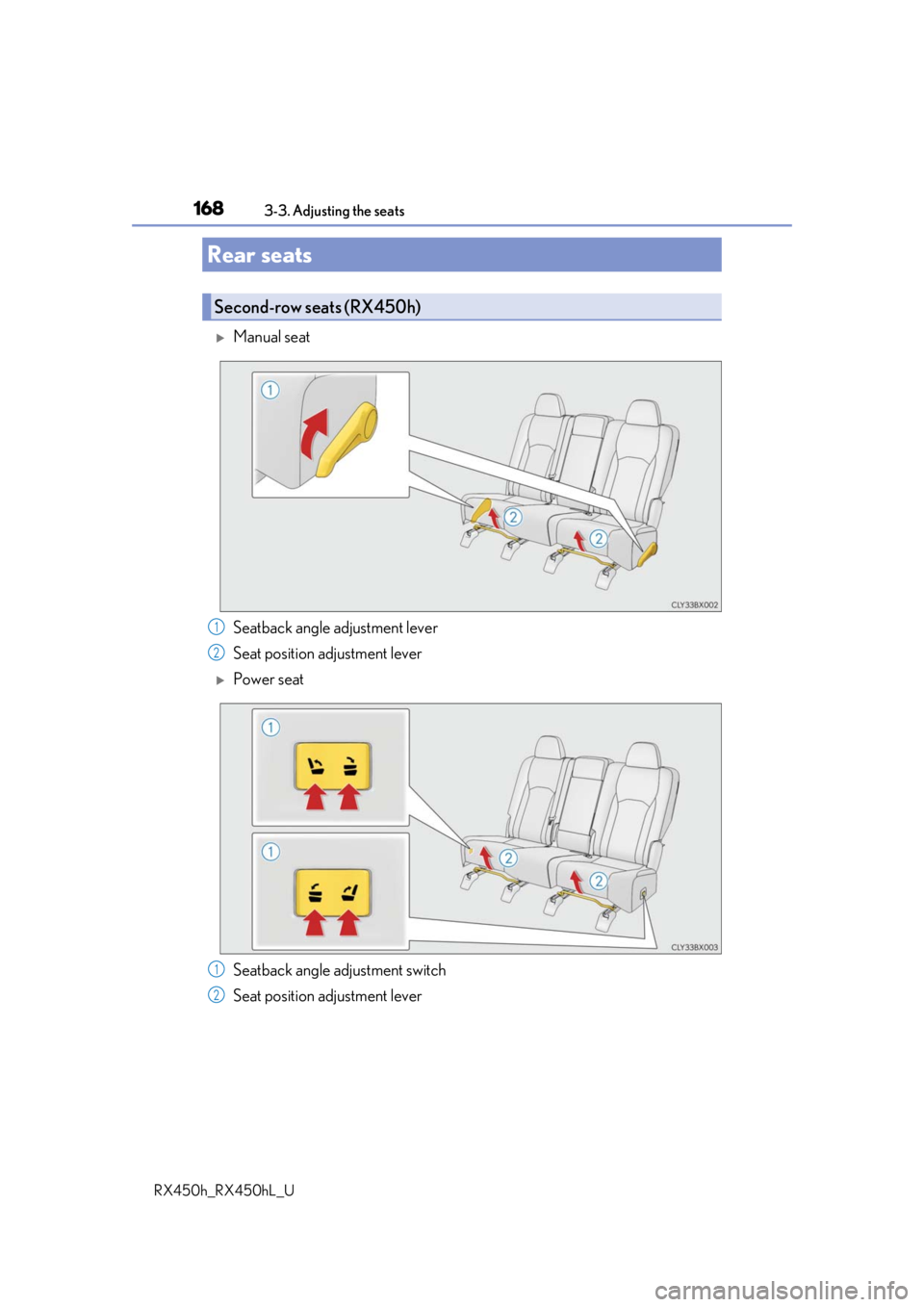
Manual seat
Seatback angle adjustment lever
Seat position adjustment lever
Power seat
Seatback angle adjustment switch
Seat position adjustment lever
Rear seats
Second-row seats (RX450h)
1
2
1
2
Page 169 of 792
1693-3. Adjusting the seats
3
Operation of each component
RX450h_RX450hL_U
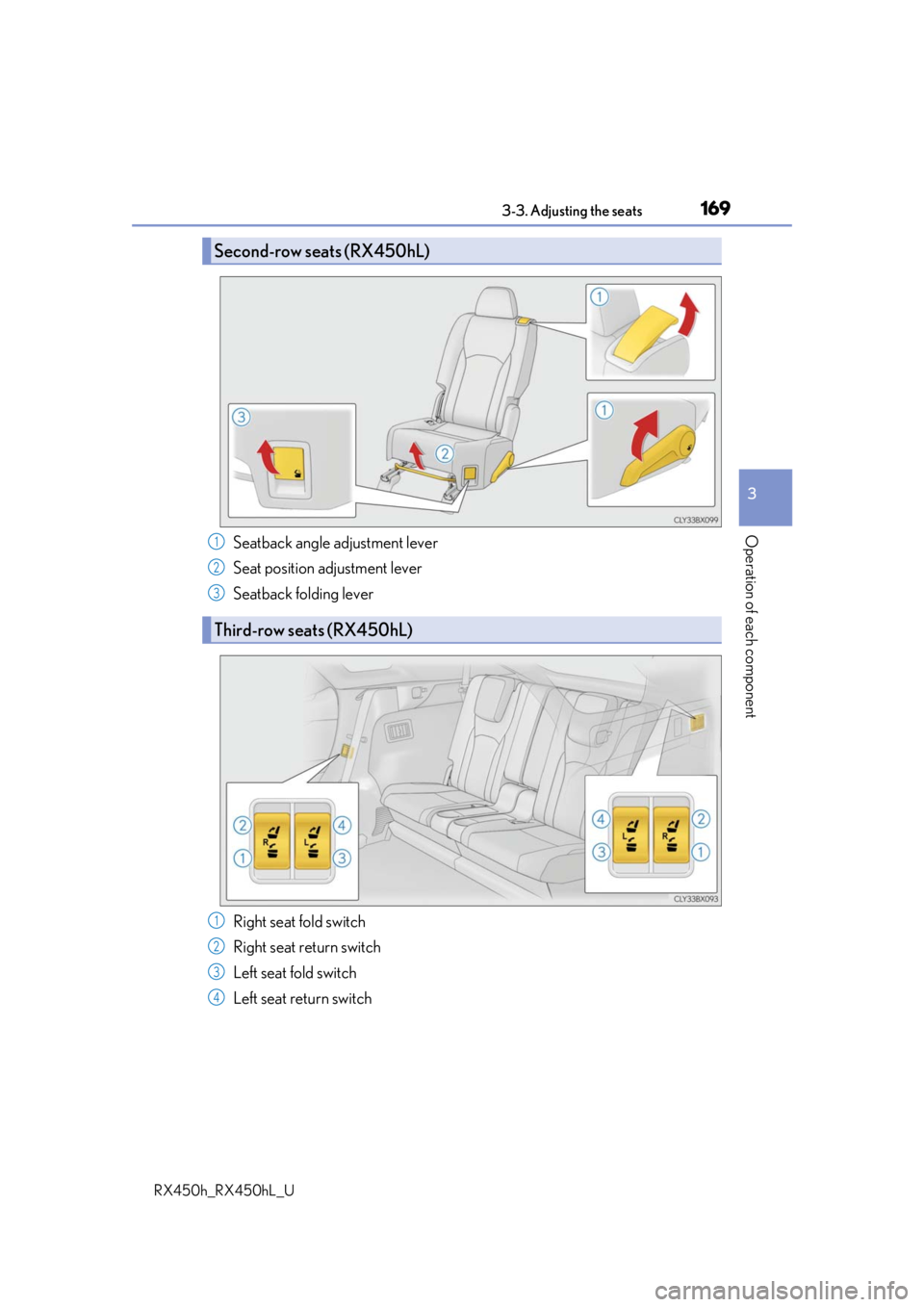
Seatback angle adjustment lever
Seat position adjustment lever
Seatback folding lever
Right seat fold switch
Right seat return switch
Left seat fold switch
Left seat return switch
Second-row seats (RX450hL)
Third-row seats (RX450hL)
1
2
3
1
2
3
4
Page 170 of 792
1703-3. Adjusting the seats
RX450h_RX450hL_U
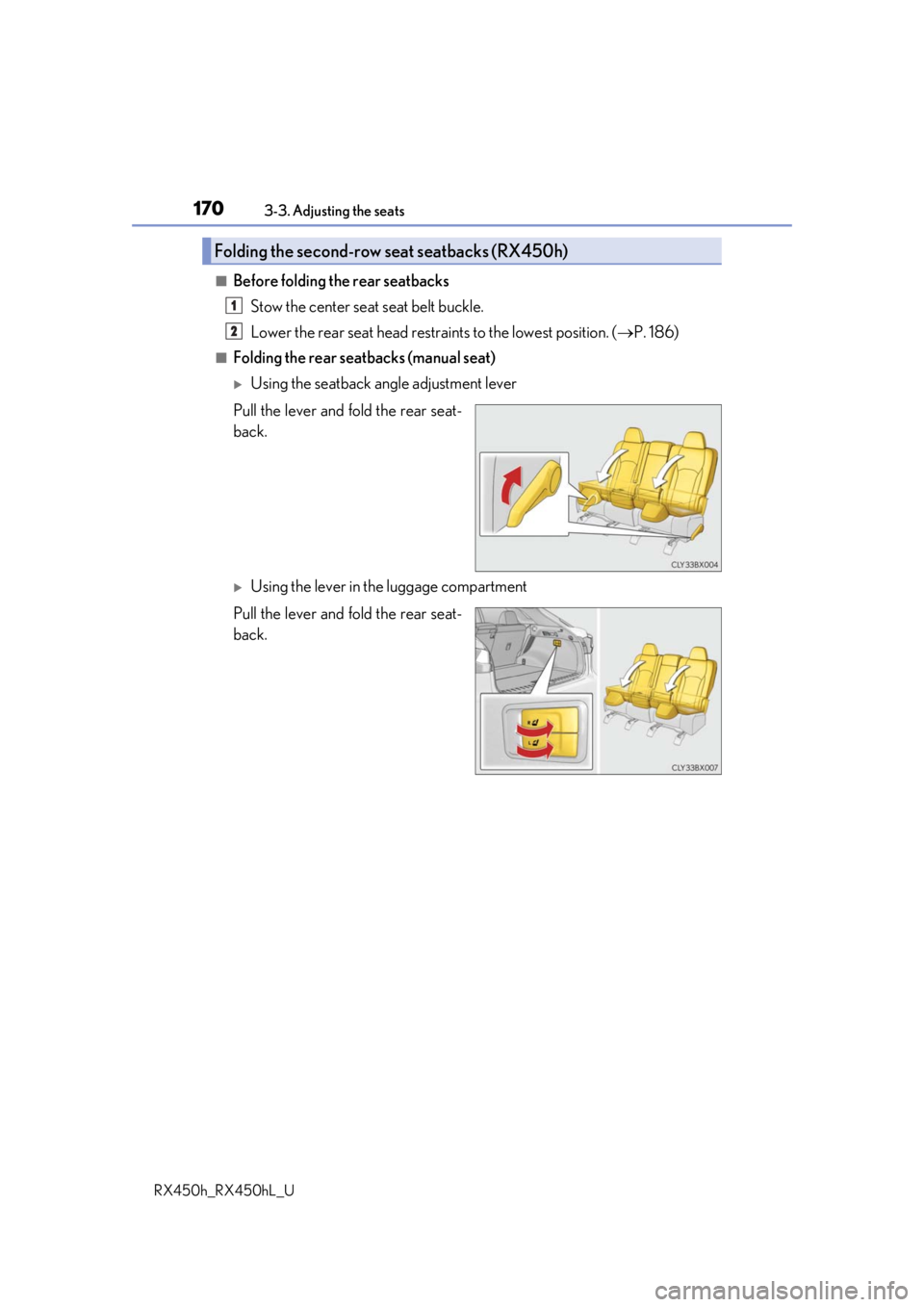
■Before folding the rear seatbacks Stow the center seat seat belt buckle.
Lower the rear seat head restra ints to the lowest position. (P. 186)
■Folding the rear seatbacks (manual seat)
Using the seatback angle adjustment lever
Pull the lever and fold the rear seat-
back.
Using the lever in the luggage compartment
Pull the lever and fold the rear seat-
back.
Folding the second-row seat seatbacks (RX450h)
1
2