2019 LEXUS RX450H ECO
[x] Cancel search: ECOPage 140 of 792
1403-2. Opening, closing and locking the doors
RX450h_RX450hL_U
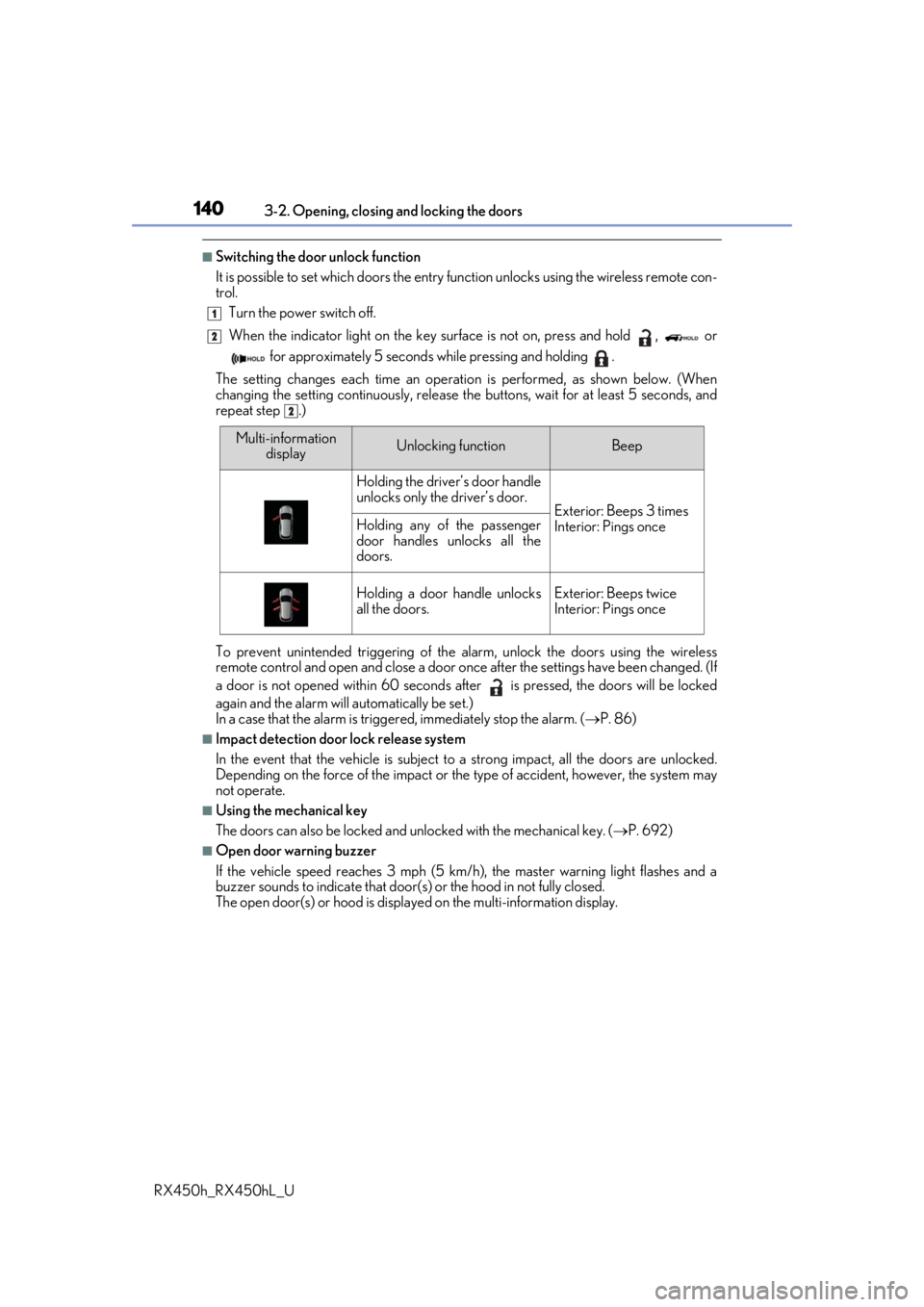
■Switching the door unlock function
It is possible to set which doors the entry function unlock s using the wireless remote con-
trol.
Turn the power switch off.
When the indicator light on the key su rface is not on, press and hold , or
for approximately 5 seconds while pressing and holding .
The setting changes each time an operation is performed, as shown below. (When
changing the setting continuously, release the buttons, wait for at least 5 seconds, and
repeat step .)
To prevent unintended triggering of the alarm, unlock the doors using the wireless
remote control and open and close a door once after the settings have been changed. (If
a door is not opened within 60 seconds af ter is pressed, the doors will be locked
again and the alarm will automatically be set.)
In a case that the alarm is triggered, immediately stop the alarm. ( P. 86)
■Impact detection door lock release system
In the event that the vehicle is subject to a strong impact, all the doors are unlocked.
Depending on the force of the impact or the type of accident, however, the system may
not operate.
■Using the mechanical key
The doors can also be locked and unlocked with the mechanical key. ( P. 692)
■Open door warning buzzer
If the vehicle speed reaches 3 mph (5 km/h), the master warning light flashes and a
buzzer sounds to indicate that door (s) or the hood in not fully closed.
The open door(s) or hood is displa yed on the multi-information display.
1
2
2
Multi-information
displayUnlocking functionBeep
Holding the driver’s door handle
unlocks only the driver’s door.
Exterior: Beeps 3 times
Interior: Pings onceHolding any of the passenger
door handles unlocks all the
doors.
Holding a door handle unlocks
all the doors.Exterior: Beeps twice
Interior: Pings once
Page 142 of 792

1423-2. Opening, closing and locking the doors
RX450h_RX450hL_U
◆Smart access system with push-button start
Carry the electronic key to enable
this function. Locks all the doors
Check that the door is securely
locked.
Unlocks all the doors
The doors cannot be unlocked for 3
seconds after the doors are locked.
◆Wireless remote control
P. 136
◆Door lock switch
P. 138
Press and hold the switch for approxi-
mately 1 second.
The power back door can be operated
whether it is locked
* or unlocked.
Pressing the switch while the power
back door is opening/closing will stop
the operation.
Pressing and holding the switch again
for approximately 1 second will operate
the power back door in the opposite
direction.
*: Opening of the power back door when it is locked can be disabled by a customized setting. ( P. 741)
Power back door
The power back door can be locked/unlocked and opened/closed by the fol-
lowing procedures.
Locking and unlocking the power back door from the outside
1
2
Locking and unlocking the power back door from the inside
Opening/closing the power back d oor using the wireless remote con-
trol
Page 143 of 792
1433-2. Opening, closing and locking the doors
3
Operation of each component
RX450h_RX450hL_U
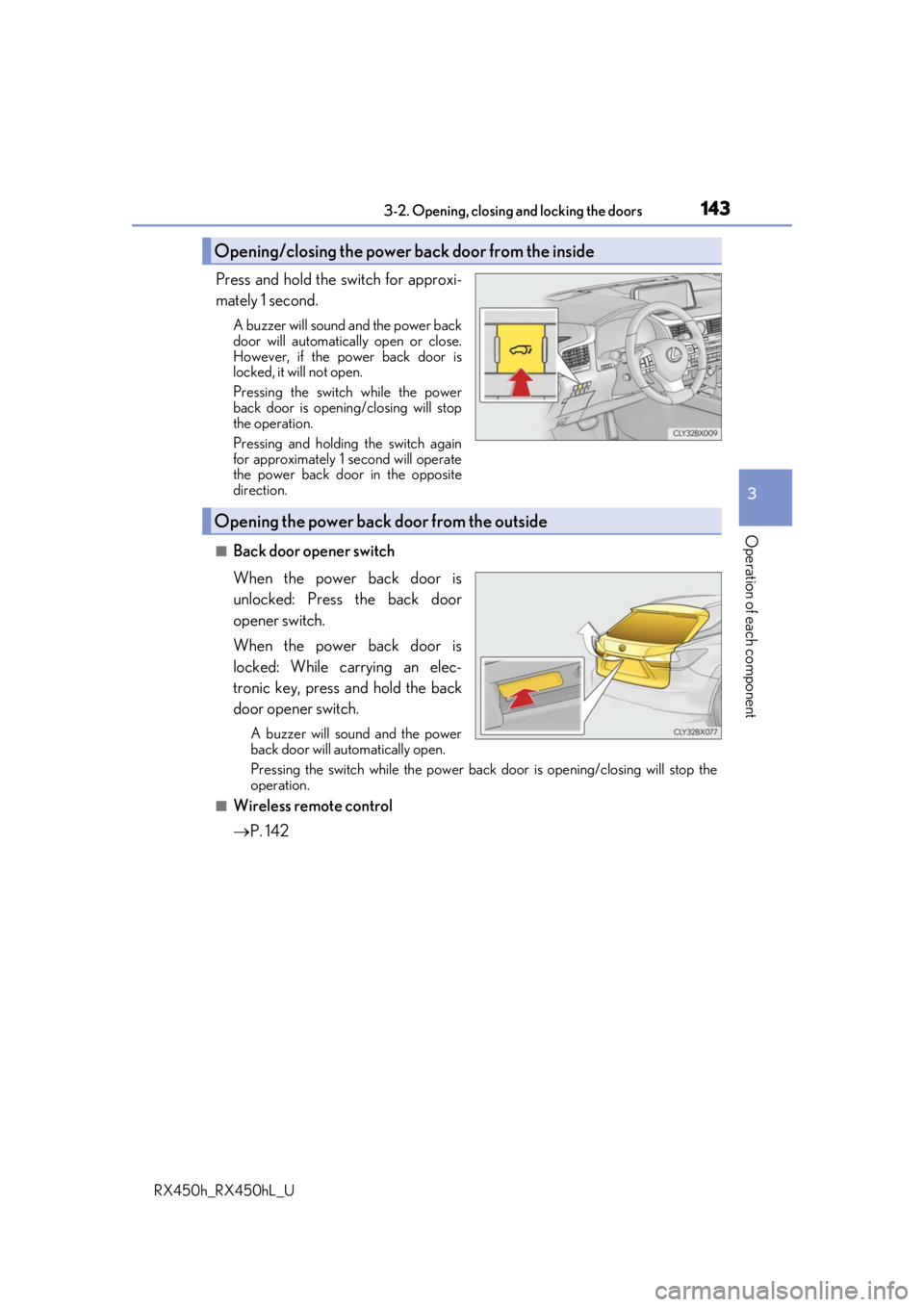
Press and hold the switch for approxi-
mately 1 second.
A buzzer will sound and the power back
door will automatically open or close.
However, if the power back door is
locked, it will not open.
Pressing the switch while the power
back door is opening/closing will stop
the operation.
Pressing and holding the switch again
for approximately 1 second will operate
the power back door in the opposite
direction.
■Back door opener switch
When the power back door is
unlocked: Press the back door
opener switch.
When the power back door is
locked: While carrying an elec-
tronic key, press and hold the back
door opener switch.
A buzzer will sound and the power
back door will automatically open.
Pressing the switch while the power back door is opening/closing will stop the
operation.
■Wireless remote control
P. 142
Opening/closing the power back door from the inside
Opening the power back door from the outside
Page 146 of 792
1463-2. Opening, closing and locking the doors
RX450h_RX450hL_U
The power back door settings can be ch anged on the multi-information display.
( P. 108)
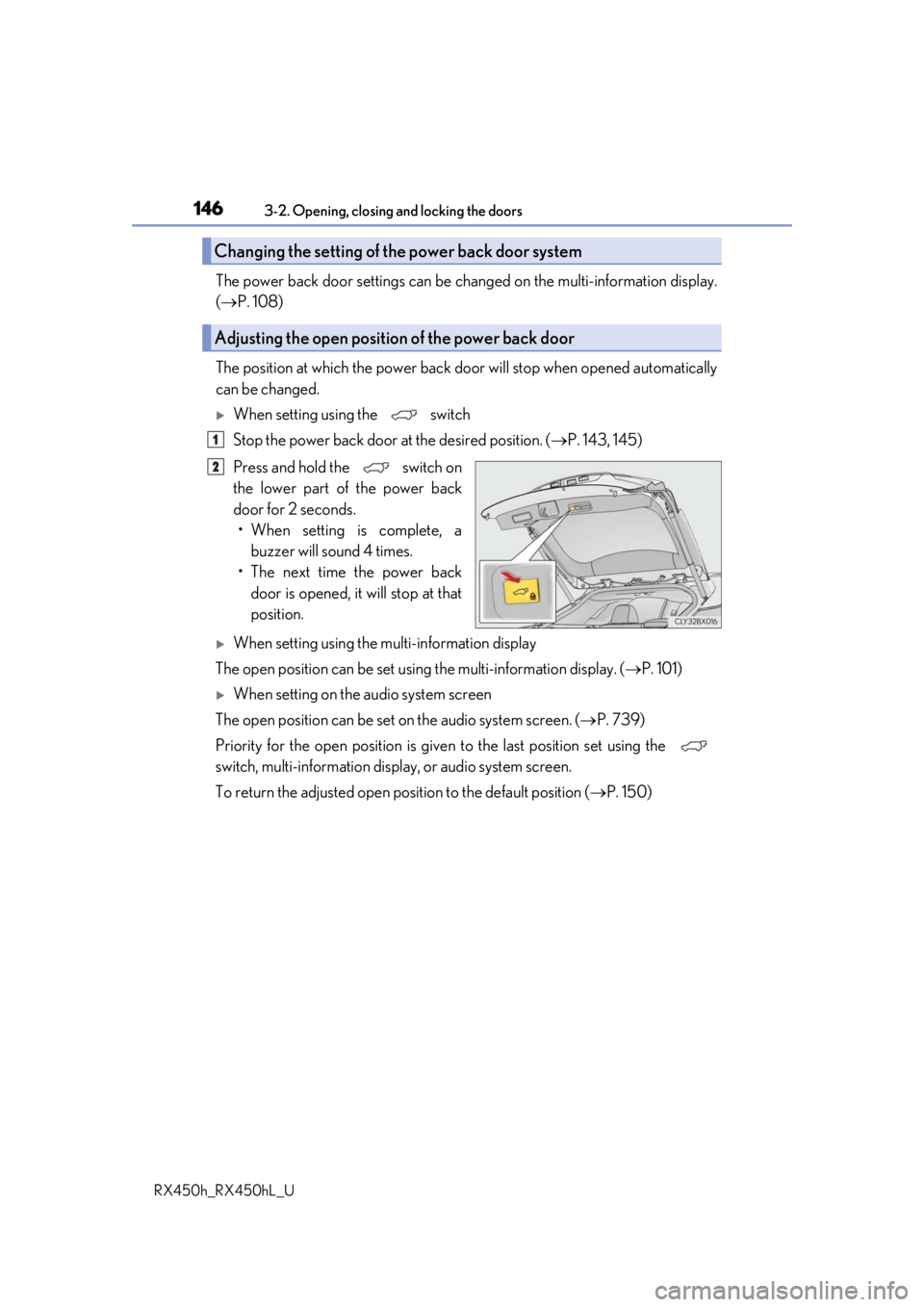
The position at which the power back door will stop when opened automatically
can be changed.
When setting using the switch
Stop the power back door at the desired position. ( P. 143, 145)
Press and hold the switch on
the lower part of the power back
door for 2 seconds. • When setting is complete, a buzzer will sound 4 times.
• The next time the power back door is opened, it will stop at that
position.
When setting using the multi-information display
The open position can be set usin g the multi-information display. (P. 101)
When setting on the audio system screen
The open position can be set on the audio system screen. ( P. 739)
Priority for the open position is give n to the last position set using the
switch, multi-information displa y, or audio system screen.
To return the adjusted open posi tion to the default position (P. 150)
Changing the setting of the power back door system
Adjusting the open position of the power back door
1
2
Page 147 of 792

1473-2. Opening, closing and locking the doors
3
Operation of each component
RX450h_RX450hL_U
■Power back door operating conditions
If the following conditions are met with the power back door operation enabled ( P. 112),
the power back door can be opened and closed automatically.
●When an electronic key is being carried an d the back door opener switch is pressed*
●When the wireless remote control is used*
●When the power switch is in ON mode, the vehicle speed must be lower than 2 mph (3
km/h) and one of the following conditions mu st be met in addition to the above condi-
tions:
• The parking brake is engaged.
• The brake pedal is depressed.
• The shift lever is in P.
*: When the operation of the power back door when it is locked has been disabled by a
customized setting, operate the power back door after it has been unlocked.
( P. 741)
Touchless sensor (vehicles with a touchless power back door)
The power back door will open automatically when the touchless sensor operation is
enabled ( P. 112) and the following conditions are met:
●The power back door is fully closed.
●The electronic key is within the operational range ( P. 158)
■Security feature
If the power back door is not opened within approximately 60 seconds after the vehicle
is unlocked, the security feature will automatically lock the doors again.
●A hand is held over the upper part of the rear
emblem with fingers closed. (The upper part of
the rear emblem can also be touched.)
The power back door may also be operated
by holding either of the following over the
upper part of the rear emblem. Make sure to
hold it close enough to the rear emblem.
•A gloved hand
•An elbow
Page 150 of 792

1503-2. Opening, closing and locking the doors
RX450h_RX450hL_U
■Close & lock function
When the power back door is open, this fu nction closes the power back door and then
locks all of the doors simultaneously.
Performing the following procedure will lock all of the doors when the power back door
is completely closed.
Close all of the doors except the power back door.
While carrying an electronic key, press the
switch on the lower part of the
power back door ( P. 145) twice.
A different buzzer than the normal one will sound and then the power back door will
begin closing automatically. When the power back door is closed, all of the doors will
lock simultaneously and operation signals w ill indicate that all of the doors have been
locked.
To enable this function, the fo llowing conditions must be met:
●The most recent power back door operation was an automatic opening operation and
the power back door is stopped.
●No electronic keys for your vehicle are in the vehicle.
■When reconnecting the 12-volt battery
To enable the power back door to operate pr operly, close the power back door manually.
■Jam protection function
■Returning the power back door opening position to the default setting
Sensors are installed in the right and left sides of
the power back door. When the door is auto-
matically closing and the sensors are pushed
due to an object being caught, etc., the jam pro-
tection function will operate.
From that position the door will automatically
move a little in the opposite direction and then
the function will stop.
Press and hold the switch on the lower
part of the power back door for 7 seconds.
A buzzer will sound twice. The next time the
power back door is opened, it will open to the
default position.
1
2
Page 151 of 792

1513-2. Opening, closing and locking the doors
3
Operation of each component
RX450h_RX450hL_U
■Situations in which the close & lock function may not operate properly
In the following situations, the close & lock function may not operate properly:
●If the switch on the lower part of the power back door ( P. 145) is pressed by a
hand which is holding an electronic key
●If the switch on the lower pa rt of the power back door (P. 145) is pressed
when the electronic key is in a bag, etc. that is placed on the ground
●If the switch on the lower pa rt of the power back door (P. 145) is pressed with
the electronic key not near the vehicle.
■Situations in which the touchless sensor may malfunction (vehicles with a touchless
power back door)
In the following situations, the touchless sensor may operate unintentionally.
To prevent unintentional operat ion, keep the electronic key out of the operational range
or disable the touchless sensor operation. ( P. 112)
●When a large amount of water is applied to the rear emblem, such as in heavy rain
●When the vehicle is being washed and water is applied to the rear emblem
●When dirt is wiped off the rear emblem
●If someone leans toward or against the rear emblem
●When a metal object is brought near the rear emblem
●When a vehicle cover is installed or removed near the rear emblem
■Situations in which the touchless sensor may not operate properly (vehicles with a
touchless power back door)
If the touchless sensor does not operate in the following situations, use the back door
opener switch to open the power back door. (P. 145)
●In the following situations, the sensitivity of the touchless sensor may be temporarily
reduced and the touchless sensor may not operate:
• When a large amount of water is applied to the rear emblem, such as in heavy rain
• When the vehicle is being washed and water is applied to the rear emblem
• For several seconds after dirt is wiped off the rear emblem
• When the rear emblem is covered with mud, snow, ice, etc.
• When the vehicle has been parked for a wh ile near objects that may move and con-
tact the rear emblem, such as tall grass or trees
• When an external radio wave source is near the touchless sensor
●The touchless sensor may not operate in the following situations:
• When an electronic ke y is not being carried
• When an electronic key is not within the operational range
• When an external radio wave source in terferes with the communication between
the vehicle and electronic key ( P. 160)
• When the power back door is not fully closed
• When a hand is held pa rallel to the rear emblem
*
*
: The detection settings can be changed by your Lexus dealer. ( P. 739)
■Customization
Some functions can be customized. ( P. 108, 736)
Page 153 of 792
1533-2. Opening, closing and locking the doors
3
Operation of each component
RX450h_RX450hL_U
WARNING
■Operating the power back door
Observe the following precautions.
Failure to do so may cause parts of the body to be caught, resulting in death or serious
injury.
●Remove any heavy loads, such as snow an d ice, from the power back door before
opening it. Failure to do so may cause the power back door to suddenly shut again
after it is opened.
●When opening or closing the power back d oor, thoroughly check to make sure the
surrounding area is safe.
●If anyone is in the vicinity, make sure they are safe and let them know that the power
back door is about to open or close.
●Use caution when opening or closing the power back door in windy weather as it may
move abruptly in strong wind.
●Do not pull on the back door spindle ( P. 156) to close the power back door, and
do not hang on the back door spindle.
Doing so may cause hands to be caught or the back door spindle to break, causing
an accident.
●If a bicycle carrier or similar heavy object is attached to the power back door, it may
suddenly shut again after being opened, causing someone’s hands, arms, head or
neck to be caught and injured. When inst alling an accessory part to the power back
door, using a genuine Lexus part is recommended.
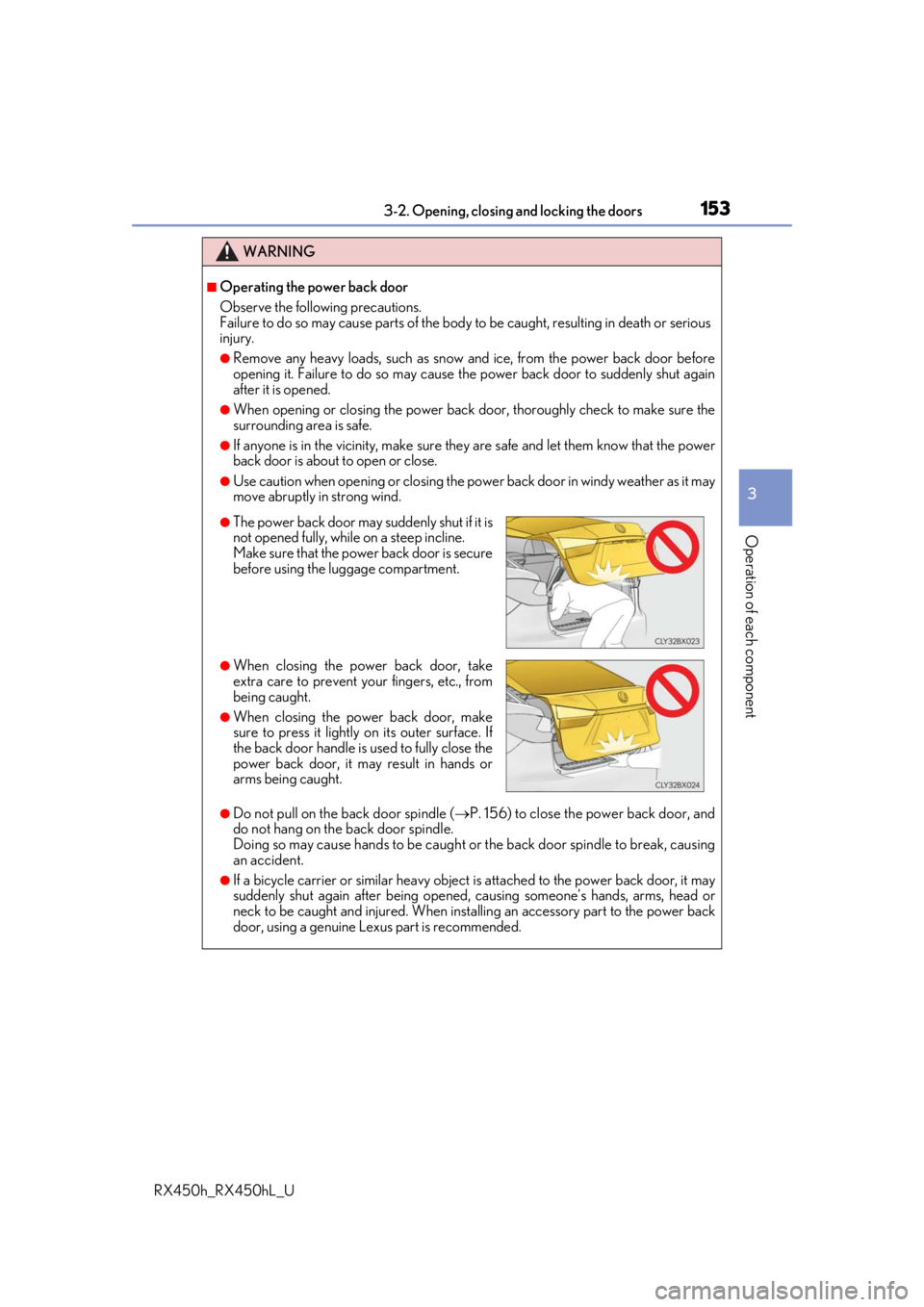
●The power back door may suddenly shut if it is
not opened fully, while on a steep incline.
Make sure that the power back door is secure
before using the luggage compartment.
●When closing the power back door, take
extra care to prevent your fingers, etc., from
being caught.
●When closing the power back door, make
sure to press it lightly on its outer surface. If
the back door handle is used to fully close the
power back door, it may result in hands or
arms being caught.