2019 LEXUS RX350 engine
[x] Cancel search: enginePage 334 of 777

3334-5. Using the driving support systems
4
Driving
RX350/RX350L_U ■
The intuitive parking assist can be operated when ●
Front corner sensors:
• The engine switch is in IGNITION ON mode.
• The shift lever is in other than P.
• The vehicle speed is less than about 6 mph (10 km/h).
(At any speed when the shift lever is in R) ●
Front center sensors:
• The engine switch is in IGNITION ON mode.
• The shift lever is in other than P or R.
• The vehicle speed is less than about 6 mph (10 km/h). ●
Rear corner and rear center sensors:
• The engine switch is in IGNITION ON mode.
• The shift lever is in R. ■
Intuitive parking assist display ●
Vehicles with a Lexus Display Audio system/navigation system (8-inch display): When
an object is detected while the Lexus parking assist monito r or panoramic view monitor
is in use, the warning indicator will appear in the up per part of the scre en even if the dis-
play setting has been set to off.●
Vehicles with a navigation system (12.3-inch display): If the intuit ive parking assist dis-
play is set to on, detected objects will also be displayed on the panoramic view monitor.
For details, refer to “NAVIGATION SYSTEM OWNER’S MANUAL”. ■
Sensor detectio n information●
The sensor’s detection areas are limited to the areas around the vehicle’s bumper. ●
Certain vehicle conditions and the surrounding environment may affect the ability of a
sensor to correctly detect an object. Particular instances where this may occur are
listed below.
• There is dirt, snow or ice on the sensor . (Wiping the sensors will resolve this prob-
lem.)
• The sensor is frozen. (Thawing th e area will resolve this problem.)
In especially cold weather, if a sensor is frozen the screen may show an abnormal
display, or obstacles may not be detected.
• The sensor is covered in any way.
• The vehicle is leaning considerably to one side.
• When a sensor or the area around a sensor is extremely hot or cold.
• On an extremely bumpy road, on an incline, on gravel, or on grass.
• The vicinity of the vehicle is noisy due to vehicle horns, motorcycle engines, air
brakes of large vehicles, or other loud noises producing ultrasonic waves.
• There is another vehicle equipped with parking assist sensors in the vicinity.
• The sensor is coated with a sheet of spray or heavy rain.
• The bumper or sensor re ceives a strong impact.
• If the vehicle is significantly tilted.
• The vehicle is approaching a tall or curved curb.
• In harsh sunlight or intense cold weather.
• The area directly under the bumpers is not detected.
• If objects draw too close to the sensor.
• People may not be detected if they are wearing certain types of clothing.
In addition to the examples above, there ar e instances in which, because of their shape,
signs and other objects may be judged by a sensor to be closer than they are.
Page 340 of 777

3394-5. Using the driving support systems
4
Driving
RX350/RX350L_U Front corner sensors
Front center sensors
Rear corner sensors
Rear center sensors
Select on the multi-information
display.
Press or of the meter con-
trol switch and select “ICS”.
Press of the meter control
switch.
Select the “Yes” and push . When the Intelligent Clearance Sonar is di sabled, the ICS OFF indicator illuminates.
To re-enable the system when it was disabl ed, select on the multi-information dis-
play, select “ICS” and then “On”. If disabled using this method, the system will not be
re-enabled by turning the engine switch off and then to IGNITION ON mode.Types of sensors
Except F SPORT models
F SPORT models
1
2
3
4
Turning the Intelligent Cle arance Sonar system on/off1
2
3
4
Page 341 of 777

340 4-5. Using the driving support systems
RX350/RX350L_U If the engine output restriction contro l or brake control operates, a buzzer will
sound and a message will be displayed on the multi-information display to alert
the driver. Depending on the situation, engine output restriction co ntrol will operate to either
limit acceleration or restrict output as much as possible.
Displays and buzzers for engine output restriction control and brake
control Control Situation Multi-information
display ICS OFF
Indicator Buzzer
Engine output
restriction control is
operating (acceler-
ation restriction) Acceleration
greater than a cer-
tain amount is not
possible. “Object Detected
Acceleration
Reduced”
Not illu-
minated
Short
beepEngine output
restriction control is
operating (output
restricted as much
as possible) Stronger-than-nor-
mal brake opera-
tion is necessary.
“BRAKE!”
Brake control is
operating Emergency brak-
ing is necessary.
Vehicle stopped by
system operation The vehicle has
been stopped by
brake control oper-
ation. “Switch to Brake” Illumi-
nated
Page 343 of 777
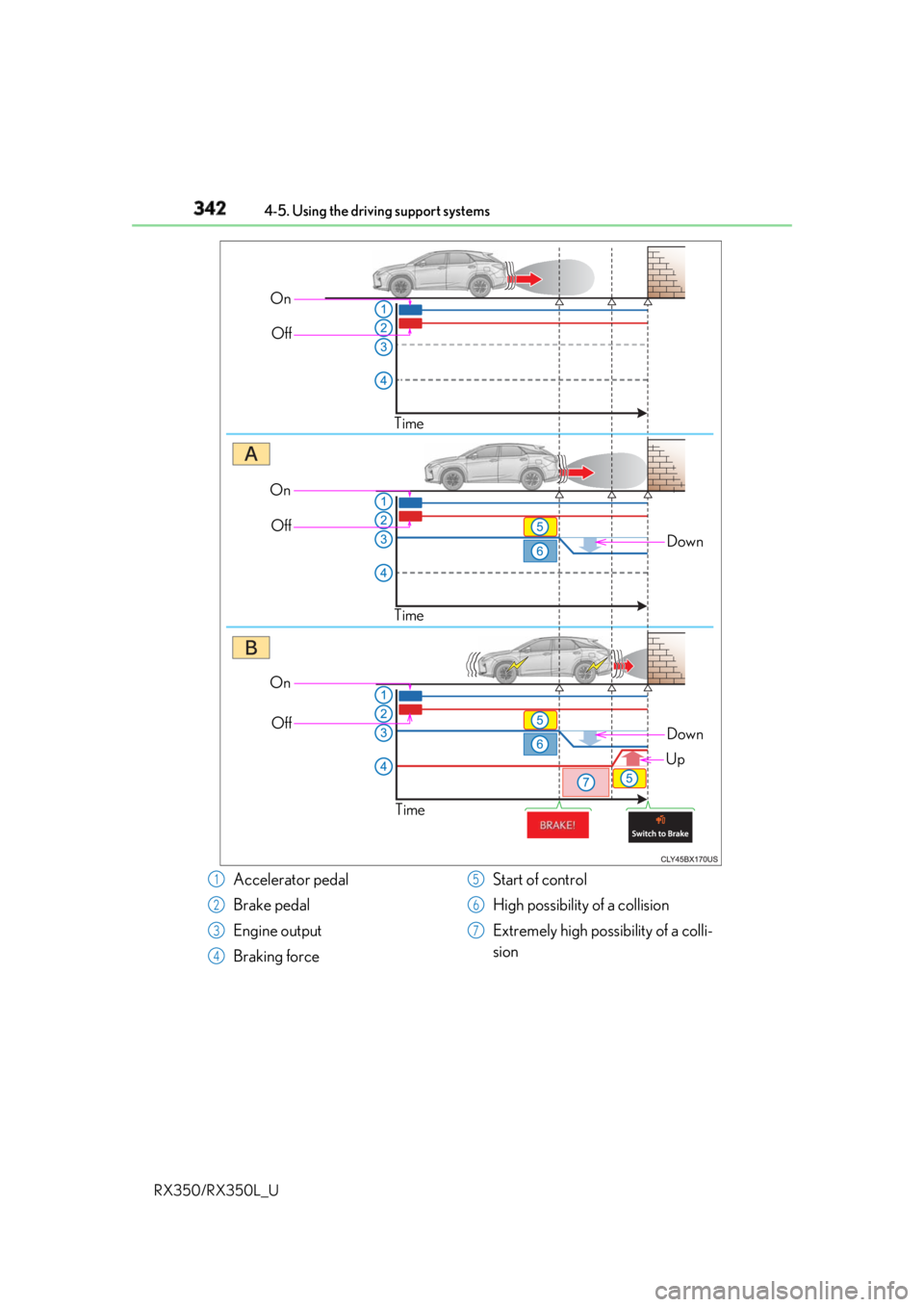
342 4-5. Using the driving support systems
RX350/RX350L_U On
Off
Time
DownOn
Off
Time
On
Off
Time Down
Up
Accelerator pedal
Brake pedal
Engine output
Braking force Start of control
High possibility of a collision
Extremely high possibility of a colli-
sion1
2
3
4 5
6
7
Page 344 of 777

3434-5. Using the driving support systems
4
Driving
RX350/RX350L_U ■
The Intelligent Clearance Sonar function will operate when
The function will operate when the ICS O FF indicator is not illuminated or flashing
( P. 339, 347) and all of the following conditions are met: ●
Engine output restriction control
• The Intelligent Clearance Sonar system is enabled.
• The vehicle speed is 10 mph (15 km/h) or less.
• There is a stationary object in the traveling direction of the vehicle and 6 to 13 ft. (2
to 4 m) away.
• The system determines that a stronger-t han-normal brake operation is necessary to
avoid a collision. ●
Brake control
• Engine output restriction control is operating.
• The system determines that an emergenc y brake operation is necessary to avoid a
collision.■
The Intelligent Clearance Sonar fu nction will stop operating when
The function will stop operating if an y of the following conditions are met:●
Engine output restriction control
• The Intelligent Clearance Son ar system is disabled.
• The collision becomes avoidable with normal brake operation.
• The stationary object is no lo nger 6 to 13 ft. (2 to 4 m) away in the traveling direction
of the vehicle. ●
Brake control
• The Intelligent Clearance Son ar system is disabled.
• Approximately 2 seconds elapse after the vehicle is stopped by brake control.
• The brake pedal is depressed after the vehicle is stopped by brake control.
• The stationary object is no lo nger 6 to 13 ft. (2 to 4 m) away in the traveling direction
of the vehicle.■
Detection range of the Intellig ent Clearance Sonar function
The detection range of the Intelligent Cleara nce Sonar function differs from the detec-
tion range of the intu itive parking assist. ( P. 331)
Therefore, even if the intuit ive parking assist detects an object and provides a warning,
the Intelligent Clearance Sonar function may not start operating. ■
If the Intelligent Clearance Sonar function has operated
If the vehicle is stopped due to operation of the Intelligent Clearance Sonar function, the
Intelligent Clearance Sonar system will be di sabled and the ICS OFF indicator will illumi-
nate.
Page 345 of 777

344 4-5. Using the driving support systems
RX350/RX350L_U ■
Re-enabling the Intelligent Clearance Sonar system
To re-enable the Intelligent Clearance Sonar system when it is disabled due to operation
of the Intelligent Clearance Sonar function, either enable the system again ( P. 339), or
turn the engine switch off and th en back to IGNITION ON mode.
Additionally, if the object becomes no longer in the traveling directio n of the vehicle or if
the traveling direction of the vehicle change s (such as changing from moving forward to
backing up, or from backing up to moving fo rward), the system will be re-enabled auto-
matically. ■
Objects that the Intelligent Cleara nce Sonar function may not detect
The sensors may not be able to detect certain objects, such as the following. ●
Cotton cloth, snow, and other materials that are poor reflectors of ultrasonic waves.
(People may also not be detected depending on the type of clothing they are wearing.) ●
Objects which are not perpendicular to the ground, are not perpendicular to the travel-
ing direction of the vehicle, are uneven or are waving. ●
Low objects ●
Thin objects such as wires, fences, ropes and signposts ●
Objects that are extremely close to the bumper ■
Intuitive parking assist buzzer
Regardless of whether the in tuitive parking assist system is enabled or not ( P. 326), if
the Intelligent Clearance Sonar system is enabled ( P. 339), the front or rear sensors
detect an object and brake control is performed, the intuitive parking assist buzzer will
sound to notify the driver of the approximate distance to the object.
Page 346 of 777

3454-5. Using the driving support systems
4
Driving
RX350/RX350L_U ■
Situations in which the Intelligent Clearance Sonar function may operate even if there
is no possibility of a collision
In some situations such as the following, the Intelligent Clearanc e Sonar function may
operate even though there is no possibility of a collision. ●
Vehicle surroundings
• When driving toward a banner, flag, low- hanging branch or boom barrier (such as
those used at railroad crossing s, toll gates and parking lots).
• When driving on a narrow path surrounded by a structure, such as in a tunnel or on
an iron bridge
• When parallel parking
• When there is a rut or hole in the surface of the road
• When driving on a metal cover (grating), such as those used for drainage ditches
• When driving on a steep slope
• If a sensor is hit by a large amount of wa ter, such as when driving on a flooded road●
Weather
• If a sensor is covered with ice, snow, dirt, etc. (when cleared, the system will return to
normal)
• If heavy rain or water strikes a sensor
• When driving in inclemen t weather such as fog, snow or a sandstorm●
Other ultrasonic waves sources
• When vehicle horns, vehicle detectors, motorcycle engines, air brakes of large vehi-
cles, the clearance sonar of other vehicles or other devices which produce ultra-
sonic waves are near the vehicle
• If a sticker or an electronic component, su ch as a backlit license plate (especially flu-
orescent type), fog lights, a fender pole or wireless antenna is installed near a sensor●
Changes in the vehicle posture
• If the vehicle is significantly tilted
• If the front of the vehicle is raised or lowered due to the carried load
• If the orientation of a sens or has been changed due to a collision or other impact• When driving on a narrow road
• When driving on a gravel road or in an area
with tall grass
Page 347 of 777

346 4-5. Using the driving support systems
RX350/RX350L_U ■
If the Intelligent Clearance Sonar function operates unnecessarily such as at a railroad
crossing
Even in the event that the Intelligent Cleara nce Sonar function operates unnecessarily,
such as at a railroad crossing, brake cont rol will be canceled afte r approximately 2 sec-
onds, allowing you to proceed forward and leave the area, Brake control can also be
canceled by depressing the brake pedal. Depressing the accelerator pedal again will
allow you to proceed forward and leave the area. ■
Situations in which the Intelligent Cleara nce Sonar Brake function may not operate
properly
In some situations such as the following , this function may not operate properly.●
Weather
• If a sensor is covered with ice, snow, dirt, etc. (when cleared, the system will return to
normal)
• If heavy rain or water strikes a sensor
• When driving in inclemen t weather such as fog, snow or a sandstorm●
Vehicle surroundings
• When an object that cannot be detected is between the vehicle and a detected object
• If an object such as a vehicle, motorcycle, bicycle or pedestrian cuts in front of the
vehicle or runs out from the side of the vehicle. ●
Other ultrasonic waves sources
• When vehicle horns, vehicle detectors, motorcycle engines, air brakes of large vehi-
cles, the clearance sonar of other vehicles or other devices which produce ultra-
sonic waves are near the vehicle
• If a sticker or an electronic component, su ch as a backlit license plate (especially flu-
orescent type), fog lights, a fender pole or wireless antenna is installed near a sensor●
Changes in the vehicle posture
• If the vehicle is significantly tilted
• If the front of the vehicle is raised or lowered due to the carried load
• If the orientation of a sens or has been changed due to a collision or other impact• When a sensor or the area around a sensor
is extremely hot or cold
• When strong winds are blowing