2019 KIA SORENTO condi
[x] Cancel search: condiPage 269 of 573
4181
Features of your vehicle
(Continued)
• Items equipped with magneticcomponents such as credit card,
telephone card, bankbook, any
transportation ticket and such
may become damaged during
wireless charging.
• Place the smart phone on the cen- ter of the charge pad for best
results. The smart phone may not
charge when placed near the rim
of the charging pad. When the
smart phone does get charged, it
may heat up excessively.
• For smart phones without built-in wireless charging system, an
appropriate accessory has to be
equipped.
• Cellphones without the certifica- tion for wireless charging ( )
could fail to charge.
• The self-protection feature equipped in some mobile phones
could slow down or stop charging. (Continued)(Continued)
• The indicator light of some manu-
facturers’ smart phones may still
be yellow after the smart phone is
fully charged. This is due to the
particular characteristic of the
smart phone and not a malfunc-
tion of the wireless charging.
• When any smart phone without a wireless charging function or a
metallic object is placed on the
charging pad, a small noise may
sound. This small sound is due to
the vehicle discerning compatibili-
ty of the object placed on the
charging pad. It does not affect
your vehicle or the smart phone in
any way. This device complies with
Industry Canada licence-exempt
RSS standard(s).
Operation is subject to the following
two conditions:
(1) This device may not cause inter-
ference, and
(2) This device must accept any
interference, including interfer-
ence that may cause undesired
operation of the device.
Page 279 of 573
(Smart cruise control system) . . . . . . . . . . . . . . . . . 5-74
. . . . . . . . . . . . . . . . . . . 5-75
. . . 5-75
smart cruise control system . . . . . . . . . . . . . . . . . . . 5-79
. . . . . . . . . . . . . . . 5-79
. . . . . . . . . . . . . . . . . . . . . . 5-80
Drive mode integrated control system . . . . . . . . . 5-86
Lane Keeping Assist (LKA) system . . . . . . . . . . . 5-91
. . . . . . . . . . . . . . . . . . . . . . . . 5-93
. . . . . . . . . . . . . . . . . . . . . . 5-98
. . . . . . . . . . . . . . . . . . . 5-99
Blind-spot Collision Warning (BCW). . . . . . . . . 5-101
. . . . . . . . . . . 5-102
. . . 5-104
Driver Attention Warning (DAW). . . . . . . . . . . . 5-110
. . . . . . . . . . . . . . . . . . 5-110
. . . . . . . . . . . . . . . . . . . . . . . . . 5-112
. . . . . . . . . . . . . . . . . . . . . . . . . . . . . 5-113
. . . . . . . . . . . . . . . . . . . . . . . . . . 5-113
Economical operation . . . . . . . . . . . . . . . . . . . . . 5-115 Special driving conditions . . . . . . . . . . . . . . . . . . 5-117
. . . . . . . . . . . . . . . . . 5-117
. . . . . . . . . . . . . . . . 5-117
. . . . . . . . . . . . . . . . . . . . . . . . . . 5-119
. . . . . . . . . . . . . . . . . . . . . . . . . . . 5-119
. . . . . . . . . . . . . . . . . . . . . . . . . . . . . 5-120
. . . . . . . . . . . . . . . . . . . . . . . . . . . 5-120
. . . . . . . . . . . . . . . . . . . . . . 5-121
. . . . . . . . . . . . . . . . . . . . . . . . . . . . . 5-121
. . . . . . . . . . . . . . . . . . . . . . . . . . . . 5-121
Winter driving . . . . . . . . . . . . . . . . . . . . . . . . . . . 5-123
. . . . . . . . . . . . . . . . . . . . . . 5-123
. . . . . . . . . 5-124
. . . . . . . . . . . . . . . . . . . . . 5-124
. . . . . . 5-124
. . . . . . . . . . . . . . . . . . . 5-124
anti-freeze in system . . . . . . . . . . . . . . . . . . . . . . . . 5-124
. . . . . . . . . . . . 5-125
. . . 5-125
. . . . . . . . . . . . . . . . . . 5-125
Trailer towing . . . . . . . . . . . . . . . . . . . . . . . . . . . . 5-126
. . . . . . . . . . . . . . . . . . . . . . . . . . . . . . . . . . . . \
5-127
. . . . . . . . . . . . . . . . . . . . . . . . . . . . . . . 5-127
5
Page 282 of 573

55
Driving your vehicle
Before entering vehicle
• Be sure that all windows, outsidemirror(s), and outside lights are
clean.
Check the condition of the tires.
Check under the vehicle for any sign of leaks.
Be sure there are no obstacles behind you if you intend to back up.
Necessary inspections
Fluid levels, such as engine oil,
engine coolant, brake fluid, and
washer fluid should be checked on a
regular basis, at the exact interval
depending on the fluid. Further
details are provided in chapter 7,
“Maintenance”.
Before starting
Close and lock all doors.
Position the seat so that all con-trols are easily reached.
Buckle your seat belt.
Adjust the inside and outside rearview mirrors.
Be sure that all lights work.
Check all gauges.
Check the operation of warning lights when the ignition switch is
turned to the ON position.
Release the parking brake and make sure the brake warning light
goes out.
For safe operation, be sure you are
familiar with your vehicle and its
equipment.
BEFORE DRIVING
WARNING - Distracted driving
Focus on the road while driving.
The driver's primary responsi-
bility is in the safe and legal
operation of the vehicle. Use of
any handled devices, other
equipment or vehicle systems
that distract the drive should
not be used during vehicle
operation.
Page 286 of 573
59
Driving your vehicle
3.Turn the ignition switch to STARTand hold it there until the engine
starts (a maximum of 10 seconds),
then release the key.
It should be started without depress-
ing the accelerator.
4.Do not wait for the engine to warm up while the vehicle remains sta-
tionary.
Start driving at moderate engine
speeds. (Steep accelerating and
decelerating should be avoided.) If the engine stalls while you are in
motion, do not attempt to move the
shift lever to the P (Park) position. If
traffic and road conditions permit,
you may put the shift lever in the N
(Neutral) position while the vehicle is
still moving and turn the ignition
switch to the START position in an
attempt to restart the engine.
CAUTION- Starter
Do not engage the starter for
more than 10 seconds. If theengine stalls or fails to start,wait 5 to 10 seconds before re-engaging the starter. Improperuse of the starter may damage it.
WARNING- Steering
wheel
Never reach for any controls
through the steering wheel
while the vehicle is in motion.
The presence of your hand or
arm in this area could cause a
loss of vehicle control.
Page 291 of 573
Driving your vehicle
14
5
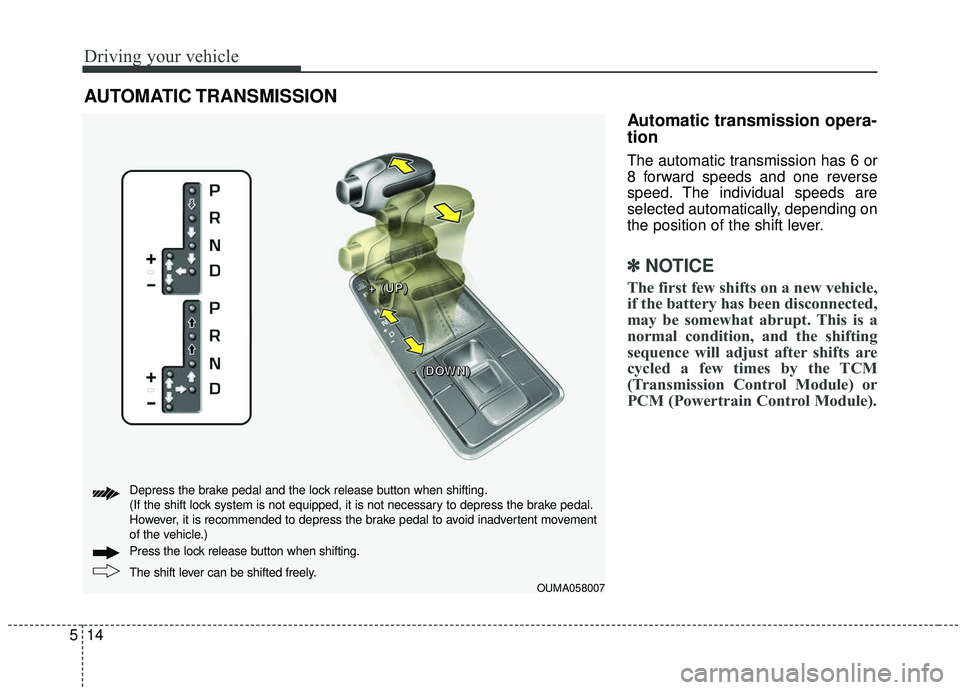
Automatic transmission opera-
tion
The automatic transmission has 6 or
8 forward speeds and one reverse
speed. The individual speeds are
selected automatically, depending on
the position of the shift lever.
✽ ✽
NOTICE
The first few shifts on a new vehicle,
if the battery has been disconnected,
may be somewhat abrupt. This is a
normal condition, and the shifting
sequence will adjust after shifts are
cycled a few times by the TCM
(Transmission Control Module) or
PCM (Powertrain Control Module).
AUTOMATIC TRANSMISSION
OUMA058007
+ +
+ +
( (
( (
U U
U U
P P
P P
) )
) )
- -
- -
( (
( (
D D
D D
O O
O O
W W
W W
N N
N N
) )
) )
The shift lever can be shifted freely. Press the loc
k release button when shifting.
Depress the brake pedal and the lock release button when shifting.
(If the shift lock system is not equipped, it is not necessary to depress the brake pedal.
However, it is recommended to depress the brake pedal to avoid inadvertent movement
of the vehicle.)
Page 295 of 573
Driving your vehicle
18
5
In manual mode, the driver must
execute upshifts in accordance
with road conditions, taking care to
keep the engine speed below the
red zone.
In manual mode, only the 6 or 8 forward gears can be selected. To
reverse or park the vehicle, move
the shift lever to the R (Reverse) or
P (Park) position as required.
In manual mode, downshifts are made automatically when the vehi-
cle slows down. When the vehicle
stops, 1st gear is automatically
selected.
In manual mode, when the engine rpm approaches the red zone shift
points are varied to upshift auto-
matically. To maintain the required levels of
vehicle performance and safety,
the system may not execute cer-
tain gearshifts when the shift lever
is operated.
When driving on a slippery road, push the shift lever forward into the
+(up) position. This causes the
transmission to shift into the 2nd
gear which is better for smooth
driving on a slippery road. Push
the shift lever to the -(down) side to
shift back to the 1st gear.Shift lock system
For your safety, the automatic trans-
mission has a shift lock system
which prevents shifting the transmis-
sion from P (Park) into R (Reverse)
unless the brake pedal is depressed.
To shift the transmission from P
(Park) into R (Reverse):
1.Depress and hold the brake pedal.
2.Start the engine or turn the ignitionswitch to the ON position.
3.Move the shift lever.
If the brake pedal is repeatedly
depressed and released with the
shift lever in the P (Park) position, a
chattering noise near the shift lever
may be heard. It is a normal condi-
tion.
Page 298 of 573

521
Driving your vehicle
Engine power can be delivered to all
front and rear wheels for maximum
traction. AWD is useful when extra
traction is required, such as, when
driving on slippery, muddy, wet, or
snow-covered roads.These vehicles are not designed for
challenging off-road use. Occasional
off-road use such as established
unpaved roads and trails are OK. It is
always important when traveling off-
highway that the driver carefully
reduces the speed to a level that
does not exceed the safe operating
speed for those conditions. In gener-
al, off-road conditions provide less
traction and braking effectiveness
than normal road conditions.
The driver must be especially alert to
avoid driving on slopes which tilt the
vehicle to either side.
These factors must be carefully con-
sidered when driving off-road.
Keeping the vehicle in contact with
the driving surface and under control
in these conditions is always the dri-
ver's responsibility for the safety of
him/herself and his or her passen-
gers.
* AWD : All Wheel Drive
FWD : Front Wheel Drive If the AWD system warning light
( ) illuminates, this indicates that
there is a malfunction in the AWD
system.
If this occurs, have your vehicle
checked by an authorized Kia dealer
as soon as possible.
ALL WHEEL DRIVE (AWD) (IF EQUIPPED)
OUMA054049
OUMA054010
■Type A
■Type B
WARNING- Off road
driving
Do not attempt to operate your
vehicle under extreme or chal-
lenging off road driving condi-
tions. Although this vehicle has
off-road capabilities, it was not
designed to be driven off road.
Page 299 of 573
Driving your vehicle
22
5
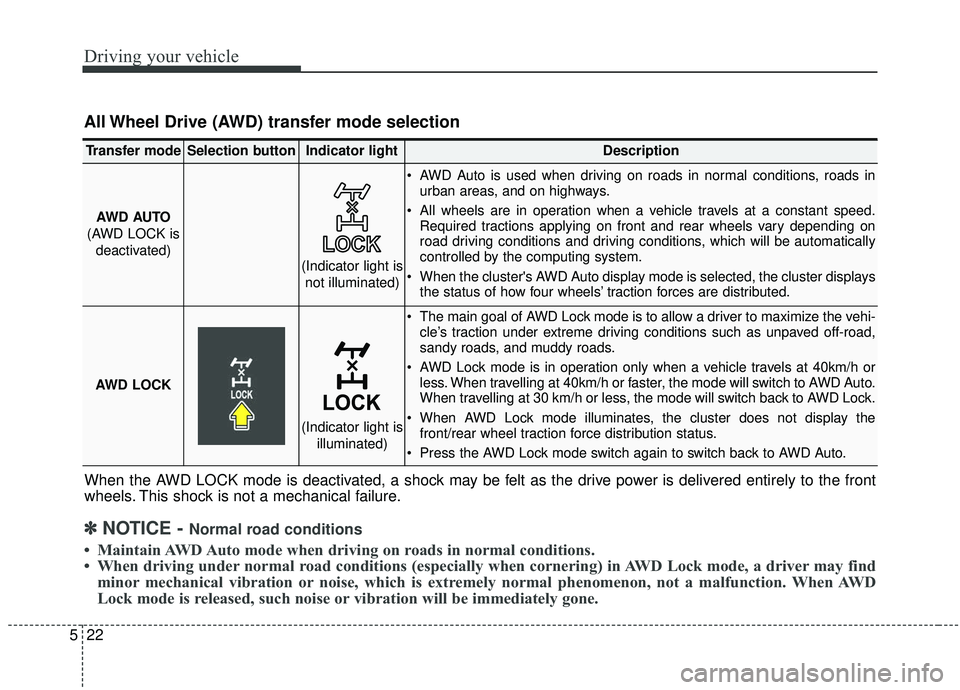
All Wheel Drive (AWD) transfer mode selection
When the AWD LOCK mode is deactivated, a shock may be felt as the drive power is delivered entirely to the front
wheels. This shock is not a mechanical failure.
Transfer modeSelection buttonIndicator lightDescription
AWD AUTO
(AWD LOCK is deactivated) AWD Auto is used when driving on roads in normal conditions, roads in
urban areas, and on highways.
All wheels are in operation when a vehicle travels at a constant speed. Required tractions applying on front and rear wheels vary depending on
road driving conditions and driving conditions, which will be automatically
controlled by the computing system.
When the cluster's AWD Auto display mode is selected, the cluster displays the status of how four wheels’ traction forces are distributed.
AWD LOCK
The main goal of AWD Lock mode is to allow a driver to maximize the vehi- cle’s traction under extreme driving conditions such as unpaved off-road,
sandy roads, and muddy roads.
AWD Lock mode is in operation only when a vehicle travels at 40km/h or less. When travelling at 40km/h or faster, the mode will switch to AWD Auto.
When travelling at 30 km/h or less, the mode will switch back to AWD Lock.
When AWD Lock mode illuminates, the cluster does not display the front/rear wheel traction force distribution status.
Press the AWD Lock mode switch again to switch back to AWD Auto.
(Indicator light is not illuminated)
(Indicator light is illuminated)
✽ ✽NOTICE - Normal road conditions
• Maintain AWD Auto mode when driving on roads in normal conditions.
• When driving under normal road conditions (especially when cornering) in AWD Lock mode, a driver may find
minor mechanical vibration or noise, which is extremely normal phenomenon, not a malfunction. When AWD
Lock mode is released, such noise or vibration will be immediately gone.