2019 KIA K900 tow
[x] Cancel search: towPage 249 of 580
Features of your vehicle
156
4
Sunvisor
Use the sunvisor to shield direct light
through the front or side windows.
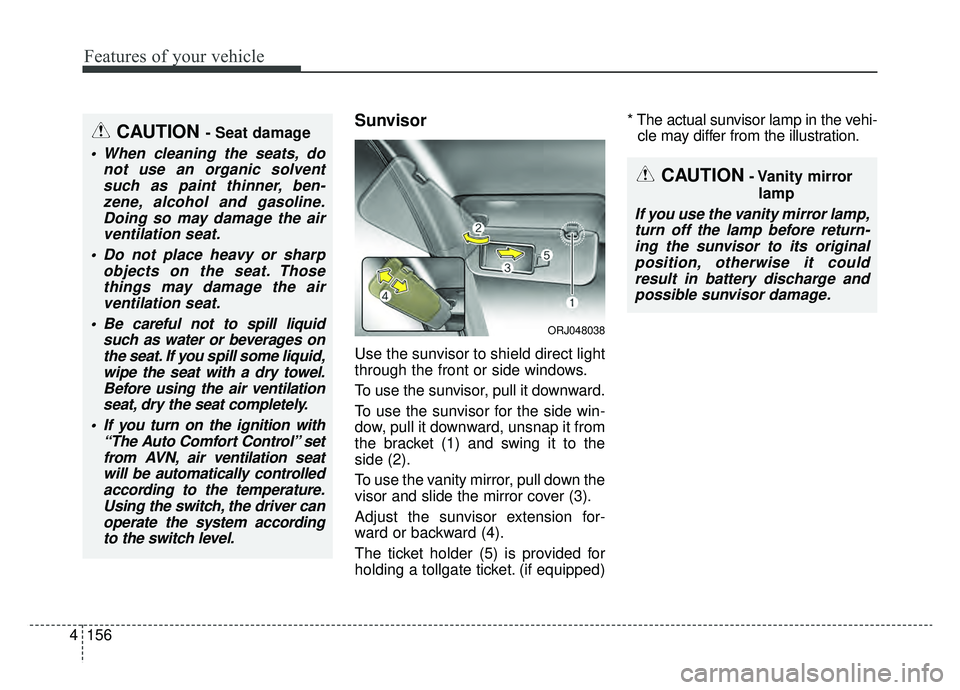
To use the sunvisor, pull it downward.
To use the sunvisor for the side win-
dow, pull it downward, unsnap it from
the bracket (1) and swing it to the
side (2).
To use the vanity mirror, pull down the
visor and slide the mirror cover (3).
Adjust the sunvisor extension for-
ward or backward (4).
The ticket holder (5) is provided for
holding a tollgate ticket. (if equipped) * The actual sunvisor lamp in the vehi-
cle may differ from the illustration.
CAUTION- Vanity mirror
lamp
If you use the vanity mirror lamp,turn off the lamp before return-ing the sunvisor to its originalposition, otherwise it couldresult in battery discharge andpossible sunvisor damage.
CAUTION - Seat damage
When cleaning the seats, do not use an organic solventsuch as paint thinner, ben-zene, alcohol and gasoline.Doing so may damage the airventilation seat.
Do not place heavy or sharp objects on the seat. Thosethings may damage the airventilation seat.
Be careful not to spill liquid such as water or beverages onthe seat. If you spill some liquid,wipe the seat with a dry towel.Before using the air ventilationseat, dry the seat completely.
If you turn on the ignition with “The Auto Comfort Control” setfrom AVN, air ventilation seatwill be automatically controlledaccording to the temperature.Using the switch, the driver canoperate the system accordingto the switch level.
ORJ048038
Page 261 of 580
Features of your vehicle
168
4
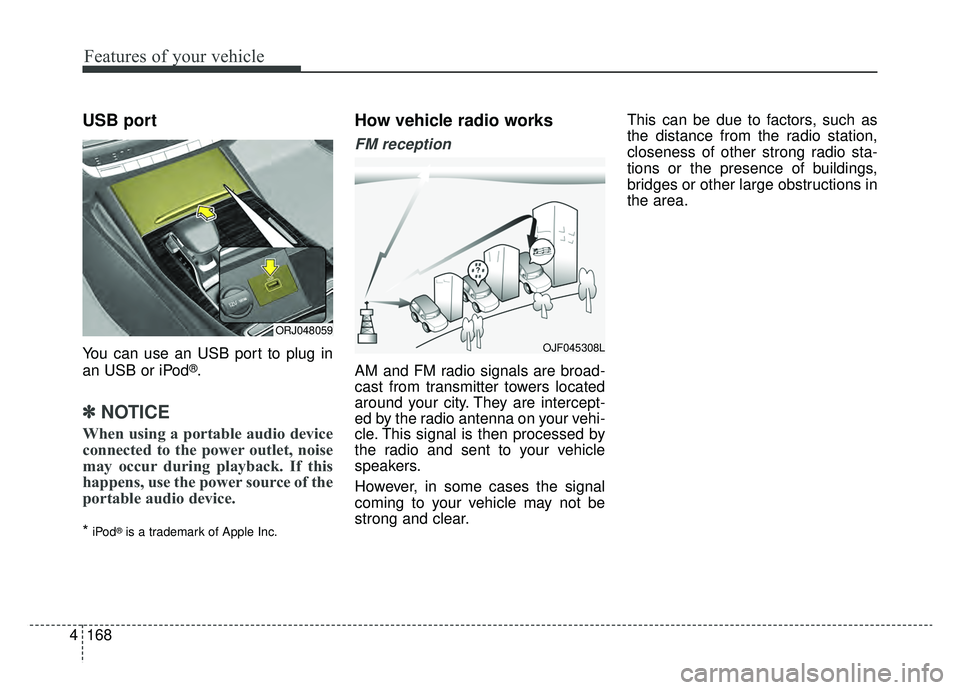
USB port
You can use an USB port to plug in
an USB or iPod®.
✽ ✽
NOTICE
When using a portable audio device
connected to the power outlet, noise
may occur during playback. If this
happens, use the power source of the
portable audio device.
*iPod®is a trademark of Apple Inc.
How vehicle radio works
FM reception
AM and FM radio signals are broad-
cast from transmitter towers located
around your city. They are intercept-
ed by the radio antenna on your vehi-
cle. This signal is then processed by
the radio and sent to your vehicle
speakers.
However, in some cases the signal
coming to your vehicle may not be
strong and clear. This can be due to factors, such as
the distance from the radio station,
closeness of other strong radio sta-
tions or the presence of buildings,
bridges or other large obstructions in
the area.
OJF045308L
ORJ048059
Page 292 of 580

527
Driving your vehicle
✽ ✽NOTICE
• Do not drive in water if the level is
higher than the bottom of the vehi-
cle.
• Check your brake condition once you are out of mud or water.
Depress the brake pedal several
times as you move slowly until you
feel normal braking return.
• Shorten your scheduled mainte- nance interval if you drive in off-
road conditions such as sand, mud
or water (see "Maintenance Under
Severe Usage Conditions" in chap-
ter 7).
• Make sure that AWD vehicle is towed by a flatbed tow truck.
For safe AWD operation
Before driving
Make sure all passengers are
wearing seat belts.
Sit upright and closer to the steer- ing wheel than usual. Adjust the
steering wheel to a position com-
fortable for you to drive.
Driving on snow-covered or icy roads
Start off slowly by applying the accelerator pedal gently.
Use snow tires or tire chains.
Keep sufficient distance between your vehicle and the vehicle in front
of you.
Use engine braking during deceler- ation.
Avoid speeding, rapid acceleration, sudden brake applications, and
sharp turns to prevent skids. Driving in sand or mud
Maintain slow and constant speed.
Use tire chains driving in mud if
necessary.
Keep sufficient distance between your vehicle and the vehicle in front
of you.
Reduce vehicle speed and always check the road condition.
Avoid speeding, rapid acceleration, sudden brake applications, and
sharp turns to prevent getting
stuck.
✽ ✽ NOTICE
When the vehicle is stuck in snow,
sand or mud, place a non-slip mate-
rial under the drive wheels to pro-
vide traction OR slowly spin the
wheels in forward and reverse direc-
tions which causes a rocking motion
that may free the vehicle. See the
Section "Rocking the Vehicle" for
more details. However, avoid run-
ning the engine continuously at high
rpm, which could damage the AWD
system.
Page 294 of 580
529
Driving your vehicle
Towing
AWD vehicles must be towed with a
wheel lift and dollies or flatbed equip-
ment with all the wheels off the
ground. For more information, refer
to "Towing" in chapter 6.
Vehicle inspection
When the vehicle is on a car lift, donot operate the front and rear
wheels separately. All four wheels
should be operated.
Never engage the parking brake while running the engine on a car
lift. This may damage the AWD
system.WARNING
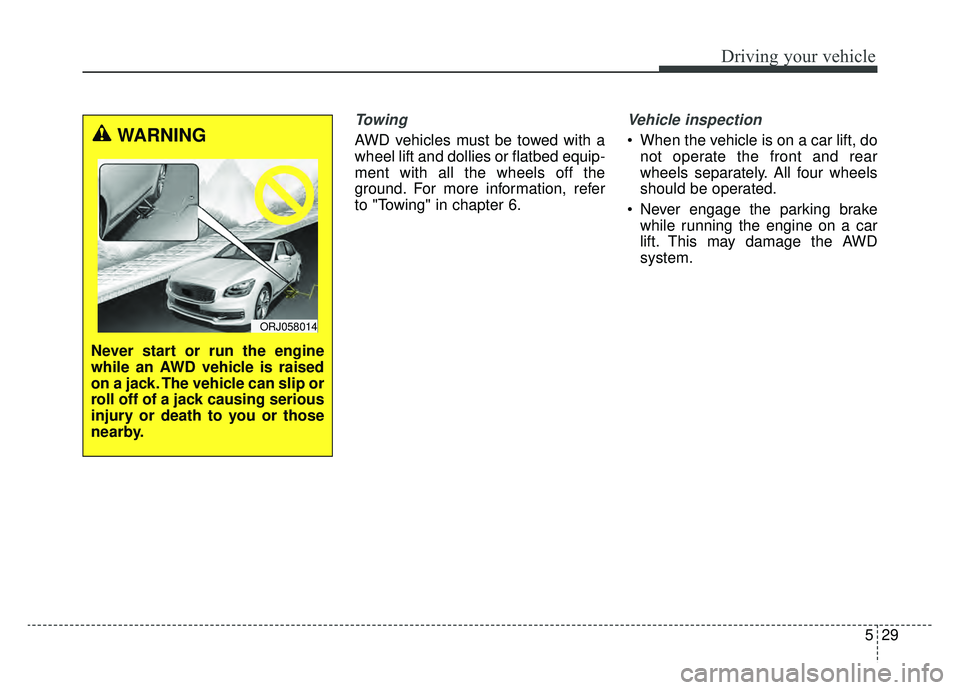
Never start or run the engine
while an AWD vehicle is raised
on a jack. The vehicle can slip or
roll off of a jack causing serious
injury or death to you or those
nearby.
ORJ058014
Page 304 of 580
539
Driving your vehicle
Emergency braking
If there is a problem with the brake
pedal while driving, emergency brak-
ing is possible by pulling up and
holding the EPB switch. Braking is
possible only while you are holding
the EPB switch.
✽ ✽NOTICE
During emergency braking by the
EPB, the parking brake warning
light will illuminate to indicate that
the system is operating.
If you notice a continuous noise or
burning smell when the EPB is used
for emergency braking, have your
vehicle checked by an authorized
K900 Kia dealer.
When the EPB (electronic parking
brake) is not released
If the EPB does not release normal-
ly, take your vehicle to an authorized
K900 Kia dealer by loading the vehi-
cle on a flatbed tow truck and have
the system checked.
AUTO HOLD (if equipped)
The Auto Hold maintains the vehicle
in a standstill even though the brake
pedal is not depressed after the driv-
er brings the vehicle to a complete
stop by depressing the brake pedal.
WARNING
Do not operate the electronic
parking brake while the vehicle
is moving except in an emer-
gency situation. Applying the
electronic parking brake while
the vehicle is moving at normal
speeds can cause a sudden
loss of control of the vehicle. If
you must use the electronic
parking brake to stop the vehi-
cle, use great caution in apply-
ing the brake.
Page 326 of 580
561
Driving your vehicle
(Continued)
Even if there is any problemwith the brake control func-
tion of the FCA system, the
vehicle's basic braking per-
formance will operate normal-
ly. However, brake control
function for avoiding collision
will not activate.
If the vehicle in front stops suddenly, you may have less
control of the brake system.
Therefore, always keep a safe
distance between your vehicle
and the vehicle in front of you.
The FCA system may activate during braking and the vehi-
cle may stop suddenly shift-
ing loose objects toward the
passengers. Always keep
loose objects secured.
The FCA system may not acti- vate if the driver applies the
brake pedal to avoid the risk
of a collision.
(Continued)(Continued)
The brake control may beinsufficient, possibly causing
a collision, if a vehicle in front
abruptly stops. Always pay
extreme caution.
The FCA system may not acti- vate according to the road
conditions, inclement weath-
er, driving conditions or traffic
conditions.
Occupants may get injured, if the vehicle abruptly stops by
the activated FCA system. Pay
extreme caution.
The FCA system operates only to detect vehicles in front
of the vehicle.WARNING
The FCA system operatesonly to help detect vehicles or
pedestrians in front of the
vehicle.
The FCA system does not operate when the vehicle is in
reverse.
The FCA system is not designed to detect other
objects on the road such as
animals.
The FCA system does not detect vehicles in the oppo-
site lane.
The FCA system does not detect cross traffic vehicles
that are approaching.
The FCA system cannot detect the driver approaching
the side view of a parked vehi-
cle (for example on a dead
end street.)
(Continued)
Page 328 of 580
563
Driving your vehicle
The camera's field of view is notwell illuminated (either too dark or
too much reflection or too much
backlight that obscures the field of
view)
The vehicle in front does not have their rear lights or their rear lights
does not turned ON or their rear
lights are located unusually.
The outside brightness changes suddenly, for example when enter-
ing or exiting a tunnel
When light coming from a street light or an oncoming vehicle is
reflected on a wet road surface
such as a puddle in the road
The field of view in front is obstructed by sun glare
The windshield glass is fogged up; a clear view of the road is obstructed
The vehicle in front is driving erratically
The vehicle is on unpaved or uneven rough surfaces, or road
with sudden gradient changes. The vehicle is driven near areas
containing metal substances as a
construction zone, railroad, etc.
The vehicle drives inside a build- ing, such as a basement parking
lot
The camera does not recognize the entire vehicle in front.
The camera is damaged.
The brightness outside is too low such as when the headlamps are
not on at night or the vehicle is
going through a tunnel.
A shadow is on the road by a medi- an strip, trees, etc.
The vehicle drives through a toll- gate.
The rear part of the vehicle in front is not fully visible. (the vehicle turns
in other direction or the vehicle is
overturned.)
Adverse road conditions cause excessive vehicle vibrations while
driving
The sensor recognition changes suddenly when passing over a
speed bump The vehicle in front is moving verti-
cally to the driving direction
The vehicle in front is stopped ver- tically
The vehicle in front is driving towards your vehicle or reversing
You are on a roundabout and the vehicle in front circles
Page 332 of 580
567
Driving your vehicle
- When the vehicle is severely shak-en,
- When driving around circular inter- section after the vehicle in front,
- If the front of the camera lens is contaminated by front glass tinting,
film, water repellent coating, dam-
age on glass, foreign matter (stick-
er, insect, etc.)
- The radar or camera or camera lens is damaged.
- If the headlights of the vehicle are not used at night or in the tunnel
section, or the light is too weak
- If street light or the light of the vehi- cle coming from the opposite is
reflected or when sunlight is
reflected by the water on the road
surface
- When the back light is projected in the direction of the vehicle's motion
(including the headlights of vehi-
cles)
- Road sign, shadow on the road, tunnel entrance, toll gate, partial
pavement - If the windshield has moisture on
its surface or if windshield freezes,
- Driving in the fog.
- When objects are out of the sens- ing range of the sensor or radar.
- When the cyclist in front is riding intersected with the driving direc-
tion
- When there is any other electro- magnetic interference
- When the construction area, rail or other metal object is near the
cyclist
- If the bicycle material is not reflect- ed well on the radar
WARNING
Do not use the ForwardCollision avoidance Assist
(FCA) system when towing a
vehicle. Application of the
FCA system while towing may
adversely affect the safety of
your vehicle or the towing
vehicle.
Use extreme caution when the vehicle in front of you has
cargo that extends rearward
from the cab, or when the
vehicle in front of you has
higher ground clearance.
The FCA system is designed to detect and monitor the vehicle
ahead in the roadway through
radar signals and camera
recognition. It is not designed
to detect bicycles, motorcy-
cles, or smaller wheeled
objects such as luggage bags,
shopping carts, or strollers.
(Continued)