2019 Hyundai Tucson lock
[x] Cancel search: lockPage 108 of 685
3-16
Convenient features of your vehicle
Operating door locks from
inside the vehicle
With the door lock button
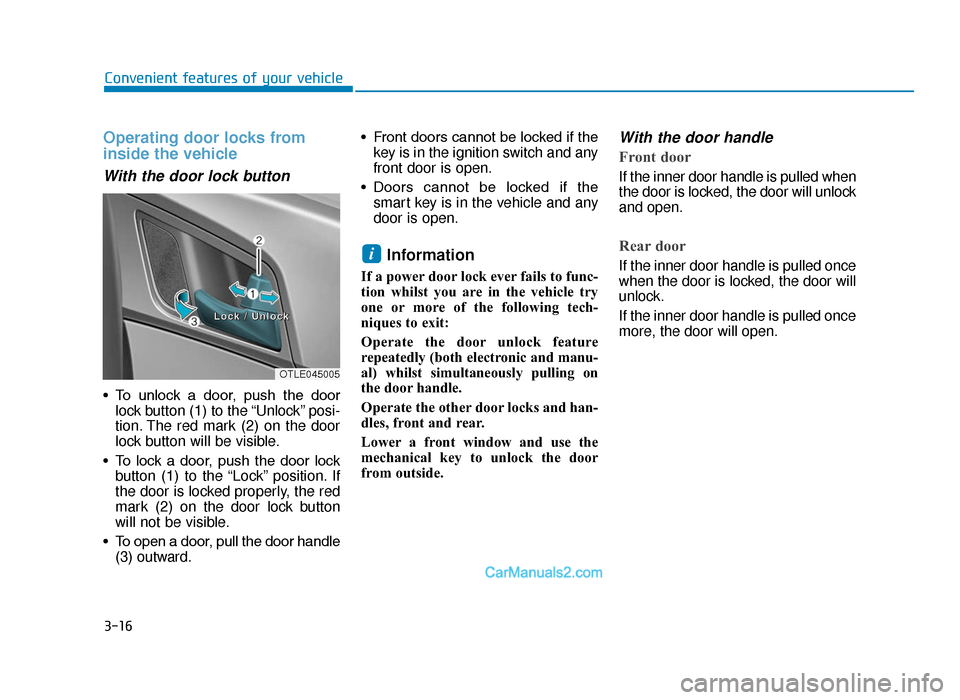
• To unlock a door, push the doorlock button (1) to the “Unlock” posi-
tion. The red mark (2) on the door
lock button will be visible.
• To lock a door, push the door lock button (1) to the “Lock” position. If
the door is locked properly, the red
mark (2) on the door lock button
will not be visible.
• To open a door, pull the door handle (3) outward. • Front doors cannot be locked if the
key is in the ignition switch and any
front door is open.
• Doors cannot be locked if the smart key is in the vehicle and any
door is open.
Information
If a power door lock ever fails to func-
tion whilst you are in the vehicle try
one or more of the following tech-
niques to exit:
Operate the door unlock feature
repeatedly (both electronic and manu-
al) whilst simultaneously pulling on
the door handle.
Operate the other door locks and han-
dles, front and rear.
Lower a front window and use the
mechanical key to unlock the door
from outside.
With the door handle
Front door
If the inner door handle is pulled when
the door is locked, the door will unlock
and open.
Rear door
If the inner door handle is pulled once
when the door is locked, the door will
unlock.
If the inner door handle is pulled once
more, the door will open.i
OTLE045005
L
Loocckk
//
UUnnlloocckk
TLe UK 3a(~109).qxp 6/12/2018 2:21 PM Page 16
Page 109 of 685
3-17
Convenient features of your vehicle
3
With the central door lock switch
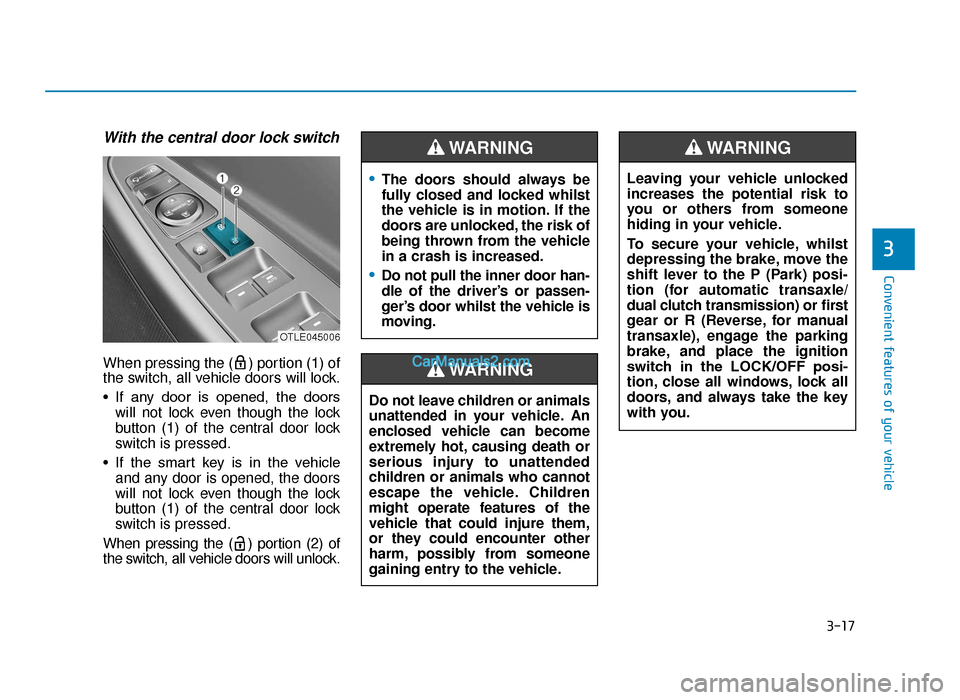
When pressing the ( ) portion (1) of
the switch, all vehicle doors will lock.
• If any door is opened, the doorswill not lock even though the lock
button (1) of the central door lock
switch is pressed.
• If the smart key is in the vehicle and any door is opened, the doors
will not lock even though the lock
button (1) of the central door lock
switch is pressed.
When pressing the ( ) portion (2) of
the switch, all vehicle doors will unlock.
OTLE045006
•The doors should always be
fully closed and locked whilst
the vehicle is in motion. If the
doors are unlocked, the risk of
being thrown from the vehicle
in a crash is increased.
•Do not pull the inner door han-
dle of the driver’s or passen-
ger’s door whilst the vehicle is
moving.
WARNING
Do not leave children or animals
unattended in your vehicle. An
enclosed vehicle can become
extremely hot, causing death or
serious injury to unattended
children or animals who cannot
escape the vehicle. Children
might operate features of the
vehicle that could injure them,
or they could encounter other
harm, possibly from someone
gaining entry to the vehicle.
WARNING
Leaving your vehicle unlocked
increases the potential risk to
you or others from someone
hiding in your vehicle.
To secure your vehicle, whilst
depressing the brake, move the
shift lever to the P (Park) posi-
tion (for automatic transaxle/
dual clutch transmission) or first
gear or R (Reverse, for manual
transaxle), engage the parking
brake, and place the ignition
switch in the LOCK/OFF posi-
tion, close all windows, lock all
doors, and always take the key
with you.
WARNING
TLe UK 3a(~109).qxp 6/12/2018 2:21 PM Page 17
Page 110 of 685
3-18
Convenient features of your vehicle
Deadlocks (if equipped)
Some vehicles are equipped with a
deadlock system. Deadlocks prevent
opening of a door from either inside
or outside the vehicle once the dead-
locks have been activated providing
an additional measure of vehicle
security.
To lock the vehicle using the dead-
lock function, the doors must be
locked by using the remote key or
smart key. To unlock the vehicle, the
transmitter or smart key must be
used again.
Auto door lock/unlock features
Impact sensing door unlocksystem (if equipped)
All doors will be automatically unlocked
when an impact causes the air bags to
deploy.
Speed sensing door lock system(if equipped)
All doors will be automatically locked
when vehicle speed exceeds 9 mph
(15 km/h).
You can activate or deactivate the
Auto Door Lock/Unlock features from
the User Settings Mode on the LCD
display. For more details, refer to
"LCD Display" in this chapter.
Do not lock the doors with the
remote key or the smart key with
anybody left in the vehicle. The
passenger in the vehicle cannot
unlock the doors with the door
lock button. For example, if the
door is locked with the remote
key, the passenger in the vehicle
cannot unlock the door without
the transmitter.
WARNING
Opening a door when something
is approaching may cause dam-
age or injury. Be careful when
opening doors and watch for
vehicles, motorcycles, bicycles
or pedestrians approaching the
vehicle in the path of the door.
WARNING
If you stay in the vehicle for a
long time whilst the weather is
very hot or cold, there are risks
of injuries or danger to life. Do
not lock the vehicle from the out-
side when someone is in the
vehicle.
WARNING
TLe UK 3a(~109).qxp 6/12/2018 2:21 PM Page 18
Page 111 of 685
3-19
Convenient features of your vehicle
3
Child-protector rear door locks
The child safety lock is provided to
help prevent children seated in the
rear from accidentally opening the
rear doors. The rear door safety locks
should be used whenever children
are in the vehicle.
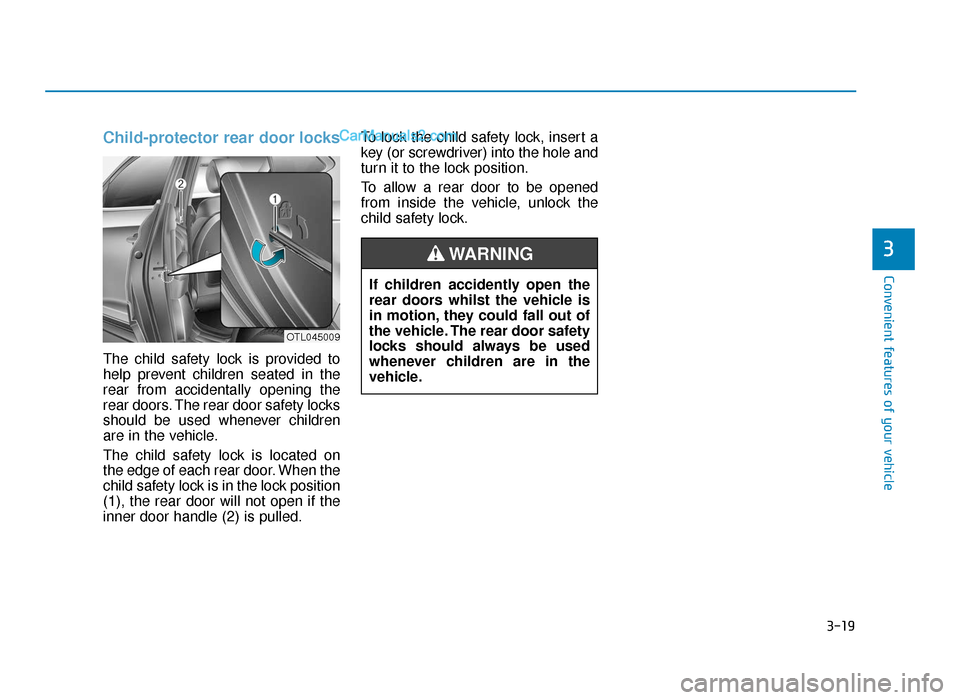
The child safety lock is located on
the edge of each rear door. When the
child safety lock is in the lock position
(1), the rear door will not open if the
inner door handle (2) is pulled.To lock the child safety lock, insert a
key (or screwdriver) into the hole and
turn it to the lock position.
To allow a rear door to be opened
from inside the vehicle, unlock the
child safety lock.
OTL045009
If children accidently open the
rear doors whilst the vehicle is
in motion, they could fall out of
the vehicle. The rear door safety
locks should always be used
whenever children are in the
vehicle.
WARNING
TLe UK 3a(~109).qxp 6/12/2018 2:21 PM Page 19
Page 112 of 685
3-20
Convenient features of your vehicle
This system helps to protect your
vehicle and valuables. The horn will
sound and the hazard warning lights
will blink continuously if any of the
following occurs:
- A door is opened without using the remote key or smart key.
- The tailgate is opened without using the remote key or smart key.
- The engine bonnet is opened.
The alarm continues for 30 seconds,
then the system resets. To turn off
the alarm, unlock the doors with the
remote key or smart key.
The Theft Alarm System automatical-
ly sets 30 seconds after you lock the
doors and the tailgate. For the system
to activate, you must lock the doors
and the tailgate from outside the vehi-
cle with the remote key or smart key
or by pressing the button on the out-
side of the door handles with the
smart key in your possession.
The hazard warning lights will blink
and the chime will sound once to
indicate the system is armed. Once the security system is set, open-
ing any door, the tailgate, or the bon-
net without using the remote key or
smart key will cause the alarm to acti-
vate.
The Theft Alarm System will not set if
the bonnet, the tailgate, or any door
is not fully closed. If the system will
not set, check the bonnet, the tail-
gate, or the doors are fully closed.
Do not attempt to alter this system or
add other devices to it.
Information
• Do not lock the doors until all pas-
sengers have left the vehicle. If the
remaining passenger leaves the
vehicle when the system is armed,
the alarm will be activated.
• If the vehicle is not disarmed with the remote key or smart key, open
the doors by using the mechanical
key and place the ignition switch in
the ON position (for remote key) or
start the engine (for smart key) and
wait for 30 seconds.
• When the system is disarmed but a door or tailgate is not opened within 30
seconds, the system will be rearmed.
i
THEFT-ALARM SYSTEM (IF EQUIPPED)
TLe UK 3a(~109).qxp 6/12/2018 2:21 PM Page 20
Page 114 of 685
3-22
Convenient features of your vehicle
STEERING WHEEL
Electric power steering (EPS)
The system assists you with steering
the vehicle. If the engine is off or if
the power steering system becomes
inoperative, the vehicle may still be
steered, but it will require increased
steering effort.
Also, the steering effort becomes
heavier as the vehicle’s speed
increases and becomes lighter as
the vehicle’s speed decreases for
better control of the steering wheel.
Should you notice any change in the
effort required to steer during normal
vehicle operation, we recommend
that the system be checked by a
HYUNDAI authorised repairer.If the Electric Power Steering System
does not operate normally, the warn-
ing light ( ) will illuminate on the
instrument cluster. The steering
wheel may become difficult to con-
trol or operate. We recommend to
take your vehicle to a HYUNDAI
authorised repairer and have the sys-
tem checked as soon as possible.
Information
The following symptoms may occur
during normal vehicle operation:
• The steering effort may be highimmediately after placing the igni-
tion switch in the ON position.
This happens as the system per-
forms the EPS system diagnostics.
When the diagnostics is completed,
the steering wheel will return to its
normal condition.
(Continued)(Continued)
• A click noise may be heard from the
EPS relay after the ignition switch is
placed to the ON or LOCK/OFF
position.
A click noise may be heard from the
EPS relay after the Engine Start/Stop
button is in the ON or OFF position.
(With Smart key system)
• Motor noise may be heard when the vehicle is at a stop or at a low driv-
ing speed.
• When you operate the steering wheel in low temperature, the steer-
ing effort may be high and abnor-
mal noise may occur. If temperature
rises, the noise will disappear. This
is a normal condition.
• When the vehicle is stationary, if you turn the steering wheel all the
way to the left or right continuously,
the steering wheel effort increases.
This is not a system malfunction. As
time passes, the steering wheel
effort will return to its normal con-
dition.
i
NOTICE
TLe UK 3a(~109).qxp 6/12/2018 2:21 PM Page 22
Page 115 of 685
3-23
Convenient features of your vehicle
3
Tilt steering / Telescope steeringInformation
After adjustment, sometimes the lock-
release lever may not lock the steering
wheel.
It is not a malfunction. This occurs
when two gears are not engaged cor-
rectly. In this case, adjust the steering
wheel again and then lock the steering
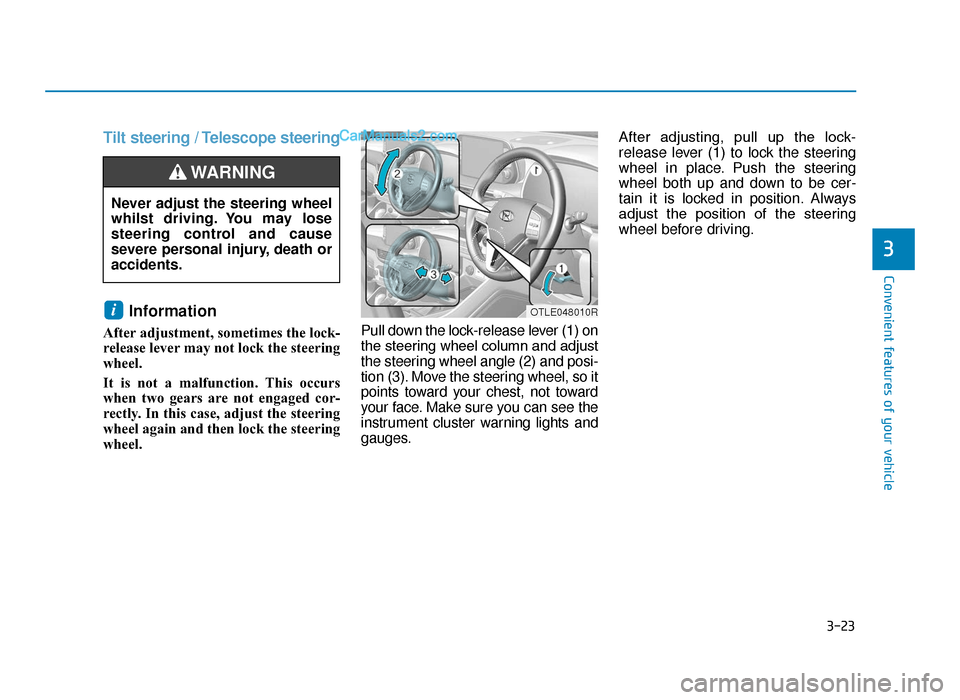
wheel. Pull down the lock-release lever (1) on
the steering wheel column and adjust
the steering wheel angle (2) and posi-
tion (3). Move the steering wheel, so it
points toward your chest, not toward
your face. Make sure you can see the
instrument cluster warning lights and
gauges.After adjusting, pull up the lock-
release lever (1) to lock the steering
wheel in place. Push the steering
wheel both up and down to be cer-
tain it is locked in position. Always
adjust the position of the steering
wheel before driving.
i
Never adjust the steering wheel
whilst driving. You may lose
steering control and cause
severe personal injury, death or
accidents.
WARNING
OTLE048010R
TLe UK 3a(~109).qxp 6/12/2018 2:21 PM Page 23
Page 123 of 685
3-31
Convenient features of your vehicle
3
Electric type (if equipped)
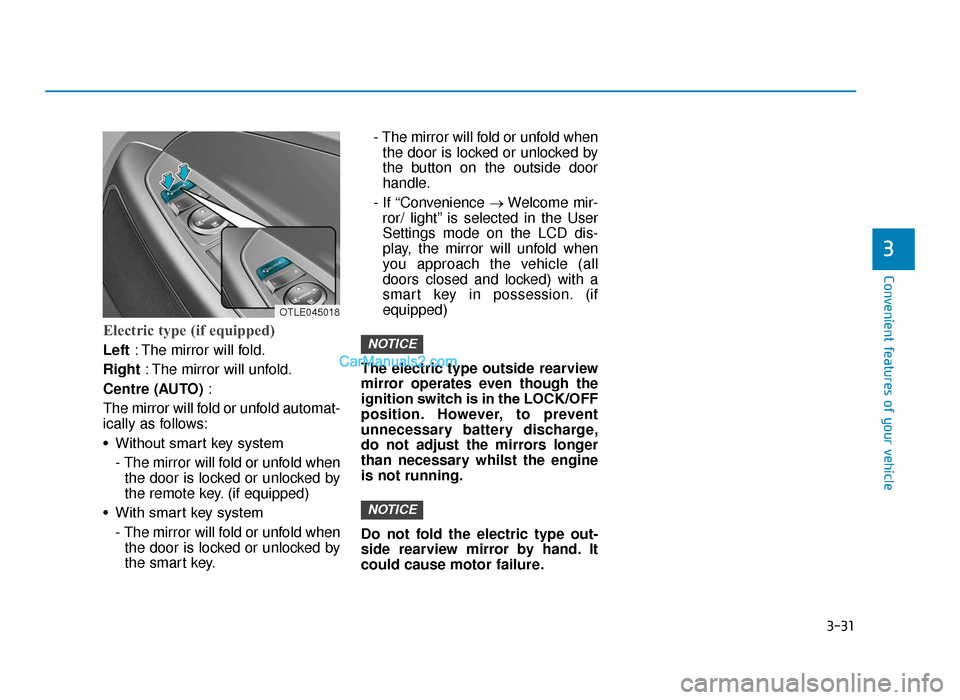
Left: The mirror will fold.
Right : The mirror will unfold.
Centre (AUTO) :
The mirror will fold or unfold automat-
ically as follows:
• Without smart key system - The mirror will fold or unfold whenthe door is locked or unlocked by
the remote key. (if equipped)
• With smart key system - The mirror will fold or unfold whenthe door is locked or unlocked by
the smart key. - The mirror will fold or unfold when
the door is locked or unlocked by
the button on the outside door
handle.
- If “Convenience →Welcome mir-
ror/ light” is selected in the User
Settings mode on the LCD dis-
play, the mirror will unfold when
you approach the vehicle (all
doors closed and locked) with a
smart key in possession. (if
equipped)
The electric type outside rearview
mirror operates even though the
ignition switch is in the LOCK/OFF
position. However, to prevent
unnecessary battery discharge,
do not adjust the mirrors longer
than necessary whilst the engine
is not running.
Do not fold the electric type out-
side rearview mirror by hand. It
could cause motor failure.
NOTICE
NOTICE
OTLE045018
TLe UK 3a(~109).qxp 6/12/2018 2:22 PM Page 31