Page 197 of 546
3-61
Convenient features of your vehicle
3
Warning and indicator lights
Ready Indicator
This indicator illuminates :
When the vehicle is ready to be driv- en.
- ON : Normal driving is possible.
- OFF : Normal driving is not possible,
or a problem has occurred.
- Blinking : Limp home driving mode. When the ready indicator goes OFF
or blinks, there is a problem with the
system. In this case, have your vehi-
cle inspected by an authorized
HYUNDAI dealer.
Service Warning Light
This warning light illuminates :
When the Engine Start/Stop button is in the ON position.
- It normally flashes on momentar-ily for 3 seconds at Ready On and
should then stay off.
When there is a problem with the hybrid vehicle control system or
hardware.
When the warning light illuminates
while driving, or does not go OFF
after starting the vehicle have your
vehicle inspected by an authorized
HYUNDAI dealer.
EV Mode Indicator
This indicator illuminates when the
vehicle is driven by the electric
motor.
EV
Page 200 of 546

3-64
Convenient features of your vehicle
Regenerative BrakeWarning Light
This warning light illuminates :
When the regenerative brake does
not operate and the brake does not
perform well. This causes the Brake
Warning light (red) and Regenerative
Brake Warning Light (yellow) to illu-
minate simultaneously.
In this case, drive safely and have
your vehicle inspected by an author-
ized HYUNDAI dealer.
Anti-lock Brake System(ABS) Warning Light
This warning light illuminates in
one of the following situations:
When the Engine Start/Stop button is in the ON position.
- It illuminates for approximately 3seconds and then goes off.
When there is a malfunction with the ABS (The normal braking sys-
tem is still operational without the
assistance of the anti-lock brakesystem).
In this case, have the vehicle
inspected by an authorized
HYUNDAI dealer.
Electronic Brake force
Distribution (EBD)
System Warning Light
These two warning lights illuminate
at the same time while driving:
When the ABS and regular brake
system may not work normally.
In this case, have your vehicle
inspected by an authorized
HYUNDAI dealer.
(yellow color)
(red color)
The operation of the brake
pedal may be more difficult thannormal and the braking dis-
tance can increase.
WARNING
Page 201 of 546
3-65
Convenient features of your vehicle
3
Information
When the ABS warning light illumi-
nates, or when both the ABS and the
Parking Brake & Brake Fluid warn-
ing lights illuminate, the speedometer,
the odometer, or the tripmeter may
not properly operate. Also, the EPS
warning light may illuminate and the
steering effort may increase or
decrease.
In this case, have the vehicle inspected
by an authorized HYUNDAI dealer as
soon as possible.Electronic Parking Brake (EPB) Warning
Light (if equipped)
This warning light illuminates:
When the Engine Start/Stop button is in the ON position.
- It illuminates for approximately 3seconds and then goes off.
When there is a malfunction with the EPB.
In this case, have the vehicle
inspected by an authorized
HYUNDAI dealer.
Information
The Electronic Parking Brake (EPB)
warning light may illuminate, when
the Electronic Stability Control (ESC)
indicator illuminates due to ESC mal-
function (This does not indicate EPB
malfunction).
i
i
When both the ABS and Parking
Brake & Brake Fluid Warning
Lights are on, the brake system
will not work normally and you
may experience an unexpected
and dangerous situation during
sudden braking.
In this case, avoid high speed driving and abrupt braking.
Have the vehicle inspected by
an authorized HYUNDAI dealer
as soon as possible.
WARNINGEPB
Page 207 of 546
3-71
Convenient features of your vehicle
3
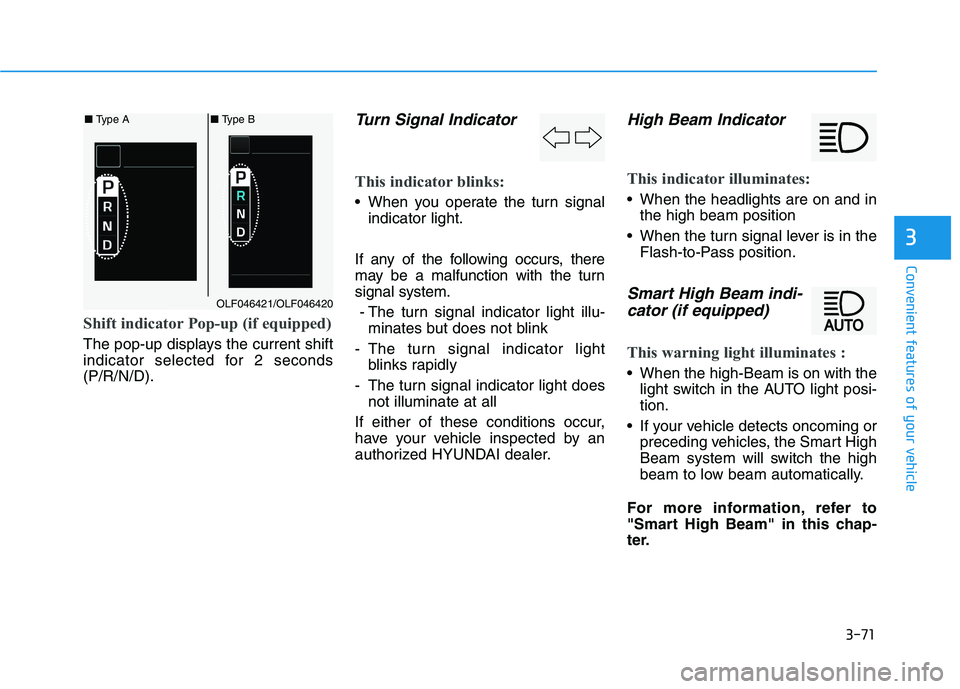
Shift indicator Pop-up (if equipped)
The pop-up displays the current shift
indicator selected for 2 seconds(P/R/N/D).
Turn Signal Indicator
This indicator blinks:
When you operate the turn signalindicator light.
If any of the following occurs, there
may be a malfunction with the turnsignal system. - The turn signal indicator light illu- minates but does not blink
- The turn signal indicator light blinks rapidly
- The turn signal indicator light does not illuminate at all
If either of these conditions occur,
have your vehicle inspected by an
authorized HYUNDAI dealer.
High Beam Indicator
This indicator illuminates:
When the headlights are on and in the high beam position
When the turn signal lever is in the Flash-to-Pass position.
Smart High Beam indi-
cator (if equipped)
This warning light illuminates :
When the high-Beam is on with the light switch in the AUTO light posi- tion.
If your vehicle detects oncoming or preceding vehicles, the Smart High
Beam system will switch the high
beam to low beam automatically.
For more information, refer to
"Smart High Beam" in this chap-
ter.
■ Type A■ Type B
OLF046421/OLF046420
Page 208 of 546
3-72
Convenient features of your vehicle
Light ON Indicator
This indicator illuminates:
When the tail lights and headlightsare on.
Cruise Indicator Light
This indicator illuminates:
When the cruise control system isON.
For more information, refer to
"Cruise Control System" in chap-ter 5.
Cruise SET Indicator
This indicator illuminates:
When the cruise control speed is set.
For more information, refer to
"Cruise Control System" in chap-ter 5.
AUTO HOLD Indicator
This indicator illuminates:
[White] When you activate the auto hold system by pressing the AUTO
HOLD button.
[Green] When you completely stop the vehicle by depressing the
brake pedal with the auto hold sys-
tem activated.
[Yellow] When there is a malfunc- tion with the auto hold system.
In this case, have the vehicle
inspected by an authorized
HYUNDAI dealer.
For more information, refer to
"Auto Hold" in chapter 5.
SET
CRUISE
AUTO
HOLD
Page 224 of 546
3-88
Convenient features of your vehicle
Warning Message Mode
If one of followings occurs, warning
messages will be displayed on the
information mode for several sec-
onds.
- Malfunction of below systems
- Low washer fluid (if equipped)
(TPMS)
system (AEB)
User settings mode
In this mode, you can change the
setting of the instrument cluster,
doors, lamps, etc.
1. Driving Assist
2. Door
3. Lights
4. Sound
5. Convenience
6. Service interval
7. Other features
8. Reset
The information provided differs
according to the items applied to
your vehicle. 1. Driving Assist
LKAS (Lane Keeping Assist
System)
- Lane Departure Warning/Standard LKA/Active LKA
To adjust the sensitivity of the Lane
Keeping Assist System.
For more information, refer to the
"Lane Keeping Assist System" in
chapter 5.
DAA (Driver Attention Alert)
To adjust the sensitivity of the Driver
Attention Alert (DAA).
- Off/Normal/Early
For more information, refer to the
"Driver Attention Alert (DAA)" in
chapter 5.
Page 226 of 546
3-90
Convenient features of your vehicle
Automatic Unlock
- Disable: The auto door unlockoperation will be canceled.
- Vehicle Off: All doors will be auto- matically unlocked when the
Engine Star/Stop button is set to
the OFF position. (if equipped with
smart key)
- On Key Out: All doors will be auto- matically unlocked when the igni-
tion key is removed from the igni-
tion switch. (if equipped with
remote key)
- Driver Door Unlock: All doors will be automatically unlocked when
the driver’s door is opened.
- On Shift to P: All doors will be auto- matically unlocked if the automatic
transmission shift lever is shifted to
the P (Park) position.
Smart Trunk
To activate or deactivate the Smart
Trunk system.
For more details, refer to "Smart
Trunk" in this chapter. 3. Lights
One Touch Turn Signal
- Off: The one touch turn signal func-
tion will be deactivated.
- 3, 5, 7 Flashes: The turn signal indicator will blink 3, 5, or 7 times
when the turn signal lever is moved
slightly.
For more information, refer to
"Light" in this chapter.
Head Lamp Delay
To activate or deactivate the head-
lamp delay function.
For more information, refer to
"Light" in this chapter
Welcome Light
To activate or deactivate the wel- come light function.
For more information, refer to
"Light" in this chapter. 4. Sound
Park Assist Volume
- Softer/Louder
To adjust the Park Assist System
volume.
Welcome Sound
To activate or deactivate the wel- come sound.
Page 227 of 546
3-91
Convenient features of your vehicle
3
5. Convenience
Seat Easy Access
- Off: The seat easy access functionis deactivated.
- Normal/Extended: When you turn off the engine, the driver's seat will
automatically move rearward short
(Normal) or long (Extended) for
you to enter or exit the vehicle
more comfortably.
For more information, refer to
"Driver Position Memory System"
in this chapter. Wireless Charging System
To activate or deactivate the wireless charging system in the front seat.
For more information, refer to
"Wireless Charging System" in
this chapter.
Wiper/Lights Display
To activate or deactivate the Wiper/
Light mode.
When activated, the LCD display
shows the selected Wiper/Light
mode whenever you changed the
mode.
Gear Position Pop-up
To activate or deactivate the gear
position pop-up.
When activated, the gear position
will be displayed on the LCD display.6. Service Interval
Enabled service Interval
To activate or deactivate the service
interval function.
Adjust Interval
If the service interval menu is acti-
vated, you may adjust the time and
distance.
Information
To use the service interval menu, con-
sult an authorized HYUNDAI dealer.
i