2019 Hyundai Kona EV Button
[x] Cancel search: ButtonPage 276 of 540

5-43
Driving your vehicle
5
ESC operation
ESC ON condition
When the POWER button is in the
ON position, the ESC and the ESC
OFF indicator lights illuminate for
approximately three seconds. After
both lights go off, the ESC is
enabled.
When operating
When the ESC is in opera-
tion, the ESC indicator light
blinks:
conditions which may lock the
wheels, you may hear sounds from
the brakes, or feel a corresponding
sensation in the brake pedal. This is
normal and it means your ESC is
active.
cle may not respond to the acceler-
ator as it does under routine condi-
tions.
when the ESC activates, the Cruise
Control automatically disengages.
The Cruise Control can be reen-
gaged when the road conditions
allow. See "Cruise Control System"
later in this chapter.
ESC OFF condition
To cancel ESC operation :
Press the ESC OFF button briefly.
The ESC OFF indicator light and
message "Traction Control disabled"
will illuminate. In this state, the trac-
tion control function of ESC is dis-
abled, but the brake control function
of ESC still operates.
OIK057082L
Page 277 of 540
5-44
Driving your vehicle
Press and hold the ESC OFF button
continuously for more than 3 sec-
onds. The ESC OFF indicator light
and message "Traction & Stability
Control disabled" illuminates and a
warning chime sounds. In this state,
both the traction control function of
ESC and the brake control function
of ESC are disabled.
If the POWER button is pressed to
the OFF position when ESC is off,
ESC remains off. Upon restarting the
vehicle, the ESC will automatically
turn on again.
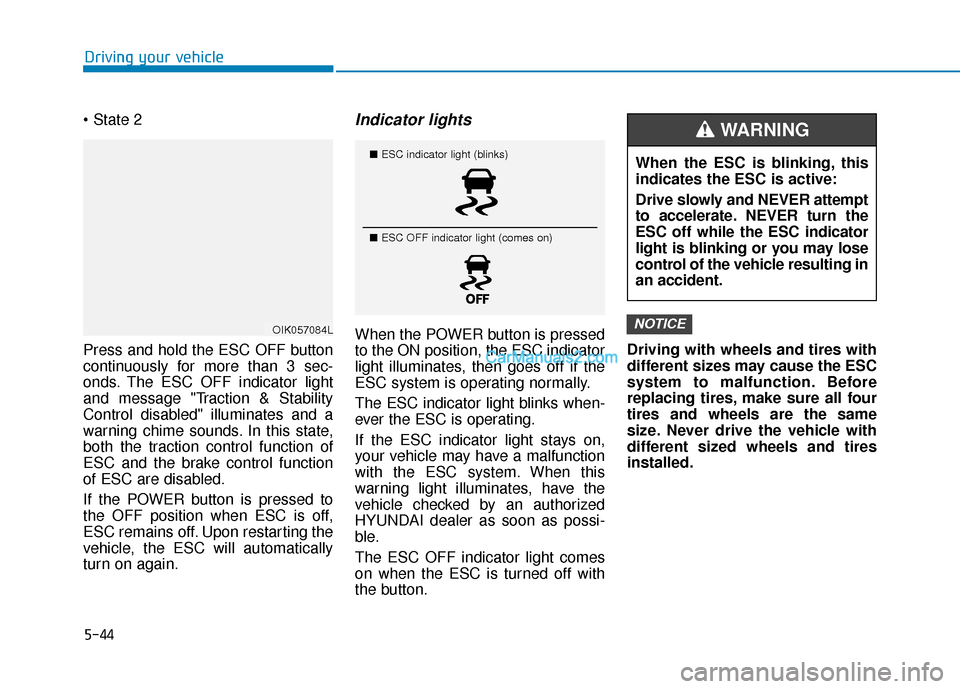
Indicator lights
When the POWER button is pressed
to the ON position, the ESC indicator
light illuminates, then goes off if the
ESC system is operating normally.
The ESC indicator light blinks when-
ever the ESC is operating.
If the ESC indicator light stays on,
your vehicle may have a malfunction
with the ESC system. When this
warning light illuminates, have the
vehicle checked by an authorized
HYUNDAI dealer as soon as possi-
ble.
The ESC OFF indicator light comes
on when the ESC is turned off with
the button. Driving with wheels and tires with
different sizes may cause the ESC
system to malfunction. Before
replacing tires, make sure all four
tires and wheels are the same
size. Never drive the vehicle with
different sized wheels and tires
installed.NOTICEOIK057084L
■
ESC indicator light (blinks)
■ ESC OFF indicator light (comes on)When the ESC is blinking, this
indicates the ESC is active:
Drive slowly and NEVER attempt
to accelerate. NEVER turn the
ESC off while the ESC indicator
light is blinking or you may lose
control of the vehicle resulting in
an accident.
WARNING
Page 278 of 540
5-45
Driving your vehicle
5
ESC OFF usage
When Driving
The ESC OFF mode should only be
used briefly to help free the vehicle if
stuck in snow or mud, by temporarily
stopping operation of the ESC, to
maintain wheel torque.
To turn ESC off while driving, press
the ESC OFF button while driving on
a flat road surface. Do not allow wheel(s) of one
axle to spin excessively while
the ESC, ABS, and parking brake
warning lights are displayed.
The repairs would not be cov-
ered by the vehicle warranty.
Reduce vehicle power and do
not spin the wheel(s) excessive-
ly while these lights are dis-
played.
When operating the vehicle on a dynamometer, make sure the
ESC is turned off (ESC OFF light
illuminated).
Information
Turning the ESC off does not affect
ABS or standard brake system opera-
tion.
Vehicle Stability Management
(VSM)
The Vehicle Stability Management
(VSM) is a function of the Electronic
Stability Control (ESC) system. It
helps ensure the vehicle stays stable
when accelerating or braking sud-
denly on wet, slippery and rough
roads where traction over the four
tires can suddenly become uneven.
i
NOTICE
Take the following precautions
when using the Vehicle Stability
Management (VSM):
ALWAYS check the speed and
the distance to the vehicle
ahead. The VSM is not a substi-
tute for safe driving practices.
Never drive too fast for the
road conditions. The VSM sys-
tem will not prevent acci-
dents. Excessive speed in bad
weather, slippery and uneven
roads can result in severe
accidents.
WARNING
Page 280 of 540
5-47
Driving your vehicle
5
Hill-Start Assist Control (HAC)
The Hill-Start Assist Control (HAC)
helps prevent the vehicle from rolling
backwards when starting a vehicle
from a stop on a hill. The system
operates the brakes automatically for
approximately 3 seconds and releas-
es the brake after 3 seconds or when
the accelerator pedal is depressed.
Information
• The HAC does not operate when thegear is in P (Park) or N (Neutral).
• The HAC activates even though the ESC (Electronic Stability Control) is
off but does not activate when the
ESC has malfunctioned.
Good Braking Practices
Wet brakes can be dangerous. The
brakes may get wet if the vehicle is
driven through standing water or if it
is washed. Your vehicle will not stop
as quickly if the brakes are wet. Wet
brakes may cause the vehicle to pull
to one side. To dry the brakes, apply the brakes
lightly until the braking action returns
to normal. If the braking action does
not return to normal, stop as soon as
it is safe to do so and call an author-
ized HYUNDAI dealer for assistance.
DO NOT drive with your foot resting
on the brake pedal. Even light, but
constant pedal pressure can result in
the brakes overheating, brake wear,
and possibly even brake failure.
If a tire goes flat while you are driv-
ing, apply the brakes gently and
keep the vehicle pointed straight
ahead while you slow down. When
you are moving slowly enough for it
to be safe to do so, pull off the road
and stop in a safe location.
Keep your foot firmly on the brake
pedal when the vehicle is stopped to
prevent the vehicle from rolling for-
ward.
i
Always be ready to depress the
accelerator pedal when starting
the vehicle on an incline. The
HAC feature activates only for
approximately 3 seconds.
WARNING
Whenever leaving the vehicle or
parking, always come to a com-
plete stop and continue to
depress the brake pedal. Shift
to the P (Park) position, then
apply the parking brake, and
place the POWER button in the
OFF position.
Vehicles parked with the park-
ing brake not applied or not
fully engaged may roll inadver-
tently and may cause injury to
the driver and others. ALWAYS
apply the parking brake before
exiting the vehicle.
WARNING
Page 281 of 540

5-48
Driving your vehicle
Drive Mode
The drive mode may be selected
according to the driver's preference
or road condition.
The mode changes, as below,whenever the DRIVE MODE but-
ton is pressed.
Press and hold the DRIVE MODE button to select ECO+ mode (if
equipped).
D DR
RI
IV
V E
E
M
M O
OD
DE
E
S
S Y
Y S
ST
T E
EM
M
OOSEV058022
NORMAL
SPORT
ECO
Drive modeNORMALSPORTECOECO+ *1
(if equipped)
FeatureNormal driving
modeSporty drivingmodeOptimal for
eco- drivingUltra power
saving driving mode
Button activationPressPressPressPress and hold
Indicator on the
cluster-
Air conditioner/heater system controlNORMAL(ECO/
NORMAL)NORMAL (ECO/
NORMAL)
ECOOff
Speed limit-
(55 mph~75 mph) *2--Below 56 mph
Regenerative braking level1 (1~3) *21 (1~3) *22 (1~3) *22
*1: Change to ECO+ mode (if equipped)
- Distance to empty may not change when the air conditioner/heater system is off. However, actual distance may be extended.
- Air conditioner/heater system turns off (except the defroster) but you may turn it on if nec- essary.
- When the drive mode is switched from the ECO+ mode to a different mode, it is changed to air conditioner/heater operation status of the ECO mode.
- The speed limit is automatically deactivated when the Smart Cruise Control system is in acti- vation or the accelerator pedal is depressed to the end. If speed limit function is deactivated
by depressing the accelerator pedal, the speed limit function will reactivate when vehicle
speed is lower than the set speed limit. Also, the speed is changed to the speed set at ECO
mode when the drive mode switches from the ECO+ mode to ECO mode.
*
2: It is possible to set the driving condition for each drive mode (except the ECO+ mode) at the drive mode setting in the Audio and AVN system. For more information, refer to the sepa-
rately supplied manual.
Initial Setting for Each Drive Mode
Page 296 of 540

5-63
Driving your vehicle
5
Rear Cross-Traffic CollisionWarning
The Rear Cross-Traffic Collision
Warning (RCCW) feature monitors
approaching cross traffic from the left
and right side of the vehicle when
your vehicle is in reverse. The feature
will operate when the vehicle is mov-
ing in reverse below about 6 mph (10
km/h).
If oncoming cross traffic is detected a
warning chime will sound.
The time of alert varies according to
the speed difference between you
and the approaching vehicle.
Blind-Spot Collision Warning
(BCW) (if equipped)
Operating conditions
To operate:
Press the BCW switch with the
POWER button in the ON position.
The indicator on the BCW switch will
illuminate.
Always be aware of road con-
ditions while driving and be
alert for unexpected situa-
tions even though the Blind-
spot Collision Warning
(BCW)/Rear Cross-Traffic
Collision Warning (RCCW)
system is operating.
The Blind-Spot Collision
Warning (BCW)/Rear Cross-
Traffic Collision Warning
(RCCW) system is not a substi-
tute for proper and safe driv-
ing. Always drive safely and
use caution when changing
lanes or backing up the vehi-
cle. The Blind-Spot Collision
Warning (BCW)/Rear Cross-
Traffic Collision Warning
(RCCW) system may not detect
every object alongside the
vehicle.
WARNING
OTM058092
OOSEV058031N
Page 309 of 540

5-76
Driving your vehicle
LKA Operation
To activate/deactivate the LKA:
With the POWER button in the ON
position, press the LKA switch locat-
ed on the instrument panel on the left
hand side of the steering wheel. The
indicator in the cluster display will ini-
tially illuminate white. This indicates
the LKA is in the READY but NOT
ENABLED state.
If you press the LKA button again,
the indicator on the switch and clus-
ter display will go off.
Always have your hands on
the steering wheel while the
LKA system is activated. If
you continue to drive with
your hands off the steering
wheel after the "Keep hands
on steering wheel" warning
message appears, the system
will turn off automatically.
After then, if you drive with
your hands on the steering
wheel, the control will be acti-
vated again.
The steering wheel is not con-
tinuously controlled so if the
vehicle speed is at a higher
speed when leaving a lane the
vehicle may not be able to be
controlled by the system. The
driver must always follow the
speed limit when using the
system.
If you attach objects to the
steering wheel, the system
may not assist steering or the
hands off alarm may not work
properly.
The system detects lane
markers and controls the
steering wheel by a camera,
therefore, if the lane markers
are hard to detect, the system
may not work properly.
Please refer to "Limitations of
the system".
Do not remove or damage the
related parts of LKA.
You may not hear a warning
sound of LKA because of
excessive audio sound.
If any other warning sound
such as seat belt warning
chime is already generated,
the Lane Keeping Assist
(LKA) system warning may
not sound.
Do not place objects on the
dashboard that reflects light
such as mirrors, white paper,
etc. The system may malfunc-
tion if the sunlight is reflected.
OOSEV058069K
Page 321 of 540

5-88
Driving your vehicle
Cruise Control Operation
1. Cruise indicator
2. Set speed
The Cruise Control system allows
you to drive at speeds above 20 mph
(30 km/h) without depressing the
accelerator pedal.
Information
• During normal cruise control opera-tion, when the SET switch is activat-
ed or reactivated after applying the
brakes, the cruise control will ener-
gize after approximately 3 seconds.
This delay is normal.
• Before activating the cruise control function, the system will check to
verify that the brake switch is oper-
ating normally. Depress the brake
pedal at least once after pressing the
POWER button to the ON position
or starting the vehicle.
i
C CR
R U
U I
IS
S E
E
C
C O
O N
NT
TR
R O
O L
L
Take the following precautions:
Always set the vehicle speed
under the speed limit.
If the Cruise Control is left on,
(cruise indicator light in the
instrument cluster is illumi-
nated) the Cruise Control can
be activated unintentionally.
Keep the Cruise Control sys-
tem off (cruise indicator light
OFF) when the Cruise Control
is not in use, to avoid inadver-
tently setting a speed.
Use the Cruise Control system
only when traveling on open
highways in good weather.
Do not use the Cruise Control
when it may be unsafe to keep
the vehicle at a constant
speed:
- When driving in heavy traffic
or when traffic conditions
make it difficult to drive at a
constant speed
- When driving on rainy, icy, or snow-covered roads
- When driving on hilly orwindy roads
- When driving in windy areas
- When driving with limited view (possibly due to bad
weather such as fog, snow,
rain and sandstorm) WARNING
OOSEV058038N