Page 322 of 540
5-89
Driving your vehicle
5
To set Cruise Control speed
1. Press the CRUISE button on thesteering wheel to turn the system
on. The cruise indicator will illumi-
nate.
2. Accelerate to the desired speed, which must be more than 20 mph
(30 km/h). 3. Push the toggle switch (1) down
(SET-), and release it. The set
speed on the LCD display will illu-
minate.
4. Release the accelerator pedal.
Information
On a steep slope, the vehicle may
slightly slow down or speed up, while
driving uphill or downhill.
To increase Cruise Control speed
Push the toggle switch (1) up
(RES+) and release it immediately.
The cruising speed will increase 1
mph (1.0 km/h) each time the tog-
gle switch is operated in this man-
ner.
Push the toggle switch (1) up (RES+) and hold it, while monitor-
ing the set speed on the instrument
cluster.
Release the toggle switch when
the desired speed is shown and
the vehicle will accelerate to that
speed.
i
OOS057053N
OOS057054N
OOS057055N
Page 324 of 540
5-91
Driving your vehicle
5
Cruise Control will be canceledwhen:
Depressing the brake pedal.
Pressing the CANCEL button
located on the steering wheel.
The vehicle is shifted into N (Neutral).
Decreasing the vehicle speed to less than approximately 20 mph
(30 km/h).
The ESC (Electronic Stability Control) is operating.
Information
Each of the above actions will cancel
Cruise Control operation (the set
speed on the instrument cluster will go
off), but only pressing the CRUISE
button will turn the system off. If you
wish to resume Cruise Control opera-
tion, push the toggle switch up (RES+)
located on your steering wheel. You
will return to your previously preset
speed, unless the system was turned
off using the CRUISE button.
To resume preset Cruisingspeed
Push the toggle switch (1) up
(RES+). If the vehicle speed is over
20 mph (30 km/h), the vehicle will
resume the preset speed.
i
OOS057056NOOS057055N
Page 325 of 540
5-92
Driving your vehicle
To turn Cruise Control off
Press the CRUISE button (thecruise indicator light will go off).
OOS057053N
Page 327 of 540

5-94
Driving your vehicle
Smart Cruise Control Speed
To set Smart Cruise Controlspeed
1. Push the CRUISE button on the
steering wheel to turn the system
on. The cruise indicator will illumi-
nate.
2. Accelerate to the desired speed. The Smart Cruise Control speedcan be set as follows:
when there is no vehicle in front
when there is a vehicle in front 3. Push the toggle switch down
(SET-). The Set Speed and
Vehicle-to-Vehicle Distance on the
LCD display will illuminate.
4. Release the accelerator pedal. The desired speed will automati-
cally be maintained.
If there is a vehicle in front of you, the
speed may decrease to maintain the
distance to the vehicle ahead.
On a steep grade, the vehicle may
slow down or speed up slightly while
going uphill or downhill.
Information
• Vehicle speed may decrease on an upward slope and increase on a
downward slope.
• When you are setting the cruise control speed, with a vehicle in
front and your vehicle speed is
between 0 ~ 20 mph (0 ~ 30 km/h ),
the speed will set to 20 mph (30
km/h).
i
OOSEV058084N
OOSEV058085L
Page 329 of 540

5-96
Driving your vehicle
To temporarily accelerate withthe Smart Cruise Control on
If you want to speed up temporarily
when the Smart Cruise Control is on,
depress the accelerator pedal.
Increased speed will not interfere
with Smart Cruise Control operation
or change the set speed.
To return to the set speed, take your
foot off the accelerator pedal.
If you push the toggle switch down
(SET-) at increased speed, the cruis-
ing speed will be set again pedal.
Smart Cruise Control set speedwill be temporarily canceledwhen:
Canceled manually
Depressing the brake pedal.
Pushing the CANCEL button locat-
ed on the steering wheel.
The Smart Cruise Control turns off
temporarily when the Set Speed and
Vehicle-to-Vehicle Distance indicator
on the LCD display turns off.
The cruise indicator is illuminated
continuously.
Canceled automatically
The driver's door is opened.
The vehicle is shifted to N (Neutral), R (Reverse) or P (Park).
The EPB (Electronic Parking Brake) is applied.
The vehicle speed is over 110 mph (180 km/h).
The vehicle stops on a steep incline.
The ESC (Electronic Stability Control), TCS (Traction Control
System) or ABS is operating.
The ESC is turned off.
The sensor or the cover is dirty or blocked with foreign matter.
The vehicle is stopped for a certain period of time.
The vehicle stops and goes repeat- edly for a long period of time.
The accelerator pedal is continu- ously depressed for a long period
of time.
Be careful when accelerating
temporarily, because the speed
is not controlled automatically
at this time even if there is a
vehicle in front of you.
CAUTIONOOSEV058087N
Page 331 of 540
5-98
Driving your vehicle
To resume Smart Cruise Controlset speed
If any method other than the cruise
toggle switch was used to cancel
cruising speed and the system is still
activated, the cruising speed will
automatically resume when you
push the toggle switch up (RES+) or
down (SET-).
If you push the toggle switch up
(RES+), the speed will resume to the
recently set speed. However, if vehi-
cle speed drops below 5 mph (10
km/h), it will resume when there is a
vehicle in front of your vehicle.
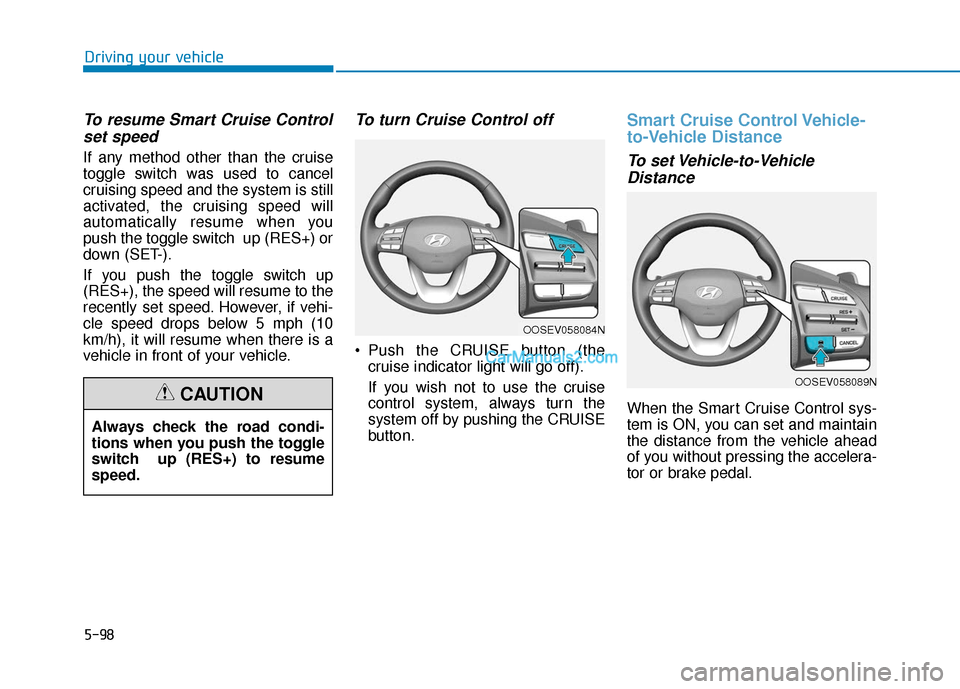
To turn Cruise Control off
Push the CRUISE button (the
cruise indicator light will go off).
If you wish not to use the cruise
control system, always turn the
system off by pushing the CRUISE
button.
Smart Cruise Control Vehicle-
to-Vehicle Distance
To set Vehicle-to-VehicleDistance
When the Smart Cruise Control sys-
tem is ON, you can set and maintain
the distance from the vehicle ahead
of you without pressing the accelera-
tor or brake pedal.
Always check the road condi-
tions when you push the toggle
switch up (RES+) to resume
speed.CAUTION
OOSEV058084N
OOSEV058089N
Page 332 of 540

5-99
Driving your vehicle
5
Each time the button is pressed, the
vehicle to vehicle distance changes
as follows:
For example, if you drive at 56 mph
(90 km/h), the distance is maintained
as follows:
Distance 4 - approximately 172 feet
Distance 3 - approximately 130 feet
Distance 2 - approximately 106 feet
Distance 1 - approximately 82 feet
Information
The distance is set to the last set dis-
tance when the system is used for the
first time after the vehicle is in the
ready ( ) mode.
When the lane ahead is clear:
The vehicle speed will maintain the
set speed.
When there is a vehicle aheadof you in your lane:
Your vehicle speed will slow down
or speed up to maintain the select-
ed distance.
If the vehicle ahead speeds up, your vehicle will travel at a steady
cruising speed after accelerating to
the set speed.
If distance from the front vehicle has changed due to accelerating or
decelerating of the front vehicle,
the distance on the LCD display
may change.
i
Distance 4 Distance 3 Distance 2
Distance 1
OOSEV058046R
Distance 4Distance 3
Distance 1Distance 2OOSEV058047R/OOSEV058048R/
OOSEV058050R/OOSEV058049R
Page 337 of 540

5-104
Driving your vehicle
SCC Reaction Setting
The sensitivity of vehicle speed
when following the front vehicle to
maintain the set distance can be
adjusted. Go to the 'User Settings →
Driver Assistance →SCC Reaction
→ Fast/Normal/Slow' on the LCD
display. You may select one of the
three stages you prefer.
Fast:
Vehicle speed following the front
vehicle to maintain the set distance
is faster than normal speed. Normal:
Vehicle speed following the front
vehicle to maintain the set distance
is normal.
Slow: Vehicle speed following the front
vehicle to maintain the set distance
is slower than normal speed.
Information
The last selected speed sensitivity of
the smart cruise control is retained in
the system.
Conventional Cruise Control
Mode
The driver may choose to switch to
use the conventional Cruise Control
mode (speed only control function)
by following these steps:
1. Push the CRUISE button on the steering wheel to turn the system
on. The cruise ( ) indi-
cator will illuminate.
2. Push and hold the Vehicle-to- Vehicle Distance button for more
than 2 seconds.
3. Choose between "Smart Cruise Control" and "Cruise Control".
Information
When the system is turned OFF using
the CRUISE button or the CRUISE
button is turned ON after the vehicle
is restarted with the POWER button,
conventional cruise control will be dis-
abled and Smart Cruise Control mode
will be enabled again.
i
i
OIK057097N


