Page 491 of 540

H28
DC Fast Charging
DC fast charging (also known as
Level 3 charging) provides high
power DC current directly to the EV
battery. DC charging stations are
capable of charging the EV battery to
80% in less than 75 minutes under
normal conditions.
While DC charging is very fast com-
pared to AC charging, prolonged and
continuous use of DC fast charging
may reduce the long term life of the
EV battery. Usage of a DC fast
charger should be minimized when
possible in order to help prolong the
life of the EV battery.Actual charger image and charg-
ing method may vary in accor-
dance with the charging station
manufacturer.
Information
If you use a DC charger when the
vehicle is already fully charged, some
DC chargers will send out an error
message. When the vehicle is fully
charged, do not charge the vehicle.
How to Connect DC Charger
1. Depress the brake pedal and
apply the electronic parking brake.
2. Shift to P (Park) and turn OFF the vehicle using the POWER button.
Information
If charging is initiated without the
gear in P (Park), charging will start
only after the gear is automatically
shifted to P (Park). 3. Unlock the vehicle before opening
the charging door. From the out-
side the vehicle, push on the
charging door in the area indicat-
ed by the arrow to open the door.
Information
If you cannot open the charging door
due to freezing weather tap lightly or
remove any ice near the charging
door. Do not try to forcibly open the
charging door.
i
i
i
E EL
LE
E C
CT
T R
R I
IC
C
V
V E
EH
H I
IC
C L
LE
E
C
C H
H A
AR
RG
G I
IN
N G
G
(
( C
C O
O N
NT
T.
.)
)
OOSEVQ018008N
OAEEQ016023
■ DC Charger
Page 496 of 540
H33
4. The charging rate (amps) can beadjusted on the portable charger
controller. Press the button (1) on
the back of the controller.
5. The charging rate (12A, 10A, 8A) on the LED display changes each
time you press the button. Refer to
the table to adjust the charging
rate based on the electrical outlet
current output.
6. When the charging rate is set, fol- low the procedure in the next sec-
tion to connect your vehicle.
OOSEVQ018054
❈ Portable Charger Charging Rate
The example is only for reference and may vary according to the surround-
ing environment.
Outlet currentCharge rateLED display
14-16A12 A
13-12A10 A
11-10A8 A
OOSEVQ018055
Page 497 of 540
H34
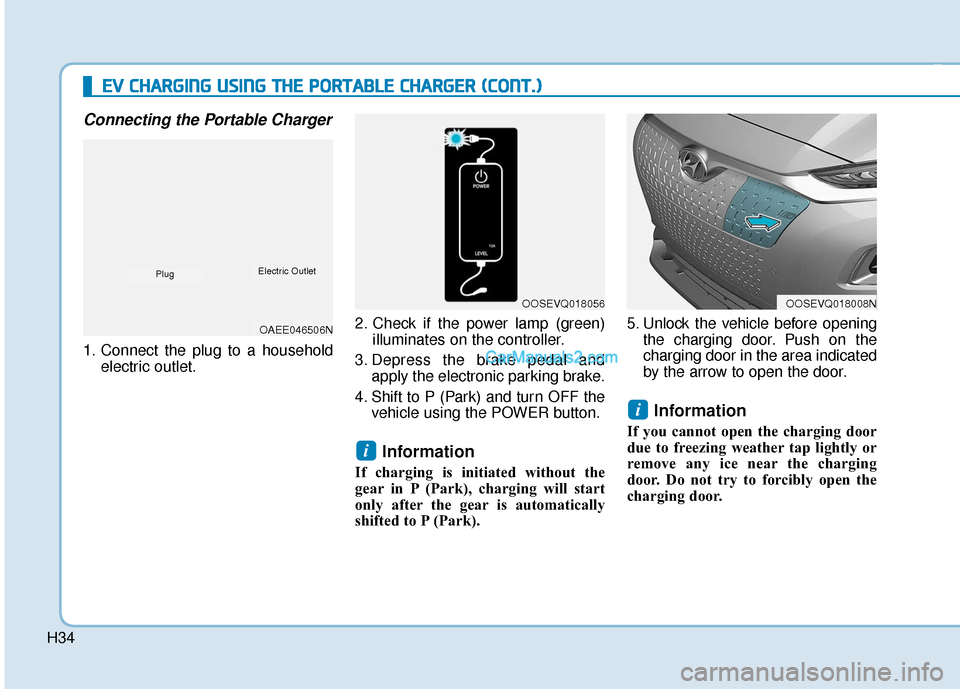
Connecting the Portable Charger
1. Connect the plug to a householdelectric outlet. 2. Check if the power lamp (green)
illuminates on the controller.
3. Depress the brake pedal and apply the electronic parking brake.
4. Shift to P (Park) and turn OFF the vehicle using the POWER button.
Information
If charging is initiated without the
gear in P (Park), charging will start
only after the gear is automatically
shifted to P (Park). 5. Unlock the vehicle before opening
the charging door. Push on the
charging door in the area indicated
by the arrow to open the door.
Information
If you cannot open the charging door
due to freezing weather tap lightly or
remove any ice near the charging
door. Do not try to forcibly open the
charging door.
i
i
E
EV
V
C
C H
H A
AR
RG
G I
IN
N G
G
U
U S
SI
IN
N G
G
T
T H
H E
E
P
P O
O R
RT
TA
A B
BL
LE
E
C
C H
H A
AR
RG
G E
ER
R
(
( C
C O
O N
NT
T.
.)
)
OOSEVQ018056OOSEVQ018008N
OAEE046506N
PlugElectric Outlet
Page 501 of 540
H38
E
EV
V
C
C H
H A
AR
RG
G I
IN
N G
G
U
U S
SI
IN
N G
G
T
T H
H E
E
P
P O
O R
RT
TA
A B
BL
LE
E
C
C H
H A
AR
RG
G E
ER
R
(
( C
C O
O N
NT
T.
.)
)
Charging Status Indicator Lamp for Portable Charger
Control BoxIndicatorDetails
PLUG
On : Power on
Blink : Plug temperature sensor failure
On : Plug high temperature protection
Blink : Plug high temperature warning
POWEROn : Power on
CHARGEBlink : Charging In power saving mode, only the CHARGE
indicator is illuminated.
FAU LTBlink : Charging interrupted
CHARGE LEVEL
Charging current 12 AThe charging current
changes (3 level)
whenever the button
(1) is pressed for 1 sec
with the charger
plugged into an electri-
cal outlet but not the
vehicle.
Charging current 10 A
Charging current 8 A
VEHICLE
Charging connector plugged
Charging
Blink : Charging impossible
(Green)
(Green) (Blue)
(Red)(Red)
❈
Back of the control box
Page 504 of 540

H41
1. Hold the charging connector han-dle and pull it while pressing the
release button (1).
Information
To prevent charging cable theft, the
charging connector cannot be discon-
nected from the charging port when the
doors are locked. Unlock all doors to
disconnect the charging connector from
the charging port. However, if the vehi-
cle is in the charging connector AUTO
mode, the charging connector automat-
ically unlocks from the charging port
when charging is completed. For more
details, refer to "Charging Connector
AUTO/LOCK Mode" in this chapter. 2. Make sure to re-install the charg-
ing port dust cover(s) before clos-
ing the charging door.
3. The charging door must be fully closed before driving the vehicle. 4. Disconnect the plug from the
household electric outlet. Do not
pull the cable when disconnecting
the plug.
5. Re-apply the protective dust cover for the charging connector so that
foreign material cannot get into
the terminal.
6. Carefully wrap the cord and store the portable charger inside the
carrying case when you are fin-
ished charging.
i
OOSEVQ018012OOSEVQ018013NOAEE046507N
PlugElectric Outlet
How to Disconnect Portable Charger
Page 507 of 540

H44
How to Start the Vehicle
1. Holding the smart key, sit in thedriver's seat.
2. Fasten the seat belt before start- ing the vehicle.
3. Make sure to engage the parking brake.
4. Turn OFF all electrical devices.
5. Make sure to depress and hold the brake pedal.
6. While depressing the brake pedal, shift to P (Park).
7. Depress and hold the brake pedal while pressing the POWER but-
ton. 8. When the " " indicator is ON,
you can drive the vehicle.
When the " " indicator is OFF,
you cannot drive the vehicle. Start
the vehicle again.
9. Depress and hold the brake pedal and shift to the desired position.
Information
While the charging cable is connected,
the gear cannot be shift from P (Park)
to any other gear for safety reasons.
10.Release the parking brake and slowly release the brake pedal.
Check if the vehicle slowly moves
forward, then depress the accel-
erator pedal.
How to Stop the Vehicle
1. Hold down the brake pedal whilethe vehicle is parked.
2. While depressing the brake pedal, shift to P (Park).
3. While depressing the brake pedal, engage the parking brake.
4. While depressing the brake pedal, press the POWER button and turn
off the vehicle.
5. Check if the " " indicator is turned OFF on the instrument
cluster.
i
D
DR
RI
IV
V I
IN
N G
G
A
A N
N D
D
O
O P
PE
ER
R A
A T
TI
IN
N G
G
I
IN
N F
FO
O R
RM
M A
AT
TI
IO
O N
N
OOSEVQ018018
OOSEVQ018017
Page 511 of 540

H48
D
DR
RI
IV
V I
IN
N G
G
A
A N
N D
D
O
O P
PE
ER
R A
A T
TI
IN
N G
G
I
IN
N F
FO
O R
RM
M A
AT
TI
IO
O N
N
(
( C
C O
O N
NT
T.
.)
)
When there are only 2 bars remain-
ing on the gauge, the SOC level is
low. The warning lamp turns ON to
alert you that the battery must be
charged soon.
When the warning lamp turns ON,
the vehicle can drive an additional
12~18 miles (20~30 km) depending
on the driving speed, heater/air con-
ditioner, weather, driving style, and
other factors. Charging is required.
When there are 1-2 gauge bars left
for the high voltage battery, the
vehicle speed is limited and then
eventually the vehicle will turn OFF.
Charge the vehicle immediately.
Warning and Indicator Lights
Ready Indicator
This indicator illuminates :
When the vehicle is ready to be driven.
- ON : Normal driving is possible.
- OFF : Nor mal driving is not possible,
or a problem has occurred.
- Blinking : Emergency driving.
When the ready indicator goes OFF
or blinks, there is a problem with the
system. In this case, have your vehi-
cle inspected by an authorized
HYUNDAI dealer.
Service Warning Light
This warning light illuminates :
When the POWER button is in the ON position.
- It illuminates for approximately 3seconds and then goes off.
When there is a problem with relat- ed parts of the electric vehicle con-
trol system, such as sensors, etc.
When the warning light illuminates
while driving, or does not go OFF
after starting the vehicle, have your
vehicle inspected by an authorized
HYUNDAI dealer.
NOTICE
OOSEV048103
Page 517 of 540
H54
D
DR
RI
IV
V I
IN
N G
G
A
A N
N D
D
O
O P
PE
ER
R A
A T
TI
IN
N G
G
I
IN
N F
FO
O R
RM
M A
AT
TI
IO
O N
N
(
( C
C O
O N
NT
T.
.)
)
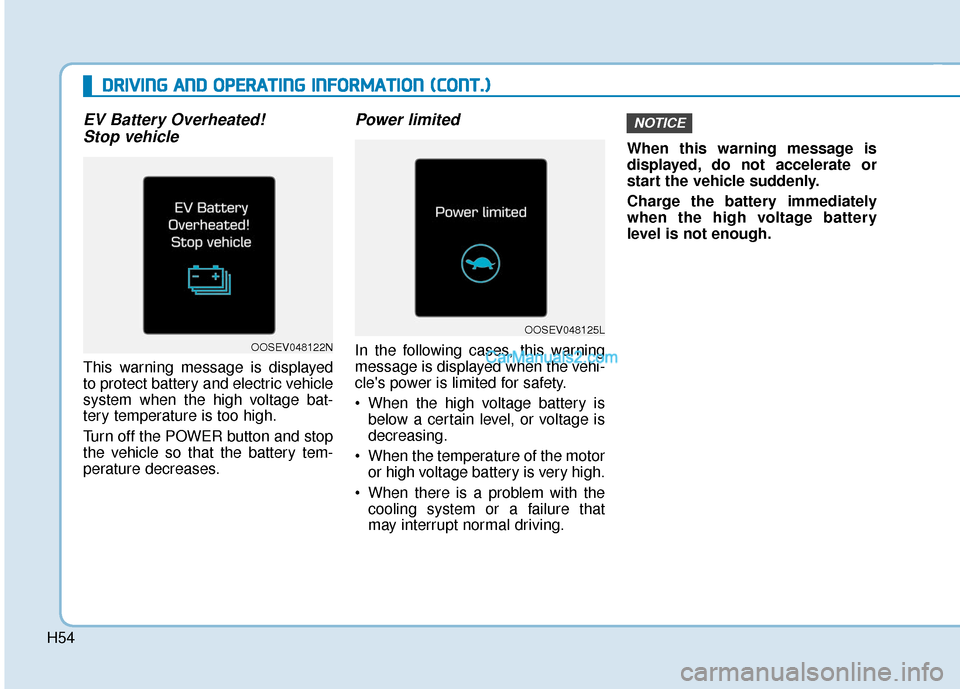
EV Battery Overheated!
Stop vehicle
This warning message is displayed
to protect battery and electric vehicle
system when the high voltage bat-
tery temperature is too high.
Turn off the POWER button and stop
the vehicle so that the battery tem-
perature decreases.
Power limited
In the following cases, this warning
message is displayed when the vehi-
cle's power is limited for safety.
When the high voltage battery is
below a certain level, or voltage is
decreasing.
When the temperature of the motor or high voltage battery is very high.
When there is a problem with the cooling system or a failure that
may interrupt normal driving. When this warning message is
displayed, do not accelerate or
start the vehicle suddenly.
Charge the battery immediately
when the high voltage battery
level is not enough.
NOTICE
OOSEV048122N
OOSEV048125L