Page 240 of 599

3-94
Convenient features of your vehicle
- Early/Normal/Late To adjust the initial warning alert
time for Forward Collision-
Avoidance Assist (FCA) system.
For more information, refer to
"Forward Collision-Avoidance
Assist (FCA) system" in chapter 5.
Warning)
To activate or deactivate the Blind-
Spot Collision Warning Sound.
For more information, refer to
"Blind-Spot Collision Warning
(BCW) system" in chapter 5.
Collision Warning
To activate or deactivate the Rear
Cross-Traffic Collision Warning func-
tion system.
For more information, refer to
"Blind-Spot Collision Warning
(BCW) system" in chapter 5.
- Coasting guidance: To activate or
deactivate the Coasting Guide sys-
tem.
- Sound: To activate or deactivate the Coasting Guide system sound.
For more information, refer to
"Coasting Guide" in chapter 5.
Coasting timing (Early/Normal/Late)
To adjust the sensitivity of the
Coasting Guide.
For more information, refer to
"Coasting Guide" in chapter 5.
2. Door
- Disable: The auto door lock opera- tion will be cancelled.
- Enable on Speed: All doors will be automatically locked when the vehi-
cle speed exceeds 9.3mph
(15km/h).
- Enable on Shift: All doors will be automatically locked if the automat-
ic transmission shift lever is shifted
from the P (Park) position to the R
(Reverse), N (Neutral), or D (Drive)
position.
- Disable: The auto door unlock oper-
ation will be cancelled.
- Vehicle Off: All doors will be auto- matically unlocked when the
Engine Star/Stop button is set to
the OFF position. (if equipped with
smart key)
- On Key Out: All doors will be auto- matically unlocked when the igni-
tion key is removed from the igni-
tion switch. (if equipped with remote
key)
- On Shift to P: All doors will be auto- matically unlocked if the automatic
transmission shift lever is shifted to
the P (Park) position.
To activate or deactivate the horn
feedback.
If the horn feedback is activated,
after locking the door by pressing the
lock button on the remote key, and
pressing it again within 4 seconds,
the horn feedback sound will operate
once to indicate that all doors are
locked.
Page 241 of 599
3-95
Convenient features of your vehicle
3
3. Lights
- Off: The one touch turn signal func-tion will be deactivated.
- 3, 5, 7 Flashes: The turn signal indi- cator will blink 3, 5, or 7 times when
the turn signal lever is moved slightly.
For more information, refer to
"Light" in this chapter.
To activate or deactivate the head-
lamp delay function.
For more information, refer to
"Light" in this chapter 4. Sound
Volume for PDW (Parking Distance
Warning)
- Level 1~3 To adjust the Park Assist System
volume.
5. Convenience
- None: The seat easy access func- tion is deactivated.
- Normal/Extended: When you turn off the engine, the driver's seat will
automatically move rearward short
(Normal) or long (Extended) for you
to enter or exit the vehicle more
comfortably.
For more information, refer to
"Driver Position Memory System"
in this chapter.
To activate or deactivate the wireless
charging system in the front seat.
For more information, refer to
"Wireless Charging System" in
this chapter.
To activate or deactivate the Wiper/
Light mode.
When activated, the LCD display
shows the selected Wiper/Light
mode whenever you changed the
mode.
To activate or deactivate the gear
position pop-up.
When activated, the gear position
will be displayed on the LCD display.
6. Service Interval
To activate or deactivate the service
interval function.
If the service interval menu is acti-
vated, you may adjust the time and
distance.
Information
To use the service interval menu, con-
sult a HYUNDAI authorised repairer.
i
Page 242 of 599
3-96
Convenient features of your vehicle
If the service interval is activated and
the time and distance is adjusted,
messages are displayed in the fol-
lowing situations each time the vehi-
cle is turned on.
- Service in : Displayed to inform the driver theremaining mileage and days to
service.
- Service required : Displayed when the mileage anddays to service has been reached
or passed.
Information
If any of the following conditions
occur, the mileage and number of days
to service may be incorrect.
- The battery cable is disconnected.
- The fuse switch is turned off.
- The battery is discharged. 7. Other Features
Battery Saver+
To activate or deactivate the Aux.
Battery Saver+ function.
When activated, the high voltage bat-
tery is used to keep the 12V battery
charged.
For more information, refer to the
“Hybrid System Overview” provided
in the front of the owner’s manual.
- Off: The average fuel economy will
not reset automatically whenever
refuelling.
- After Ignition: When the engine has been OFF for 4 hours or longer the
average fuel economy will reset
automatically.
- After Refuelling: The average fuel economy will reset automatically
after adding 1.6 gallons (6 litres) of
fuel or more and after driving speed
exceeds 1 mph (1 km/h).
For more information, refer to
"Trip Computer" in this chapter.
To select the fuel economy unit.
(km/L, L/100, MPG)
To select the temperature unit.
(°C,°F)
To select the tyre pressure unit.
(psi, kPa, bar)
To select language.
8. Reset
You can reset the menus in the User
Settings Mode. All menus in the User
Settings Mode are reset to factory
settings, except language and serv-
ice interval.
i
Page 243 of 599
3-97
Convenient features of your vehicle
3
T
TR
R I
IP
P
C
C O
O M
M P
PU
U T
TE
ER
R
(
( H
H Y
Y B
BR
RI
ID
D
V
V E
EH
H I
IC
C L
LE
E )
)
The trip computer is a microcomput-
er-controlled driver information sys-
tem that displays information related
to driving.
Information
Some driving information stored in the
trip computer (for example Average
Vehicle Speed) resets if the battery is
disconnected.
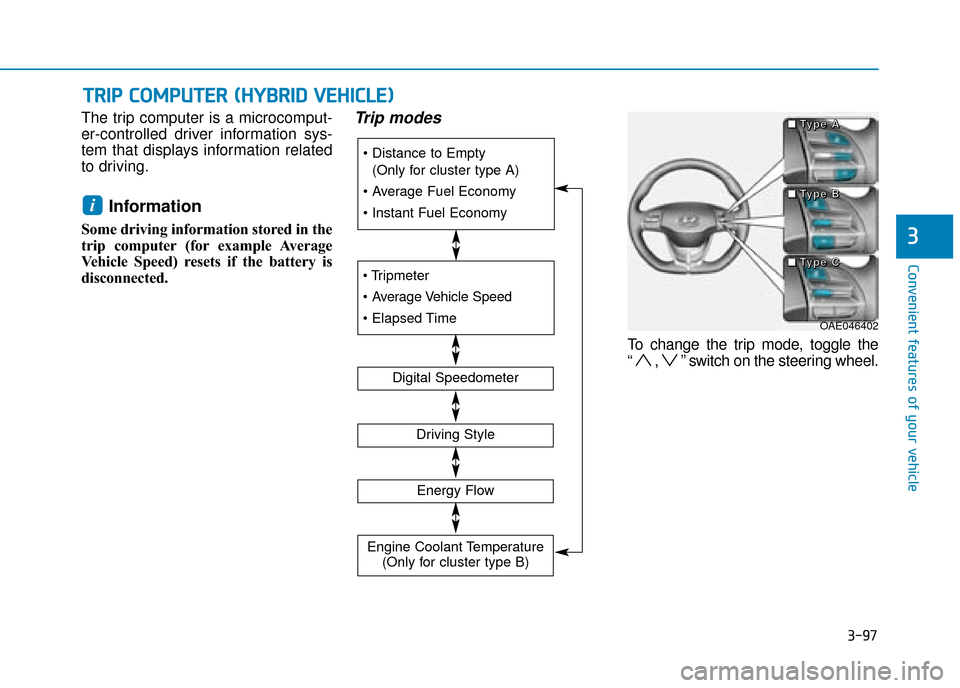
Trip modes
To change the trip mode, toggle the
“ , ” switch on the steering wheel.
i
(Only for cluster type A)
Digital Speedometer
Driving Style
Energy Flow
Engine Coolant Temperature (Only for cluster type B)
OAE046402
■
■
■
■
T
T
T
T
y
y
y
y
p
p
p
p
e
e
e
e
A
A
A
A
■
■
■
■
T
T
T
T
y
y
y
y
p
p
p
p
e
e
e
e
B
B
B
B
■
■
■
■
T
T
T
T
y
y
y
y
p
p
p
p
e
e
e
e
C
C
C
C
Page 244 of 599
3-98
Convenient features of your vehicle
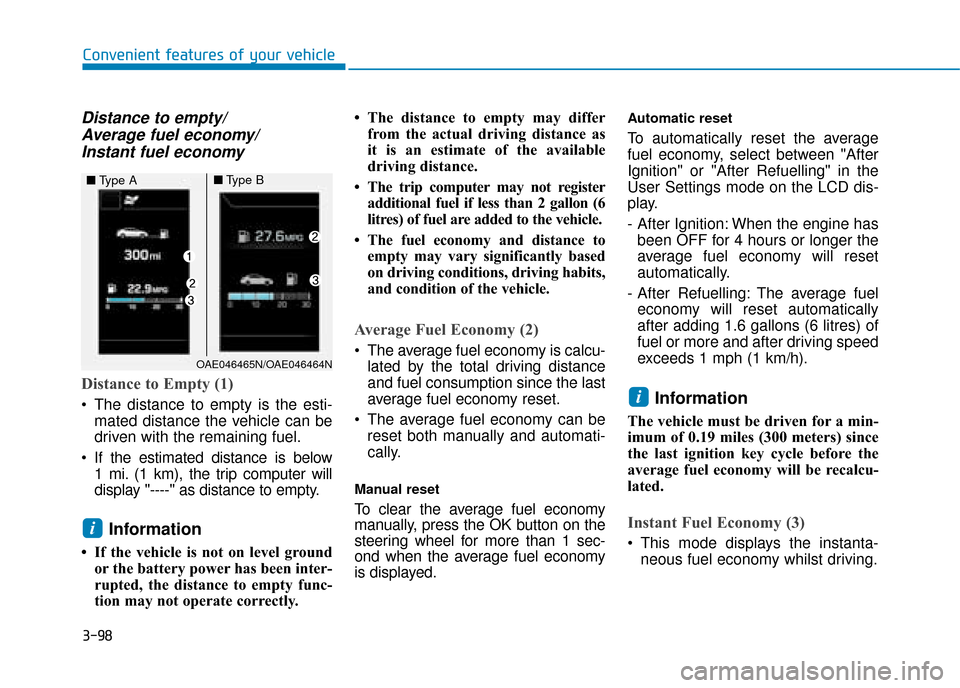
Distance to empty/Average fuel economy/Instant fuel economy
Distance to Empty (1)
The distance to empty is the esti-
mated distance the vehicle can be
driven with the remaining fuel.
If the estimated distance is below 1 mi. (1 km), the trip computer will
display "----" as distance to empty.
Information
• If the vehicle is not on level groundor the battery power has been inter-
rupted, the distance to empty func-
tion may not operate correctly. • The distance to empty may differ
from the actual driving distance as
it is an estimate of the available
driving distance.
• The trip computer may not register additional fuel if less than 2 gallon (6
litres) of fuel are added to the vehicle.
• The fuel economy and distance to empty may vary significantly based
on driving conditions, driving habits,
and condition of the vehicle.
Average Fuel Economy (2)
The average fuel economy is calcu-lated by the total driving distance
and fuel consumption since the last
average fuel economy reset.
The average fuel economy can be reset both manually and automati-
cally.
Manual reset
To clear the average fuel economy
manually, press the OK button on the
steering wheel for more than 1 sec-
ond when the average fuel economy
is displayed.
Automatic reset
To automatically reset the average
fuel economy, select between "After
Ignition" or "After Refuelling" in the
User Settings mode on the LCD dis-
play.
- After Ignition: When the engine hasbeen OFF for 4 hours or longer the
average fuel economy will reset
automatically.
- After Refuelling: The average fuel economy will reset automatically
after adding 1.6 gallons (6 litres) of
fuel or more and after driving speed
exceeds 1 mph (1 km/h).
Information
The vehicle must be driven for a min-
imum of 0.19 miles (300 meters) since
the last ignition key cycle before the
average fuel economy will be recalcu-
lated.
Instant Fuel Economy (3)
This mode displays the instanta- neous fuel economy whilst driving.
i
i
OAE046465N/OAE046464N
■ Type A■Type B
Page 245 of 599
3-99
Convenient features of your vehicle
3
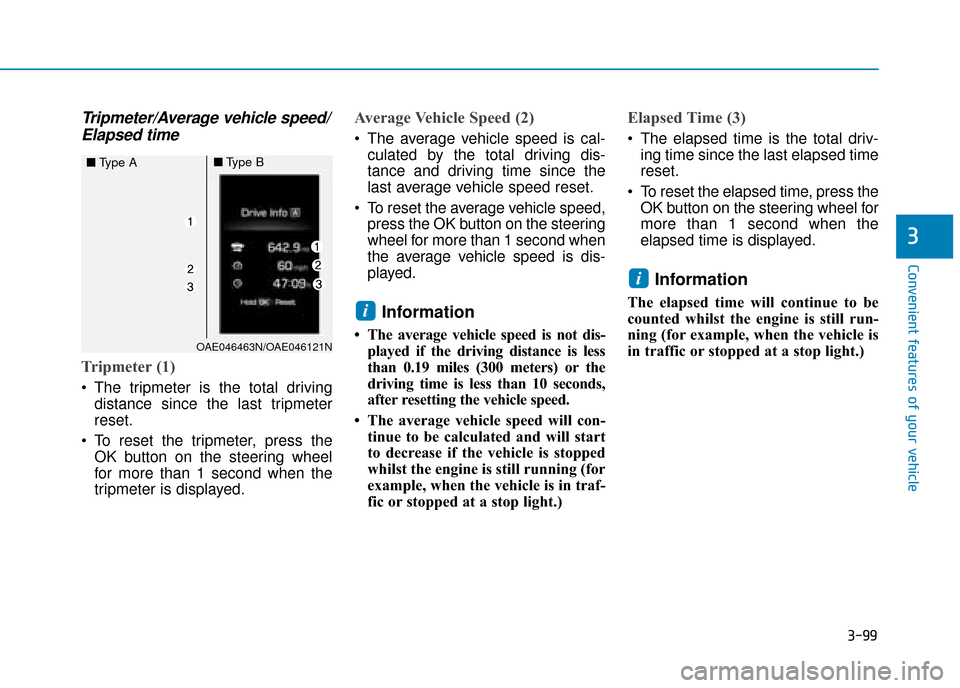
Tripmeter/Average vehicle speed/Elapsed time
Tripmeter (1)
The tripmeter is the total driving
distance since the last tripmeter
reset.
To reset the tripmeter, press the OK button on the steering wheel
for more than 1 second when the
tripmeter is displayed.
Average Vehicle Speed (2)
The average vehicle speed is cal-culated by the total driving dis-
tance and driving time since the
last average vehicle speed reset.
To reset the average vehicle speed, press the OK button on the steering
wheel for more than 1 second when
the average vehicle speed is dis-
played.
Information
• The average vehicle speed is not dis-played if the driving distance is less
than 0.19 miles (300 meters) or the
driving time is less than 10 seconds,
after resetting the vehicle speed.
• The average vehicle speed will con- tinue to be calculated and will start
to decrease if the vehicle is stopped
whilst the engine is still running (for
example, when the vehicle is in traf-
fic or stopped at a stop light.)
Elapsed Time (3)
The elapsed time is the total driv-ing time since the last elapsed time
reset.
To reset the elapsed time, press the OK button on the steering wheel for
more than 1 second when the
elapsed time is displayed.
Information
The elapsed time will continue to be
counted whilst the engine is still run-
ning (for example, when the vehicle is
in traffic or stopped at a stop light.)
i
i
OAE046463N/OAE046121N
■ Type A■Type B
Page 247 of 599
3-101
Convenient features of your vehicle
3
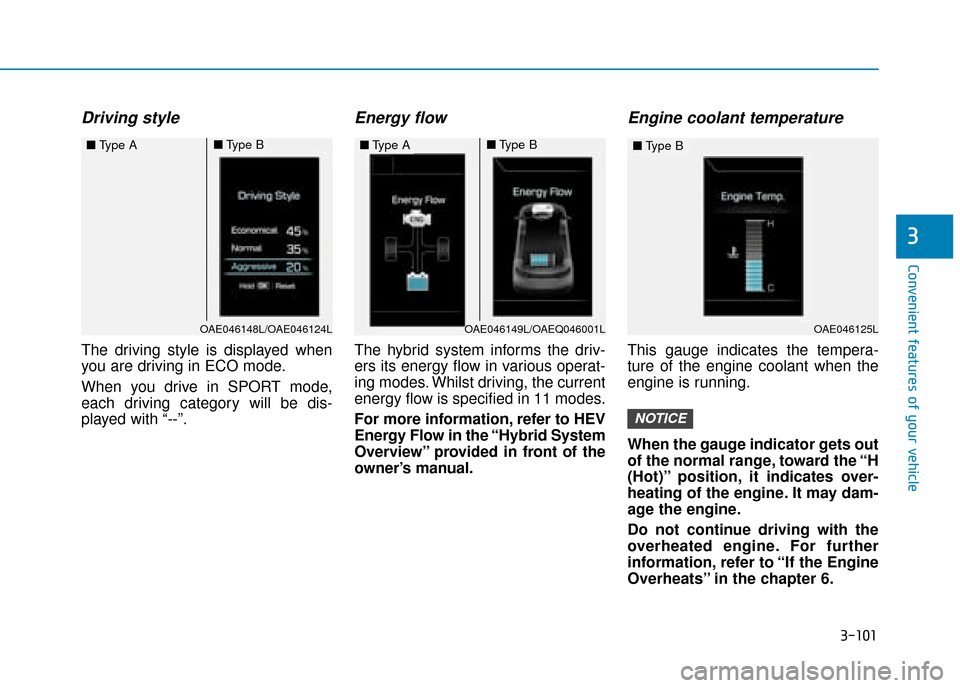
Driving style
The driving style is displayed when
you are driving in ECO mode.
When you drive in SPORT mode,
each driving category will be dis-
played with “--”.
Energy flow
The hybrid system informs the driv-
ers its energy flow in various operat-
ing modes. Whilst driving, the current
energy flow is specified in 11 modes.
For more information, refer to HEV
Energy Flow in the “Hybrid System
Overview” provided in front of the
owner’s manual.
Engine coolant temperature
This gauge indicates the tempera-
ture of the engine coolant when the
engine is running.
When the gauge indicator gets out
of the normal range, toward the “H
(Hot)” position, it indicates over-
heating of the engine. It may dam-
age the engine.
Do not continue driving with the
overheated engine. For further
information, refer to “If the Engine
Overheats” in the chapter 6.
NOTICE
OAE046148L/OAE046124L
■Type A■Type B■Type A■Type B
OAE046125L
■Type B
OAE046149L/OAEQ046001L
Page 248 of 599
3-102
The trip computer is a microcomput-
er-controlled driver information sys-
tem that displays information related
to driving.
Information
Some driving information stored in the
trip computer (for example Average
Vehicle Speed) resets if the battery is
disconnected.
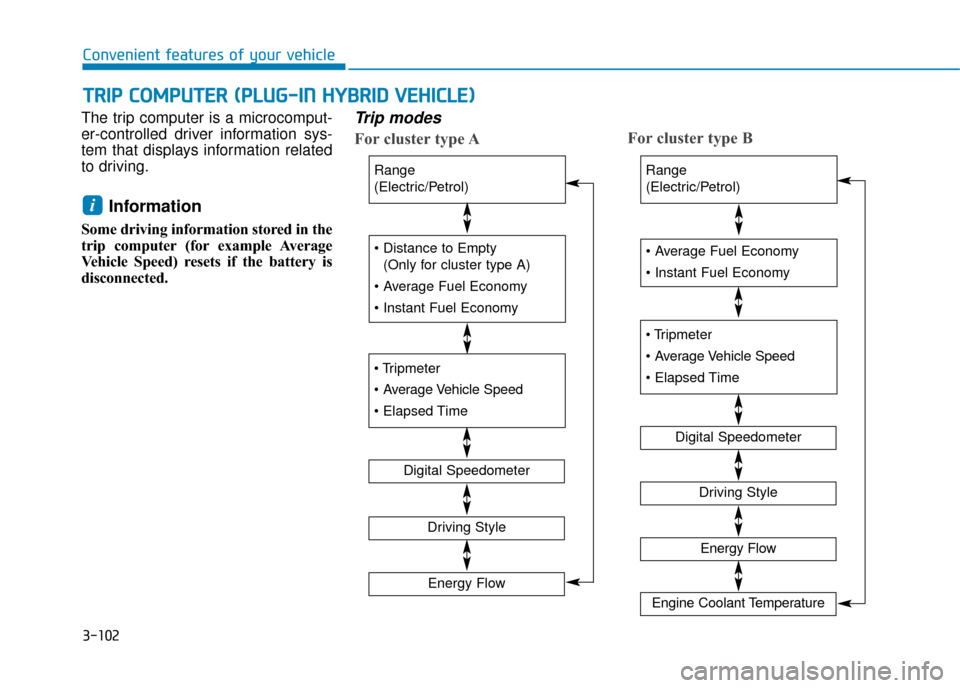
Trip modes
For cluster type AFor cluster type B
i
T T
R
R I
IP
P
C
C O
O M
M P
PU
U T
TE
ER
R
(
( P
P L
LU
U G
G-
-I
IN
N
H
H Y
Y B
BR
RI
ID
D
V
V E
EH
H I
IC
C L
LE
E )
)
Convenient features of your vehicle
(Only for cluster type A)
Digital Speedometer
Range
(Electric/Petrol)
Driving Style
Energy Flow
Range
(Electric/Petrol)
Digital Speedometer
Driving Style
Energy Flow
Engine Coolant Temperature