Page 67 of 512
Note:
The doors do not autounlock if you
electronically lock your vehicle after you
switch the ignition off and before you open
the driver door.
Enabling or Disabling Autounlock
You can enable or disable the autounlock
feature in the information display or an
authorized dealer can do it for you. See
General Information (page 90).
64
Ranger (TFG) Canada/United States of America, enUSA, Edition date: 201809, Fourth-Printing Doors and Locks
Page 68 of 512

PASSIVE ANTI-THEFT
SYSTEM
Principle of Operation
The system prevents someone from
starting the engine with an incorrectly
coded key.
Coded Keys
If you lose a key, you can purchase a
replacement from an authorized dealer. If
possible, provide them with the key
number from the tag provided with the
original keys. You can also obtain extra
keys from an authorized dealer.
Note:
Have all of your remaining keys
erased and recoded if you lose a key. Have
replacement keys coded together with your
remaining keys. See an authorized dealer
for further information.
Note: Do not shield your keys with metal
objects. This may prevent the receiver from
recognizing a coded key.
Note: Do not leave a duplicate coded key
in the vehicle. Always take your keys and
lock all doors when leaving the vehicle.
Arming the Engine Immobilizer
When you switch the ignition off, the
engine immobilizer will arm automatically
after a short time.
Disarming the Engine Immobilizer
When you switch the ignition on, the engine
immobilizer will disarm automatically if
you use a correctly coded key.
If you are unable to start the engine with a
correctly coded key, have your vehicle
checked by an authorized dealer. ANTI-THEFT ALARM
Alarm System
Perimeter Alarm
The perimeter alarm is a deterrent against
unauthorized access to your vehicle
through the doors, luggage compartment
and the hood.
Panic Alarm (If Equipped)
The alarm can be activated using the
remote control.
Triggering the Alarm
•
If someone opens a door or the hood
without a valid key or remote control.
• If you switch the ignition on without a
valid key.
If the alarm sounds, the alarm horn sounds
for 30 seconds and the hazard warning
lamps flash for five minutes.
Any further attempts to carry out one of
the above will sound the alarm again.
Arming the Alarm
Press the lock button once to lock your
vehicle and arm the alarm.
Disarming the Alarm
Disarm the alarm by any of the following
actions:
• Unlock the doors with the key and
switch the ignition on with a correctly
coded key within 12 seconds.
• Unlock the doors or luggage
compartment using the remote control.
65
Ranger (TFG) Canada/United States of America, enUSA, Edition date: 201809, Fourth-Printing Security
Page 69 of 512
ADJUSTING THE STEERING
WHEEL
WARNING: Do not adjust the
steering wheel when your vehicle is
moving.
Note: Make sure that you are sitting in the
correct position. See Sitting in the Correct
Position
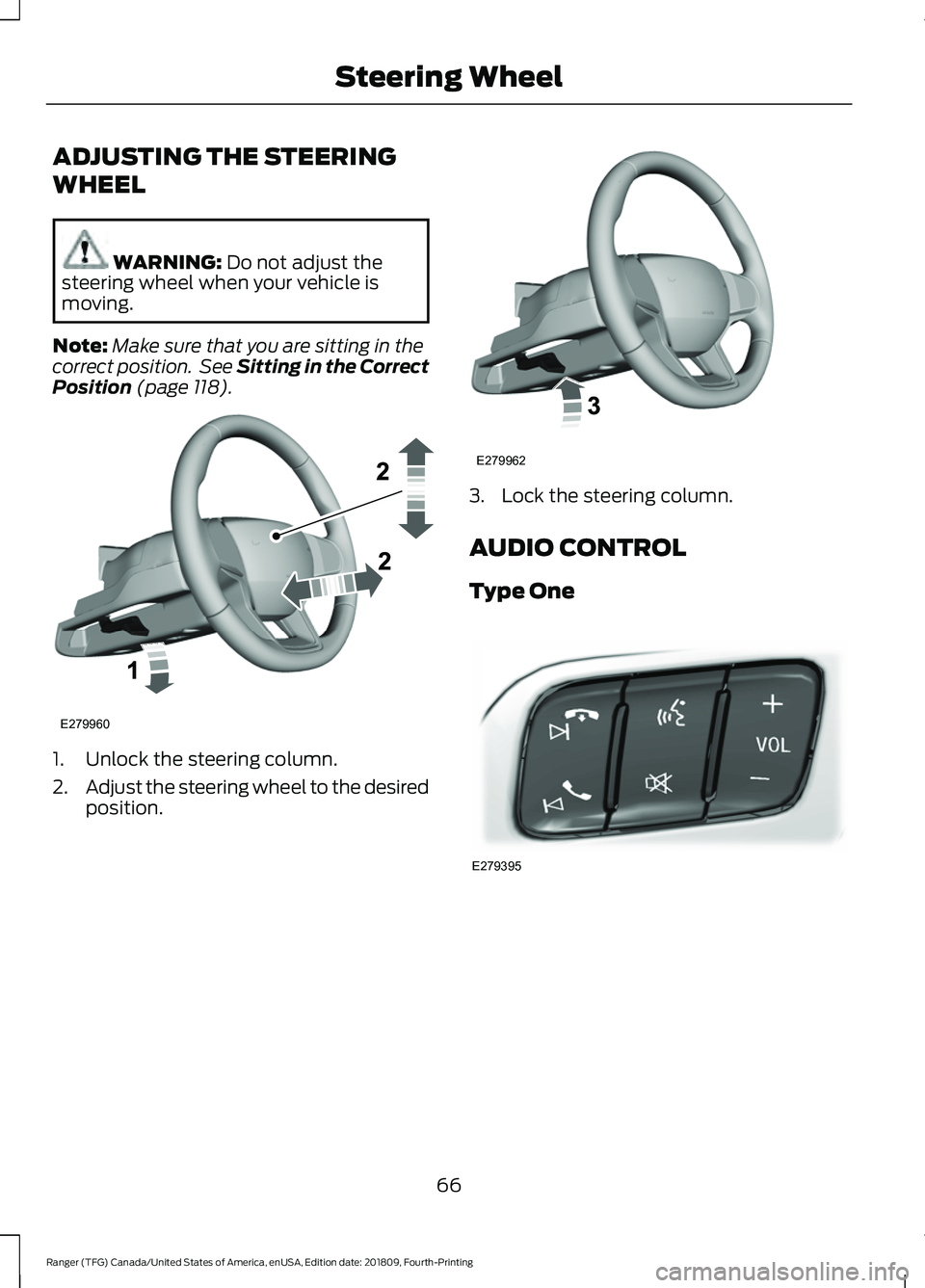
(page 118). 1. Unlock the steering column.
2.
Adjust the steering wheel to the desired
position. 3. Lock the steering column.
AUDIO CONTROL
Type One
66
Ranger (TFG) Canada/United States of America, enUSA, Edition date: 201809, Fourth-Printing Steering WheelE279960 E279962 E279395
Page 70 of 512
Type Two
You can operate the following
functions with the control:
Press to access phone mode or
to answer a phone call.
Press to end a phone call.
Press to silence the current
media
Press + or - to increase or to
decrease volume levels. Press to access the previous
media selection. Press to access the next media
selection.
Press to change the media
source.
Press to access the settings
menu on the SYNC screen.
Press to access the home
screen.
VOICE CONTROL
The controls are on the steering wheel. Press and release to activate
voice recognition.
CRUISE CONTROL
(IF EQUIPPED)
Type One See
Using Cruise Control (page 182).
67
Ranger (TFG) Canada/United States of America, enUSA, Edition date: 201809, Fourth-Printing Steering WheelE272251 E272252 E265040 E268549 E265304 E265045 E265044 E100027 E142607 E272621 E142599 E200995
Page 71 of 512
Type Two
See Using Adaptive Cruise Control
(page 183).
INFORMATION DISPLAY
CONTROL Use the controls to adjust the information
display. Navigate through the screen and
press
OK to select. See General
Information (page 90).
HORN 68
Ranger (TFG) Canada/United States of America, enUSA, Edition date: 201809, Fourth-Printing Steering WheelE200996 E205893 E201420 E270945
Page 72 of 512
WINDSHIELD WIPERS
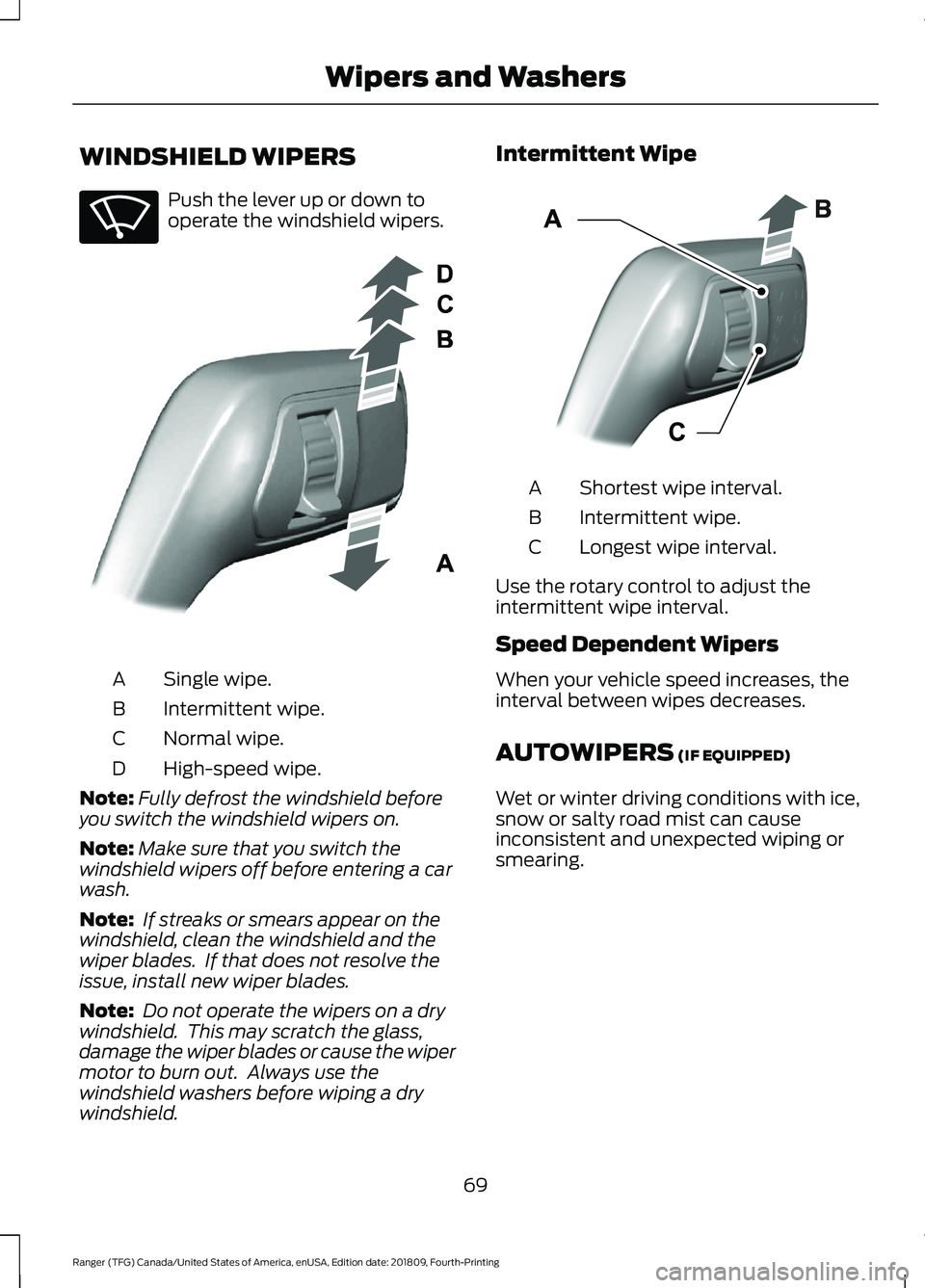
Push the lever up or down to
operate the windshield wipers.
Single wipe.
A
Intermittent wipe.
B
Normal wipe.
C
High-speed wipe.
D
Note: Fully defrost the windshield before
you switch the windshield wipers on.
Note: Make sure that you switch the
windshield wipers off before entering a car
wash.
Note: If streaks or smears appear on the
windshield, clean the windshield and the
wiper blades. If that does not resolve the
issue, install new wiper blades.
Note: Do not operate the wipers on a dry
windshield. This may scratch the glass,
damage the wiper blades or cause the wiper
motor to burn out. Always use the
windshield washers before wiping a dry
windshield. Intermittent Wipe
Shortest wipe interval.
A
Intermittent wipe.
B
Longest wipe interval.
C
Use the rotary control to adjust the
intermittent wipe interval.
Speed Dependent Wipers
When your vehicle speed increases, the
interval between wipes decreases.
AUTOWIPERS (IF EQUIPPED)
Wet or winter driving conditions with ice,
snow or salty road mist can cause
inconsistent and unexpected wiping or
smearing.
69
Ranger (TFG) Canada/United States of America, enUSA, Edition date: 201809, Fourth-Printing Wipers and WashersE270969 E295996 E295997
Page 73 of 512

High sensitivity.
A
Autowipers On.
B
Low sensitivity.
C
Use the rotary control to adjust the
sensitivity of the autowipers. When you
select low sensitivity, the wipers operate
when the sensor detects a large amount
of water on the windshield. When you
select high sensitivity, the wipers operate
when the sensor detects a small amount
of water on the windshield.
Keep the outside of the windshield clean.
The rain sensor is very sensitive and the
wipers may operate if dirt, mist or insects
hit the windshield.
In these conditions, you can do the
following:
• Lower the sensitivity of the autowipers
to reduce the amount of smearing on
the windshield.
• Switch to normal or high-speed wipe.
• Switch autowipers off.
Note: Fully defrost the windshield before
you switch the windshield wipers on.
Note: Make sure that you switch the
windshield wipers off before entering a car
wash. Note:
If streaks or smears appear on the
windshield, clean the windshield and the
wiper blades. If that does not resolve the
issue, install new wiper blades.
Note: If you switch autolamps and
autowipers on, the headlamps turn on when
the windshield wipers continuously operate.
Autowipers Settings
Autowipers defaults to on and remains on
until you switch it off in the information
display. When you switch off autowipers,
the wipers operate in intermittent mode.
WINDSHIELD WASHERS Pull the lever toward you to
operate the windshield washers.
When you release the lever, the wipers
operate for a short time. When activated,
a courtesy wipe occurs a short time after
the wipers stop to clear any remaining
washer fluid.
Note: You can switch courtesy wipe on or
off in the information display. See
Information Displays (page 90).
Note: Do not operate the washers when
the washer reservoir is empty. This could
cause the washer pump to overheat.
70
Ranger (TFG) Canada/United States of America, enUSA, Edition date: 201809, Fourth-Printing Wipers and WashersE295997 E296048 E270967
Page 75 of 512

Flashing the Headlamp High Beam
Slightly pull the lever toward you and
release it to flash the headlamps.
AUTOLAMPS
WARNING: The system does not
relieve you of your responsibility to drive
with due care and attention. You may
need to override the system if it does not
turn the headlamps on in low visibility
conditions, for example daytime fog. When the lighting control is in the
autolamps position, the headlamps turn
on in low light situations, or when the
wipers turn on. The headlamps remain on for a period of
time after you switch the ignition off. Use
the information display controls to adjust
the period of time that the headlamps
remain on.
Note:
If you switch the autolamps on, you
cannot switch the high beams on until the
system turns the low beams on.
Windshield Wiper Activated
Headlamps
When you switch the autolamps on, the
headlamps turn on within 10 seconds of
switching the wipers on. They turn off
approximately 60 seconds after you switch
the windshield wipers off.
The headlamps do not turn on with the
wipers:
• During a single wipe.
• When using the windshield washers.
• If the wipers are in intermittent mode.
Note: If you switch the autolamps and the
autowipers on, the headlamps turn on when
the windshield wipers continuously operate.
INSTRUMENT LIGHTING
DIMMER
Note: When disconnecting the battery or
when it runs out of charge, the illuminated
components turn to the maximum setting.
72
Ranger (TFG) Canada/United States of America, enUSA, Edition date: 201809, Fourth-Printing LightingE242675 E142451