2019 FORD E SERIES reset
[x] Cancel search: resetPage 265 of 329
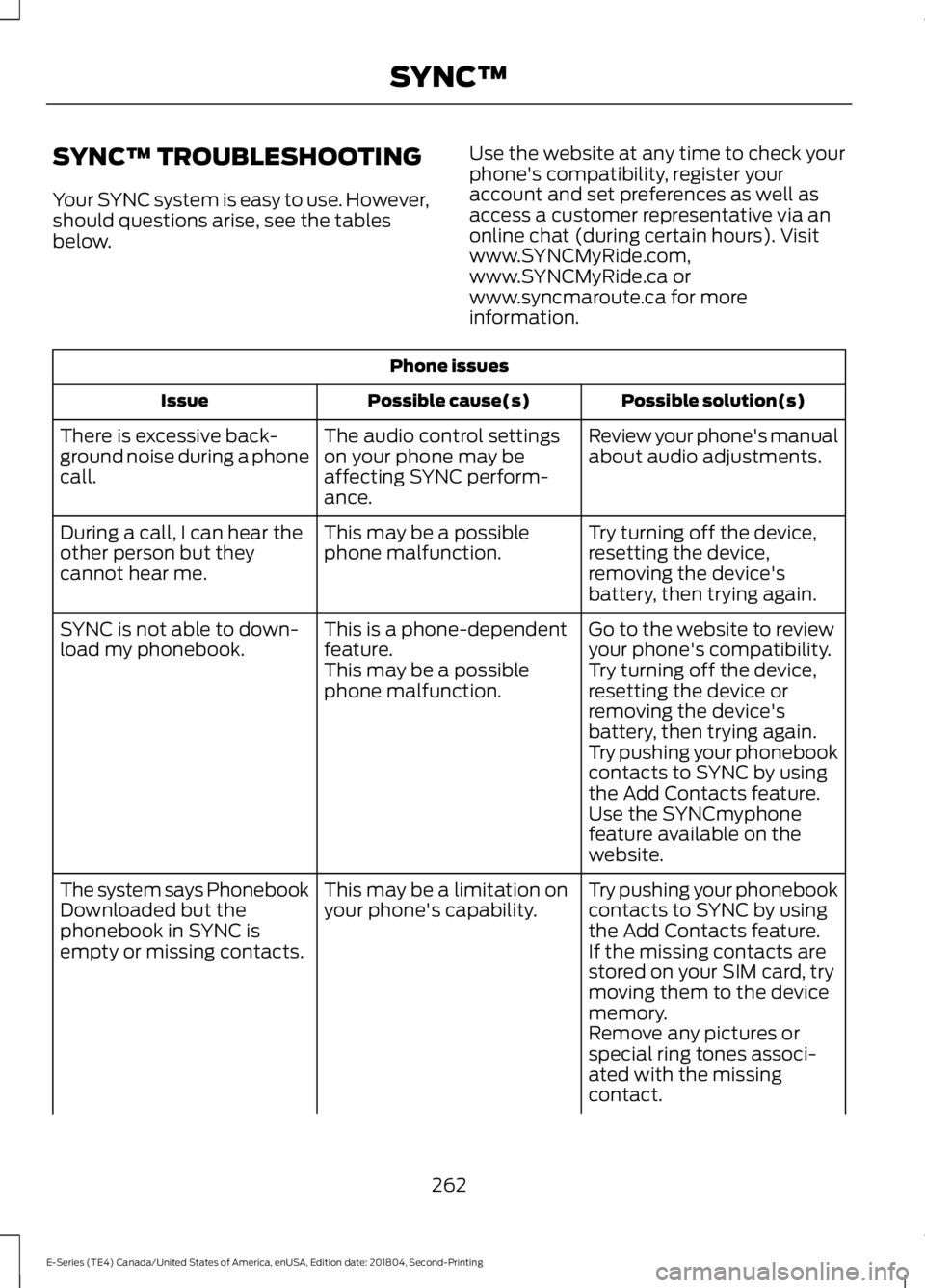
SYNC™ TROUBLESHOOTING
Your SYNC system is easy to use. However,should questions arise, see the tablesbelow.
Use the website at any time to check yourphone's compatibility, register youraccount and set preferences as well asaccess a customer representative via anonline chat (during certain hours). Visitwww.SYNCMyRide.com,www.SYNCMyRide.ca orwww.syncmaroute.ca for moreinformation.
Phone issues
Possible solution(s)Possible cause(s)Issue
Review your phone's manualabout audio adjustments.The audio control settingson your phone may beaffecting SYNC perform-ance.
There is excessive back-ground noise during a phonecall.
Try turning off the device,resetting the device,removing the device'sbattery, then trying again.
This may be a possiblephone malfunction.During a call, I can hear theother person but theycannot hear me.
Go to the website to reviewyour phone's compatibility.This is a phone-dependentfeature.SYNC is not able to down-load my phonebook.Try turning off the device,resetting the device orremoving the device'sbattery, then trying again.
This may be a possiblephone malfunction.
Try pushing your phonebookcontacts to SYNC by usingthe Add Contacts feature.Use the SYNCmyphonefeature available on thewebsite.
Try pushing your phonebookcontacts to SYNC by usingthe Add Contacts feature.
This may be a limitation onyour phone's capability.The system says PhonebookDownloaded but thephonebook in SYNC isempty or missing contacts.If the missing contacts arestored on your SIM card, trymoving them to the devicememory.Remove any pictures orspecial ring tones associ-ated with the missingcontact.
262
E-Series (TE4) Canada/United States of America, enUSA, Edition date: 201804, Second-Printing
SYNC™
Page 266 of 329
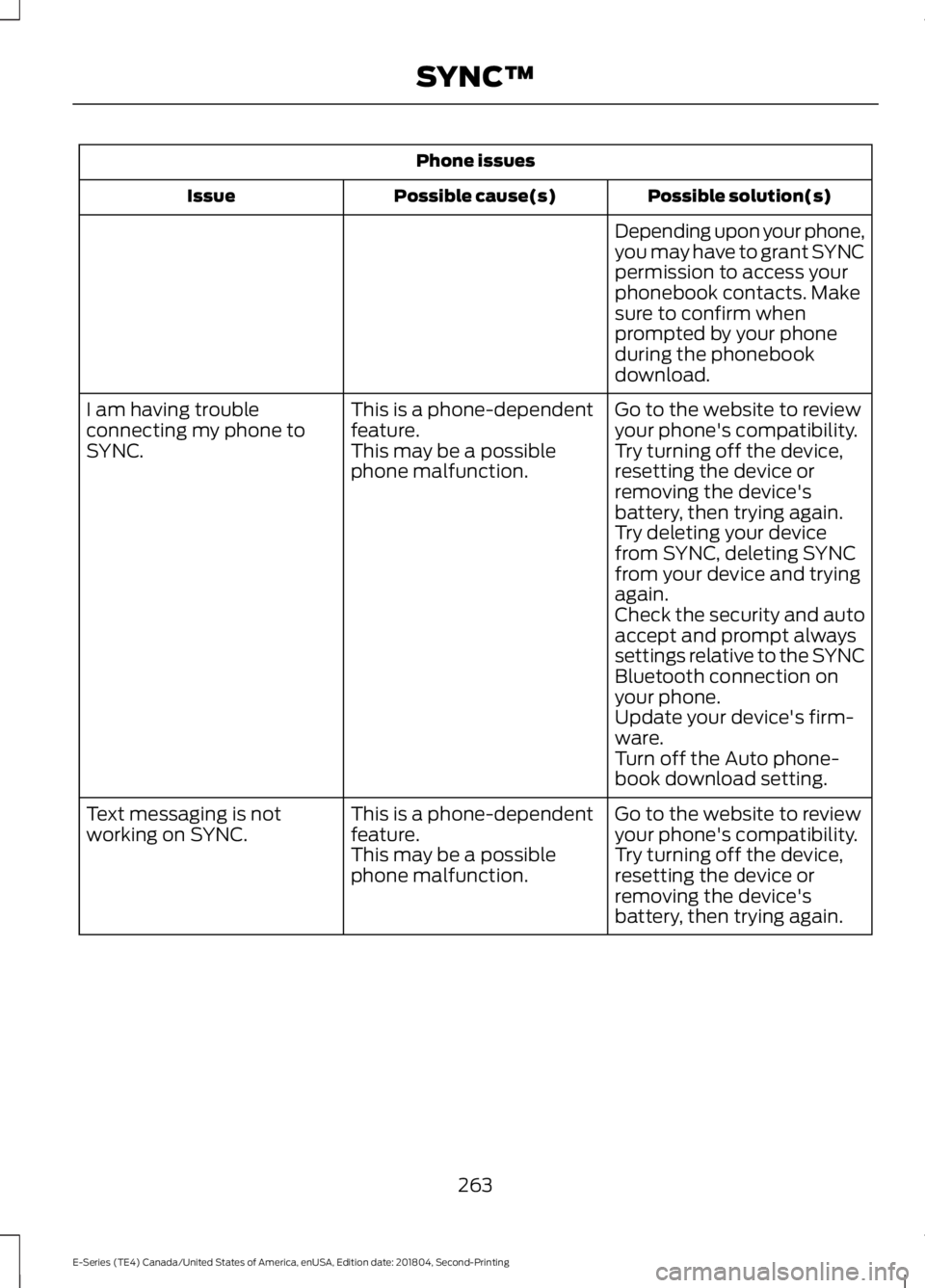
Phone issues
Possible solution(s)Possible cause(s)Issue
Depending upon your phone,you may have to grant SYNCpermission to access yourphonebook contacts. Makesure to confirm whenprompted by your phoneduring the phonebookdownload.
Go to the website to reviewyour phone's compatibility.This is a phone-dependentfeature.I am having troubleconnecting my phone toSYNC.Try turning off the device,resetting the device orremoving the device'sbattery, then trying again.
This may be a possiblephone malfunction.
Try deleting your devicefrom SYNC, deleting SYNCfrom your device and tryingagain.Check the security and autoaccept and prompt alwayssettings relative to the SYNCBluetooth connection onyour phone.Update your device's firm-ware.Turn off the Auto phone-book download setting.
Go to the website to reviewyour phone's compatibility.This is a phone-dependentfeature.Text messaging is notworking on SYNC.Try turning off the device,resetting the device orremoving the device'sbattery, then trying again.
This may be a possiblephone malfunction.
263
E-Series (TE4) Canada/United States of America, enUSA, Edition date: 201804, Second-Printing
SYNC™
Page 267 of 329

USB and media issues
Possible solution(s)Possible cause(s)Issue
Try turning off the device,resetting the device,removing the device'sbattery, then trying again.
This may be a possibledevice malfunction.I am having troubleconnecting my device.
Make sure you are using themanufacturer's cable.Make sure you insert theUSB cable correctly into thedevice and the USB port.Make sure that the devicedoes not have an auto-install program or activesecurity settings.
Make sure you are notleaving the device in yourvehicle during very hot orcold temperatures.
This is a device limitation.SYNC does not recognizemy device when I turn on thecar.
Review the device compatib-ility chart on the SYNCwebsite to confirm yourphone supports theBluetooth audio streamingfunction.
This is a phone-dependentfeature.The device is not connected.
Bluetooth audio does notstream.
Make sure you correctlyconnect the device to SYNC,and that you have pressedplay on your device.
Make sure that all songdetails are populated.Your music files may notcontain the correct artist,song title, album or genreinformation.
SYNC does not recognizemusic that is on my device.Some devices require you tochange the USB settingsfrom mass storage to MTPclass.The file may be corrupted.The song may have copy-right protection, which doesnot allow it to play.
264
E-Series (TE4) Canada/United States of America, enUSA, Edition date: 201804, Second-Printing
SYNC™
Page 272 of 329

AppLink issues
Possible solution(s)Possible cause(s)Issue
On an iPhone with iOS7+, toforce close an app, doubletab the home button thenswipe up on the app to closeit. Tab the home buttonagain, then select the appagain to restart it. After afew seconds, the app shouldthen appear in SYNC'sMobile App's Menu.
Reset the Bluetooth on yourphone by turning it off andthen turning Bluetooth backon. If you are in your vehicle,SYNC should be able toautomatically re-connect toyour phone if you press the"Phone" button.
There is a bluetooth bug onsome order versions of theAndroid OS. This bug maycause apps that were foundthe last time your phoneconnected to SYNC not tobe found again if you havenot turned off bluetooth.
My Android phone isconnected, my app(s) arerunning, I restarted them,but I still cannot find anyapps.
269
E-Series (TE4) Canada/United States of America, enUSA, Edition date: 201804, Second-Printing
SYNC™
Page 273 of 329

AppLink issues
Possible solution(s)Possible cause(s)Issue
Unplug the USB cable fromthe phone, wait a moment,and plug the USB cableback in to the phone. After afew seconds, the app shouldappear in SYNC's MobileApps Menu. If not, "ForceClose" the application andrestart it.
The USB connection toSYNC may need to be reset.My iPhone phone isconnected, my app isrunning, I restarted the appbut I still cannot find it onSYNC.
Try increasing the Bluetoothvolume of the device byusing the device's volumecontrol buttons which aremost often found on theside of the device.
The bluetooth volume onthe phone may be low.I have an Android phone. Ifound and started my mediaapp on SYNC, but there is nosound or the sound is verylow.
Force close or uninstall theapps you do not want SYNCto find. If the app has a "FordSYNC" setting, disable thatsetting in the app's settingsmenu on the phone.
Some Android devices havea limited number ofbluetooth ports apps canuse to connect. If you havemore AppLink apps on yourphone than the number ofavailble Bluetooth ports, youwill not see all of your appslisted in SYNC's mobile appsmenu.
I can only see some of theAppLink apps running on myphone listed in SYNC'sMobile Apps Menu.
270
E-Series (TE4) Canada/United States of America, enUSA, Edition date: 201804, Second-Printing
SYNC™
Page 284 of 329

SPECIAL OPERATING
CONDITIONS SCHEDULED
MAINTENANCE
If you operate your vehicle primarily in anyof the following conditions, you need toperform extra maintenance as indicated.If you operate your vehicle occasionallyunder any of these conditions, it is notnecessary to perform the extramaintenance. For specificrecommendations, see your dealershipservice advisor or technician.
Perform the services shown in thefollowing tables when specified or within3,000 mi (4,800 km) of the messageappearing in the information displayprompting you to change your oil.
•Example 1: The message comes on at28,751 mi (46,270 km). Perform the30,000 mi (48,000 km) automatictransmission fluid replacement.
•Example 2: The message has notcome on, but the odometer reads30,000 mi (48,000 km) (for example,the Intelligent Oil-Life Monitor wasreset at 25,000 mi (40,000 km)).Perform the engine air filterreplacement.
Towing a Trailer or Using a Car-top Carrier
Change engine oil and filter as indicated by the informationdisplay and perform services listed in the Normal Sched-uled Maintenance chart.
As required
Inspect U-joints.Inspect frequently, serviceas required
Replace rear axle fluid. See axle maintenance items underExceptions.Every 22,500 mi(36,000 km)
Change automatic transmission fluid.Every 30,000 mi(48,000 km)
Replace spark plugs.Every 60,000 mi(96,000 km)
281
E-Series (TE4) Canada/United States of America, enUSA, Edition date: 201804, Second-Printing
Scheduled Maintenance
Page 285 of 329

Extensive Idling or Low-speed Driving for Long Distances, as in Heavy Commercial Use(Such as Delivery, Taxi, Patrol Car or Livery)
Change engine oil and filter as indicated by the informationdisplay and perform services listed in the Normal Sched-uled Maintenance chart.
As required
Replace engine air filter.Inspect frequently, serviceas required
Replace rear axle fluid. See axle maintenance items underExceptions.Every 22,500 mi(36,000 km)
Change automatic transmission fluid.Every 30,000 mi(48,000 km)
Replace spark plugs.Every 60,000 mi(96,000 km)
Operating in Dusty or Sandy Conditions (Such as Unpaved or Dusty Roads)
Replace engine air filter.Inspect frequently, serviceas required
Inspect the wheels and related components for abnormalnoise, wear, looseness or drag.Every 5,000 mi (8,000 km)
Rotate tires1, inspect tires for wear and measure treaddepth.
Change engine oil and filter.2Every 5,000 mi (8,000 km)or six monthsPerform multi-point inspection.
Change automatic transmission fluid.Every 30,000 mi(48,000 km)
1Vehicles equipped with dual rear wheels should rotate the front wheels when specified;rear wheels only if unusual wear is noted.2Reset your Intelligent Oil-Life Monitor after each engine oil and filter change. See OilChange Indicator Reset (page 144).
Exclusive Use of E85 (Flex Fuel Vehicles Only)
If ran exclusively on E85, fill the fuel tank with regularunleaded fuel.Every oil change
282
E-Series (TE4) Canada/United States of America, enUSA, Edition date: 201804, Second-Printing
Scheduled Maintenance
Page 322 of 329

A
A/CSee: Climate Control..........................................66About This Manual...........................................5ABSSee: Brakes..............................................................91ABS driving hintsSee: Hints on Driving With Anti-LockBrakes...................................................................91Accessories......................................................271Exterior Style.........................................................271Interior Style..........................................................271Peace of Mind.......................................................271AccessoriesSee: Replacement PartsRecommendation............................................12Adjusting the Headlamps.........................156Vertical Aim Adjustment Procedure...........156Adjusting the Steering Wheel....................47Airbag Disposal...............................................38Air ConditioningSee: Climate Control..........................................66Air FilterSee: Changing the Engine Air Filter..............159Appendices....................................................294At a Glance........................................................16Audible Warnings and Indicators..............57Fail-Safe Cooling Warning Chime..................57Headlamps On Warning Chime......................57Key in Ignition Warning Chime.........................57Parking Brake On Warning Chime..................57Shift to Park Warning Chime............................57Audio System.................................................214General Information..........................................214Audio Unit - Vehicles With: AM/FM/CD/SYNC..............................................................216Accessing CD or MP3 Mode............................217Accessing the Auxiliary MediaSources..............................................................216Accessing the Folders........................................217Accessing the Menu...........................................217Accessing the Phone Features.......................217Adjusting the Volume........................................217Changing Radio Stations.................................218Ejecting the CD....................................................218Fast Forwarding the Media.............................218Inserting a CD.......................................................218
Muting the Audio................................................218Playing or Pausing Media................................218Rewinding the Media.........................................218Scanning the Audio...........................................218Selecting a Frequency Band..........................218Setting the Memory Presets...........................218Switching Shuffle Mode On and Off...........218Switching the Audio Unit On and Off.........218Using Seek, Fast Forward andReverse..............................................................219Audio Unit - Vehicles With: AM/FM.......215Accessing the Clock Settings.........................215Accessing the Sound Settings.......................216Adjusting the Volume........................................216Changing Radio Stations.................................216Selecting the Audio Modes.............................216Setting the Memory Presets...........................216Switching the Audio Unit On and Off.........216Using Seek, Fast Forward andReverse..............................................................216Automatic Transmission.............................87Brake-Shift Interlock..........................................88If Your Vehicle Gets Stuck In Mud orSnow....................................................................89Putting your vehicle in or out of gear:...........87Automatic Transmission FluidCheck.............................................................149Automatic Transmission Fluid Filter............152Checking Automatic TransmissionFluid....................................................................149Auxiliary Power Points..................................72110 Volt AC Power Point.....................................7212 Volt DC Power Point.......................................72Locations..................................................................72Auxiliary Switches........................................272
B
BatterySee: Changing the 12V Battery......................153Bonnet LockSee: Opening and Closing the Hood............141Booster Seats..................................................22Types of Booster Seats......................................23Brake Fluid Check.........................................152Brakes..................................................................91General Information.............................................91Breaking-In.......................................................116
319
E-Series (TE4) Canada/United States of America, enUSA, Edition date: 201804, Second-Printing
Index