Page 507 of 718

CAUTION!
Recovery feature:
•Is to be used by a professional ONLY.
• Is used only to provide recovery of the vehicle.
• Is NOT to be used to recover secondary vehicle.
• Is NOT to be used for transporting the vehicle over
the road, i.e. “Flat Towing”.
Recovery load should:
• Be applied at constant speed.
• Be applied parallel to the center line of the length of
the vehicle.
• Not be an abrupt acceleration.
If you must use the accessories (wipers, defrosters, etc.)
while being towed, the ignition must be in the ON/RUN
mode, not the ACC mode.
NOTE: The Safehold feature will engage the Electric Park
Brake whenever the driver’s door is opened (if the ignition
is ON, transmission is not in PARK, and brake pedal is
released). If you are towing this vehicle with the ignition in
the ON/RUN mode, you must manually disable the Elec-
tric Park Brake each time the driver’s door is opened, by
pressing the brake pedal and then releasing the EPB. If the key fob is unavailable, or the vehicle’s battery is
discharged, refer to “Manual Park Release” in this section
for instructions on shifting the transmission out of PARK in
order to move the vehicle.
CAUTION!
•
Do not use sling-type equipment when towing.
Vehicle damage may occur.
• When securing the vehicle to a flatbed truck, do not
attach to front or rear suspension components. Dam-
age to your vehicle may result from improper towing.
• Ensure that the Electric Park Brake is released, and
remains released, while being towed.
ENHANCED ACCIDENT RESPONSE SYSTEM
(EARS)
This vehicle is equipped with an Enhanced Accident
Response System.
Please refer to “Occupant Restraint Systems” in “Safety”
for further information on the Enhanced Accident Re-
sponse System (EARS) function.
7
IN CASE OF EMERGENCY 505
Page 598 of 718
Camera
After pressing the “Camera” button on the touchscreen, the
following settings will be available:
Setting NameSelectable Options
Surround View Camera Delay — If Equipped On
Off
NOTE:
The “Surround View Camera Delay” setting determines whether or not the screen will display the 360 degree view
image with guidelines for up to ten seconds after the vehicle is shifted out of REVERSE. This delay will be canceled if
the vehicle’s speed exceeds 8 mph (13 km/h), the transmission is shifted into PARK, or the ignition is switched to the
OFF position. Surround View Camera Guidelines — If Equipped On
Off
NOTE:
The “Surround View Rear Back Up Camera Active Guidelines” feature allows you to see active guidelines over the
Surround View camera display whenever the gear selector is put into REVERSE or the Surround View button on the
touchscreen is pressed. The image will be displayed on the radio touchscreen display.
596 MULTIMEDIA
Page 623 of 718
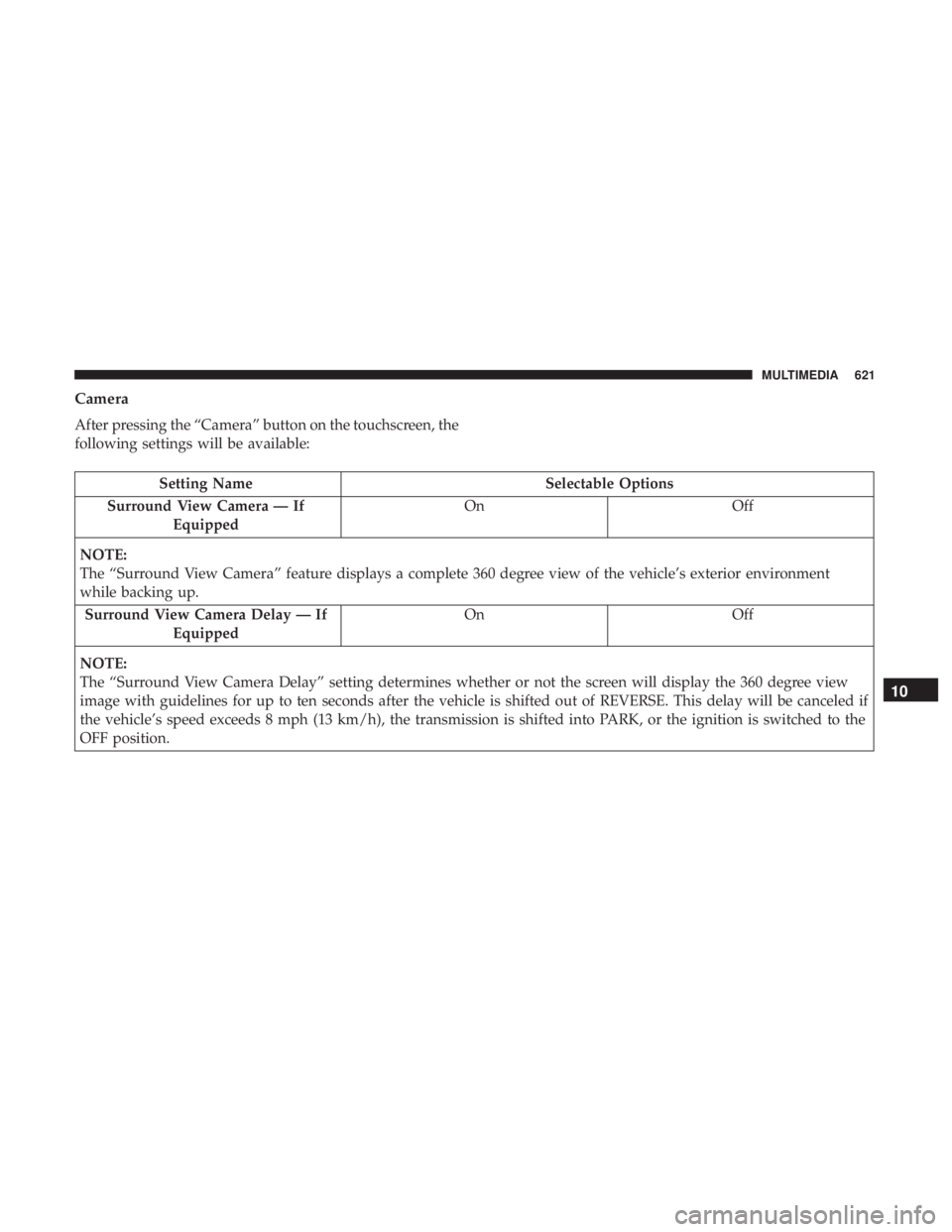
Camera
After pressing the “Camera” button on the touchscreen, the
following settings will be available:
Setting NameSelectable Options
Surround View Camera — If Equipped On
Off
NOTE:
The “Surround View Camera” feature displays a complete 360 degree view of the vehicle’s exterior environment
while backing up. Surround View Camera Delay — If Equipped On
Off
NOTE:
The “Surround View Camera Delay” setting determines whether or not the screen will display the 360 degree view
image with guidelines for up to ten seconds after the vehicle is shifted out of REVERSE. This delay will be canceled if
the vehicle’s speed exceeds 8 mph (13 km/h), the transmission is shifted into PARK, or the ignition is switched to the
OFF position.
10
MULTIMEDIA 621
Page 624 of 718
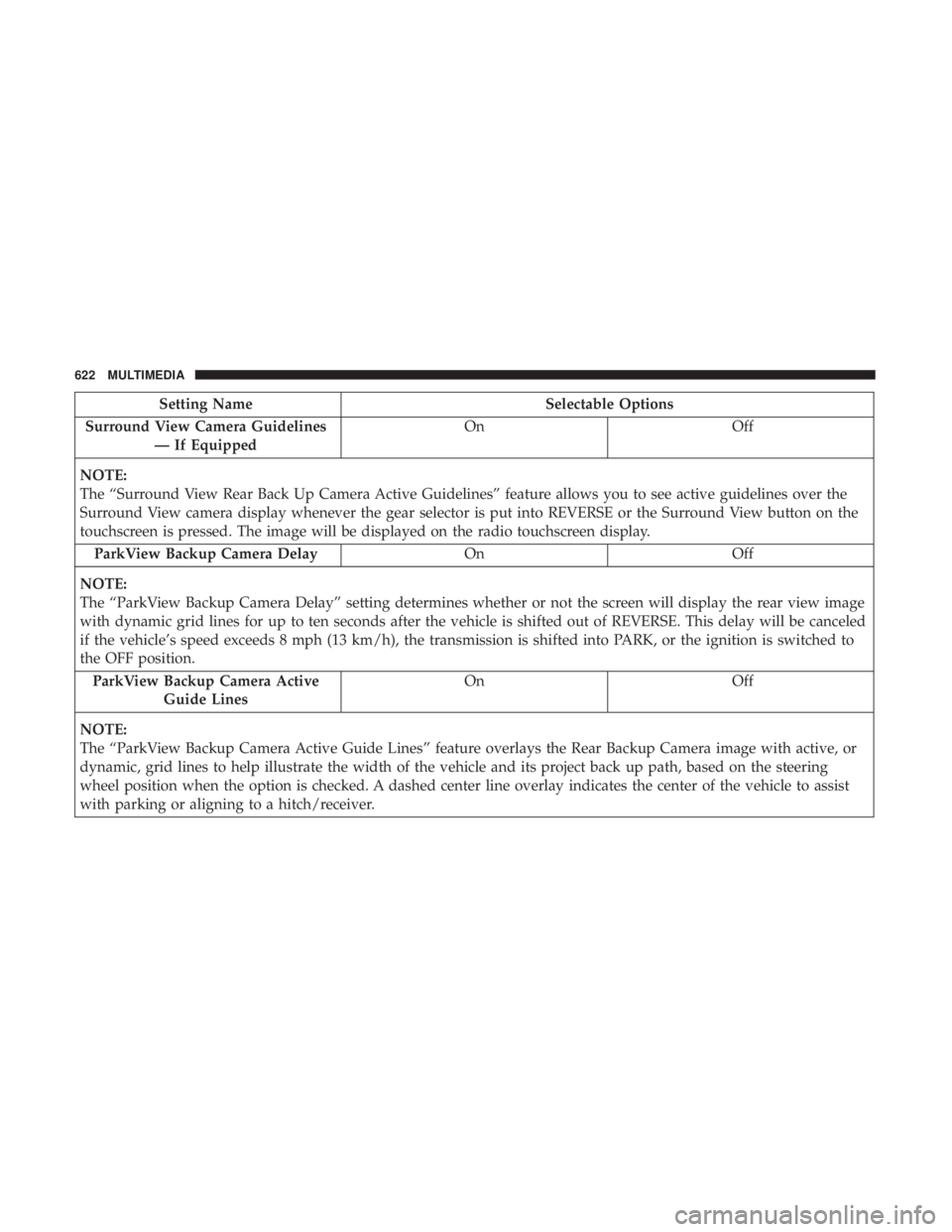
Setting NameSelectable Options
Surround View Camera Guidelines — If Equipped On
Off
NOTE:
The “Surround View Rear Back Up Camera Active Guidelines” feature allows you to see active guidelines over the
Surround View camera display whenever the gear selector is put into REVERSE or the Surround View button on the
touchscreen is pressed. The image will be displayed on the radio touchscreen display. ParkView Backup Camera Delay OnOff
NOTE:
The “ParkView Backup Camera Delay” setting determines whether or not the screen will display the rear view image
with dynamic grid lines for up to ten seconds after the vehicle is shifted out of REVERSE. This delay will be canceled
if the vehicle’s speed exceeds 8 mph (13 km/h), the transmission is shifted into PARK, or the ignition is switched to
the OFF position. ParkView Backup Camera Active Guide Lines On
Off
NOTE:
The “ParkView Backup Camera Active Guide Lines” feature overlays the Rear Backup Camera image with active, or
dynamic, grid lines to help illustrate the width of the vehicle and its project back up path, based on the steering
wheel position when the option is checked. A dashed center line overlay indicates the center of the vehicle to assist
with parking or aligning to a hitch/receiver.
622 MULTIMEDIA
Page 713 of 718

Tilting.............................. .50, 52
Security Alarm ........................... .209
Arm The System ..........................35
Disarm The System ........................35
Selection Of Coolant (Antifreeze) ...............577
Sentry Key Key Programming .........................34
Sentry Key (Immobilizer) ......................33
Sentry Key Replacement ......................34
Service Assistance ......................... .694
Service Contract .......................... .696
Service Manuals .......................... .698
Shifting Automatic Transmission ....................335
Shoulder Belts ............................ .249
Side View Mirror Adjustment ...................92
Signals, Turn .....................97, 215, 315, 453
Siri .................................... .686
SiriusXM Guardian Vehicle Health Alert ...................... .685
SmartBeams ...............................98
Snow Chains (Tire Chains) ....................559
Snow Tires .............................. .555
Spare Tires .....................467, 555, 556, 557
Spark Plugs ............................. .577Specifications
Oil.................................. .577
Speed Control Accel/Decel (ACC Only) ...................353
Cancel ............................... .348
Resume .............................. .348
Speed Control (Cruise Control) ..............346, 348
Starting .............................. .30, 321
Button .................................28
Cold Weather .......................... .326
Engine Fails To Start ..................... .326
Remote ................................30
Starting And Operating ..................... .321
Starting Procedures ........................ .321
Steering ................................ .341
Tilt Column .............................90
Wheel,
Heated ...........................90
Wheel, Tilt ..............................90
Steering Wheel Audio Controls .................639
Steering Wheel Mounted Sound System Controls . . . .639
Storage, Vehicle ........................... .136
Stow ‘n Go (Fold In Floor) Seats .................63
Stow ‘n Vac .............................. .152
Stuck, Freeing ............................ .501
Sunglasses Storage ......................... .180
12
INDEX 711