Page 83 of 492
IconDescription
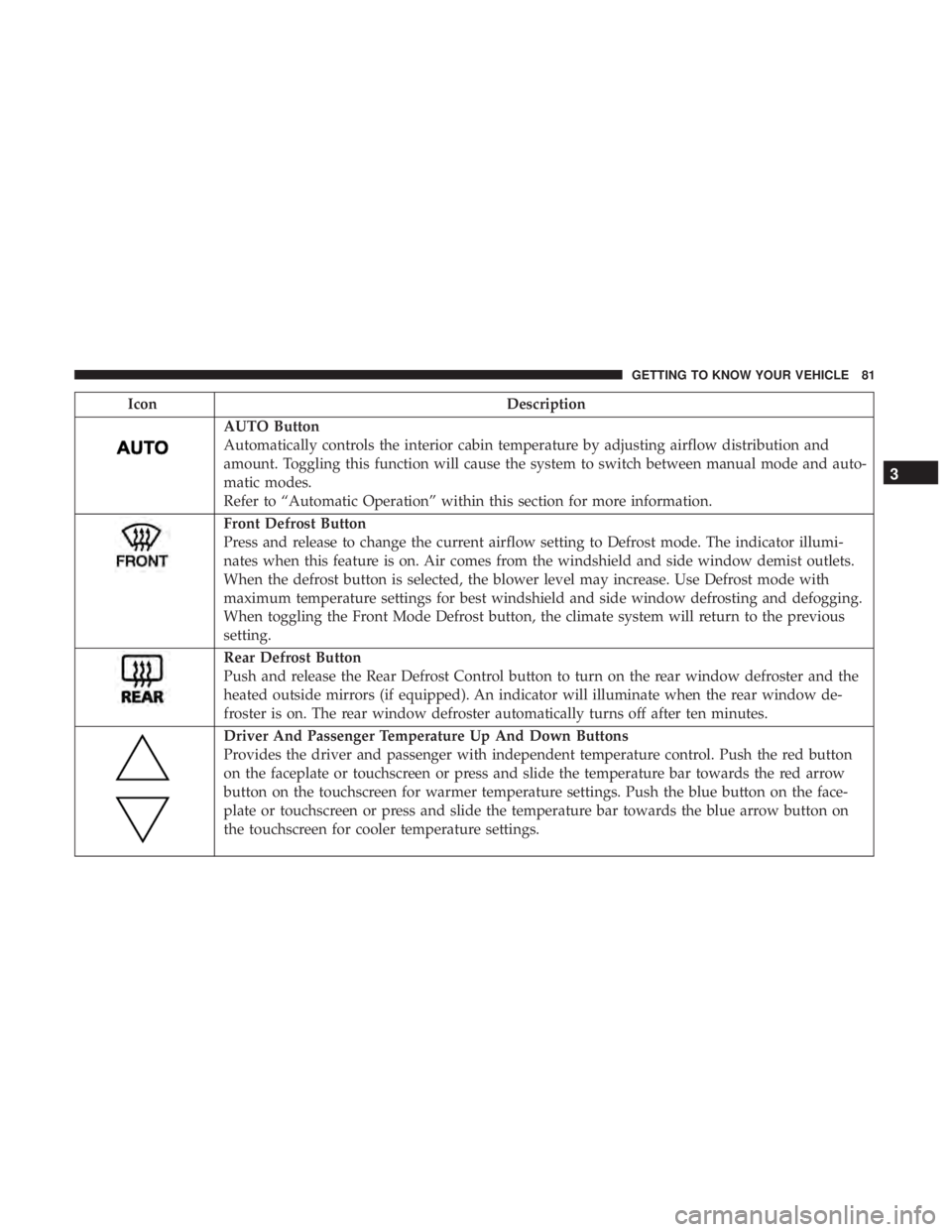
AUTO Button
Automatically controls the interior cabin temperature by adjusting airflow distribution and
amount. Toggling this function will cause the system to switch between manual mode and auto-
matic modes.
Refer to “Automatic Operation” within this section for more information.
Front Defrost Button
Press and release to change the current airflow setting to Defrost mode. The indicator illumi-
nates when this feature is on. Air comes from the windshield and side window demist outlets.
When the defrost button is selected, the blower level may increase. Use Defrost mode with
maximum temperature settings for best windshield and side window defrosting and defogging.
When toggling the Front Mode Defrost button, the climate system will return to the previous
setting.
Rear Defrost Button
Push and release the Rear Defrost Control button to turn on the rear window defroster and the
heated outside mirrors (if equipped). An indicator will illuminate when the rear window de-
froster is on. The rear window defroster automatically turns off after ten minutes.
Driver And Passenger Temperature Up And Down Buttons
Provides the driver and passenger with independent temperature control. Push the red button
on the faceplate or touchscreen or press and slide the temperature bar towards the red arrow
button on the touchscreen for warmer temperature settings. Push the blue button on the face-
plate or touchscreen or press and slide the temperature bar towards the blue arrow button on
the touchscreen for cooler temperature settings.
3
GETTING TO KNOW YOUR VEHICLE 81
Page 118 of 492
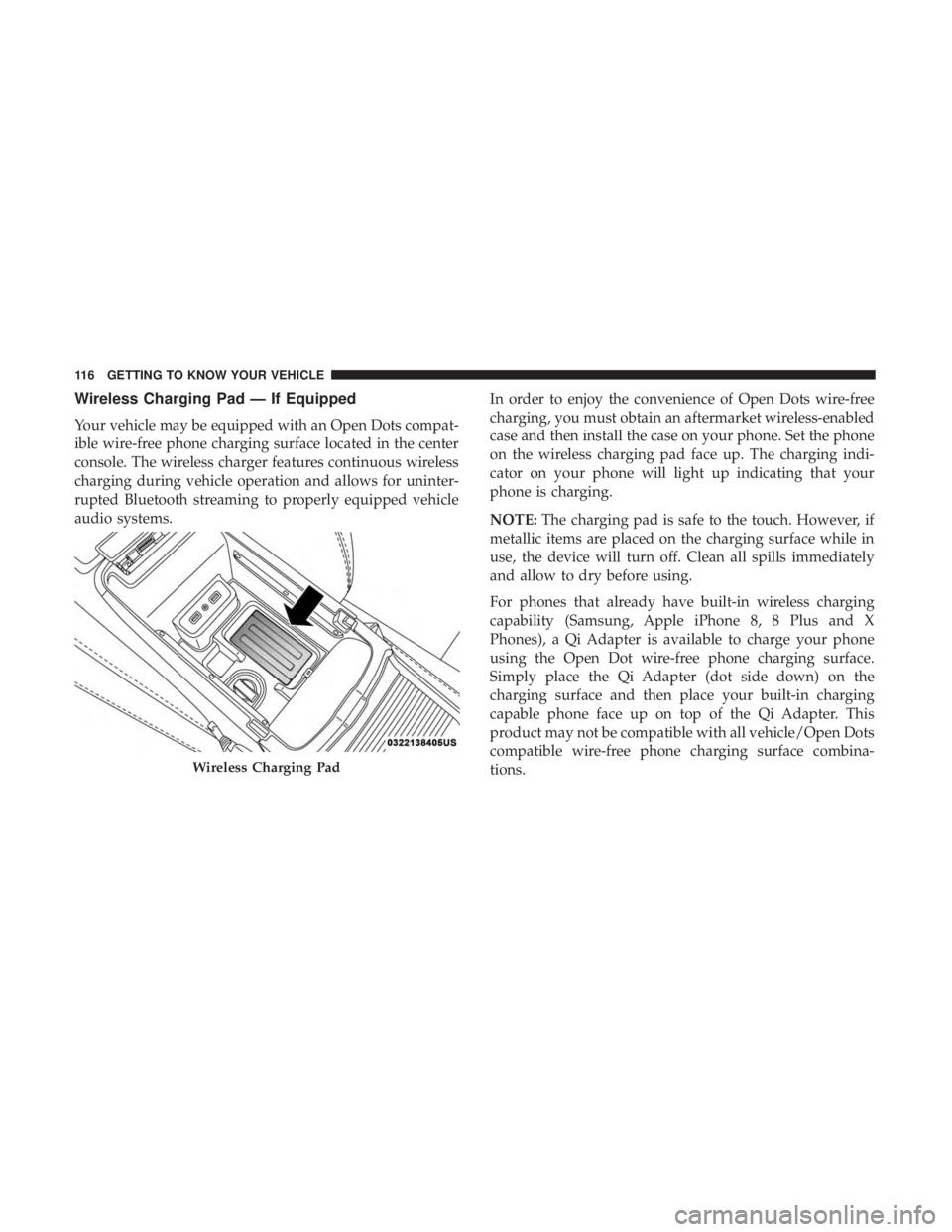
Wireless Charging Pad — If Equipped
Your vehicle may be equipped with an Open Dots compat-
ible wire-free phone charging surface located in the center
console. The wireless charger features continuous wireless
charging during vehicle operation and allows for uninter-
rupted Bluetooth streaming to properly equipped vehicle
audio systems.In order to enjoy the convenience of Open Dots wire-free
charging, you must obtain an aftermarket wireless-enabled
case and then install the case on your phone. Set the phone
on the wireless charging pad face up. The charging indi-
cator on your phone will light up indicating that your
phone is charging.
NOTE:
The charging pad is safe to the touch. However, if
metallic items are placed on the charging surface while in
use, the device will turn off. Clean all spills immediately
and allow to dry before using.
For phones that already have built-in wireless charging
capability (Samsung, Apple iPhone 8, 8 Plus and X
Phones), a Qi Adapter is available to charge your phone
using the Open Dot wire-free phone charging surface.
Simply place the Qi Adapter (dot side down) on the
charging surface and then place your built-in charging
capable phone face up on top of the Qi Adapter. This
product may not be compatible with all vehicle/Open Dots
compatible wire-free phone charging surface combina-
tions.
Wireless Charging Pad
116 GETTING TO KNOW YOUR VEHICLE
Page 121 of 492
GETTING TO KNOW YOUR INSTRUMENT PANEL
CONTENTS
�INSTRUMENT CLUSTER ..................120
▫ Instrument Cluster Descriptions ............121
� INSTRUMENT CLUSTER DISPLAY ...........122
▫ Location And Controls ...................122
▫ Engine Oil Life Reset ....................124
▫ Instrument Cluster Display Selectable Menu
Items .............................. .125
▫ Battery Saver On/Battery Saver Mode Message —
Electrical Load Reduction Actions
— If Equipped ....................... .129
� WARNING LIGHTS AND MESSAGES .........131
▫ Red Warning Lights .....................131 ▫
Yellow Warning Lights ...................135
▫ Yellow Indicator Lights ...................140
▫ Green Indicator Lights ...................140
▫ White Indicator Lights ...................141
▫ Blue Indicator Lights ....................142
� ONBOARD DIAGNOSTIC SYSTEM — OBD II . . .142
▫ Onboard Diagnostic System (OBD II)
Cybersecurity ........................ .143
� EMISSIONS INSPECTION AND MAINTENANCE
PROGRAMS .......................... .1434
Page 144 of 492
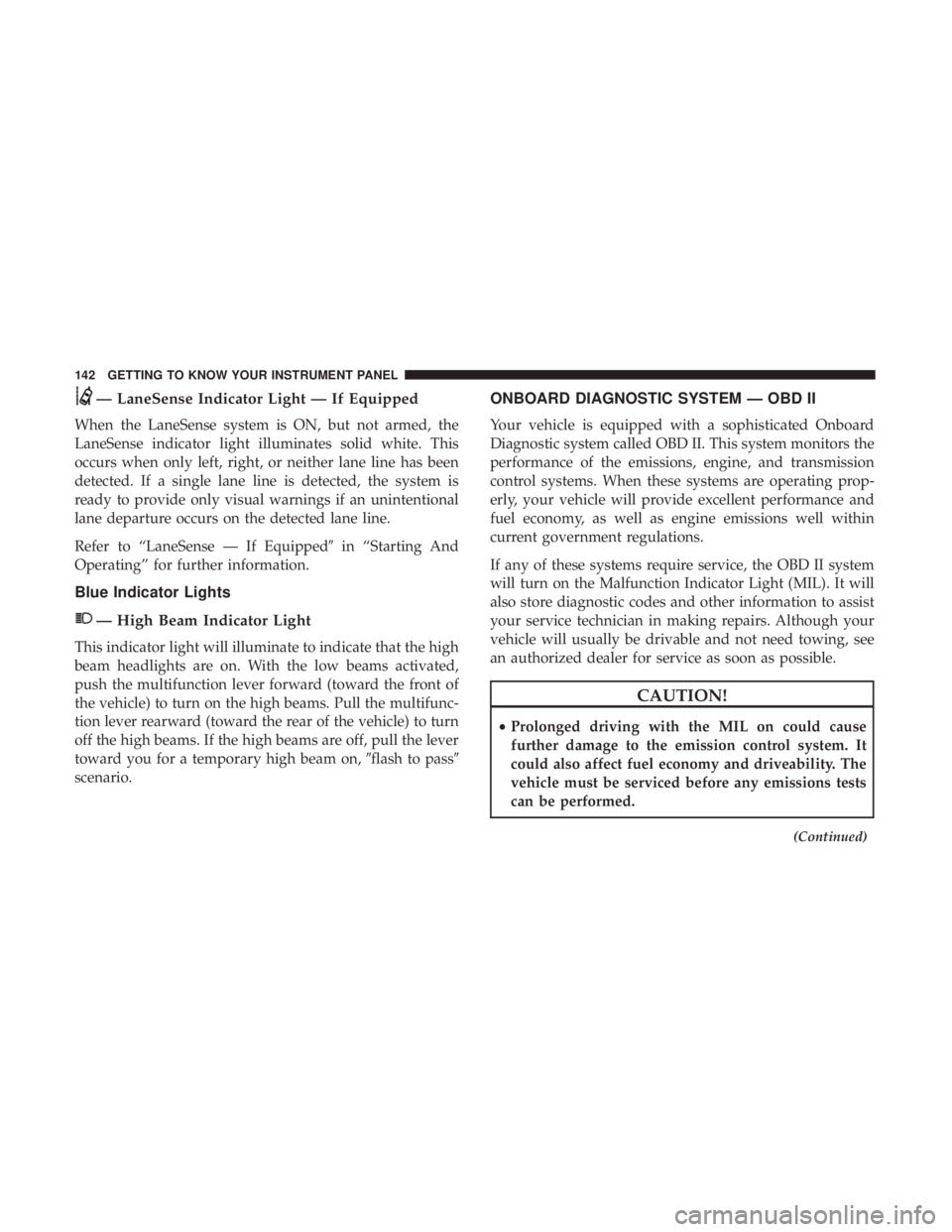
— LaneSense Indicator Light — If Equipped
When the LaneSense system is ON, but not armed, the
LaneSense indicator light illuminates solid white. This
occurs when only left, right, or neither lane line has been
detected. If a single lane line is detected, the system is
ready to provide only visual warnings if an unintentional
lane departure occurs on the detected lane line.
Refer to “LaneSense — If Equipped�in “Starting And
Operating” for further information.
Blue Indicator Lights
— High Beam Indicator Light
This indicator light will illuminate to indicate that the high
beam headlights are on. With the low beams activated,
push the multifunction lever forward (toward the front of
the vehicle) to turn on the high beams. Pull the multifunc-
tion lever rearward (toward the rear of the vehicle) to turn
off the high beams. If the high beams are off, pull the lever
toward you for a temporary high beam on, �flash to pass�
scenario.
ONBOARD DIAGNOSTIC SYSTEM — OBD II
Your vehicle is equipped with a sophisticated Onboard
Diagnostic system called OBD II. This system monitors the
performance of the emissions, engine, and transmission
control systems. When these systems are operating prop-
erly, your vehicle will provide excellent performance and
fuel economy, as well as engine emissions well within
current government regulations.
If any of these systems require service, the OBD II system
will turn on the Malfunction Indicator Light (MIL). It will
also store diagnostic codes and other information to assist
your service technician in making repairs. Although your
vehicle will usually be drivable and not need towing, see
an authorized dealer for service as soon as possible.
CAUTION!
• Prolonged driving with the MIL on could cause
further damage to the emission control system. It
could also affect fuel economy and driveability. The
vehicle must be serviced before any emissions tests
can be performed.
(Continued)
142 GETTING TO KNOW YOUR INSTRUMENT PANEL
Page 309 of 492
Bulb Number
Front Sidemarker Lamp LED (Serviced At Authorized Dealer)
Rear Tail/Stop/Turn Lamp LED (Serviced At Authorized Dealer)
Rear Sidemarker Lamp LED (Serviced At Authorized Dealer)
Backup Lamp LED (Serviced At Authorized Dealer)
Center High Mount Stop Lamp (CHMSL) LED (Serviced At Authorized Dealer)
License LED (Serviced At Authorized Dealer)
Replacing Exterior Bulbs
High Intensity Discharge Headlamps (HID) — If
Equipped
The headlamps are a type of high voltage discharge tube.
High voltage can remain in the circuit even with the
headlamp switch off and the ignition turned to the OFF
position.Because of this, you should not attempt to
service a headlamp bulb yourself. If a headlamp bulb
fails, take your vehicle to an authorized dealer for ser-
vice.
WARNING!
A transient high voltage occurs at the bulb sockets of
HID headlamps when the headlamp switch is turned
ON. It may cause serious electrical shock or electrocu-
tion if not serviced properly. See your authorized
dealer for service.
NOTE: On vehicles equipped with HID headlamps, when
the headlamps are turned on, there is a blue hue to the
lights. This diminishes and becomes more white after
approximately 10 seconds, as the system charges.7
IN CASE OF EMERGENCY 307
Page 315 of 492
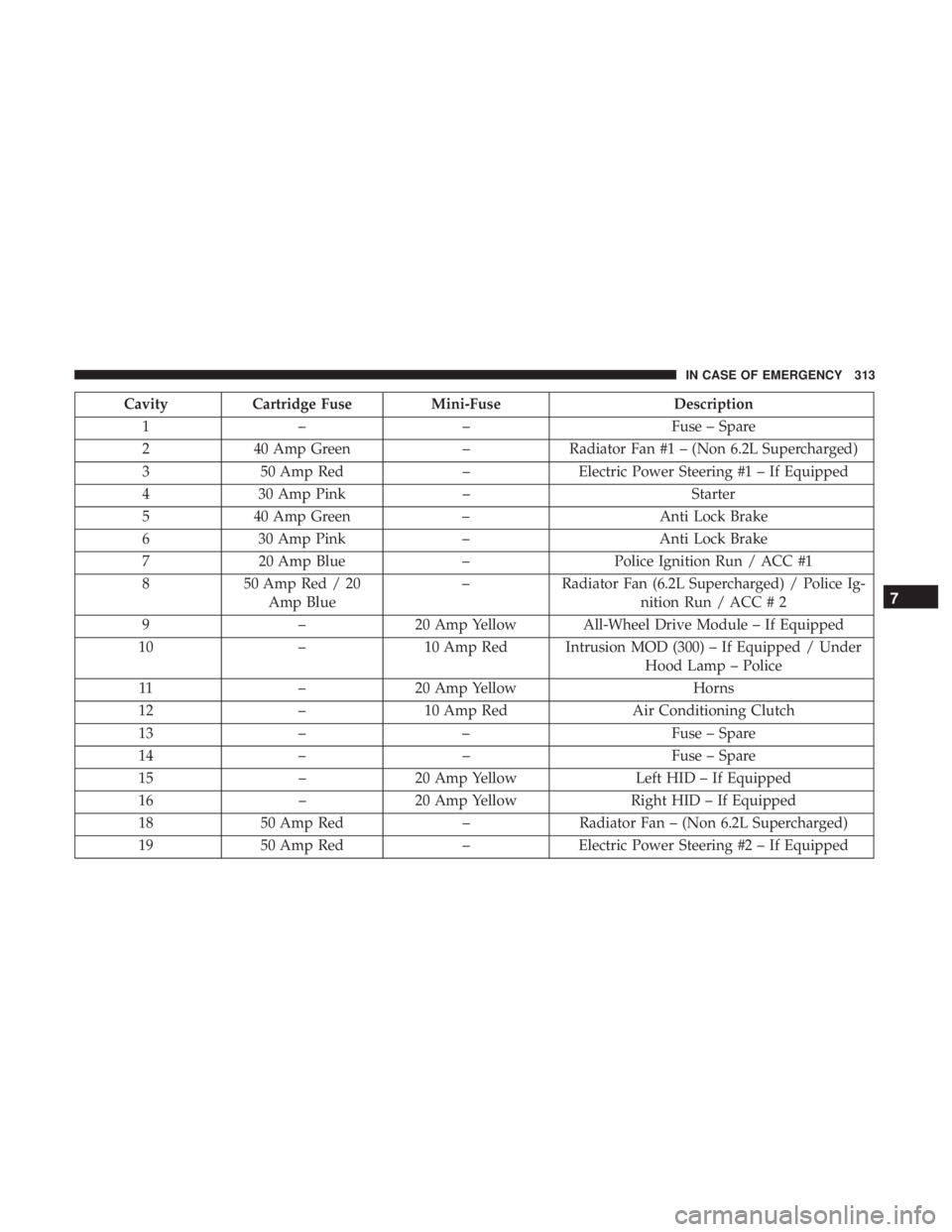
CavityCartridge Fuse Mini-Fuse Description
1 – – Fuse – Spare
2 40 Amp Green –Radiator Fan #1 – (Non 6.2L Supercharged)
3 50 Amp Red –Electric Power Steering #1 – If Equipped
4 30 Amp Pink – Starter
5 40 Amp Green –Anti Lock Brake
6 30 Amp Pink –Anti Lock Brake
7 20 Amp Blue –Police Ignition Run / ACC #1
8 50 Amp Red / 20
Amp Blue –
Radiator Fan (6.2L Supercharged) / Police Ig-
nition Run / ACC # 2
9 –20 Amp Yellow All-Wheel Drive Module – If Equipped
10 –10 Amp Red Intrusion MOD (300) – If Equipped / Under
Hood Lamp – Police
11 –20 Amp Yellow Horns
12 –10 Amp Red Air Conditioning Clutch
13 – – Fuse – Spare
14 – – Fuse – Spare
15 –20 Amp Yellow Left HID – If Equipped
16 –20 Amp Yellow Right HID – If Equipped
18 50 Amp Red –Radiator Fan – (Non 6.2L Supercharged)
19 50 Amp Red –Electric Power Steering #2 – If Equipped
7
IN CASE OF EMERGENCY 313
Page 316 of 492
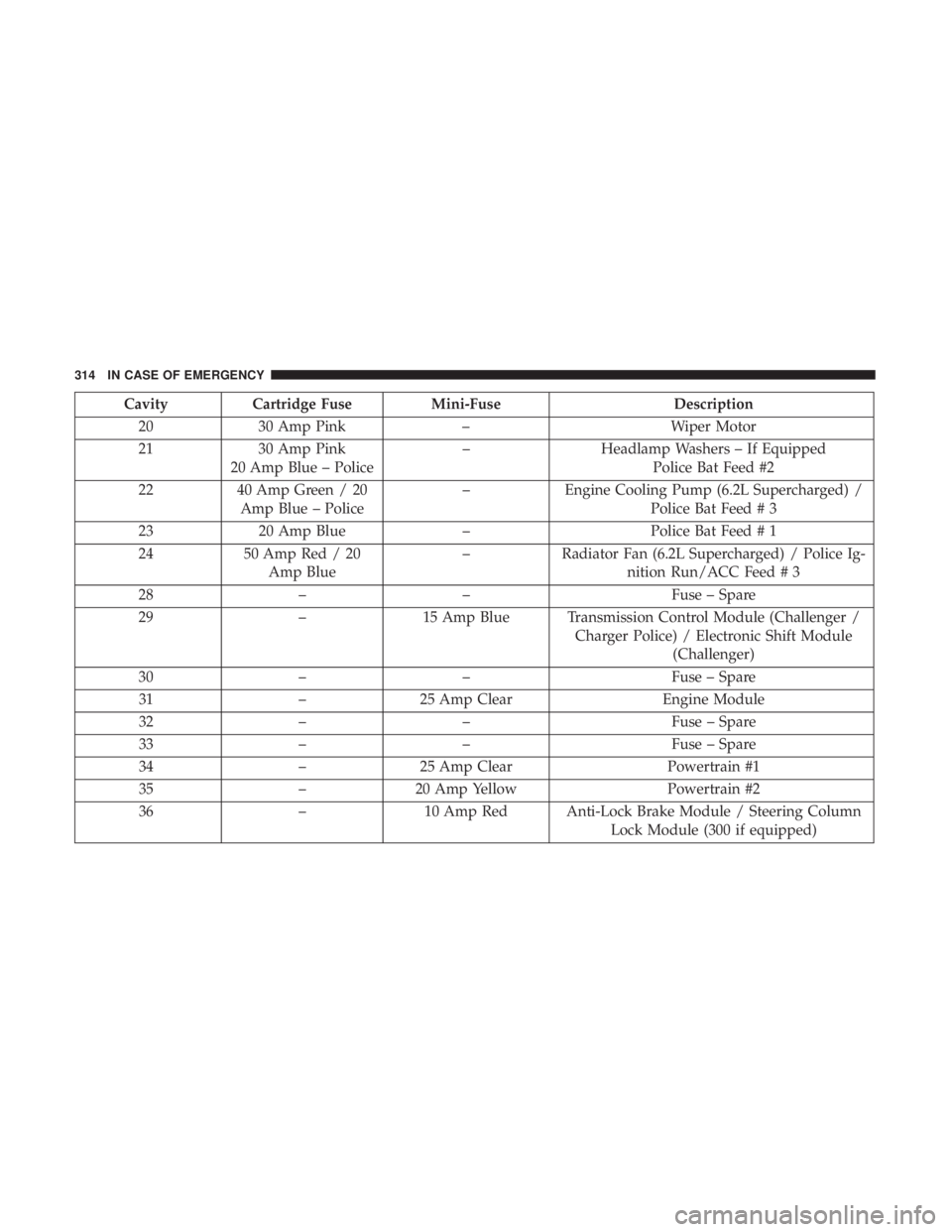
CavityCartridge Fuse Mini-Fuse Description
20 30 Amp Pink – Wiper Motor
21 30 Amp Pink
20 Amp Blue – Police –
Headlamp Washers – If Equipped
Police Bat Feed #2
22 40 Amp Green / 20
Amp Blue – Police –
Engine Cooling Pump (6.2L Supercharged) /
Police Bat Feed # 3
23 20 Amp Blue –Police Bat Feed # 1
24 50 Amp Red / 20
Amp Blue –
Radiator Fan (6.2L Supercharged) / Police Ig-
nition Run/ACC Feed # 3
28 – – Fuse – Spare
29 –15 Amp Blue Transmission Control Module (Challenger /
Charger Police) / Electronic Shift Module(Challenger)
30 – – Fuse – Spare
31 –25 Amp Clear Engine Module
32 – – Fuse – Spare
33 – – Fuse – Spare
34 –25 Amp Clear Powertrain #1
35 –20 Amp Yellow Powertrain #2
36 –10 Amp Red Anti-Lock Brake Module / Steering Column
Lock Module (300 if equipped)
314 IN CASE OF EMERGENCY
Page 319 of 492
CAUTION!(Continued)
•When replacing a blown fuse, it is important to use
only a fuse having the correct amperage rating. The
use of a fuse with a rating other than indicated may
result in a dangerous electrical system overload. If a
properly rated fuse continues to blow, it indicates a
problem in the circuit that must be corrected.
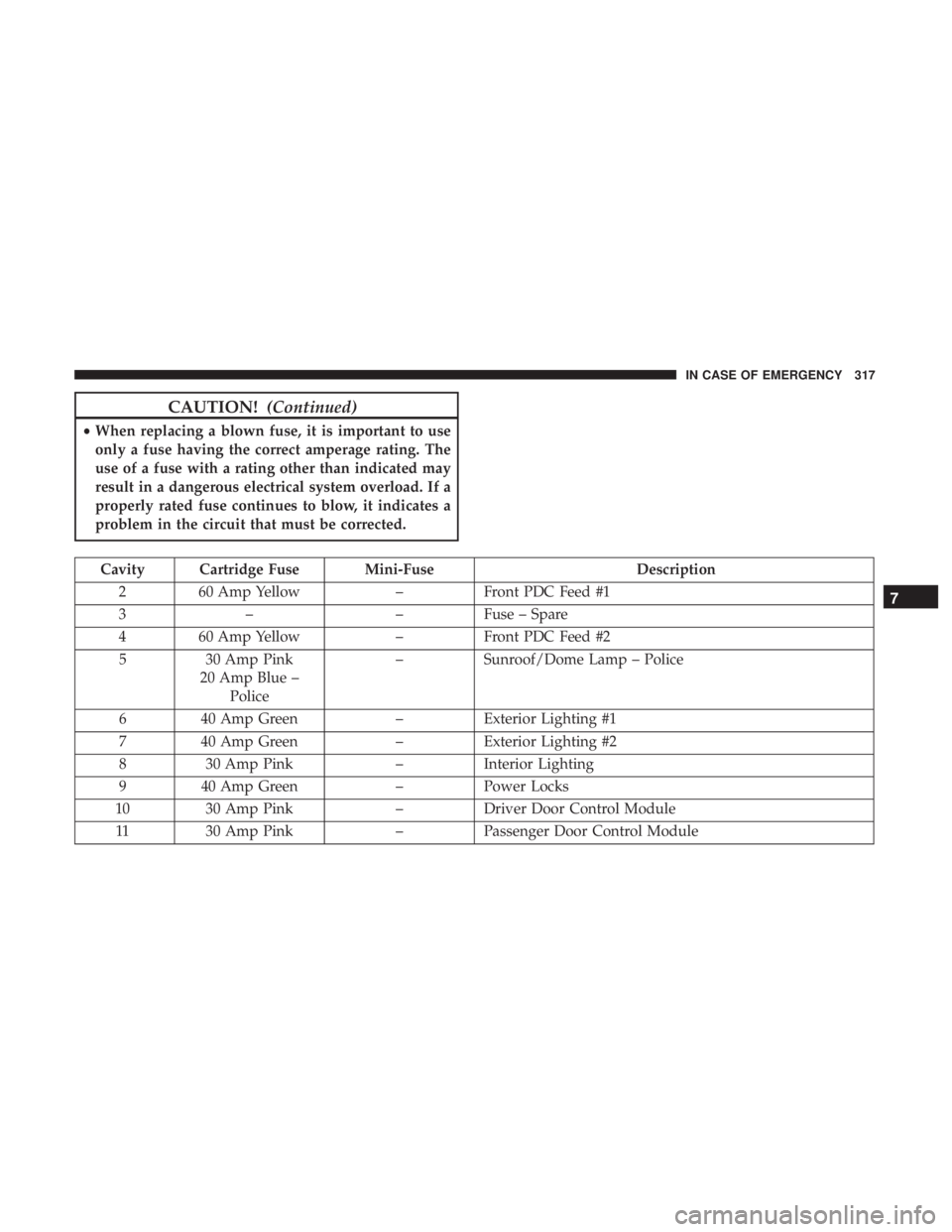
Cavity Cartridge Fuse Mini-Fuse Description
2 60 Amp Yellow –Front PDC Feed #1
3 – –Fuse – Spare
4 60 Amp Yellow –Front PDC Feed #2
5 30 Amp Pink
20 Amp Blue – Police –
Sunroof/Dome Lamp – Police
6 40 Amp Green –Exterior Lighting #1
7 40 Amp Green –Exterior Lighting #2
8 30 Amp Pink –Interior Lighting
9 40 Amp Green –Power Locks
10 30 Amp Pink –Driver Door Control Module
11 30 Amp Pink –Passenger Door Control Module
7
IN CASE OF EMERGENCY 317