2019 AUDI Q5 ignition
[x] Cancel search: ignitionPage 200 of 392

Audiconnect
Dependingonthecountry,vehicleequipment,
andconnectiontype,thefollowingfunctionsmay
beavailable:
Dataconnectionsettings
UsingtheDataconnectionsettingsmenu,you
cansetwhenthesystemshouldconnecttothe
Internet.TheInternetconnectiondisconnects
automaticallyoncetherequested Audiconnect
Infotainmentservicenolongerrequiresanydata.
—Connectionsetup:youcanselectwhenadata
connection should beestablished.
—Audiconnect(MMI):whenthisfunctionis
switchedon,adataconnectionisautomatically
establishedinordertouseAudiconnectInfo-
tainmentservices.
—Wi-Fidevices:whenthisfunctionisswitched
on,youcanallowordenyInternetconnections.
ZAWARNING
Alwaysfollowtheinformationfoundin>A\
inGeneralinformationonpage192.
@)Note
Alwaysfollowtheinformationfoundin>@in
Generalinformationonpage192.
@Tips
Formoreinformationonroamingcharges,
contactyourcellphoneserviceprovider.
Wi-Fisettings
Appliesto:vehicleswithWi-Fihotspot
YoucanusetheMMIasaWi-Fihotspottocon-
nect
uptoeight Wi-FidevicestotheInternet.
Requirement:theignitionmustbe switchedon.
>Select:[MENU]button>Telephone>rightcon-
trolbutton>Wi-Fisettings.
Dependingonthecountryandthevehicleequip-
ment,thefollowing functionsmaybeavailable:
198
Wi-Fi
Whenthisfunctionisswitchedon,theMMIWi-Fi
hotspotisactiveandvisibletootherdevices(for
example,laptopsandcellphones).Youcancon-
nectyourWi-FidevicetotheMMIandusetheIn-
ternetconnectionifnecessary.Ifyouswitchoff
theWi-FiintheMMI,theWi-Fihotspotwillbe
deactivated.Therefore,anyotherdevicesaccess-
ingtheWi-Fihotspotwillnolongerbeconnected
totheWi-Fi.
Networkkey
TheWi-Ficonnectionbetweenyourvehicleand
yourWi-Fideviceisencrypted.Toestablishacon-
nection,youmustenterthefollowingvalues
whensettingupyourwirelessdevice.Youcan
changethemifnecessary.
—Accesspoint(SSID):NameoftheWi-Finet-
work.
—Password:arandompasswordwassetinthe
MMIatthefactory.Thepasswordcanbe
changed.Theencryptionmethodrequiresa
passwordtobeatleasteightcharacterslong.
Chooseasecurepassword.
—Visibletoothers:ThevisibilityofyourWi-Fi
networkcanbeswitchedonandoff.
Z\WARNING
Alwaysfollowtheinformationfoundin>A\
inGeneralinformationonpage192.
()Note
Alwaysfollowtheinformationfoundin©in
Generalinformationonpage192.
G)Tips
InvehicleswithoutAudiconnectInfotain-
ment,theuseoftheWi-Fihotspotisonly
possiblefortheWi-Fiaudioplayer*.Adata
connectiontotheInternetcannotbeestab-
lished.
Page 203 of 392
80A012721BG
Emergencycall
Emergencycall
Introduction
Appliesto:vehicleswithemergencycallfunction
Dependingonthe countryandthevehicleequip-
ment,thefollowing functionsmaybeavailable.
Withtheemergencycall,youcancallforhelpin
dangeroussituationsasquicklyaspossible.Use
thisfunctionwhenemergencyhelpisneeded
=>page201.
Withonlineroadsideassistance,youcanrequest
assistanceifthereisabreakdownoraminoracci-
dent>page202.
@Tips
— TheservicesareprovidedthroughaSIM
cardinstalledinthevehicle.Thecostofthe
callanddataconnectionsisincludedinthe
priceoftheservices.Servicesareprovided
assumingthatthecellphonenetworkre-
quiredfortheinstalledSIMcardisfunction-
ingandavailable foruse.Theavailableserv-
icessetbyAudiAGareonlyavailablewithin
thecellphonenetworkcoverageareafor
thecellphoneserviceprovider selectedby
AudiAG.
—Youcanfindwhatdatawillbetransferredat
www.audiusa.com.
—Theseservicescannot bedeactivatedusing
thesettingsintheInfotainmentsystem.
Emergencycall
Appliesto:vehicleswithemergencycallfunction
Anemergencycallisacombinationofdatatrans-
missionandaphonecall.Thedatatransmission
fromyourvehicleforwardsimportantinforma-
tion,suchasthevehicleandpositiondata,tothe
emergencycallcenter.
@)Tips
Theavailability oftheservicesofferedde-
pendsonthecountryandmaychangeinthe
future.
Makinganemergencycall
Appliesto:vehicleswithemergencycallfunction
Theemergencycallcanbemadetwodifferent
ways.
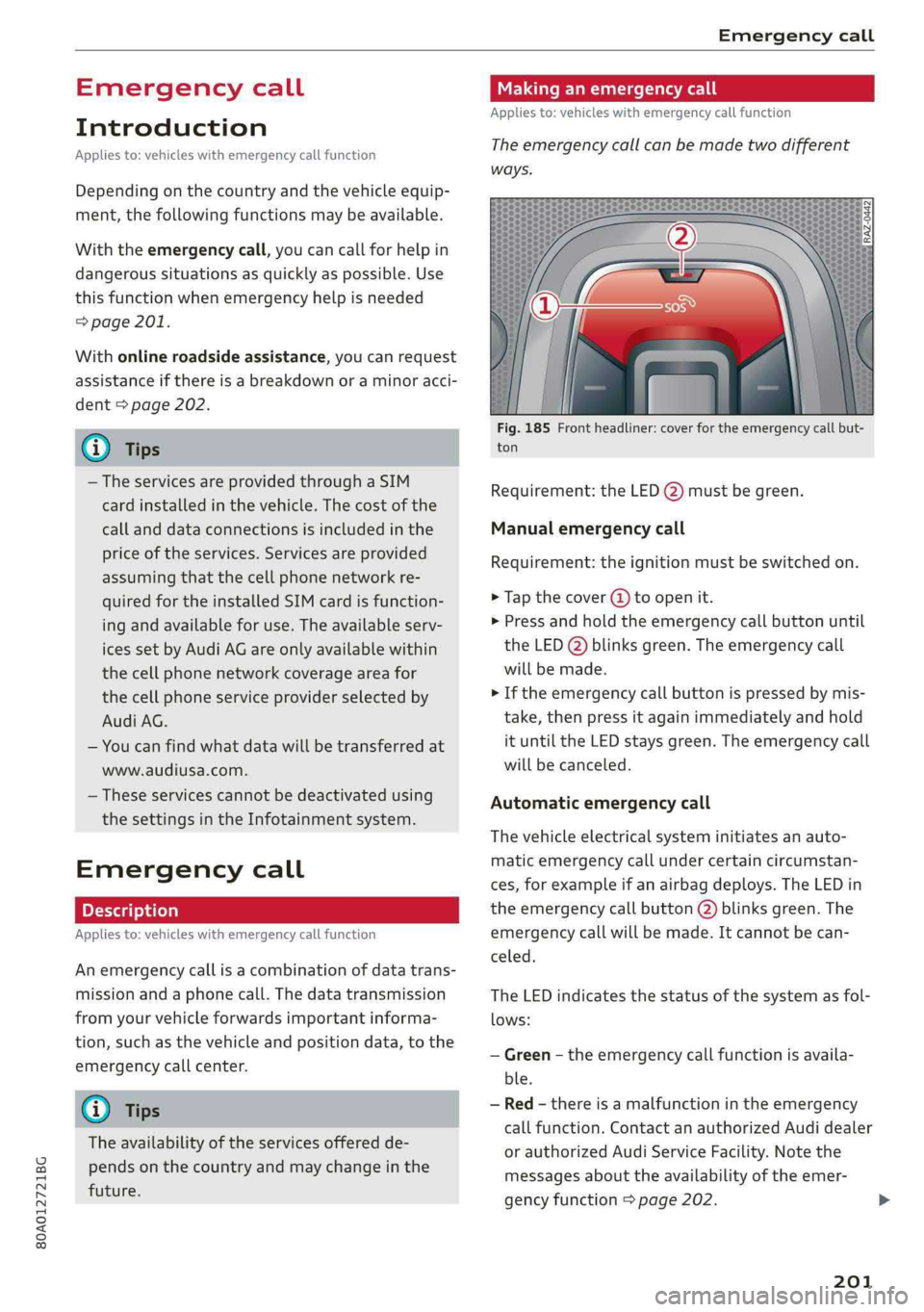
Fig.185Frontheadliner:coverfortheemergencycallbut-
ton
Requirement:theLED@)mustbegreen.
Manualemergencycall
Requirement:theignitionmustbeswitchedon.
>Tapthecover(4)toopenit.
>Pressandholdthe emergencycallbuttonuntil
theLED()blinksgreen.Theemergencycall
willbemade.
>Iftheemergencycallbuttonispressedbymis-
take,thenpressitagainimmediatelyandhold
ituntiltheLEDstaysgreen.Theemergencycall
willbecanceled.
Automaticemergencycall
Thevehicleelectricalsysteminitiatesanauto-
matic emergencycallundercertaincircumstan-
ces,forexampleifanairbagdeploys.TheLEDin
the emergencycallbutton(2)blinksgreen.The
emergencycallwillbe made.Itcannot becan-
celed.
TheLEDindicatesthestatusofthesystemasfol-
lows:
—Green-theemergencycallfunctionisavaila-
ble.
—Red-thereisamalfunctionintheemergency
callfunction.ContactanauthorizedAudidealer
orauthorizedAudiServiceFacility.Notethe
messagesabouttheavailability oftheemer-
gencyfunction>page202.
201
Page 211 of 392

80A012721BG
Navigation
Personalroute
assistance
Appliesto:vehicleswithnavigationsystemandpersonal
routeassistance
YourMMIcanlearntheroutesthatyoudrivefre-
quently(suchasyourdailycommutetoworkand
back)andsuggestrouteguidancebasedonthe
currentvehicleposition.
#Homeaddress
5iRk]Ae
na
®MarketStreet
14
Fig.190Example:displayofpersonalroutesinthe"Enter
destination"menu
Thereisadelayof6minonyour
personalrouteto
StevensCreekBlvd,SanJose,CA95117.
Byelamceleiemeeee)
Paescruheiuccsc
Ignoreallmessages
Fig.191Informationonpersonalroute
>Pressthe [NAV/MAP]buttonrepeatedlyuntil
the Enterdestinationmenuisdisplayed
=>page203,fig. 187.
>Select:rightcontrolbutton>Navigationset-
tings>Personalrouteassistance.
WhenthefunctionisswitchedonM,theMMIre-
cordsthefrequently-drivenroutesregardlessof
whetheradestinationwasenteredandreached
ornot.
Aslongasrouteguidanceisnotactive,yourper-
sonalroutesarelistedinthe Enterdestination
menuunderthehomeaddressandindicatedwith
thesymbol(@©fig.190.Whenpersonalroute
assistanceisswitchedon,thissymbolisdis-
playedintheNavigationmenuandintheInfo-
tainmentsystemdisplaystatuslineatthesame
time.
Thedistancetothedestinationandthecalculat-
edarrivaltimearealsodisplayedforyourperson-
alroutes.Withoutstartingrouteguidance,your
MMImonitorsthetrafficconditionsforyourper-
sonalroutesandshowspossibletrafficincidents
forthepossibleroutestobedrivenintheInfo-
tainmentsystemdisplay@)>fig.190.
Amessagewillbedisplayedifthereisalarge
trafficincident(morethan12minutedelay)re-
gardlessofwhichmenuisselected>fig.191.
Selectandconfirmoneofthefollowingoptions:
—Startrouteguidance:theMMIstartstheroute
guidanceforthepersonalroutedisplayedand
searchesfora fasterrouteifavailable.
—Ignorethisrouteandthismessage:thedis-
playeddestinationwithallapplicablepersonal
routesisnoLongerfactoredintothecurrent
trip.Nomoremessagesareshownforthedis-
playeddestination.Thedisplayeddestination
withallapplicablepersonalrouteswillbefac-
toredintothetripagainonlyafterstoppingthe
vehicleandswitchingtheignitiononagain.
—Ignoreallmessages:allpersonalroutesareno
longerfactoredintothecurrenttrip.No more
messagesaredisplayed.Messagesforpersonal
routeswhenthereisincreasedtrafficwillap-
pearagainafterthevehicleisstoppedandthe
ignitionisswitchedonagain.
Assoonasyouswitchoffpersonalrouteassis-
tance,thesymbolinthestatuslineturnsoffand
yourtripsarenolongerrecorded.Tripsthatwere
alreadystoredremainstored.
Deletingpersonalroutes:
—SelectthedesiredpersonalrouteintheEnter
destinationmenu>fig.190.
—Select:rightcontrolbutton>Deletedestina-
tion.
Deletingallpersonalroutes:
—Select:[MENU]button>Settings>leftcontrol
button>MMIsettings>Factorysettings.
—Select:Navigationandonlinememory>Re-
storefactorysettings>page246.
209
Page 212 of 392

Navigation
G@)Tips
—Personalroutesarelearnedbasedontheve-
hicleposition.Therouteisprioritizedac-
cordingtohowfrequentlyyoudrivetoa
destination.
—Amaximumofthreepersonalroutesare
displayedintheEnterdestinationmenu.
Basedonthecurrentvehicleposition,the
trafficsituation fortheroutethatismost
likelytobedrivenoutofthethreeroutes
willalwaysbemonitored.
—Pleasenotethatpersonalroutesthathave
alreadybeenstoredwillremainstoredafter
theignitionisswitchedoffandtheymust
bedeletedmanually.
Alternativeroutes
Appliesto:vehicleswithnavigationsystem
Fig.192Diagram:displayofalternativeroutesintheover-
viewmap
Requirement:adestinationmustbeenteredand
therouteguidancemustbestarted.
>Pressthe LNAV/MAP]buttonrepeatedlyuntil
the Enterdestinationmenuisdisplayed
=>page203,fig.187.
>Select:rightcontrolbutton>Navigationset-
tings>Showalternativeroutes.
Threeroutesaredisplayedinthe overviewmap
afteryouenteradestination.
Uptothree routesuggestionsandtheirproper-
tiesaredisplayedonthe overviewmapwhenthe
functionisswitchedon4©fig.192.
Ifavailable,thefollowinginformationwillap-
pearontheroutesuggestions:
—Routetype(fast©,fastalternative2), eco-
nomicroute@))
210
—Distancetothedestinationandthecalculated
arrivaltime
—Trafficcongestion along therouteincluding
timedelays
Theroutethatwascalculatedaccordingtothe
routecriteriayouselectedisshownontheover-
viewmap.Thespecialpropertiesoftherouteare
alsodisplayed(@)>fig.192andgivenasaspo-
kenmessage.
Usingthecontrolknob,youcanselectthepossi-
ble
routingforthealternativeroutesandshow
themonmapSelectandconfirmthedesired
routethatyouwouldliketouseforrouteguid-
ance.
Additionalsettings
Appliesto:vehicleswithnavigationsystem
>Pressthe LNAV/MAP]buttonrepeatedlyuntil
theEnterdestinationmenuisdisplayed
=>page203,fig. 187.
Storingahomeaddress
—SelectandconfirmHomeaddress(2)
=>page203,fig.187.Afteropeningthehome
addressforthefirsttime,youwillbe askedto
createahomeaddress.
—SelectandconfirmCreatenow.
—Enteradestinationorselectadestinationfrom
thelist.
Editingthehomeaddress
—SelecttheHomeaddress(2)>page203,
fig.187.
—Select:rightcontrolbutton>Edithomead-
dress.
—Selectandconfirmanewdestinationasthe
homeaddress.
Theselecteddestinationisstoredasthenew
homeaddress.
Page 218 of 392

Navigation
MMIdisplayautomaticallyswitchestothe
2Dmaptypewhendrivingthroughtunnels.
—Also readtheinformationinthechapter
=page192,Audiconnect.
—Foradditionalinformation,visitwww.
audiusa.com.
Mapupdate
Appliesto:vehicleswithnavigationsystem
Therearemultipleoptionsavailableforupdating
yourmapmaterial:
—Mapupdatesthroughthe onlinemapupdate*
>page216.
—ImportmapupdatesfromtheSDcard*toyour
MMI.Youcanfindadditionalinformationon-
lineatwww.audiusa.com/myaudi.
—MapupdateatanauthorizedAudidealeror au-
thorizedAudiServiceFacility.Thiscanresultin
additionalcosts.
Onlinemapupdate
Appliesto:vehicleswithnavigationsystemandAudiconnect
Infotainment
Usingtheonlinemapupdate,youcanupdate
themapmaterialinyournavigationsystemdi-
rectlyfromyourvehicle.
Recommendedregions->Confirmation
[RAH-8624]LOTRolRUTae
Cannelel
BTCCelTe)
Fig.197Example:displayofanewonlinemapupdate
OMGriceetcare)
GecmaeuteCRiees
io
Fy)iecf
ereReteeleERI)
Allregions
Fig.198Example:selectionofacountrypackage
216
Requirement:therequirementsforAudiconnect
Infotainmentservicesmustbemet>page193.
YoumusthaveamyAudiaccountandhaveas-
signedyourvehicletoit.
Usingyourvehicleposition,theMMIidentifies
regionswhichyouarefrequentlyin.Basedon
this,theMMIsuggestsupdatepackagesfor
theseregions,iftheyareavailable.
»Selectandconfirm@Startdownload
=>fig.197ifthemessageforanewmapupdate
appearsintheInfotainmentsystemdisplay.Or:
>Select:[MENU]button>Settings>leftcontrol
button>Systemmaintenance>Systemup-
date>Onlineupdate.
Aselectionwiththeavailableupdatepackages
appearsintheInfotainmentsystemdisplay
>fig.198.
Selectingtheonlinemapupdate
—Selectanupdatepackagefromthelist%)@
>fig.198.
—Confirmyourselectionwiththe[BACK]button
and gobacktotheselection.
—Thenumberandamountofdatafortheselect-
edupdatepackagearenowdisplayedintheIn-
fotainmentsystem.
Startingthedownload
—SelectandconfirmStartdownload.
—ConfirmthesecuritypromptbyselectingStart
downloadagain.
Theupdatepackagesbegintodownloadandthe
statusofthedownloadprogressisshowninthe
Infotainmentsystemdisplay.
Installationofonlinemapupdates
Thedownloadedmapmaterialinstallsafteryou
stopyourvehicle.Thenewupdatepackagesin-
stallonlyafteryouswitchofftheignition.After
restartingtheMMI,theInfotainmentsystemdis-
playindicatesiftheupdatesinstalledsuccessful-
ly.
—ConfirmthesuccessfulupdatewithOK.
Thenewmapmaterialcannowbeusedfornavi-
gation.
Page 230 of 392

Media
—Thestatusofthedeletingprocessisshownin
theMMI.Jukeboxplaybackstopsduringthede-
letingprocessandstartsagainautomatically
oncethedeletioniscomplete.
@)Note
Donotimportaudio/videofileswhentheen-
gineisturnedoffbecausethiswilldrainthe
vehiclebattery.
@)Tips
—TracksfromaudioCDscannotbeimported
totheJukeboxforlegalreasons.
—Filesthathavealreadybeenimportedare
automaticallyrecognizedandcannotbe
copiedtotheJukeboxagain.
—Itisnotpossible toplay audio/video*files
intheCD/DVD*drivewhileimportingthem.
— TheJukeboxdoesnotprovidean export
functionduetolegalreasons.
—Filesortrackswithoutadditionalstoredin-
formationarelistedasUnknown.Audirec-
ommendsaddingadditionalinformation
(such asID3tags)toaudiofiles.
—ResettheJukeboxtothefactorydefaultset-
tingswhensellingyourvehicle>page246.
Bluetoothaudioplayer
Appliesto:vehicleswithBluetoothaudioplayer
WiththeBluetoothaudioplayer,youcanplay
musicwirelesslyfrom yourBluetooth-capable
device(suchasacellphone)throughtheMMI.
Requirement:thevehiclemustbestationaryand
theignitionmustbe switchedon.TheBluetooth
settingswillopenonyourmobiledeviceduring
theconnectionsetup.TheBluetoothfunctionand
visibilityoftheMMI>page248andmobilede-
vicemustbe switchedon.TheBluetoothaudio
player>page248mustbe switchedoninthe
MMI.
—ConnectingaBluetoothplayer:pressthe
MEDIA]button.Presstheleftcontrolbutton
untilthesourcesoverviewisdisplayed.Select
andconfirmBluetoothaudioplayer@)
=>page234,fig.211.
228
—Ifnecessary,selectandconfirm,Notconnected
>ConnectBluetoothaudioplayer.TheBlue-
toothdevicesearchstarts.Followtheinstruc-
tionsintheMMI.
—SelectandconfirmthedesiredBluetoothdevice
fromthelist.TheMMIgeneratesaPINforthe
connection.
—SelectandconfirmYes.
—EnterthePINforconnectingonyourBluetooth
device.Or:ifthePINisalreadydisplayedon
yourBluetoothdevice,confirmitintheBlue-
toothdeviceandintheMMI.Thetimeallowed
forenteringthePINislimitedtoapproximately
30seconds.
Themediaisstartedandoperatedthroughthe
mobiledeviceortheMMI,dependingonthede-
vicebeingused.
(i)Tips
—Checkforanyconnectionrequestsonyour
Bluetoothdevice.
—MultipleBluetoothaudioplayerscan be
connectedtotheMMI,butonlyonemobile
devicecanbeactive.
—BluetoothprotocolsAVRCP(1.0/1.3/1.4)
andA2DParesupported.
—NotethevolumesettingonyourBluetooth
device.Audirecommendssettingyourmo-
biledevicetothemaximumvolumewhen
usingitasaBluetoothaudioplayer.
— Thesupportedmediafunctions(suchas
shuffle)dependontheBluetoothdevicebe-
ingused.
—Formoreinformationonsupporteddevices,
visitwww.audiusa.com/bluetoothorcon-
tactanauthorizedAudidealerorauthorized
AudiServiceFacility.
Page 234 of 392

Media
TheAudimusicinterfaceAUXinputislocatedin
thestoragecompartmentunderthecenter
armrestandislabeledwithAUX.
USBInput
—Connectingorchargingmobiledevicesusinga
USBadapter:ConnectthematchingUSBadapt-
ertothe AudimusicinterfaceUSBportand
thenconnectittothemobiledevice,forexam-
pleaniPhone.Thebatterywillchargeautomat-
ically.
—DisconnectingamobiledevicefromtheAudi
musicinterface:RemovetheUSBadapterfrom
the AudimusicinterfaceUSBport.
Themediaarestartedandoperatedthroughthe
mobiledeviceortheMMI,dependingonthede-
vicebeingused>page234.
Connectingmultiplemobiledevices:ifamobile
device(suchasasmartphone)isconnectedatthe
respectiveUSBportontheAudimusicinterface,
thenalldevicescanbeusedasa playbacksource.
AUXInput
—Connectingamobiledevice totheAUXinput:
ConnecttheAUXcabletotheAUXinputonthe
Audimusicinterfaceandthenconnectittothe
mobiledevice(forexample,anMP3playerora
smartphone).
—DisconnectingamobiledevicefromtheAUX
input:RemovetheAUXcablefromtheAUXin-
putonthe Audimusicinterface.
—Operation:selectandconfirmtheExternalau-
dioplayersource©)>page234,fig.210.Me-
diaisstartedandoperatedonthemobilede-
vice.
ZAWARNING
Drivingrequiresyourcompleteandundivided
attention.Asthedriver,youhavecompletere-
sponsibilityforsafetyintraffic.Neveroperate
mobiledeviceswhiledriving,becausethisin-
creasestheriskofanaccident.
1)Applies onlytoMTPdevices.DoesnotapplytoAppledevi-
cesandUSBmassstoragedevices.
232
@)Note
—UseaUSBextensioncabletoconnectdevi-
cesthathaveanintegratedUSBconnector
(suchasaUSBstick)topreventdamageto
yourUSBdeviceandthe Audimusicinter-
face.
—Extremelyhighorlow temperaturesthat
canoccurinsidevehiclescandamagemobile
devicesand/orimpairtheirperformance.
Neverleavemobiledevicesinthevehiclein
extremelyhighorlowtemperatures.
G)Tips
—Alwaysfollowtheinformationfoundin
=page59.
—Whenyouswitchtheignitionoff,theUSB
portsarestillsuppliedwithpoweruntilthe
energymanagementintervenes.
—DonotuseanadditionaladapterorUSBex-
tensioncabletoconnectmobiledevicesto
theAudimusicinterfacethatalreadyhavea
cableorthatmustbeconnectedwithaUSB
adapter(>page231).Using anadditional
adapterorUSextensioncablemayimpair
functionality.
—YoucanpurchasetheAUXconnectorcable
fromanauthorizedAudidealeror atspe-
cialtystores.
—Audirecommendssettingthevolumeofa
mobiledeviceconnectedtotheAUXinputto
approximately70%ofthemaximumvol-
ume.
—Functionalityisnotguaranteedformobile
devicesthatdonotconformtotheUSB2.0
specification.
—USBhubsarenotsupported.
—SomeversionsoftheiPodsuchastheiPod
shufflecannotbeconnectedtotheUSB
adapterfordeviceswithAppleDockconnec-
tor.ConnectthesedevicesusingaAUXcon-
nectorcable.
—Changedcontentonamobiledevice»)that
isconnectedtotheAudimusicinterface
maynotbedisplayedinthemediacenter.In>
Page 235 of 392

80A012721BG
Media
thiscase,resettheMediasettingsbackto
Factorysettings>page246.
—VideoplaybackthroughtheAudimusicin-
terfaceisonlysupportediftheconnected
deviceisrecognizedasaUSBstoragedevice
(forexampleaUSBstick).Appledevicesand
MTPdevices(such assmartphones)arenot
recognizedasUSBstoragedevices.
—iPod oriPhonemalfunctionsalsoaffectthe
operationoftheMMI.ResetyouriPodor
iPhoneifthishappens.
—AudirecommendsupdatingtheiPod or
iPhonesoftwaretothelatestversion.For
importantinformationonoperatingyour
iPod oriPhone,refertotheuserguidefor
thedevice.
— TheUSBadapteronthe Audimusicinter-
facewillsupportiPodtouchoriPhonedevi-
cesfromthe5thgenerationornewerwith
thelightningconnector.
—Formoreinformationaboutthe Audimusic
interfaceandsupporteddevices,checkthe
Audidatabaseformobiledevicesatwww.
audiusa.com/mp3orcontactanauthorized
AudidealerorauthorizedAudiServiceFa-
cility.
USBchargingportsintherear
Appliesto:vehicleswithUSBchargingportsintherear
Youcanchargethebatteryon yourmobiledevice
throughaUSBchargingport.
TwoUSBchargingportsarelocatedatthebackof
thecenterconsole.
—USBadapter:referto>page231,USBadapter
forAudimusicinterfaceorUSBchargingport.
—ChargingamobiledeviceusingtheUSB
adapter:connectyourmobiledevice toaUSB
chargingportusingasuitableUSBadapter.
—Disconnectingamobiledevicefromthecharg-
ingport:removetheUSBadapterfromtheUSB
chargingport.
—Disconnectingmobiledeviceswith anApple
Dockconnector:removetheAppleDockcon-
nectorfromtheAppledevicewiththerelease
tabspressedin.
ZAWARNING
Drivingrequiresyourcompleteandundivided
attention.Asthedriver,youhavecompletere-
sponsibilityforsafetyintraffic.Neveroperate
yourmobiledeviceswhiledriving,because
thisincreasestheriskofanaccident.
@)Note
Extremelyhighorlowtemperaturesthatcan
occurinsidevehiclescandamagemobiledevi-
cesand/orimpairtheirperformance.Never
leavemobiledevicesinthevehicleinex-
tremelyhighorlowtemperatures.
G)Tips
—Inpreparationatthetimeofprinting.
—Alwaysfollowtheinformationfoundin
=>page59.
—Whenyouswitchtheignitionoff,theUSB
portsarestillsupplied withpoweruntilthe
energymanagementintervenes.
—DonotuseanyadditionalUSBextensionca-
blesoradapterstoconnectmobiledevices
totheUSBchargingport thathavealready
beenconnectedbyaUSBadapter.Usingan
additionaladapterorUSextensioncable
mayimpairfunctionality.
— USBhubsarenotsupported.
—Refertothemanufacturer'soperatingman-
ual forimportantinformationregardingthe
operationofyourmobiledevice.
—Correctfunctionofallmobiledevicescan-
notbeguaranteed.
—Thevehiclebatterydrainswhenmobilede-
vicesareturnedonbuttheengineisoff.
Tat)eaedeSelaCol
Appliesto:vehicleswith Rear SeatEntertainmentpreparation
TheRear SeatEntertainmentpreparationin-
cludescablesandamountforAudiEntertain-
mentmobileinthedriver'sandfrontpassenger's
seatbackrests.
ThesuitableAudiEntertainmentmobileRear
SeatEntertainmentpackageisavailablethrough
AudiGenuineAccessories.
233
>