2019 AUDI E-TRON wheel
[x] Cancel search: wheelPage 61 of 310

4KE012721BB
Sitting correctly and safely
— You are always holding the steering wheel with
both hands on the outer edge at the sides (9:00
and
3:00 position) when driving
Z\ WARNING
— If you are too close to the steering wheel,
the driver's airbag cannot provide optimal
protection, which increases the risk of injury
or death.
— Never hold the steering wheel in the 12:00
position or in any other way, such as holding
the center of the steering wheel. Otherwise,
your arms, hands, and head could be injured
in the event that the driver's airbag deploys.
Power steering wheel position adjustment
Applies to: vehicles with power steering wheel adjustment
The steering wheel position can be adjusted elec-
trically up/down and forward/back.
7
Ss = c o
Fig. 53 Steering column: switch for adjusting the steering
wheel position
> To move the steering wheel upward or down-
ward, press the switch upward or downward.
> To move the steering wheel forward or back-
ward, press the switch forward or backward.
The steering wheel can also be adjusted when the
ignition is switched off.
In vehicles with memory function*, the steering
column settings are stored together with the
seat position.
@) Tips
The entry assistance makes entering and exit-
ing
the vehicle easier, because the steering
column moves upward into the park position
when the ignition is switched off. After enter-
ing the vehicle, the steering column returns
to the stored position once the ignition is
switched on. To use entry assistance, select
on the home screen: VEHICLE > Seats > Addi-
tional seat settings > Driver seat entry assis-
tance.
Head restraints
General information
B4G-0454
Fig. 54 Correctly adjusted head restraints
Make sure that:
— The upper edge of the head restraint is as even
as possible with the top of your head
— The head restraint is as close as possible to the
back of your head
— The head restraints on the occupied rear seats
are positioned all the way up
Z\ WARNING
— There is one head restraint for each seat. All
vehicle occupants must adjust the head re-
straint correctly before every trip. Having
head restraints that are not adjusted cor-
rectly or not installed in the vehicle increas-
es the risk of a neck injury during sudden or
unexpected driving or braking maneuvers or
in a collision.
— Only remove the rear seat head restraints if
it is necessary to install a child safety seat
=> page 69. Stow the removed head re-
straints securely, for example in the luggage
compartment. Reinstall the head restraints
immediately once the child safety seat has
been removed. Driving without head re-
straints increases the risk of serious neck in-
juries.
s9
Page 63 of 310

4KE012721BB
Sitting correctly and safely
that are seated in a child safety seat that is
appropriate for their weight and age and
that is secured with a safety belt.
In the event of a collision, vehicle occupants
that are not wearing safety belts could be
propelled through the vehicle interior and
collide with vehicle components, such as the
steering wheel, instrument panel, wind-
shield, or doors. In some situations, vehicle
occupants could also be ejected from the ve-
hicle. Vehicle occupants in the rear seats
who do not wear safety belts not only en-
danger themselves, but also other people in
the vehicle.
Only one person may be fastened with a
safety belt at a time. Never secure more
than one person, including children, with a
single safety belt.
Never allow children or infants to ride on an-
other person's lap and be belted into the
safety belt with them.
Insert the belt buckle only in the belt latch
belonging to the corresponding seat, so that
the protective function is not impaired.
To ensure the maximum protective function
of the safety belts, all vehicle passengers
must sit in the correct seating position
=> page 56.
Check the condition of your vehicle’s safety
belts regularly. If you find damage to the
belt webbing, the belt connections, the re-
tractor, or the buckle, have the damaged
safety belt replaced by an authorized Audi
dealer or authorized Audi Service Facility.
The safety belts must not be removed or
modified in any way. Do not attempt to re-
pair the safety belts yourself.
Safety belts that are strained during an acci-
dent, and thus stretched, must be replaced
by an authorized Audi dealer or authorized
Audi Service Facility.
Correct safety belt positioning
B4H-0751
Fig. 58 Safety belt positioning for pregnant women
:
B4L-1296
Fastened safety belts only offer optimal protec-
tion during an accident and reduce the risk of se-
rious injury or death when they are positioned
correctly. Furthermore, the correct safety belt
position holds the vehicle occupant in place so
that a deployed airbag can provide maximum
protection. Therefore, always fasten the safety
belt and make sure it is positioned correctly
> fig. 57.
To position the safety belt correctly, make sure
that:
— The lap portion of the safety belt lies across the
lap
—The shoulder portion of the safety belt lies over
the center of the shoulder
— The safety belt always rests flat and securely on
the body
For pregnant women, the safety belt must rest
evenly across the chest and as low and flat as
possible on the lap, so that no pressure is applied
to the lower abdomen. This should be done
throughout the entire pregnancy > fig. 58.
61
>
Page 66 of 310

Sitting correctly and safely
Depending on the equipment, it may be possible
to store the following settings:
— Driver's seat: seat, steering wheel*, exterior
mirrors
— Front passenger's seat: seat
Storing and recalling a seat profile
Applies to: vehicles with memory function
Fig. 62 Door trim panel: memory function buttons
Storing a seat profile
> Press the [SET] button. If the LED in the button
turns on, a seat profile can be stored.
> Push one of the numbered memory buttons. A
tone confirms that the settings were stored.
Recalling a seat profile
> While the driver’s or front passenger's door is
open and the ignition is switched off, press the
memory button once briefly. The seat will be
fully adjusted to the settings in the seat profile.
> If the driver's/front passenger's door is closed
or the ignition is switched on, press and hold
the memory button until the seat profile is
completely set.
ZA\ WARNING
—To reduce the risk of an accident, the seat
setting can only be recalled when the vehicle
is stationary.
—Inan emergency, the recall process can be
canceled by pressing the seat adjustment
button on that seat.
@ Tips
Specific settings are stored automatically in
the active personal profile.
64
Airbag system
General information
ZX WARNING
— If you have not fastened your safety belt,
you are in an incorrect seating position, or
you are too close to the airbag system, the
airbag system will not be able to protect
you. This increases the risk of serious or fa-
tal injuries. Make sure that all passengers
have their safety belts correctly fastened
and are sitting in a correct position
= page 55. This is necessary regardless of
whether the seat is equipped with an airbag
or not.
— Never place your feet on the instrument
panel, out of the window, or on the seat sur-
faces. Never bend forward or lean on the
door or the side window. Keep as far as pos-
sible from the airbags so that they will not
be obstructed in the event that the airbags
deploy. Otherwise, serious and possibly fatal
injuries can occur if the airbags deploy.
— People, animals, or objects between the
passengers and the airbag system can inter-
fere with the correct deployment of the air-
bag or can be thrown through the vehicle in-
terior, increasing the risk of serious or fatal
injuries. Make sure that nothing is located
between the vehicle occupants and the air-
bag system. Do not secure or transport any
objects within the deployment zone of the
airbag systems, especially on the steering
wheel, on the instrument panel, on the
doors, on the windows, or in the footwell.
— Never put stickers on the airbag system cov-
ers or cover them with any objects.
— Only lightweight clothing should be hung
from the garment hooks in the vehicle. Do
not use clothes hangers to hang clothing.
The pockets of the clothing must not con-
tain any heavy, breakable, or sharp-edged
objects. This could impair the effectiveness
of the side curtain airbags.
— You must not use seat or protective covers
that are not specifically approved for use on
Audi seats with side airbags. Since the side
Page 69 of 310
4KE012721BB
Sitting correctly and safely
The airbag is filled by a gas generator when it de-
ploys. When this occurs, the airbag covers open
and the airbags unfold with great force into the
deployment zone within milliseconds.
Airbags lessen the movement of passengers in
the direction of the impact and thus help to re-
duce the risk of injury. They can help to protect
the head, upper body, and lap, for example. How-
ever, there is the possibility that airbag deploy-
ment can cause injuries.
The airbag system only works when the ignition
is turned on.
If you or other vehicle passengers have physical
limitations that prevent sitting in a correct posi-
tion, modifications to the vehicle may be neces-
sary. For more information, contact an author-
ized Audi dealer or authorized Audi Service Facili-
ty, or call Audi customer support at
1-800-822-2834.
G@) Tips
The side curtain airbags in your vehicle have
ejection mitigation functions. This reduces
the risk of being ejected from the vehicle inte-
rior during an accident, especially in the event
of a vehicle rollover.
Advanced airbag system
(Ri A Gasca cae) Ones \, e
[sr
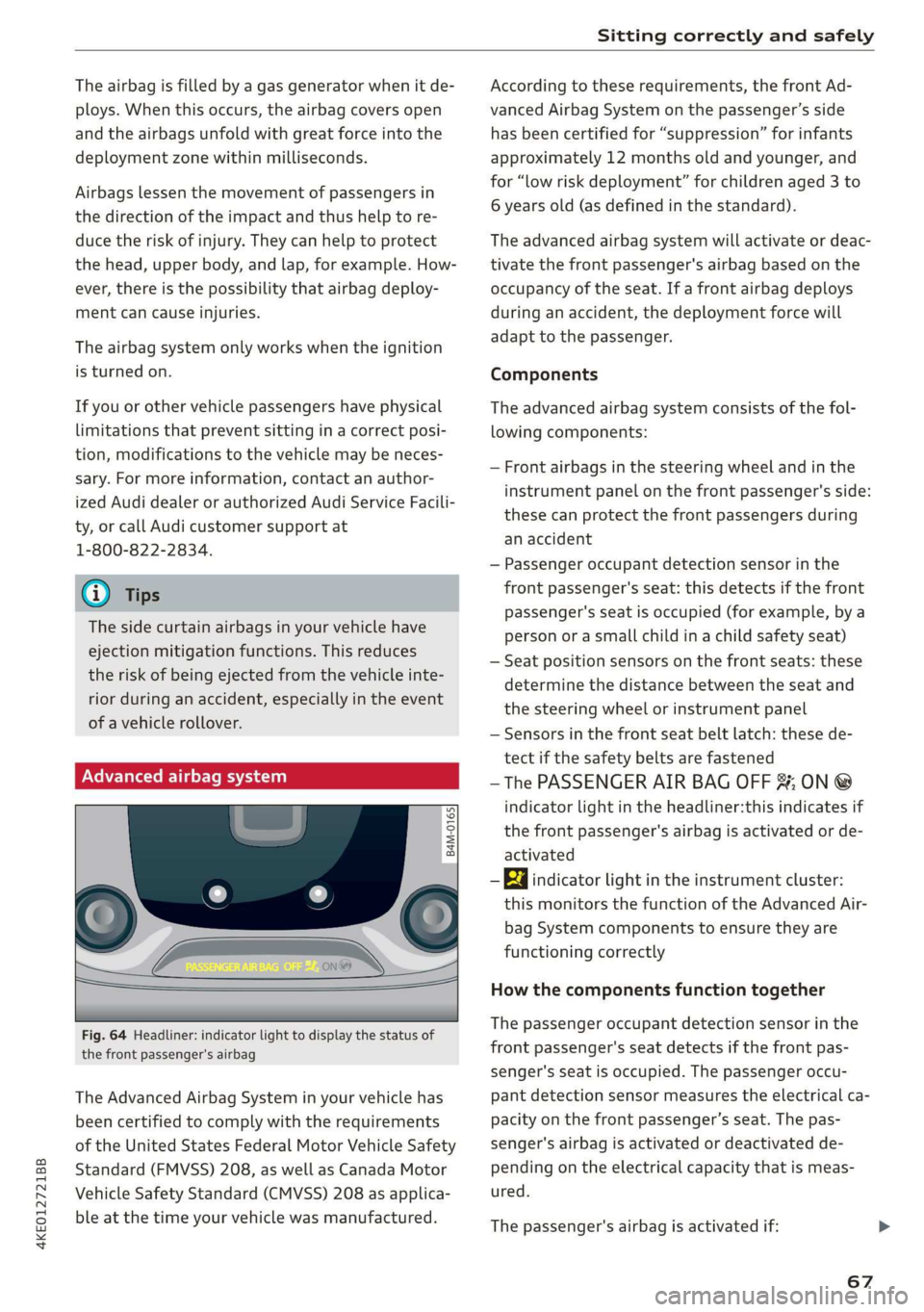
Fig. 64 Headliner: indicator light to display the status of
the front passenger's airbag
The Advanced Airbag System in your vehicle has
been certified to comply with the requirements
of the United States Federal Motor Vehicle Safety
Standard (FMVSS) 208, as well as Canada Motor
Vehicle Safety Standard (CMVSS) 208 as applica-
ble at the time your vehicle was manufactured.
According to these requirements, the front Ad-
vanced Airbag System on the passenger’s side
has been certified for “suppression” for infants
approximately 12 months old and younger, and
for “low risk deployment” for children aged 3 to
6 years old (as defined in the standard).
The advanced airbag system will activate or deac-
tivate the front passenger's airbag based on the
occupancy of the seat. If a front airbag deploys
during an accident, the deployment force will
adapt to the passenger.
Components
The advanced airbag system consists of the fol-
lowing components:
— Front airbags in the steering wheel and in the
instrument panel on the front passenger's side:
these can protect the front passengers during
an accident
— Passenger occupant detection sensor in the
front passenger's seat: this detects if the front
passenger's seat is occupied (for example, by a
person or a small child in a child safety seat)
— Seat position sensors on the front seats: these
determine the distance between the seat and
the steering wheel or instrument panel
— Sensors in the front seat belt latch: these de-
tect if the safety belts are fastened
—The PASSENGER AIR BAG OFF %; ON @
indicator light in the headliner:this indicates if
the front passenger's airbag is activated or de-
activated
- Ea indicator light in the instrument cluster:
this monitors the function of the Advanced Air-
bag System components to ensure they are
functioning correctly
How the components function together
The passenger occupant detection sensor in the
front passenger's seat detects if the front pas-
senger's seat is occupied. The passenger occu-
pant detection sensor measures the electrical ca-
pacity on the front passenger’s seat. The pas-
senger's airbag is activated or deactivated de-
pending on the electrical capacity that is meas-
ured.
The passenger's airbag is activated if:
67
Page 70 of 310

Sitting correctly and safely
— The electrical capacity is higher than the
threshold stored in the control module
— The electrical capacity is the same as or greater
than the electrical capacity of a typical adult
The passenger's airbag is deactivated if:
— The electrical capacity is lower than the thresh-
old stored in the control module
— The electrical capacity is the same as or less
than the electrical capacity of a typical one-
year-old child in a child safety seat that has
been used for certification in accordance with
FMVSS 208
If the front passenger's airbag is activated, the
PASSENGER AIR BAG ON @ indicator light
will turn on. If the front passenger's airbag is de-
activated, the PASSENGER AIR BAG OFF #;
indicator light will turn on.
The deployment force of the front airbags adapts
based on whether or not the safety belt is used
and the distance between the seat and the steer-
ing wheel/instrument panel. For example, if a
person is too close to the front airbag, the front
airbag will deploy with less force to help reduce
the risk of injury.
Meaning of PASSENGER AIR BAG OFF #4, ON
® indicator light
When the ignition is switched on, the system de-
tects whether the front passenger's seat is occu-
pied. PASSENGER AIR BAG OFF #; ON ®
will turn on for several seconds during this proc-
ess. Then it will indicate whether the front pas-
senger's airbag is activated or deactivated.
— PASSENGER AIR BAG OFF 8%; the front
passenger's airbag is deactivated and will not
deploy in the event of an accident.
— PASSENGER AIR BAG ON @®: the front pas-
senger's airbag is activated and could deploy in
the event of an accident.
If a change to the occupancy status of the front
passenger's seat is detected
PASSENGER AIR BAG OFF #; ON @ will
flash for several seconds and will then display the
status of the front passenger's airbag.
68
Always make sure the indicator light corresponds
to the occupancy of the front passenger's seat.
— An adult or individual of similar size in the
front passenger's seat: the front passenger's
airbag must be activated, so
PASSENGER AIR BAG ON @ must remain
on.
—
An individual of smaller size (for example, an
adolescent or small adult) in the front pas-
senger's seat: the front passenger's airbag
must be activated, so
PASSENGER AIR BAG ON ® must remain
on. Move the front passenger's seat as far back
as possible.
— Child in a child safety seat on the front pas-
senger's seat: the front passenger's airbag
must be deactivated, so
PASSENGER AIR BAG OFF #; must remain
on.
— Front passenger's seat not occupied: the front
passenger's airbag must be deactivated, so
PASSENGER AIR BAG OFF #; must remain
on.
Z\ WARNING
— An adult or a person with a small stature
(such as a young person or small adult) seat-
ed on the front passenger's seat will not be
protected by the passenger's airbag in the
event of a collision if the passenger's airbag
is deactivated. This increases the risk of in-
jury and death. Always make sure that
PASSENGER AIR BAG ON @ remains on
while driving. If
PASSENGER AIR BAG ON @ does not
turn on, make sure the front passenger is
sitting correctly in the seat > page 55 and
that there are no objects covering the front
passenger's seat (such as blankets or pil-
lows). If PASSENGER AIR BAG ON ®
still does not turn on, the front passenger's
seat must not be used. Drive to an author-
ized Audi dealer or authorized Audi Service
Facility and have the airbag system inspect-
ed.
—Achild in a child safety seat on the front
passenger's seat - especially in a rear-facing
Page 85 of 310

4KE012721BB
Warm and cold
® Defrosting
The windshield and side windows are defrosted
or cleared of condensation as quickly as possible.
Align the outer air vents with the side windows.
The maximum amount of air flows mainly from
the vents below the windshield. Recirculation
mode switches off. The temperature should be
set at +72°F (22°C) or higher. Depending on the
outside temperature, the A/C cooling mode may
automatically switch on.
& Rear window defogger
The rear window defogger only operates when
the drive system running. It switches off auto-
matically after 10 to 20 minutes, depending on
the outside temperature.
To prevent the rear window defogger from
switching off automatically, press and hold & for
more than three seconds. This is stored until the
ignition is switched off.
AUTO
/& Recirculation mode
In recirculation mode, the air inside the vehicle is
circulated and filtered. This prevents the unfil-
tered air outside the vehicle from entering the
vehicle interior.
If you activate 3S, the air quality sensor will auto-
matically switch recirculation mode on or off de-
pending on the outside temperature.
If you activate &, recirculation mode will switch
on manually > A\.
«@ Seat heating
Applies
to: vehicles with heated seats
The seat heating temperature can be set at mul-
tiple levels. Press w once to switch on the highest
level. Press ) again to decrease the temperature
one level at a time. The seat heating is switched
off if the button is not illuminated.
2) Seat ventilation
Applies to: vehicles with seat ventilation
The seat ventilation intensity can be set to multi-
ple levels. Press ©) once to switch on the highest
level. Press 2) again to decrease the intensity one
level at a time. The seat ventilation is switched
off if the button is not illuminated.
@ Steering wheel heating
Applies to: vehicles with steering wheel heating
The steering wheel rim is heated electrically. You
can also operate the steering wheel heating us-
ing
the multifunction steering wheel > page 26.
& Child safety lock*
If 8 turns on in the control panel in the rear*, the
child safety lock is active and operation is blocked
> page 39.
»(% Ionizer
Applies to: vehicles with ionizer
Hazardous particles and germs in the air may be
reduced through ionization. This will produce
better air quality inside the vehicle.
&* Fragrance
Applies to: vehicles with fragrance function
The fragrance function will dispense a scent in
the vehicle interior. It is dispensed through the
front outer vents. This will produce a pleasant
scent. The fragrance is time-delayed, especially
at low or high temperatures. You can adjust the
fragrance function > page 84.
ZA WARNING
— You should not use the recirculation mode
for an extended period of time, because no
fresh air is drawn in and the windows can
fog when cooling mode is switched off. This
increases the risk of an accident.
— Individuals with reduced sensitivity to pain
or temperature could develop burns when
using the seat heating* function. To reduce
the risk of injury, these individuals should
not use seat heating*.
() Note
To reduce the risk of damage to the seat heat-
ing* elements, do not kneel on the seats or
place heavy pressure on one area of the seat.
@ Tips
— If the front passenger's seat heating” is
turned on, it will not turn on again automat-
ically if more than 10 minutes have passed
83
Page 86 of 310

Warm and cold
between switching the ignition off and on
again.
— Only use the fragrance function* in modera-
tion and take any other passengers and ani-
mals into consideration when using the
function.
— An overlap of different scents or odors could
cause discomfort.
— If there is discomfort, reduce the intensity
or switch the fragrance function* off.
— Only use fragrances that are approved by
Audi.
Adjusting the vents
You can open and close the vents using the
thumbwheels. The levers adjust the direction of
the airflow from the vents.
Additional settings
You can adjust additional settings.
> Applies to: MMI: Select on the home screen:
VEHICLE > Air conditioning > ©.
Fragrance
Applies to: vehicles with fragrance function
Using Fragrance selection, you can select the fra-
grance and see the fill level of the fragrance.
You can select the strength of the scent with Fra-
grance level.
Footwell temperature*
You can adjust the footwell temperature for the
driver and front passenger.
NIM ia alee
Applies to: vehicles with air quality display
You can display information about the air quality.
> Applies to: MMI: Select on the home screen:
VEHICLE > Air conditioning > Air quality.
Pollutant filter
A pollutant filter cleans the air in the vehicle inte-
rior when the blower is switched on.
A schematic display represents the effectiveness
of the filter. The display visualizes the amount of
pollutant particles in the vehicle interior in com-
parison to the surroundings.
G) Tips
For optimal air quality in the vehicle interior,
close all windows and doors and activate A/C
cooling mode, the AUTO function, and recircu-
lation mode.
Auxiliary climate control
Applies to: vehicles with auxiliary climate control
The auxiliary climate control switches on depend-
ing on the outside temperature and the tempera-
ture set in the climate control system. You can
switch the climate control on or off immediately
as well as set a timer in the MMI.
Requirement: the charge level of the high-volt-
age battery must be sufficient.
G) Tips
— The temperature that the auxiliary climate
control adjusts to depends on the last tem-
perature that was set.
— Using the auxiliary climate control while
charging can also reduce the charge level of
the high-voltage battery.
— Starting or stopping the vehicle will not
switch off the auxiliary climate control auto-
matically.
Applies to: vehicles with auxiliary climate control
Select on the home screen: VEHICLE > Air condi-
tioning > F
Immediate start
You can immediately switch the auxiliary climate
control on and off using the F button. When this
function is switched on, a colored bar lights up
over the button and the remaining time is dis-
played.
Page 87 of 310

4KE012721BB
Warm and cold
The auxiliary climate control will run for a maxi-
mum of 30 minutes after the immediate start.
Timer programming
You can set up to two timers for the departure
time. Each one of the timers can be activated.
> Select one timer.
> Set the date and select Next.
>» Set the time (departure time) and select OK.
> Activate the timer with CD.
By setting the departure time, you determine
when your vehicle should reach the desired tem-
perature. The departure time can be a maximum
of six days in the future. The auxiliary climate
control will continue to run approximately ten
minutes after the departure time is reached.
After switching off the ignition
Information about the active timer(s) will appear
on the upper display after switching off the igni-
tion. You can start the set climate control set-
tings immediately with the § button, or go to the
auxiliary climate control menu with the > button.
@ Tips
— Make sure the time and date match in the
system settings so that the timer can func-
tion correctly > page 231.
— The auxiliary climate control can also be
switched on and off immediately when a
timer is set.
— The auxiliary climate control can continue to
run after the departure time is reached.
— You can operate the climate control in the
vehicle interior using the charging timer
while the high-voltage battery is charging.
The climate control output depends on the
power socket capacity.
Additional settings
> Applies to: MMI: Select on the home screen:
VEHICLE > Air conditioning > Auxiliary air con-
ditioning > ©.
Start air conditioning after unlocking*
If this function is activated, the climate control
will continue to run for five minutes after the ve-
hicle has been unlocked.
Comfort auxiliary air conditioning*
Applies to: vehicles with comfort auxiliary climate control
You can set if the steering wheel heating* and
seat heating or seat ventilation should also be
automatically activated with auxiliary climate
control. You can select the respective zones.
Automatic glass surface defogging*
Applies to: vehicles with comfort auxiliary climate control
You can set if the rear window and mirrors should
also be heated during auxiliary climate control.
2 There is a malfunction in the auxiliary air
conditioning.
If this message appears, there is a system mal-
function. Drive immediately to an authorized Au-
di dealer or authorized Audi Service Facility to
have the malfunction repaired.
8s