2019 Acura RDX info system
[x] Cancel search: info systemPage 155 of 649

uuLocking and Unlocking the Doors uLocking/Unlocking the Doors from the Outside
154
Controls
■Unlocking the doors and tailgate
Grab the driver’s door handle: u The driver’s door and fuel fill door
unlock.
u Some exterior lights flash twice and the
beeper sounds twice.
Grab the front passenger’s door or rear
* door
handle: u All doors, fuel fill door, and the tailgate
unlock.
u Some exterior lights flash twice and the
beeper sounds twice.
Press the tailgate outer handle: u The tailgate unlocks.
u Some exterior lights flash twice and the
beeper sounds.
2 Opening/Closing the Tailgate P. 172
1Using the Keyless Access System
The light flash, beep and door unlock mode settings
can be customized using the audio/information
screen.
2 Customized Features P. 332
When you go into the keyless access system working
range with all the doors locked, the puddle lights
come on for 30 seconds.
The lights do not come on if you have previously
stayed within the range for more than two minutes,
or the doors have been locked for a few days. The
feature activates again after you open and close any
door, then lock the doors.
You can also unlock and open with the power
tailgate.
2 Using the Tailgate Outer Handle P. 168
Models with puddle lights
All models
Tailgate Outer
Handle
* Not available on all models
19 ACURA RDX-31TJB6000.book 154 ページ 2018年4月26日 木曜日 午後4時51分
Page 185 of 649

uuOperating the Switches Around the Steering Wheel uENGINE START/STOP Button
184
Controls
Warning buzzers may sound from inside
and/or outside the vehicle to remind you that
the keyless access remote is out of the vehicle.
If the buzzer continues even after the remote
is put back inside, place it to be within its
operational range.
■When the power mode is in ON
If the keyless access remo te is taken out of the
vehicle, and all doors are closed, a warning
buzzer sounds from both inside and outside
the vehicle. A warning message on the multi-
information display notifies the driver inside
that the remote is outside of the vehicle.
■When the power mode is in
ACCESSORY
If the keyless access remo te is taken out of the
vehicle, and all doors are closed, a warning
buzzer sounds from outside the vehicle.
■Keyless Access Remote Reminder1 Keyless Access Remote Reminder
When the keyless access remote is within the
system’s operational range, and the driver’s door is
closed, the warni ng function cancels.
If the keyless access remote is taken out of the vehicle
after the engine has been started, you can no longer
change the ENGINE START/STOP button mode or
restart the engine. Always make sure if the remote is
in your vehicle when you operate the ENGINE
START/STOP button.
Removing the keyless access remote from the vehicle
through a window does not activate the warning
buzzer.
Do not put the keyless access remote on the
dashboard or in the glove box. It may cause the
warning buzzer to go of f. Under some other
conditions that can prevent the vehicle from locating
the remote, the warning buzzer may also go off even
if the remote is within the system’s operational
range.
19 ACURA RDX-31TJB6000.book 184 ページ 2018年4月26日 木曜日 午後4時51分
Page 202 of 649

201
uuOperating the Switches Around the Steering Wheel uDriving Position Memory System
Continued
Controls
Driving Position Memory System
You can store two driver’s seat and door mirror positions with the driving position
memory system.
When you unlock and open the driver’s door with a remote transmitter, or keyless
access system, door mirrors adjust to one of the two preset positions and the seat
adjusts to retracted positions of one of the two preset positions automatically.
The seat will move to the stored position when you set the power mode to
ACCESSORY.
• DRIVER 1 transmitter is linked to memory button 1.
• DRIVER 2 transmitter is linked to memory button 2.
The driver’s seat moves rearward depending
on the set seating position once you
•Stop the vehicle.
• Put the transmission in
(P.
• Turn the engine off.
• Then open the driver’s door.
Once the power mode is in the ACCESSORY
position, the driver’s seat moves forward to
the DRIVER 1 or 2 preset position.
1 Driving Position Memory System
Using the audio/informati on screen, you can disable
the automatic seat adjustment function. 2 Customized Features P. 332
The driver’s seat easy exit feature can be turned ON/
OFF. 2 Customized Features P. 332
System Operation
The system will not operate if:
•The vehicle is moving.
•Either memory position button is pressed while the
seat is in motion.
•The seat position is adju sted while in operation.
•The memory 1 or 2 position is set fully to the rear.
•The mode selector is pressed up or down while in
operation.
Models with mode selector
DRIVER 1
DRIVER 2
19 ACURA RDX-31TJB6000.book 201 ページ 2018年4月26日 木曜日 午後4時51分
Page 238 of 649
237
Features
This chapter describes how to operate technology features.
Audio SystemAbout Your Audio System ................ 238
USB Ports ......................................... 239
Auxiliary Input Jack .......................... 241
Audio System Theft Protection ......... 242
Audio Remote Controls .................... 243
Audio System Basic Operation ........ 245
True Touchpad Operation ................ 246
Audio/Information Screen ................ 249
System Updates ............................... 263
Adjusting the Sound ........................ 269
Display Setup ................................... 270 Voice Control Operation .................. 271
Playing AM/FM Radio ....................... 274
Playing SiriusXM
® Radio ................... 278
Playing an iPod ................................ 291
Playing a USB Flash Drive ................. 294
Playing Bluetooth ® Audio................. 297
Wi-Fi Connection ............................. 300
Siri ® Eyes Free .................................. 302
Apple CarPlay
TM............................... 303
Audio Error Messages ...................... 307
General Information on the Audio System ............................................. 310 Customized Features
........................ 332
HomeLink ® Universal Transceiver ... 355
Bluetooth ® HandsFreeLink® ............. 358
AcuraLink® ........................................ 387
19 ACURA RDX-31TJB6000.book 237 ページ 2018年4月26日 木曜日 午後4時51分
Page 239 of 649
238
Features
Audio System
About Your Audio System
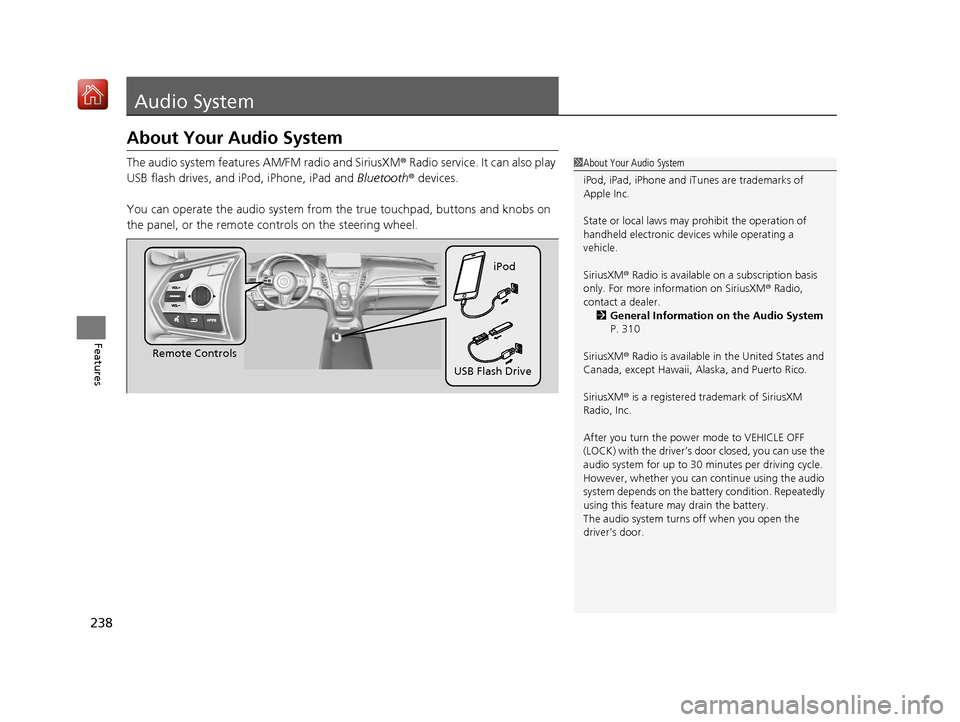
The audio system features AM/FM radio and SiriusXM® Radio service. It can also play
USB flash drives, and iPod, iPhone, iPad and Bluetooth® devices.
You can operate the audio system from the true touchpad, buttons and knobs on
the panel, or the remote controls on the steering wheel.1 About Your Audio System
iPod, iPad, iPhone and iT unes are trademarks of
Apple Inc.
State or local laws may pr ohibit the operation of
handheld electronic devi ces while operating a
vehicle.
SiriusXM ® Radio is available on a subscription basis
only. For more information on SiriusXM ® Radio,
contact a dealer. 2 General Information on the Audio System
P. 310
SiriusXM ® Radio is available in the United States and
Canada, except Ha waii, Alaska, and Puerto Rico.
SiriusXM ® is a registered trademark of SiriusXM
Radio, Inc.
After you turn the power mode to VEHICLE OFF
(LOCK) with the driver’s door closed, you can use the
audio system for up to 30 minutes per driving cycle.
However, whether you can continue using the audio
system depends on the batter y condition. Repeatedly
using this feature ma y drain the battery.
The audio system turns off when you open the
driver’s door.
Remote Controls iPod
USB Flash Drive
19 ACURA RDX-31TJB6000.book 238 ページ 2018年4月26日 木曜日 午後4時51分
Page 244 of 649
243
uuAudio System uAudio Remote Controls
Continued
Features
Audio Remote Controls
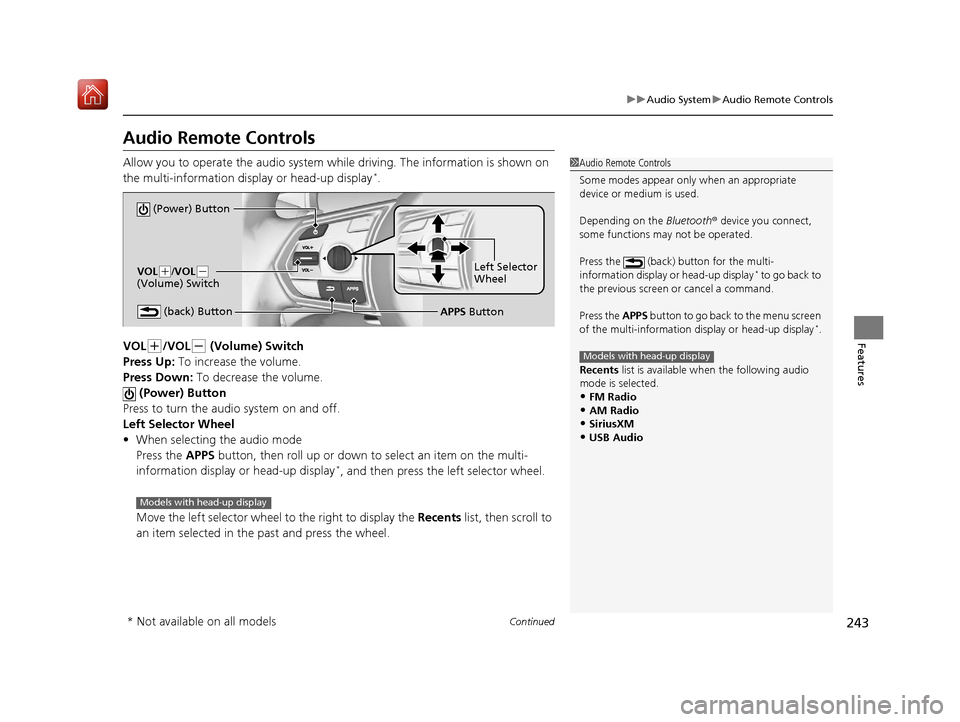
Allow you to operate the audio system whil e driving. The information is shown on
the multi-information disp lay or head-up display*.
VOL
(+/VOL(- (Volume) Switch
Press Up: To increase the volume.
Press Down: To decrease the volume.
(Power) Button
Press to turn the audio system on and off.
Left Selector Wheel
• When selecting the audio mode
Press the APPS button, then roll up or down to select an item on the multi-
information display or head-up display
*, and then press the left selector wheel.
Move the left selector wheel to the right to display the Recents list, then scroll to
an item selected in the past and press the wheel.
1 Audio Remote Controls
Some modes appear only when an appropriate
device or medium is used.
Depending on the Bluetooth® device you connect,
some functions ma y not be operated.
Press the (back) button for the multi-
information display or head-up display
* to go back to
the previous screen or cancel a command.
Press the APPS button to go back to the menu screen
of the multi-information di splay or head-up display
*.
Recents list is available wh en the following audio
mode is selected.
•FM Radio
•AM Radio•SiriusXM
•USB Audio
Models with head-up display
(Power) Button
VOL( +/VOL(-
(Volume) Switch
(back) ButtonLeft Selector
Wheel
APPS Button
Models with head-up display
* Not available on all models
19 ACURA RDX-31TJB6000.book 243 ページ 2018年4月26日 木曜日 午後4時51分
Page 245 of 649
uuAudio System uAudio Remote Controls
244
Features
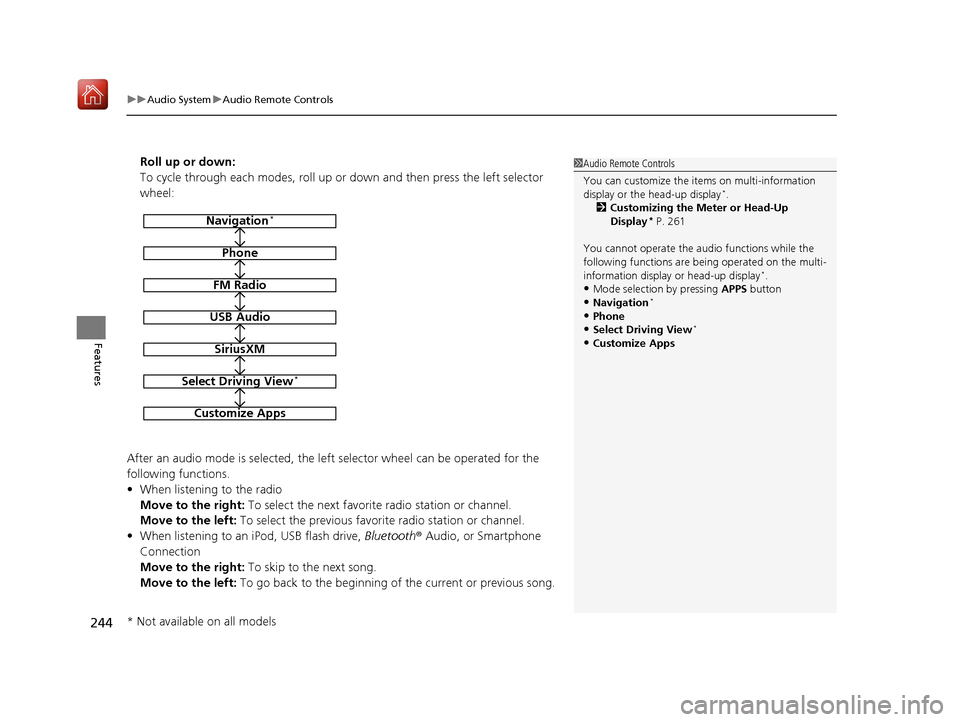
Roll up or down:
To cycle through each modes, roll up or down and then press the left selector
wheel:
After an audio mode is selected, the left selector wheel can be operated for the
following functions.
• When listening to the radio
Move to the right: To select the next favorite radio station or channel.
Move to the left: To select the previous favori te radio station or channel.
• When listening to an iPod, USB flash drive, Bluetooth® Audio, or Smartphone
Connection
Move to the right: To skip to the next song.
Move to the left: To go back to the beginning of the current or previous song.1Audio Remote Controls
You can customize the items on multi-information
display or the head-up display
*.
2 Customizing the Meter or Head-Up
Display
* P. 261
You cannot operate the a udio functions while the
following functions are be ing operated on the multi-
information display or head-up display
*.•Mode selection by pressing APPS button
•Navigation*
•Phone
•Select Driving View*
•Customize Apps
Navigation*
Phone
FM Radio
USB Audio
SiriusXM
Select Driving View*
Customize Apps
* Not available on all models
19 ACURA RDX-31TJB6000.book 244 ページ 2018年4月26日 木曜日 午後4時51分
Page 246 of 649

245
Features
Audio System Basic Operation
You can use the audio system for 30 minutes when the power mode to VEHICLE OFF
(LOCK) with the driver’s door closed, the system will then turn off automatically.
If you want to keep using it, we recomme nd that you turn the power mode to
ACCESSORY or ON.
VOL/AUDIO (Volume/Power) Knob:
Push to turn the audio sy stem on and off. Turn
to adjust the volume wh en audio system is on.
/ (Seek/Skip) Buttons: Press to
change station, channel, song or file.
(Back) Button: Press to go back to the
previous display when it is displayed. (Home) Button: Press to go to the home
screen. (Cards List) Button: Press to display the
cards list of the secondary information area on
the audio/information screen.
2 Secondary Information Area P. 252
True Touchpad A: Click or swipe the pad
with your finger, or move your finger along
the pad to operate the primary information
area on the audio/information screen.
True Touchpad B: Click or swipe the pad
with your finger to operate the secondary
information area on the audio/information
screen.
1 Audio System Basic Operation
True Touchpad Operation
2 True Touchpad Operation P. 246
Primary Information Area 2 Primary Information Area P. 249
Secondary Information Area 2 Secondary Information Area P. 252
(Home) Button
(Back) Button
True Touchpad A (Cards List) Button
Audio/Information Screen
/ (Seek/
Skip) Buttons
VOL /AUDIO (Volume/
Power) Knob
True Touchpad B
19 ACURA RDX-31TJB6000.book 245 ページ 2018年4月26日 木曜日 午後4時51分