2018 YAMAHA NIKEN warning light
[x] Cancel search: warning lightPage 35 of 106

Instrument and control functions
3-20
3
EAU26826
Brake leverThe brake lever is located on the right
side of the handlebar. To apply the
front brake, pull the lever toward the
throttle grip.
The brake lever is equipped with a
brake lever position adjusting dial. To
adjust the distance between the brake
lever and the throttle grip, slightly pull
the brake lever away from the throttle
grip and rotate the adjusting dial. Make
sure the setting number on the adjust-
ing dial aligns with the match mark on
the brake lever.
EAU12944
Brake ped alThe brake pedal is located on the right
side of the motorcycle. To apply the
rear brake, press down on the brake
pedal.
EAU84570
ABSThe anti-lock brake system (ABS) acts
on the front and rear brakes indepen-
dently.
WARNING
EWA16051
Always keep a sufficient d istance
from the vehicle ahea d to match the
ri din g speed even with ABS.
The ABS performs b est with
lon g b rakin g d istances.
On certain surfaces, such as
rou gh or g ravel roa ds, the b rak-
in g d istance may be lon ger with
the ABS than without.How to operate the brakes
Operate the brake lever and brake
pedal the same as you would conven-
tional brakes. If wheel slip is detected
while braking, ABS will activate and a
pulsating sensation may be felt at the
brake lever or brake pedal. Continue to
apply the brakes and let the ABS work.
Do not pump the brakes as this will re-
duce braking effectiveness.
1. Brake lever
2. Distance
3. Brake lever position adjusting dial
4. Match mark3
4
1
2
1. Brake pedal
1
UBD5E0E0.book Page 20 Wednesday, April 25, 2018 2:23 PM
Page 37 of 106
Instrument and control functions
3-22
3
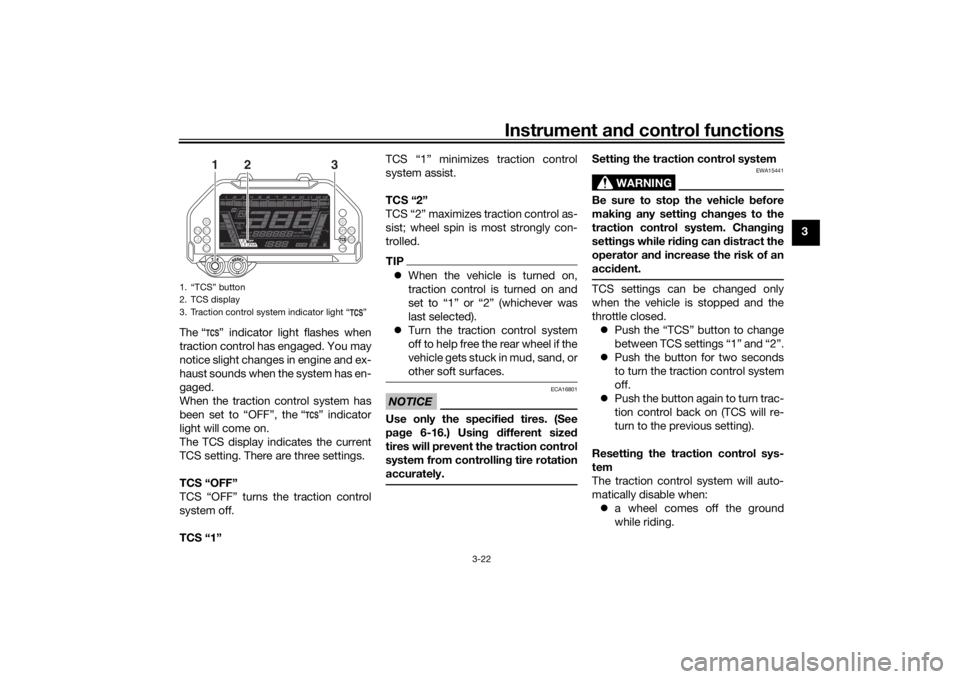
The “ ” indicator light flashes when
traction control has engaged. You may
notice slight changes in engine and ex-
haust sounds when the system has en-
gaged.
When the traction control system has
been set to “OFF”, the “ ” indicator
light will come on.
The TCS display indicates the current
TCS setting. There are three settings.
TCS “OFF”
TCS “OFF” turns the traction control
system off.
TCS “1” TCS “1” minimizes traction control
system assist.
TCS “2”
TCS “2” maximizes traction control as-
sist; wheel spin is most strongly con-
trolled.
TIP
When the vehicle is turned on,
traction control is turned on and
set to “1” or “2” (whichever was
last selected).
Turn the traction control system
off to help free the rear wheel if the
vehicle gets stuck in mud, sand, or
other soft surfaces.NOTICE
ECA16801
Use only the specifie d tires. (See
pa ge 6-16.) Usin g different sized
tires will prevent the traction control
system from controllin g tire rotation
accurately.
Settin g the traction control system
WARNING
EWA15441
Be sure to stop the vehicle before
makin g any settin g chan ges to the
traction control system. Chan gin g
settin gs while ri din g can d istract the
operator an d increase the risk of an
acci dent.TCS settings can be changed only
when the vehicle is stopped and the
throttle closed.
Push the “TCS” button to change
between TCS settings “1” and “2”.
Push the button for two seconds
to turn the traction control system
off.
Push the button again to turn trac-
tion control back on (TCS will re-
turn to the previous setting).
Resettin g the traction control sys-
tem
The traction control system will auto-
matically disable when: a wheel comes off the ground
while riding.
1. “TCS” button
2. TCS display
3. Traction control system indicator light “ ”
1
3
2
UBD5E0E0.book Page 22 Wednesday, April 25, 2018 2:23 PM
Page 38 of 106

Instrument and control functions
3-23
3
excessive rear wheel spin is de-
tected while riding.
a wheel is rotated by external forc-
es with the vehicle power on (such
as when performing mainte-
nance).
If the traction control system is dis-
abled, both the “ ” indicator light and
the “ ” warning light will come on.
Should this occur, try resetting the sys-
tem as follows. 1. Stop the vehicle and turn the vehi- cle off.
2. Wait a few seconds and then turn the vehicle back on. 3. The “ ” indicator light should
turn off and the system be en-
abled.
TIPIf the “ ” indicator light remains on af-
ter resetting, the vehicle may still be
ridden; however, have a Yamaha deal-
er check the vehicle as soon as possi-
ble.4. Have a Yamaha dealer check thevehicle and turn off the “ ”
warning light.
EAU13076
Fuel tank capTo open the fuel tank cap
Open the fuel tank cap lock cover, in-
sert the key into the lock, and then turn
it 1/4 turn clockwise. The lock will be
released and the fuel tank cap can be
opened.
To close the fuel tank cap
With the key still inserted in the lock,
push down the fuel tank cap. Turn the
key 1/4 turn counterclockwise, remove
it, and then close the lock cover.
1. Engine trouble warning light “ ”
2. TCS display
3. Traction control system indicator light “ ”
3
2
1
1. Fuel tank cap lock cover
2. Unlock.
1
2
UBD5E0E0.book Page 23 Wednesday, April 25, 2018 2:23 PM
Page 39 of 106

Instrument and control functions
3-24
3
TIPThe fuel tank cap cannot be closed un-
less the key is in the lock. In addition,
the key cannot be removed if the cap is
not properly closed and locked.
WARNING
EWA11092
Make sure that the fuel tank cap is
properly closed after filling fuel.
Leakin g fuel is a fire hazar d.
EAU13222
FuelMake sure there is sufficient gasoline in
the tank.
WARNING
EWA10882
Gasoline an d gasoline vapors are
extremely flammab le. To avoid fires
an d explosions an d to re duce the
risk of injury when refueling , follow
these instructions.1. Before refueling, turn off the en- gine and be sure that no one is sit-
ting on the vehicle. Never refuel
while smoking, or while in the vi-
cinity of sparks, open flames, or
other sources of ignition such as
the pilot lights of water heaters
and clothes dryers.
2. Do not overfill the fuel tank. When refueling, be sure to insert the
pump nozzle into the fuel tank filler
hole. Stop filling when the fuel
reaches the bottom of the filler
tube. Because fuel expands when
it heats up, heat from the engine or
the sun can cause fuel to spill out
of the fuel tank. 3. Wipe up any spilled fuel immedi-
ately. NOTICE: Immediately
wipe off spille d fuel with a clean,
d ry, soft cloth, since fuel may
d eteriorate painte d surfaces or
plastic parts.
[ECA10072]
4. Be sure to securely close the fuel tank cap.
WARNING
EWA15152
Gasoline is poisonous an d can
cause injury or death. Han dle gaso-
line with care. Never siphon gasoline
b y mouth. If you shoul d swallow
some gasoline or inhale a lot of g as-
oline vapor, or get some gasoline in
your eyes, see your doctor imme di-1. Fuel tank filler tube
2. Maximum fuel level
1
2
UBD5E0E0.book Page 24 Wednesday, April 25, 2018 2:23 PM
Page 55 of 106

Operation and important ri din g points
5-1
5
EAU15952
Read the Owner’s Manual carefully to
become familiar with all controls. If
there is a control or function you do not
understand, ask your Yamaha dealer.
WARNING
EWA10272
Failure to familiarize yourself with
the controls can lead to loss of con-
trol, which coul d cause an acci dent
or injury.
EAUM3632
TIPThis model is equipped with: a lean angle sensor. This sensor
stops the engine in case of a vehi-
cle turnover. If this happens, the
engine trouble warning light will
come on, but this is not a malfunc-
tion. Turn the vehicle power off
and then back on again to cancel
the warning light. Failing to do so
will prevent the engine from start-
ing even though the engine will
crank when pushing the start
switch.
an engine auto-stop system. The
engine stops automatically if left
idling for 20 minutes. If the engine
stops, simply push the start
switch to restart the engine.
EAU84620
Startin g the en gineUnder normal conditions, shift the
transmission into neutral before start-
ing the engine. To start the engine with
the transmission in gear, the sidestand
must be up and the clutch lever pulled.
To start the engine1. Set the engine stop switch to “ ”.
2. Turn the main switch to “ ”.
3. Confirm the following lights per-
form a circuit check. Coolant temperature warning
light
Oil level warning light
Engine trouble warning light
ABS warning light
Traction control system indi-
cator light
Cruise control indicator lights
Shift indicator light
Immobilizer system indicator
lightTIP The ABS warning light should go
off after reaching a speed of 10
km/h (6 mi/h) or higher.
UBD5E0E0.book Page 1 Wednesday, April 25, 2018 2:23 PM
Page 90 of 106

Periodic maintenance an d a djustment
6-32
6
If a fuse is blown, replace it as follows.1. Turn the main switch off and turn off the electrical circuit in ques-
tion.
2. Remove the blown fuse, and then install a new fuse of the specified
amperage. WARNING! Do not
use a fuse of a hi gher ampera ge
ratin g than recommen ded to avoi
d causin g extensive d am-
a g e to the electrical system an d
possi bly a fire.
[EWA15132]
3. Turn the main switch on and turn
on the electrical circuit in question
to check if the device operates.
4. If the fuse immediately blows again, have a Yamaha dealer
check the electrical system.
1. Signaling system fuse
2. ABS control unit fuse
3. Accessory fuse
4. Ignition fuse
5. Hazard fuse
6. Terminal fuse 1
7. Terminal fuse 2
8. Headlight fuse
9. Right radiator fan motor fuse
10.Left radiator fan motor fuse
11.Spare fuse
11 1
2
3
11
10 9876 5 4
Specifie
d fuses:
Main fuse: 50.0 A
ABS motor fuse:
30.0 A
Cruise control fuse: 1.0 A
Brake light fuse: 1.0 A
Specifie d fuses (fuse box 1):
Fuel injection system fuse: 25.0 A
ABS solenoid fuse: 20.0 A
Electronic throttle valve fuse:
7.5 A
Backup fuse: 7.5 A
Heater fuse: 10.0 A
Specifie d fuses (fuse box 2):
Signaling system fuse:
7.5 A
ABS control unit fuse:
5.0 A
Accessory fuse: 5.0 A
Ignition fuse: 15.0 A
Specifie d fuses (fuse box 3):
Hazard fuse: 7.5 A
Te r m i n a l f u s e 1 : 2.0 A
Te r m i n a l f u s e 2 :
2.0 A
Radiator fan motor fuse: 10.0 A × 2
Headlight fuse: 10.0 A
UBD5E0E0.book Page 32 Wednesday, April 25, 2018 2:23 PM
Page 91 of 106

Periodic maintenance an d a djustment
6-33
6
EAU72980
Vehicle li ghtsThis model is equipped with full-LED
lighting. There are no user replaceable
bulbs.
If a light does not come on, check the
fuses and then have a Yamaha dealer
check the vehicle.NOTICE
ECA16581
Do not affix any type of tinte d film or
stickers to the head lig ht lens.
EAU84980
Sta bility barThis model is equipped with a stability
bar.NOTICE
ECA26440
The stab ility bar was not d esigne d to
support the wei ght of the vehicle. Do
not use the sta bility bar as a jackin g
point.
EAU25872
Trou bleshootin gAlthough Yamaha motorcycles receive
a thorough inspection before shipment
from the factory, trouble may occur
during operation. Any problem in the
fuel, compression, or ignition systems,
for example, can cause poor starting
and loss of power.
The following troubleshooting charts
represent quick and easy procedures
for checking these vital systems your-
self. However, should your motorcycle
require any repair, take it to a Yamaha
dealer, whose skilled technicians have
the necessary tools, experience, and
know-how to service the motorcycle
properly.
Use only genuine Yamaha replace-
ment parts. Imitation parts may look
like Yamaha parts, but they are often
inferior, have a shorter service life and
can lead to expensive repair bills.
WARNING
EWA15142
When checkin g the fuel system, d o
not smoke, an d make sure there are
no open flames or sparks in the ar-
ea, inclu din g pilot li ghts from water
1. Stability bar
1
UBD5E0E0.book Page 33 Wednesday, April 25, 2018 2:23 PM
Page 96 of 106

Motorcycle care and stora ge
7-2
7 chemicals such as, solvents,
g
asoline, rust removers, brake
flui d, or antifreeze, etc.
Before washin g
1. Park the vehicle out of direct sun- light and allow it to cool. This will
help avoid water spots.
2. Make sure all caps, covers, elec- trical couplers and connectors are
tightly installed.
3. Cover the muffler end with a plas- tic bag and a strong rubber band.
4. Pre-soak stubborn stains like in- sects or bird droppings with a wet
towel for a few minutes.
5. Remove road grime and oil stains with a quality degreasing agent
and a plastic-bristle brush or
sponge. NOTICE: Do not use
d eg reasin g a gent on areas re-
quirin g lu brication such as
seals, gaskets, an d wheel axles.
Follow prod uct instructions.
[ECA26290]
Washing
1. Rinse off any degreaser and spray down the vehicle with a garden
hose. Use only enough pressure
to do the job. Avoid spraying wa-
ter directly into the muffler, instru-
ment panel, air inlet, or other inner
areas such as underseat storage
compartments.
2. Wash the vehicle with a quality au- tomotive-type detergent mixed
with cool water and a soft, clean
towel or sponge. Use an old tooth-
brush or plastic-bristle brush for
for hard-to-reach places.
NOTICE: Use col d water if the
vehicle has b een exposed to
salt. Warm water will increase
salt’s corrosive properties.
[ECA26301]
3. For windshield-equipped vehicles: Clean the windshield with a soft
towel or sponge dampened with
water and a pH neutral detergent.
If necessary, use a high-quality
windshield cleaner or polish for
motorcycles. NOTICE: Never use
any stron g chemicals to clean
the win dshiel d. A dditionally, some cleanin
g compoun ds for
plastic may scratch the win d-
shiel d, so b e sure to test all
cleanin g prod ucts before gen-
eral application.
[ECA26310]
4. Rinse off thoroughly with clean water. Be sure to remove all deter-
gent residues, as they can be
harmful to plastic parts.
After washin g
1. Dry the vehicle with a chamois or absorbent towel, preferably mi-
crofiber terrycloth.
2. For drive chain-equipped models: Dry and then lubricate the drive
chain to prevent rust.
3. Use a chrome polish to shine chrome, aluminum, and stainless
steel parts. Often the thermally in-
duced discoloring of stainless
steel exhaust systems can be re-
moved through polishing.
4. Apply a corrosion protection spray on all metal parts including
chrome or nickel-plated surfaces.
WARNING! Do not apply sili-
cone or oil spray to seats, han d
g rips, ru bber foot peg s or tire
UBD5E0E0.book Page 2 Wednesday, April 25, 2018 2:23 PM