Page 171 of 632
1713-2. Opening, closing and locking the doors
3
Operation of each component
YARIS_HV_OM_Europe_OM52J66E
■ To operate the system properly
Make sure to carry the electronic key when operating the system. Do not get
the electronic key too close to the vehicle when operating the system from the
outside of the vehicle.
Depending on the position and holding condition of the electronic key, the key
may not be detected correctly and the system may not operate properly. (The
alarm may go off accidentally, or the door lock prevention function may not
operate.)
■ If the smart entry & start system does not operate properly
● Locking and unlocking the doors: Use the mechanical key. (P. 573)
● Starting the hybrid system: P. 574
■ Customization
Settings (e. g. smart entry & start system) can be changed.
(Customizable features: P. 603)
■ If the smart entry & start system has been deactivated in a customized
setting
● Locking and unlocking the doors:
Use the wireless remote control or mechanical key. ( P. 141, 573)
● Starting the hybrid system and changing power switch modes: P. 574
● Stopping the hybrid system: P. 222
Page 202 of 632
2023-5. Opening and closing the windows
YARIS_HV_OM_Europe_OM52J66E
WARNING
Observe the following precautions.
Failure to do so may result in death or serious injury.
■ Closing the windows
● The driver is responsible for all the power window operations, including the
operation for the passengers. In order to prevent accidental operation,
especially by a child, do not let a child operate the power windows. It is
possible for children and other passengers to have body parts caught in
the power window. Also, when riding with a child, it is recommended to use
the window lock switch. ( P. 199)
● Check to make sure that all passengers do not have any part of their body
in a position where it could be caught when a window is being operated.
● When exiting the vehicle, turn the power switch off, carry the key and exit
the vehicle along with the child. T here may be accidental operation, due to
mischief, etc., that may possibly lead to an accident.
■ Jam protection function (driver’s window only)
● Never use any part of your body to intentionally activate the jam protection
function.
● The jam protection function may not work if something gets caught just
before the window fully closes.
Page 204 of 632
2044-1. Before driving
YARIS_HV_OM_Europe_OM52J66E
Driving the vehicle
P. 216, 220
With the brake pedal depressed, shift the shift lever to D.
( P. 232)
Release the parking brake. ( P. 237)
Gradually release the brake pedal and gently depress the accelera-
tor pedal to accelerate the vehicle.
With the shift lever in D, depress the brake pedal.
If necessary, set the parking brake.
If the vehicle is to be stopped for an extended period of time, shift the shift
lever to P. ( P. 232)
With the shift lever in D, depress the brake pedal.
Set the parking brake ( P. 237), and shift the shift lever to P.
( P. 232)
If parking on a hill, block the wheels as needed.
Vehicles without a smart entry & start system: Turn the power
switch to the “LOCK” position to stop the hybrid system.
Vehicles with a smart entry & start system: Press the power switch
to stop the hybrid system.
Lock the door, making sure that you have the electronic key on your
person.
The following procedures should be observed to ensure safe
driving:
Starting the hybrid system
Driving
Stopping
Parking the vehicle
1
2
3
1
2
1
2
3
4
Page 217 of 632
2174-2. Driving procedures
4
Driving
YARIS_HV_OM_Europe_OM52J66E
“LOCK”
The steering wheel is locked and
the key can be removed. (The key
can be removed only when the
shift lever is in P.)
“ACC”
Some electrical components such
as the audio system can be used.
“ON”
All electrical components can be
used.
“START”
For starting the hybrid system.
Changing power switch positions
1
2
3
4
Page 218 of 632
2184-2. Driving procedures
YARIS_HV_OM_Europe_OM52J66E
■Sounds and vibrations specific to a hybrid vehicle
P. 8 9
■ When the ambient temperature is low, such as during winter driving con-
ditions
When starting the hybrid system, the flashing time of the “READY” indicator
may be long. Leave the vehicle as it is until the “READY” indicator is steady
on, as steady means the vehicle is able to move.
■ If the hybrid system does not start
The immobilizer system may not have been deactivated. ( P. 96)
Contact any authorized Toyota retailer or Toyota authorized repairer, or any
reliable repairer.
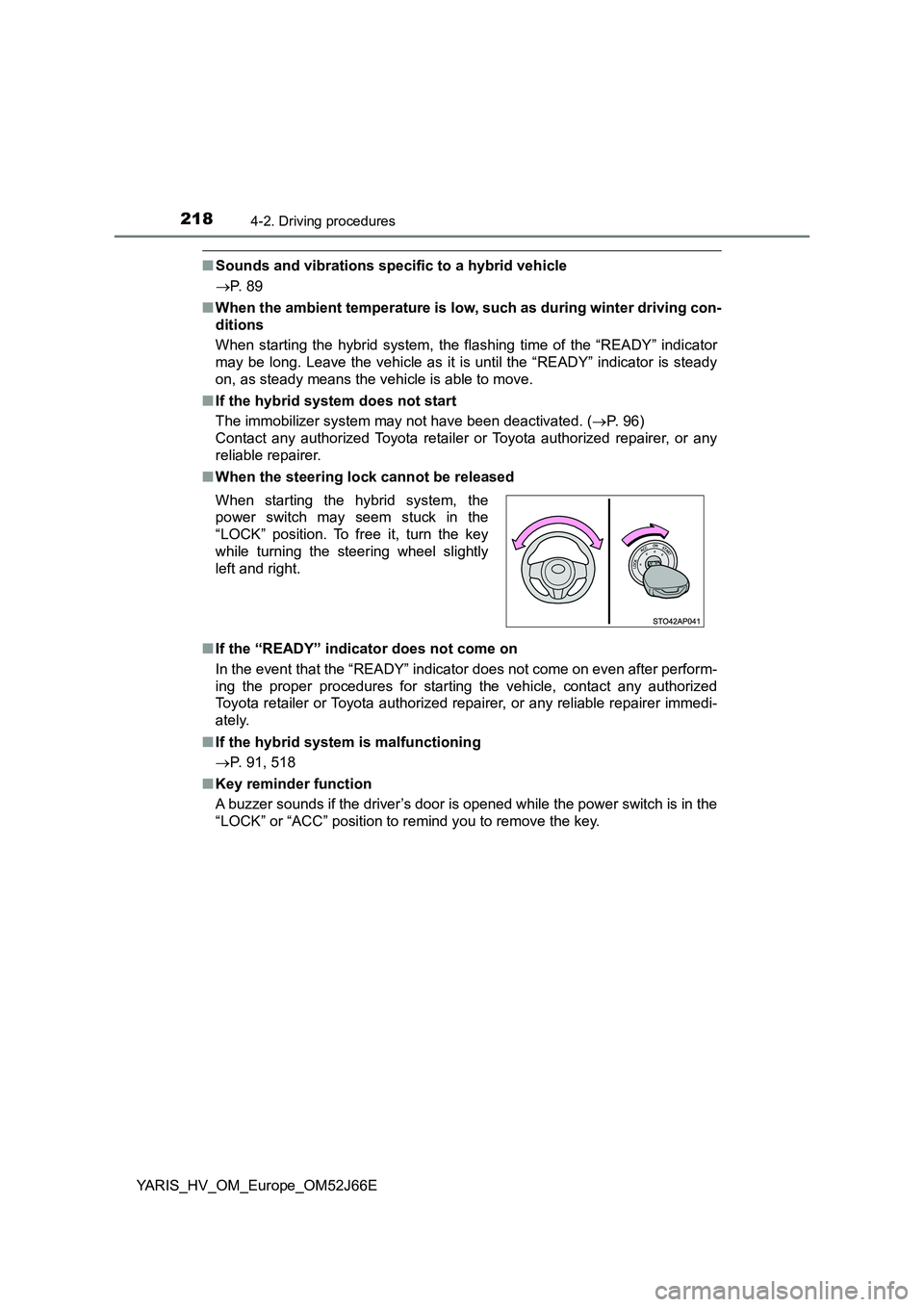
■ When the steering lock cannot be released
■ If the “READY” indicator does not come on
In the event that the “READY” indicator does not come on even after perform-
ing the proper procedures for starting the vehicle, contact any authorized
Toyota retailer or Toyota authorized repairer, or any reliable repairer immedi-
ately.
■ If the hybrid system is malfunctioning
P. 91, 518
■ Key reminder function
A buzzer sounds if the driver’s door is opened while the power switch is in the
“LOCK” or “ACC” position to remind you to remove the key.
When starting the hybrid system, the
power switch may seem stuck in the
“LOCK” position. To free it, turn the key
while turning the steering wheel slightly
left and right.
Page 220 of 632
2204-2. Driving procedures
YARIS_HV_OM_Europe_OM52J66E
Power (ignition) switch (vehicles with a
smart entry & start system)
Check that the parking brake is set.
Check that the shift lever is in P.
Vehicles with monochrome display
Firmly depress the brake pedal.
The smart entry & start system indicator (green) will turn on.
If the indicator light does not turn on, the hybrid system cannot be started.
Press the power switch shortly
and firmly.
When operating the power switch,
one short, firm press is enough. It
is not necessary to press and hold
the switch.
If the “READY” indicator turns on,
the hybrid system will operate nor-
mally.
Continue depressing the brake
pedal until the “READY” indicator
is illuminated.
The hybrid system can be started
from any power switch mode.
Performing the following operations when carrying the elec-
tronic key on your person starts the hybrid system or changes
power switch mode.
Starting the hybrid system
1
2
3
4
Page 225 of 632
2254-2. Driving procedures
4
Driving
YARIS_HV_OM_Europe_OM52J66E
■Auto power off function
If the vehicle is left in ACCESSORY mode for more than 20 minutes or ON
mode (the hybrid system is not operating) for more than an hour with the shift
lever in P, the power switch will automatically turn off. However, this function
cannot entirely prevent 12-volt battery discharge. Do not leave the vehicle
with the power switch in ACCESSORY or ON mode for long periods of time
when the hybrid system is not operating.
■ Sounds and vibrations specific to a hybrid vehicle
P. 8 9
■ Electronic key battery depletion
P. 477
■ When the ambient temperature is low, such as during winter driving con-
ditions
When starting the hybrid system, the flashing time of the “READY” indicator
may be long. Leave the vehicle as it is until the “READY” indicator is steady
on, as steady means the vehicle is able to move.
■ Conditions affecting operation
P. 168
■ Notes for the entry function
P. 169
■ If the hybrid system does not start
● The immobilizer system may not have been deactivated. (P. 9 6 )
Contact any authorized Toyota retailer or Toyota authorized repairer, or any
reliable repairer.
● Check that the shift lever is securely set in P. The hybrid system may not
start if the shift lever is displaced out of P.
Vehicles with monochrome display
The smart entry & start system indicator light (green) will flash quickly.
Vehicles with color display
“Shift to P position to start.” will be displayed on the multi-information dis-
play.
Page 226 of 632
2264-2. Driving procedures
YARIS_HV_OM_Europe_OM52J66E
■ Steering lock
After turning the power switch off and opening and closing the doors, the
steering wheel will be locked due to the steering lock function. Operating the
power switch again automatically cancels the steering lock.
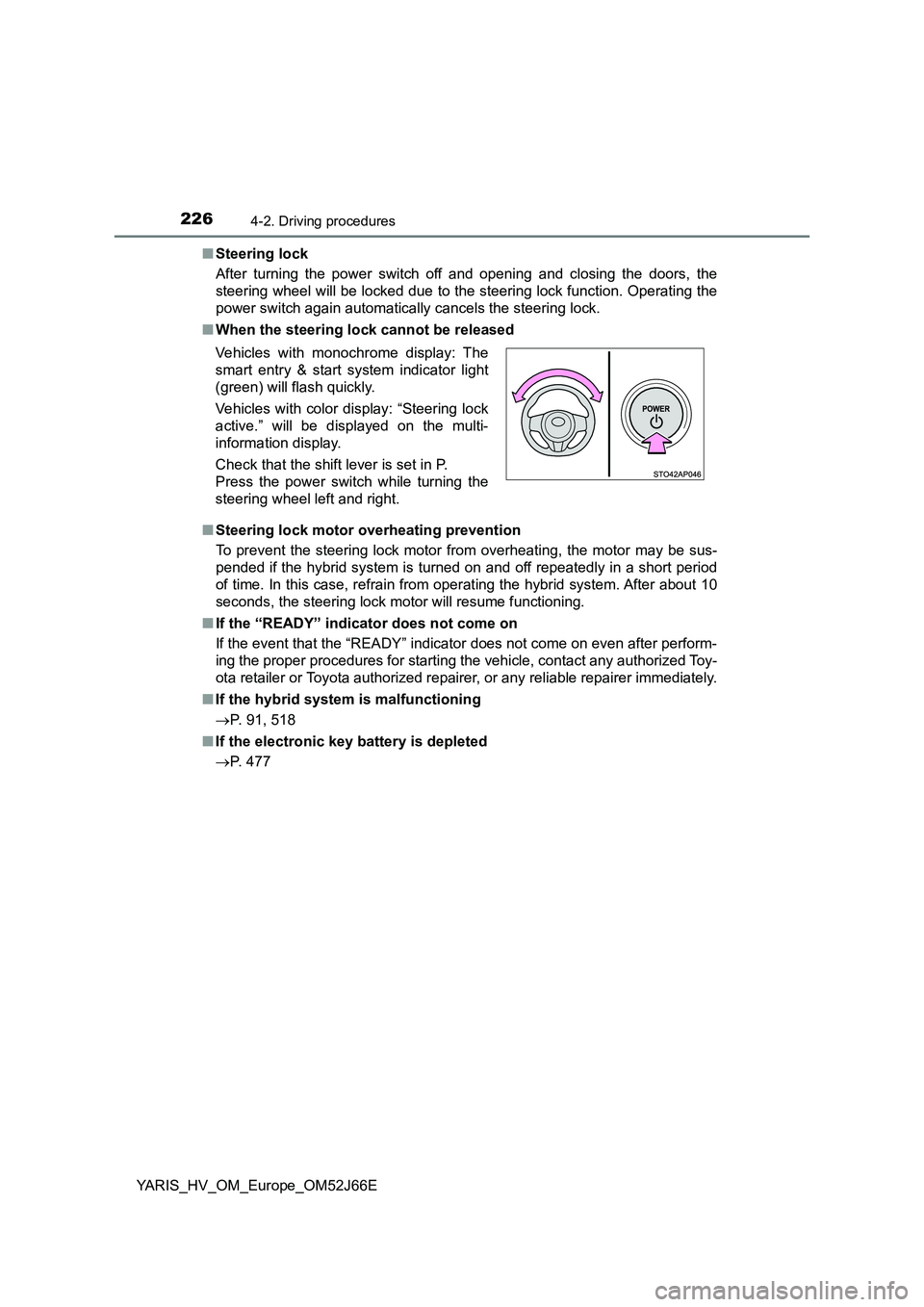
■ When the steering lock cannot be released
■ Steering lock motor overheating prevention
To prevent the steering lock motor from overheating, the motor may be sus-
pended if the hybrid system is turned on and off repeatedly in a short period
of time. In this case, refrain from operating the hybrid system. After about 10
seconds, the steering lock motor will resume functioning.
■ If the “READY” indicator does not come on
If the event that the “READY” indicator does not come on even after perform-
ing the proper procedures for starting t he vehicle, contact any authorized Toy-
ota retailer or Toyota authorized repair er, or any reliable repairer immediately.
■ If the hybrid system is malfunctioning
P. 91, 518
■ If the electronic key battery is depleted
P. 477
Vehicles with monochrome display: The
smart entry & start system indicator light
(green) will flash quickly.
Vehicles with color display: “Steering lock
active.” will be displayed on the multi-
information display.
Check that the shift lever is set in P.
Press the power switch while turning the
steering wheel left and right.