Page 91 of 632
911-3. Hybrid system
1
For safety and security
YARIS_HV_OM_Europe_OM52J66E
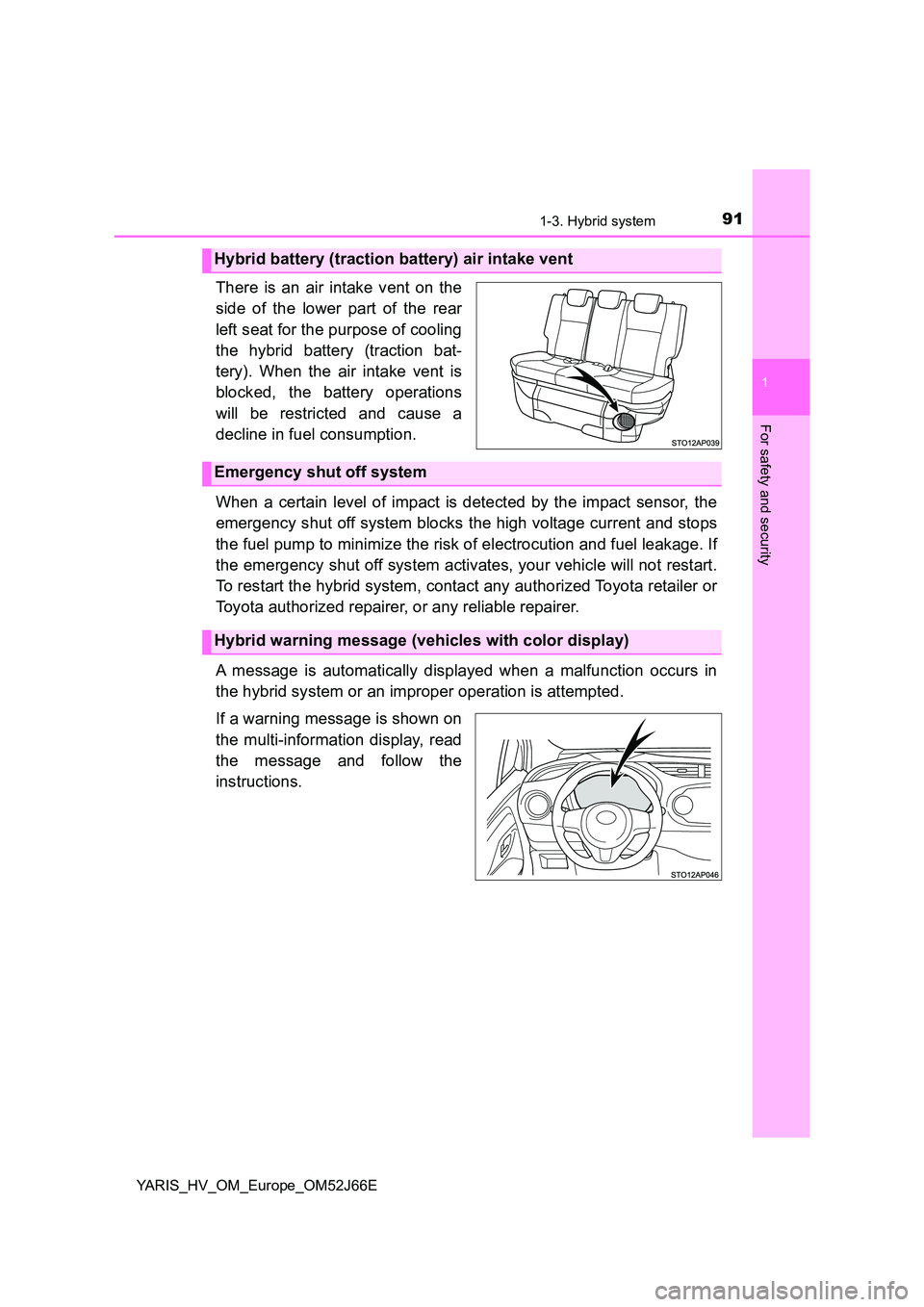
There is an air intake vent on the
side of the lower part of the rear
left seat for the purpose of cooling
the hybrid battery (traction bat-
tery). When the air intake vent is
blocked, the battery operations
will be restricted and cause a
decline in fuel consumption.
When a certain level of impact is detected by the impact sensor, the
emergency shut off system blocks the high voltage current and stops
the fuel pump to minimize the risk of electrocution and fuel leakage. If
the emergency shut off system activates, your vehicle will not restart.
To restart the hybrid system, contact any authorized Toyota retailer or
Toyota authorized repairer, or any reliable repairer.
A message is automatically displayed when a malfunction occurs in
the hybrid system or an improper operation is attempted.
If a warning message is shown on
the multi-information display, read
the message and follow the
instructions.
Hybrid battery (traction battery) air intake vent
Emergency shut off system
Hybrid warning message (vehicles with color display)
Page 95 of 632
951-3. Hybrid system
1
For safety and security
YARIS_HV_OM_Europe_OM52J66E
NOTICE
■Hybrid battery (traction battery) air intake vent
● Do not get water or foreign materials in the air intake vent as this may
cause a short circuit and damage the hybrid battery (traction battery).
● Do not carry large amounts of water such as water cooler bottles in the
vehicle. If water spills onto the hybrid battery (traction battery), the battery
may be damaged. Have the vehicle inspected by any authorized Toyota
retailer or Toyota authorized repairer, or any reliable repairer.
● There is a filter installed to the air intake vent. When the filter remains
noticeably dirty even after cleaning the air intake vent, filter cleaning or
replacement is recommended. For information regarding filter cleaning or
replacement, contact any authorized Toyota retailer or Toyota authorized
repairer, or any reliable repairer.
● Vehicles with color display: If “Maintenance required for Traction battery
cooling parts. See owner’s manual.” is shown on the multi-information dis-
play, the air intake vent and filter may be clogged. Refer to P. 420 for infor-
mation on how to clean the air intake vent.
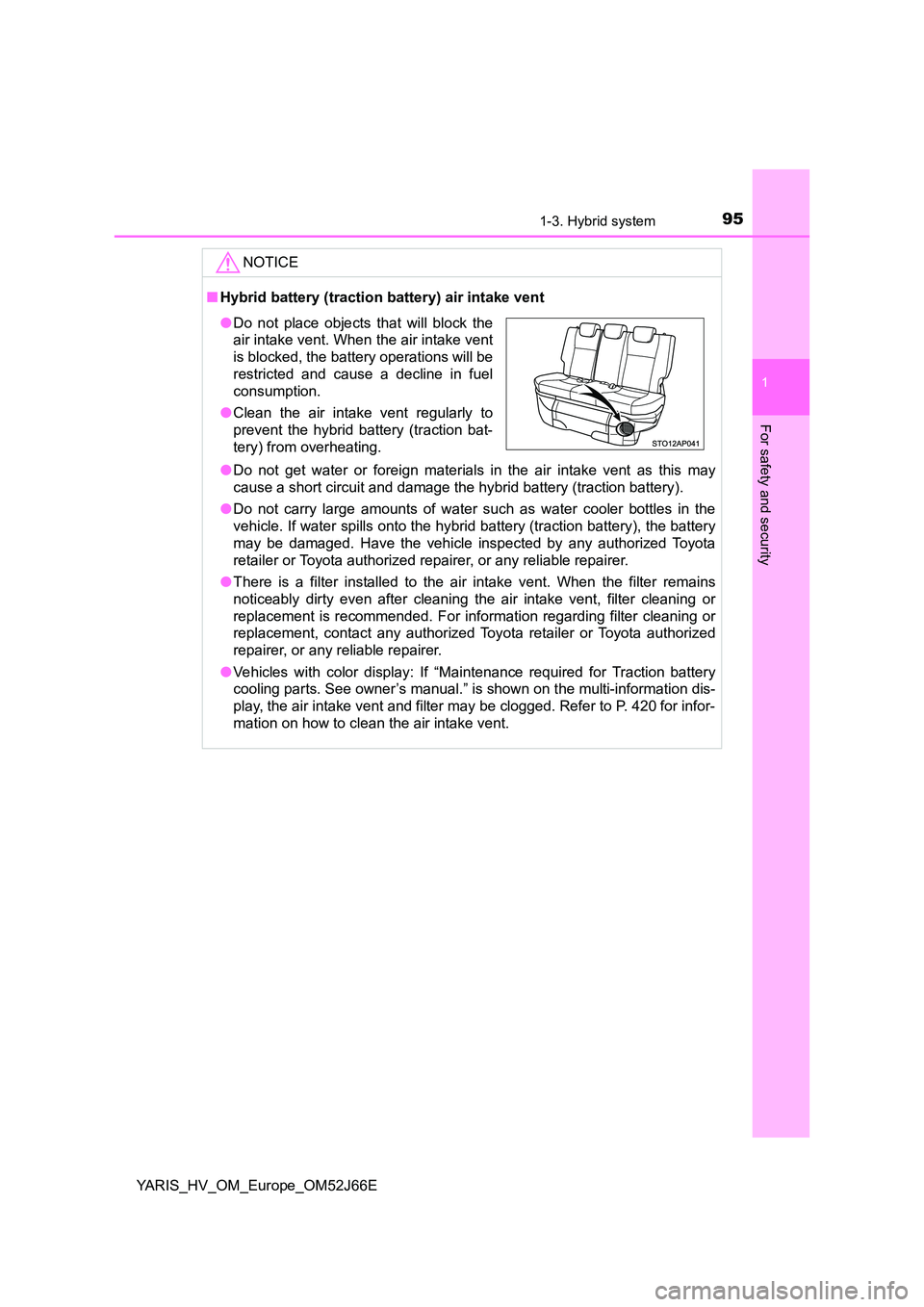
● Do not place objects that will block the
air intake vent. When the air intake vent
is blocked, the battery operations will be
restricted and cause a decline in fuel
consumption.
● Clean the air intake vent regularly to
prevent the hybrid battery (traction bat-
tery) from overheating.
Page 122 of 632
1222. Instrument cluster
YARIS_HV_OM_Europe_OM52J66E
■Odometer
Displays the total distance the vehicle has been driven.
■Trip meter
Displays the distance the vehicle has been driven since the meter
was last reset. Trip meters A and B can be used to record and dis-
play different distances independently.
Press and hold the button for longer than 1 second to reset. Pressing and
holding the button while the trip meter is displayed will reset the trip meter
to “0”.
■Instantaneous fuel consumption
Displays the instantaneous of fuel consumption.
Use the displayed instantaneous fuel consumption as a reference.
■Average fuel consumption
Displays the average rate of fuel consumption.
• The function can be reset by pressing the button for longer than 1 sec-
ond when the average fuel consumption is displayed.
• Use the displayed average fuel consumption as a reference.
■Driving range
Displays the estimated maximum distance that can be driven with
the quantity of fuel remaining.
• This distance is computed based on your average fuel consumption. As
a result, the actual distance that can be driven may differ from that dis-
played.
• When only a small amount of fuel is added to the tank, the display may
not be updated.
When refueling, turn the power switch to the “LOCK” position (vehicles
without a smart entry & start system) or off (vehicles with a smart entry &
start system). If the vehicle is refueled without turning the power switch to
the “LOCK” position or off, the display may not be updated.
■Average vehicle speed
Displays the average vehicle speed since the hybrid system was
last started.
Drive information
Page 123 of 632
1232. Instrument cluster
2
Instrument cluster
YARIS_HV_OM_Europe_OM52J66E
EV indicator can be activated or deactivated by pressing the display
change button when the EV indicator customization display is dis-
played.
To change the EV indicator customization display, display the odometer
and press and hold the display change button until the display changes.
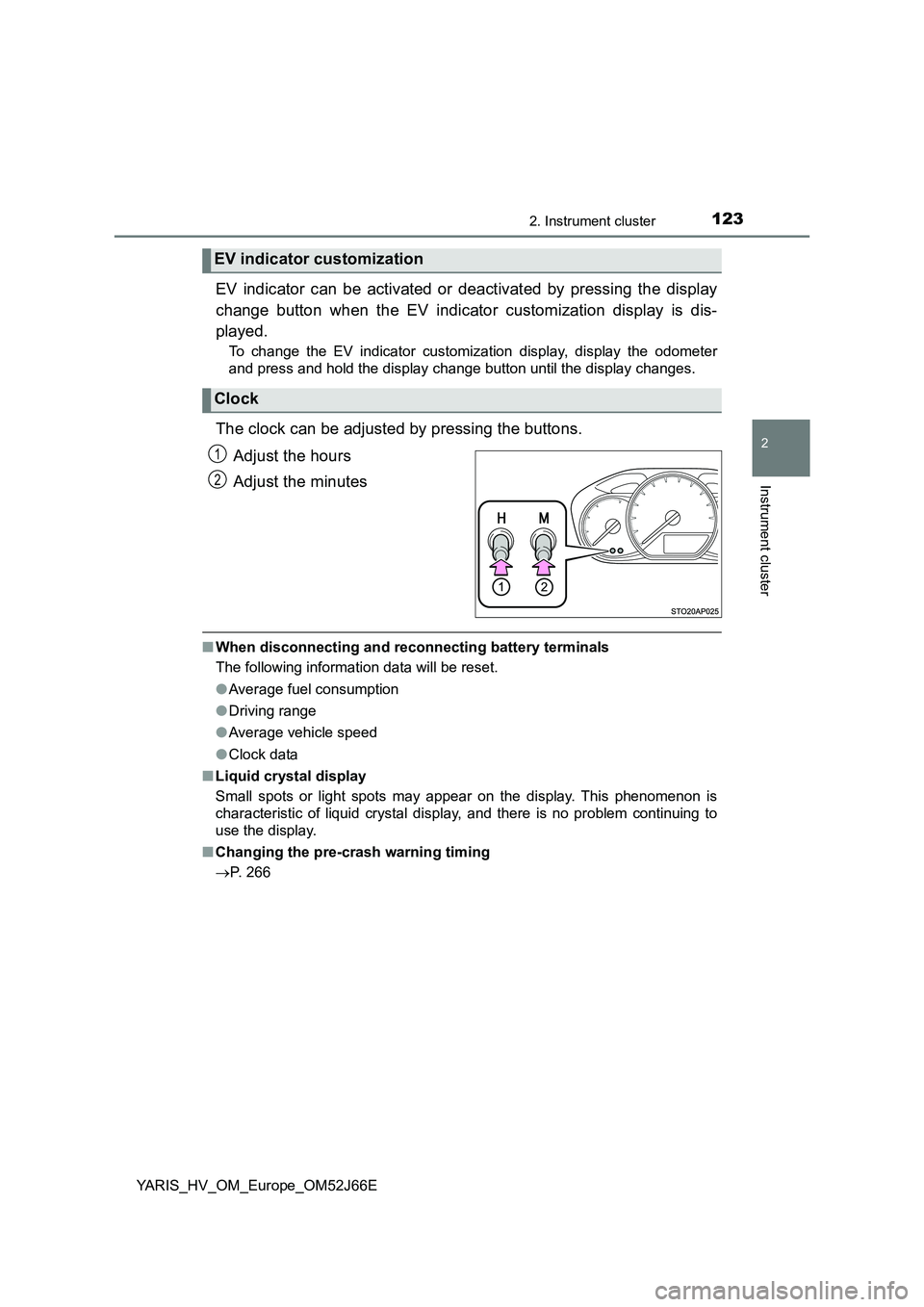
The clock can be adjusted by pressing the buttons.
Adjust the hours
Adjust the minutes
■ When disconnecting and reconnecting battery terminals
The following information data will be reset.
● Average fuel consumption
● Driving range
● Average vehicle speed
● Clock data
■ Liquid crystal display
Small spots or light spots may appear on the display. This phenomenon is
characteristic of liquid crystal display, and there is no problem continuing to
use the display.
■ Changing the pre-crash warning timing
P. 266
EV indicator customization
Clock
1
2
Page 127 of 632
1272. Instrument cluster
2
Instrument cluster
YARIS_HV_OM_Europe_OM52J66E
Items displayed can be switched by pressing “” or “” of the meter
control switches to select and pressing “ ” or “”.
● Average fuel consumption (after reset*/after start/after refuel)
Displays the average fuel consumption since the function was reset, the
hybrid system was on, and the vehicle was refueled, respectively
Use the displayed average fuel consumption as a reference.
● Average vehicle speed (after reset*/after start)
Displays the average vehicle speed since the function was reset and the
hybrid system was on, respectively
● Elapsed time (after reset*/after start)
Displays the elapsed time since the function was reset and the hybrid sys-
tem was on, respectively
● Distance (driving range/after refuel)
Displays the estimated maximum distance that can be driven with the
quantity of fuel remaining
• This distance is computed based on your average fuel consumption. As
a result, the actual distance that can be driven may differ from that dis-
played.
• When only a small amount of fuel is added to the tank, the display may
not be updated.
When refueling, turn the power switch off. If the vehicle is refueled with-
out turning the power switch off, the display may not be updated.
● Energy monitor
P. 133
●Speedometer
Displays the vehicle speed.
●Display off
A blank screen is displayed
*: The function can be reset by pressing and holding the of the meter
control switches when the reset item is displayed.
Drive information
Page 136 of 632
1362. Instrument cluster
YARIS_HV_OM_Europe_OM52J66E
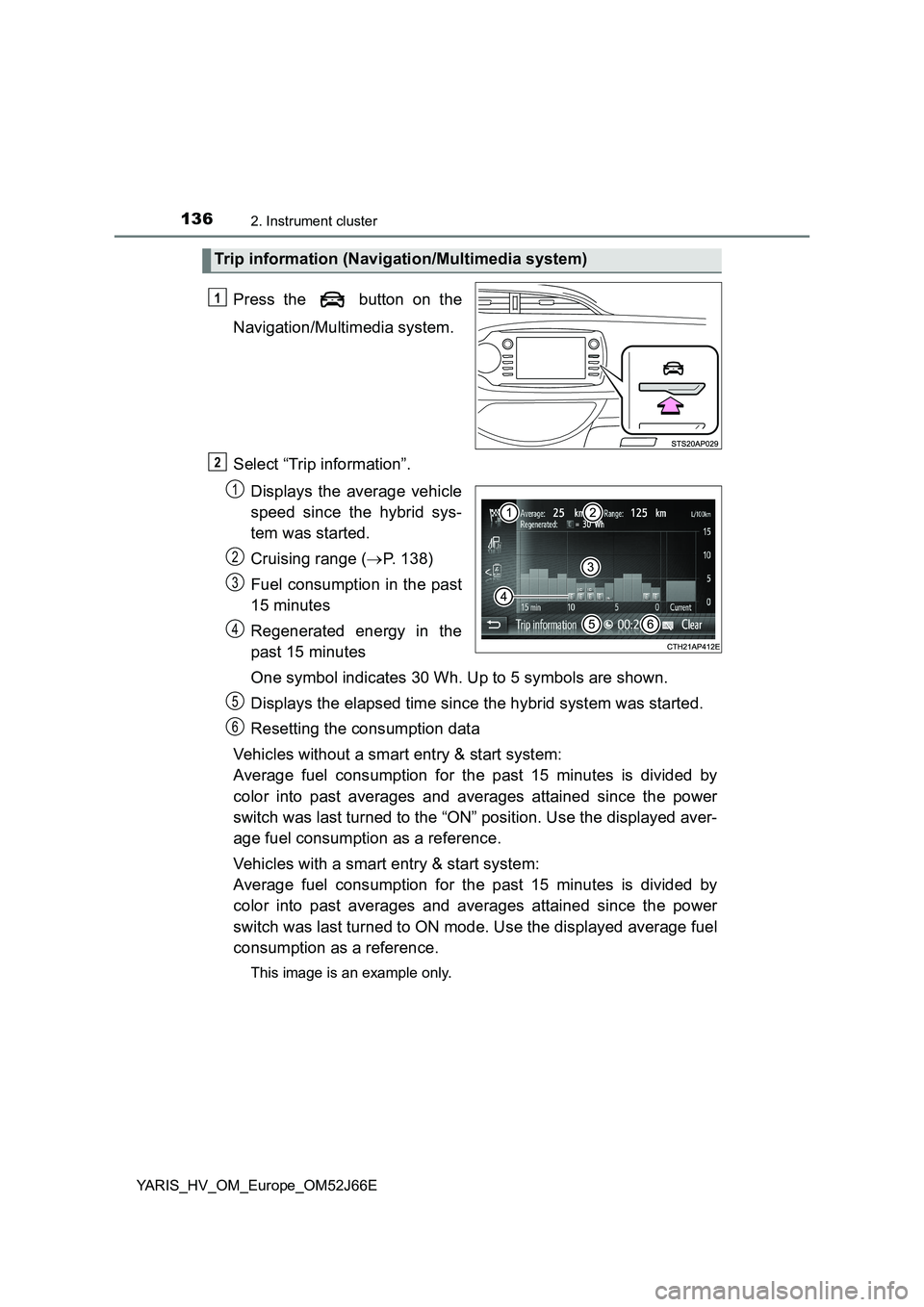
Press the button on the
Navigation/Multimedia system.
Select “Trip information”.
Displays the average vehicle
speed since the hybrid sys-
tem was started.
Cruising range ( P. 138)
Fuel consumption in the past
15 minutes
Regenerated energy in the
past 15 minutes
One symbol indicates 30 Wh. Up to 5 symbols are shown.
Displays the elapsed time since the hybrid system was started.
Resetting the consumption data
Vehicles without a smart entry & start system:
Average fuel consumption for the past 15 minutes is divided by
color into past averages and averages attained since the power
switch was last turned to the “ON” position. Use the displayed aver-
age fuel consumption as a reference.
Vehicles with a smart entry & start system:
Average fuel consumption for the past 15 minutes is divided by
color into past averages and averages attained since the power
switch was last turned to ON mode. Use the displayed average fuel
consumption as a reference.
This image is an example only.
Trip information (Navigation/Multimedia system)
1
2
1
2
3
4
5
6
Page 137 of 632
1372. Instrument cluster
2
Instrument cluster
YARIS_HV_OM_Europe_OM52J66E
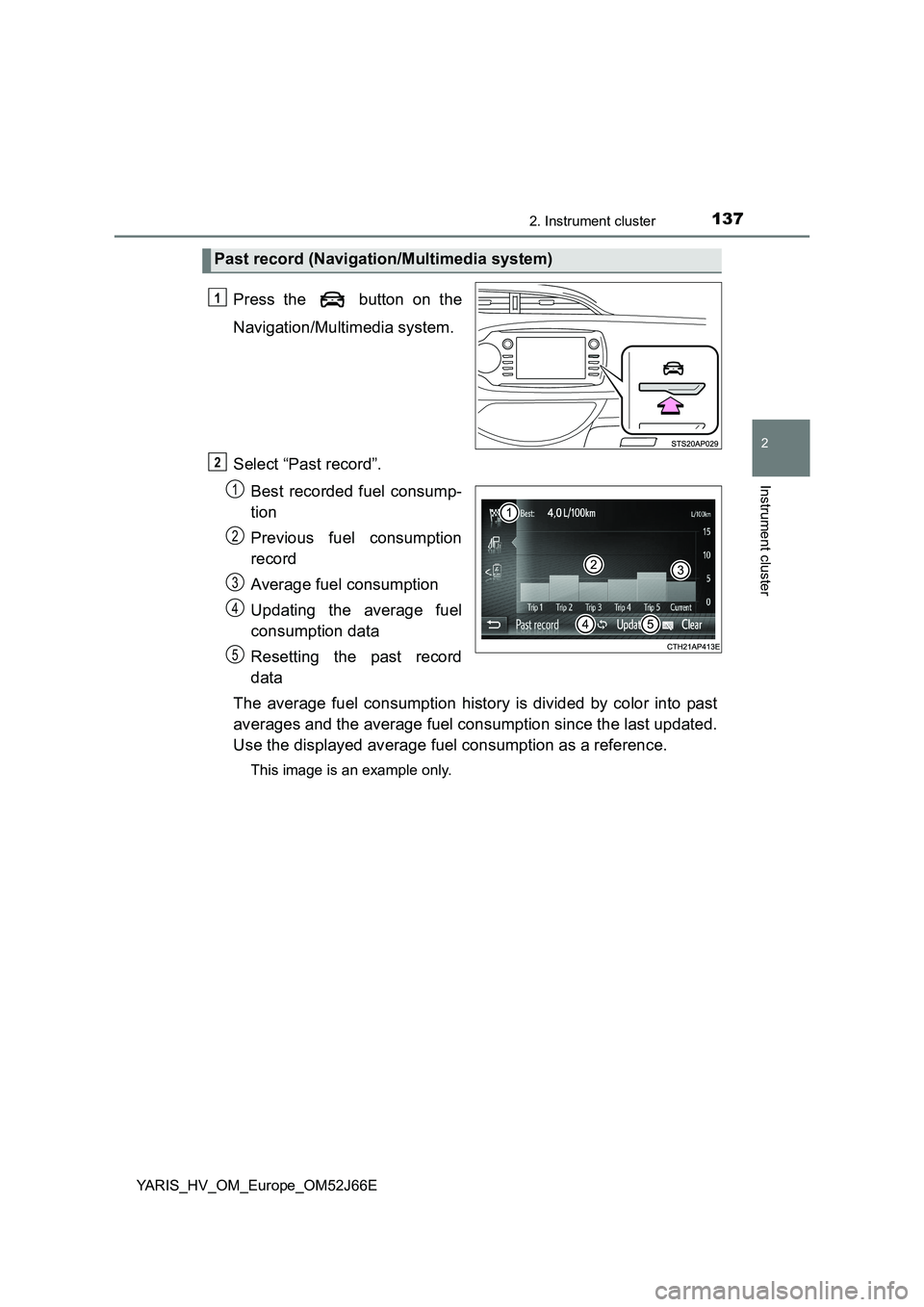
Press the button on the
Navigation/Multimedia system.
Select “Past record”.
Best recorded fuel consump-
tion
Previous fuel consumption
record
Average fuel consumption
Updating the average fuel
consumption data
Resetting the past record
data
The average fuel consumption history is divided by color into past
averages and the average fuel consumption since the last updated.
Use the displayed average fuel consumption as a reference.
This image is an example only.
Past record (Navigation/Multimedia system)
1
2
1
2
3
4
5
Page 138 of 632
1382. Instrument cluster
YARIS_HV_OM_Europe_OM52J66E
■Resetting the data
● Selecting “Clear” on the “Trip information” screen will reset the trip informa-
tion data.
● Selecting “Clear” on the “Past record” screen will reset the past record data.
■ Updating the past record data
Selecting “Update” on the “Past record” screen will update the past record
data.
Also, the average fuel consumption displayed in the multi-information display
will be reset at the same time. (vehicles with color display)
■ Cruising range
Displays the estimated maximum distance that can be driven with the quan-
tity of fuel remaining.
This distance is computed based on your average fuel consumption.
As a result, the actual distance that can be driven may differ from that dis-
played.