Page 357 of 632
3575-6. Using Bluetooth® devices
5
Audio system
YARIS_HV_OM_Europe_OM52J66E
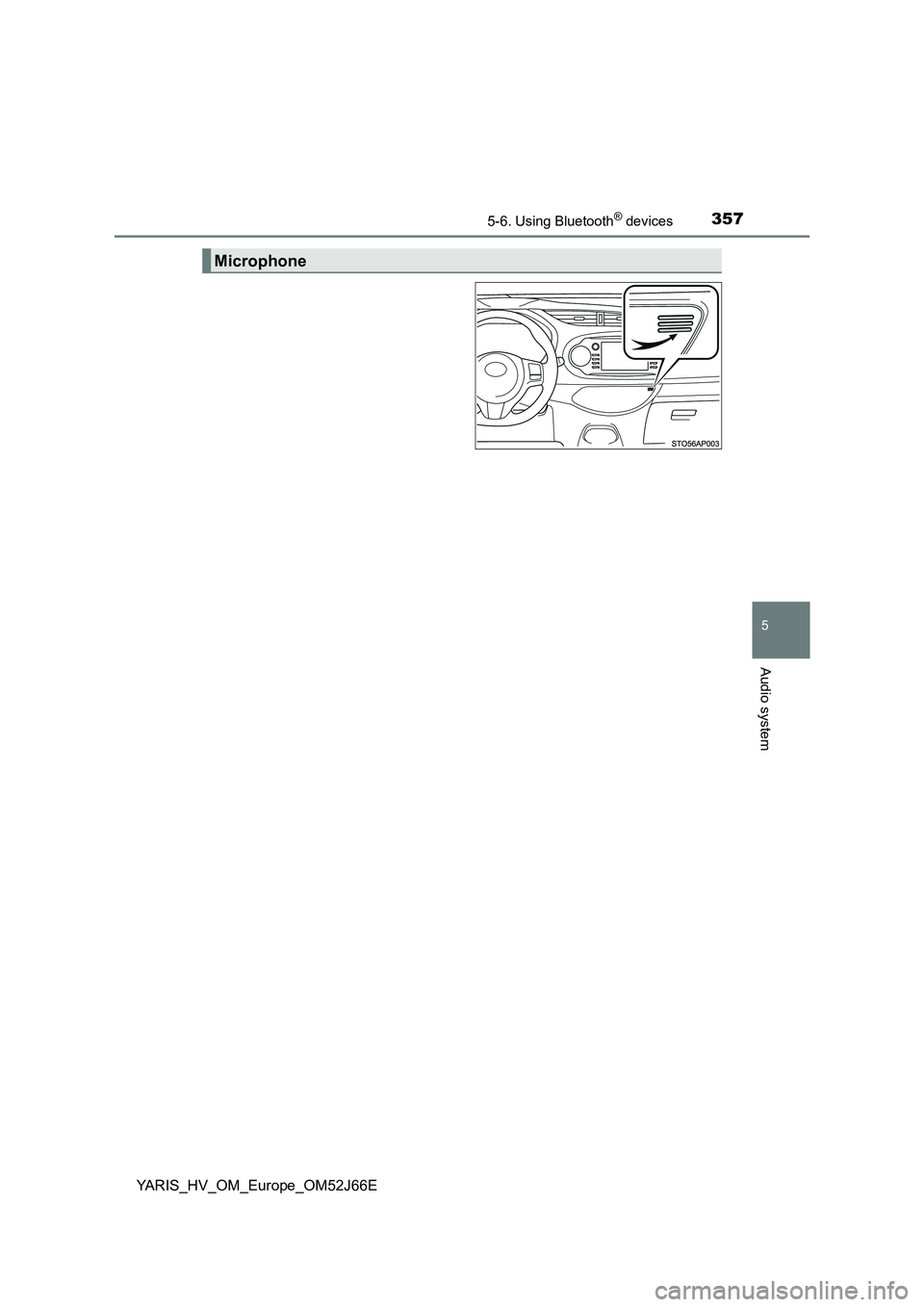
Microphone
Page 358 of 632
3585-6. Using Bluetooth® devices
YARIS_HV_OM_Europe_OM52J66E
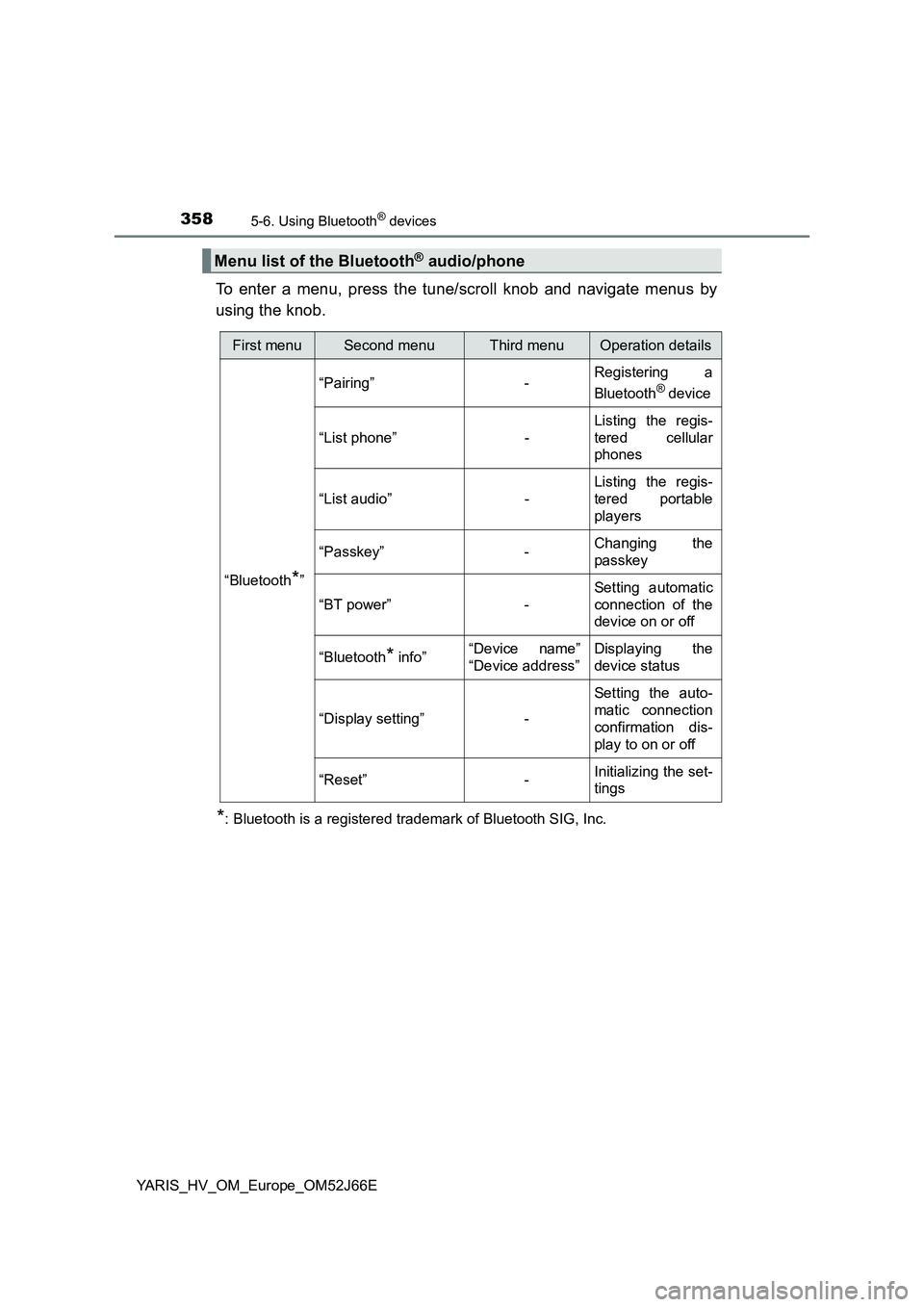
To enter a menu, press the tune/scroll knob and navigate menus by
using the knob.
*: Bluetooth is a registered trademark of Bluetooth SIG, Inc.
Menu list of the Bluetooth® audio/phone
First menuSecond menuThird menuOperation details
“Bluetooth*”
“Pairing” - Registering a
Bluetooth® device
“List phone” -
Listing the regis-
tered cellular
phones
“List audio” -
Listing the regis-
tered portable
players
“Passkey” - Changing the
passkey
“BT power” -
Setting automatic
connection of the
device on or off
“Bluetooth* info” “Device name”
“Device address”
Displaying the
device status
“Display setting” -
Setting the auto-
matic connection
confirmation dis-
play to on or off
“Reset” - Initializing the set-
tings
Page 359 of 632
3595-6. Using Bluetooth® devices
5
Audio system
YARIS_HV_OM_Europe_OM52J66E
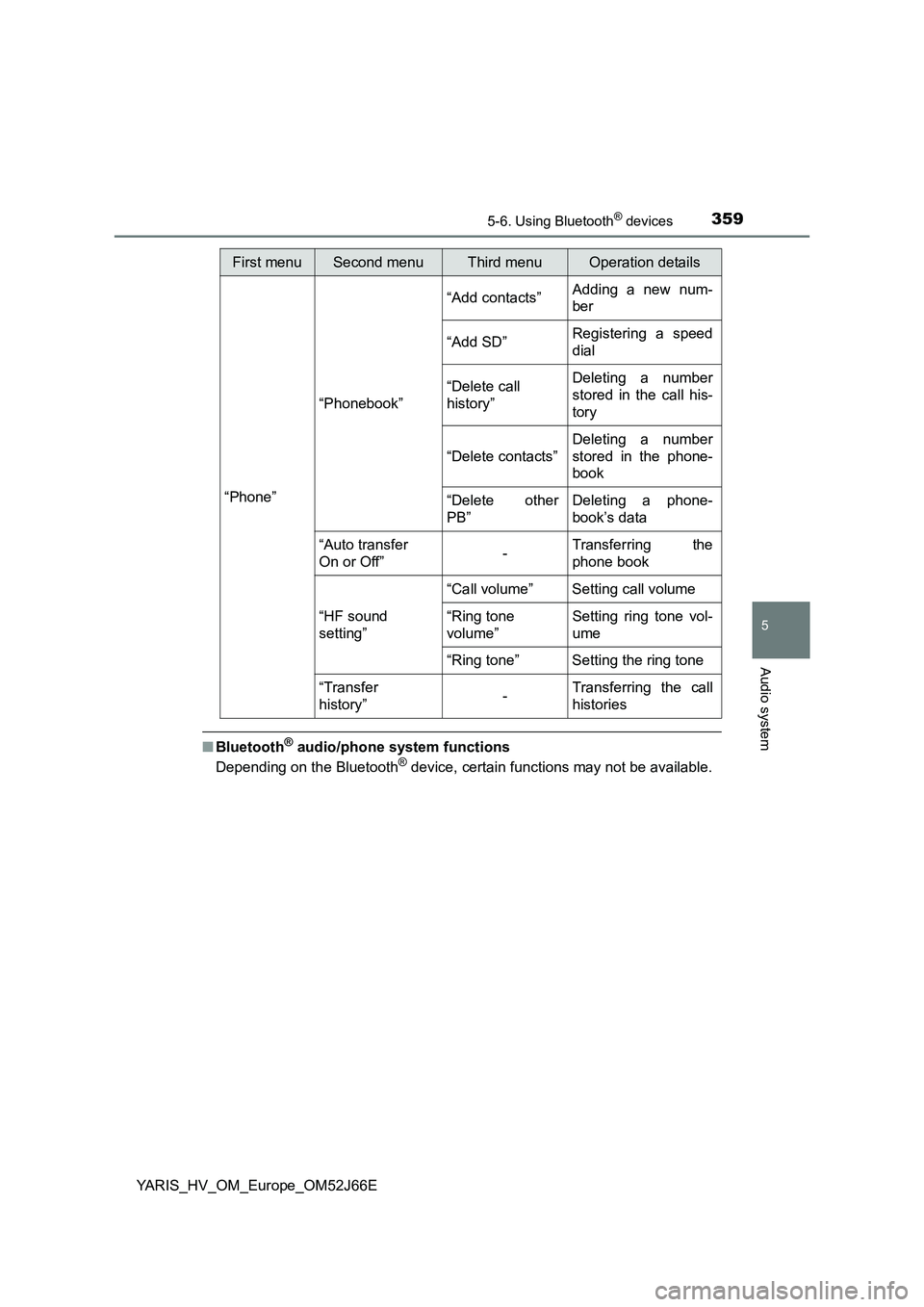
■Bluetooth® audio/phone system functions
Depending on the Bluetooth® device, certain functions may not be available.
First menuSecond menuThird menuOperation details
“Phone”
“Phonebook”
“Add contacts” Adding a new num-
ber
“Add SD” Registering a speed
dial
“Delete call
history”
Deleting a number
stored in the call his-
tory
“Delete contacts”
Deleting a number
stored in the phone-
book
“Delete other
PB”
Deleting a phone-
book’s data
“Auto transfer
On or Off” - Transferring the
phone book
“HF sound
setting”
“Call volume” Setting call volume
“Ring tone
volume”
Setting ring tone vol-
ume
“Ring tone” Setting the ring tone
“Transfer
history” -Transferring the call
histories
Page 360 of 632
3605-6. Using Bluetooth® devices
YARIS_HV_OM_Europe_OM52J66E
Using the steering wheel switches
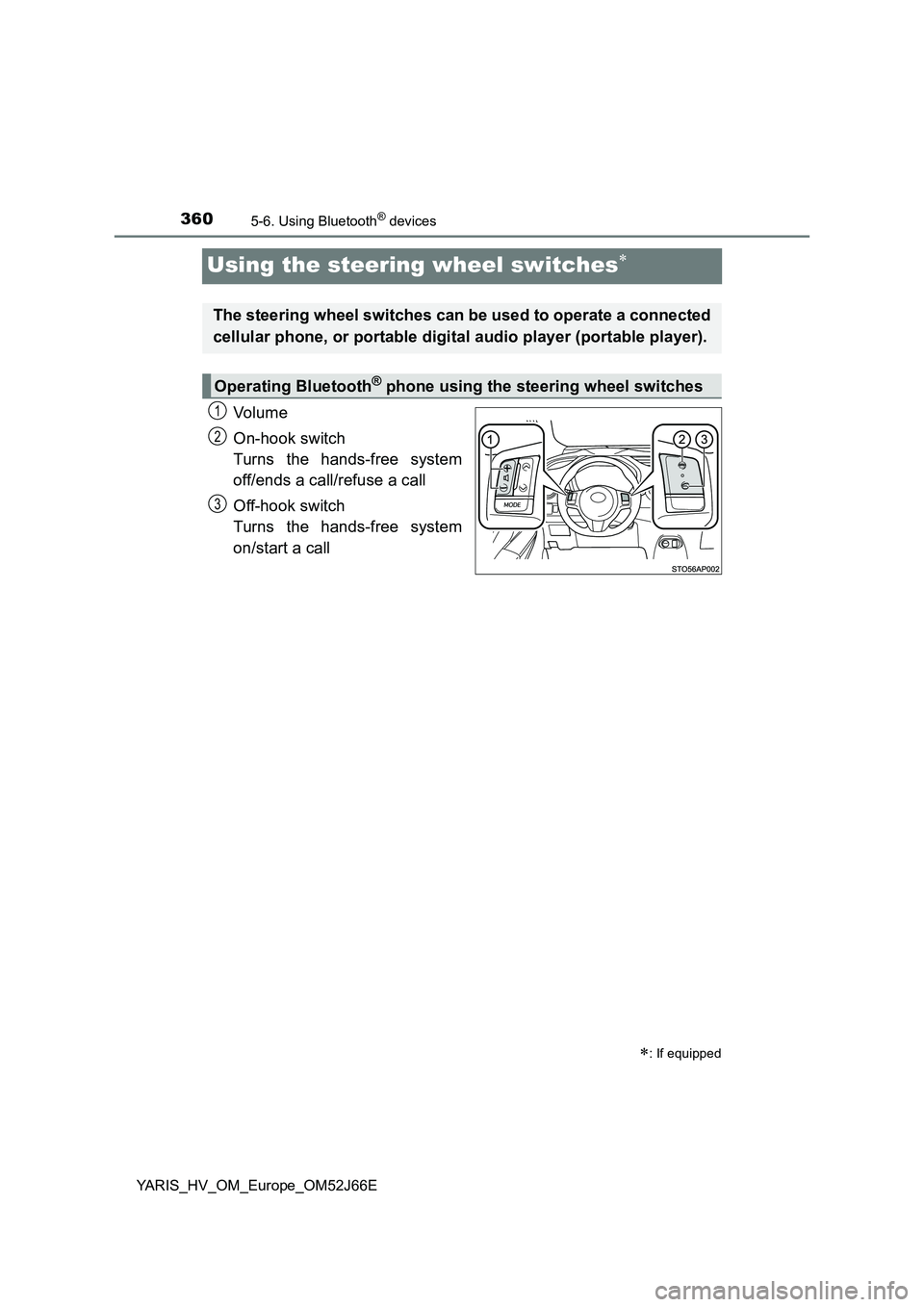
Vo lu m e
On-hook switch
Turns the hands-free system
off/ends a call/refuse a call
Off-hook switch
Turns the hands-free system
on/start a call
: If equipped
The steering wheel switches can be used to operate a connected
cellular phone, or portable digital audio player (portable player).
Operating Bluetooth® phone using the steering wheel switches
1
2
3
Page 361 of 632
3615-6. Using Bluetooth® devices
5
Audio system
YARIS_HV_OM_Europe_OM52J66E
Registering a Bluetooth® device
Press the tune/scroll knob and select “Bluetooth*” using the knob.
Press the knob and select “Pairing” using the knob.
A passkey will be displayed.
SSP (Secure Simple Pairing) incompatible Bluetooth® devices:
Input the passkey into the device.
SSP (Secure Simple Pairing) compatible Bluetooth® devices:
Select “Yes” to register the device. Depending on the type of
device, it may register automatically.
If a Bluetooth® device has both music player and cellular phone func-
tions, both functions will be registered at the same time. When delet-
ing the device, both functions will be deleted at the same time.
If the off-hook switch is pressed and the “Phone” mode is entered
when no phones have been registered, the registration screen will be
automatically displayed.
*: Bluetooth is a registered trademark of Bluetooth SIG, Inc.
: If equipped
Before using the Bluetooth® audio/phone, it is necessary to reg-
ister a Bluetooth® device in the system. You can register up to 5
Bluetooth® devices.
How to register a Bluetooth® device
1
2
3
Page 362 of 632
3625-7. “SETUP” menu
YARIS_HV_OM_Europe_OM52J66E
Using the “SETUP” menu (“Bluetooth*”
menu)
Select “Pairing” using the tune/scroll knob ( P. 358), and perform the
procedure for registering a portable player. ( P. 361)
Select “List phone” using the tune/scroll knob. ( P. 358) The list of
registered cellular phones will be displayed.
● Connecting the registered cellular phone to the audio system
Select the name of the cellular phone to be connected using the
tune/scroll knob.
Select “Select” using the knob.
● Deleting a registered cellular phone
Select the name of the cellular phone to be deleted using the
tune/scroll knob.
Select “Delete” using the knob.
Press (“Yes”).
*: Bluetooth is a registered trademark of Bluetooth SIG, Inc.
: If equipped
Registering a Bluetooth® device in the system allows the system
to function. The following functions can be used for registered
devices:
Registering a portable player
Listing the registered cellular phones
1
2
1
2
3
Page 363 of 632
3635-7. “SETUP” menu
5
Audio system
YARIS_HV_OM_Europe_OM52J66E
●Disconnecting the registered cellular phone from the audio system
Select the name of the cellular phone to be disconnected using
the tune/scroll knob.
Select “Disconnect” using the knob.
Press (“Yes”).
Select “List audio” using the tune/scroll knob. ( P. 358) The list of
registered portable players will be displayed.
● Connecting the registered portable player to the audio system
Select the name of the portable player to be connected using the
tune/scroll knob.
Select “Select” using the knob.
● Deleting the registered portable player
Select the name of the portable player to be deleted using the
tune/scroll knob.
Select “Delete” using the knob.
Press (“Yes”).
Listing the registered portable players
1
2
3
1
2
1
2
3
Page 365 of 632
3655-7. “SETUP” menu
5
Audio system
YARIS_HV_OM_Europe_OM52J66E
If “BT power” is set to on, the registered device will be connected
automatically when the power switch is turned to the “ACC” position
(vehicles without a smart entry & start system) or ACCESSORY mode
(vehicles with a smart entry & start system).
Select “BT power” using the tune/scroll knob. ( P. 358)
Select “On” or “Off” using the knob.
Select “Bluetooth* info” using the tune/scroll knob. ( P. 358)
● Displaying the device name
Select “Device name” using the tune/scroll knob.
● Displaying the device address
Select “Device address” using the tune/scroll knob.
*: Bluetooth is a registered trademark of Bluetooth SIG, Inc.
If the “Display setting” is set to on, the Bluetooth phone/portable
player connection status will be displayed when the power switch is
turned to the “ACC” or “ON” position (vehicles without a smart entry &
start system), or ACCESSORY or ON mode (vehicles with a smart
entry & start system).
Select “Display setting” using the tune/scroll knob. ( P. 358)
Select “On” or “Off” using the knob.
Setting automatic connection of the device on or off
Displaying the device status
Setting the automatic connection confirmation display to on or off
1
2
1
2