Page 4 of 632
TABLE OF CONTENTS4
YARIS_HV_OM_Europe_OM52J66E
5-1. Basic Operations
Audio system types............320
Steering wheel audio
switches ...........................322
AUX port/USB port.............323
5-2. Using the audio system
Optimal use of the audio
system .............................324
5-3. Using the radio
Radio operation .................326
5-4. Playing audio CDs and
MP3/WMA discs
CD player operation ...........330
5-5. Using an external device
Listening to an iPod ...........339
Listening to a USB
memory device ................347
Using the AUX port ............353
5-6. Using Bluetooth®
devices
Bluetooth® audio/phone .....354
Using the steering
wheel switches ................360
Registering a Bluetooth®
device ..............................361
5-7. “SETUP” menu
Using the “SETUP” menu
(“Bluetooth*” menu)......... 362
Using the “SETUP” menu
(“Phone” menu) ............... 367
5-8. Bluetooth® Audio
Operating a Bluetooth®
enabled portable
player .............................. 371
5-9. Bluetooth® Phone
Making a phone call .......... 374
Receiving a phone call ...... 376
Speaking on the phone ..... 377
5-10. Bluetooth®
Bluetooth®......................... 379
5Audio system
*: Bluetooth is a registered trademark of Bluetooth SIG, Inc.
Page 319 of 632
319
5Audio system
YARIS_HV_OM_Europe_OM52J66E
5-1. Basic Operations
Audio system types ........... 320
Steering wheel audio
switches ........................... 322
AUX port/USB port ............ 323
5-2. Using the audio system
Optimal use of the audio
system ............................. 324
5-3. Using the radio
Radio operation ................. 326
5-4. Playing audio CDs and
MP3/WMA discs
CD player operation........... 330
5-5. Using an external device
Listening to an iPod ........... 339
Listening to a USB
memory device ................ 347
Using the AUX port ............ 353
5-6. Using Bluetooth®
devices
Bluetooth® audio/phone..... 354
Using the steering
wheel switches ................ 360
Registering a Bluetooth®
device .............................. 361
5-7. “SETUP” menu
Using the “SETUP” menu
(“Bluetooth*” menu)......... 362
Using the “SETUP” menu
(“Phone” menu) ............... 367
5-8. Bluetooth® Audio
Operating a Bluetooth®
enabled portable
player ............................... 371
5-9. Bluetooth® Phone
Making a phone call ........... 374
Receiving a phone call....... 376
Speaking on the phone ...... 377
5-10. Bluetooth®
Bluetooth®......................... 379
*: Bluetooth is a registered trademark of Bluetooth SIG, Inc.
Page 321 of 632
3215-1. Basic Operations
5
Audio system
YARIS_HV_OM_Europe_OM52J66E
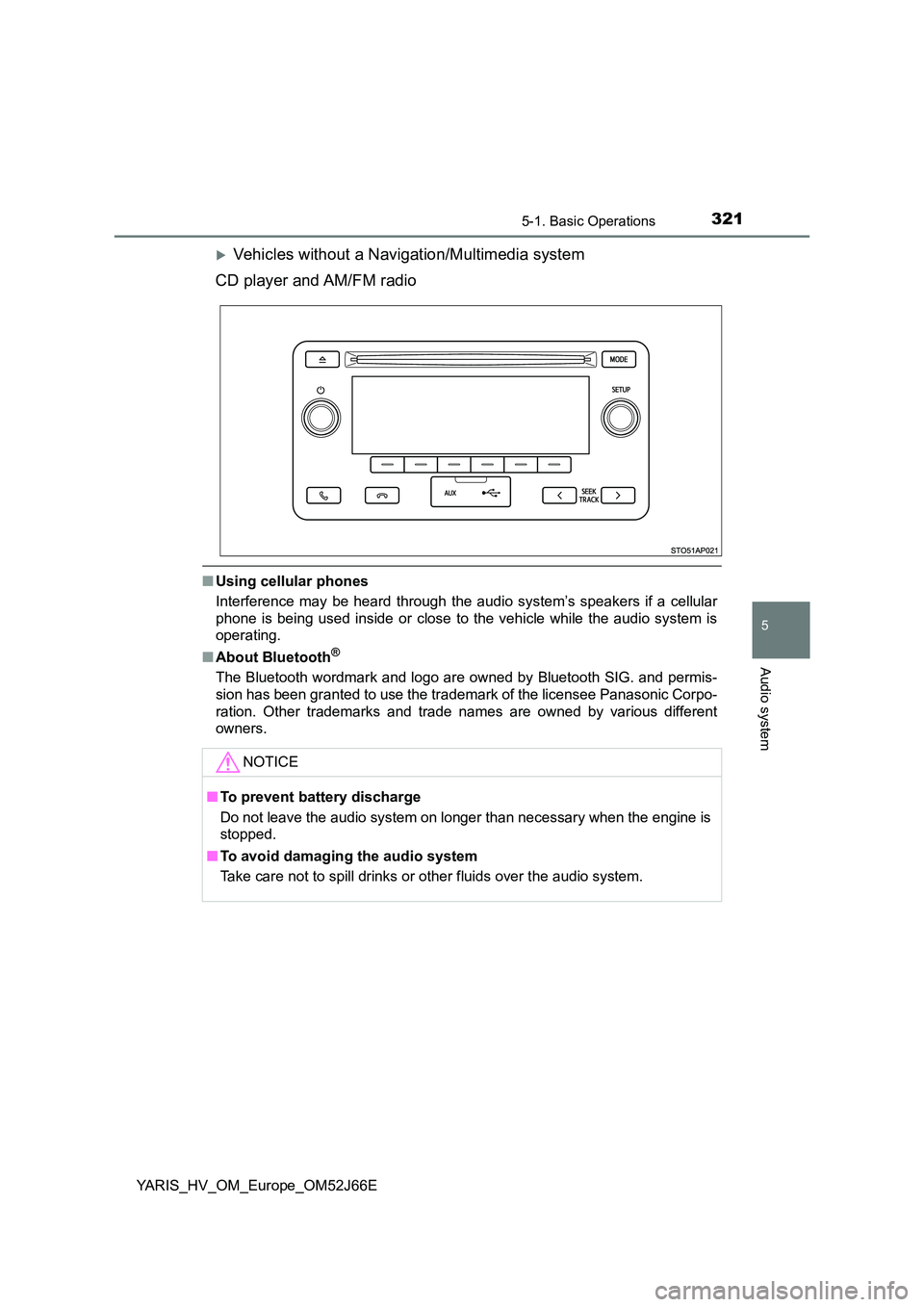
Vehicles without a Navigation/Multimedia system
CD player and AM/FM radio
■ Using cellular phones
Interference may be heard through the audio system’s speakers if a cellular
phone is being used inside or close to the vehicle while the audio system is
operating.
■ About Bluetooth®
The Bluetooth wordmark and logo are owned by Bluetooth SIG. and permis-
sion has been granted to use the trademark of the licensee Panasonic Corpo-
ration. Other trademarks and trade nam es are owned by various different
owners.
NOTICE
■ To prevent battery discharge
Do not leave the audio system on longer than necessary when the engine is
stopped.
■ To avoid damaging the audio system
Take care not to spill drinks or other fluids over the audio system.
Page 322 of 632
3225-1. Basic Operations
YARIS_HV_OM_Europe_OM52J66E
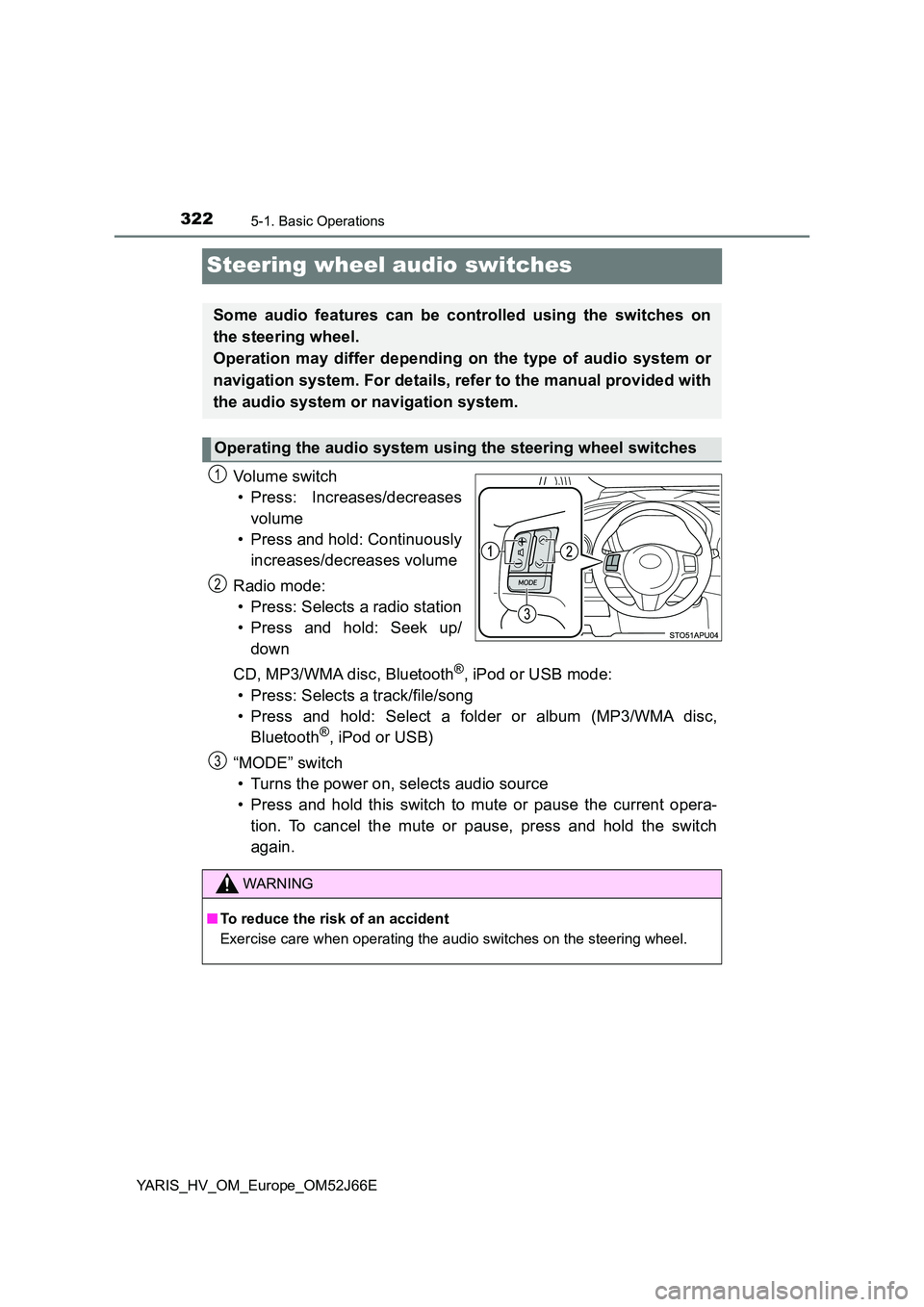
Steering wheel audio switches
Vo lu m e swi tc h
• Press: Increases/decreases
volume
• Press and hold: Continuously
increases/decreases volume
Radio mode:
• Press: Selects a radio station
• Press and hold: Seek up/
down
CD, MP3/WMA disc, Bluetooth®, iPod or USB mode:
• Press: Selects a track/file/song
• Press and hold: Select a folder or album (MP3/WMA disc,
Bluetooth®, iPod or USB)
“MODE” switch
• Turns the power on, selects audio source
• Press and hold this switch to mute or pause the current opera-
tion. To cancel the mute or pause, press and hold the switch
again.
Some audio features can be controlled using the switches on
the steering wheel.
Operation may differ depending on the type of audio system or
navigation system. For details, refer to the manual provided with
the audio system or navigation system.
Operating the audio system using the steering wheel switches
1
2
WARNING
■ To reduce the risk of an accident
Exercise care when operating the audio switches on the steering wheel.
3
Page 354 of 632
3545-6. Using Bluetooth® devices
YARIS_HV_OM_Europe_OM52J66E
Bluetooth® audio/phone
◆Bluetooth® audio
The Bluetooth® audio system enables you to enjoy music played on
a portable digital audio player (portable player) from the vehicle
speakers via wireless communication.
This audio system supports Bluetooth®, a wireless data system
capable of playing portable audio music without cables. If your por-
table player does not support Bluetooth®, the Bluetooth® audio sys-
tem will not function.
◆Bluetooth® phone (hands-free phone system)
This system supports Bluetooth®, which allows you to make or
receive calls without using cables to connect a cellular phone and
the system, and without operating the cellular phone.
: If equipped
The following can be performed using Bluetooth® wireless com-
munication:
Page 355 of 632
3555-6. Using Bluetooth® devices
5
Audio system
YARIS_HV_OM_Europe_OM52J66E
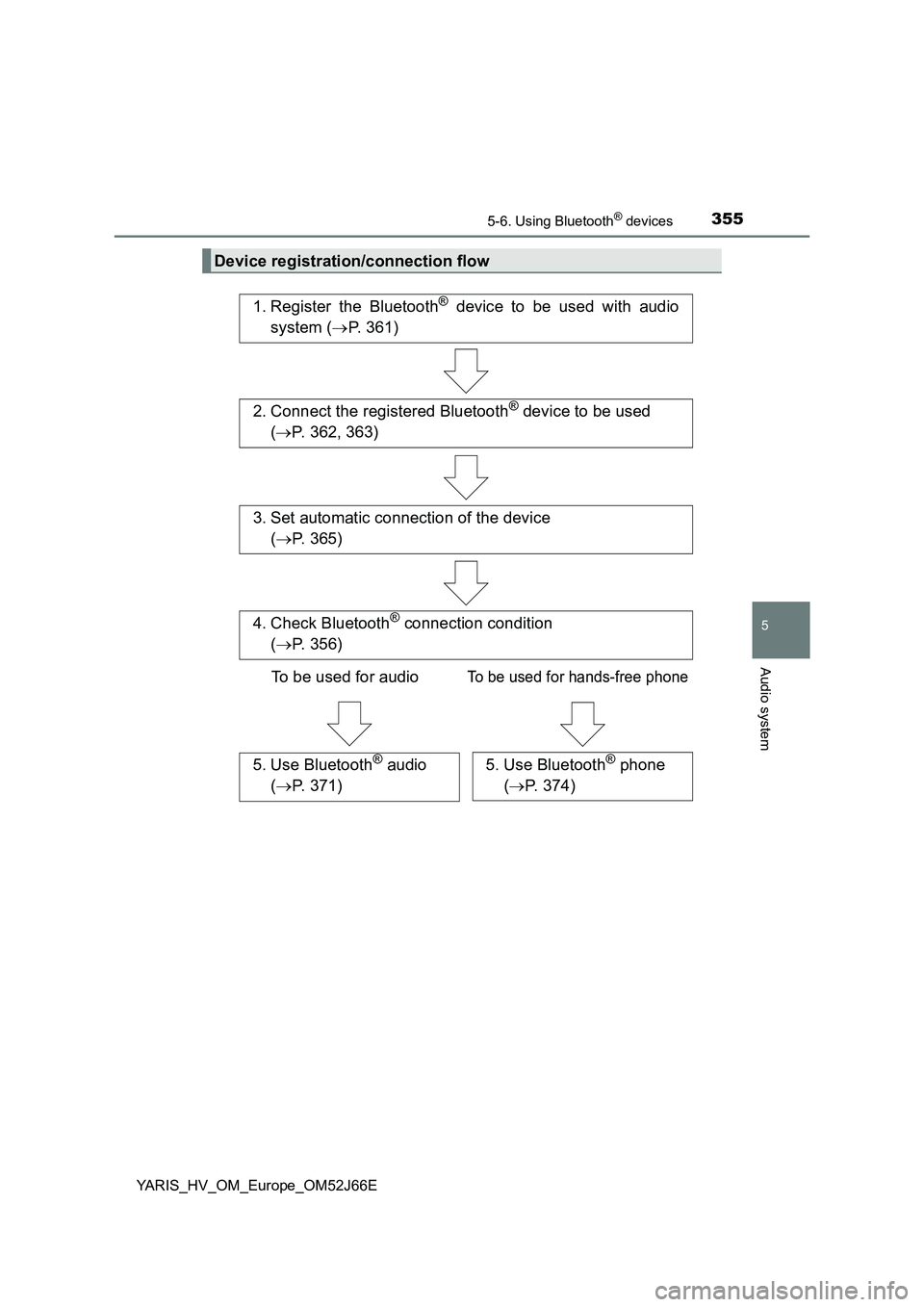
Device registration/connection flow
1. Register the Bluetooth® device to be used with audio
system ( P. 361)
2. Connect the registered Bluetooth® device to be used
( P. 362, 363)
5. Use Bluetooth® audio
( P. 371)
5. Use Bluetooth® phone
( P. 374)
3. Set automatic connection of the device
( P. 365)
4. Check Bluetooth® connection condition
( P. 356)
To be used for audioTo be used for hands-free phone
Page 356 of 632
3565-6. Using Bluetooth® devices
YARIS_HV_OM_Europe_OM52J66E
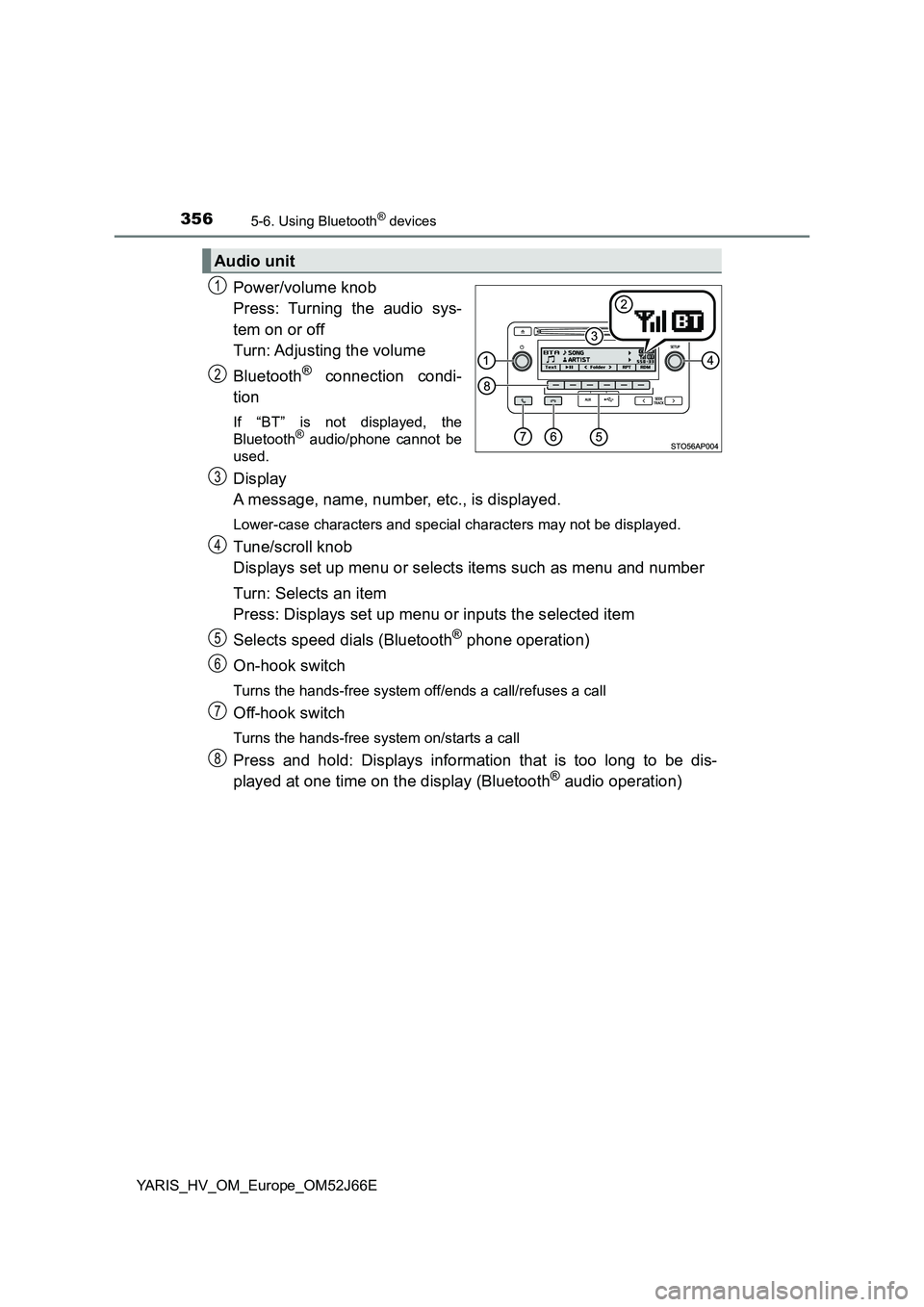
Power/volume knob
Press: Turning the audio sys-
tem on or off
Turn: Adjusting the volume
Bluetooth® connection condi-
tion
If “BT” is not displayed, the
Bluetooth® audio/phone cannot be
used.
Display
A message, name, number, etc., is displayed.
Lower-case characters and special characters may not be displayed.
Tune/scroll knob
Displays set up menu or selects items such as menu and number
Turn: Selects an item
Press: Displays set up menu or inputs the selected item
Selects speed dials (Bluetooth® phone operation)
On-hook switch
Turns the hands-free system off/ends a call/refuses a call
Off-hook switch
Turns the hands-free system on/starts a call
Press and hold: Displays information that is too long to be dis-
played at one time on the display (Bluetooth® audio operation)
Audio unit
1
2
3
4
5
6
7
8
Page 357 of 632
3575-6. Using Bluetooth® devices
5
Audio system
YARIS_HV_OM_Europe_OM52J66E
Microphone