Page 115 of 672
1153-2. Opening, closing and locking the doors
3
Operation of each component
■Security feature (vehicles with wireless remote control)
If a door is not opened within approximately 60 seconds after t he vehicle is
unlocked, the security feature automatically locks the vehicle again.
■ Alarm (if equipped)
Using the wireless remote control to lock the doors will set th e alarm system.
( P. 85)
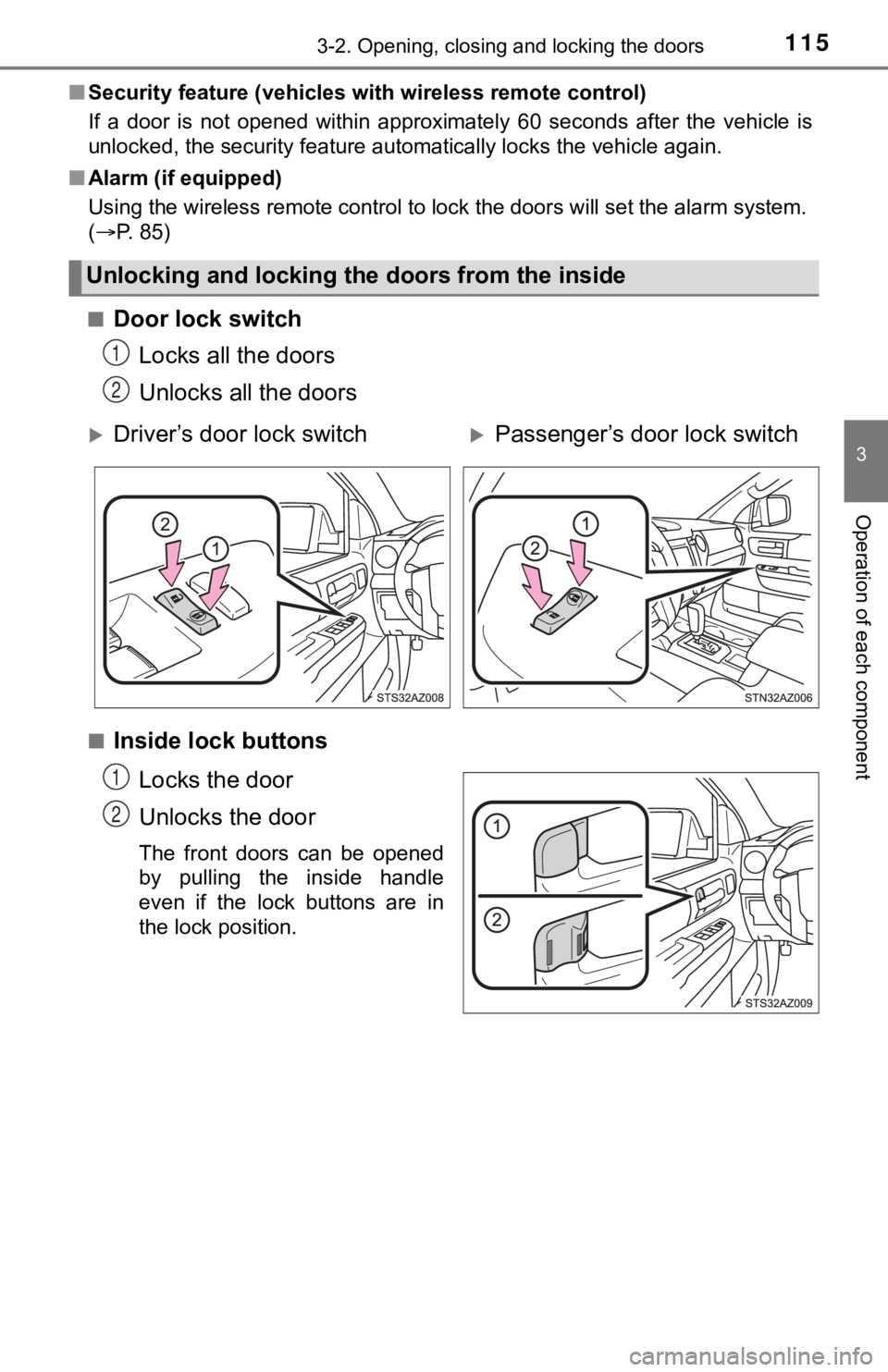
■
Door lock switch Locks all the doors
Unlocks all the doors
■Inside lock buttons
Locks the door
Unlocks the door
The front doors can be opened
by pulling the inside handle
even if the lock buttons are in
the lock position.
Unlocking and locking the doors from the inside
1
2
Driver’s door lock switchPassenger’s door lock switch
1
2
Page 131 of 672
1313-3. Adjusting the seats
3
Operation of each component
A desired driving position can be recalled linked with the unlo cking of
the door.
■Registering procedure
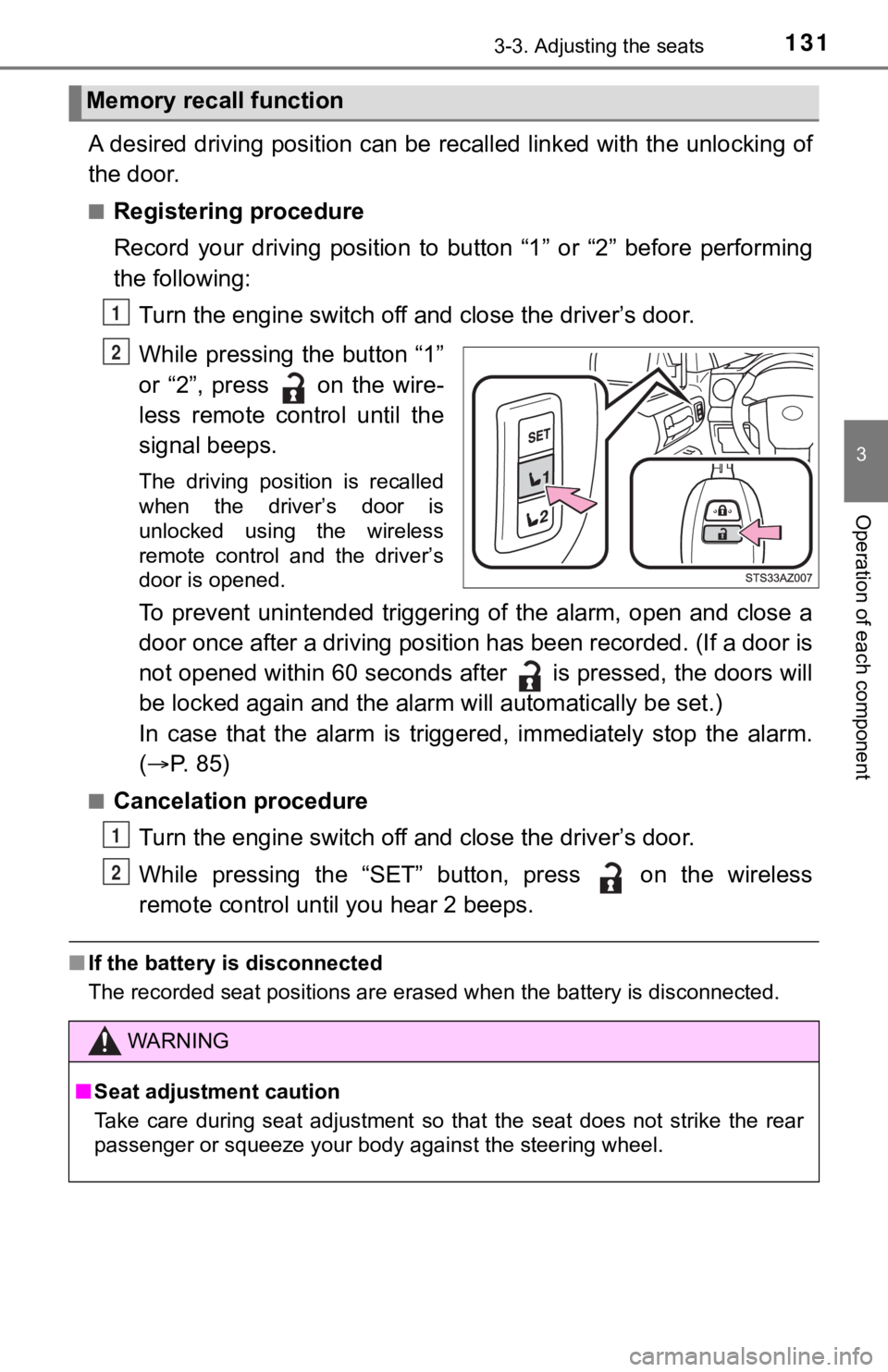
Record your driving position to button “1” or “2” before perfor ming
the following:
Turn the engine switch off and close the driver’s door.
While pressing the button “1”
or “2”, press on the wire-
less remote control until the
signal beeps.
The driving position is recalled
when the driver’s door is
unlocked using the wireless
remote control and the driver’s
door is opened.
To prevent unintended triggering of the alarm, open and close a
door once after a driving position has been recorded. (If a doo r is
not opened within 60 seconds after is pressed, the doors will
be locked again and the alarm will au tomatically be set.)
In case that the alarm is triggered, immediately stop the alarm .
( P. 85)
■Cancelation procedure
Turn the engine switch off and close the driver’s door.
While pressing the “SET” button, press on the wireless
remote control until you hear 2 beeps.
■ If the battery is disconnected
The recorded seat positions are erased when the battery is disc onnected.
Memory recall function
1
2
WARNING
■Seat adjustment caution
Take care during seat adjustment so that the seat does not stri ke the rear
passenger or squeeze your body against the steering wheel.
1
2
Page 405 of 672

4055-11. Bluetooth®
5
Multimedia
■Compatible models
The Bluetooth® audio system supports portable audio players with the follow-
ing specifications
● Bluetooth
® specifications:
Ver. 2.0, or higher (Recommended: Ver. 3.0+EDR or higher)
● Profiles:
• A2DP (Advanced Audio Distribution Profile) Ver. 1.0, or higher
(Recommended: Ver. 1.2 or higher)
This is a profile to transmit stereo audio or high quality soun d to the multi-
media system.
• AVRCP (Audio/Video Remote Control Profile) Ver. 1.0 or higher (Recommended: Ver. 1.4 or higher)
This is a profile to allow remote control the A/V equipment.
However, please note that some functions may be limited depending on the
type of portable audio player connected.
The hands-free system supports cellular phones with the followi ng specifica-
tions.
● Bluetooth
® specification:
Ver. 2.0 or higher (Recommended: Ver. 3.0+EDR or higher)
● Profiles:
• HFP (Hands Free Profile) Ver. 1.0 or higher (Recommended: Ver. 1.6 or
higher)
This is a profile to allow hands-free phone calls using a cellu lar phone or
head set. It has outgoing and incoming call functions.
• OPP (Object Push Profile) Ver. 1.1 or higher (Recommended: Ver . 1.2)
This is a profile to transfer contact data. When a Bluetooth
® compatible
cellular phone has both PBAP and OPP, OPP cannot be used.
• PBAP (Phone Book Access Profile) Ver. 1.0 or higher (Recommend ed:
Ver. 1.1)
This is a profile to transfer contact data.
If the cellular phone does not support HFP, you cannot register it with the
hands-free system. OPP, PBAP serv ices must be selected individually.
Page 456 of 672
4566-4. Using the other interior features
Garage door opener
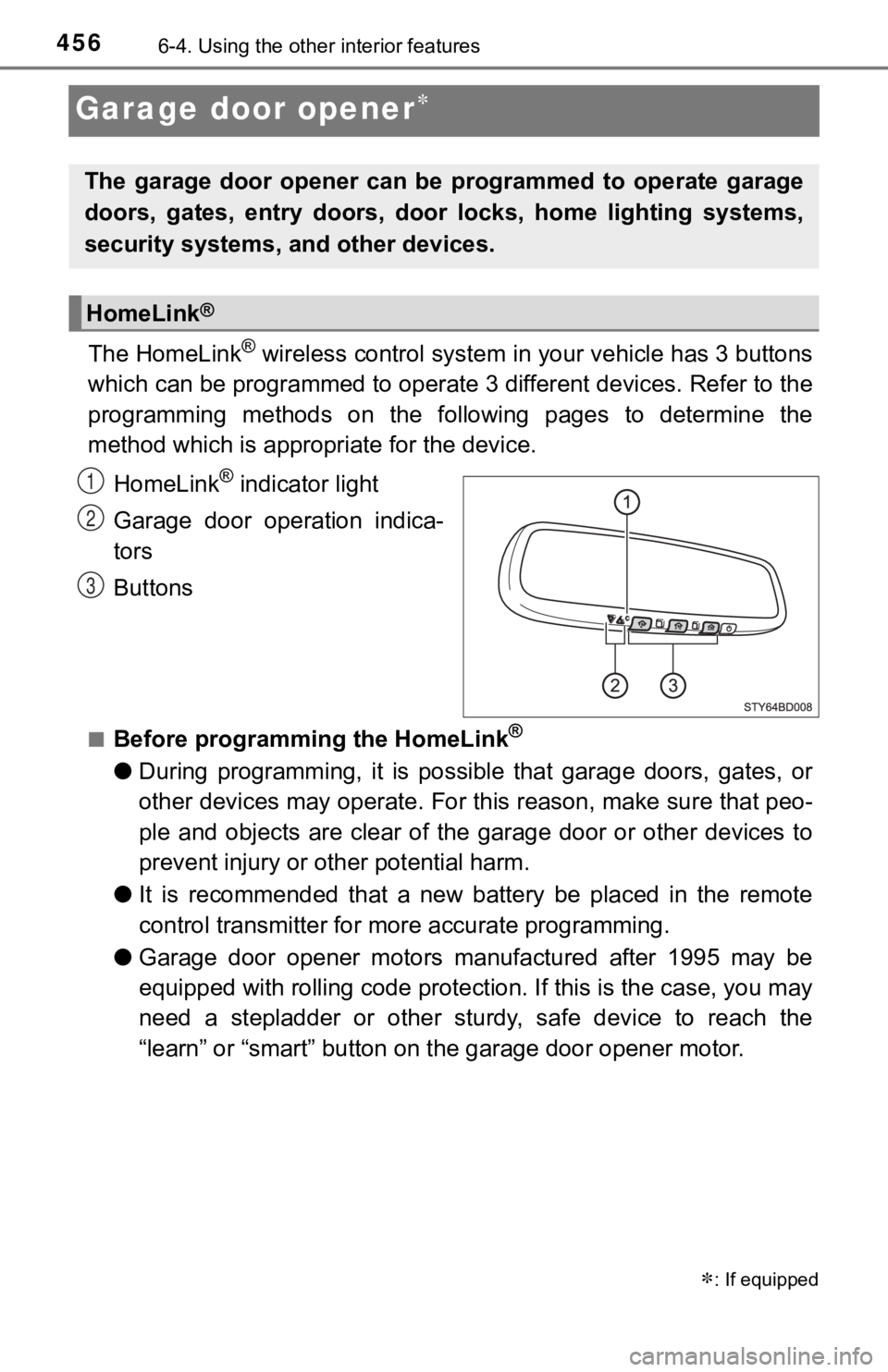
The HomeLink® wireless control system in your vehicle has 3 buttons
which can be programmed to operate 3 different devices. Refer to the
programming methods on the following pages to determine the
method which is approp riate for the device.
HomeLink
® indicator light
Garage door operation indica-
tors
Buttons
■Before programming the HomeLink®
● During programming, it is possible that garage doors, gates, or
other devices may operate. For this reason, make sure that peo-
ple and objects are clear of the garage door or other devices t o
prevent injury or other potential harm.
● It is recommended that a new battery be placed in the remote
control transmitter for mo re accurate programming.
● Garage door opener motors manufactured after 1995 may be
equipped with rolling code pro tection. If this is the case, you may
need a stepladder or other sturdy, safe device to reach the
“learn” or “smart” button on the garage door opener motor.
: If equipped
The garage door opener can be programmed to operate garage
doors, gates, entry doors, door locks, home lighting systems,
security systems, and other devices.
HomeLink®
1
2
3
Page 457 of 672
4576-4. Using the other interior features
6
Interior features
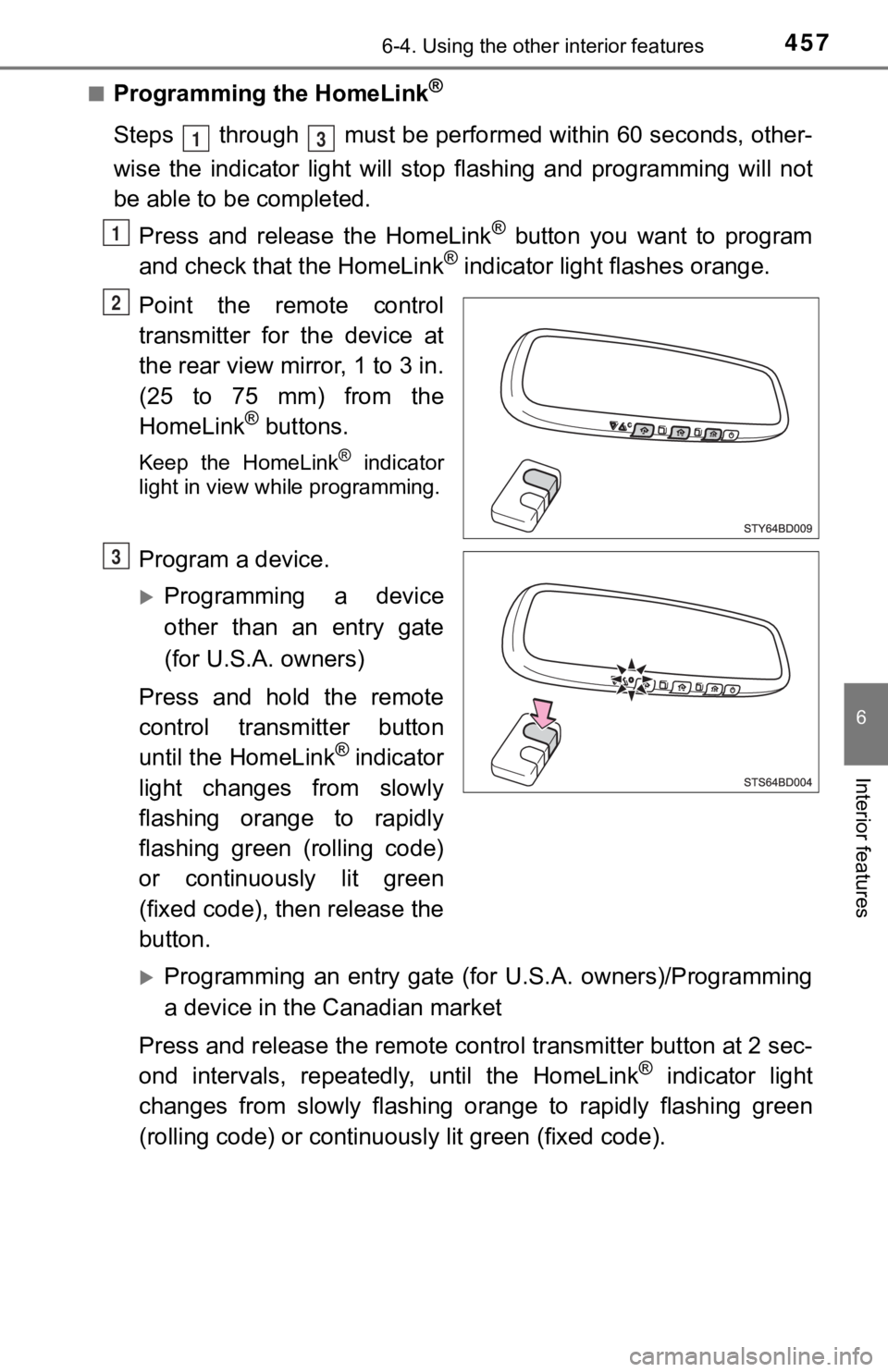
■Programming the HomeLink®
Steps through must be performed within 60 seconds, other-
wise the indicator light will st op flashing and programming wil l not
be able to be completed.
Press and release the HomeLink
® button you want to program
and check that the HomeLink® indicator light flashes orange.
Point the remote control
transmitter for the device at
the rear view mirror, 1 to 3 in.
(25 to 75 mm) from the
HomeLink
® buttons.
Keep the HomeLink® indicator
light in view while programming.
Program a device.
Programming a device
other than an entry gate
(for U.S.A. owners)
Press and hold the remote
control transmitter button
until the HomeLink
® indicator
light changes from slowly
flashing orange to rapidly
flashing green (rolling code)
or continuously lit green
(fixed code), then release the
button.
Programming an entry gate (for U.S.A. owners)/Programming
a device in the Canadian market
Press and release the remote con trol transmitter button at 2 sec-
ond intervals, repeatedly, until the HomeLink
® indicator light
changes from slowly flashing orange to rapidly flashing green
(rolling code) or continuous ly lit green (fixed code).
13
1
2
3
Page 464 of 672
4646-4. Using the other interior features
WARNING
■When programming a garage door or other remote control device
The garage door or other device may operate, so ensure people a nd
objects are out of danger to prevent potential harm.
■ Conforming to federal safety standards
Do not use the HomeLink
® compatible transceiver with any garage door
opener or device that lacks safety stop and reverse features as required by
federal safety standards.
This includes any garage door that cannot detect an interfering object. A
door or device without these features increases the risk of dea th or serious
injury.
■ When operating or programming HomeLink
®
Never allow a child to operate or play with the HomeLink® buttons.
Page 469 of 672
469
7Maintenance and care
7-1. Maintenance and careCleaning and protecting the vehicle exterior .......... 470
Cleaning and protecting the vehicle interior ........... 473
7-2. Maintenance Maintenance requirements ................... 476
General maintenance ........ 478
Emission inspection and maintenance (I/M)
programs ......................... 481 7-3. Do-it-yourself maintenance
Do-it-yourself service precautions ..................... 482
Hood ................................. 484
Engine compartment ......... 485
Tires .................................. 495
Tire inflation pressure ....... 507
Wheels .............................. 510
Air conditioning filter.......... 513
Wireless remote control battery ............................. 516
Checking and replacing fuses ............................... 518
Light bulbs......................... 521
Page 516 of 672
5167-3. Do-it-yourself maintenance
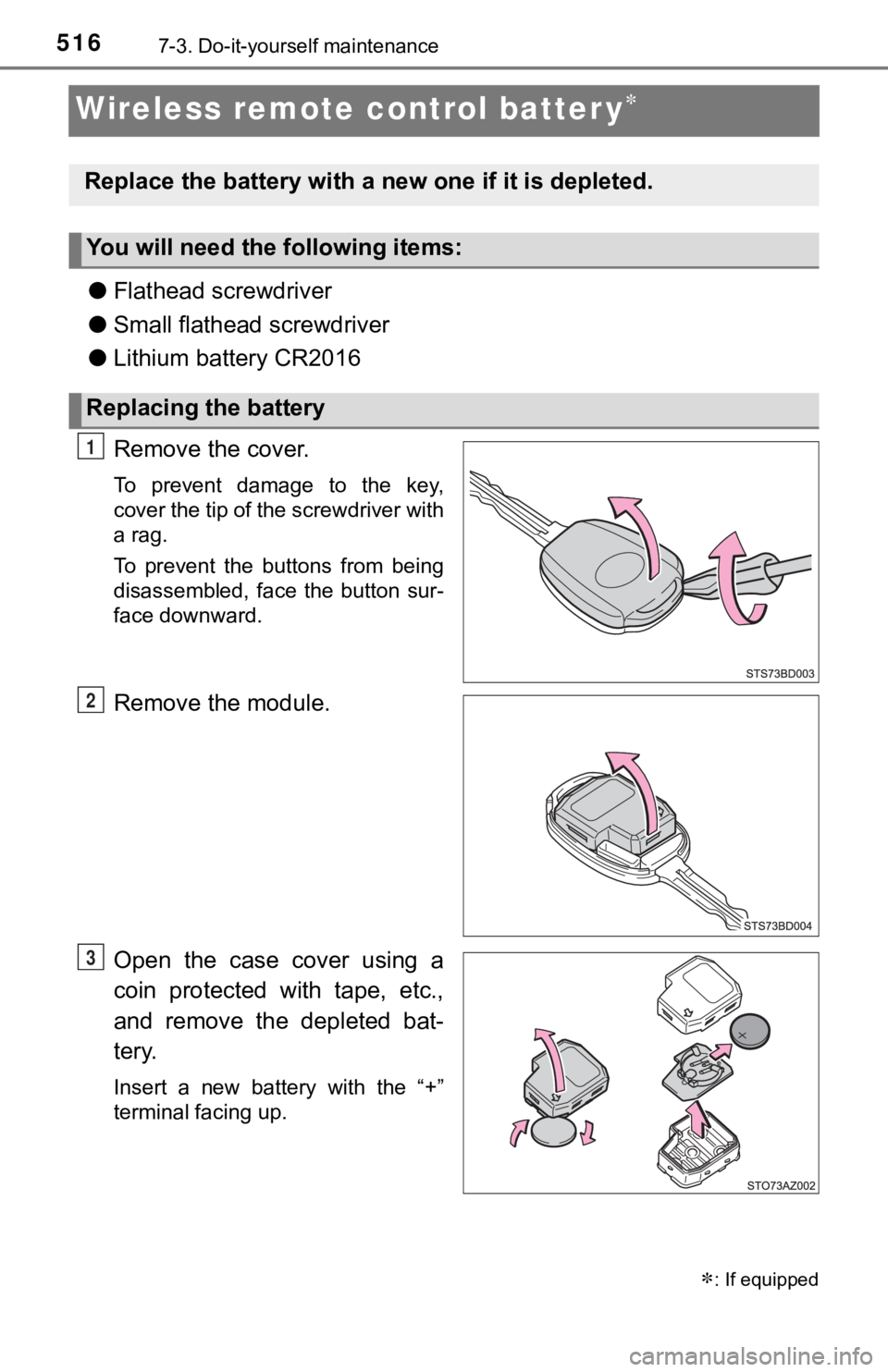
Wireless remote control batter y
●Flathead screwdriver
● Small flathead screwdriver
● Lithium battery CR2016
Remove the cover.
To prevent damage to the key,
cover the tip of the screwdriver with
a rag.
To prevent the buttons from being
disassembled, face the button sur-
face downward.
Remove the module.
Open the case cover using a
coin protected with tape, etc.,
and remove the depleted bat-
tery.
Insert a new battery with the “+”
terminal facing up.
: If equipped
Replace the battery with a n ew one if it is depleted.
You will need the following items:
Replacing the battery
1
2
3