Page 37 of 504
37
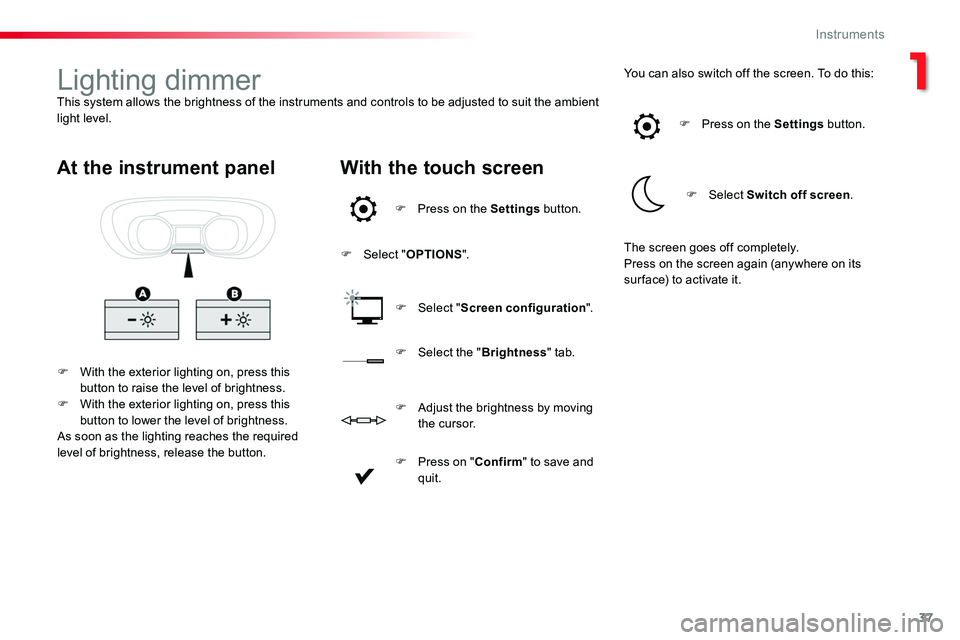
Lighting dimmerThis system allows the brightness of the instruments and controls to be adjusted to suit the ambient light level.
F With the exterior lighting on, press this button to raise the level of brightness.F With the exterior lighting on, press this button to lower the level of brightness.As soon as the lighting reaches the required level of brightness, release the button.
At the instrument panelWith the touch screen
F Press on the Settings button.
F Select "OPTIONS".
F Select "Screen configuration".
You can also switch off the screen. To do this:
F Select the "Brightness" tab.
F Press on the Settings button.
F Select Switch off screen.
F Press on "Confirm" to save and quit.
F Adjust the brightness by moving t h e c u r s o r.
The screen goes off completely.Press on the screen again (anywhere on its sur face) to activate it.
1
Instruments
Page 39 of 504
39
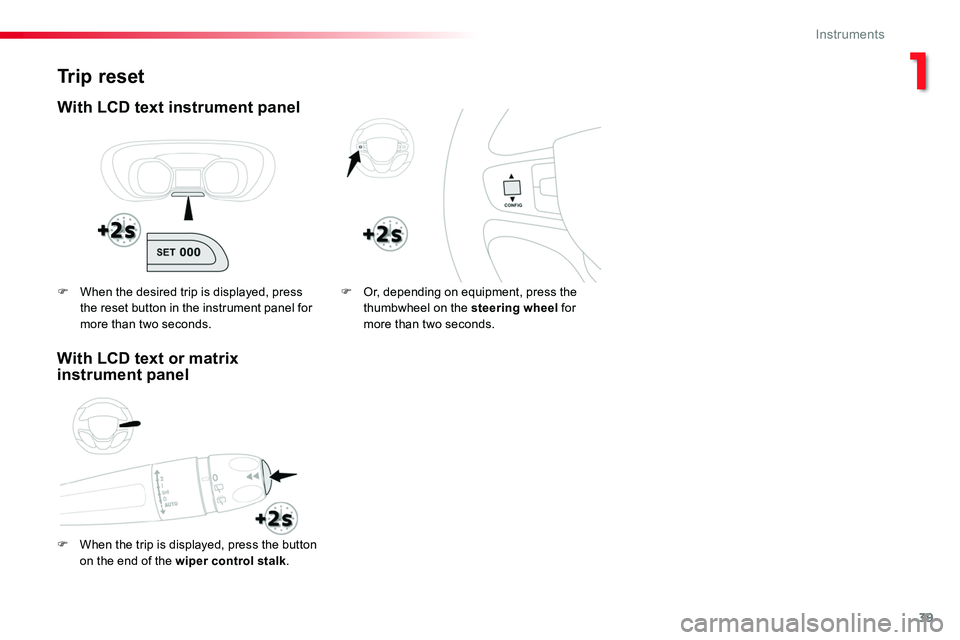
Trip reset
With LCD text instrument panel
F When the trip is displayed, press the button on the end of the wiper control stalk.
F Or, depending on equipment, press the thumbwheel on the steering wheel for more than two seconds.
F When the desired trip is displayed, press the reset button in the instrument panel for more than two seconds.
With LCD text or matrix instrument panel
1
Instruments
Page 51 of 504

51
Changing the battery
Do not throw the remote control batteries away, they contain metals which are harmful to the environment.Take them to an approved collection point.
If the battery is flat, you are informed by lighting of this warning lamp in the instrument panel, an audible signal and a message in the screen.
Reinitialisation
Locking the rear wing doors with glass windows
F If fitted to your vehicle, check that the electric child lock is not on.F Open the left-hand door.
Battery ref.: CR1620 / 3 volts.
F Lock the driver's door using the key.F Press one of the remote control buttons.
F Turn the key to position 2 (Ignition on).
F Switch off the ignition and remove the key from the ignition switch.The remote control is fully operational again.
Unlocking
F Use the interior door handle.
Remote control problem
Following disconnection of the vehicle battery, replacement of the remote control battery or in the event of a remote control malfunction, you can no longer unlock, lock or locate your vehicle.F First of all, use the key in the lock to unlock or lock your vehicle.F Then reinitialise the remote control.If the problem persists, contact an authorized Toyota dealer or repairer, or another duly qualified and equipped professional as soon as possible.
F Insert the key into the latch aperture on the edge of the door (without forcing) and slide the assembly upward.F Remove the key.F Close the door and check from the outside that it has locked correctly.
F Unclip the cover using a screwdriver in the cut-out.F Remove the cover.F Extract the flat battery from its location.F Place the new battery into its location
observing the original direction.F Clip the cover in place.
2
Access
Page 62 of 504

62
Changing the cell battery
Battery ref.: CR2032 / 3 volts.This replacement battery is available from an authorized Toyota dealer or repairer, or another duly qualified and equipped professional.A message appears in the instrument panel screen when replacement of the battery is needed.
Do not throw the remote control batteries away, they contain metals which are harmful to the environment.Take them to an approved collection
point.
F Place the remote control against the reader.F Keeping it in place, switch on the ignition by pressing "START/STOP".The remote control is fully operational again.
Reinitialisation
Remote control problem
Following disconnection of the vehicle battery, replacement of the remote control battery or in the event of a remote control malfunction, you can no longer unlock, lock or locate your vehicle.F First, use the integral key in the door lock to unlock or lock your vehicle.F Then, reinitialise the remote control.
If the problem persists, contact an authorized Toyota dealer or repairer, or another duly qualified and equipped
professional as soon as possible.
F Unlock the driver's door using the integral key.
F Press one of the remote control buttons.
F Place the integral key in the lock to unlock your vehicle.
F Unclip the cover using a small screwdriver at the cutout.F Lift off the cover.F Remove the flat battery from its location.F Fit the new battery into its location observing the original direction of fitment.F Clip the cover onto the casing.
Access
Page 131 of 504
131
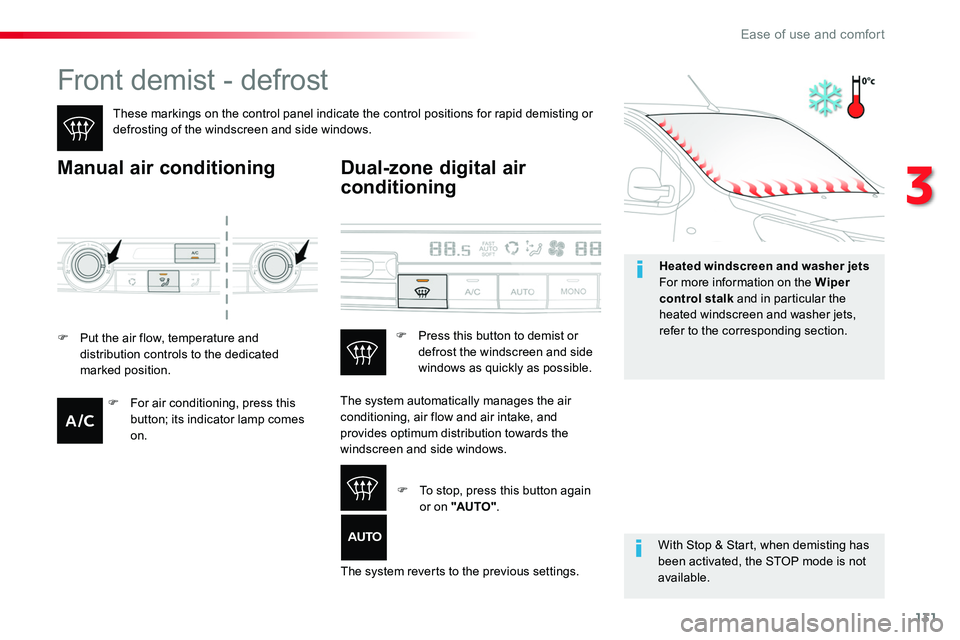
Front demist - defrost
These markings on the control panel indicate the control positions for rapid demisting or defrosting of the windscreen and side windows.
Manual air conditioning
With Stop & Start, when demisting has been activated, the STOP mode is not available.
Dual-zone digital air
conditioning
F Put the air flow, temperature and distribution controls to the dedicated marked position.
The system automatically manages the air conditioning, air flow and air intake, and
provides optimum distribution towards the windscreen and side windows.
The system reverts to the previous settings.
F Press this button to demist or defrost the windscreen and side windows as quickly as possible.
F To stop, press this button again or on "AUTO".
F For air conditioning, press this button; its indicator lamp comes
on.
Heated windscreen and washer jetsFor more information on the Wiper control stalk and in particular the heated windscreen and washer jets, refer to the corresponding section.
3
Ease of use and comfort
Page 136 of 504
136
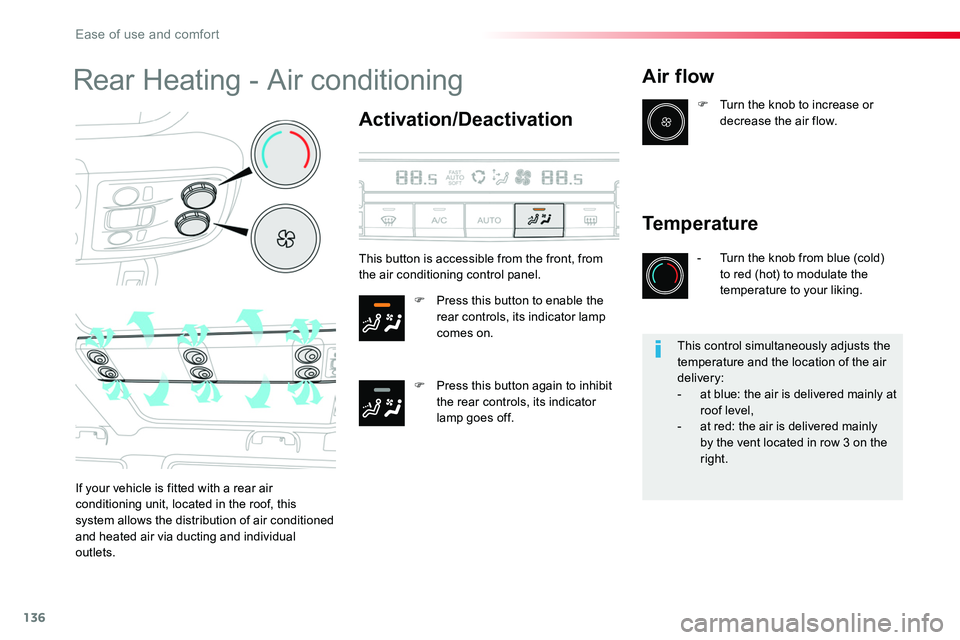
Rear Heating - Air conditioning
Activation/Deactivation
F Press this button to enable the rear controls, its indicator lamp comes on.
F Press this button again to inhibit the rear controls, its indicator lamp goes off.
Air flow
If your vehicle is fitted with a rear air conditioning unit, located in the roof, this system allows the distribution of air conditioned
and heated air via ducting and individual outlets.
F Turn the knob to increase or decrease the air flow.
Temperature
- Turn the knob from blue (cold) to red (hot) to modulate the temperature to your liking.
This button is accessible from the front, from the air conditioning control panel.
This control simultaneously adjusts the temperature and the location of the air delivery:- at blue: the air is delivered mainly at roof level,- at red: the air is delivered mainly by the vent located in row 3 on the right.
Ease of use and comfort
Page 147 of 504

147
Front daytime running
lamps
(light-emitting diodes)
If fitted to your vehicle, they come on automatically when the engine is started, when the lighting control stalk is in position "0" or "AUTO".
Automatic illumination of
headlamps
Activation
When a low level of ambient light is detected by a sunshine sensor, the number plate lamps, sidelamps and dipped beam headlamps are switched on automatically, without any action on the part of the driver. They can also come on if rain is detected, at the same time as automatic operation of the windscreen wipers.As soon as the brightness returns to a sufficient level or after the windscreen wipers are switched off, the lamps are switched off automatically.
Deactivation
F Turn the ring to another position. Deactivation of the function is accompanied by the display of a message.
Operating fault
In the event of a malfunction of the sunshine sensor, the lighting comes on; this warning lamp is displayed
Contact an authorized Toyota dealer or repairer, or another duly qualified and equipped professional.
in the instrument panel accompanied by an audible signal and/or a message.
In fog or snow, the sunshine sensor may detect sufficient light. In this case, the lighting will not come on automatically.Do not cover the sunshine sensor, coupled with the rain sensor and located in the top of the windscreen behind the rear view mirror; the associated functions would no longer be controlled.
F Turn the ring to the "AUTO" position. The activation of the function is accompanied by the display of a message.
4
Lighting and visibility
Page 155 of 504

155
Automatic rain sensitive windscreen wipers
Switching on
Briefly push the control stalk downwards.A wiping cycle confirms that the instruction has been accepted.This warning lamp comes on in the instrument panel and a message is displayed.
Briefly push the control stalk downwards again, or place the control stalk in another position (Int, 1 or 2).This warning lamp goes off in the instrument panel and a message is displayed.
Switching off
The automatic rain sensitive windscreen wipers must be reactivated by pushing the control stalk downwards, if the ignition has been off for more than one minute.
The windscreen wipers operate automatically, without any action on the part of the driver, if rain is detected (sensor behind the rear view mirror), adapting their speed to the intensity of the rainfall.
Do not cover the rain sensor, linked with the sunshine sensor and located in the top of the windscreen behind the rear view
m i r r o r.Switch off the automatic rain sensitive wipers when using an automatic car wash.In winter, it is advisable to wait until the windscreen is completely clear of ice before activating the automatic rain sensitive wipers.
Operating fault
If a fault occurs with the automatic rain sensitive wipers, the wipers will operate in intermittent mode.Have it checked by an authorized Toyota dealer or repairer, or another duly qualified and
equipped professional.
Park.
Intermittent wipe.
Wash-wipe (set duration).
Rear wiper
4
Lighting and visibility