Page 182 of 532

182 2-1. Driving procedures
●When engine oil temperature is high and engine speed rises clos e
to the red zone.
■ When moving the shift lever out of P
If the shift lever is pushed sideways before the brake pedal is depressed,
shift lever operation may not be possible. Depress the brake pedal before
shifting the shift lever out of P.
■ Downshifting restrictions warning buzzer
If downshifting operations are performed at a vehicle speed by which down-
shifting is not possible (when downshifting will cause the engi ne speed to
enter the red zone), a buzzer will sound to warn the driver that downshifting
cannot be performed.
■ When driving with cruise control activated
Downshifting can be performed even when using cruise control. A fter down-
shifting, the set speed continues. ( P. 181, 183)
■ Sport mode
●In sport mode, lower gears are used and gears change at a highe r
engine speed.
● If sport mode is changed to while the shift lever is in the M p osition, the
“SPORT” indicator will come on but sport mode controls will not be car-
ried out. Shift the shift lever to the D position.
● Sport mode cannot be changed to when driving with cruise contro l acti-
vated.
■ Snow mode
To prevent slipping, 1
st gear cannot be selected when in snow mode.
■ Sport mode and snow mode automatic deactivation
In the following situations, the driving mode is automatically deactivated:
●When the engine is turned off after driving in sport mode or sn ow mode.
● When cruise control is activated while driving in sport mode.
■ If the shift lever cannot be shifted from P
P. 438
Page 184 of 532
184 2-1. Driving procedures
■AI-SHIFT
The AI-SHIFT automatically shifts the gear to the suitable posi tion according
to the driver performance and driving conditions.
The AI-SHIFT automatically operates when the shift lever is in the D posi-
tion. (Operating the paddle shift switches or shifting the shif t lever to the M
position cancels the function.)
WARNING
■ When driving on slippery road surfaces
Be careful of downshifting and sudden acceleration, as this cou ld result in
the vehicle skidding to the side or spinning.
■ To prevent incorrect operation
Do not attach items such as accessories to the paddle shift swi tches.
Doing so may unintentionally move the paddle shift switches.
Page 193 of 532

193
2-2. Instrument cluster
2
When driving
■
The meters and display illuminate when
Vehicles without a smart key system
The engine switch is in the “ON” position.
Vehicles with a smart key system
The “ENGINE START STOP” switch is in IGNITION ON mode.
■ The brightness of the i nstrument panel lights
When the parking lights or the headlights turn on, the instrume nt panel lights
will dim. However, when the instrument panel brightness control dial is
turned to the up most position, the instrument panel lights wil l not dim even
when the parking lights or headlights turn on.
NOTICE
■ To prevent damage to the engine and its components
● Do not let the indicator needle of the tachometer enter the red zone, which
indicates the maximum engine speed.
● In the following situations, the engine may be overheating. In this case,
immediately stop the vehicle in a safe place, and check the eng ine after it
has cooled completely. (
P. 449)
• Vehicles with a monochrome multi-information display: The engine coolant temperature gauge enters the red zone
• Vehicles with a color multi-information display: The high engine coolant temperature warning light flashes or illuminates
Page 194 of 532
194
2-2. Instrument cluster
Indicators and warning lights
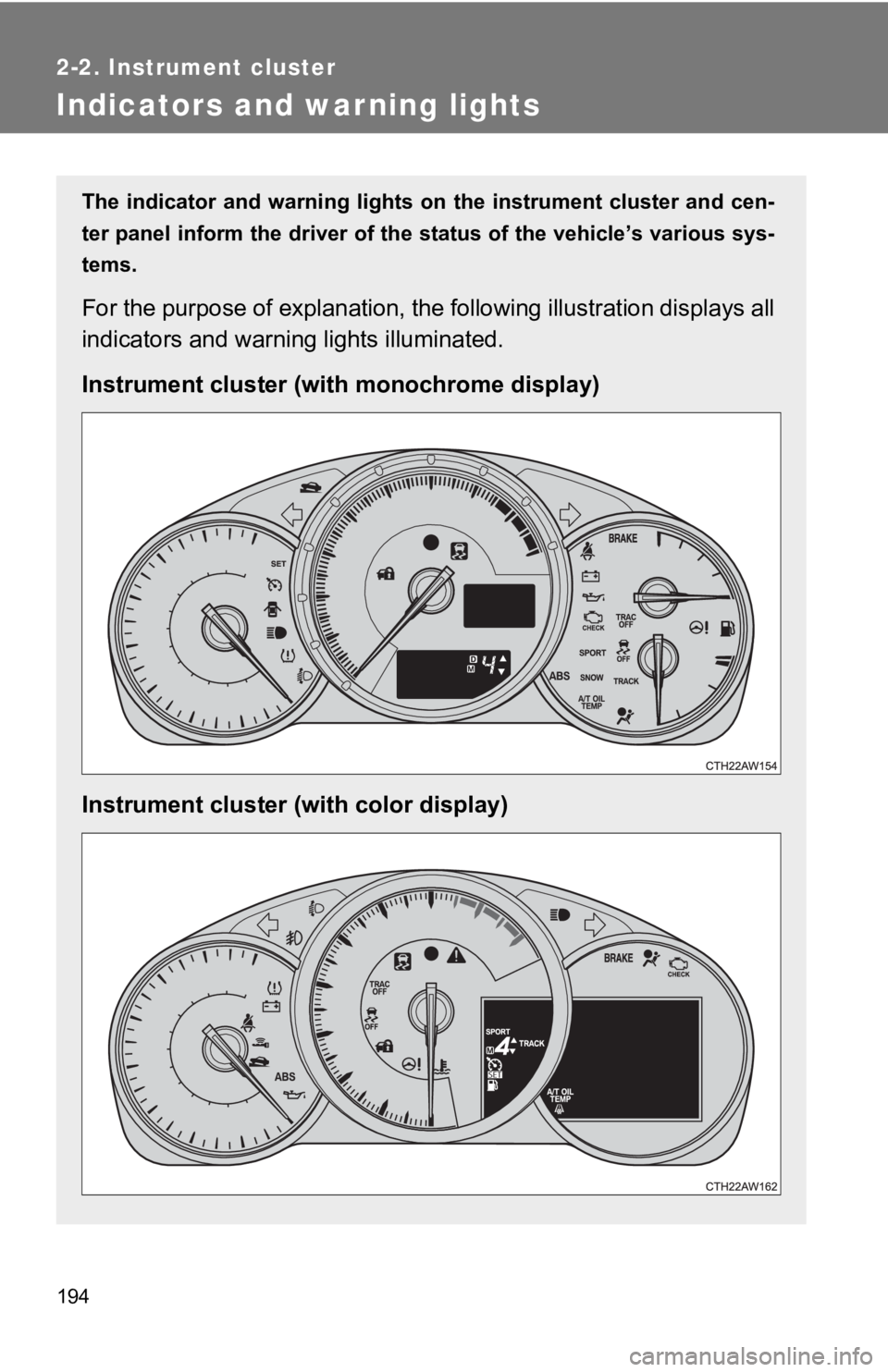
The indicator and warning lights on the instrument cluster and cen-
ter panel inform the driver of the status of the vehicle’s vari ous sys-
tems.
For the purpose of explanation, the following illustration displays all
indicators and warning lights illuminated.
Instrument cluster (with monochrome display)
Instrument cluster (with color display)
Page 198 of 532
198 2-2. Instrument cluster
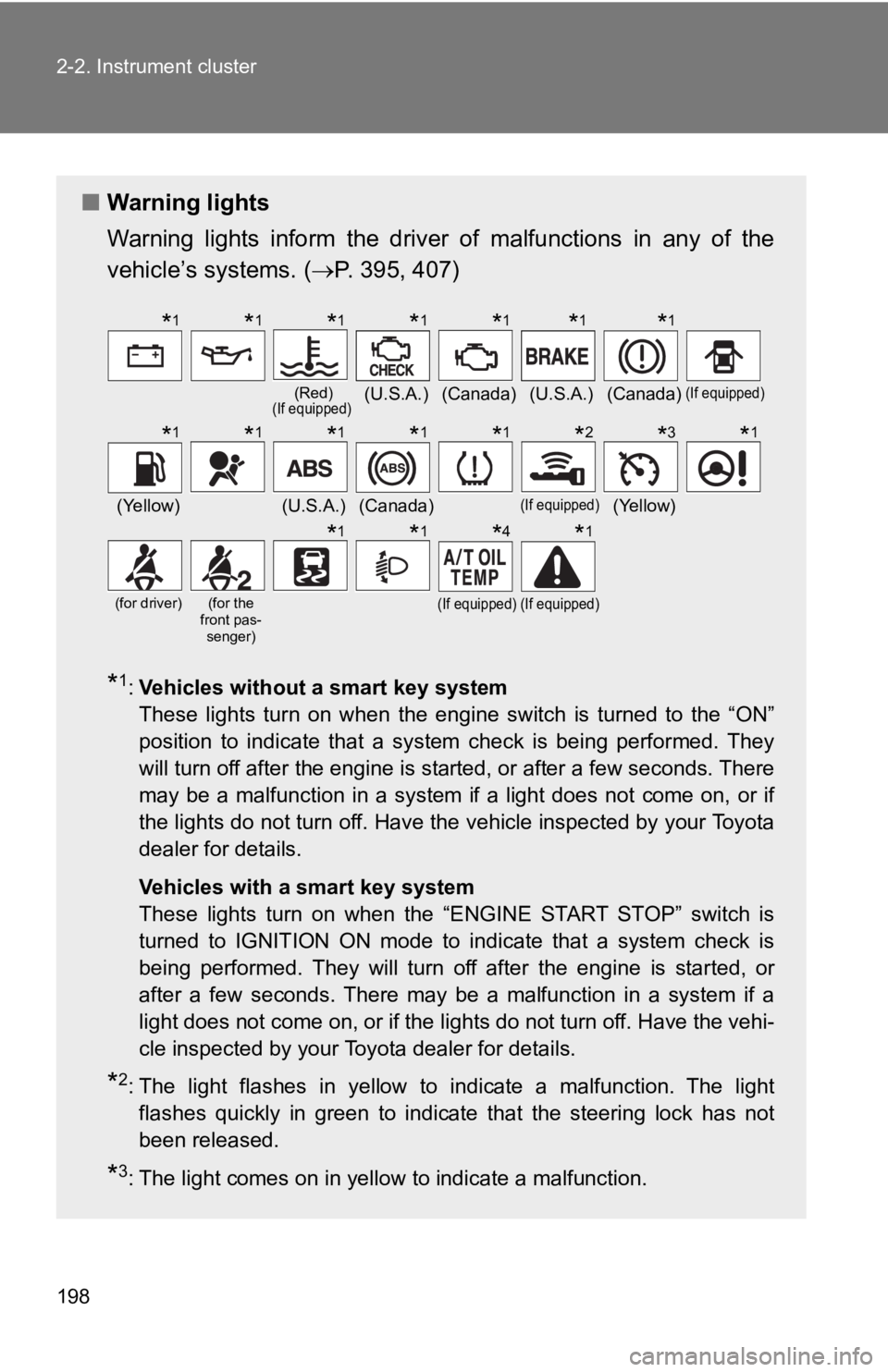
■Warning lights
Warning lights inform the driver of malfunctions in any of the
vehicle’s systems. ( P. 395, 407)
*1:Vehicles without a smart key system
These lights turn on when the engine switch is turned to the “O N”
position to indicate that a system check is being performed. Th ey
will turn off after the engine is started, or after a few seconds. There
may be a malfunction in a system if a light does not come on, o r if
the lights do not turn off. Have the vehicle inspected by your To y o t a
dealer for details.
Vehicles with a smart key system
These lights turn on when the “ENGINE START STOP” switch is
turned to IGNITION ON mode to indicate that a system check is
being performed. They will turn off after the engine is started , or
after a few seconds. There may be a malfunction in a system if a
light does not come on, or if the lights do not turn off. Have the vehi-
cle inspected by your Toyota dealer for details.
*2: The light flashes in yellow to indicate a malfunction. The light flashes quickly in green to indicate that the steering lock has not
been released.
*3: The light comes on in yellow to indicate a malfunction.
(Red)(If equipped)(U.S.A.)(Canada)(U.S.A.)(Canada)(If equipped)
(Yellow)(U.S.A.)(Canada)(If equipped)(Yellow)
(for driver)(for the
front pas- senger)(If equipped)(If equipped)
*1*1*1*1*1*1*1
*1*1*1*1*1*2*3*1
*1*1*4*1
Page 199 of 532
199
2-2. Instrument cluster
2
When driving
WARNING
■
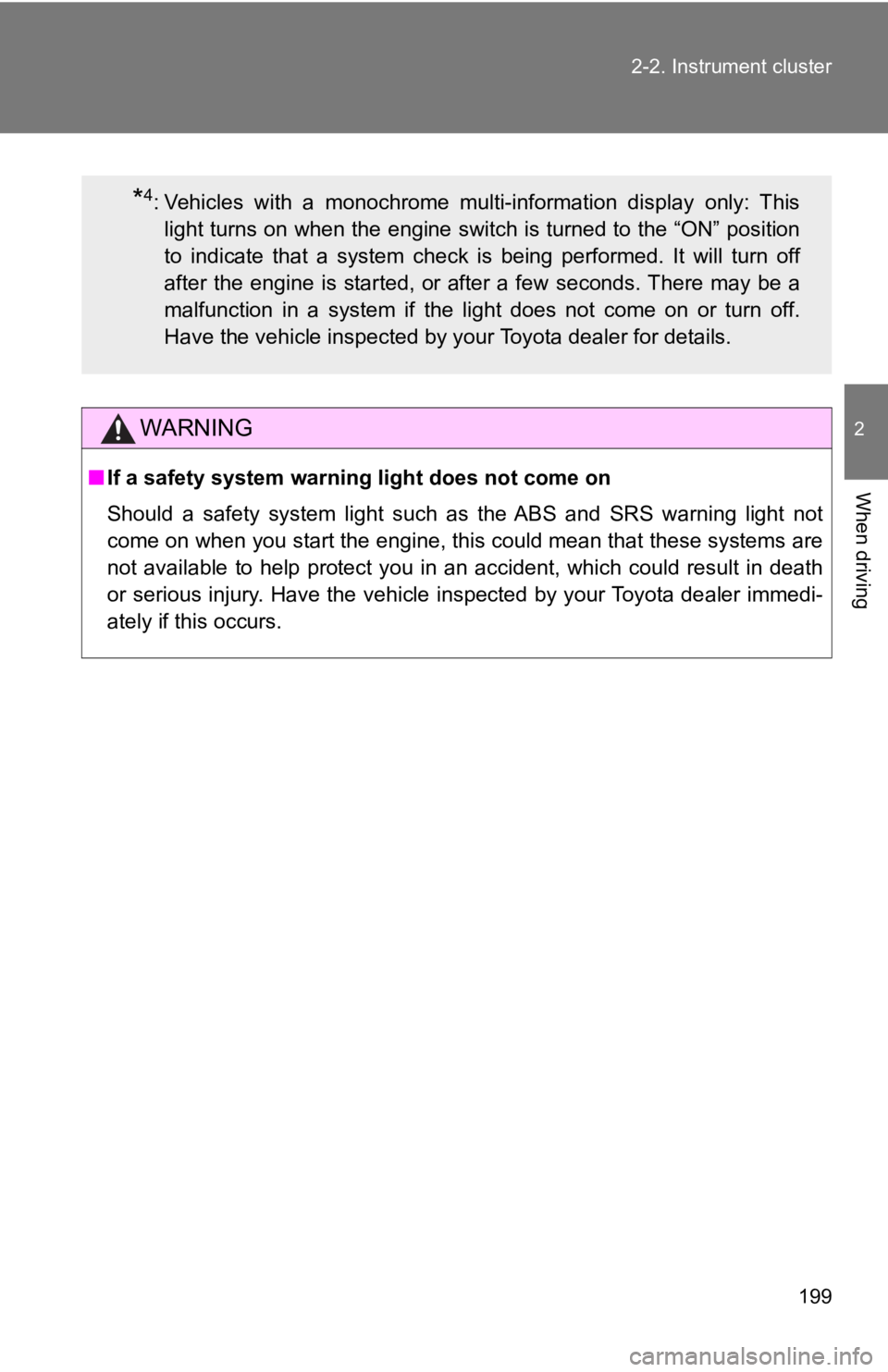
If a safety system warning light does not come on
Should a safety system light such as the ABS and SRS warning li ght not
come on when you start the engine, this could mean that these s ystems are
not available to help protect you in an accident, which could r esult in death
or serious injury. Have the vehicle inspected by your Toyota de aler immedi-
ately if this occurs.
*4: Vehicles with a monochrome multi-information display only: This light turns on when the engine switch is turned to the “ON” pos ition
to indicate that a system check is being performed. It will tur n off
after the engine is started, or after a few seconds. There may be a
malfunction in a system if the light does not come on or turn o ff.
Have the vehicle inspected by your Toyota dealer for details.
Page 206 of 532

206 2-2. Instrument cluster
■Outside temperature display
●In the following situations, the correct outside temperature ma y not be
displayed.
• When the vehicle is very hot, such as when under the sun.
• When the vehicle is idling or being driven at low speeds such as in a
traffic jam or when the engine is stopped and then restarted immedi-
ately afterward.
• When the actual outside temperature is outside of the indicato r range.
● If “ ” is displayed for approximately 1 minute or more or if the out side
temperature is not displayed, the system may be malfunctioning. Have
the vehicle inspected by your Toyota dealer.
WARNING
■ The information displ ay at low temperatures
Allow the interior of the vehicle to warm up before using the liquid crystal
information display. At extremely low temperatures, the informa tion display
monitor may respond slowly, and display changes may be delayed.
For example, there is a lag between the driver's shifting and t he new shift
position number appearing on the display. In this case, wait un til the display
changes and take care not to downshift again, causing rapid and excessive
engine braking and possibly an accident resulting in death or s erious injury.
Page 207 of 532
207
2-2. Instrument cluster
2
When driving
Multi-information display (color display)
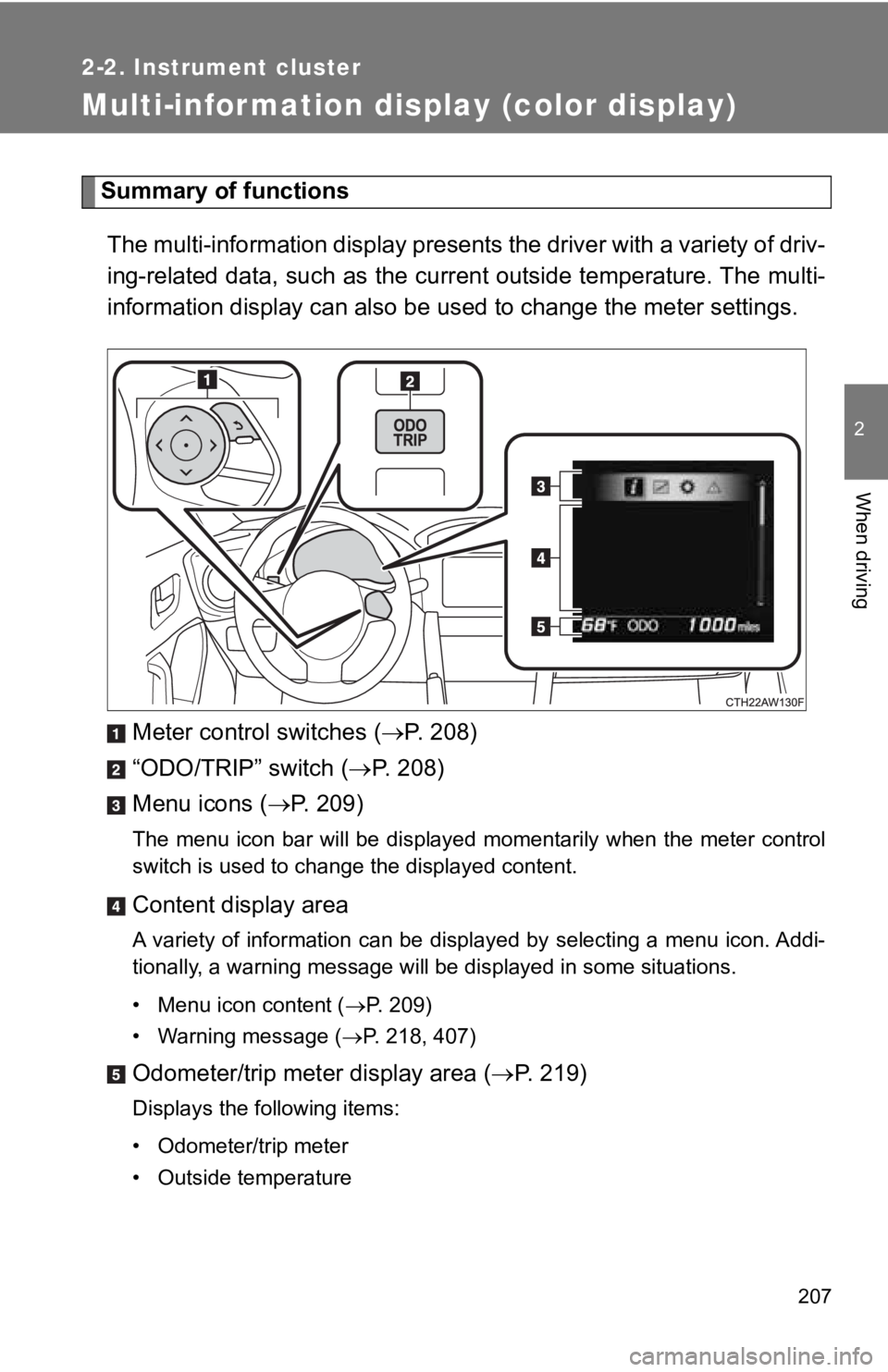
Summary of functionsThe multi-information display presents the driver with a variet y of driv-
ing-related data, such as the current outside temperature. The multi-
information display can also be used to change the meter settings.
Meter control switches ( P. 208)
“ODO/TRIP” switch ( P. 2 0 8 )
Menu icons ( P. 209)
The menu icon bar will be displayed momentarily when the meter control
switch is used to change the displayed content.
Content display area
A variety of information can be displayed by selecting a menu icon. Addi-
tionally, a warning message will be displayed in some situation s.
• Menu icon content ( P. 209)
• Warning message ( P. 218, 407)
Odometer/trip meter display area ( P. 219)
Displays the following items:
• Odometer/trip meter
• Outside temperature