2018 TESLA MODEL 3 auto
[x] Cancel search: autoPage 3 of 165
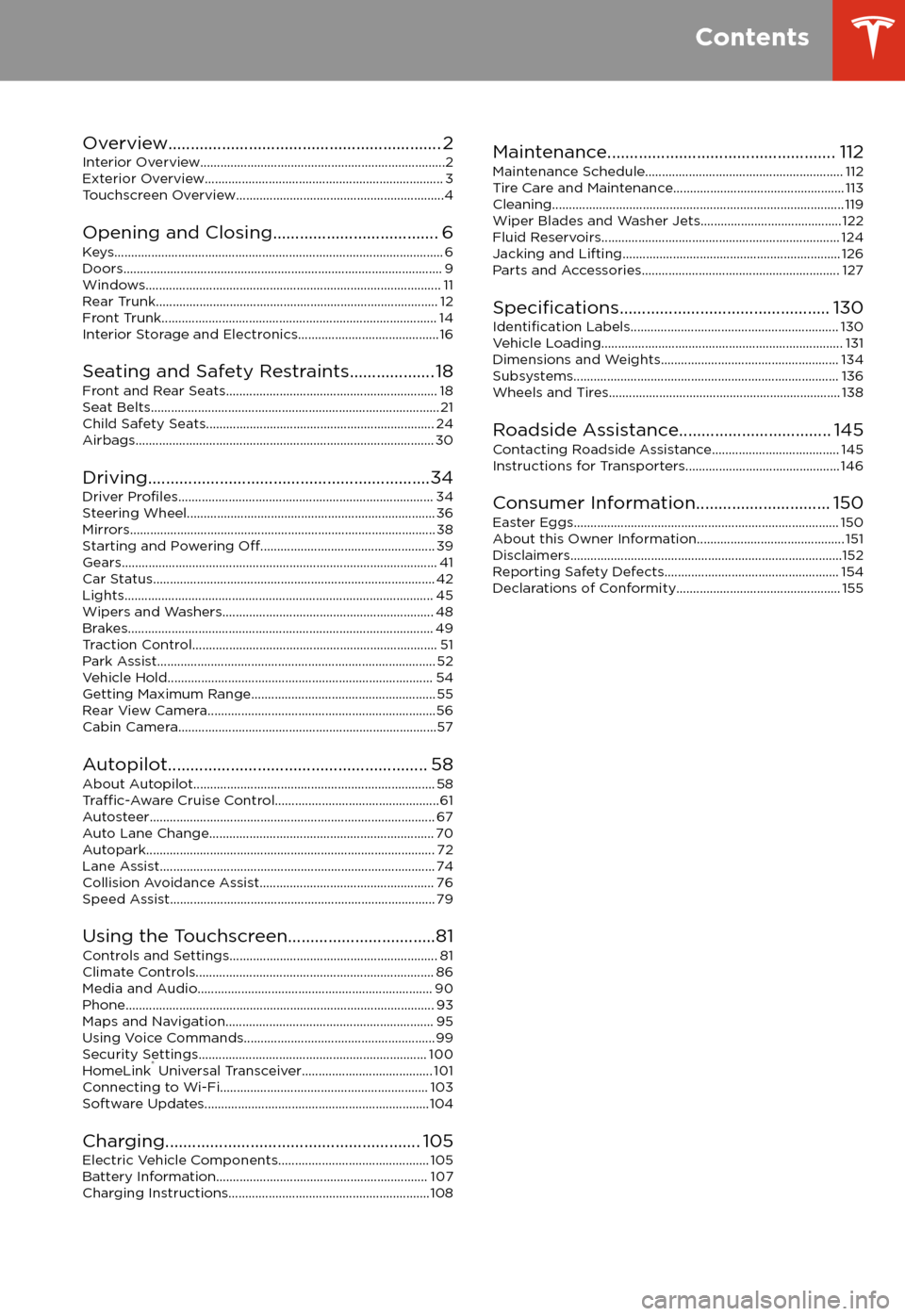
Overview............................................................. 2
Interior Overview.........................................................................2
Exterior Overview....................................................................... 3
Touchscreen Overview..............................................................4
Opening and Closing..................................... 6
Keys.................................................................................................. 6 Doors............................................................................................... 9Windows........................................................................................ 11 Rear Trunk.................................................................................... 12 Front Trunk.................................................................................. 14Interior Storage and Electronics.......................................... 16
Seating and Safety Restraints................... 18 Front and Rear Seats............................................................... 18Seat Belts...................................................................................... 21 Child Safety Seats.................................................................... 24
Airbags......................................................................................... 30
Driving...............................................................34 Driver
Profiles............................................................................ 34
Steering Wheel.......................................................................... 36 Mirrors........................................................................................... 38Starting and Powering
Off.................................................... 39
Gears.............................................................................................. 41 Car Status.................................................................................... 42Lights............................................................................................ 45 Wipers and Washers............................................................... 48Brakes........................................................................................... 49 Traction Control......................................................................... 51Park Assist................................................................................... 52 Vehicle Hold............................................................................... 54Getting Maximum Range....................................................... 55Rear View Camera....................................................................56
Cabin Camera.............................................................................57
Autopilot.......................................................... 58 About Autopilot........................................................................ 58
Traffic-Aware Cruise Control.................................................61
Autosteer..................................................................................... 67 Auto Lane Change................................................................... 70Autopark...................................................................................... 72Lane Assist.................................................................................. 74 Collision Avoidance Assist.................................................... 76Speed Assist............................................................................... 79
Using the Touchscreen.................................81 Controls and Settings.............................................................. 81Climate Controls....................................................................... 86Media and Audio...................................................................... 90 Phone............................................................................................ 93Maps and Navigation.............................................................. 95Using Voice Commands......................................................... 99Security Settings.................................................................... 100HomeLink
Page 4 of 165
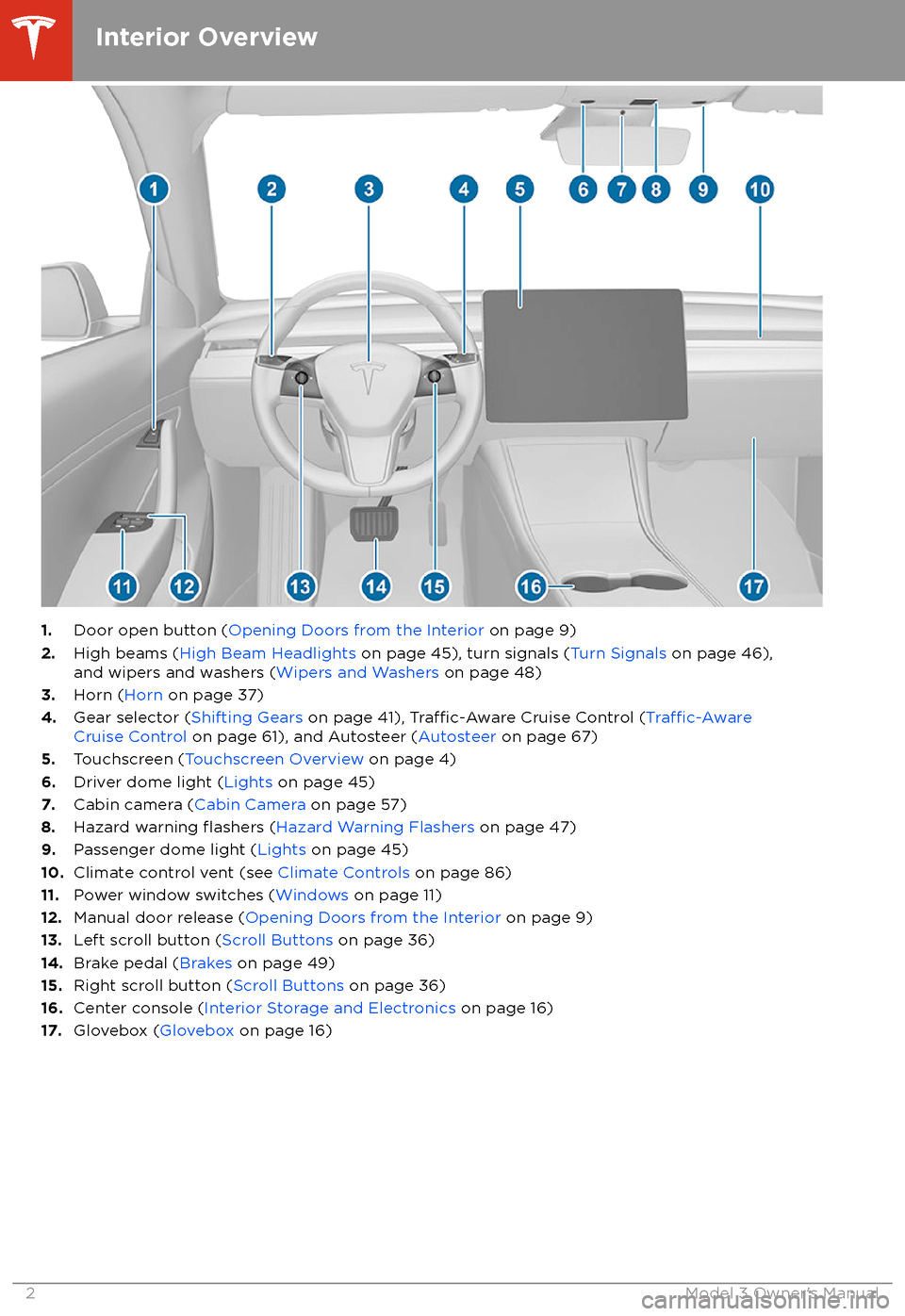
1.Door open button ( Opening Doors from the Interior on page 9)
2. High beams ( High Beam Headlights on page 45), turn signals ( Turn Signals on page 46),
and wipers and washers ( Wipers and Washers on page 48)
3. Horn ( Horn on page 37)
4. Gear selector ( Shifting Gears on page 41),
Traffic-Aware Cruise Control (Traffic-AwareCruise Control on page 61), and Autosteer ( Autosteer on page 67)
5. Touchscreen ( Touchscreen Overview on page 4)
6. Driver dome light ( Lights on page 45)
7. Cabin camera ( Cabin Camera on page 57)
8. Hazard warning
flashers (Hazard Warning Flashers on page 47)
9. Passenger dome light ( Lights on page 45)
10. Climate control vent (see Climate Controls on page 86)
11. Power window switches ( Windows on page 11)
12. Manual door release ( Opening Doors from the Interior on page 9)
13. Left scroll button ( Scroll Buttons on page 36)
14. Brake pedal ( Brakes on page 49)
15. Right scroll button ( Scroll Buttons on page 36)
16. Center console ( Interior Storage and Electronics on page 16)
17. Glovebox ( Glovebox on page 16)
Interior Overview
2Model 3 Owner
Page 5 of 165

1.Exterior lights ( Lights on page 45)
2. Autopilot camera ( About Autopilot on page 58)
3. Front door handle ( Using Exterior Door Handles on page 9)
4. Key card sensor ( Keys on page 6), Autopilot camera ( About Autopilot on page 58)
5. Rear door handle ( Using Exterior Door Handles on page 9)
6. Charge port ( Charging Instructions on page 108)
7. Autopilot cameras ( About Autopilot on page 58)
8. Exterior mirrors ( Mirrors on page 38)
9. Radar sensor (hidden from view) ( About Autopilot on page 58)
10. Hood/front trunk ( Front Trunk on page 14)
11. Tow eye cover ( Instructions for Transporters on page 146)
12. Wheels and tires ( Wheels and Tires on page 138)
13. Rear view camera ( Rear View Camera on page 56)
14. Rear trunk ( Rear Trunk on page 12)
Exterior Overview
Overview3
Page 6 of 165
The features and information you need to drive Model 3 are displayed on the touchscreen. When
driving, the touchscreen displays driving-related information such as driving speed, vehicle range,
warnings, etc. The touchscreen is used to control many features that, in traditional cars, are controlled using physical buttons (for example, adjusting mirrors). You can also use the
touchscreen to customize Model 3 to suit your preferences.Warning: Always pay attention to road and traffic conditions when driving. To minimize driver
distraction and ensure the safety of vehicle occupants as well as other road users, avoid using
the touchscreen to adjust settings while the vehicle is in motion.
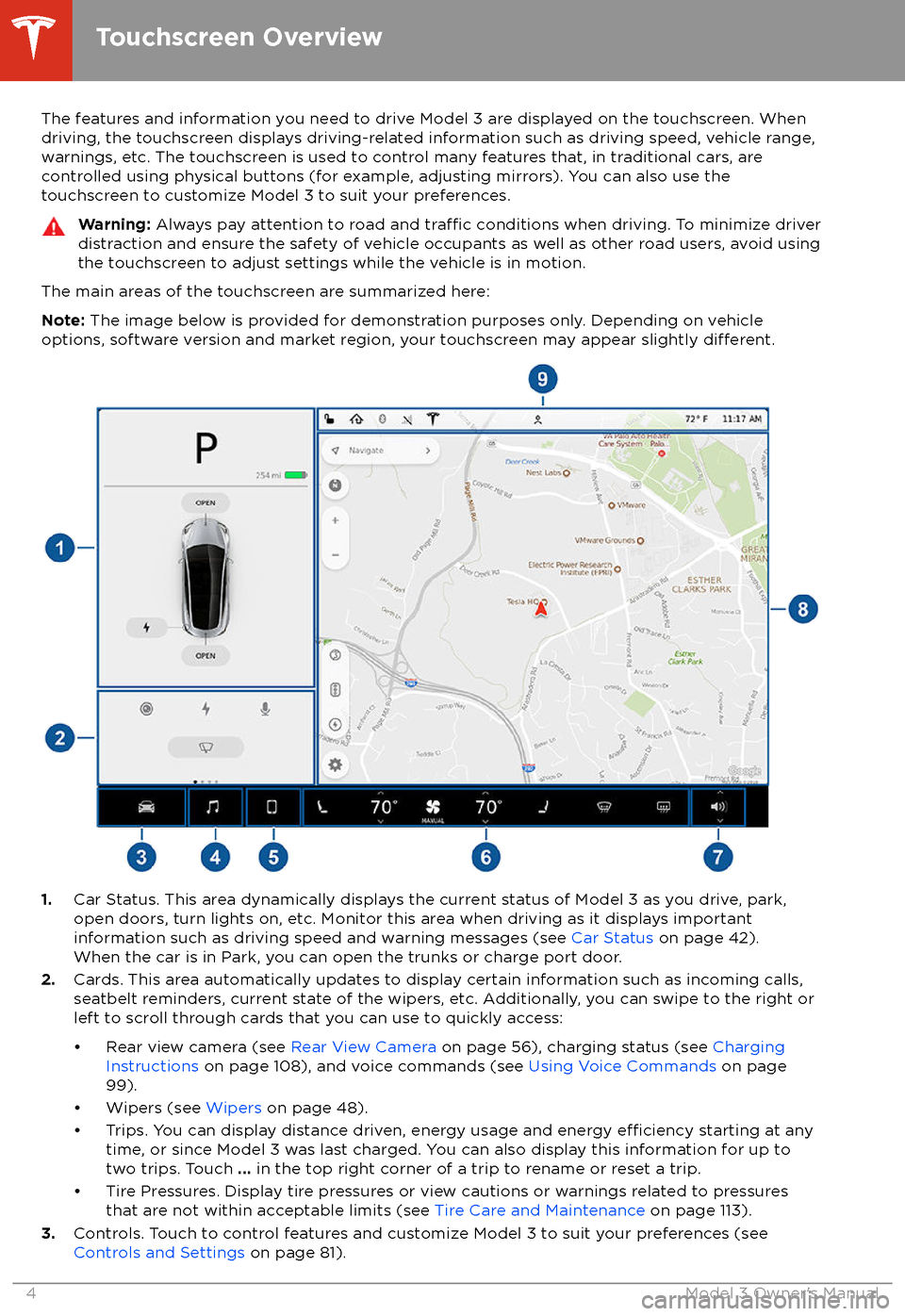
The main areas of the touchscreen are summarized here:
Note: The image below is provided for demonstration purposes only. Depending on vehicle
options, software version and market region, your touchscreen may appear slightly
different.
1. Car Status. This area dynamically displays the current status of Model 3 as you drive, park,
open doors, turn lights on, etc. Monitor this area when driving as it displays important
information such as driving speed and warning messages (see Car Status on page 42).
When the car is in Park, you can open the trunks or charge port door.
2. Cards. This area automatically updates to display certain information such as incoming calls,
seatbelt reminders, current state of the wipers, etc. Additionally, you can swipe to the right or
left to scroll through cards that you can use to quickly access:
Page 11 of 165

Keyless Locking and Unlocking
Locking and unlocking Model 3 is easy and convenient. Just carry your authenticated
phone with you. Model 3 recognizes the presence of an authenticated phone and
automatically unlocks when you press a door
handle, and locks when you leave (see Walk
Away Lock on page 10).
Note: If you don
Page 12 of 165

Interior Locking and Unlocking
While sitting inside Model 3, you can lock and unlock all doors and trunks by touching the
lock icon on the touchscreen (you do not need an authenticated phone or key card).The icon changes to indicate
whether doors are locked or
unlocked.
You can also unlock the doors by pressing the
Park button on the end of the gear selector a
second time. Pressing this button once engages the Park gear and pressing it again
unlocks the doors.
Walk Away Lock
Doors and trunks can automatically lock
whenever you walk away carrying your
authenticated phone. When the doors lock, the exterior lights
flash once and the mirrors
fold (if equipped with the premium package
and Fold Mirrors is on).
Model 3 does not automatically lock if:
Page 18 of 165
Glovebox
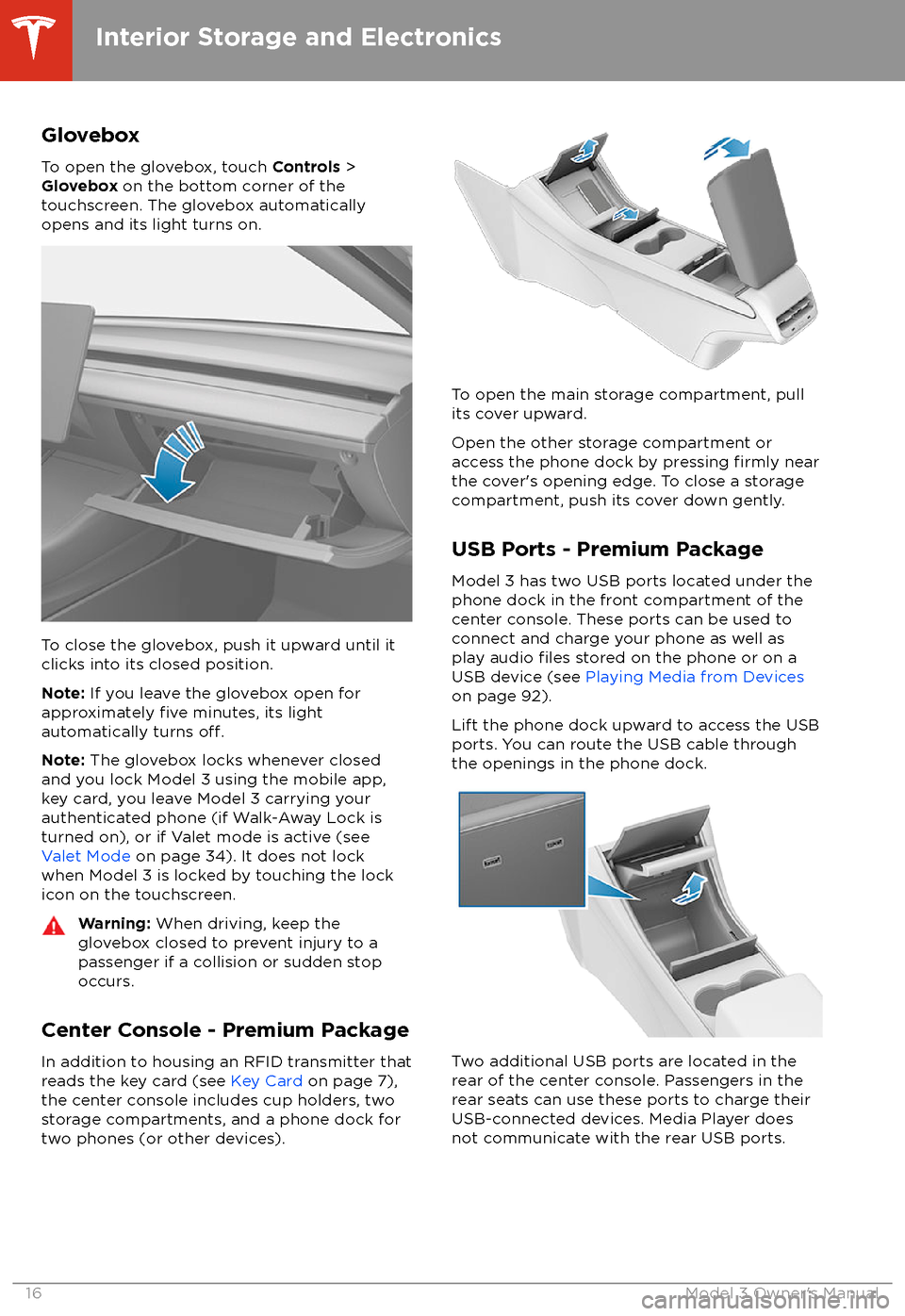
To open the glovebox, touch Controls >
Glovebox on the bottom corner of the
touchscreen. The glovebox automatically
opens and its light turns on.
To close the glovebox, push it upward until it
clicks into its closed position.
Note: If you leave the glovebox open for
approximately
five minutes, its light
automatically turns off.
Note: The glovebox locks whenever closed
and you lock Model 3 using the mobile app,
key card, you leave Model 3 carrying your authenticated phone (if Walk-Away Lock is
turned on), or if Valet mode is active (see
Valet Mode on page 34). It does not lock
when Model 3 is locked by touching the lock
icon on the touchscreen.
Warning: When driving, keep the
glovebox closed to prevent injury to a
passenger if a collision or sudden stop occurs.
Center Console - Premium Package
In addition to housing an RFID transmitter that reads the key card (see Key Card on page 7),
the center console includes cup holders, two
storage compartments, and a phone dock for
two phones (or other devices).
To open the main storage compartment, pull its cover upward.
Open the other storage compartment or
access the phone dock by pressing
firmly near
the cover
Page 23 of 165

Wearing Seat BeltsUsing seat belts and child safety seats is the
most
effective way to protect occupants if a
collision occurs. Therefore, wearing a seat belt is required by law in most jurisdictions.
Both the driver and passenger seats are
equipped with three-point inertia reel seat
belts. Inertia reel belts are automatically
tensioned to allow occupants to move
comfortably during normal driving conditions.
To securely hold child safety seats, all
passenger seating positions are equipped with
an automatic locking retractor (ALR) that, by
pulling the seat belt beyond the length
needed for a typical adult occupant, locks the
belt into place until the seat belt is unbuckled
(see Installing Seat Belt Retained Child Seats
on page 26).
The seat belt reel automatically locks to prevent movement of occupants if Model 3
experiences a force associated with hard acceleration, braking, cornering, or an impact
in a collision.
The seat belt reminder on the
touchscreen alerts you if a seat belt
for an occupied seat is not fastened. If the belt remains unfastened, the
reminder
flashes and an intermittent
chime sounds. If all occupants are
buckled up and the reminder stays
on, re-fasten seat belts to ensure
they are correctly latched. Also
remove any heavy objects (such as a
briefcase) from an unoccupied seat.
If the reminder light continues to
stay on, contact Tesla.
To Fasten a Belt
1. Ensure correct positioning of the seat (see
Correct Driving Position on page 18).
2. Draw the belt out smoothly, ensuring the
belt lays
flat across the pelvis, chest and
mid-point of your collar bone, between
the neck and shoulder.
3. Insert the latch plate into the buckle and
press together until you hear a click
indicating it is locked in place.
4. Pull the belt to check that it is securely
fastened.
5. Pull the diagonal part of the belt toward
the reel to remove excess slack.
To Adjust the Shoulder Anchor Height
Model 3 is equipped with an adjustable shoulder anchor for each front seat to ensure
that the seat belt is positioned correctly. The
seat belt should lay
flat across the mid-point
of your collar bone while in the correct driving
position (see Correct Driving Position on page
18). Adjust the height of the shoulder anchor if
the seat belt is not positioned correctly:
1. Press and hold the button on the shoulder
anchor to release the locking mechanism.
2. While holding the button, move the
shoulder anchor up or down as necessary
so that the seat belt is positioned correctly.
3. Release the button on the shoulder anchor
so that it locks into position.
4. Without pressing the button, pull on the
seat belt webbing and attempt to move
the shoulder anchor downwards to check that it is locked into position.
Seat Belts
Seating and Safety Restraints21