Page 49 of 165
Model 3 to change lanes (see Auto Lane
Change on page 70).
Hazard Warning Flashers
To turn on the hazard warning
flashers, press
the button located above the rear view mirror.
All turn signals
flash. Press the button again to
turn off the hazard warning flashers.
Note: Hazard warning flashers operate even
when Model 3 cannot detect a key
(authenticated phone or key card).
Lights
Driving47
Page 50 of 165
WipersTo perform a single wipe with the windshield
wipers, press and immediately release the
button on the end of the left-hand steering column lever.
To adjust the continuous wiper settings, touch the windshield wiper icon on the touchscreen
(which also displays the current state of the
wipers) or swipe to the windshield wiper "Card" on the touchscreen (see Touchscreen
Overview on page 4).
Note: When you operate the wipers, the
headlights automatically turn on (if they were
not on already).Caution: To avoid damaging the hood,
ensure that the hood is fully closed before
activating the windshield wipers.
1. Turn the wipers on or off.2.Adjust the speed of the wipers.
Page 51 of 165

Braking SystemsWarning: Properly functioning braking
systems are critical to ensure safety. If you experience a problem with the brake
pedal, brake caliper, or any component of
a Model 3 braking system, contact Tesla
immediately.
Model 3 has an anti-lock braking system (ABS)
that prevents the wheels from locking when
you apply maximum brake pressure. This improves steering control during heavy
braking in most road conditions.
During emergency braking conditions, the
ABS constantly monitors the speed of each
wheel and varies the brake pressure according to the grip available.
The alteration of brake pressure can be felt as
a pulsing sensation through the brake pedal.
This demonstrates that the ABS is operating
and is not a cause for concern. Keep
firm and
steady pressure on the brake pedal while
experiencing the pulsing.
The ABS indicator flashes briefly on
the touchscreen when you first start
Model 3. If this indicator lights up at
any other time, an ABS fault has
occurred and the ABS is not
operating. Contact Tesla. The braking system remains fully operational and
is not
affected by an ABS failure.
However, braking distances may increase.
If the touchscreen displays this
indicator at any time other than
displaying
briefly when you first start
Model 3, a brake system fault is
detected or the brake
fluid level is
low. Contact Tesla immediately.
Emergency Braking
In an emergency, fully press the brake pedal and maintain
firm pressure, even on low
traction surfaces. The ABS varies the braking
pressure to each wheel according to the
amount of traction available. This prevents
wheels from locking and ensures that you stop
as safely as possible.
Warning: Do not pump the brake pedal.
Doing so interrupts operation of the ABS
and can increase braking distance.Warning: Always maintain a safe distance
from the vehicle in front of you and beaware of hazardous driving conditions.
While the ABS can improve stopping
distance, it cannot overcome the laws of physics. It also does not prevent the
danger of hydroplaning (where a layer of
water prevents direct contact between the tires and the road).
Automatic Emergency Braking automatically
applies full braking in situations where a
collision is considered imminent (see Automatic Emergency Braking on page 77).
Warning: Automatic Emergency Braking
is not designed to prevent a collision. At best, it can minimize the impact of a
frontal collision by attempting to reduce
your driving speed. Depending on Automatic Emergency Braking to avoid a
collision can result in serious injury or death.
Brake Wear
Model 3 brake pads are equipped with wear
indicators. A wear indicator is a thin metal
strip attached to the brake pad that squeals as
it rubs against the rotor when the pad wears
down. This squealing sound indicates that the
brake pads have reached the end of their service life and require replacement. To
replace the brake pads, contact Tesla Service.
Warning: Neglecting to replace worn
brake pads damages the braking system
and can result in a braking hazard.
Regenerative Braking
Whenever Model 3 is moving and your foot is
off the accelerator, regenerative braking slows
down Model 3 and feeds any surplus energy back to the Battery.
By anticipating your stops and reducing or
removing pressure from the accelerator pedal
to slow down, you can take advantage of regenerative braking to increase driving range.
Of course, this is no substitute for regular
braking when needed for safety.
Note: If regenerative braking is aggressively
slowing Model 3 (such as when your foot is
completely
off the accelerator pedal at
highway speeds), the brake lights turn on to
alert others that you are slowing down.
Warning: In snowy or icy conditions
Model 3 may experience traction loss
during regenerative braking, particularly
when in the Standard setting and/or not
using winter tires. Tesla recommends
Brakes
Driving49
Page 54 of 165
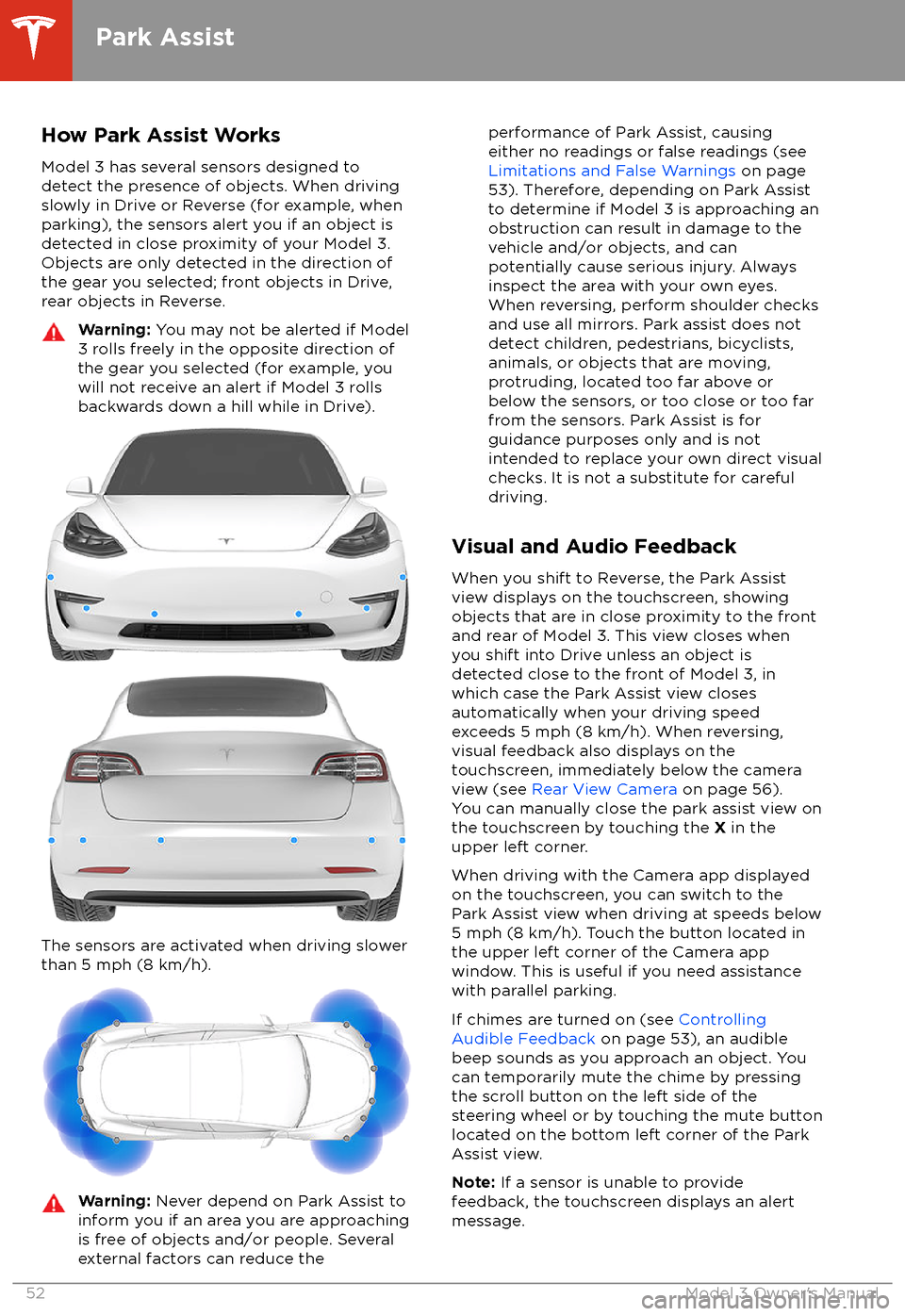
How Park Assist WorksModel 3 has several sensors designed to
detect the presence of objects. When driving slowly in Drive or Reverse (for example, when
parking), the sensors alert you if an object is
detected in close proximity of your Model 3.
Objects are only detected in the direction of
the gear you selected; front objects in Drive,
rear objects in Reverse.Warning: You may not be alerted if Model
3 rolls freely in the opposite direction of
the gear you selected (for example, you
will not receive an alert if Model 3 rolls
backwards down a hill while in Drive).
The sensors are activated when driving slower
than 5 mph (8 km/h).
Warning: Never depend on Park Assist to
inform you if an area you are approaching is free of objects and/or people. Several
external factors can reduce theperformance of Park Assist, causing
either no readings or false readings (see
Limitations and False Warnings on page
53). Therefore, depending on Park Assist
to determine if Model 3 is approaching an
obstruction can result in damage to the vehicle and/or objects, and can
potentially cause serious injury. Always
inspect the area with your own eyes.
When reversing, perform shoulder checks and use all mirrors. Park assist does not
detect children, pedestrians, bicyclists,
animals, or objects that are moving, protruding, located too far above or
below the sensors, or too close or too far
from the sensors. Park Assist is for
guidance purposes only and is not intended to replace your own direct visual
checks. It is not a substitute for careful
driving.
Visual and Audio Feedback
When you shift to Reverse, the Park Assist
view displays on the touchscreen, showing objects that are in close proximity to the front
and rear of Model 3. This view closes when you shift into Drive unless an object is
detected close to the front of Model 3, in
which case the Park Assist view closes automatically when your driving speed
exceeds 5 mph (8 km/h). When reversing,
visual feedback also displays on the touchscreen, immediately below the camera
view (see Rear View Camera on page 56).
You can manually close the park assist view on
the touchscreen by touching the X in the
upper left corner.
When driving with the Camera app displayed
on the touchscreen, you can switch to the
Park Assist view when driving at speeds below
5 mph (8 km/h). Touch the button located in the upper left corner of the Camera app
window. This is useful if you need assistance with parallel parking.
If chimes are turned on (see Controlling
Audible Feedback on page 53), an audible
beep sounds as you approach an object. You
can temporarily mute the chime by pressing
the scroll button on the left side of the steering wheel or by touching the mute buttonlocated on the bottom left corner of the Park
Assist view.
Note: If a sensor is unable to provide
feedback, the touchscreen displays an alert message.
Park Assist
52Model 3 Owner
Page 60 of 165
How It WorksYour Model 3 includes the following Autopilot components that actively monitor the surrounding
roadway:
1. A camera is mounted above the rear license plate.
2. Ultrasonic sensors are located in the front and rear bumpers.
3. A camera is mounted in each door pillar.
4. Three cameras are mounted to the windshield above the rear view mirror.
5. A camera is mounted to each front fender.
6. Radar is mounted behind the front bumper on the side of the vehicle.
Model 3 is also equipped with high precision electronically-assisted braking and steering systems.
About Autopilot
58Model 3 Owner
Page 61 of 165
FeaturesThese Autopilot safety features are available
on all Model 3 vehicles:
Page 62 of 165
abrasive object that can scratch or
damage its surface.
About Autopilot
60Model 3 Owner
Page 63 of 165
Note: Traffic-Aware Cruise Control is a BETA
feature.
If you have purchased the optional Enhanced Autopilot or Full Self-Driving Capabilitypackage, the forward looking cameras and theradar sensor are designed to determine when
there is a vehicle in front of you in the same
lane. If the area in front of Model 3 is clear,
Traffic-Aware Cruise Control maintains a set
driving speed. When a vehicle is detected,
Traffic-Aware Cruise Control is designed to
slow down Model 3 as needed to maintain a selected time-based distance from the vehiclein front, up to the set speed.
Traffic-AwareCruise Control does not eliminate the need to
watch the road in front of you and to manually
apply the brakes when needed.
Traffic-Aware Cruise Control is primarily
intended for driving on dry, straight roads,
such as highways and freeways. It should not be used on city streets.
Warning: Traffic-Aware Cruise Control is
designed for your driving comfort and
convenience and is not a collision warning or avoidance system. It is your
responsibility to stay alert, drive safely,
and be in control of the vehicle at all
times. Never depend on
Traffic-AwareCruise Control to adequately slow down
Model 3. Always watch the road in front
of you and be prepared to take corrective
action at all times. Failure to do so can
result in serious injury or death.
Warning: Although Traffic-Aware Cruise
Control is capable of detecting
pedestrians and cyclists, never depend on
Traffic-Aware Cruise Control to
adequately slow Model 3 down for them.
Always watch the road in front of you and
be prepared to take corrective action at
all times. Failure to do so can result in
serious injury or death.
Warning: Do not use Traffic-Aware Cruise
Control on city streets or on roads where
traffic conditions are constantly changing.
Warning: Do not use Traffic-Aware Cruise
Control on winding roads with sharp
curves, on icy or slippery road surfaces, or
when weather conditions (such as heavy
rain, snow, fog, etc.) make it inappropriate
to drive at a consistent speed.
Traffic-
Aware Cruise Control does not adapt
driving speed based on road and driving
conditions.
Operating Tra


