2018 SUBARU CROSSTREK lock
[x] Cancel search: lockPage 109 of 474

(112,1)
北米Model "A1320BE-C" EDITED: 2017/ 10/ 10
&Unlock using PIN Code Ac-
cessWhen all doors including the rear gate are
locked, you can unlock the doors (includ-
ing rear gate) without a key by pressing the
rear lock button.1) Rear lock buttonNOTEPIN Code Access will be helpful if the
key fob is accidentally left in the
vehicle. It is recommended that a 5-
digit security code (PIN code) be regis-
tered.!Preparation for registering a PIN
code
1. Turn off the ignition switch.
2. Close all doors (including rear gate).
3. Press and hold the“
”button on the
access key fob. Then all doors (including
rear gate) will be locked.
4. Keep the“
”button pressed, and
press the rear lock button within 5 seconds
after step 3.
5. Press and hold the rear lock button for
more than 5 seconds. Confirm a chirp
sound.
6. Release the“”button and rear lock
button.
7. Press the“
”button on the access key
fob while the chirp sounds.
Then the chirp will stop and the prepara-
tion is complete.
NOTEPress the“
”button within 30 seconds
of step 6 to end the preparation mode
and move on to the registration stage.
Unless the“”button is pressed within
30 seconds after step 6, the PIN code
registration will be canceled.!Registration for a PIN code
For example, to register“32468”as the
PIN code, perform the following proce-
dure.
1. Press the rear lock button three times.
2. After a chirp sounds once, press the
rear lock button twice.
3. After a chirp sounds once, press the
rear lock button four times.
4. After a chirp (ding) sounds once, press
the rear lock button six times.
5. After a chirp (ding) sounds once, press
the rear lock button eight times.
6. Perform steps 1 to 5 again within
approximately 30 seconds after the chirp
starts sounding intermittently.
7. All doors will be unlocked and locked.
Then the PIN code will be registered.
Keys and doors/Keyless access with push-button start system
2-10
Page 110 of 474

(113,1)
北米Model "A1320BE-C" EDITED: 2017/ 10/ 10
NOTE.Press the rear lock button ten times
to enter“0”.
.Change the PIN code frequently to
protect your vehicle from theft.
.If you have lent your vehicle to
another person, confirm that the PIN
code has not been changed or deleted.
If the PIN code has been changed or
deleted, reregister a new PIN code.
.If you make an error during the
registration procedure, press the“
”
or“
”button on the access key fob.
Then, start over from the procedure
described in“Preparation for register-
ing a PIN code”.
.To protect your vehicle from theft,
you cannot register a string of the same
five numbers together, such as
“00000”, nor“12345”as a PIN code.
.Do not register your vehicle license
plate number or simple numbers such
as“11122”or“12121”as a PIN code.
Doing so will increase the risk of
vehicle theft.
.When you try to register“22222”, the
registered PIN code will be deleted. You
cannot unlock the doors by PIN Code
Access until a new code is registered.
.After registering a new PIN code,
make sure that you can unlock the
doors using the PIN code..The PIN code cannot be deleted
while the keyless access function is
disabled by operating the access key
fob.
.Reregister the PIN code in the fol-
lowing case.
–when you forget the PIN code
–when you want to change the PIN
code
!Unlocking
Perform steps 1 to 5 described in“Regis-
tration for a PIN code”.
NOTE.You cannot unlock by PIN Code
Access in the following cases.
–when the access key fob is within
the operating ranges
–when the ignition switch is in the
“ACC”or“ON”position
.If you make an operation error dur-
ing the unlocking procedure, start over
with the unlocking procedure after
waiting for 5 seconds or longer.
.To protect your vehicle from theft, a
buzzer will sound if incorrect PIN codes
are entered five times continuously. If
this occurs, you cannot unlock the
doors by PIN Code Access for 5
minutes.
&Power saving functionThe keyless access function will be dis-
abled in the following cases to protect the
access key fob battery and the vehicle
battery.
.Case 1: When the keyless access
function and the remote keyless entry
system have not been used for 2 weeks
or longer while all doors are locked
Operate one of the following items to
recover the keyless access function:
–Unlock the doors by operating any
procedure other than gripping the front
passenger’s door handle
–Lock the doors
–Open a door and then close it
.Case 2: When the access key fob has
been left in the operating range for 10
minutes or longer while all doors are
locked
Operate one of the following items to
recover the keyless access function:
–Unlock the doors by gripping the
door handle
–Unlock the doors by pressing the
rear gate opener button
–Lock the doors by touching the door
lock sensor
–Lock or unlock the doors by using
–CONTINUED–
Keys and doors/Keyless access with push-button start system
2-11
2
Page 111 of 474

(114,1)
北米Model "A1320BE-C" EDITED: 2017/ 10/ 10
the remote keyless entry system
–Lock or unlock the doors by using
the power door locking switch
–Open either of the front doors
&Power saving function of ac-
cess key fobThis function stops the access key fob
from receiving signals and helps minimize
the battery consumption of the access key
fob.
1. Press the“
”button twice while hold-
ing the“
”button.
1) LED indicator2. Confirm that the LED indicator blinks 4
times to notify that the setting is complete.
When the access key fob is in the power
save mode, the keyless access functionand push-button start system will not be
available.
To cancel the power save mode, press one
of the buttons on the access key fob.
&Disabling keyless access
function
WARNING
If you wear an implanted pacemaker
or an implanted defibrillator, per-
form the procedure described in
“By operating the driver’s door”
F2-13 to disable the keyless access
function. If you perform the proce-
dure described in“By operating the
access key fob”F2-12, the opera-
tion of an implanted pacemaker or
implanted defibrillator may be af-
fected by the radio waves from the
transmitter antenna.
When the vehicle is not going to be used
for a long time, or when you choose not to
use the keyless access function, the key-
less access function can be disabled.NOTE.The locking and unlocking function
by the remote keyless entry system is
not disabled..To start the engine while the func-
tions are disabled, perform the proce-
dure described in“Starting engine”
F9-18.
!Disabling functions
!By operating the access key fob
If you have registered a PIN code for PIN
Code Access, you can disable the keyless
access function by operating the access
key fob. For details about registering a PIN
code, refer to“Preparation for registering a
PIN code”F2-10.
1. Open the driver’s door.
2. Rotate the lock lever toward the lock
position.
3. Press and hold the“
”button and“
”
button on the access key fob simulta-
Keys and doors/Keyless access with push-button start system
2-12
Page 112 of 474
(115,1)
北米Model "A1320BE-C" EDITED: 2017/ 10/ 10
neously for more than 5 seconds.
A chirp sound will be heard, and the
function will be disabled.
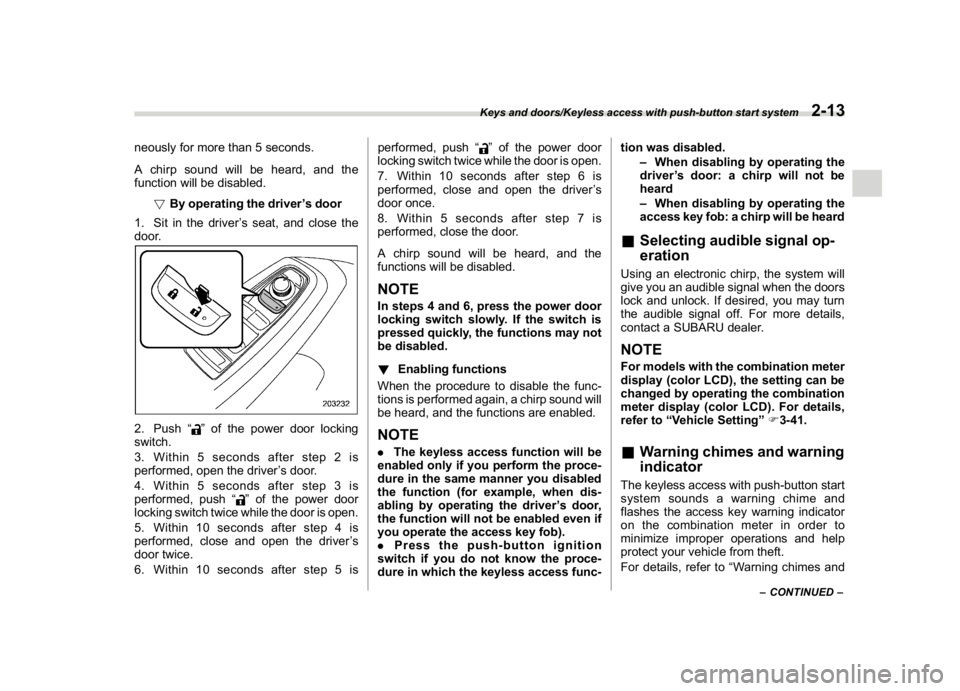
!By operating the driver’s door
1. Sit in the driver’s seat, and close the
door.2. Push“
”of the power door locking
switch.
3. Within 5 seconds after step 2 is
performed, open the driver’s door.
4. Within 5 seconds after step 3 is
performed, push“
”of the power door
locking switch twice while the door is open.
5. Within 10 seconds after step 4 is
performed, close and open the driver’s
door twice.
6. Within 10 seconds after step 5 isperformed, push“
”of the power door
locking switch twice while the door is open.
7. Within 10 seconds after step 6 is
performed, close and open the driver’s
door once.
8. Within 5 seconds after step 7 is
performed, close the door.
A chirp sound will be heard, and the
functions will be disabled.
NOTEIn steps 4 and 6, press the power door
locking switch slowly. If the switch is
pressed quickly, the functions may not
be disabled.
!Enabling functions
When the procedure to disable the func-
tions is performed again, a chirp sound will
be heard, and the functions are enabled.NOTE.The keyless access function will be
enabled only if you perform the proce-
dure in the same manner you disabled
the function (for example, when dis-
abling by operating the driver’s door,
the function will not be enabled even if
you operate the access key fob).
.Press the push-button ignition
switch if you do not know the proce-
dure in which the keyless access func-tion was disabled.
–When disabling by operating the
driver’s door: a chirp will not be
heard
–When disabling by operating the
access key fob: a chirp will be heard
&Selecting audible signal op-
erationUsing an electronic chirp, the system will
give you an audible signal when the doors
lock and unlock. If desired, you may turn
the audible signal off. For more details,
contact a SUBARU dealer.NOTEFor models with the combination meter
display (color LCD), the setting can be
changed by operating the combination
meter display (color LCD). For details,
refer to“Vehicle Setting”F3-41.&Warning chimes and warning
indicatorThe keyless access with push-button start
system sounds a warning chime and
flashes the access key warning indicator
on the combination meter in order to
minimize improper operations and help
protect your vehicle from theft.
For details, refer to“Warning chimes and
–CONTINUED–
Keys and doors/Keyless access with push-button start system
2-13
2
Page 114 of 474

(117,1)
北米Model "A1320BE-C" EDITED: 2017/ 10/ 10
.Mexico-spec. modelsIFT
RLVDE1415-1661
14AHK
DENSO
ImmobilizerThe immobilizer system is designed to
prevent an unauthorized person from
starting the engine. Only keys registered
with your vehicle’s immobilizer system can
be used to operate your vehicle. If engine
start is attempted with an unregistered
access key fob or key, the engine will not
start. Even if the engine does start, it will
stop after a few seconds. This system,
however, is not a 100% anti-theft guaran-
tee.
CAUTION
.Do not place the key under direct
sunlight or anywhere it may be-
come hot.
.Do not get the key wet. If the key
gets wet, wipe it dry with a cloth
immediately.
.Do not modify or remove the
system. If modified or removed,
the proper operation of the sys-
tem cannot be guaranteed.
NOTE.To protect your vehicle from theft,
please pay close attention to the follow-
ing security precautions:
–Never leave your vehicle unat-
tended with its keys inside.
–Before leaving your vehicle,
close all windows and the moon-
roof, and lock the doors and rear
gate.
–Do not leave spare keys or any
record of your key number in the
vehicle.
.The vehicle has a maintenance-free
type immobilizer system.&Security indicator lightRefer to“Security indicator light”F3-29.&Key replacementYour key number plate will be required if
you ever need a replacement key made.
Any new key must be registered for use
with your vehicle’s immobilizer system
before it can be used. The maximum
number of keys that can be registered for
use with one vehicle is as follows.
.Four (models without“keyless access
with push-button start system”)
.Seven (models with“keyless access
–CONTINUED–
Keys and doors/Immobilizer
2-15
2
Page 116 of 474
(119,1)
北米Model "A1320BE-C" EDITED: 2017/ 10/ 10
–Mexico-spec. models
Remote keyless entry system
CAUTION
.Do not expose the remote trans-
mitter to severe shocks, such as
those experienced as a result of
dropping or throwing.
.Do not take the remote transmit-
ter apart except when replacing
the battery.
.Do not get the remote transmitter
wet. If it gets wet, wipe it dry with
a cloth immediately.
.When you carry the remote trans-
mitter on an airplane, do not
press the button of the remote
transmitter while in the airplane.
When any button of the remote
transmitter is pressed, radio
waves are sent and may affect
the operation of the airplane.
When you carry the remote trans-
mitter in a bag on an airplane,
take measures to prevent the
buttons of the remote transmitter
from being pressed.
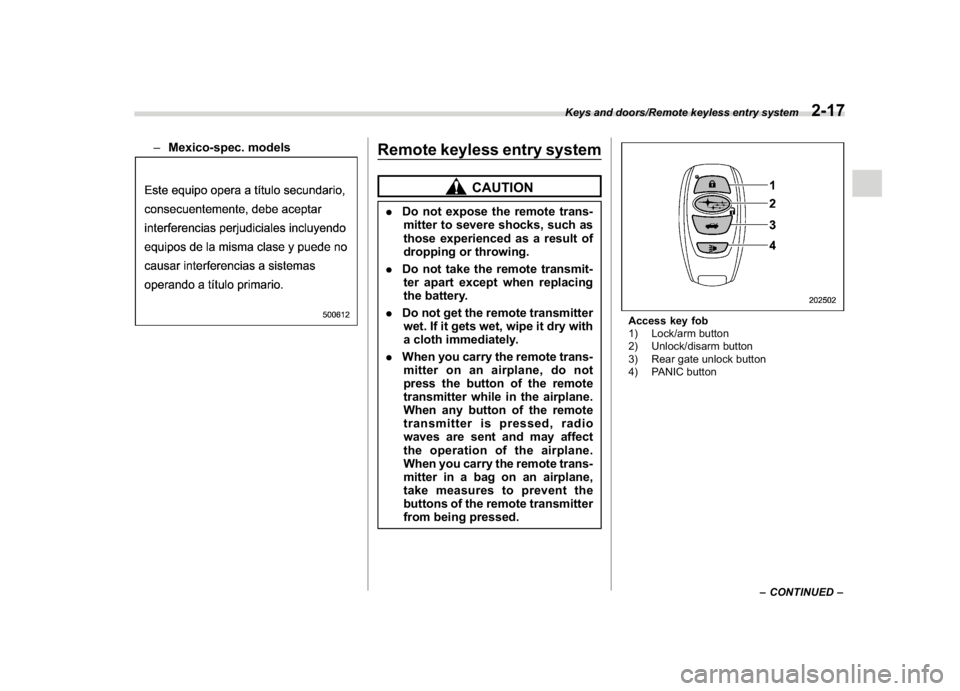
Access key fob
1) Lock/arm button
2) Unlock/disarm button
3) Rear gate unlock button
4) PANIC button
–CONTINUED–
Keys and doors/Remote keyless entry system
2-17
2
Page 117 of 474

(120,1)
北米Model "A1320BE-C" EDITED: 2017/ 10/ 10
Transmitter
1) Lock/arm button
2) Unlock/disarm button
3) Rear gate unlock button
4) PANIC buttonThe remote keyless entry system has the
following functions.
.Locking and unlocking the doors (and
rear gate)
.Unlocking the rear gate
.Sounding a panic alarm
.Arming and disarming the alarm sys-
tem. For detailed information, refer to
“Alarm system”F2-24.
The operable distance of the remote key-
less entry system is approximately 30 feet
(10 meters). However, this distance will
vary depending on environmental condi-tions. The system’s operable distance will
be shorter in areas near a facility or
electronic equipment emitting strong radio
waves such as a power plant, broadcast
station, TV tower, or remote controller of
home electronic appliances.
NOTE.For models with“keyless access
with push-button start system”,the
remote keyless entry system will not
be activated when the push-button
ignition switch is in any position other
than the“OFF”position.
.For models without“keyless access
with push-button start system”,the
remote keyless entry system will not
be activated when the key is inserted in
the ignition switch.
.The hazard warning flashers will
flash once or twice when the access
key fob/transmitter button is pressed in
the following cases.
–When locking the doors
–When unlocking the doors
–When unlocking the rear gate
Operation of the hazard warning
flashers in the above cases can be set
to“On”or“Off”by a SUBARU dealer.
Consult your SUBARU dealer for de-
tails.
&Locking the doorsPress the lock/arm button to lock all doors
and rear gate. An electronic chirp will
sound once and the hazard warning
flashers will flash once.
If any of the doors (or the rear gate) are not
fully closed, the following will occur to alert
you that the doors (or the rear gate) are not
properly closed.
.an electronic chirp sounds five times.
.the hazard warning flashers flash five
times.
When you close the door, it will automati-
cally lock and then the following will occur.
.an electronic chirp sounds once.
.the hazard warning flashers flash once.&Unlocking the doorsPress the unlock/disarm button to unlock
the driver’s door. An electronic chirp will
sound twice and the hazard warning
flashers will flash twice. To unlock all doors
and the rear gate, briefly press the unlock/
disarm button a second time within 5
seconds.NOTEIf the interval between the first and
second presses of the unlock/disarm
button (for unlocking of all of the doors
Keys and doors/Remote keyless entry system
2-18
Page 118 of 474
(121,1)
北米Model "A1320BE-C" EDITED: 2017/ 10/ 10
and the rear gate) is extremely short,
the system may not respond.&Unlocking the rear gatePress the rear gate unlock button to unlock
the rear gate.
An electronic chirp will sound twice and the
hazard warning flashers will flash twice.&Vehicle finder functionUse this function to find your vehicle
parked among many vehicles in a large
parking lot. Provided you are within 30 feet
(10 meters) of the vehicle, pressing the
lock/arm button three times in a 5-second
period will cause your vehicle’s horn to
sound once and its hazard warning
flashers to flash three times.NOTEIf the interval between presses is too
short when you press the lock/arm
button three times, the system may
not respond to the signals from the
remote transmitter.
&Sounding a panic alarmTo activate the alarm, press the“PANIC”
button once.
The horn will sound and the hazard
warning flashers will flash.
To deactivate the panic alarm, press any
button on the remote transmitter. Unless a
button on the remote transmitter is
pressed, the alarm will be deactivated
after approximately 30 seconds.&Setting audible signal opera-
tion (models without“keyless
access with push-button start
system”)Using an electronic chirp, the system will
give you an audible signal when the doors
lock and unlock. If desired, you may turn
the audible signal off.
Perform the following steps to deactivate
the audible signal. You can also use the
same steps to restore the function.
1. Sit in the driver’s seat and shut all
doors and the rear gate.
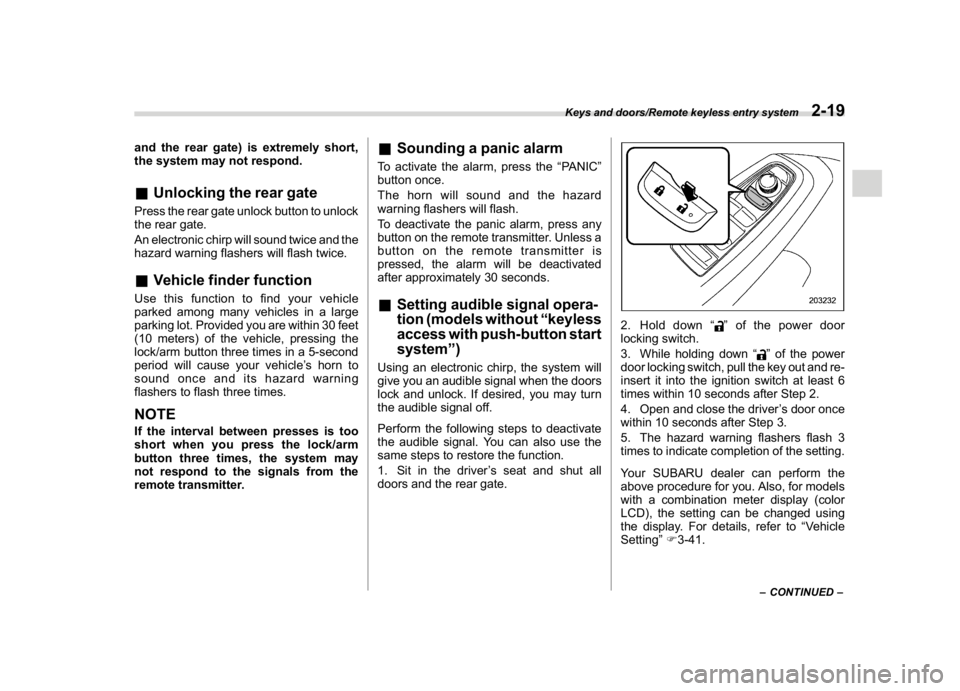
2. Hold down“
”of the power door
locking switch.
3. While holding down“
”of the power
door locking switch, pull the key out and re-
insert it into the ignition switch at least 6
times within 10 seconds after Step 2.
4. Open and close the driver’s door once
within 10 seconds after Step 3.
5. The hazard warning flashers flash 3
times to indicate completion of the setting.
Your SUBARU dealer can perform the
above procedure for you. Also, for models
with a combination meter display (color
LCD), the setting can be changed using
the display. For details, refer to“Vehicle
Setting”F3-41.–CONTINUED–
Keys and doors/Remote keyless entry system
2-19
2