2018 SUBARU CROSSTREK lock
[x] Cancel search: lockPage 162 of 474

(167,1)
北米Model "A1320BE-C" EDITED: 2017/ 10/ 10
&Security indicator lightThis indicator light shows the status of the
alarm system. It also indicates operation of
the immobilizer system.
!Alarm system
It blinks to show the driver the operational
status of the alarm system. For detailed
information, refer to“Alarm system”F2-
24.
!Immobilizer system
The security indicator light starts blinking
in the following conditions.
For models with“keyless access with
push-button start system”:
.Immediately after the push-button igni-
tion switch is turned to the“OFF”position.
.Immediately after the driver’s door is
opened or closed when all of the following
conditions are met.
–The push-button ignition switch is in
the“ON”or“ACC”position.
–The access key fob is outside the
vehicle.
–The engine is not running.
In the event that an unauthorized key is
used (for example, the key is unregistered
or the ID code does not match), the power
is not switched to“ON”and the security
indicator light continues blinking.For models without“keyless access
with push-button start system”:
.Immediately after the key is pulled out.
.Approximately 60 seconds after the
ignition switch is turned from the“ON”
position to the“ACC”or“LOCK”position.
If the indicator light does not blink in the
above conditions, it may indicate that
immobilizer system may be malfunction-
ing. Contact your nearest SUBARU dealer
immediately.
In the event that an unauthorized key (for
example, an unauthorized duplicate) is
used to start the engine, the security
indicator light illuminates. For details about
the immobilizer system, refer to“Immobi-
lizer”F2-15.
NOTE.The security indicator light remains
off in the following conditions. It means
that the matching of the ID code is
completed and the immobilizer system
is deactivated, and it does not indicate
a malfunction.
Models with“keyless access with
push-button start system”:
–while the engine is running
–the push-button ignition switch
has been turned to the“ON”or“ACC”position and the driver’s
door has not been opened or closed
Models without“keyless access
with push-button start system”:
–while the engine is running
–when the ignition switch is in the
“ON”position.
–for approximately 60 seconds
after the ignition switch is turned
from the“ON”position to the“ACC”
or“LOCK”position
.Even if a malfunction occurs, such
as the security indicator light flashes
irregularly, it will not affect the func-
tionality of the immobilizer system.
–CONTINUED–
Instruments and controls/Warning and indicator
3-29
3
Page 167 of 474

(172,1)
北米Model "A1320BE-C" EDITED: 2017/ 10/ 10
&Basic operationControl switch
1)
(Up)
2)/SET (enter)
3)(Down)
By operating“
”or“
”of the control
switch, the screens and selection items
can be switched. When the“
/SET”
switch is pulled toward you, the item can
be selected and set.
If there are some useful messages, such
as vehicle information, warning informa-
tion, etc., they will interrupt the current
screen, and appear on the display accom-
panied by a beep. If such a screen is
displayed, take proper action according to
the message shown on the screen.
The warning screen will return to theoriginal screen after a few seconds. While
the“
”information reminder is shown on
the display, it may be possible to display
the warning screen again. To recall the
message marked with“
”on the display,
pull the“
/SET”switch on the steering
wheel toward you.
NOTEWhen the multi-function display (color
LCD) is set to the setting screen, the
combination meter display (color LCD)
cannot be controlled pressing on the
“
”,“
”and“
/SET”on the control
switch.
&Welcome screen and Good-
bye screenWhen the driver’s door is opened and
closed after unlocking the door, the wel-
come screen will appear on the combina-
tion meter display (color LCD) for approxi-
mately 20 seconds.
When the ignition switch is turned to the
“LOCK”/“OFF”position, the combination
meter display (color LCD) gradually turns
off (Good-bye screen).
NOTE.Once the welcome screen appears, it
takes a certain period of time to display
it again.
.If the ignition switch is operated
after unlocking the driver’s door, the
welcome screen will not appear even
when the driver’s door is opened and
closed.
.The welcome screen will disappear
when you lock the driver’s door by
using the remote keyless entry system
(all models) or the keyless access
function (if equipped) while the wel-
come screen is displayed.
.The welcome screen including the
multi-function display (color LCD) (if
equipped) and the audio/navigation
unit can be set to on or off. For details,
refer to“Welcome Screen”F3-41.
Instruments and controls/Combination meter display (color LCD)
3-34
Page 173 of 474

(178,1)
北米Model "A1320BE-C" EDITED: 2017/ 10/ 10
1st menu2nd menu 3rd menu
Vehicle Setting Keyless Entry System Audible Signal (if equipped)
Hazard Warning Flasher
Security Relocking (if equipped)
Driver Door Unlock (if equipped)
Rear Gate/Trunk Unlock (if equipped)
Defogger―
Interior Light―
Auto Light Sensor (if equipped)―
Welcome Lighting (if equipped) Approaching Time Set
Leaving Time Set
One-touch lane changer―
Default Settings――
Instruments and controls/Combination meter display (color LCD)
3-40
Page 174 of 474

(179,1)
北米Model "A1320BE-C" EDITED: 2017/ 10/ 10
By operating the“
”or“
”switch on the
steering wheel, you can select the menu.
Pull the“
/SET”switch to enter the
selected menu.
NOTEIf you enter the“Go Back”menu, the
system will return to the previous
screen.
!Screen Settings
After entering the“Screen Settings”menu,
select one of the following menus.
!Welcome Screen
The welcome screen can be activated or
deactivated.
!Good-bye Screen
The good-bye screen can be activated or
deactivated.
!Gauge Initial Movement
The movement of the meter needles and
gauge needles that occurs when the
ignition switch is turned to the“ON”
position can be activated or deactivated.
!Units
Changes the units displayed in the combi-
nation meter display (color LCD), the type
A multi-function display (black and white)
and the type B multi-function display (colorLCD).
!Tire Pressure Units (if equipped)
Changes the units displayed in the Tire
Pressure Monitoring system.
!Languages
Changes the language displayed in the
combination meter display (color LCD)
and the multi-function display (color LCD).
!Warning Volume (if equipped)
Sets the EyeSight warning volume, the
BSD/RCTA warning volume and the RAB
warning volume.
!EyeSight (models with EyeSight
system)
NOTEFor models with the EyeSight system,
refer to the Owner’s Manual supple-
ment for the EyeSight system.
!RAB (models with EyeSight system)
The Sonar Audible Alarm can be set to on
or off.NOTEFor models with Reverse Automatic
Braking system, refer to“Reverse
Automatic Braking System”F7-61.!Sonar Audible Alarm
When the Reverse Automatic Braking
system is in operation, the warning sound
to notify that an obstacle is detected in the
rear can be activated or deactivated.
!Vehicle Setting
After entering the“Vehicle Setting”menu,
select one of the following menus.
!Keyless Entry System
Sets the settings used when the keyless
access function was operated.
.Audible Signal (if equipped)
Sets the electronic chirp that sounds when
the door is locked or unlocked.
.Hazard Warning Flasher
Sets the operation of the hazard warning
flasher that blinks when the door is locked
or unlocked.
.Security Relocking (if equipped)
The automatic locking operation period
can be set or customized. Select the
preferred seconds to customize the opera-
tion period.
.Driver Door Unlock (if equipped)
Select only the driver’s door to unlock or all
doors to unlock simultaneously when the
driver’s door is unlocked.
.Rear Gate/Trunk Unlock (if equipped)
Select only the rear gate to unlock or all
–CONTINUED–
Instruments and controls/Combination meter display (color LCD)
3-41
3
Page 175 of 474

(180,1)
北米Model "A1320BE-C" EDITED: 2017/ 10/ 10
doors to unlock simultaneously when
accessing from the cargo area.
!Defogger
Sets and customizes the operation of the
defogger.
!Interior Light
Sets and customizes the interior light off
delay timer.
!Auto Light Sensor (if equipped)
Sets and customizes the sensitivity of the
auto light sensor.
!Welcome Lighting (if equipped)
Sets the leaving time and approaching
time.
.Approaching time set
Sets the illumination time of the headlights
that illuminate when you approach the
vehicle.
.Leaving time set
Sets the time until the headlights turn off
when you have moved away from the
vehicle.
!One-touch lane changer
Sets the one-touch lane changer on/off.!Default Settings
Select“Ye s”to use the menu screen to
restore customized settings to the factory
default settings. Select“No”to return to the
previous screen without restoring to the
factory default settings.
Multi-function display (black
and white)NOTEFor models with multi-function display
(color LCD), refer to“Multi-function
display (color LCD)”F3-47.1) Outside temperature indicator
2) X-mode indicator (if equipped)
3) Driving information display
4) ClockWith the ignition switch in the“ACC”
position, the clock appears on the display.
With the ignition switch in the“ON”posi-
tion, the outside temperature indicator,
driving information display and clock all
appear on the display.
Instruments and controls/Multi-function display (black and white)
3-42
Page 179 of 474

(184,1)
北米Model "A1320BE-C" EDITED: 2017/ 10/ 10
time a complete hour has elapsed. If the
display is giving a reading other than the
journey time, the display switches to the
journey time, flashes for 5 seconds, and
returns to its original reading each time a
complete hour has elapsed.NOTEThe journey time is reset when the
ignition switch is turned to the“ACC”
or“LOCK”/“OFF”position.
!Average vehicle speed1) When units in miles is selected
2) When units in km is selectedThis display shows the average vehicle
speed since the trip meter was last reset.
Pressing the TRIP RESET switch toggles
the display between the average vehiclespeed corresponding to the A trip meter
display and the average vehicle speed
corresponding to the B trip meter display.
When either of the trip meter displays is
reset, the corresponding average vehicle
speed value is also reset.
NOTEWhen either trip meter display is reset,
the average vehicle speed correspond-
ing to that trip meter display is not
shown until the vehicle has subse-
quently covered a distance of 1 mile
(or 1 km).
!Turn off display of driving informa-
tion display
Select the blank space in the menu to exit
the driving information display selection.NOTE.The average fuel consumption and
average vehicle speed are calculated
even while the driving information dis-
play is not displayed.
.Even if you turn off the driving
information display, the display will
automatically turn on when the battery
voltage is disconnected and then re-
connected for battery replacement or
fuse replacement.
&Outside temperature indica-
tor1) U.S.-spec. models
2) Except U.S.-spec. modelsNOTE.The outside temperature indicator
shows the temperature around the
sensor. Therefore, the temperature in-
dication may differ from the actual
outside air temperature.
.The temperature unit cannot be
changed.
Instruments and controls/Multi-function display (black and white)
3-46
Page 180 of 474
(185,1)
北米Model "A1320BE-C" EDITED: 2017/ 10/ 10
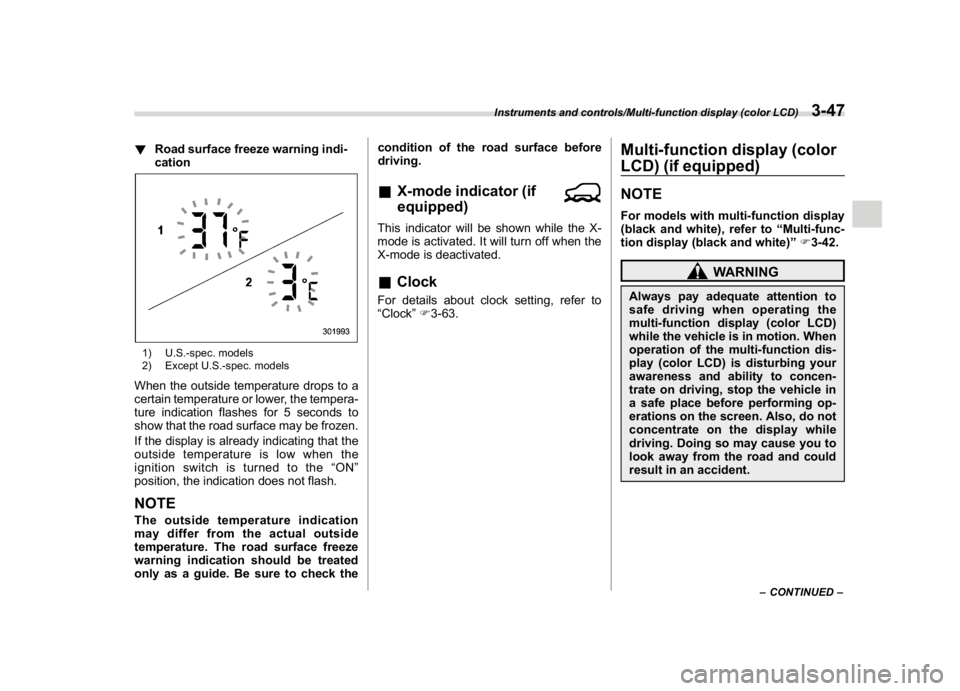
!Road surface freeze warning indi-
cation1) U.S.-spec. models
2) Except U.S.-spec. modelsWhen the outside temperature drops to a
certain temperature or lower, the tempera-
ture indication flashes for 5 seconds to
show that the road surface may be frozen.
If the display is already indicating that the
outside temperature is low when the
ignition switch is turned to the“ON”
position, the indication does not flash.NOTEThe outside temperature indication
may differ from the actual outside
temperature. The road surface freeze
warning indication should be treated
only as a guide. Be sure to check thecondition of the road surface before
driving.
&X-mode indicator (if
equipped)This indicator will be shown while the X-
mode is activated. It will turn off when the
X-mode is deactivated.&ClockFor details about clock setting, refer to
“Clock”F3-63.
Multi-function display (color
LCD) (if equipped)NOTEFor models with multi-function display
(black and white), refer to“Multi-func-
tion display (black and white)”F3-42.
WARNING
Always pay adequate attention to
safe driving when operating the
multi-function display (color LCD)
while the vehicle is in motion. When
operation of the multi-function dis-
play (color LCD) is disturbing your
awareness and ability to concen-
trate on driving, stop the vehicle in
a safe place before performing op-
erations on the screen. Also, do not
concentrate on the display while
driving. Doing so may cause you to
look away from the road and could
result in an accident.
–CONTINUED–
Instruments and controls/Multi-function display (color LCD)
3-47
3
Page 183 of 474

(188,1)
北米Model "A1320BE-C" EDITED: 2017/ 10/ 10
&Basic screens1) Clock
2) Climate control*
3) Outside temperature
4) Information screen
*: This is not displayed on the multi-function
display (color LCD) when the ignition switchis in the“ACC”position.
While the ignition switch is in the“ACC”or
“ON”position, the basic screen will be
displayed.
!Outside temperature indicator
The outside temperature is displayed on
the multi-function display (color LCD).NOTE.The outside temperature indicator
shows the temperature around the
sensor. Therefore, the temperature in-
dication may differ from the actual
outside air temperature.
.The temperature unit cannot be
changed.!Climate control screen
The climate control status is displayed on
the multi-function display (color LCD).
Climate control screen
1) Set temperature indicator (left-hand side)
2) FULL AUTO indicator
3) AUTO indicator
4) Airflow mode indicator
5) Set temperature indicator (right-hand
side)*
1
6) Air inlet selection indicator
7) SYNC indicator*
1
8) Fan speed indicator
9) Air conditioner ON indicator
*1: Models with the SYNC function onlyWhen operating the climate control sys-
tem, the basic screen switches to the
climate control screen. For details about
Instruments and controls/Multi-function display (color LCD)
3-50