Page 143 of 290
2.27
LANE DEPARTURE WARNING (1/3)
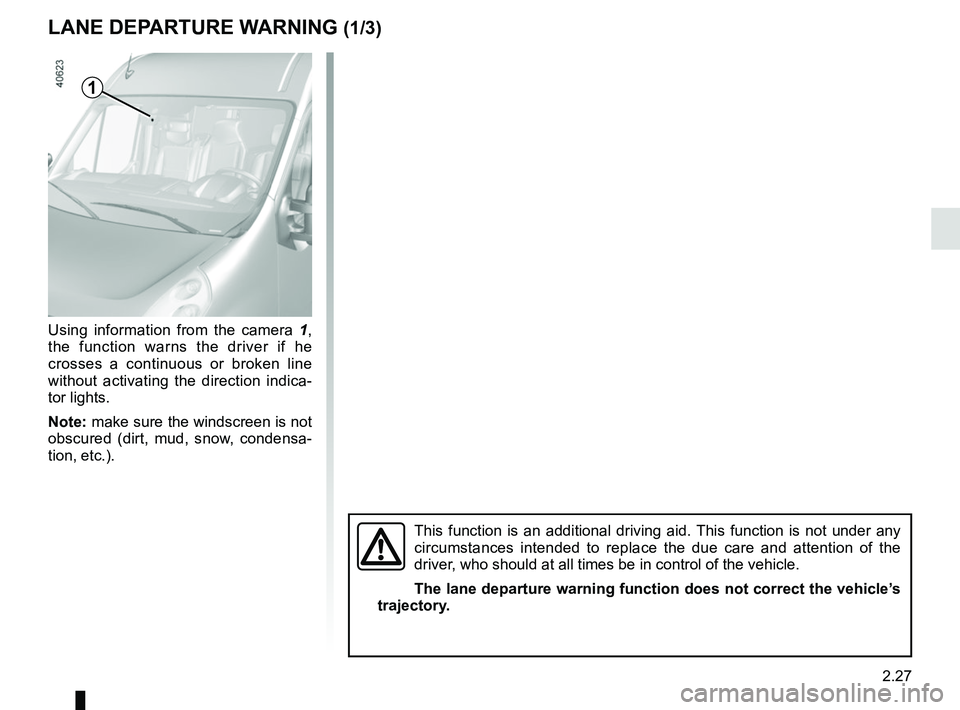
Using information from the camera 1,
the function warns the driver if he
crosses a continuous or broken line
without activating the direction indica-
tor lights.
Note: make sure the windscreen is not
obscured (dirt, mud, snow, condensa-
tion, etc.).
1
This function is an additional driving aid. This function is not under any
circumstances intended to replace the due care and attention of the
driver, who should at all times be in control of the vehicle.
The lane departure warning function does not correct the vehicle’s
trajectory.
Page 144 of 290
2.28
LANE DEPARTURE WARNING (2/3)Conditions for non-activation
of alerts
– Indicators activated or having been activated less than approximately
four seconds prior to departing from
the lane;
– Very fast lane departure;
– Driving continuously on a line;
– ...
Operating faults
In the event of a malfunction, a mes-
sage “LANE DEPARTURE CHECK” is
displayed on the instrument panel ac-
companied by the warning light
©.
Consult an approved dealer.
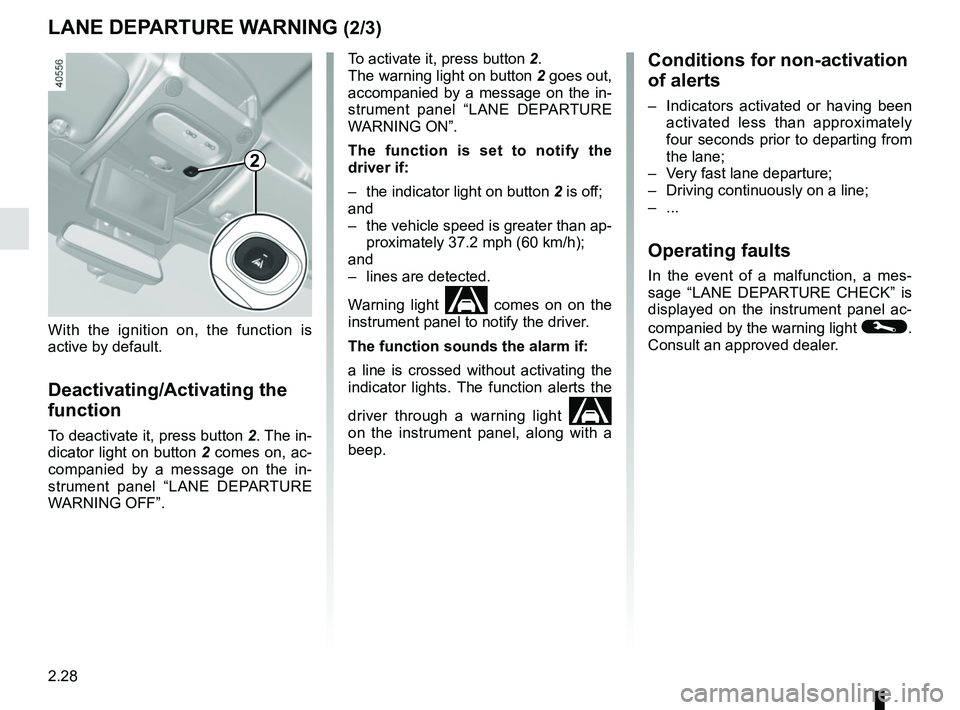
To activate it, press button 2.
The warning light on button
2 goes out,
accompanied by a message on the in-
strument panel “LANE DEPARTURE
WARNING ON”.
The function is set to notify the
driver if:
– the indicator light on button 2 is off;
and
– the vehicle speed is greater than ap- proximately 37.2 mph (60 km/h);
and
– lines are detected.
Warning light
comes on on the
instrument panel to notify the driver.
The function sounds the alarm if:
a line is crossed without activating the
indicator lights. The function alerts the
driver through a warning light
on the instrument panel, along with a
beep.
2
With the ignition on, the function is
active by default.
Deactivating/Activating the
function
To deactivate it, press button 2. The in-
dicator light on button 2 comes on, ac-
companied by a message on the in-
strument panel “LANE DEPARTURE
WARNING OFF”.
Page 145 of 290

2.29
This function is an additional driving aid. This function is not under any circumstances intended to replace the due\
care
and attention of the driver, who should at all times be in control of the vehicle.
System servicing/repairs
– In the event of an impact, the camera alignment may be changed, and its \
operation may consequently be affected. Deactivate the function, then consult an authorised dealer.
– Any work in the area where the camera is located (repairs, replacements\
, windscreen modifications etc.) must be carried out by a qualified professional.
Only an authorised dealer is qualified to service the system.
In the event of system disturbance
Some conditions can disturb or damage the operation of the system, such \
as:
– a complex environment (tunnel etc.);
– poor weather conditions (snow, hail, black ice etc.);
– poor visibility (night, fog etc.);
– road markings which are worn, lacking in contrast or very widely spaced \
from one another (lines partially erased etc);
– being dazzled (glaring sun, lights of vehicles travelling in the opposi\
te direction etc.);
– the road is narrow, winding or undulating (tight bends etc.);
– closely following a vehicle travelling in the same lane.
Risk of false alarms or absence of warnings
LANE DEPARTURE WARNING (3/3)
Page 152 of 290
2.36
Switching off the function
The cruise control function is deacti-
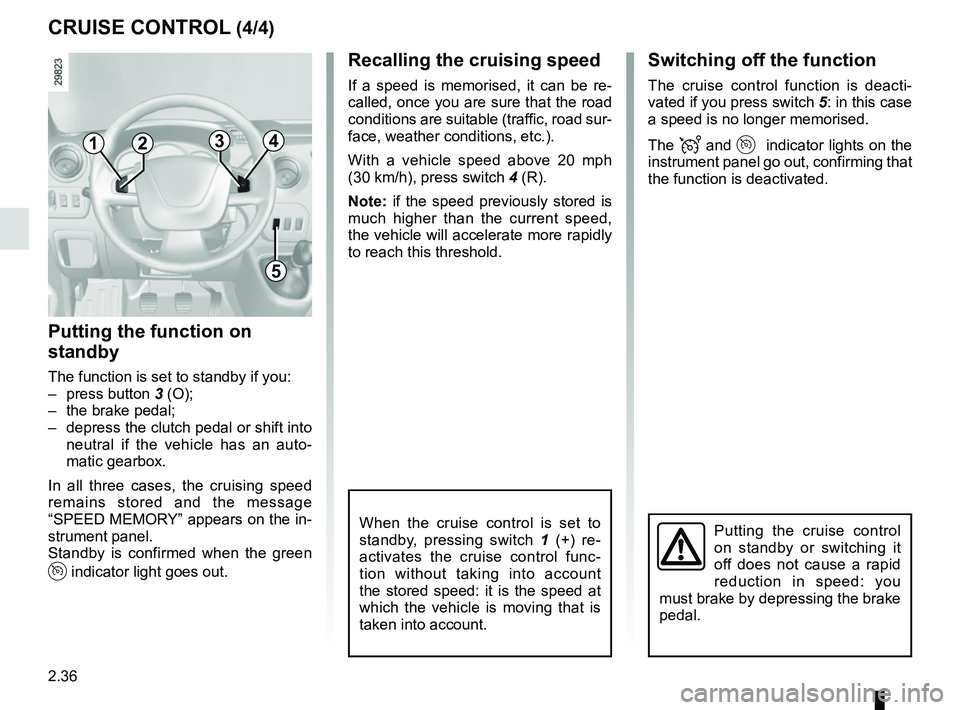
vated if you press switch 5: in this case
a speed is no longer memorised.
The
and indicator lights on the
instrument panel go out, confirming that
the function is deactivated.
Recalling the cruising speed
If a speed is memorised, it can be re-
called, once you are sure that the road
conditions are suitable (traffic, road sur-
face, weather conditions, etc.).
With a vehicle speed above 20 mph
(30 km/h), press switch 4 (R).
Note: if the speed previously stored is
much higher than the current speed,
the vehicle will accelerate more rapidly
to reach this threshold.
When the cruise control is set to
standby, pressing switch 1 (+) re-
activates the cruise control func-
tion without taking into account
the stored speed: it is the speed at
which the vehicle is moving that is
taken into account.Putting the cruise control
on standby or switching it
off does not cause a rapid
reduction in speed: you
must brake by depressing the brake
pedal.
CRUISE CONTROL (4/4)
1
5
2
Putting the function on
standby
The function is set to standby if you:
– press button 3 (O);
– the brake pedal;
– depress the clutch pedal or shift into neutral if the vehicle has an auto-
matic gearbox.
In all three cases, the cruising speed
remains stored and the message
“SPEED MEMORY” appears on the in-
strument panel.
Standby is confirmed when the green
indicator light goes out.
43
Page 155 of 290
2.39
Prolonged deactivation of the
system
You can deactivate the system perma-
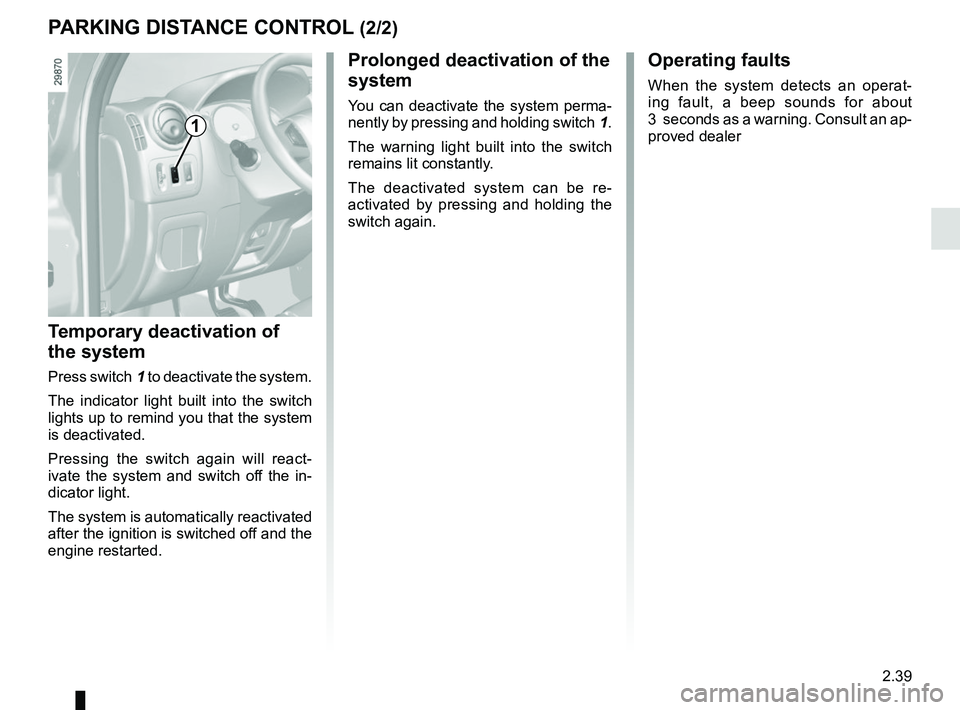
nently by pressing and holding switch 1.
The warning light built into the switch
remains lit constantly.
The deactivated system can be re-
activated by pressing and holding the
switch again.
Temporary deactivation of
the system
Press switch 1 to deactivate the system.
The indicator light built into the switch
lights up to remind you that the system
is deactivated.
Pressing the switch again will react-
ivate the system and switch off the in-
dicator light.
The system is automatically reactivated
after the ignition is switched off and the
engine restarted.
Operating faults
When the system detects an operat-
ing fault, a beep sounds for about
3 seconds as a warning. Consult an ap-
proved dealer
PARKING DISTANCE CONTROL (2/2)
1
Page 163 of 290
2.47
SEQUENTIAL GEARBOX (3/5)
Operation in semiautomatic
mode (manual)
This mode can be activated at any time
when driving by pushing the lever to the
left. The mode is switched without shift-
ing up a gear.
You can initiate gear changes using the
selector lever.
To shift up a gear, push the selector
lever forwards; the accelerator pedal
does not have to be lifted.
To shift down a gear, push the selector
lever backwards; the accelerator pedal
does not have to be lifted. The system will not tolerate a series
of up or down changes that cause the
engine to underrev or overrev.
By pushing the lever forwards twice
you can move up two gears at a time
(except if underrevving). By pushing
the lever backwards twice you can
move down two gears at a time (unless
this causes overrevving).
When decelerating with the foot off
the pedal, the gears will automatically
drop to the low engine speed limit to
avoid stalling. First gear automatically
shifts below a certain speed limit. You
can stop the vehicle at red lights or
junctions etc. by depressing the brake
pedal; there is no need to change to
neutral (N).
The vehicle will move off again:
– either slowly, if you release the brake
without accelerating (e.g. when in a
traffic jam);
– or quickly, if you release the brake and accelerate.
Note: neutral may only be selected
when the vehicle is being driven or is
stationary when the brake pedal is
depressed (if you forget, warning
light 5 will come on) .
Push the gear selector lever to the right
to engage neutral.
If the engine speed is too high or too
low, the system will choose the opti-
mum gear.
Semiautomatic mode can be deacti-
vated and reactivated at any time when
the engine is running by pushing the
lever to the left.
Page 164 of 290

2.48
SEQUENTIAL GEARBOX (4/5)
Operation in automatic mode
Automatic mode is selected by default
every time the ignition is switched on.
The letter A appears on the display.
The vehicle is controlled using the ac-
celerator and the brake. Gears will
change automatically at the correct
moment and at a suitable engine speed
because the automatic mode takes the
road surface and the chosen driving
style into consideration.
Gears may be shifted manually in this
mode. Pushing the lever forwards
or backwards shifts a gear upwards
(except if there is a risk of underrev-
ving) or downwards (except if there is a
risk of overrevving).
Note: automatic mode takes account
of:
– the position and speed of depression of the accelerator pedal to assess
driving style and select the optimum
gear;
– action on the brake pedal, to com- mence engine braking in preparation
for a downshift.
You can stop the vehicle at red lights,
with the gear engaged, by depressing
the brake pedal; there is no need to
change to neutral (N).
The vehicle will move off again:
– either slowly, if you release the brake without accelerating (e.g. when in a
traffic jam);
– or quickly, if you release the brake and accelerate.
Accelerating and overtaking
– Slowly depress the accelerator pedal to accelerate gradually;
The oil level in the automatic gear-
box system reservoir varies depend-
ing on use. Adding oil is strictly
forbidden (except by qualified ap-
proved network personnel).
– to obtain maximum vehicle per-
formance regardless of the mode
selected (automatic or manual),
quickly depress the accelerator
pedal beyond the kickdown point.
The speed with which you depress the
pedal will allow you to downshift ac-
cording to the vehicle’s capabilities.
Parking the vehicle
It is possible to park in gear (for exam-
ple, on a slope):
– with the ignition on, select a gear with your foot on the brake ;
– check that a gear other than N is dis- played on the instrument panel, then
remove the ignition key;
– apply the handbrake.
To disengage the gear, switch on the
ignition without starting the engine and
shift the selector lever to neutral with
the brake pedal depressed . Check
that N is displayed on the instrument
panel.
Page 171 of 290

3.5
Adjusting the air temperature
Turn control C.Turning the control to the right in-
creases the temperature.
MANUAL AIR CONDITIONING, HEATING SYSTEM (2/3)
Air recirculation operation
(isolation of the passenger
compartment)
Normal operation of the heating and
ventilation system is obtained using air
from outside.
Recirculation of air allows the external
atmosphere to be isolated (driving in
polluted areas, etc.).
Press button B to switch to isolation
mode. This function also allows the de-
sired comfort level to be achieved as
quickly as possible.
This starts or stops air recirculation.
Operating tell-tale lights up when the
function is operational. In this position
the air is taken from inside the passen-
ger compartment and is recycled with-
out letting air in from outside.
Prolonged use of this position can
lead to condensation forming on the
side windows and windscreen and
problems due to the use of non-
renewed air in the passenger com-
partment.
We therefore advise you to return
to normal mode (external air) as
soon as the air recirculation function
is no longer required, by pressing
button B again.
BC