Page 239 of 290
5.25
REAR LIGHTS: changing bulbs (1/2)
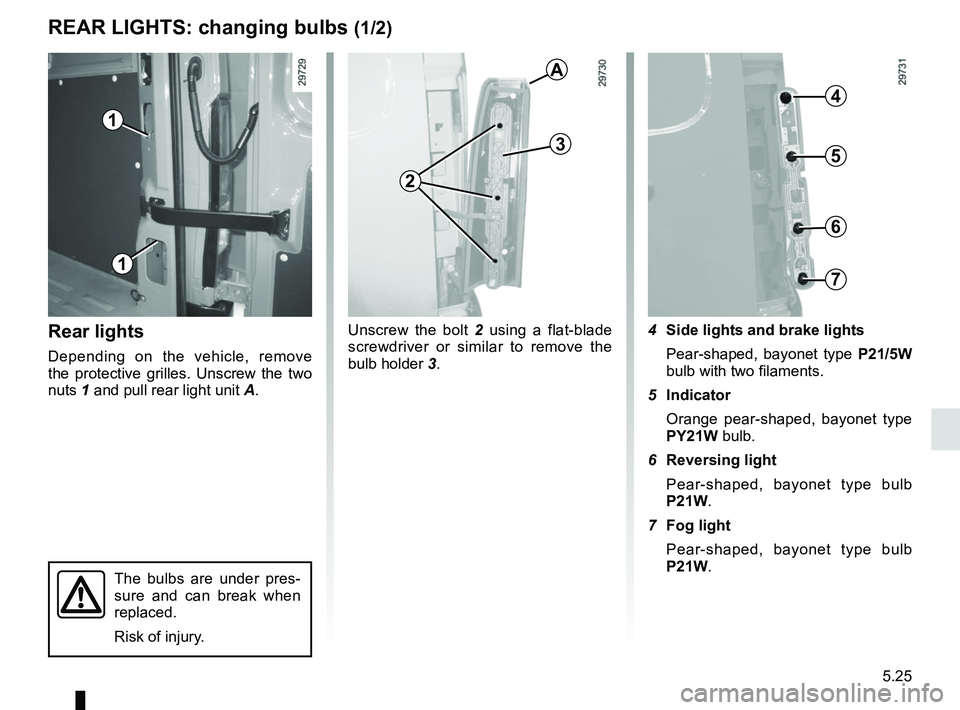
Rear lights
Depending on the vehicle, remove
the protective grilles. Unscrew the two
nuts 1 and pull rear light unit A.Unscrew the bolt
2 using a flat-blade
screwdriver or similar to remove the
bulb holder 3. 4 Side lights and brake lights
Pear-shaped, bayonet type P21/5W
bulb with two filaments.
5 Indicator Orange pear-shaped, bayonet type
PY21W bulb.
6 Reversing light
Pear-shaped, bayonet type bulb
P21W.
7 Fog light Pear-shaped, bayonet type bulb
P21W.
The bulbs are under pres-
sure and can break when
replaced.
Risk of injury.
1
1
A
2
3
4
5
6
7
Page 240 of 290
5.26
REAR LIGHTS: changing bulbs (2/2)
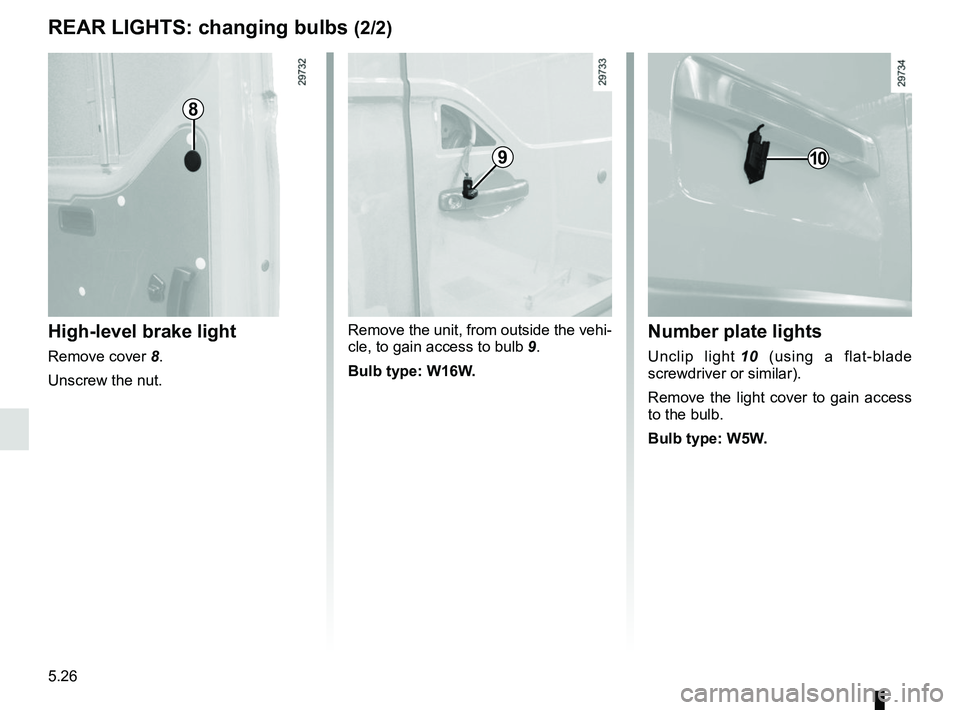
High-level brake light
Remove cover 8.
Unscrew the nut. Remove the unit, from outside the vehi-
cle, to gain access to bulb
9.
Bulb type: W16W.
Number plate lights
Unclip light 10 (using a flat-blade
screwdriver or similar).
Remove the light cover to gain access
to the bulb.
Bulb type: W5W.
8
910
Page 241 of 290
5.27
INTERIOR LIGHTING: changing bulbs
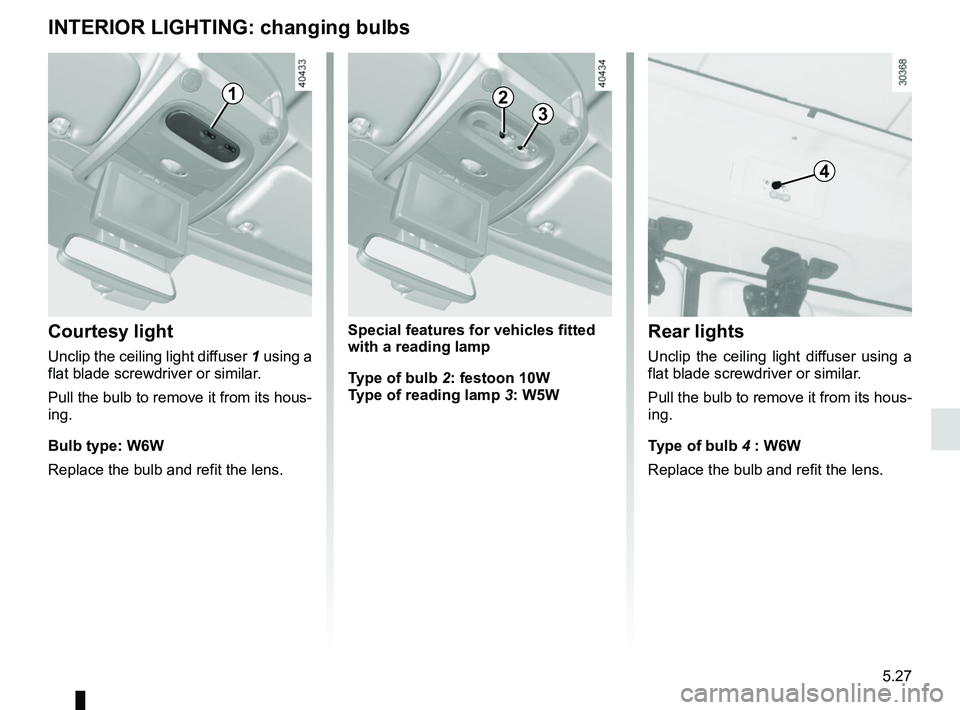
Courtesy light
Unclip the ceiling light diffuser 1 using a
flat blade screwdriver or similar.
Pull the bulb to remove it from its hous-
ing.
Bulb type: W6W
Replace the bulb and refit the lens.
Rear lights
Unclip the ceiling light diffuser using a
flat blade screwdriver or similar.
Pull the bulb to remove it from its hous-
ing.
Type of bulb 4 : W6W
Replace the bulb and refit the lens.
1
4
Special features for vehicles fitted
with a reading lamp
Type of bulb 2: festoon 10W
Type of reading lamp 3: W5W
23
Page 243 of 290
5.29
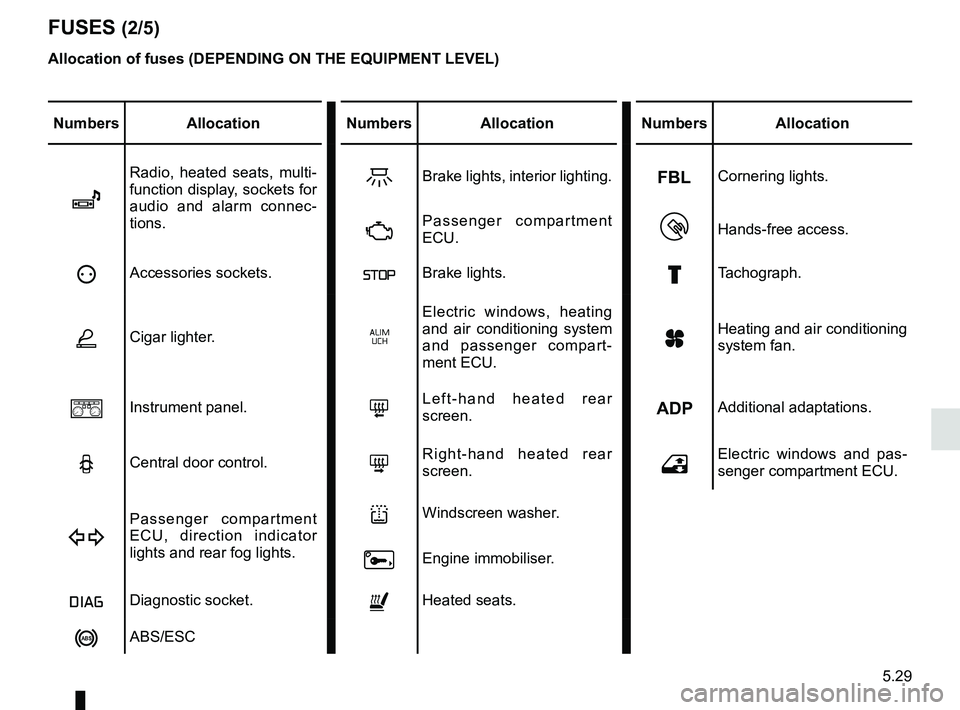
FUSES (2/5)
Allocation of fuses (DEPENDING ON THE EQUIPMENT LEVEL)
Numbers AllocationNumbers Allocation Numbers Allocation
î
Radio, heated seats, multi-
function display, sockets for
audio and alarm connec-
tions.ZBrake lights, interior lighting.Cornering lights.
ÄPassenger compartment
ECU.Hands-free access.
ëAccessories sockets.ßBrake lights.£Tachograph.
ÆCigar lighter.‚
Electric windows, heating
and air conditioning system
and passenger compart-
ment ECU.
yHeating and air conditioning
system fan.
aInstrument panel.8Left-hand heated rear
screen.Additional adaptations.
NCentral door control.7Right-hand heated rear
screen.hElectric windows and pas-
senger compartment ECU.
D
Passenger compartment
ECU, direction indicator
lights and rear fog lights.lWindscreen washer.
0Engine immobiliser.
ÎDiagnostic socket.ñHeated seats.
nABS/ESC
Page 247 of 290

5.33
Connecting a battery charger
The battery charger must be com-
patible with a battery with nominal
voltage of 12 volts.
Do not disconnect the battery when the
engine is running. Follow the instruc-
tions given by the manufacturer of
the battery charger you are using.
When many accessories are fitted to
the vehicle, have them connected to
the + after ignition feed .
BATTERY: troubleshooting (1/2)
To avoid all risk of sparks:
– Ensure that any consumers (cour-
tesy lights, etc.) are switched off
before disconnecting or reconnect-
ing the battery;
– when charging, stop the charger before connecting or disconnecting
the battery;
– to avoid creating a short circuit be- tween the terminals, do not place
metal objects on the battery;
– always wait at least one minute after the engine has been switched off
before disconnecting a battery;
– make sure that you reconnect the battery terminals after refitting.
Special procedures may be
required to charge some
batteries. Contact your ap-
proved dealer.
Avoid all risk of sparks which may
cause an immediate explosion, and
charge the battery in a well venti-
lated area. Risk of serious injury.
Handle the battery with care
as it contains sulphuric acid,
which must not come into
contact with eyes or skin. If
it does, wash the affected area with
plenty of cold water. If necessary,
consult a doctor.
Ensure that naked flames, red hot
objects and sparks do not come into
contact with the battery as there is a
risk of explosion.
Please note when working close to
the engine that it may be hot. In ad-
dition, the engine cooling fan may
start at any moment. The
warning light in the engine compart-
ment reminds you of this.
Risk of injury.
Page 252 of 290

5.38
TOWING: breakdown (1/2)
The steering wheel must be un-
locked and the ignition key must be
in position M (ignition on) to provide
brake lights and hazard warning
lights on the towed vehicle. At night
the vehicle must have its lights on.
Unhitch the trailer, etc., if one is
being towed.
You must observe the towing regu-
lations which apply in the country in
which you are driving: do not exceed
the towing weight for your vehicle.
Contact an approved dealer.
– Use a rigid towing bar.
If a rope or cable is used
(where the law allows this),
the vehicle being towed
must be able to brake.
– A vehicle must not be towed if it is not fit to be driven.
– Avoid accelerating or braking suddenly when towing, as this
may result in damage being
caused to the vehicle.
– When towing a vehicle, it is ad- visable not to exceed 15 mph
(25 km/h).
When the engine is
stopped, steering and brak-
ing assistance are not op-
erational.
Do not remove the key from
the ignition when the vehi-
cle is being towed.
Towing a vehicle with a
sequential gearbox
If the gearbox is stuck in a gear:
– switch on the ignition;
– select neutral with the brake pedal depressed;
– check that the gearbox is in neutral (by pushing the vehicle for example).
If you cannot find neutral you must tow
the vehicle with the front wheels raised.
The vehicle should always be towed
with the ignition switched off.
Page 256 of 290
5.42
The starter is activatedPOSSIBLE CAUSESWHAT TO DO
Warning lights dim or fail to come on;
the starter does not run. Battery terminals disconnected,
oxidised or incorrectly secured.Contact an approved Dealer.
Battery discharged or worn. Connect another battery to the faulty bat-
tery. Refer to the paragraph “Battery: trou-
bleshooting” in Section 5 or replace the bat-
tery if necessary.
Do not push the vehicle if the steering
column is locked.
The engine will not start. Starting conditions are not fulfilled.Refer to the information on “Starting/stop-
ping the engine” in Section 2.
The steering column remains locked. Steering wheel locked. To unlock, move the key and the steer-
ing wheel (refer to the information on the
“Ignition switch” in Section 2).
OPERATING FAULTS (1/5)
The following advice will enable you to carry out quick, temporary repai\
rs. For safety reasons you should always contact
an approved dealer as soon as possible.
Page 259 of 290
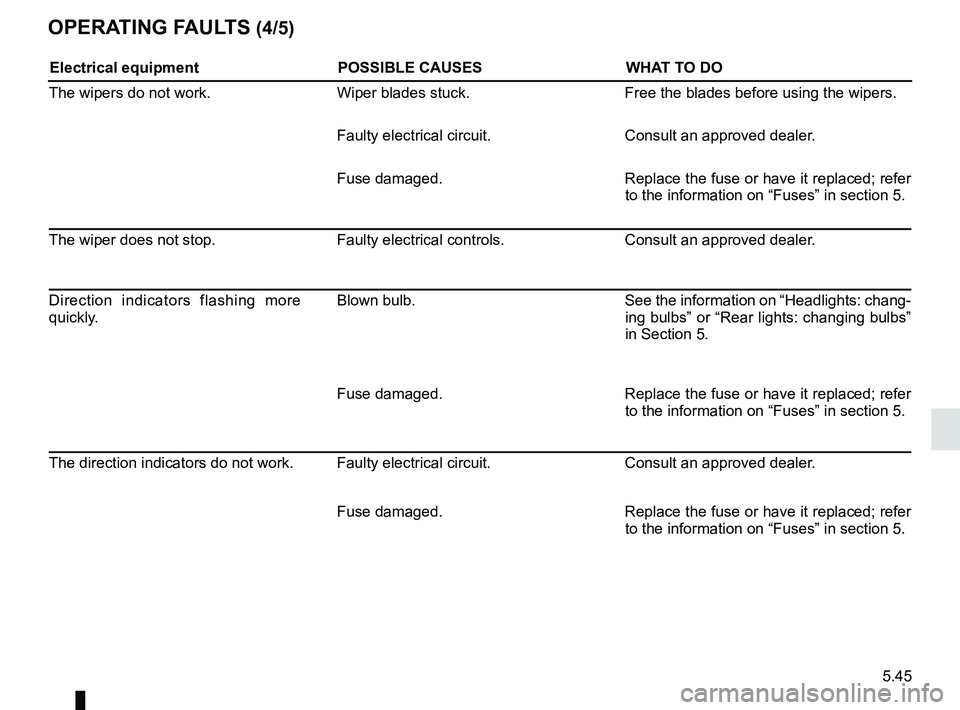
5.45
OPERATING FAULTS (4/5)
Electrical equipmentPOSSIBLE CAUSESWHAT TO DO
The wipers do not work. Wiper blades stuck. Free the blades before using the wipers.
Faulty electrical circuit. Consult an approved dealer.
Fuse damaged. Replace the fuse or have it replaced; refer
to the information on “Fuses” in section 5.
The wiper does not stop. Faulty electrical controls.Consult an approved dealer.
Direction indicators flashing more
quickly. Blown bulb.
See the information on “Headlights: chang-
ing bulbs” or “Rear lights: changing bulbs”
in Section 5.
Fuse damaged. Replace the fuse or have it replaced; refer
to the information on “Fuses” in section 5.
The direction indicators do not work. Faulty electrical circuit. Consult an approved dealer.
Fuse damaged. Replace the fuse or have it replaced; refer
to the information on “Fuses” in section 5.