2018 PEUGEOT EXPERT ECO mode
[x] Cancel search: ECO modePage 390 of 416
8
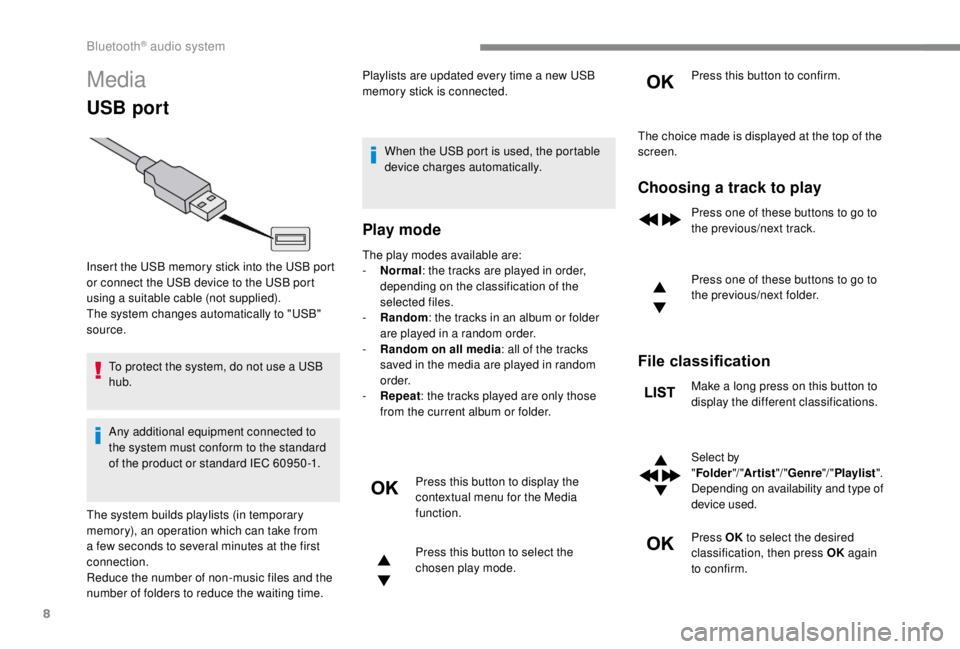
Media
USB port
To protect the system, do not use a USB
hub.
Any additional equipment connected to
the system must conform to the standard
of the product or standard IEC 60950 -1.Playlists are updated every time a new USB
memory stick is connected.
When the USB port is used, the portable
device charges automatically.
Play mode
The play modes available are:
- No rmal: the tracks are played in order,
depending on the classification of the
selected files.
-
Ra
ndom: the tracks in an album or folder
are played in a random order.
-
R
andom on all media: all of the tracks
saved in the media are played in random
o r d e r.
-
R
epeat : the tracks played are only those
from the current album or folder.
Press this button to display the
contextual menu for the Media
function.
Press this button to select the
chosen play mode. Press this button to confirm.
Insert the USB memory stick into the USB port
or connect the USB device to the USB port
using a suitable cable (not supplied).
The system changes automatically to "USB"
source.
The system builds playlists (in temporary
memory), an operation which can take from
a few seconds to several minutes at the first
connection.
Reduce the number of non-music files and the
number of folders to reduce the waiting time. The choice made is displayed at the top of the
screen.
Choosing a track to play
Press one of these buttons to go to
the previous/next track.
Press one of these buttons to go to
the previous/next folder.
File classification
Make a long press on this button to
display the different classifications.
Select by
"
Folder "/ "Artist "/ "Genre "/ "Playlist ".
Depending on availability and type of
device used.
Press OK to select the desired
classification, then press OK again
to confirm.
Bluetooth® audio system
Page 391 of 416
9
Playing files
Make a short press on this button to
display the chosen classification.
Navigate in the list using the left /
right and up/down buttons.
Confirm the selection by pressing
OK.
Press one of these buttons to go to
the previous/next track in the list.
Press and hold one of these buttons
for fast for ward or rewind.
Press one of these buttons
to go to the previous/next
"Folder "/ "Artist "/ "Genre "/ "Playlist "*
in the list.
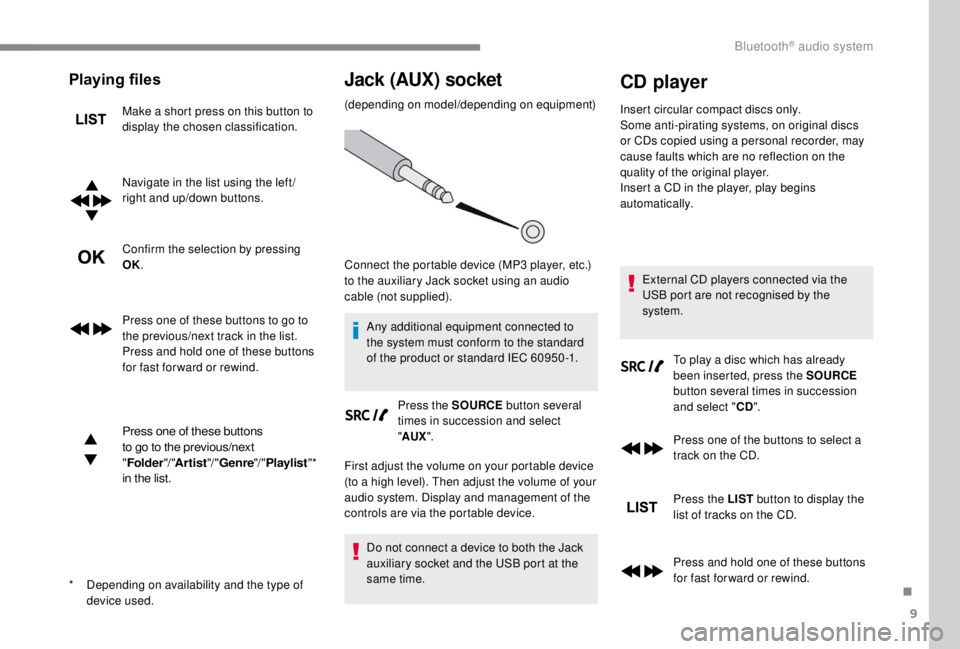
Jack (AUX) socket
(depending on model/depending on equipment)
Any additional equipment connected to
the system must conform to the standard
of the product or standard IEC 60950 -1. Press the SOURCE button several
times in succession and select
" AUX ".
First adjust the volume on your portable device
(to a high level). Then adjust the volume of your
audio system. Display and management of the
controls are via the portable device.
Do not connect a device to both the Jack
auxiliary socket and the USB port at the
same time.
CD player
Insert circular compact discs only.
Some anti-pirating systems, on original discs
or CDs copied using a personal recorder, may
cause faults which are no reflection on the
quality of the original player.
Insert a CD in the player, play begins
automatically.
External CD players connected via the
USB port are not recognised by the
system. To play a disc which has already
been inserted, press the SOURCE
button several times in succession
and select " CD".
Press one of the buttons to select a
track on the CD.
Press the LIST button to display the
list of tracks on the CD.
Press and hold one of these buttons
for fast for ward or rewind.
*
D
epending on availability and the type of
device used. Connect the portable device (MP3
player, etc.)
to the auxiliary Jack socket using an audio
cable (not supplied).
.
Bluetooth® audio system
Page 392 of 416
10
Playing an MP3 compilation
Insert an MP3 compilation in the CD player.
T he audio equipment searches for all of the
music tracks, which may take anything between
a few seconds and several tens of seconds,
before play begins.
On a single disc, the CD player can
read up to 255
MP3 files spread over
8
directory levels.
However, it is advisable to keep to a limit
of two levels to reduce the access time
before the CD is played.
The folder structure is not obser ved during
playback.
All of the files are displayed on a single
level.
To play a disc which has already
been inserted, press the SOURCE
button several times in succession
and select " CD".
Press one of the buttons to select a
folder on the CD.
Press one of the buttons to select a
track on the CD. Press the LIST
button to display
the list of directories of the
MP3 compilation.
Press and hold one of these buttons
for fast for ward or rewind.
Bluetooth® audio streaming
Streaming allows music files on the telephone
to be played via the vehicle's loudspeakers.
Connect the telephone.
(Refer to the " Pairing a telephone " section).
Activate the streaming source by
pressing SOURCE .
In certain cases, play of the audio
files must be initiated from the
keypad.
Audio files can be selected using the buttons
on the audio system control panel and the
steering mounted controls. The contextual
information can be displayed in the screen, if
the telephone supports the function. The audio
quality depends on the quality of transmission
by the telephone.
Connecting Apple® players
Connect the Apple® player to the USB port
using a suitable cable (not supplied).
Play starts automatically.
Control is via the audio system.
The classifications available are those of the
portable device connected (artists/albums/
genres/playlists).
The version of software in the audio system
may not be compatible with the generation of
your Apple
® p l aye r.
Information and advice
The CD player can play files with ".mp3",
".wma", ".wav" and ".aac" file extensions, with a
bit rate of 32
to 320 Kbps.
It also supports TAG mode (ID3
tag, WMA
TAG) .
No other file types (".mp4", etc.) can be read.
Files of the ".wma" type should be to the wma
9
standard.
The sampling rates supported are 11, 22,
44
and 48 kHz.
Bluetooth® audio system
Page 396 of 416

14
Ending a call
In the contextual menu, select
"Hang up " to end the call.
Confirm with OK.
Microphone off
(so that the caller cannot hear) In the contextual menu:
-
s
elect "Micro OFF " to switch off
the microphone.
-
d
eselect "Micro OFF " to switch
the microphone on.
Confirm with OK.
Telephone mode
In the contextual menu:
- s elect " Telephone mode " to
transfer the call to the telephone
(for example, to leave the
vehicle while continuing a
conversation).
-
d
eselect " Telephone mode " to
transfer the call to the vehicle. Confirm with OK.
If the contact has been cut off, when you
reconnect on returning to the vehicle,
the Bluetooth connection will be restored
automatically and sound returned to the
system (depending on the compatibility of the
telephone).
In some cases, the combined mode must be
activated from the telephone.
Interactive voice response
From the contextual menu, select
" DTMF tones " and confirm to use
the digital keypad to navigate in the
interactive voice response menu.
Confirm with OK.
Consultation call
From the contextual menu, select
" Switch " and validate to return to a
call left on hold.
Confirm with OK.
Directory
To access the directory, press and
hold SRC/TEL .
Select " Directory " to see the list of
contacts.
Confirm with OK.
To modify the contacts saved in the
system, press MENU then select
" Telephone " and confirm.
Select " Directory management "
and confirm.
Yo u c a n :
-
"Consult an entr y ",
-
"Delete an entry ",
-
"Delete all entries ".
The system accesses the
telephone's contacts directory,
depending on its compatibility, and
while it is connected via Bluetooth.
Bluetooth® audio system
Page 398 of 416

16
QUESTIONRESPONSESOLUTION
With the engine off, the audio system switches
off after a few minutes of use. When the engine is switched off, the audio
system operating time depends on the state of
charge of the battery.
The switch-off is normal: the audio system
switches to economy mode and switches off to
prevent discharging the vehicle's battery.Turn the ignition on to increase the charge of
the battery.
The message "the audio system is overheated"
appears on the display. In order to protect the installation if the
surrounding temperature is too high, the audio
system switches to an automatic thermal
protection mode leading to a reduction in
volume or the CD play stopping.Switch the audio system off for a few minutes to
allow the system to cool.
Frequently asked questions
The following information groups together the answers to the most frequently asked questions concerning your audio system.
Bluetooth® audio system
Page 399 of 416

17
Radio
QUESTIONRESPONSE SOLUTION
There is a difference in sound quality
between the different audio sources
(radio, CD, etc.). To allow for optimal listening quality, the audio
settings (Volume, Bass, treble, Ambience,
Loudness) can be tailored to different sound
sources, which can generate audible differences
when changing source (radio, CD, etc.). Check that the audio settings (Volume, Bass,
Treble, Ambience and Loudness) are adapted to
the sources listened to. It is advisable to set the
audio functions (Bass, Treble, Front-Rear Balance
and Left-Right Balance) to the middle position,
select the musical ambience "None" and set the
loudness correction to the "Active" position in CD
mode or to the "Inactive" position in radio mode.
The preset stations do not function (no
sound, 87.5
MHz is displayed, etc.). An incorrect waveband is selected.
Press the BAND button to return to the waveband
(FM, FM2, DAB, AM) on which the stations are
preset.
The traffic announcement (TA) is displayed.
I do not receive any traffic information. The radio station is not part of the regional traffic
information network. Tune to a radio station which broadcasts traffic
information.
The reception quality of the tuned radio
station gradually deteriorates or the
stored stations are not working (no sound,
87.5
MHz is displayed, etc.). The vehicle is too far from the transmitter of
the station or no transmitter is present in the
geographical area.
Activate the RDS function to allow the system to
see if a more power ful transmitter is within the
geographic area.
The environment (hills, buildings, tunnels,
basement car parks, etc.) block reception, including
in RDS mode. This phenomenon is normal and does not indicate
a failure of the audio equipment.
The aerial is absent or has been damaged (for
example when going through an automatic car
wash or in an underground car park). Have the aerial checked by a franchised dealer.
Sound cut-outs of 1
to 2 seconds in radio
mode. During this brief sound cut-out, the RDS searches
for another frequency giving better reception of the
station. Switch off the RDS function if the phenomenon is
too frequent and always on the same route.
.
Bluetooth® audio system
Page 406 of 416
308
G
H
Gauge, fuel............................................. 237-238
Gearbox, automatic .......................18, 179, 186,
189 -193, 198 -20 0, 251
Gearbox, electronic
......179, 186, 194-200, 251
Gearbox, manual
....................18, 18 6, 18 6 -187,
198 -20 0, 19 9, 251
Gear lever, automatic gearbox
..............18 9 -19 3
Gear lever, electronic gearbox
.....................2 51
Gear lever, manual gearbox
.........................187
Gear shift indicator ~ Gear efficiency indicator
..................................... 188
Glove box
...................................................... 109
G . P. S .
.............................................................. 14
Grip control
............................................ 14 8 -15 0
Guide-me-home
..................................... 13 3 -13 4
Hazard warning lamps
..........................143, 257
Hazard warning lamps, automatic operation
....143
Headlamp adjustment
...................................137
Headlamp beam height
................................. 13
7
Headlamp dipping, automatic
.......................13 6
Electronic brake force
distribution (EBFD)
.............................. 14
5 -14 6
Emergency call
......................................
143 -14 4
Emergency braking assistance (EBA)
...... 14
5 -14 6
Emissions control system, SCR
.....................
23
Energy economy mode
.......................... 24
2-243
Engine compartment
.................................... 2
47
Engine, Diesel
........................
18, 240, 247, 257,
295-296, 298-299
Engine oil pressure
......................................... 15
Engines
......................................................... 294
Environment
............................................ 4 6, 127
ESC/ASR
................................................145 -14 6
ESC (electronic stability control)
.................... 21
E
F
Fatigue detection .......................................... 223
Filling the fuel tank ........................237-238, 240
Filter, air
........................................................ 250
Filter, oil
................
......................................... 250
Filter, particle
........................................ 250-251
Filter, passenger compartment
.....................250
Fitting a wheel
....................................... 2 6 9 -271
Fitting roof bars
..................................... 243 -244
Fittings, interior
.............................. 10
8 -109, 113
Fittings, rear
.................................................. 113
Fitting the mat
............................................... 108
Flap, fuel filler
......................................... 237-238
Flap, removable
..............................
..........94-97
Floor cab
....................................................... 282
Foglamp, rear
........................ 131, 278, 280, 282
DDAB (Digital Audio
Broadcasting) – Digital radio ............25, 9, 6 -7
Date (setting)
...................................... 38, 36, 20
Daytime running lamps
.........13 0, 132, 273 -275
Deactivating the passenger airbag ...154, 159 -16 0
Deactivation of DSC (ESC)
........................... 147
Deadlocking
.................................. 43, 50, 55 -56
Defrosting/demisting
....................... 8 6, 120 -12 2
Diagnostic system, engine
.............................. 17
D
imensions
..............................
..................... 301
Dipstick
................
............................ 30, 248-249
Direction indicators
........................ 26, 132, 273,
276 -278, 280, 282
Display, head-up
...............................
....200-201
Display screen, instrument panel
................. 188
Door pockets
...............................
.......... 108, 110
Doors
............................................................... 63
Doors, rear
................................................. 7 7-78
Doors, side-hinged
........ 5
4-56, 77-79, 278-279
Driver’s attention warning
............................. 223
Driver's door open warning
............................. 64
Driving abroad ............................................... 131
Driving time warning
..................................... 223
Dynamic stability control (DSC)
....... 21, 14 5 -15 0
Courtesy lamp, front
..............
128 -12 9, 279, 282
Courtesy lamp, rear
...............
128 -12 9, 279, 282
Courtesy lamps
......................
128 -12 9, 279, 282
Crew cab, fixed
......................................
10 6 -107
Crew cab, folding
..........................................
107
Cruise control
.................
202, 204-205, 209-211
Cruise control, adaptive
................
204 -205, 211-215, 217-218
Cruise control by speed limit recognition
...............................
...........
204-205
Cup holder
.....................................................
108Economy mode
......................................
24
2-243
Electric windows
.......................................
83-84Foglamps
......................................................
2 74
Foglamps, front
........
26, 131, 134-135, 274, 277
Foglamps, rear
.............................................. 13
1
Frequency (radio)
......................................
24-25
Fuel ................................................................ 240
Fuel consumption
......................................
36 -37
Fuel tank .......................................................... 16
Fusebox, engine compartment
.....................
287
Fuses
..................................................... 28
3-287
Alphabetical index