Page 108 of 232
106
If the windscreen is damaged, it is strongly
recommended that you go to a PEUGEOT
dealer or a
qualified workshop for any
replacement and calibration of the camera.
Operation
The system starts automatically when moving
of f.
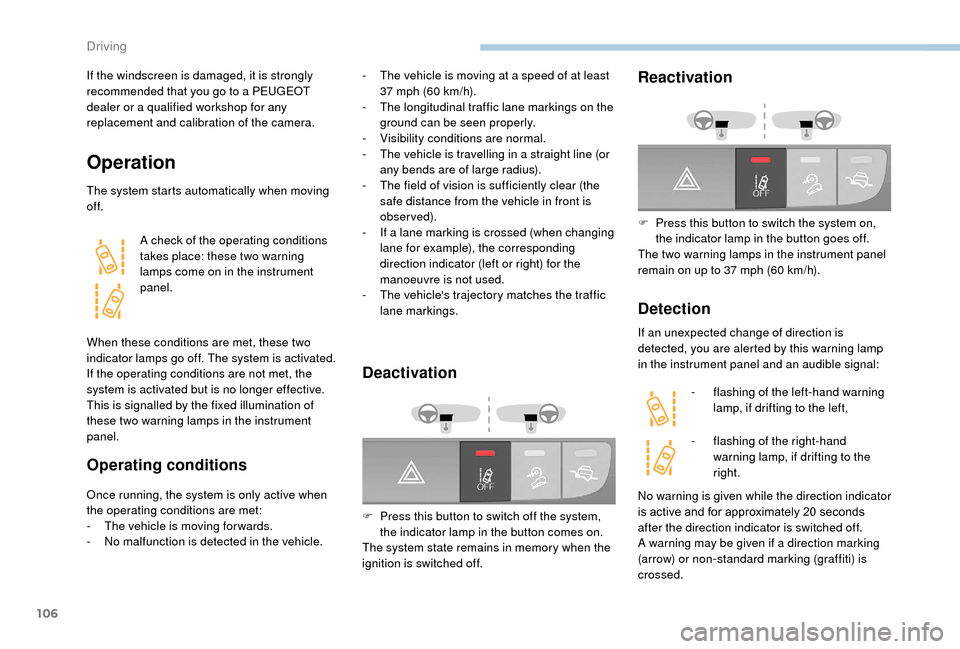
A check of the operating conditions
takes place: these two warning
lamps come on in the instrument
panel.
When these conditions are met, these two
indicator lamps go off. The system is activated.
If the operating conditions are not met, the
system is activated but is no longer effective.
This is signalled by the fixed illumination of
these two warning lamps in the instrument
panel.
Operating conditions
Once running, the system is only active when
the operating conditions are met:
-
T
he vehicle is moving for wards.
-
N
o malfunction is detected in the vehicle.
Deactivation
F Press this button to switch off the system, the indicator lamp in the button comes on.
The system state remains in memory when the
ignition is switched off.
Reactivation
F Press this button to switch the system on, the indicator lamp in the button goes off.
The two warning lamps in the instrument panel
remain on up to 37
mph (60 km/h).
Detection
If an unexpected change of direction is
detected, you are alerted by this warning lamp
in the instrument panel and an audible signal:-
f
lashing of the left-hand warning
lamp, if drifting to the left,
-
f
lashing of the right-hand
warning lamp, if drifting to the
right.
-
T
he vehicle is moving at a
speed of at least
37
mph (60
km/h).
-
T
he longitudinal traffic lane markings on the
ground can be seen properly.
-
V
isibility conditions are normal.
-
T
he vehicle is travelling in a
straight line (or
any bends are of large radius).
-
T
he field of vision is sufficiently clear (the
safe distance from the vehicle in front is
observed).
-
I
f a
lane marking is crossed (when changing
lane for example), the corresponding
direction indicator (left or right) for the
manoeuvre is not used.
-
T
he vehicle's trajectory matches the traffic
lane markings.
No warning is given while the direction indicator
is active and for approximately 20 seconds
after the direction indicator is switched off.
A warning may be given if a
direction marking
(arrow) or non-standard marking (graffiti) is
crossed.
Driving
Page 112 of 232

110
Under-inflation detection
The tyre under-inflation detection system
is a driving aid which does not replace the
need for vigilance on the part of the driver.This system does not relieve you of
the monthly check of the tyre inflation
pressures (including the spare) and before
a
long journey.
Driving with under-inflated tyres impairs
handling, extends braking distances and
causes premature tyre wear, particularly
in adverse conditions (heavy loads, high
speeds, long journeys).
Driving with under-inflated tyres
increases fuel consumption. The tyre pressure measurement unit can be
configured with the MODE
button: in the "Tyre
pressure measurement" menu, select "psi/bar/
k Pa".
For more information on Vehicle
configuration , refer to the corresponding
section.
Under-inflation warning
This warning is indicated by
continuous illumination of this lamp,
an audible signal and, depending on
the equipment installed, a message
displayed on the screen.
System which automatically checks the
pressures of the tyres while driving.
The system continuously monitors the
pressures of the four tyres, as soon as the
vehicle is moving.
A pressure sensor is located in the valve of
each tyre (except the spare wheel).
The system triggers an alert as soon as it
detects a
drop in the inflation pressure of one
or more tyres. In the event of a
problem with one of the tyres,
depending on equipment the symbol or the
message appears to identify it.
-
R
educe speed immediately, avoid excessive
steering movements and sudden braking.
-
S
top as soon as possible, as traffic
conditions allow.
-
I
n case of a puncture, use the temporary
puncture repair kit or the spare wheel
(depending on equipment).
-
I
n the event of under-inflation:
•
i
f you have a compressor (such as the
one in the temporary puncture repair kit)
check the pressures of the four tyres
when cold.
or
The tyre pressure specifications for your
vehicle can be found on the tyre pressure
label.
Tyre pressures should be checked when
the tyres are "cold" (vehicle stopped for
1
hour or after a
journey of less than
6
miles (10
km) at moderate speeds).
Other wise, add 0.3
bar to the values
indicated on the label.
For more information on Identification
markings , including in particular the tyre
pressure label, refer to the corresponding
section.
Driving
Page 201 of 232

15
- Unit of measurement.
Set the units used for the display of fuel
consumption, distance and temperature.
-
T
ouch screen beep .
Activate or deactivate the audible signal
when touching a
screen button.
-
D
isplay Trip B .
Display Trip B in the driver's screen.
Voice commands
-
V
oice response time .
Set the response time for the voice system.
-
D
isplay command list .
Display suggestions with the different
options during a
voice session.
Clock and Date
-
S
et time and format .
Set the time.
-
Di
splay time mode .
Activate or deactivate display of the digital
clock in the status bar.
-
S
ync time .
Activate or deactivate the automatic display
of time.
-
S
et date .
Set the date. Safety/Help
-
R eversing camera.
Display the reversing camera.
-
C
amera delay.
Maintain the display in the screen of the
image from the reversing camera for
a
maximum of ten seconds or up to 11 mph
(18
km/h).
Lamps
-
D
aytime running lamps.
Activate or deactivate the automatic
illumination of headlamps when starting.
Doors and locking
-
A
utoclose.
Activate or deactivate the automatic locking
of doors when the vehicle is moving. -
A utomatic radio
.
Adjust the radio on startup or restore the
active state the last time the ignition was
switched to STOP.
-
R
adio off delay.
Adjust the setting.
-
A
UX vol. adjustment.
Adjust the settings.
Telephone/Bluetooth
®
- Tel. connected .
Start the Bluetooth® connection of the
device selected.
Delete the selected device.
Save the selected device in favourites.
Adjust the settings.
-
A
dd device .
Add a
new peripheral device.
-
A
udio connect .
Connect a
device in audio only.
Audio
-
E
qualiser .
Adjust the bass, mid-range and treble.
-
B
alance/Fade .
Adjust the balance of the speakers, front
and rear, left and right.
Press the button in the middle of the arrows
to balance the adjustments.
-
V
olume/Speed .
Select the desired setting, the option is
highlighted.
-
L
oudness .
Optimise audio quality at low volume. Radio settings
-
D
AB announcements .
Activate or deactivate announcements.
Activate or deactivate the options: Alarm,
Event announc., Stock market flash, News
flash, Programme info, Special event,
Sports info, Public transp. info, Alarm
announcement, Weather flash.
.
Touch screen Audio-Telematic system