2018 PEUGEOT 5008 display
[x] Cancel search: displayPage 184 of 364
182
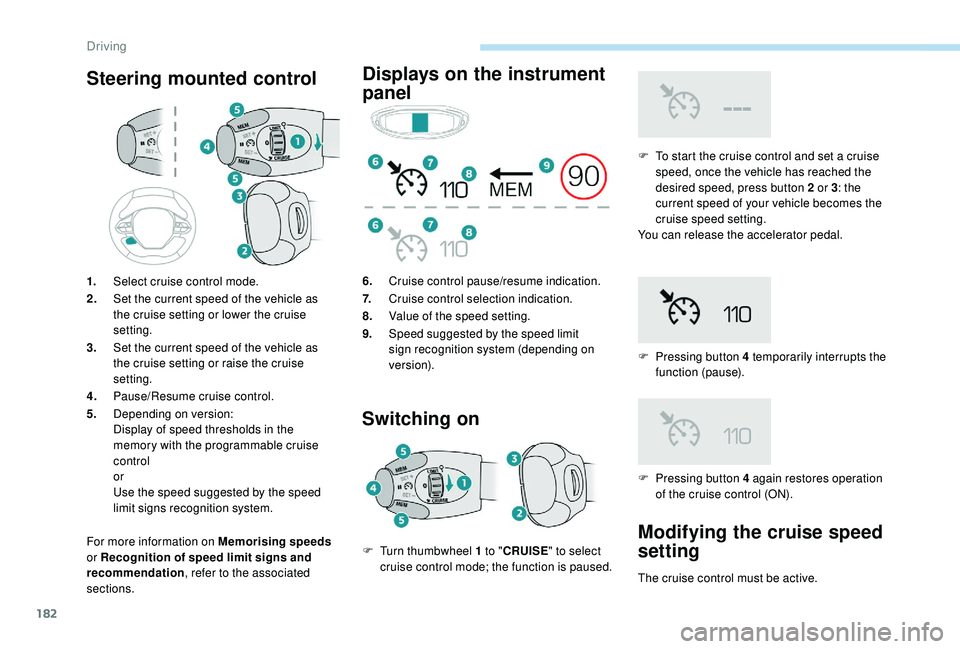
Steering mounted control
For more information on Memorising speeds
or Recognition of speed limit signs and
recommendation , refer to the associated
sections.
Displays on the instrument
panel
Switching on
F To start the cruise control and set a cruise
speed, once the vehicle has reached the
desired speed, press button 2
or 3: the
current speed of your vehicle becomes the
cruise speed setting.
You can release the accelerator pedal.
F
P
ressing button 4 temporarily interrupts the
function (pause).
1.
Select cruise control mode.
2. Set the current speed of the vehicle as
the cruise setting or lower the cruise
setting.
3. Set the current speed of the vehicle as
the cruise setting or raise the cruise
setting.
4. Pause/Resume cruise control.
5. Depending on version:
Display of speed thresholds in the
memory with the programmable cruise
control
or
Use the speed suggested by the speed
limit signs recognition system. 6.
Cruise control pause/resume indication.
7. Cruise control selection indication.
8. Value of the speed setting.
9. Speed suggested by the speed limit
sign recognition system (depending on
ve r s i o n).
F
T
urn thumbwheel 1
to " CRUISE " to select
cruise control mode; the function is paused. F
P
ressing button 4 again restores operation
of the cruise control (ON).
Modifying the cruise speed
setting
The cruise control must be active.
Driving
Page 185 of 364
183
To modify the cruise speed setting from the
current speed of the vehicle:
F
i
n steps of + or - 1 mph (km/h), make
repeated short presses on button 2
or 3,
F
c
ontinuously, in steps of + or - 5 mph (km/h),
press and hold button 2
or 3.
Take care: pressing and holding button
2
or 3 results in a rapid change in the
speed of your vehicle.
As a
precaution, it is recommended
that the cruise speed chosen be close
to the current speed of your vehicle, so
as to avoid any sudden acceleration or
deceleration of the vehicle.
To modify the cruise speed setting using
memorised speed settings and from the touch
screen:
F
p
ress button 5 to display the six memorised
speed settings,
F
p
ress the button for the desired speed
setting.
This setting becomes the new cruise speed. F
m ake a first press on button 5; a message
is displayed to confirm the memorisation
request,
F
p
ress button 5 again to save the suggested
speed.
The speed displays immediately in the
instrument panel as the new speed setting.
Temporarily exceeding the
programmed speed
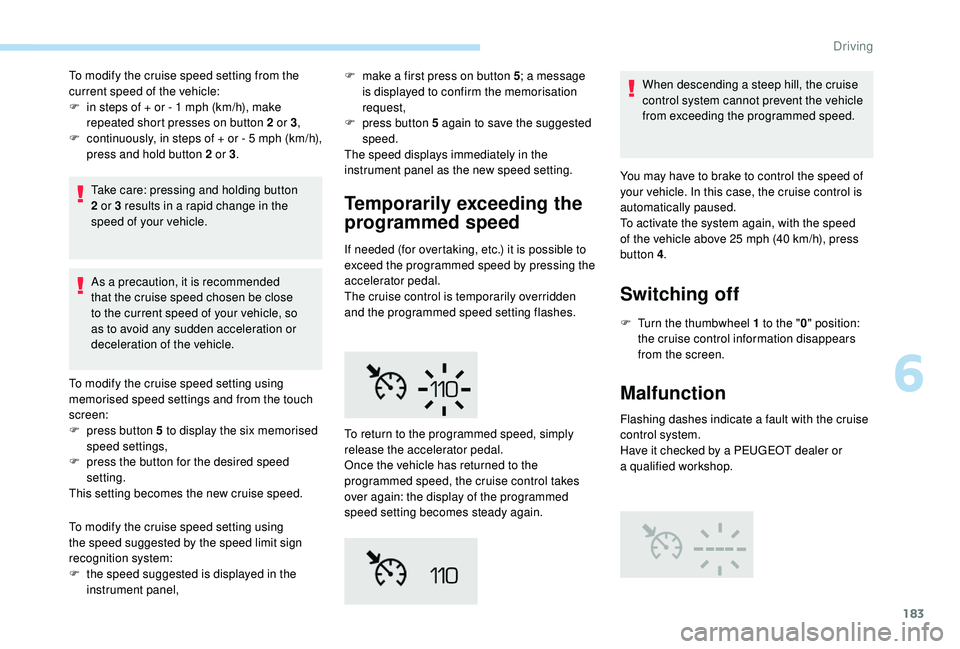
If needed (for overtaking, etc.) it is possible to
exceed the programmed speed by pressing the
accelerator pedal.
The cruise control is temporarily overridden
and the programmed speed setting flashes. When descending a
steep hill, the cruise
control system cannot prevent the vehicle
from exceeding the programmed speed.
To modify the cruise speed setting using
the speed suggested by the speed limit sign
recognition system:
F
t
he speed suggested is displayed in the
instrument panel, To return to the programmed speed, simply
release the accelerator pedal.
Once the vehicle has returned to the
programmed speed, the cruise control takes
over again: the display of the programmed
speed setting becomes steady again. You may have to brake to control the speed of
your vehicle. In this case, the cruise control is
automatically paused.
To activate the system again, with the speed
of the vehicle above 25
mph (40 km/h), press
button 4 .
Switching off
F Turn the thumbwheel 1 to the "0" position:
the cruise control information disappears
from the screen.
Malfunction
Flashing dashes indicate a fault with the cruise
c ontrol system.
Have it checked by a
PEUGEOT dealer or
a
qualified workshop.
6
Driving
Page 187 of 364
185
The adaptive cruise control system
is a driving aid that cannot, in any
circumstances, replace the need to obser ve
speed limits and safety distances, nor the
need for vigilance on the part of the driver.
It is recommended that you always keep
your feet close to the pedals.
The driver must be ready to take back
control of their vehicle at any time, using the
brake or accelerator pedal as appropriate.
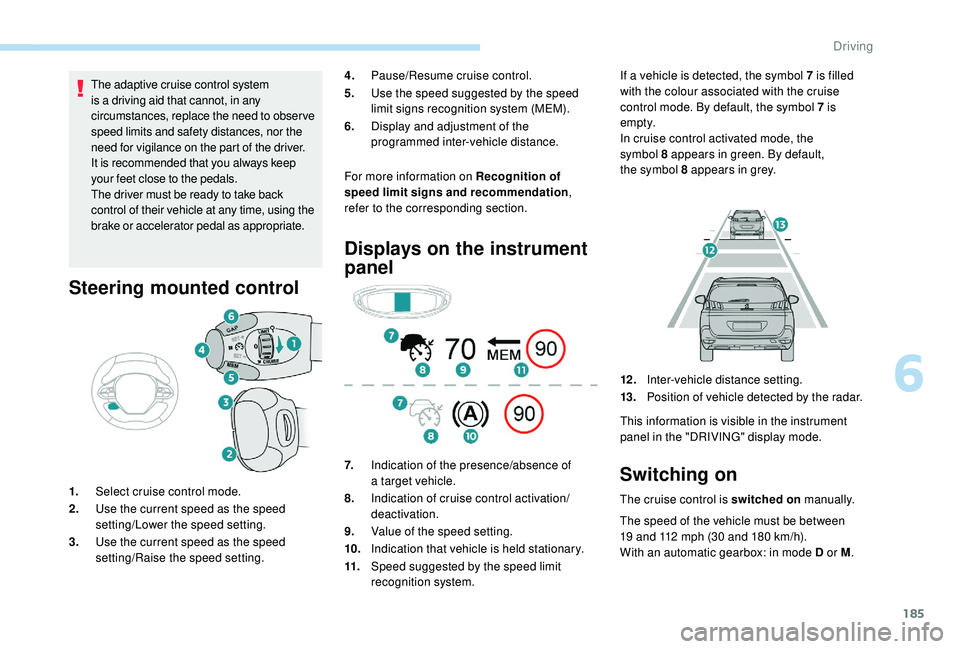
Steering mounted control
For more information on Recognition of
speed limit signs and recommendation ,
refer to the corresponding section.
1. Select cruise control mode.
2. Use the current speed as the speed
setting/Lower the speed setting.
3. Use the current speed as the speed
setting/Raise the speed setting.
Displays on the instrument
panel
7.Indication of the presence/absence of
a
target vehicle.
8. Indication of cruise control activation/
deactivation.
9. Value of the speed setting.
10. Indication that vehicle is held stationary.
11. Speed suggested by the speed limit
recognition system. If a
vehicle is detected, the symbol 7 is filled
with the colour associated with the cruise
control mode. By default, the symbol 7 is
e m pt y.
In cruise control activated mode, the
symbol 8 appears in green. By default,
the symbol 8 appears in grey.
4.
Pause/Resume cruise control.
5. Use the speed suggested by the speed
limit signs recognition system (MEM).
6. Display and adjustment of the
programmed inter-vehicle distance.
12 .Inter-vehicle distance setting.
13. Position of vehicle detected by the radar.
This information is visible in the instrument
panel in the "DRIVING" display mode.Switching on
The cruise control is switched on manually.
The speed of the vehicle must be between
19
and 112 mph (30 and 180 km/h).
With an automatic gearbox: in mode D or M .
6
Driving
Page 188 of 364
186
Pause
The adaptive cruise control can be paused
manually by:
-
a
ction by the driver:
•
O
n button 4 (Pause).
•
O
n the brake pedal.
•
O
n the electric parking brake control.
•
B
y changing from mode D to N with an
automatic gearbox.
When the cruise control is paused, it
can only be reactivated when all of the
safety conditions are met. The message
"Activation not possible, conditions
unsuitable" is displayed while reactivation is
not possible.
To reactivate the function, the driver
must accelerate to reach at least 19
mph
(30
km/h), then press one of the
buttons 2 ,
3 or 4.
As a safety measure, wait until the current
speed reaches the speed setting to
reactivate the function by pressing button 4 .
Versions fitted with an automatic
gearbox
Following braking of the vehicle bringing it
to a
complete stop, the system holds the
vehicle stationary; the cruise control is
paused.
The driver should press the accelerator
pedal to move off, then reactivate the
system above 19
mph (30 km/h) by
pressing button 2 , 3
or 4.
If the driver takes no action following
this immobilisation, the electric parking
brake is applied automatically after a
few
minutes.
Modification of the speed
setting
Modification from the current
speed
F By successive short presses on button 2 or
3 , to raise or lower the setting in steps of
1
mph (km/h).
F
B
y a maintained press on button 2 or 3, to
raise or lower the setting in steps of 5
mph
(km/h).
Take care: the maintained press on button
2
or 3 will cause a very quick change in
the speed of your vehicle.
Modification from the speed limit
sign recognition system
F The suggested speed is displayed in the instrument panel.
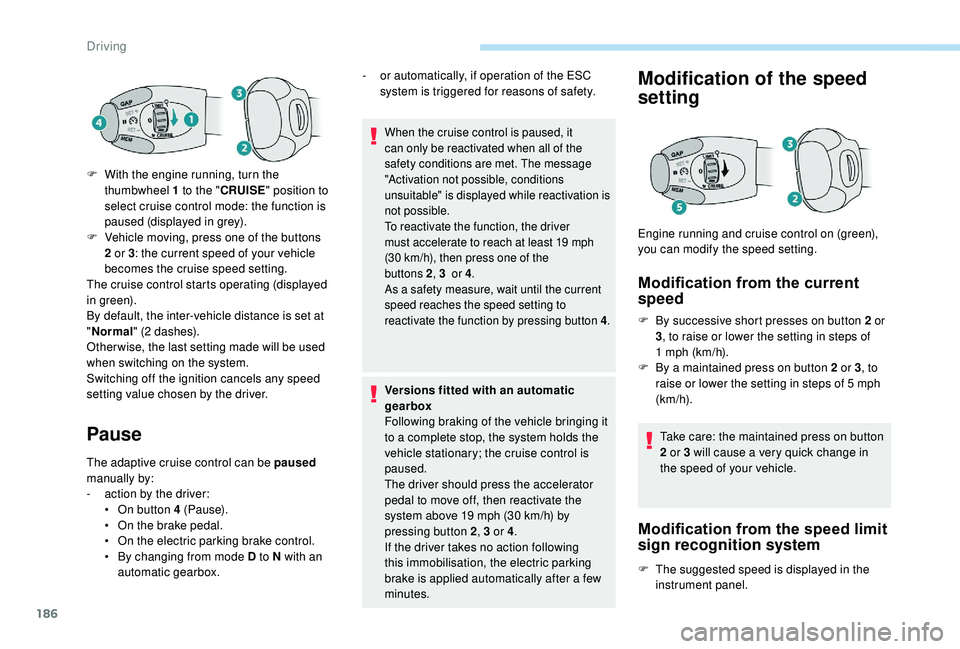
Engine running and cruise control on (green),
you can modify the speed setting.
F
W
ith the engine running, turn the
thumbwheel 1
to the "
CRUISE " position to
select cruise control mode: the function is
paused (displayed in grey).
F
V
ehicle moving, press one of the buttons
2
or 3
: the current speed of your vehicle
becomes the cruise speed setting.
The cruise control starts operating (displayed
in green).
By default, the inter-vehicle distance is set at
" Normal " (2
dashes).
Other wise, the last setting made will be used
when switching on the system.
Switching off the ignition cancels any speed
setting value chosen by the driver. -
o
r automatically, if operation of the ESC
system is triggered for reasons of safety.
Driving
Page 189 of 364
187
For more information on Recognition of
speed limit signs and recommendation,
refer to the corresponding section. F
M
ake an initial press on button 5
; a
message is displayed to confirm the
memorisation request.
F
P
ress button 5 again to save the suggested
speed.
The speed displays immediately in the
instrument panel as the new speed setting.
As a precaution, it is recommended
that you select a
cruise speed close to
the current speed of your vehicle, so
as to avoid any sudden acceleration or
deceleration of the vehicle.
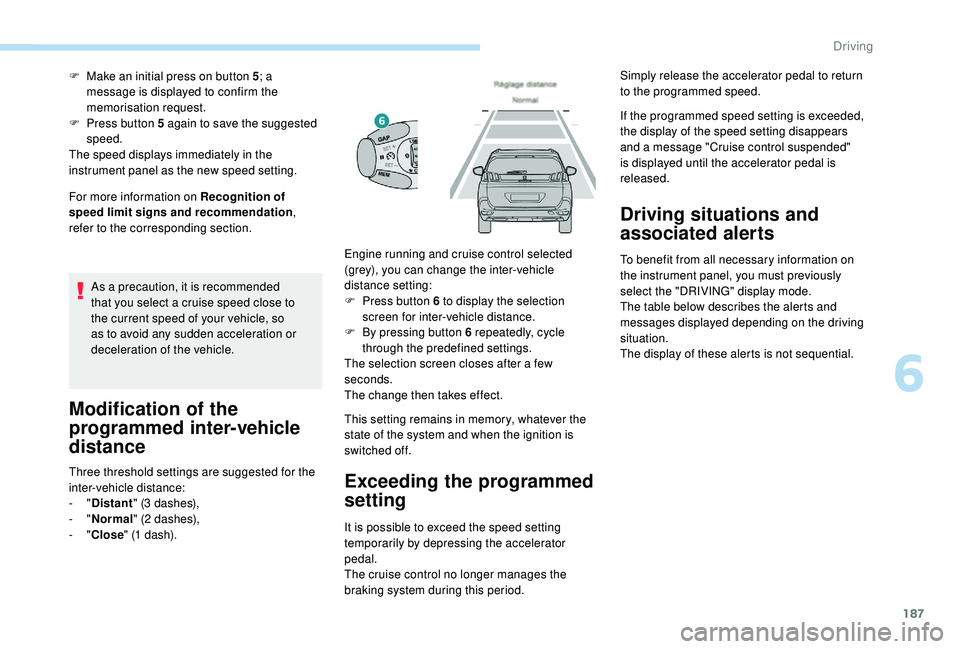
Modification of the
programmed inter-vehicle
distance
Three threshold settings are suggested for the
inter-vehicle distance:
-
"Distant " (3
dashes),
-
"Normal " (2
dashes),
-
"Close " (1
dash). This setting remains in memory, whatever the
state of the system and when the ignition is
switched off.Exceeding the programmed
setting
It is possible to exceed the speed setting
temporarily by depressing the accelerator
pedal.
The cruise control no longer manages the
braking system during this period. If the programmed speed setting is exceeded,
the display of the speed setting disappears
and a
message "Cruise control suspended"
is displayed until the accelerator pedal is
released.
Driving situations and
associated alerts
To benefit from all necessary information on
the instrument panel, you must previously
select the "DRIVING" display mode.
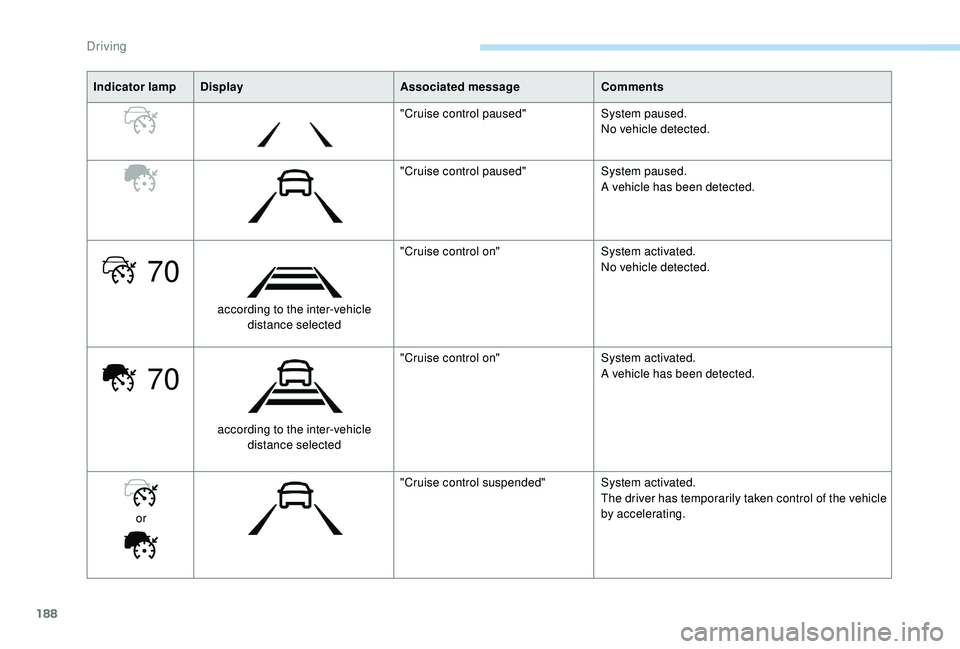
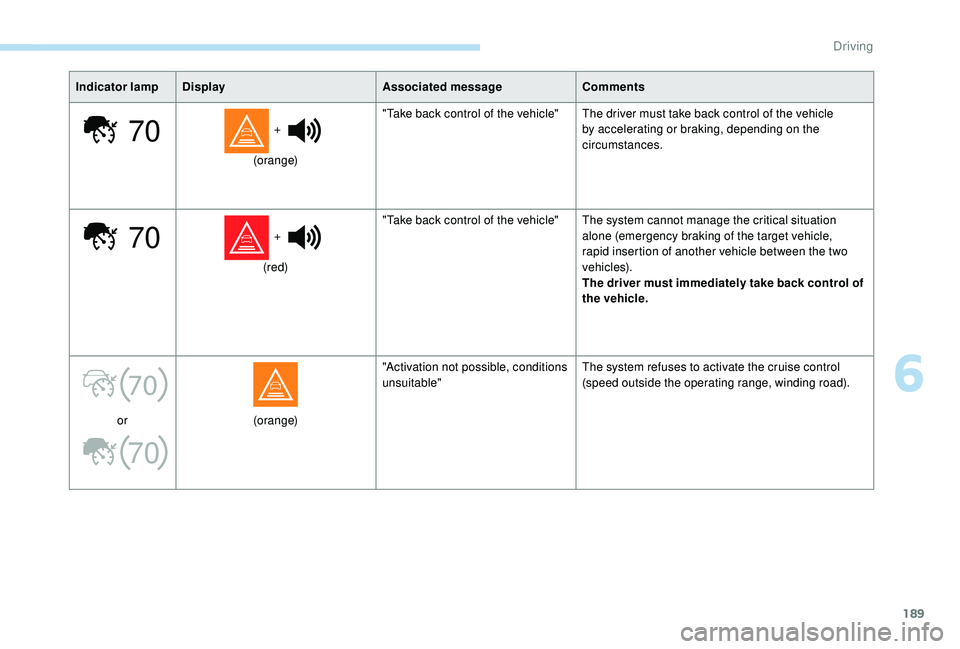
The table below describes the alerts and
messages displayed depending on the driving
situation.
The display of these alerts is not sequential.
Engine running and cruise control selected
(grey), you can change the inter-vehicle
distance setting:
F
P
ress button 6
to display the selection
screen for inter-vehicle distance.
F
B
y pressing button 6
repeatedly, cycle
through the predefined settings.
The selection screen closes after a
few
seconds.
The change then takes effect. Simply release the accelerator pedal to return
to the programmed speed.
6
Driving
Page 190 of 364
188
70
70
Indicator lampDisplay Associated message Comments
"Cruise control paused" System paused.
No vehicle detected.
"Cruise control paused" System paused.
A vehicle has been detected.
according to the inter-vehicle distance selected "Cruise control on"
System activated.
No vehicle detected.
according to the inter-vehicle distance selected "Cruise control on"
System activated.
A vehicle has been detected.
or "Cruise control suspended"
System activated.
The driver has temporarily taken control of the vehicle
by accelerating.
Driving
Page 191 of 364
189
70
70
70
70
Indicator lampDisplay Associated messageComments
+
(orange) "Take back control of the vehicle" The driver must take back control of the vehicle
by accelerating or braking, depending on the
circumstances.
+
(red) "Take back control of the vehicle" The system cannot manage the critical situation
alone (emergency braking of the target vehicle,
rapid insertion of another vehicle between the two
vehicles).
The driver must immediately take back control of
the vehicle.
or (orange)"Activation not possible, conditions
unsuitable"
The system refuses to activate the cruise control
(speed outside the operating range, winding road).
6
Driving
Page 192 of 364
190
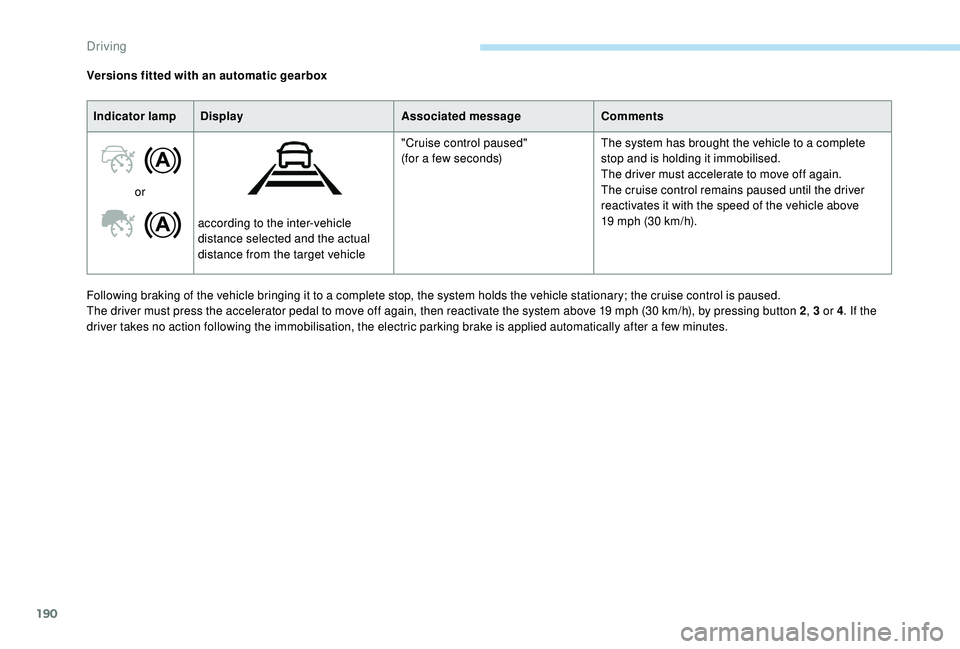
Following braking of the vehicle bringing it to a complete stop, the system holds the vehicle stationary; the cruise control is paused.
T he driver must press the accelerator pedal to move off again, then reactivate the system above 19 mph (30 km/h), by pressing button 2, 3
or 4. If the
driver takes no action following the immobilisation, the electric parking brake is applied automatically after a
few minutes.
Versions fitted with an automatic gearbox
Indicator lamp Display Associated messageComments
or according to the inter-vehicle
distance selected and the actual
distance from the target vehicle "Cruise control paused"
(for a few seconds)
The system has brought the vehicle to a complete
stop and is holding it immobilised.
The driver must accelerate to move off again.
The cruise control remains paused until the driver
reactivates it with the speed of the vehicle above
19 mph (30 km/h).
Driving