2018 PEUGEOT 5008 display
[x] Cancel search: displayPage 216 of 364
214
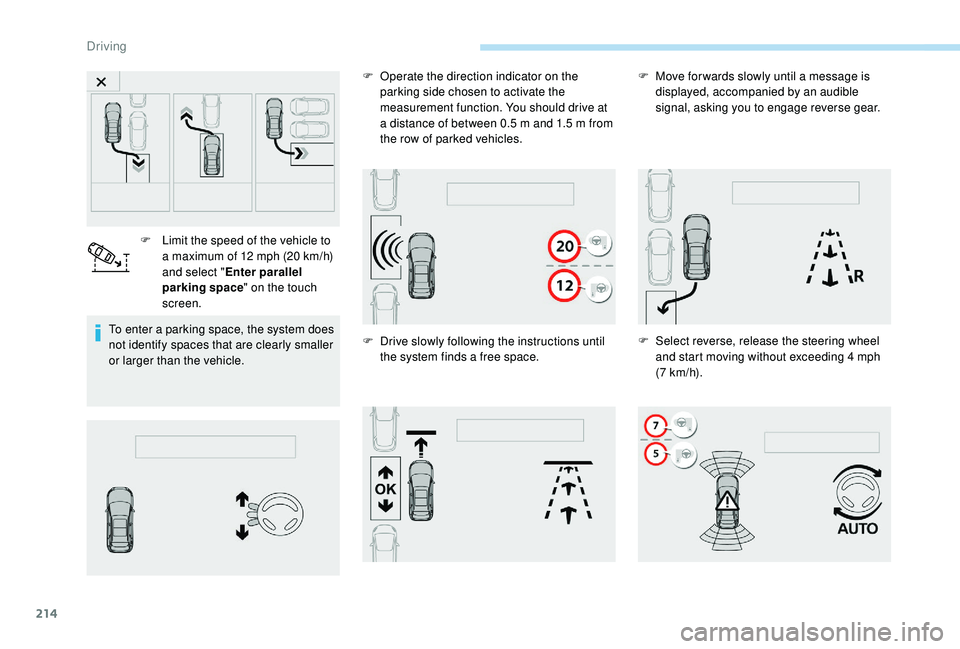
To enter a parking space, the system does
n ot identify spaces that are clearly smaller
or larger than the vehicle. F
L
imit the speed of the vehicle to
a maximum of 12 mph (20 km/h)
and select " Enter parallel
parking space " on the touch
screen. F
O
perate the direction indicator on the
parking side chosen to activate the
measurement function. You should drive at
a distance of between 0.5 m and 1.5 m from
the row of parked vehicles.
F D rive slowly following the instructions until
the system finds a
free space.F
M
ove for wards slowly until a message is
displayed, accompanied by an audible
signal, asking you to engage reverse gear.
F S elect reverse, release the steering wheel
and start moving without exceeding 4
mph
(7
km/h).
Driving
Page 217 of 364
215
Assistance in exiting from
a parallel parking space
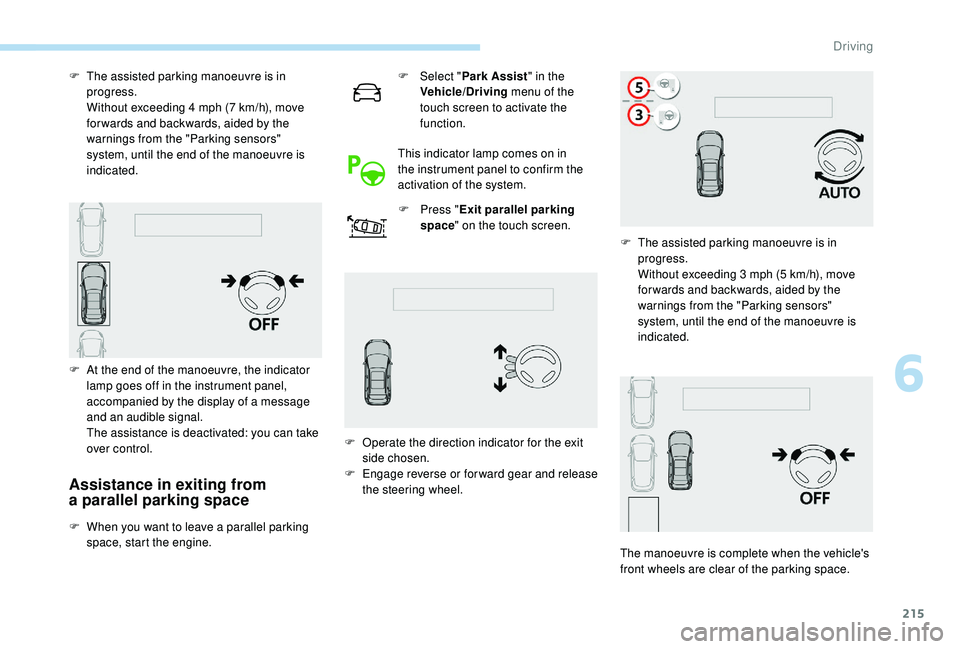
F When you want to leave a parallel parking
space, start the engine. F
Sel
ect "
Park Assist " in the
Vehicle/Driving menu of the
touch screen to activate the
function.
This indicator lamp comes on in
the instrument panel to confirm the
activation of the system. F
P
ress "
Exit parallel parking
space " on the touch screen.
F
T
he assisted parking manoeuvre is in
progress.
W
ithout exceeding 4 mph (7 km/h), move
for wards and backwards, aided by the
warnings from the "Parking sensors"
system, until the end of the manoeuvre is
indicated.
F
A
t the end of the manoeuvre, the indicator
lamp goes off in the instrument panel,
accompanied by the display of a message
and an audible signal.
T
he assistance is deactivated: you can take
over control. F
O
perate the direction indicator for the exit
side chosen.
F
E
ngage reverse or forward gear and release
the steering wheel. F
T
he assisted parking manoeuvre is in
progress.
W
ithout exceeding 3 mph (5 km/h), move
for wards and backwards, aided by the
warnings from the "Parking sensors"
system, until the end of the manoeuvre is
indicated.
The manoeuvre is complete when the vehicle's
front wheels are clear of the parking space.
6
Driving
Page 218 of 364
216
Assistance with bay parking
manoeuvres
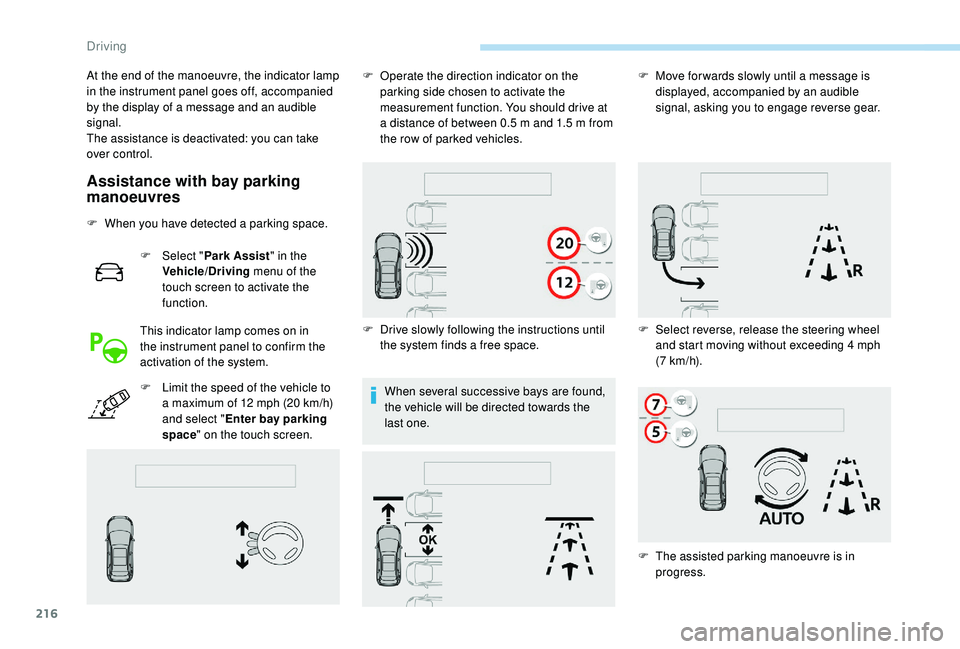
F When you have detected a parking space.
F
Sel
ect "Park Assist " in the
Vehicle/Driving menu of the
touch screen to activate the
function.
This indicator lamp comes on in
the instrument panel to confirm the
activation of the system.
F
L
imit the speed of the vehicle to
a
maximum of 12 mph (20 km/h)
and select " Enter bay parking
space " on the touch screen. When several successive bays are found,
the vehicle will be directed towards the
last one.
At the end of the manoeuvre, the indicator lamp
in the instrument panel goes off, accompanied
by the display of a
message and an audible
signal.
The assistance is deactivated: you can take
over control. F
O
perate the direction indicator on the
parking side chosen to activate the
measurement function. You should drive at
a distance of between 0.5 m and 1.5 m from
the row of parked vehicles.
F
D
rive slowly following the instructions until
the system finds a
free space.F
M
ove for wards slowly until a message is
displayed, accompanied by an audible
signal, asking you to engage reverse gear.
F
S
elect reverse, release the steering wheel
and start moving without exceeding 4
mph
(7
km/h).
F
T
he assisted parking manoeuvre is in
progress.
Driving
Page 219 of 364
217
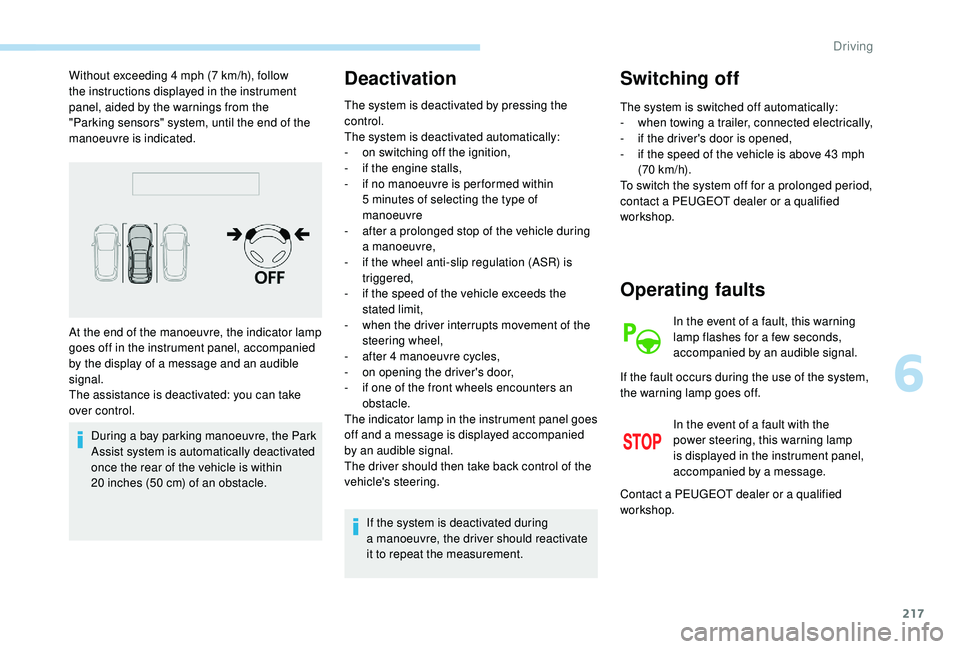
Without exceeding 4 mph (7 km/h), follow
t he instructions displayed in the instrument
panel, aided by the warnings from the
"Parking sensors" system, until the end of the
manoeuvre is indicated.
During a
bay parking manoeuvre, the Park
Assist system is automatically deactivated
once the rear of the vehicle is within
20
inches (50 cm) of an obstacle.Deactivation
The system is deactivated by pressing the
control.
The system is deactivated automatically:
-
o
n switching off the ignition,
-
i
f the engine stalls,
-
i
f no manoeuvre is per formed within
5
minutes of selecting the type of
manoeuvre
-
a
fter a prolonged stop of the vehicle during
a
manoeuvre,
-
i
f the wheel anti-slip regulation (ASR) is
triggered,
-
i
f the speed of the vehicle exceeds the
stated limit,
-
w
hen the driver interrupts movement of the
steering wheel,
-
a
fter 4 manoeuvre cycles,
-
o
n opening the driver's door,
-
i
f one of the front wheels encounters an
obstacle.
The indicator lamp in the instrument panel goes
off and a
message is displayed accompanied
by an audible signal.
The driver should then take back control of the
vehicle's steering.
If the system is deactivated during
a
manoeuvre, the driver should reactivate
it to repeat the measurement.
Switching off
The system is switched off automatically:
- w hen towing a trailer, connected electrically,
-
i
f the driver's door is opened,
-
i
f the speed of the vehicle is above 43 mph
(70
km/h).
To switch the system off for a
prolonged period,
contact a
PEUGEOT dealer or a qualified
workshop.
At the end of the manoeuvre, the indicator lamp
goes off in the instrument panel, accompanied
by the display of a
message and an audible
signal.
The assistance is deactivated: you can take
over control.
Operating faults
In the event of a fault, this warning
l amp flashes for a few seconds,
accompanied by an audible signal.
In the event of a
fault with the
power steering, this warning lamp
is displayed in the instrument panel,
accompanied by a
message.
If the fault occurs during the use of the system,
the warning lamp goes off.
Contact a
PEUGEOT dealer or a qualified
workshop.
6
Driving
Page 222 of 364
220
Fuel
Fuel tank capacity: approximately 56 litres.
R eser ve level: 6 litres.
Low fuel level
If your vehicle is fitted with Stop & Start,
never refuel with the engine in STOP
mode; you must switch off the ignition
using the key, or the START/STOP button
if your vehicle has
K
eyless Entry and
Starting.
Refuelling
If you have put in the wrong fuel for your
vehicle, you must have the fuel tank
drained and filled with the correct fuel
before starting the engine.
When the low fuel level is reached
in the fuel tank, this warning lamp
comes on in the instrument panel,
accompanied by the display of
a
message and an audible signal.
When it first comes on, about
6
litres of fuel is left in the tank.
Until sufficient fuel is added, this warning lamp
appears every time the ignition is switched on,
accompanied by the display of a
message and
an audible signal. When driving, this message
and audible signal are repeated with increasing
frequency as the fuel level drops towards 0 .
Refuel as soon as possible to avoid running out
of fuel.
For more information on Running out of fuel
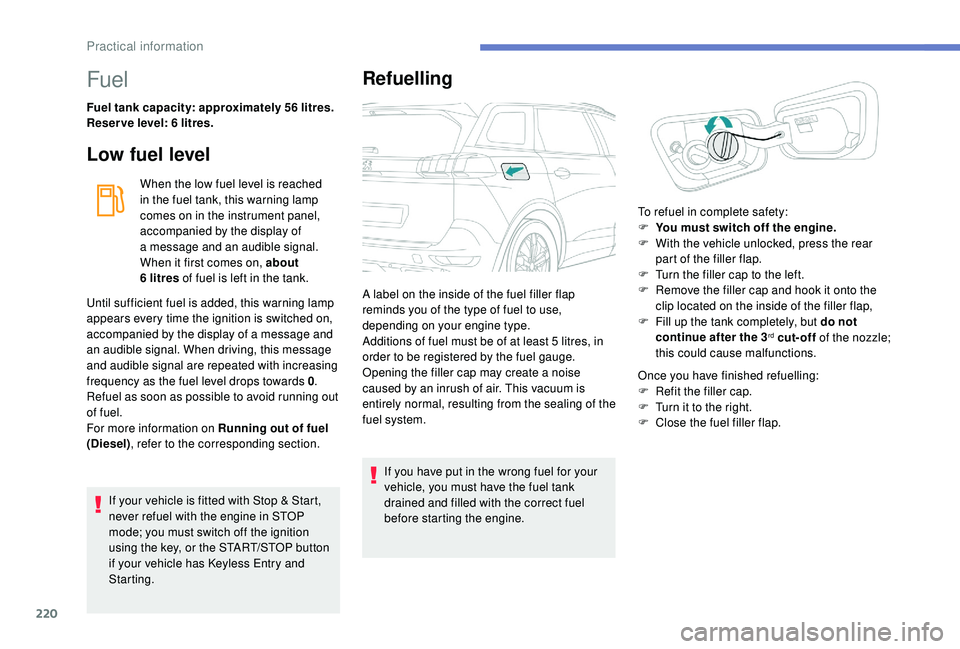
(Diesel) , refer to the corresponding section. A label on the inside of the fuel filler flap
reminds you of the type of fuel to use,
depending on your engine type.
Additions of fuel must be of at least 5
litres, in
order to be registered by the fuel gauge.
Opening the filler cap may create a noise
caused by an inrush of air. This vacuum is
entirely normal, resulting from the sealing of the
fuel system. Once you have finished refuelling:
F
R
efit the filler cap.
F
T
urn it to the right.
F
C
lose the fuel filler flap.
To refuel in complete safety:
F
Y
ou must switch off the engine.
F
W
ith the vehicle unlocked, press the rear
part of the filler flap.
F
T
urn the filler cap to the left.
F
R
emove the filler cap and hook it onto the
clip located on the inside of the filler flap,
F
F
ill up the tank completely, but do not
continue after the 3
rd cut-off of the nozzle;
this could cause malfunctions.
Practical information
Page 261 of 364

259
Fuse N°Rating (A) Functions
F1 3
A
K
eyless Entry and Starting.
F2 5
AMultifunction screen.
F5 5
AReversing camera, parking sensors.
F7 10
AHi-Fi amplifier.
F8 20
ARear wiper.
F10 30
ALocks.
F11 30
ALocks.
F17 10
ABoot 12
V accessory socket.
F18 5
AEmergency and assistance calls.
F22 3
AGlove box lighting.
F26 3
ASeat belts not fastened warning lamps display.
F27 3
ARain/sunshine sensor.
F31 5
AAirbags.
F33 15
AFront 12
V accessory socket
F35 5
AInstrument panel.
F36 20
AAudio system, touch screen, CD player, audio/
navigation system.
Fuse N° Rating (A) Functions
F17 10
AStoring driving positions.
Version 1 (Full)
Box 1
Box 2
8
In the event of a breakdown
Page 277 of 364
1
PEUGEOT Connect Nav
GPS satellite navigation –
Applications – Multimedia
audio system – Bluetooth
®
telephone
Contents
First steps
2
S
teering mounted controls
3
M
enus
3
V
oice commands
5
N
avigation
1
1
Connected navigation
1
3
Applications
1
6
Radio
21
D
AB radio (Digital Audio Broadcasting)
2
2
Media
23
T
elephone
2
5
Settings
2
9
Frequently asked questions
3
2The different functions and settings
described vary according to the version
and configuration of your vehicle.
As a
safety measure and because it
requires sustained attention by the
driver, the pairing of a Bluetooth mobile
telephone with the Bluetooth hands-free
system of your audio system must be
done with the vehicle stationary and the
ignition on.
The system is protected in such a way that
it will only operate in your vehicle.
The display of the message Energy
Economy Mode signals that a change to
standby is imminent.
The link below gives access to OSS (Open
Source Software) codes for the system.
https://www.groupe-psa.com/fr/oss/
https://www.groupe-psa.com/en/oss/
.
PEUGEOT Connect Nav
Page 278 of 364
2
12:13
18,5 21,5
23 °CFirst steps
With the engine running, a press
mutes the sound.
With the ignition off, a press turns
the system on.
Adjustment of the volume.
Use the buttons on either side of or below the
touch screen for access to the menus, then
press the virtual buttons in the touch screen.
Depending on the model, use the "Source" or
"Menu" buttons on the left-hand side of the
touch screen for access to the menus, then
press the virtual buttons in the touch screen.
You can display the menus at any time by
pressing the screen briefly with three fingers.
All of the touch areas of the screen are white.
Press the cross to go back a
level.
Press "OK" to confirm. The touch screen is of the "capacitive"
type.
To clean the screen, use a
soft, non-
abrasive cloth (e.g. spectacles cloth) with
no additional product.
Do not use sharp objects on the screen.
Do not touch the screen with wet hands.
*
D
epending on equipment.
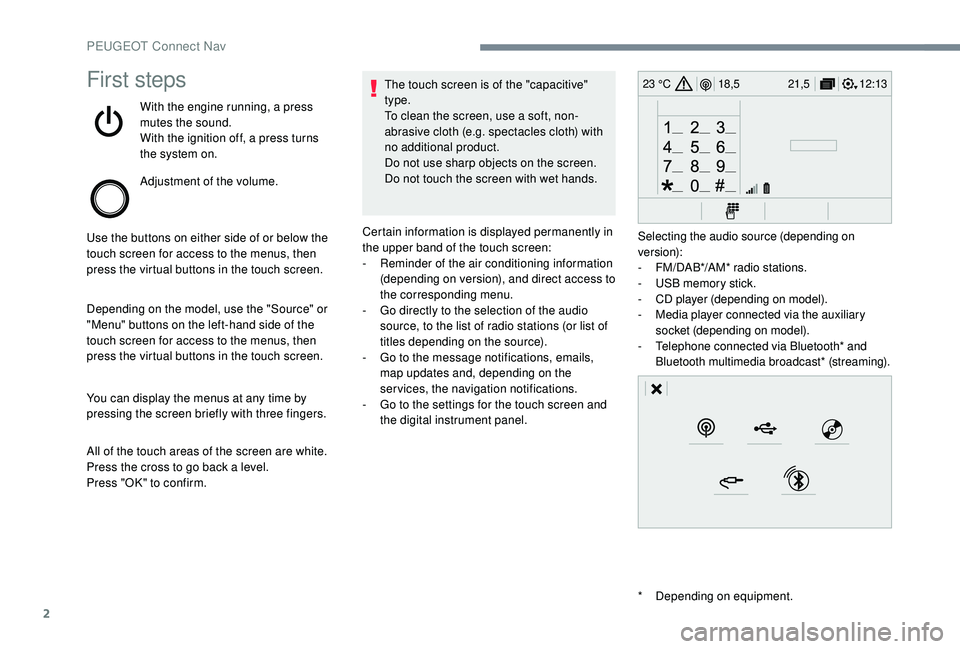
Certain information is displayed permanently in
the upper band of the touch screen:
-
R
eminder of the air conditioning information
(depending on version), and direct access to
the corresponding menu.
-
G
o directly to the selection of the audio
source, to the list of radio stations (or list of
titles depending on the source).
-
G
o to the message notifications, emails,
map updates and, depending on the
services, the navigation notifications.
-
G
o to the settings for the touch screen and
the digital instrument panel. Selecting the audio source (depending on
version):
-
F
M/DAB*/AM* radio stations.
-
U
SB memory stick.
-
C
D player (depending on model).
-
M
edia player connected via the auxiliary
socket (depending on model).
-
T
elephone connected via Bluetooth* and
Bluetooth multimedia broadcast* (streaming).
PEUGEOT Connect Nav