2018 Peugeot 308 screen 2
[x] Cancel search: screen 2Page 34 of 324

32
Display configuration
This menu gives access to the following
settings:
-
"
Choice of units",
-
"
Date and time adjustment",
-
"
Personalise display",
-
"Language".For safety reasons, configuration of
the multifunction screen by the driver
must only be done when the vehicle is
stationary.
Touch screen
This system gives access to:
- t he permanent display of the time and
the exterior temperature (a blue symbol
appears when there is a risk of ice),
-
t
he heating/air conditioning controls,
-
m
enus for adjusting settings for vehicle
functions and systems,
-
a
udio system and telephone controls and
the display of associated information,
-
t
he display of visual parking aids (visual
parking sensor information, Park Assist,
e t c .),
-
I
nternet ser vices and the display of
associated information. For safety reasons, the vehicle must
always be stationar y for the driver to
perform operations that require close
attention.
Some functions are not accessible when
driving.
General operation
RecommendationsThis screen is of the capacitive type.
Use is possible in all temperatures.
Do not use pointed objects on the touch
screen.
Do not touch the touch screen with wet hands.
Use a soft clean cloth to clean the touch
screen.
Design
Use the buttons below the touch screen to
access the menus, then press the virtual
buttons in the touch screen.
Some menus may display across two pages:
press the "
OPTIONS" button to access the
second page. After a few moments with no action on the
second page, the first page is displayed
automatically.
To deactivate or activate a function, select
" OFF " or " ON".
Use this button to adjust the settings
for a function.
Use this button for access to
additional information on the
function.
Use this button to confirm.
Use this button to return to the
previous page.
Menus
and, depending on equipment, allows:
- a ccess to the navigation system controls
and the display of associated information.
Instruments
Page 35 of 324
33
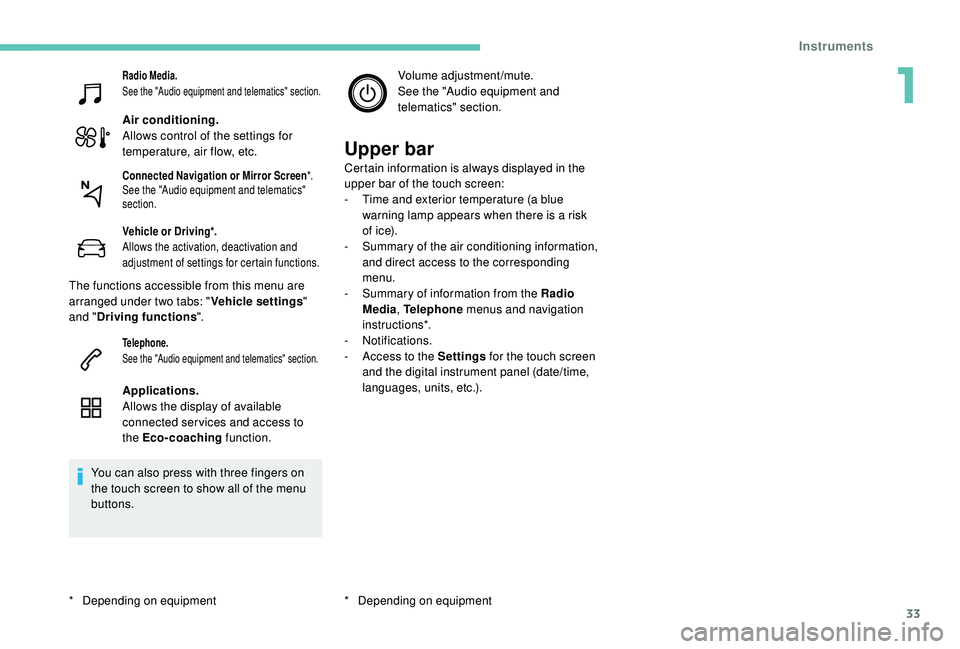
Radio Media.
See the "Audio equipment and telematics" section.
Air conditioning.
Allows control of the settings for
temperature, air flow, etc.
Vehicle or Driving*.
Allows the activation, deactivation and
adjustment of settings for certain functions.
The functions accessible from this menu are
arranged under two tabs: "Vehicle settings"
and " Driving functions ".
Telephone.
See the "Audio equipment and telematics" section.
Applications.
Allows the display of available
connected ser vices and access to
the Eco-coaching function.
You can also press with three fingers on
the touch screen to show all of the menu
buttons. Volume adjustment/mute.
See the "Audio equipment and
telematics" section.
Upper bar
Certain information is always displayed in the
upper bar of the touch screen:
-
T
ime and exterior temperature (a blue
warning lamp appears when there is a risk
of i c e).
-
S
ummary of the air conditioning information,
and direct access to the corresponding
menu.
-
S
ummary of information from the Radio
Media , Telephone menus and navigation
instructions*.
-
Notifications.
-
A
ccess to the Settings for the touch screen
and the digital instrument panel (date/time,
languages, units, etc.).
*
D
epending on equipmentConnected Navigation or Mirror Screen *.
See the "Audio equipment and telematics"
section.
* Depending on equipment
1
Instruments
Page 38 of 324

36
"Driving functions" tab
FunctionsComments
" Park Assist " Activation/deactivation of the function.
" Automatic headlamp dip "Activation/deactivation of the function.
" Stop & Star t " Activation/deactivation of the function.
" Blind spot sensors " Activation/deactivation of the function.
" Traction control" Activation/deactivation of the function.
" Parking sensors " Activation/deactivation of the function.
"
Under-inflation initialisation "Reinitialisation of the under-inflation detection system.
" Adjusting Speeds " Memorisation of speed settings for the speed limiter or
programmable cruise control.
" Diagnostic " Summary of current alerts.
" Active Lane Keeping Assistance "Activation/deactivation of the function.
For more information on one of these
functions, refer to the corresponding
section.
Settings
PEUGEOT Connect Nav
The functions available through the
upper menu bar are detailed in the
table below.
Buttons Comments
Select a theme.
Audio settings (sound ambience,
sound distribution, sound level,
voice volume, ringtone volume).
Switch off the screen.
Settings for the touch screen
and the digital instrument panel.
Instruments
Page 39 of 324
37
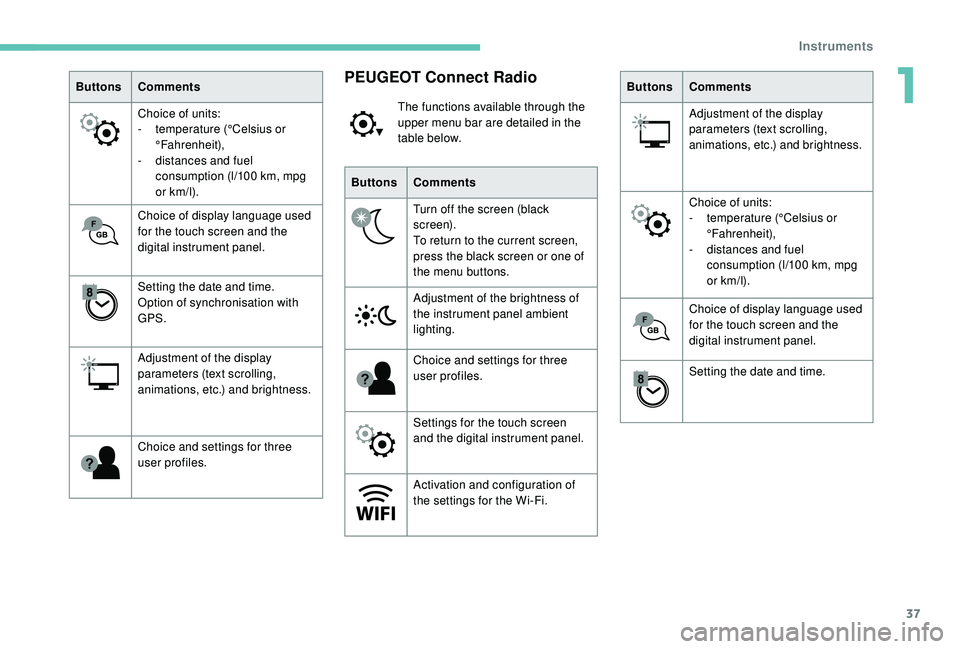
ButtonsComments
Choice of units:
-
t
emperature (°Celsius or
°Fahrenheit),
-
d
istances and fuel
consumption (l/100
km, mpg
or km/l).
Choice of display language used
for the touch screen and the
digital instrument panel.
Setting the date and time.
Option of synchronisation with
GPS.
Adjustment of the display
parameters (text scrolling,
animations, etc.) and brightness.
Choice and settings for three
user profiles.PEUGEOT Connect Radio
The functions available through the
upper menu bar are detailed in the
table below.
Buttons Comments
Turn off the screen (black
screen).
To return to the current screen,
press the black screen or one of
the menu buttons.
Adjustment of the brightness of
the instrument panel ambient
lighting.
Choice and settings for three
user profiles.
Settings for the touch screen
and the digital instrument panel.
Activation and configuration of
the settings for the Wi-Fi. Buttons
Comments
Adjustment of the display
parameters (text scrolling,
animations, etc.) and brightness.
Choice of units:
-
t
emperature (°Celsius or
°Fahrenheit),
-
d
istances and fuel
consumption (l/100
km, mpg
or km/l).
Choice of display language used
for the touch screen and the
digital instrument panel.
Setting the date and time.
1
Instruments
Page 40 of 324
38
With PEUGEOT Connect
Radio
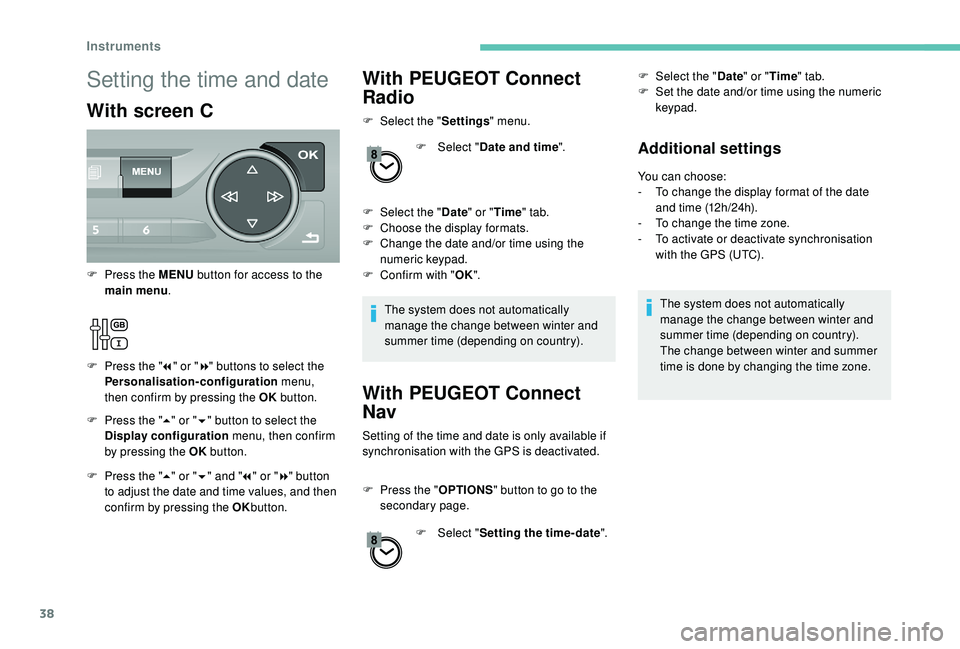
F Select the "Settings" menu.
F
Sel
ect "Date and time ".
F
Sel
ect the " Date" or "Time " tab.
F
C
hoose the display formats.
F
C
hange the date and/or time using the
numeric keypad.
F
C
onfirm with " OK".
The system does not automatically
manage the change between winter and
summer time (depending on country).
With PEUGEOT Connect
Nav
Setting of the time and date is only available if
synchronisation with the GPS is deactivated.
F
P
ress the " OPTIONS " button to go to the
secondary page.
F
Sel
ect "Setting the time- date". F
Sel
ect the "
Date" or "Time " tab.
F
S
et the date and/or time using the numeric
keypad.
Additional settings
You can choose:
- T o change the display format of the date
and time (12h/24h).
-
T
o change the time zone.
-
T
o activate or deactivate synchronisation
with the GPS (UTC).
The system does not automatically
manage the change between winter and
summer time (depending on country).
The change between winter and summer
time is done by changing the time zone.
Setting the time and date
With screen C
F Press the " 5" or " 6" button to select the
Display configuration menu, then confirm
by pressing the OK button.
F
P
ress the MENU
button for access to the
main menu .
F
P
ress the "
7" or " 8" buttons to select the
Personalisation-configuration menu,
then confirm by pressing the OK button.
F
P
ress the " 5" or " 6" and " 7" or " 8" button
to adjust the date and time values, and then
confirm by pressing the OK button.
Instruments
Page 45 of 324

43
If one of the doors or the boot is still open
or if the electronic key for the K eyless
Entry and Starting system has been left
inside the vehicle, the central locking does
not take place.
If the vehicle is unlocked inadvertently and
if no action is taken at the doors or boot,
the vehicle will automatically lock itself
again after about 30
seconds.
If fitted to your vehicle, the alarm is not
reactivated.
The automatic folding and unfolding of
the door mirrors can be deactivated by a
PEUGEOT dealer or a qualified workshop.
As a safety measure (children on board),
never leave the vehicle without taking the
electronic key for the
K
eyless Entry and
Starting system with you, even for a short
period.
Be aware of the risk of theft when the
electronic key for the
K
eyless Entry and
Starting system is in one of the defined
zones with the vehicle unlocked. In order to preser ve the battery in the
electronic key and the vehicle's battery,
the "hands-free" functions are put into
long-term standby after 21 days without
use. To restore these functions, press
one of the remote control buttons or start
the engine with the electronic key in the
reader.
For more information on Star ting -
switching off the engine with "
Keyless
Entr y and Star ting ", refer to the
corresponding section.
Locking/unlocking from
the inside
Automatic central locking
of the doors
The doors can lock automatically while driving
(speed above 6 mph [10 km/h]).
To activate or deactivate this
function, press and hold the button
until a message appears in the
screen. After unlocking, if no door is opened
within 30
seconds, the doors lock again
automatically.
F
P
ress the button.
This locks and unlocks the doors and the boot.
If the vehicle is deadlocked or locked with
the remote control or the door handles,
the button is not operational. In this case,
use the key or remote control to unlock.
When carrying large objects with the boot
open, you can press this button to lock
just the doors.
When locking from inside, the door mirrors
do not fold.
2
Access
Page 47 of 324
45
Central locking not
functioning
Use these procedures in the following cases:
- c entral locking fault,
-
b
attery disconnected or discharged.
In the event of a malfunction with the
central locking system, the battery must
be disconnected to lock the boot and thus
ensure that the vehicle is locked fully.
Driver's door
F Insert the key in the door lock.
F T urn the key towards the front of the vehicle
to unlock it, or towards the rear to lock it.
If fitted to your vehicle, the alarm is not
activated/deactivated when the vehicle is
locked/unlocked.
Opening a door will trigger the alarm,
which can be stopped by switching the
ignition on.
Passenger doorsF Turn the key towards the rear again within 5 seconds to deadlock the vehicle.
F
O
n the rear doors, check that the child lock
is not on.
F
I
nsert the integral key in the latch located
on the edge of the door and turn it an eighth
of a turn to the right for the right-hand side,
and to the left for the left-hand side.
F
C
lose the doors and check from the outside
that the vehicle is locked.
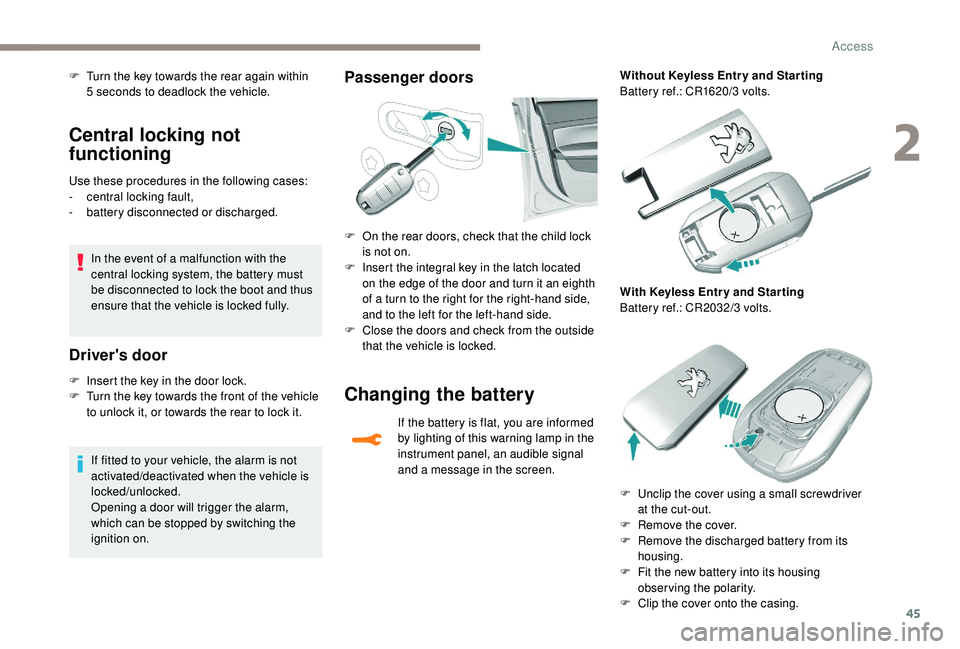
Changing the battery
If the battery is flat, you are informed
by lighting of this warning lamp in the
instrument panel, an audible signal
and a message in the screen. Without Keyless Entr y and Star ting
Battery ref.: CR1620/3 volts.
With Keyless Entr y and Star ting
Battery ref.: CR2032/3 volts.
F
U
nclip the cover using a small screwdriver
at the cut-out.
F
R
emove the cover.
F
R
emove the discharged battery from its
housing.
F
F
it the new battery into its housing
observing the polarity.
F
C
lip the cover onto the casing.
2
Access
Page 57 of 324
55
Steering wheel adjustment
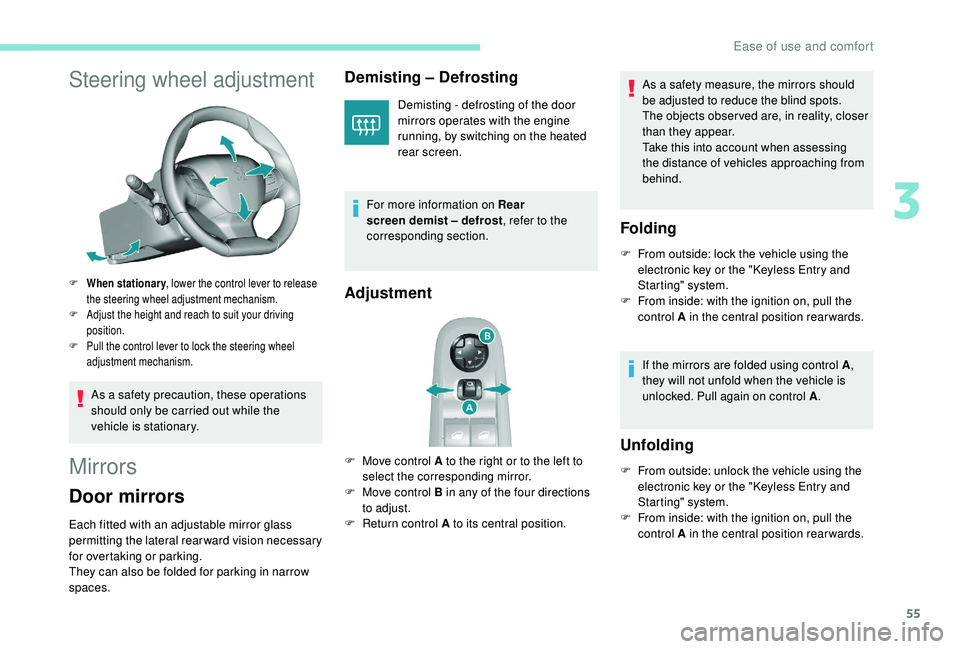
F When stationary, lower the control lever to release
the steering wheel adjustment mechanism.
F
A
djust the height and reach to suit your driving
position.
F
P
ull the control lever to lock the steering wheel
adjustment mechanism.
As a safety precaution, these operations
should only be carried out while the
vehicle is stationary.
Mirrors
Door mirrors
Each fitted with an adjustable mirror glass
permitting the lateral rearward vision necessary
for overtaking or parking.
They can also be folded for parking in narrow
spaces.
Demisting – Defrosting
Demisting - defrosting of the door
mirrors operates with the engine
running, by switching on the heated
rear screen.
For more information on Rear
screen demist – defrost , refer to the
corresponding section.
Adjustment
F Move control A to the right or to the left to select the corresponding mirror.
F
M
ove control B in any of the four directions
to adjust.
F
R
eturn control A to its central position. As a safety measure, the mirrors should
be adjusted to reduce the blind spots.
The objects obser ved are, in reality, closer
than they appear.
Take this into account when assessing
the distance of vehicles approaching from
behind.
Folding
F From outside: lock the vehicle using the
electronic key or the " K eyless Entry and
Starting" system.
F
F
rom inside: with the ignition on, pull the
control A in the central position rearwards.
If the mirrors are folded using control A ,
they will not unfold when the vehicle is
unlocked. Pull again on control A .
Unfolding
F From outside: unlock the vehicle using the
electronic key or the " K eyless Entry and
Starting" system.
F
F
rom inside: with the ignition on, pull the
control A in the central position rearwards.
3
Ease of use and comfort