Page 136 of 180
6
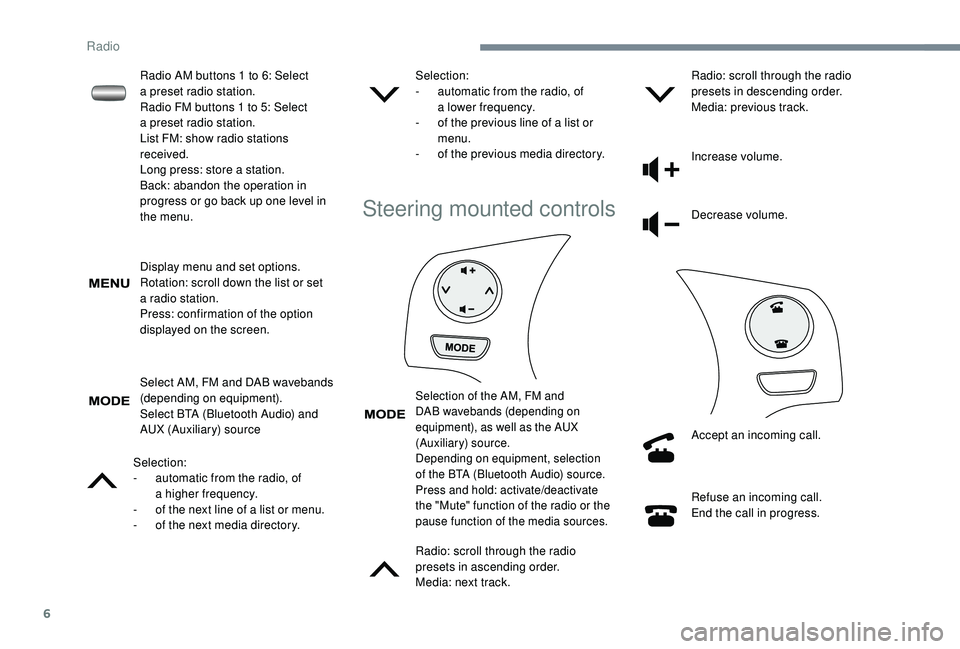
Display menu and set options.
Rotation: scroll down the list or set
a
radio station.
Press: confirmation of the option
displayed on the screen.
Select AM, FM and DAB wavebands
(depending on equipment).
Select BTA (Bluetooth Audio) and
AUX (Auxiliary) source
Selection:
-
a
utomatic from the radio, of
a
higher frequency.
-
o
f the next line of a list or menu.
-
o
f the next media directory. Selection:
-
a
utomatic from the radio, of
a
lower frequency.
-
o
f the previous line of a list or
menu.
-
o
f the previous media directory.
Steering mounted controls
Selection of the AM, FM and
DAB wavebands (depending on
equipment), as well as the AUX
(Auxiliary) source.
Depending on equipment, selection
of the BTA (Bluetooth Audio) source.
Press and hold: activate/deactivate
the "Mute" function of the radio or the
pause function of the media sources.
Radio: scroll through the radio
presets in ascending order.
Media: next track.Radio: scroll through the radio
presets in descending order.
Media: previous track.
Increase volume.
Decrease volume.
Accept an incoming call.
Refuse an incoming call.
End the call in progress.
Radio AM buttons 1
to 6: Select
a
preset radio station.
Radio FM buttons 1
to 5: Select
a
preset radio station.
List FM: show radio stations
received.
Long press: store a
station.
Back: abandon the operation in
progress or go back up one level in
the menu.
Radio
Page 140 of 180

10
The system can play audio files alternately
via the Bluetooth® system and the USB
port.
It is recommended that the USB cable for
the mobile device is used.
Audio streaming
Streaming allows music files on the telephone
to be played via the vehicle's loudspeakers.
Connect the telephone: see the " Telephone"
section.
Select "Bluetooth" then " Pairing".
You can also read, activate or deactivate
the parameters of the system linked to the
Bluetooth function. Press "MENU" to display the list.
Turn the dial to select "Bluetooth",
press to view the list. Once connected in streaming mode, the
telephone is considered to be a
media
source.
If playback does not start automatically,
it may be necessary to start the audio
playback from the telephone.Connecting Apple® players
Control is via the audio system. The classifications available are those of
the portable device connected (artists/
albums/genres/tracks/playlists/audio
books/podcasts).
The default classification used is by artist.
To modify the classification used, return
to the first level of the menu then select
the desired classification (playlists for
example) and confirm to go down through
the menu to the desired track.
The version of software in the audio
system may not be compatible with the
generation of your Apple
® p l aye r.
Connect the Apple
® player to the USB port
using a
suitable cable (not supplied).
Play starts automatically.Telephone
Pair a Bluetooth® telephone
For safety reasons and because they
require prolonged attention on the part
of the driver, the operations for pairing
the Bluetooth mobile telephone to the
hands-free kit of the audio system must be
carried out with the vehicle stationary .
Radio
Page 141 of 180
11
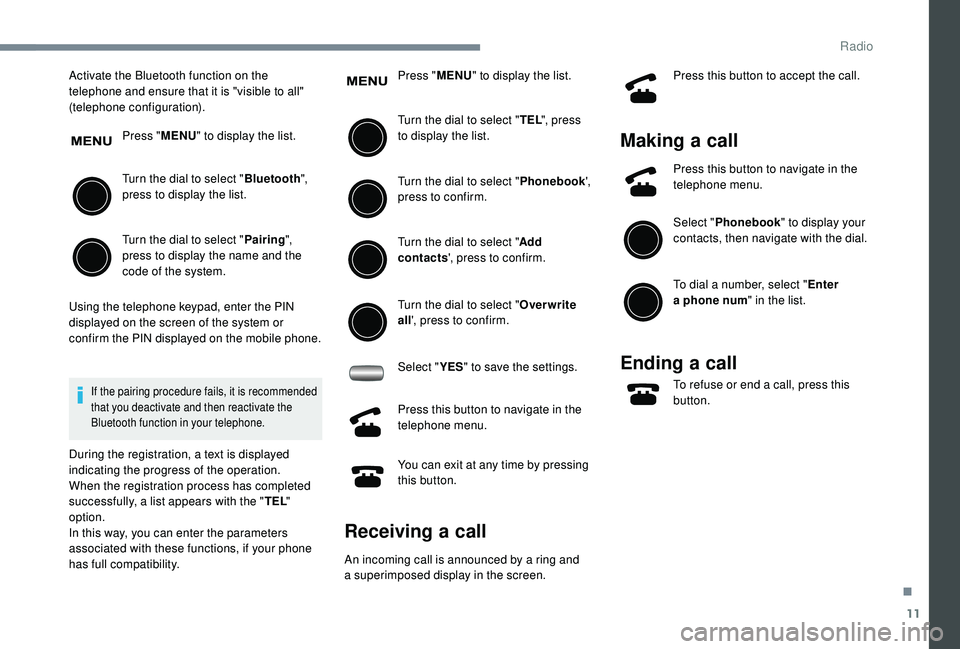
Activate the Bluetooth function on the
telephone and ensure that it is "visible to all"
(telephone configuration).Press "MENU" to display the list.
Turn the dial to select " Bluetooth",
press to display the list.
Turn the dial to select " Pairing",
press to display the name and the
code of the system.
Using the telephone keypad, enter the PIN
displayed on the screen of the system or
confirm the PIN displayed on the mobile phone.
If the pairing procedure fails, it is recommended
that you deactivate and then reactivate the
Bluetooth function in your telephone.
During the registration, a text is displayed
indicating the progress of the operation.
When the registration process has completed
successfully, a list appears with the " TEL"
option.
In this way, you can enter the parameters
associated with these functions, if your phone
has full compatibility. Press "
MENU" to display the list.
Turn the dial to select " TEL", press
to display the list.
Turn the dial to select " Phonebook',
press to confirm.
Turn the dial to select " Add
contacts ', press to confirm.
Turn the dial to select " Overwrite
all ', press to confirm.
Select " YES" to save the settings.
Press this button to navigate in the
telephone menu.
You can exit at any time by pressing
this button.
Receiving a call
An incoming call is announced by a ring and
a superimposed display in the screen. Press this button to accept the call.
Making a
call
Press this button to navigate in the
telephone menu.
Select "Phonebook " to display your
contacts, then navigate with the dial.
To dial a
number, select " Enter
a
phone num " in the list.
Ending a call
To refuse or end a call, press this
b utton.
.
Radio
Page 143 of 180
13
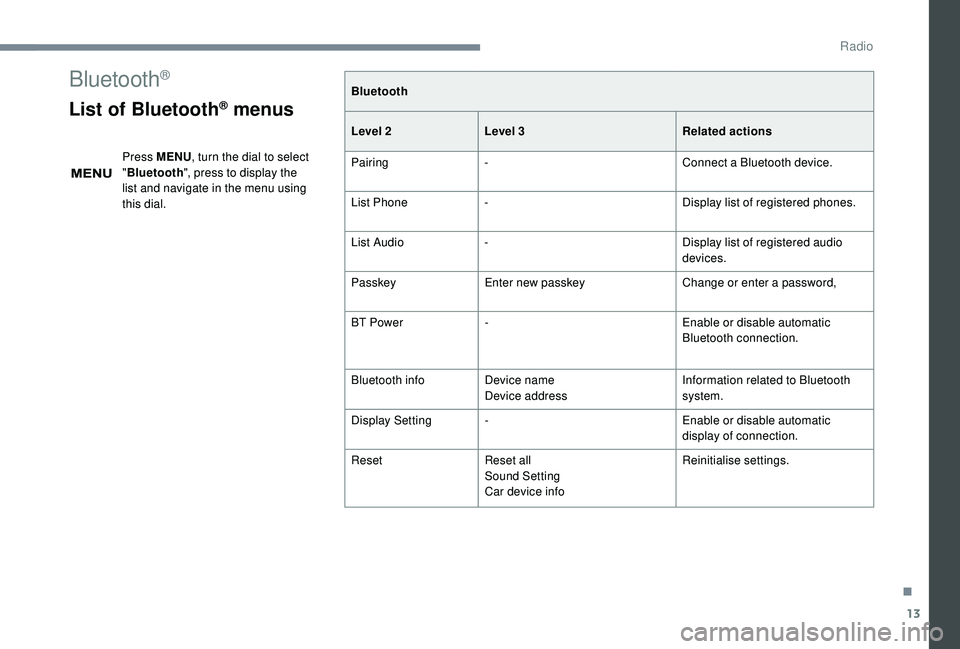
Bluetooth®
List of Bluetooth® menus
Press MENU, turn the dial to select
" Bluetooth ", press to display the
list and navigate in the menu using
this dial. Bluetooth
Level 2
Level 3 Related actions
Pairing - Connect a
Bluetooth device.
List Phone - Display list of registered phones.
List Audio - Display list of registered audio
devices.
Passkey Enter new passkey Change or enter a
password,
BT Power - Enable or disable automatic
Bluetooth connection.
Bluetooth info Device name
Device address Information related to Bluetooth
system.
Display Setting - Enable or disable automatic
display of connection.
Reset Reset all
Sound Setting
Car device info Reinitialise settings.
.
Radio
Page 144 of 180
14
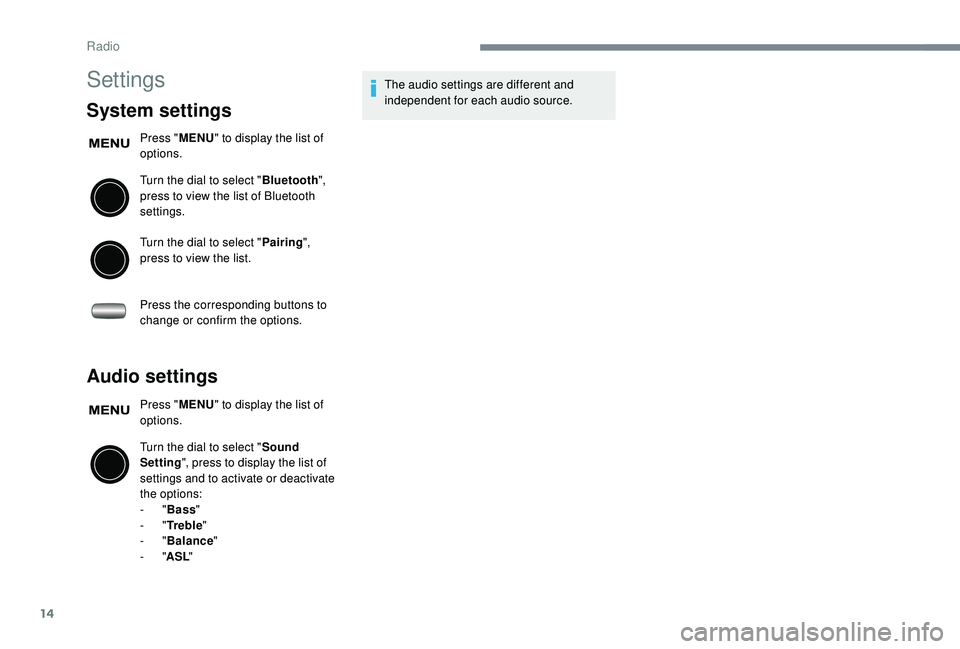
Settings
System settings
Press "MENU" to display the list of
options.
Turn the dial to select " Bluetooth",
press to view the list of Bluetooth
settings.
Turn the dial to select " Pairing",
press to view the list.
Press the corresponding buttons to
change or confirm the options.
Audio settings
Press " MENU" to display the list of
options.
Turn the dial to select " Sound
Setting ", press to display the list of
settings and to activate or deactivate
the options:
-
"Bass "
-
"Tr e b l e "
-
"Balance "
-
"ASL " The audio settings are different and
independent for each audio source.
Radio
Page 145 of 180
15
Frequently asked questions
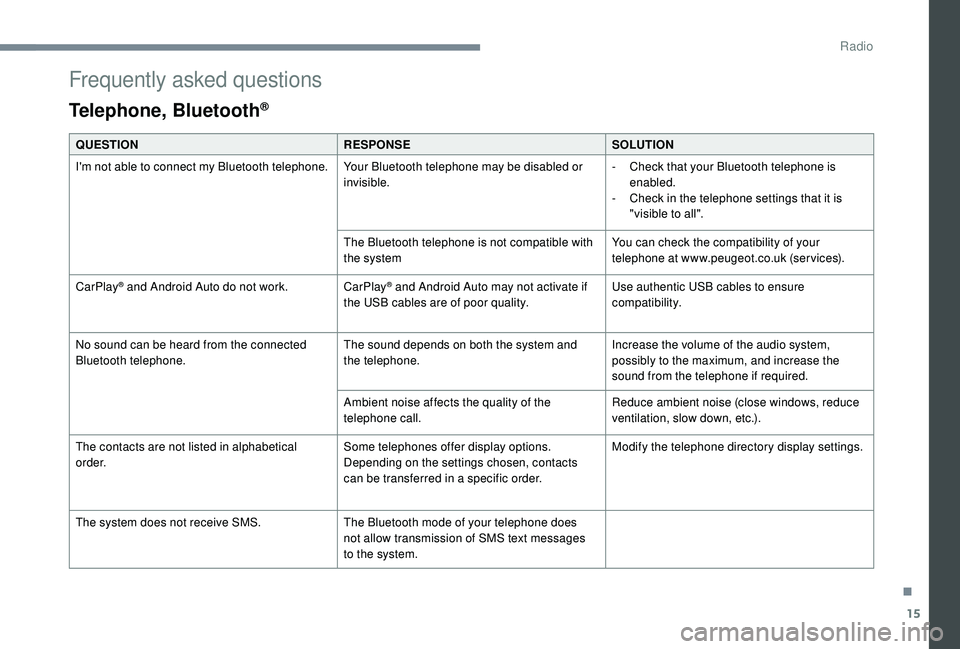
Telephone, Bluetooth®
QUESTIONRESPONSESOLUTION
I'm not able to connect my Bluetooth telephone. Your Bluetooth telephone may be disabled or
invisible.-
C
heck that your Bluetooth telephone is
enabled.
-
C
heck in the telephone settings that it is
"visible to all".
The Bluetooth telephone is not compatible with
the system You can check the compatibility of your
telephone at www.peugeot.co.uk (services).
CarPlay
® and Android Auto do not work. CarPlay® and Android Auto may not activate if
the USB cables are of poor quality. Use authentic USB cables to ensure
compatibility.
No sound can be heard from the connected
Bluetooth telephone. The sound depends on both the system and
the telephone.Increase the volume of the audio system,
possibly to the maximum, and increase the
sound from the telephone if required.
Ambient noise affects the quality of the
telephone call. Reduce ambient noise (close windows, reduce
ventilation, slow down, etc.).
The contacts are not listed in alphabetical
o r d e r. Some telephones offer display options.
Depending on the settings chosen, contacts
can be transferred in a
specific order. Modify the telephone directory display settings.
The system does not receive SMS. The Bluetooth mode of your telephone does
not allow transmission of SMS text messages
to the system.
.
Radio
Page 146 of 180
16
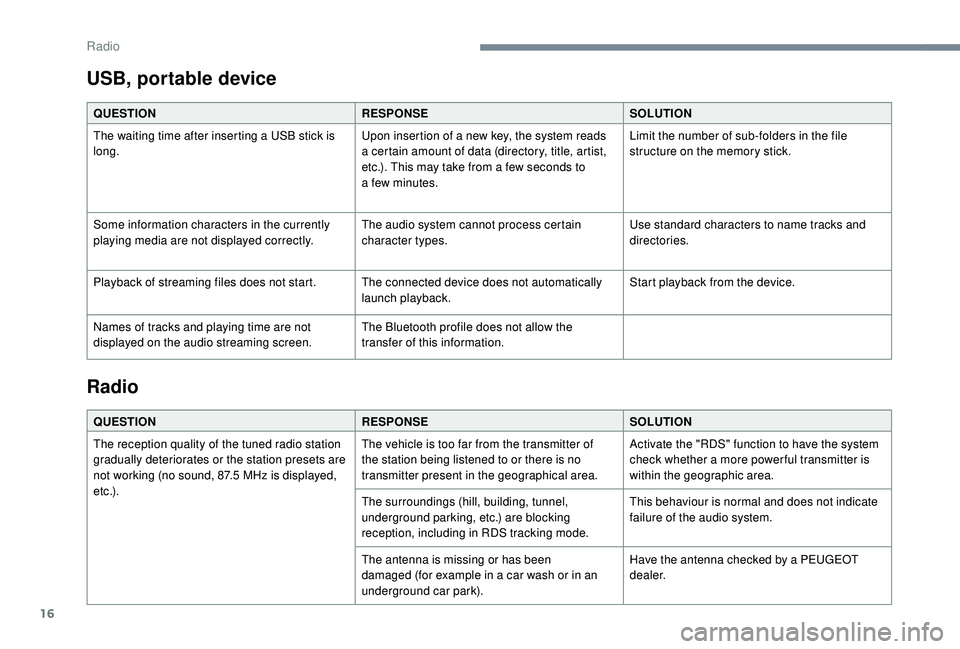
USB, portable device
QUESTIONRESPONSESOLUTION
The waiting time after inserting a USB stick is
long. Upon insertion of a
new key, the system reads
a
certain amount of data (directory, title, artist,
etc.). This may take from a
few seconds to
a
few minutes.Limit the number of sub-folders in the file
structure on the memory stick.
Some information characters in the currently
playing media are not displayed correctly. The audio system cannot process certain
character types.Use standard characters to name tracks and
directories.
Playback of streaming files does not start. The connected device does not automatically launch playback.Start playback from the device.
Names of tracks and playing time are not
displayed on the audio streaming screen. The Bluetooth profile does not allow the
transfer of this information.
Radio
QUESTION
RESPONSESOLUTION
The reception quality of the tuned radio station
gradually deteriorates or the station presets are
not working (no sound, 87.5
MHz is displayed,
e t c .) . The vehicle is too far from the transmitter of
the station being listened to or there is no
transmitter present in the geographical area.
Activate the "RDS" function to have the system
check whether a
more power ful transmitter is
within the geographic area.
The surroundings (hill, building, tunnel,
underground parking, etc.) are blocking
reception, including in RDS tracking mode. This behaviour is normal and does not indicate
failure of the audio system.
The antenna is missing or has been
damaged (for example in a
car wash or in an
underground car park). Have the antenna checked by a
PEUGEOT
dealer.
Radio
Page 149 of 180
1
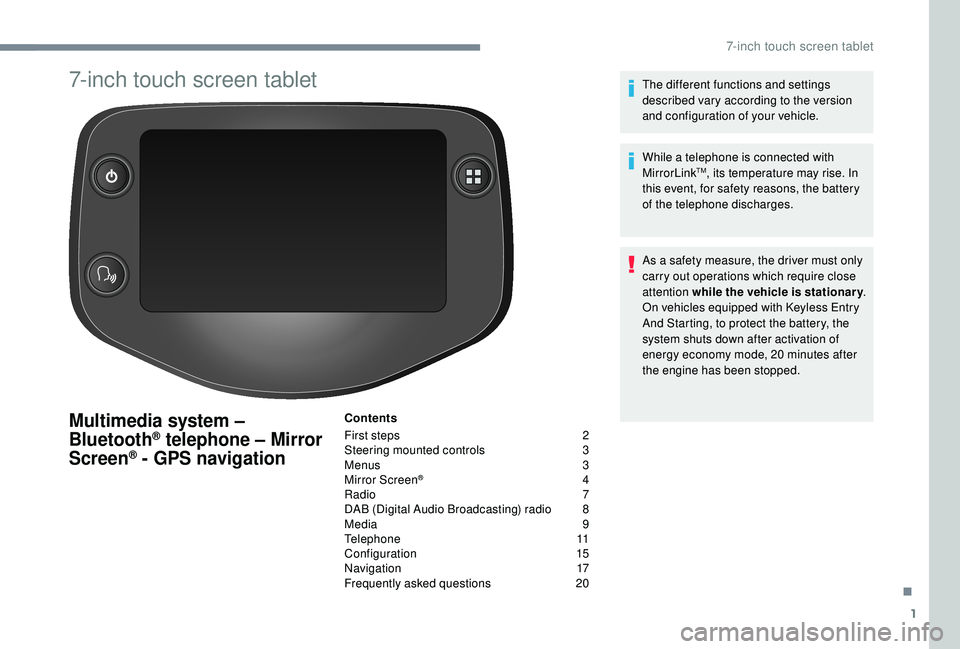
7-inch touch screen tablet
Multimedia system –
Bluetooth® telephone – Mirror
Screen® - GPS navigation
Contents
First steps
2
S
teering mounted controls
3
M
enus
3
M
irror Screen
® 4
R
adio
7
D
AB (Digital Audio Broadcasting) radio
8
M
edia
9
T
elephone
1
1
Configuration
1
5
Navigation
1
7
Frequently asked questions
20T
he different functions and settings
described vary according to the version
and configuration of your vehicle.
While a telephone is connected with
MirrorLink
TM, its temperature may rise. In
this event, for safety reasons, the battery
of the telephone discharges.
As a
safety measure, the driver must only
carry out operations which require close
attention while the vehicle is stationary .
On vehicles equipped with Keyless Entry
And Starting, to protect the battery, the
system shuts down after activation of
energy economy mode, 20
minutes after
the engine has been stopped.
.
7-inch touch screen tablet