2018 MITSUBISHI ASX heater
[x] Cancel search: heaterPage 267 of 514

NOTElSometimes, for example after using a high-
pressure car wash, the condenser can get wet, and the operation indication lamp (A)
blinks temporarily. In this case there is noth- ing wrong. Wait a while, press the air condi-
tioning switch once to turn the system off, then once more to turn it back on. Once the
water evaporates, the blinking will stop.Customizing the air condition-
ing switch (Automatic air condi- tioning)
E00764700030
Functions can be changed as desired, as sta- ted below.
l Enable automatic air conditioning con-
trol:
If the mode selection dial or blower
speed selection dial is turned to the “AUTO” position, or the temperature
control dial is set to the minimum tem-
perature, the air conditioning switch is controlled automatically.
l Disable automatic air conditioning con-
trol:
The air conditioning switch is not con-
trolled automatically as long as the air
conditioning switch is not operated.
l Setting change method
Hold down the air conditioning switch for about 10 seconds or more.
When the setting is changed, a sound is
emitted and the indication lamp flashes. • When the setting is changed from ena-
ble to disable 3 sounds are emitted and
the indication lamp flashes 3 times.
• When the setting is changed from dis-
able to enable 2 sounds are emitted and the indication lamp flashes 3times.NOTEl The factory setting is “Enable automatic air
conditioning control”.
l When you turn the mode selection dial to
“
”, in order to prevent misting of the
windows the air conditioning operates auto- matically even if “Disable automatic air con-
ditioning control” is set.
Operating the air conditioning
system
E00701800436
Heating (Heater/Manual air
conditioning)
Set the mode selection dial to the “” posi-
tion and set the air selection switch (A) to the outside position.
Turn the temperature control dial clockwise
or anticlockwise to the desired temperature.
Select the desired blower speed.NOTEl For quick heating, set the blower speed se-
lection dial to the position shown in the il-
lustration.
Heater/Air conditioning
7-07OGAE18E1For pleasant driving7
Page 268 of 514
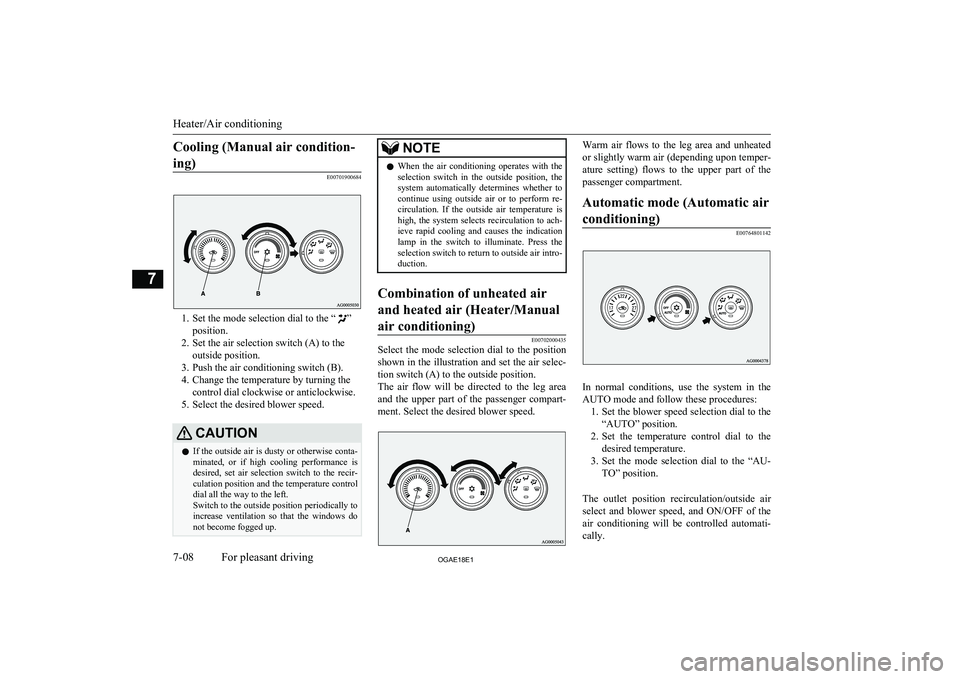
Cooling (Manual air condition-ing)
E00701900684
1. Set the mode selection dial to the “”
position.
2. Set the air selection switch (A) to the outside position.
3. Push the air conditioning switch (B).
4. Change the temperature by turning the control dial clockwise or anticlockwise.
5. Select the desired blower speed.
CAUTIONl If the outside air is dusty or otherwise conta-
minated, or if high cooling performance is
desired, set air selection switch to the recir- culation position and the temperature control
dial all the way to the left.
Switch to the outside position periodically to increase ventilation so that the windows donot become fogged up.NOTEl When the air conditioning operates with the
selection switch in the outside position, the
system automatically determines whether to continue using outside air or to perform re-
circulation. If the outside air temperature is high, the system selects recirculation to ach- ieve rapid cooling and causes the indication
lamp in the switch to illuminate. Press the
selection switch to return to outside air intro- duction.Combination of unheated air
and heated air (Heater/Manual air conditioning)
E00702000435
Select the mode selection dial to the position shown in the illustration and set the air selec- tion switch (A) to the outside position.The air flow will be directed to the leg area
and the upper part of the passenger compart-
ment. Select the desired blower speed.
Warm air flows to the leg area and unheated
or slightly warm air (depending upon temper-
ature setting) flows to the upper part of the
passenger compartment.Automatic mode (Automatic air
conditioning)
E00764801142
In normal conditions, use the system in the
AUTO mode and follow these procedures: 1. Set the blower speed selection dial to the
“AUTO” position.
2. Set the temperature control dial to the
desired temperature.
3. Set the mode selection dial to the “AU-
TO” position.
The outlet position recirculation/outside air
select and blower speed, and ON/OFF of the air conditioning will be controlled automati-cally.
Heater/Air conditioning
7-08OGAE18E1For pleasant driving7
Page 269 of 514

To stop the system, turn the blower speed se-lection dial to the “OFF” position.NOTEl While the engine coolant temperature is low,
the temperature of the air from the heaterwill be cool/cold until the engine warms up, even if you have selected warm air with the
dial. To prevent the windscreen and win-
dows from fogging up, the ventilator mode
will be changed to “
” and the blower
speed will be reduced.
l If the blower speed selection dial, air condi-
tioning switch, mode selection dial, or air se-
lection switch is operated while the system is operating in the AUTO mode, the activa-ted function overrides the corresponding
function of automatic control. All other
functions remain under automatic control.
Manual mode (Automatic air
conditioning)
E00764900032
Blower speed and ventilator mode may be
controlled manually by setting the blower speed selection dial and the mode selection
dial to the desired positions. To return to au-
tomatic operation, set the dials to the “AU- TO” position.
Demisting of the windscreen
and door windows
E00702102052
CAUTIONl For safety, make sure you have a clear view
through all the windows.
Use the mode selection dial (“” or “”)
to remove frost or mist from the windscreen or door windows.
For ordinary demisting
Perform the following settings to prevent
misting of the windscreen and door windows,
and to heat the leg area.
Heater/Manual air conditioningAutomatic air conditioning1. Set the air selection switch (A) to the
outside position.
2. Set the mode selection dial to the “
”
position.
3. Select your desired blower speed by
turning the blower speed selection dial.
4. Select your desired temperature by turn-
ing the temperature control dial.
5. On vehicles with air conditioning, push
the air conditioning switch (B).
For quick demisting
Heater/Manual air conditioningAutomatic air conditioning
1. Set the mode selection dial to the “”
position.
2. Set the blower to the maximum speed. 3. Set the temperature to the highest posi-
tion.
Heater/Air conditioning
7-09OGAE18E1For pleasant driving7
Page 270 of 514

NOTElWhen the mode selection dial is in the “”
position, the system operates automatically
and outside air is set automatically.
l To demist effectively, direct the air flow
from the side ventilators towards the door
windows.
l On vehicles with air conditioning, do not set
the temperature control dial to the max. cool position. Cool air will blow against the win-
dow glasses and prevent demisting.
l For vehicles with the Auto Stop & Go
(AS&G) system, if the mode selection dial is
set to the demister position shown in the il- lustration, the AS&G system will not oper- ate and the engine will not stop automatical-
ly even if the vehicle is stopped. This is to ensure that good visibility is maintained.Introduction of outside air
(Heater/Manual air condition- ing)
E00702200408
To introduce air into the vehicle during hot
weather, set the air selection switch (A) to the
outside position and set the temperature con-
trol dial to the positions shown in the illustra- tion. Be sure to set the temperature control dial all the way to the left. Select the desiredblower speed.
NOTEl Turn the mode selection dial clockwise and
air will flow to the leg area and the wind-
screen.Important operation tips for
the air conditioning E00708302463
l Park the vehicle in the shade.
Parking in the hot sun will make the ve-
hicle inside extremely hot, and it will re-
quire more time to cool the interior.
If it is necessary to park in the sun, open the windows for the first few minutes of
air conditioning operation to expel the
hot air.
l Close the windows when the air condi-
tioning is in use. The entry of outside air
through open windows will reduce the cooling efficiency.
l Too much cooling is not good for the
health. Keep the difference between the
vehicle interior temperature and outside
temperature at 5 to 6 °C.
l When operating the system, make sure
the air intake, which is located in front of the windscreen, is free of obstructions
such as leaves and snow. Leaves collec- ted in the air-intake plenum may reduce
air flow and plug the plenum water
drains.
Important operation tips for the air conditioning
7-10OGAE18E1For pleasant driving7
Page 274 of 514

Handling of DiscsE00735900027
This explains care that should be taken in thehandling of discs.
Important Points on Handling
l Fingerprints or other marks on the read
surface of the disc may result in its con-
tent being more difficult to read. When
holding the disc, grip both edges, or one edge and the centre hole, in order that the read surface is not touched.
l Do not affix paper or stickers, or other-
wise damage the disc.
l Do not forcefully insert a disc if another
is already within the device. This can re- sult in damage to discs, or malfunction.
Cleaning
l Periodically clean the read surface of the
disc. When cleaning, do not wipe in a
circular motion. Instead, wipe gently outwards from the centre of the disc to the outer edge.
l New discs may have burring around the
outer edge or in the hole in the centre.
Ensure you check for these. If there are burrs, these may lead to faulty operation,
therefore ensure these are removed.
Important Points on Storage
l When not using discs, ensure these are
kept in cases, and stored out of direct sunlight.
l If discs are not going to be used for a
long period of time, remove these from
the product.
Disc Playback Environment
In cold environments such as in mid-winter
when the interior of the vehicle is cold, turn- ing the heater on and immediately trying to
use the product may cause condensation (wa-
ter droplets) to form on the disc and internal optical components, and this may prevent the product from operating correctly.
In these conditions, remove the disc, and wait
a short time before use.
Copyright
Actions such as unauthorized reproduction,
broadcast, public performance, or rental of discs that comprise other than personal use are prohibited by law.
Types of Disc That Can Be
Played Back
E00736001064
The following marks are printed on the disc label, package, or jacket.
Handling of Discs
7-14OGAE18E1For pleasant driving74th generation
8GB 32GB 64GB3rd generation
32GB 64GB
2nd generation
8GB 16GB 32GB 1st generation
8GB 16GB 32GB
16GB 32GB 64GB
8GB 16GB 32GB 8GB 16GB 16GB 32GB
Page 337 of 514

NOTElWhen the lamps are illuminated with the
lamp switch in the “”, “”, or “AU-
TO” position (vehicles with automatic lamp control), the glove box lamp illuminates.
To use the warming and cooling
function*
The glove box can be used to keep its con- tents (e.g. drink bottles) warm or cool with
the warm or cold air from the air condition- ing. 1. Turn the dial in the glove box to the
“
” position.
Turn the dial to the “
” position when
not using the warming and cooling func- tion.
2. Turn the air conditioning temperature
control dial (A) to the desired tempera- ture.
3. Turn the air conditioning blower speed
selection dial (B) to the desired air flow.Manual air conditioningAutomatic air conditioning
For detailed information on how to use
the air conditioning, refer to “Heater/Air
conditioning” on page 7-03.
NOTEl The glove box has the same temperature as
the air that comes out of the air conditioningventilators, so it is not possible to greatly heat or cool the contents.
For efficient warming or cooling, select the
“
” mode.
Refer to “Mode selection dial” on page 7-03.
l When placing drinks in the glove box, read
the precautions on the container first.
l Do not place in the glove box chocolate,
sweets, or other items which are susceptible
to temperature changes or which may rot.
Pen holder
There is a pen holder inside the glove box.
Storage spaces
7-77OGAE18E1For pleasant driving7
Page 344 of 514

If the vehicle breaks downE00800101108
If the vehicle breaks down on the road, move it to the shoulder and turn on the hazard
warning flashers and set up a warning trian- gle, flashing lamp, etc.
Refer to “Hazard warning flasher switch” on
page 5-57.
If the engine stops/fails
Vehicle operation and control are affected if
the engine stops.
Before moving the vehicle to a safe area, be
aware of the following:
l The brake booster becomes inoperative
and the pedal effort will increase. Press down the brake pedal harder than usual.
l Since the power steering system is no
longer operative, the steering wheel feels
heavy when turning it.
Emergency starting
E00800504259
If the engine cannot be started because thebattery is weak or dead, the battery from an-other vehicle can be used with jumper cables to start the engine.
WARNINGl To start the engine by using jumper ca-
bles from another vehicle, perform thecorrect procedures according to the in-
struction below. Incorrect procedures could result in a fire or explosion or dam-
age to the vehicles.CAUTIONl Do not attempt to start the engine by pulling
or pushing the vehicle.
It could damage your vehicle.
l Always wear protective eye goggles when
working near the battery.
l Keep the battery out of the reach of children.
1.
Get the vehicles close enough so the
jumper cables can reach, but be sure the vehicles aren’t touching each other.
CAUTIONl Check the other vehicle. It must have a 12-
volt battery.
If the other system isn’t 12-volt, shorting can
damage both vehicles.
2. Turn off all lamps, heater and other elec-
trical loads.
3. Set the parking brake firmly on each ve-
hicle. Put an A/T, CVT in “P” (Park) or
a M/T in “N” (Neutral).
4. Turn the ignition switch to the “LOCK”
position or put the operation mode in
OFF.WARNINGl Perform step 4 on both vehicles before-
hand.
Make sure that the cables or your clothes
cannot be caught by the fan or drive belt.
Personal injury could result.
5. Make sure battery electrolyte is at the
proper level.
Refer to “Battery” on page 10-09.
WARNINGl If electrolyte fluid is not visible, or ap-
pears to be frozen, Do Not Attempt Jump
Starting!
A battery might rupture or explode if the temperature is below the freezing point orif it is not filled to the proper level.
6. Connect one end of one jumper cable to
the positive (+) terminal of the dis-charged battery (A), and the other end to
the positive (+) terminal of the booster
battery (B).
If the vehicle breaks down
8-02OGAE18E1For emergencies8
Page 373 of 514

CAUTIONlDo not use a scrubbing brush or other hard
tools as they may damage the plastic part
surface.
l Do not use wax containing compound (pol-
ishing powder) which may damage the plas-
tic part surface.
l Do not bring the plastic parts into contact
with petrol, light oil, brake fluids, engine oils, greases, paint thinners, and sulphuric
acid (battery electrolyte) which may crack, stain or discolour the plastic parts.
If they touch the plastic parts, wipe them off
with soft cloth, chamois or the like and an aqueous solution of neutral detergent thenimmediately rinse the affected parts with
water.Chrome parts
E00901400098
In order to prevent spots and corrosion of
chrome parts, wash with water, dry thorough-
ly, and apply a special protective coating.
This should be done more frequently in win-
ter.
Aluminium wheels*
E00901500347
1. Remove dirt using a sponge while sprin-
kling water on the vehicle.
2. Use neutral detergent on any dirt that
cannot be removed easily with water.
Rinse off the neutral detergent after
washing the vehicle.
3. Dry the vehicle thoroughly using a cha-
mois leather or a soft cloth.CAUTIONl Do not use a brush or other hard implement
on the wheels.
Doing so could scratch the wheels.
l Do not use any cleaner that contains an abra-
sive substance or is acidic or alkaline. Doing
so could cause the coating on the wheels to peel or become discoloured or stained.
l Do not directly apply hot water using a
steam cleaner or by any other means.
l Contact with seawater and road deicer can
cause corrosion. Rinse off such substances as soon as possible.Window glass
E00901600117
The window glass can normally be cleaned
using only a sponge and water.
Glass cleaner can be used to remove oil, grease, dead insects, etc. After washing the
glass, wipe dry with a clean, dry, soft cloth. Never use a cloth that is used for cleaning a
painted surface to clean a window. Wax from
the painted surface could get on the glass and lower glass transparency and visibility.
NOTEl To clean the inside of the rear window, al-
ways use a soft cloth and wipe the window
glass along the demister heater element so as not to cause damage.Wiper blades
E00901700062
Use a soft cloth and glass cleaner to remove
grease, dead insects, etc., from the wiper blades. Replace the wiper blades when they
no longer wipe properly. (Refer to page 10-17.)
Engine compartment
E00902100308
Clean the engine compartment at the begin-ning and end of winter. Pay particular atten- tion to flanges, crevices and peripheral parts where dust containing road chemicals and
other corrosive materials might collect.
If salt and other chemicals are used on the roads in your area, clean the engine compart-
ment at least every three months.
Never spray or splash water on the electrical
components in the engine compartment, as
this may cause damage.
Do not bring the nearby parts, the plastic parts and so on into contact with sulphuric
acid (battery electrolyte) which may crack,
stain or discolour them.
Cleaning the exterior of your vehicle
9-05OGAE18E1Vehicle care9