2018 MERCEDES-BENZ SLC ROADSTER change time
[x] Cancel search: change timePage 161 of 298
When ATTENTION ASSIST is deactivated, the
ésymbol appears in the multifunction dis-
play in the assistanc egraphics display.
Vehicles with COMAND: ifaw arning is output
in the multifunction display, aservice station
search is performed in the multimedia system.
You can select aservice station and navigation
to this service station will then begin. This func-
tion can be activated and deactivated in the
multimedia system.
Lane Tracking package
General notes
The Lane Tracking package consists of Blind
Spot Assist (Ypage 159) and Lane Keeping
Assist (Ypage 161).
Blind Spot Assist
General notes
Blind Spot Assist monitors the areas on either
side of the vehicle that are not visible to the
driver with two lateral, rear-facing radar sen-
sors. Awarning display in the exterior mirrors
draws your attention to vehicles detected in the
monitored area. If you then switch on the cor-
respondingt urn signal to change lane, you will
also receive an optical and audible warning.
Blind Spot Assist supports you from aspeed of
approximately 20 mph (30 km/h).
For Blind Spot Assist to assist you, the radar
sensor system must be operational.
Important safety notes
GWARNING
Blind Spot Assist does not react to:
Rvehicles overtaken too closely on the side,
placing them in the blind spot area
Rvehicles which approach with alarge speed
differential and overtake your vehicle
As aresult, Blind Spot Assist may not give
warnings in such situations .There is arisk of
an accident.
Always observe the traffic conditions care-
fully, and maintain asafe lateral distance.
Blind Spot Assist is only an aid. It may fail to
detect some vehicles and is no substitut efor attentive driving. Always ensure that there is
sufficientd
istancetothe side for other road
users and obstacles.
iUSA only:
This device has been approved by the FCC as
a" Vehicular Radar System". The radar sensor
is intended for use in an automotiv eradar
system only. Removing, tamperin gwith, or
altering the device will void any warranties,
and is not permitted by the FCC. Do not tam-
per with, alter, or use in any non-approved
way.
An yu nauthorized modification to this device
could void the user’s authority to operate the
equipment.
Radar sensors
The radar sensor sfor Blind Spot Assist are inte-
grated into the rear bumper. Make sure that the bumpers are free from dirt, ice or slush. The
sensor smust not be covered, for example by
cycle racks or overhangin gloads. Following a
severe impact or in the event of damage to the
bumpers, have the function of the radar sensors
checked at aqualified specialist workshop.
Blind Spot Assist may no longer work properly.
Monitoring range of the sensors
In particular, the detection of obstacles can be
impaired if:
Rthere is dirt on the sensor soranything else
coveringt he sensors
Rthere is poor visibility, e.g. due to fog, heavy
rain, snow or spray
Rthere are narrow vehicles, e.g. motorcycles or
bicycles
Rthe road has very wide lanes
Rthe road has narrow lanes
Ryou are not driving in the middle of the lane
Rthere are barriers or other road boundaries
Vehicles in the monitoring range are then not
indicated.
Driving systems159
Driving and parking
Z
Page 164 of 298
Standard
IfStandardis selected, no warning vibration
occurs if:
Ryou switch on the turn signals. In this event,
the warnings are suppressed for acertain
period of time
Rad riving safety system intervenes, such as
ABS,B AS or ESP®
Adaptive
WhenAdaptiveis selected, no warning vibra-
tion occurs if:
Ryou switch on the turn signals. In this event,
the warnings are suppressed for acertain
period of time
Rad riving safety system intervenes, e.g. ABS,
BAS or ESP®
Ryou accelerate hard, e.g. kickdown
Ryou brake hard
Ryou steer actively, e.g. swerve to avoid an
obstacle or change lanes quickly
Ryou cut the corner on asharp bend
In order that you are warned only when neces-
sary and in good time if you cross the lane mark-
ing, the system recognizes certain conditions
and warns you accordingly.
The warning vibration occurs earlier if:
Ryou approach the outer lane marking on a
bend
Rthe road has very wide lanes, e.g. afreeway
Rthe system recognizes solid lane markings
The warning vibration occurs later if:
Rthe road has narrow lanes
Ryou cut the corner on abend
162Driving systems
Driving and parking
Page 169 of 298
style and the amount of fuel in the tank. If
there is onlyasmall amount of fuel left in the
fuel tank, avehicle being refueled C
appears instead of approximate range :.
Recuperation display =shows you if energy
has been recuperated from the kinetic energy in overrun mode and saved in the battery.
Recuperation display =depends on the
engine installed and is therefore not available
in all vehicles.
Digital speedometer
XPress the =or; button on the steering
wheel to select the Tripmenu.
XPress the9or: button to select the
digital speedometer.
Ag earshift recommendation Zmay also
appearint he display.
Observe the information on gearshift recom-
mendation when shifting manually
(
Ypage 128).
Mercedes-AMG SLC 43: agearshift recom-
mendation is shown in the status bar of the
multifunction displaya nd not in the digital
speedometer display.
Resetting values
XPress the =or; button on the steering
wheel to select the Tripmenu.
XPress the9or: button to select the
function that you wish to reset.
XPress ato confirm your selection.
XPress :to select Yesand press ato
confirm.
You can reset the values of the following func-
tions:
RTrip odometer
R"From Start" trip computer
R"From Reset" trip computer
RECO display
If you reset the values in the ECO display, the
values in the "From Start" trip computer are also reset. If you reset the values in the "From Start"
trip computer, the values in the ECO displaya re
also reset.
Navigation system menu
Displaying navigation instructions
In the Navimenu, the multifunction display
shows navigation instructions.
Observe the additional information on naviga-
tion in the Digital Operator's Manual of the mul-
timedia system.
XSwitch on the multimedia system (see the
Digital Operator's Manual)
XPress the =or; button on the steering
wheel to select the Navimenu.
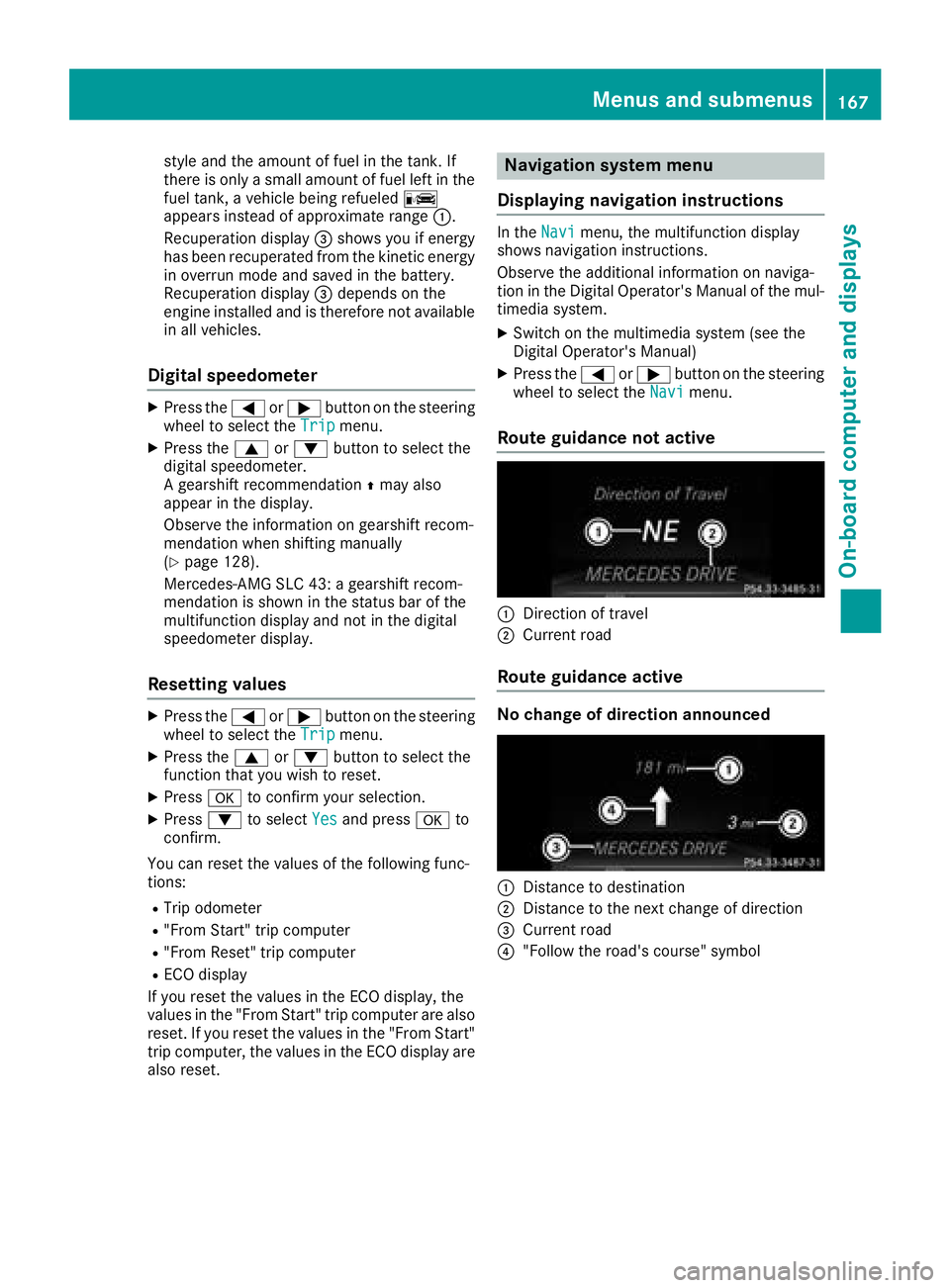
Route guidance not active
:Direction of travel
;Current road
Route guidance active
No change of direction announced
:Distance to destination
;Distance to the next change of direction
=Current road
?"Follow the road's course" symbol
Menus and submenus167
On-board computer and displays
Z
Page 170 of 298
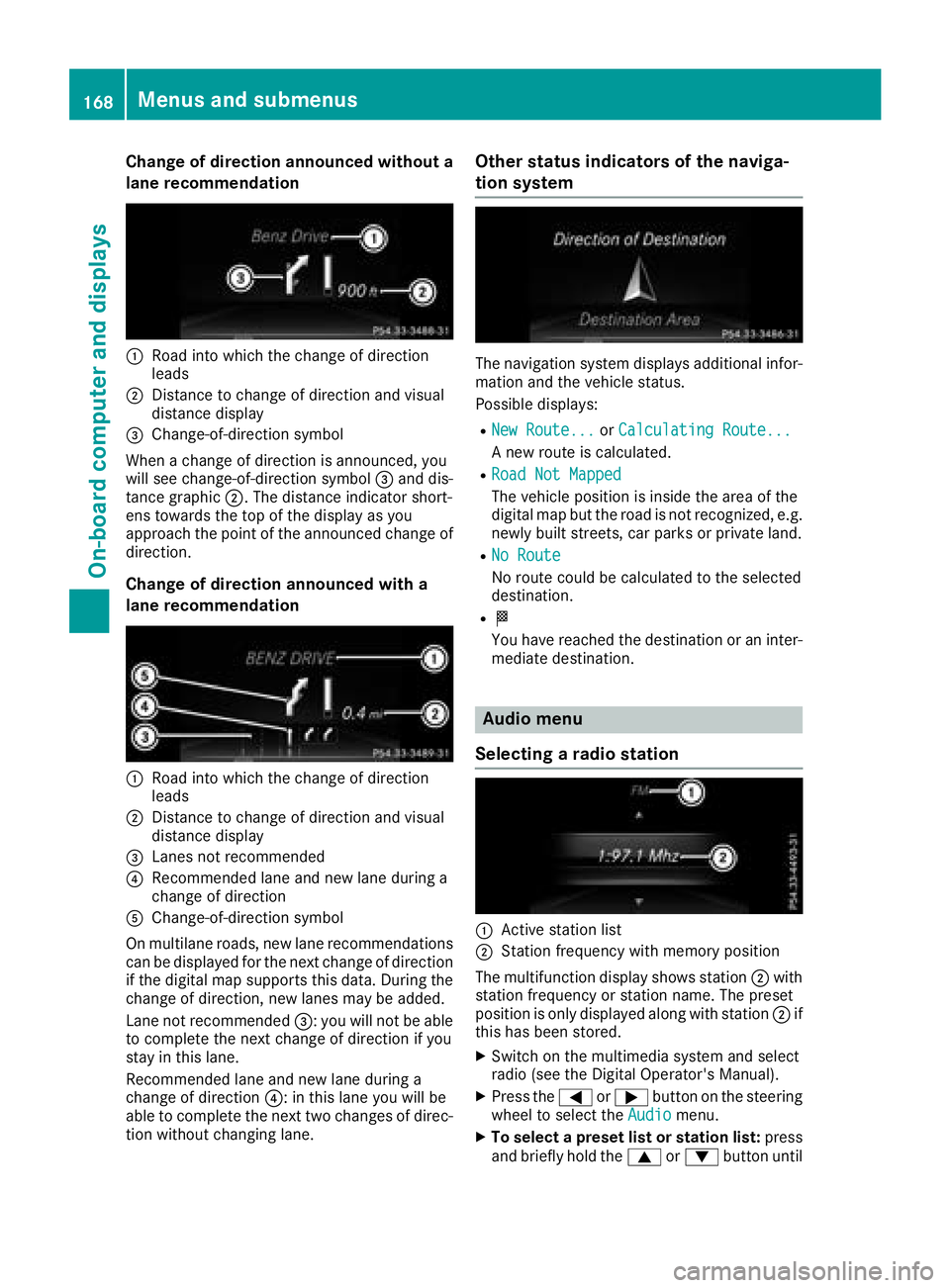
Change of direction announced without a
lane recommendation
:Road intowhicht hechange of direction
leads
;Distance to change of direction and visual
distanc edisplay
=Change-of-direction symbol
When achange of direction is announced ,you
will see change-of-direction symbol =and dis-
tance graphic ;.The distanc eindicator short-
ens towards th etop of th edisplay as you
approach th epointoft heannounced change of
direction.
Change of direction announced with a
lane recommendation
:Road int owhicht hechange of direction
leads
;Distance to change of direction and visual
distanc edisplay
=Lanes no trecommended
?Recommende dlane and new lane durin ga
change of direction
AChange-of-direction symbol
On multilane roads ,new lane recommendations
can be displayedf or thenextc hange of direction
if th edigital map support sthisd ata. During the
change of direction,n ew lanesmay be added.
Lanen otrecommended =:you will no tbeable
to completet henex tchange of direction if you
stay in this lane.
Recommende dlane and new lane durin ga
change of direction ?:inthisl ane you will be
able to completet henex ttwo changes of direc-
tio nw ithout changingl ane.
Other status indicators of th enaviga-
tion system
The navigation system displays additional infor-
mation and th evehicle status.
Possible displays:
RNew Route...or Calculating Route...
An ew rout eiscalculated.
RRoadN ot Mapped
The vehicle position is inside th earea of the
digital map but th eroad is no trecognized, e.g.
newly built streets, car park sorprivate land.
RNo Route
No rout ecoul dbec alculate dtotheselected
destination.
RO
You have reached th edestination or an inter-
mediate destination.
Audio menu
Selecting aradio station
:Activ estatio nlist
;Statio nfrequency with memory position
The multifunction display showss tation ;with
statio nfrequency or statio nname. The preset
position is only displayeda longwith station ;if
this has been stored.
XSwitch on th emultimedia system and select
radio (see th eDigital Operator's Manual).
XPres sthe = or; button on th esteering
wheel to selectt heAudiomenu.
XTo select apreset list or station list: press
and briefly hold the 9or: button until
168Menusa nd submenus
On-boardc omputer and displays
Page 174 of 298
Settings menu
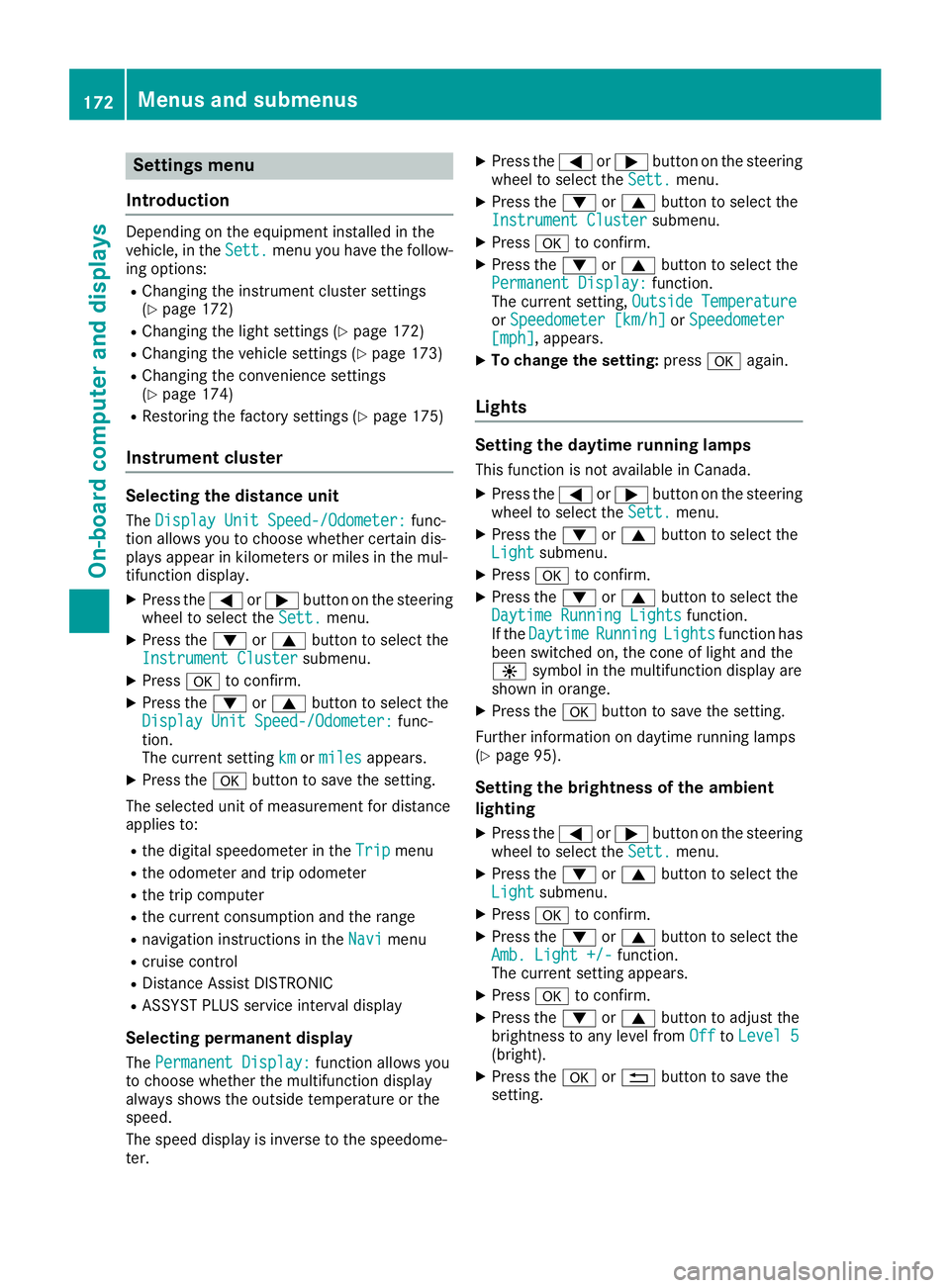
Introduction
Depending on the equipment installed in the
vehicle, in the Sett.menu you have the follow-
ing options:
RChanging the instrumentc luster settings
(Ypage 172)
RChanging the light settings (Ypage 172)
RChanging the vehicle settings (Ypage 173)
RChanging the convenience settings
(Ypage 174)
RRestoring the factory settings (Ypage 175)
Instrument cluster
Selecting the distance unit
The Display Unit Speed-/Odometer:func-
tion allowsy ou to choose whether certain dis-
playsa ppear in kilometers or miles in the mul-
tifunction display.
XPress the =or; button on the steering
wheel to select the Sett.menu.
XPress the:or9 button to select the
Instrument Clustersubmenu.
XPress ato confirm.
XPress the :or9 button to select the
Display Unit Speed-/Odometer:func-
tion.
The current setting km
ormilesappears.
XPress the abutton to save the setting.
The selected unit of measurement for distance
appliest o:
Rthe digital speedometer in the Tripmenu
Rthe odometer and trip odometer
Rthe trip computer
Rthe current consumption and the range
Rnavigation instructions in theNavimenu
Rcruise control
RDistanceAssist DISTRONIC
RASSYST PLUS service interval display
Selecting permanent display
The Permanent Display:function allowsy ou
to choose whether the multifunction display
always shows the outside temperature or the
speed.
The speed display is inverse to the speedome-
ter.
XPress the =or; button on the steering
wheel to select the Sett.menu.
XPress the:or9 button to select the
Instrument Clustersubmenu.
XPress ato confirm.
XPress the :or9 button to select the
Permanent Display:function.
The current setting, Outside Temperature
orSpeedometer [km/h]orSpeedometer[mph],appears.
XTo change the setting: pressaagain.
Lights
Setting the daytime running lamps
This function is not available in Canada.
XPress the =or; button on the steering
wheel to select the Sett.menu.
XPress the:or9 button to select the
Lightsubmenu.
XPress ato confirm.
XPress the :or9 button to select the
Daytime Running Lightsfunction.
If the DaytimeRunningLightsfunction has
been switched on, the cone of light and the
W symbol in the multifunction display are
shown in orange.
XPress the abutton to save the setting.
Further information on daytime running lamps
(
Ypage 95).
Setting the brightness of the ambient
lighting
XPress the =or; button on the steering
wheel to select the Sett.menu.
XPress the:or9 button to select the
Lightsubmenu.
XPress ato confirm.
XPress the :or9 button to select the
Amb. Light +/-function.
The current settinga ppears.
XPressato confirm.
XPress the :or9 button to adjust the
brightness to any level from OfftoLevel 5(bright).
XPress the aor% button to save the
setting.
172Menus and submenus
On-board computer and displays
Page 213 of 298
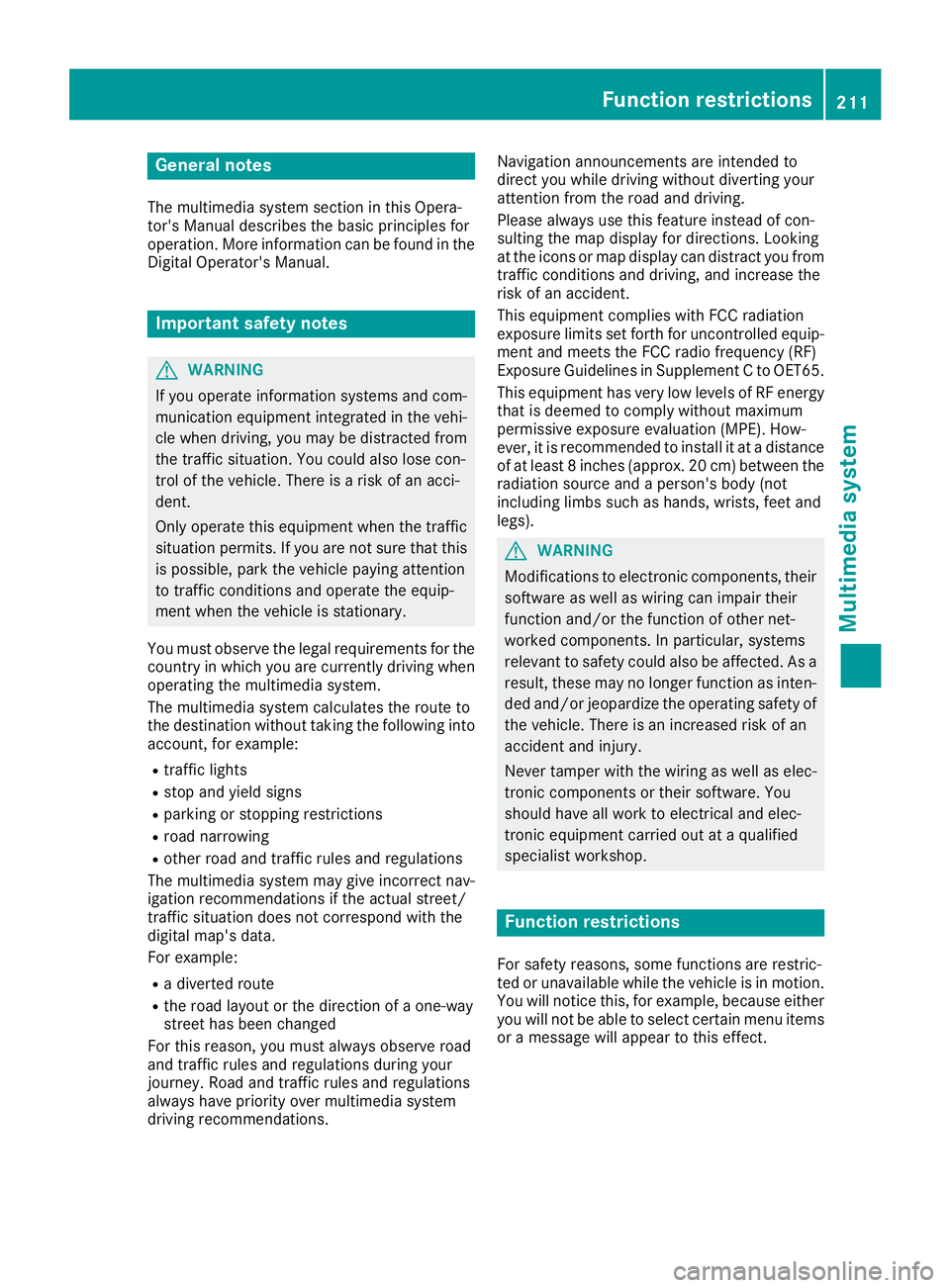
General notes
The multimedia system section in this Opera-
tor's Manualdescribes the basicp rinciples for
operation. More information can be found in the Digital Operator's Manual.
Important safety notes
GWARNING
If you operate information systems and com-
municatio nequipment integrated in the vehi-
cle when driving, you may be distracted from
the traffic situation. You could also lose con-
trol of the vehicle.T here isarisk of an acci-
dent.
Only operate this equipment when the traffic
situation permits. If you are not sure that this
is possible, park the vehicle paying attention
to traffic conditions and operate the equip-
ment when the vehicle is stationary.
You must observe the legalr equirements for the
country in which you are currently driving when
operating the multimedia system.
The multimedia system calculates the route to
the destination withoutt aking the following into
account, for example:
Rtraffic lights
Rstop and yield signs
Rparking or stopping restrictions
Rroad narrowing
Rother road and traffic rule sand regulations
The multimedia system may give incorrect nav-
igation recommendations if the actual street/
traffic situation does not correspond with the
digital map's data.
For example:
Rad iverted route
Rthe road layout or the direction of aone-way
street has been changed
For this reason, you must alwayso bserve road
and traffic rule sand regulations during your
journey. Roa dand traffic rule sand regulations
alwaysh ave priority over multimedia system
driving recommendations. Navigation announcements are intended to
direct you whiled
riving withoutdiverting your
attention from the road and driving.
Please alwaysu se this feature instead of con-
sulting the map display for directions. Looking
at the icons or map display can distract you from
traffic conditions and driving, and increase the
risk of an accident.
This equipment complies with FCC radiation
exposure limits set forth for uncontrolled equip-
ment and meets the FCC radiof requency (RF)
Exposure Guidelines in Supplement CtoOET65.
This equipment has very low levelsofRFe nergy
that is deemedtoc omply withoutmaximum
permissive exposure evaluation (MPE). How-
ever, it is recommended to insta
ll it atadistance
of at least 8inches (approx. 20 cm) betweent he
radiation source and aperson's body (not
including limbss uch as hands, wrists, feet and
legs).
GWARNING
Modifications to electronic components, their software as wellasw iring can impair their
function and/or the function of other net-
worked components. In particular, systems
relevant to safety could also be affected. As a
result, these may no longer function as inten-
ded and/or jeopardize the operating safety of
the vehicle.T here is an increasedr isk of an
accident and injury.
Never tamper with the wiring as wellase lec-
tronic components or their software .You
shoul dhave all work to electricala nd elec-
tronic equipment carried out at aqualified
specialist workshop.
Function restrictions
For safety reasons, some functions are restric-
ted or unavailable whilet he vehicle is in motion.
You willn otice this, for example, because either
you willn ot be abletos elect certain menu items
or am essag ewillappear to this effect.
Function restrictions211
Multimedia system
Z
Page 214 of 298
Operating system
Overview
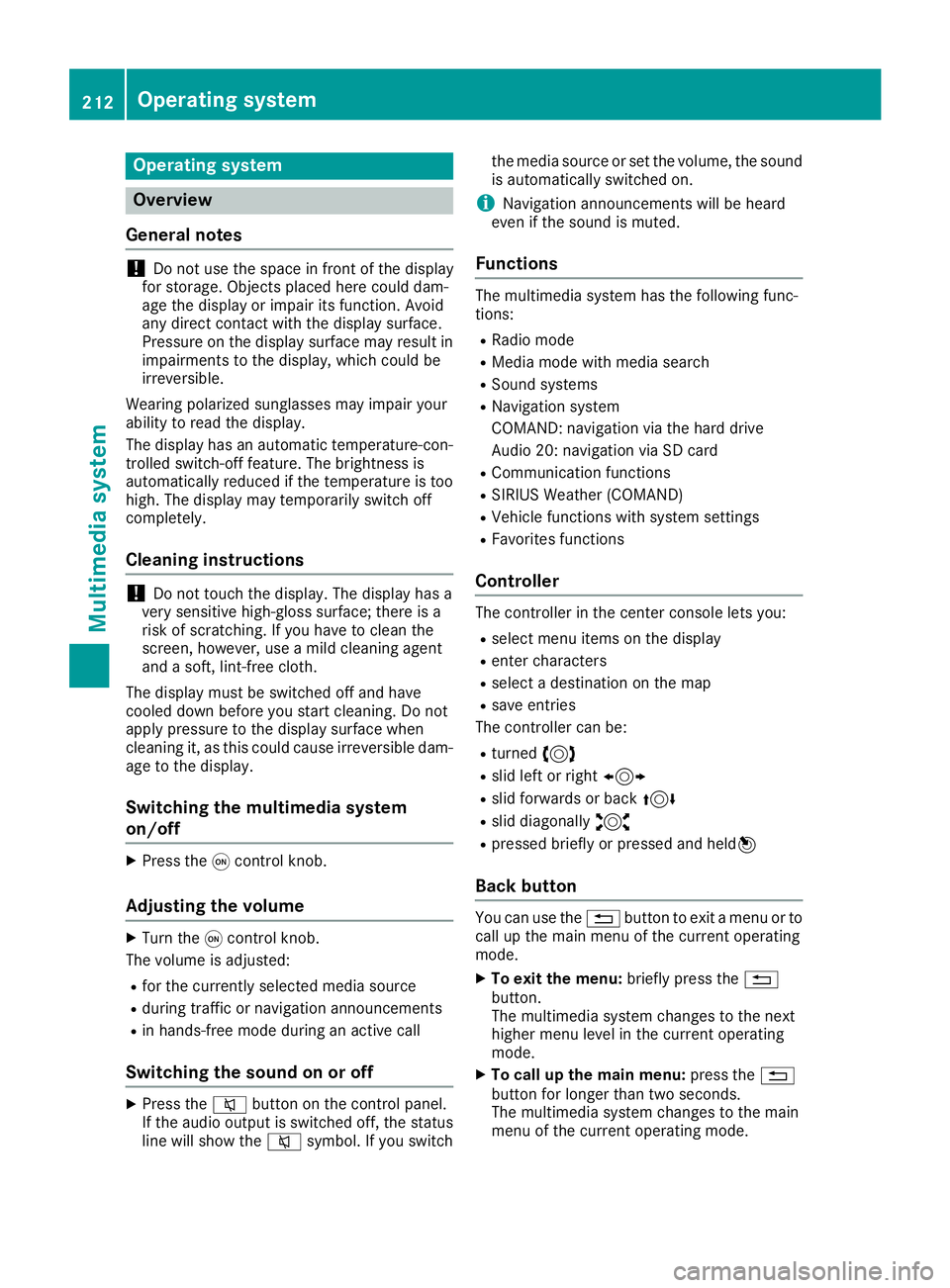
General notes
!Do not use the space in frontoft he display
for storage. Objects placed here could dam-
age the display or impair its function .Avoid
any direct contact with the display surface.
Pressure on the display surface may result in
impairment stothe display, which could be
irreversible.
Wearing polarized sunglasses may impair your
ability to read the display.
The display has an automatic temperature-con-
trolled switch-off feature. The brightness is
automatically reduced if the temperature is too
high. The display may temporarily switch off
completely.
Cleaning instructions
!Do not touch the display. The display has a
very sensitive high-gloss surface; there is a
risk of scratching .Ifyou have to clean the
screen,h owever, use amild cleanin gagent
and asoft,l int-free cloth.
The display must be switched off and have
cooled down before you start cleaning. Do not
apply pressure to the display surface when
cleanin git, as this could cause irreversible dam-
age to the display.
Switching the multimedia system
on/off
XPress the qcontrol knob.
Adjusting the volume
XTurn the qcontrol knob.
The volume is adjusted:
Rfor the currently selected media source
Rduring traffic or navigation announcements
Rin hands-free mode during an active call
Switching the sound on or off
XPress the 8button on the control panel.
If the audio output is switched off, the status
line will show the 8symbol. If you switch the media source or set the volume, the sound
is automatically switched on.
iNavigation announcements will be heard
even if the sound is muted.
Functions
The multimedia system has the following func-
tions:
RRadio mode
RMedia mode with media search
RSound systems
RNavigation system
COMAND :navigation via the hard drive
Audio 20: navigation via SD card
RCommunication functions
RSIRIUS Weather (COMAND)
RVehicle function swith system settings
RFavorites functions
Controller
The controller in the center console lets you:
Rselect menu items on the display
Renter characters
Rselect adestination on the map
Rsave entries
The controller can be:
Rturned 3
Rslid left or right 1
Rslid forwards or back 4
Rslid diagonally2
Rpressed briefly or pressed and held 7
Back button
You can use the%button to exit amenu or to
call up the main menu of the currento perating
mode.
XTo exit the menu: briefly press the%
button.
The multimedia system changes to the next
higher menu level in the currento perating
mode.
XTo call up the main menu: press the%
button for longer than two seconds.
The multimedia system changes to the main
menu of the currento peratingmode.
212Operating system
Multimedia system
Page 218 of 298
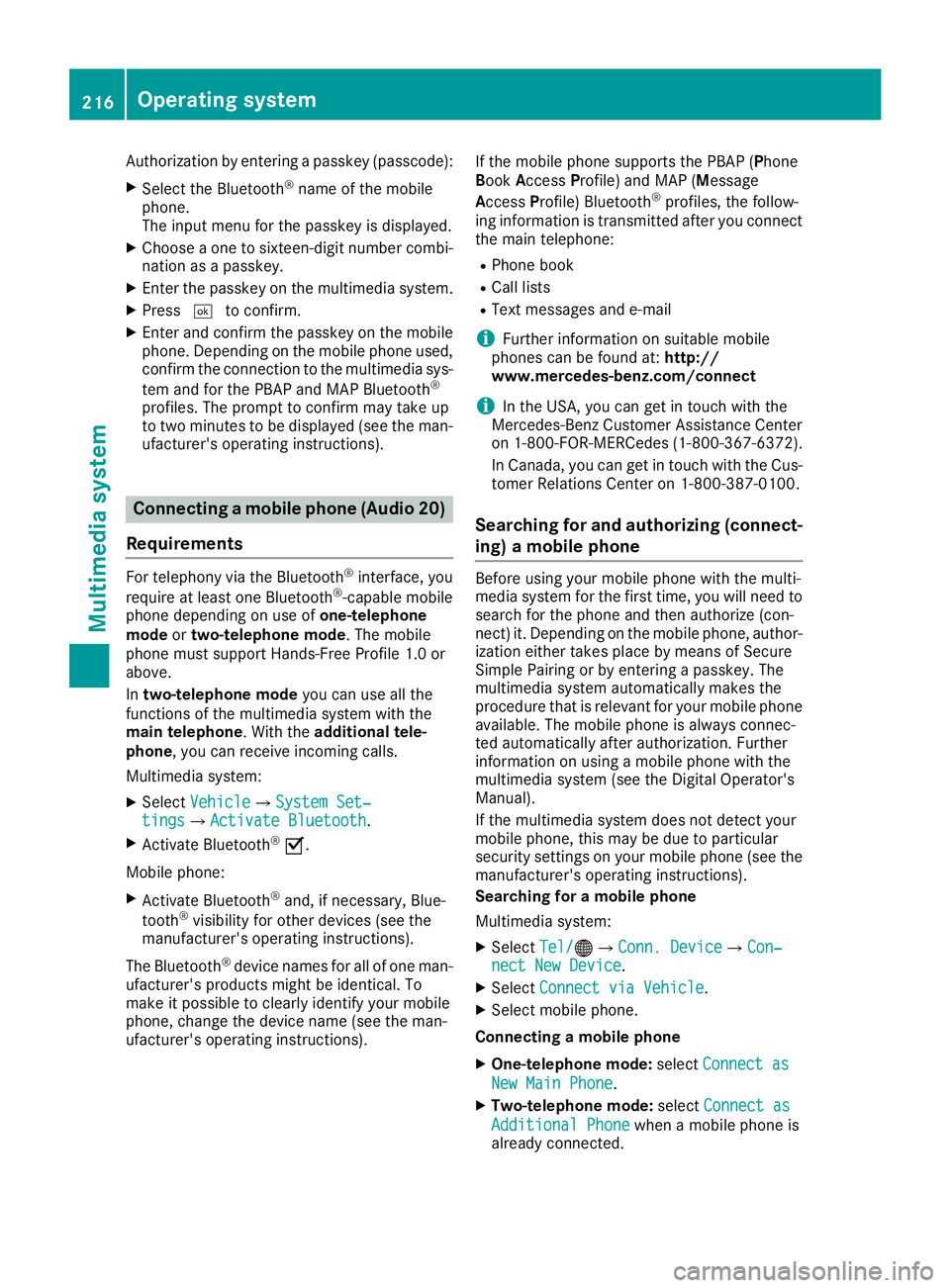
Authorization by enteringapasskey( passcode):
XSelect the Bluetooth®nameoft he mobile
phone.
The input menu for the passkeyisd isplayed.
XChoos eaone to sixteen-digitn umbercombi-
nation as apasskey.
XEnter the passkeyont he multimedia system.
XPress¬to confirm.
XEnter and confirm the passkeyont he mobile
phone. Depending on the mobil ephone used,
confirm the connectio ntothe multimedia sys-
tem and for the PBAP and MAP Bluetooth
®
profiles. The prompt to confirm mayt ake up
to two minutes to be displayed (se ethe man-
ufacturer's operating instructions).
Connectin gamobilephon e(Au dio 20)
Requirements
For telephony via the Bluetooth®interface, you
require at leas tone Bluetooth®-capable mobile
phone depending on us eofone-telephone
mode ortwo-telephon emode.The mobile
phone must support Hands-FreeP rofile1.0 or
above.
In two-telephon emode youc an us eallthe
functions of the multimedia system with the
main telephone .Witht he additional tele-
phone ,you can receive incoming calls.
Multimedia system:
XSelect VehicleQSystem Set‐tingsQActivate Bluetooth.
XActivate Bluetooth®O.
Mobil ephone:
XActivate Bluetooth®and ,ifn ecessary,B lue-
tooth®visibility for othe rdevice s(seet he
manufacturer's operating instructions).
The Bluetooth
®device names for al lofone man-
ufacturer's products might be identical .To
make it possibl etoclearly identify your mobile
phone, change the device nam e(seet he man-
ufacturer's operating instructions). If the mobil
ephone supports the PBAP ( Phone
Book Access Profile )and MAP ( Message
A ccess Profile) Bluetooth
®profiles, the follow-
ing informatio nist ransmitte dafteryou connect
the main telephone:
RPhone book
RCall lists
RText messages and e-mail
iFurther informatio nonsuitabl emobile
phones can be found at: http://
www.mercedes-benz.com/connect
iIn the USA, yo ucan getint ouch with the
Mercedes-Benz Customer Assistance Center
on 1-800-FOR-MERCedes (1-800-367-6372).
In Canada, yo ucan getint ouch with the Cus-
tomerR elations Center on 1-800-387-0100.
Searching for and authorizing (connect-
ing) amobile phone
Before using your mobile phone with the multi-
media system for the first time, you will need to
search for the phone and then authorize (con-
nect)i t. Depending on the mobile phone, author-
ization either takes place by means of Secure
Simple Pairing or by enteringap asskey. The
multimedia system automatically makes the
procedure that is relevant for your mobile phone
available. The mobile phone is always connec-
ted automatically after authorization. Further
information on using amobile phone with the
multimedia system (see the Digital Operator's
Manual).
If the multimedia system does not detect your
mobile phone, this may be due to particular
security settings on your mobile phone (see the
manufacturer's operating instructions).
Searching for amobile phone
Multimedia system:
XSelect Tel/®QConn. DeviceQCon‐nect New Device.
XSelectConnect via Vehicle.
XSelect mobile phone.
Connecting amobile phone
XOne-telephone mode: selectConnect as
New Main Phone.
XTwo-telephone mode: selectConnect as
Additional Phonewhenamobile phone is
already connected.
216Operating system
Multimedia system