2018 MERCEDES-BENZ SL ROADSTER cruise control
[x] Cancel search: cruise controlPage 10 of 322

Temperature (on-board computer,
Mercedes-AMG vehicles) ............... 197
Temperature gauge ........................ 186
Warning lamp ................................. 232
Cooling
see Climate control
Copyright ............................................. 31
Cornering light function
Display message ............................2 12
Function/notes .............................1 08
Cruise control
Cruise control lever ....................... 149
Deactivating ................................... 150
Display message ............................ 220
Driving system ............................... 149
Function/notes .............................1 49
Important safety notes .................. 149
Setting a speed .............................. 150
Storing and maintaining current
speed ............................................. 150
Cup holder
Center console .............................. 246
Important safety notes .................. 245
Customer Assistance Center
(CAC) ..................................................... 28
Customer Relations Department ....... 28
D
Data
see Technical data
Data carrier
Selecting ........................................ 191
Daytime running lamps
Display message ............................ 212
Function/notes .............................1 06
Switching on/off (on-board com-
puter) ............................................. 195
Declarations of conformity ................. 27
Decorative film
Cleaning instructions ..................... 265
Delayed switch-off
Exterior lighting (on-board com-
puter) ............................................. 195
Interior lighting .............................. 196
Diagnostics connection ......................28
Digital Operator's Manua l
Help ................................................ .23 Introduction .....................................2
3
Digital speedomete r........................ .189
Display messages
ASSYST PLUS ................................ 262
Calling up (on-board computer) ..... 200
Driving systems .............................2 15
Engine ............................................ 213
General notes ................................ 200
Hiding (on-board computer) ........... 200
KEYLESS-GO .................................. 226
Lights ............................................. 212
Safety systems .............................. 201
SmartKey ....................................... 225
Tires ............................................... 221
Vehicle ...........................................2 22
Distance Pilot DISTRONIC
Activating ....................................... 153
Calling up a speed ......................... 153
Cruise control lever ....................... 153
Display Message ............................ 218
Displays in the instrument cluster .. 155
Driving tips .................................... 157
Function/notes ............................. 151
Important safety notes .................. 151
Setting the specified minimum
distance ......................................... 155
Stopping ........................................ 154
Storing a speed .............................. 153
Swi tching off .................................. 156
Warning lamp ................................. 234
Distance recorder
see Odometer
see Trip odometer
Distance warning (warning lamp) .... 234
Distance warning function
Function/notes ................................ 63
Doors
Automatic locking (on-board com-puter) ............................................. 196
Automatic locking (switch) ............... 79
Central locking/unlocking
(SmartKey) ....................................... 73
Control panel ................................... 39
Display message ............................ 224
Emergency locking ........................... 80
Emergency unlocking ....................... 80
Important safety notes .................... 78
Opening (from inside) ...................... 79
8Index
Page 11 of 322

Overview .......................................... 78
Power closing ..................................80
Drinking and drivin g........................ .145
Drive program
Automatic transmission ................. 134
Display ...........................................1 31
SETUP (on-board computer,
Mercedes-AMG vehicles) ...............1 98
Driver's door
see Doors
Driving abroad
Mercedes-Benz Service ................. 263
Driving on flooded roads .................. 148
Driving safety system
Active Brake Assist .......................... 62
Driving safety systems
ABS (Anti-lock Braking System) ....... 60
Active Brake Assist with cross-
traffic function ................................. 69
ADAPTIVE BRAKE .............................6 9
Adaptive Brake Assist ...................... 64
Adaptive brake lights ....................... 65
BAS (Brake Assist System) .............. 60
Brake Assist with cross-traffic
function ........................................... 61
Distance warning function ............... 63
EBD (electronic brake force distri-
bution) ............................................. 69
ESP
®(Electronic Stability Pro-
gram) ............................................... 65
Important safety information ........... 60
Overview .......................................... 59
STEER CONTROL ............................. 71
Driving system
Active Body Control (ABC) (except
Mercedes-AMG vehicles) ............... 163
Active Body Control (ABC)
(Mercedes-AMG vehicles) .............. 165
Distance Pilot DISTRONIC with
Steering Pilot and Stop&Go Pilot ... 158
Parking Pilot .................................. 170
RACE START (Mercedes-AMG
vehicles) ........................................ 161
Driving systems
Active Blind Spot Assist ................. 179
Active Driving Assistance pack-
age ................................................. 179
Active Lane Keeping Assist ............ 181 Adaptive Damping System ............. 162
ATTENTION ASSIST ........................ 177
Cruise control ................................ 149
Disp
lay me
ssage ............................ 215
DISTRONIC PLUS ........................... 151
HOLD function ............................... 159
PARKTRONIC ................................. 167
Rear view camera .......................... 174
Driving tips
AMG ceramic brakes ..................... 148
Automatic transmission ................. 133
Brakes ........................................... 146
Break-in period .............................. 121
Distance Pilot DISTRONIC ............. 157
Downhill gradient ........................... 146
Drinking and driving ....................... 145
Driving in winter ............................. 148
Driving on flooded roads ................ 148
Driving on wet roads ...................... 148
Exhaust check ............................... 145
Fuel ................................................ 144
General .......................................... 144
Hydroplaning ................................. 148
Icy road surfaces ........................... 148
Limited braking efficiency on sal-
ted roads ....................................... 147
Snow chains .................................. 287
Subjecting brakes to a load ........... 147
Wet road surface ........................... 147
DVD video
Operating (on-board computer) ..... 191
see also Digital Operator's Man-
ual .................................................. 236
DYNAMIC SELECT button (all vehi-
cles except Mercedes-AMG vehi-
cles) .................................................... 128
DYNAMIC SELECT controller
(Mercedes-AMG vehicles) ................. 129
E
EASY-ENTRY feature
Activating/deactivating ................. 196
Function/notes ............................. 101
EASY-EXIT feature
Crash-responsive ........................... 102
Function/notes ............................. 101
Switching on/off ........................... 196
Index9
Page 20 of 322
Overview .......................................... 73
Positions (ignition lock) ................. 122
Problem (malfunction) ..................... 77
Starting the engine ........................ 124
SMS
see also Digital Operator's Man-
ual .................................................. 236
Snow chains ...................................... 287
Sockets
Front-passenger footwell ............... 248
General notes ................................ 247
Trunk ............................................. 248
Sound
Switching on/off ........................... 237
Special seat belt retractor .................. 57
Specialist workshop ............................28
Speed, controlling
see Cruise control
Speedometer
Digital ............................................ 189
In the Instrument cluster ................. 33
Segments ...................................... 185
Selecting the display unit ............... 194
SPORT handling mode
Deactivating/activating
(Mercedes-AMG vehicles) ................6 7
Warning lamp ................................. 231
Standing lamps
Display message ............................2 12
Switching on/off ........................... 107
Start/stop function
see ECO start/stop function
Starting (engine) ................................ 123
STEER CONTROL .................................. 71
Steering
Display message ............................ 224
Steering Assist and Stop&Go Pilot
(DISTRONIC PLUS)
Activating/deactivating ................. 193
Steering assistant STEER CON-
TROL
see STEER CONTROL
Steering Pilot and Stop&Go Pilot
Display message ............................ 220
Steering wheel
Adjusting (electrically) ................... 101
Button overview ............................... 34 Buttons (on-board computer)
......... 186
Important sa
fety notes .................. 100
Storing settings (memory func-
tion) ............................................... 105
Steering wheel paddle shifters ........136
Stopwatch (RACETIMER) ................... 198
Stowage areas ................................... 242
Stowage compartments
Armrest (under) .............................2 42
Center console .............................. 243
Center console (rear) ..................... 243
Cup holders ................................... 245
Eyeglasses compartment ...............2 43
Glove box ....................................... 242
Important safety information ......... 242
Rear ............................................... 244
Stowage net ................................... 244
Stowage net ....................................... 244
Stowage space
Umbrella holder .............................2 43
Stowage well beneath the trunk
floor .................................................... 245
Summer tires ..................................... 287
Sun visor ............................................ 246
Surround lighting (on-board com-
puter) ..................................................1 95
Suspension settings
Active Body Control (ABC) (except
Mercedes-AMG vehicles) ...............1 64
Active Body Control (ABC)
(Mercedes-AMG vehicles) .............. 166
Suspension tuning
SETUP (on-board computer,
Mercedes-AMG vehicles) ...............1 98
Switching air-recirculation mode
on/off ................................................. 118
Switching on media mode
Via the device list .......................... 241
T
Tachometer ........................................ 185
Tail lamps
Display message ............................ 212
see Lights
Tank content
Fuel gauge ....................................... 33
18Index
Page 34 of 322

Cockpit
FunctionPage
:Steering wheel paddle shift-
ers136
;Combination switch107
=Adjusts the steering wheel
electrically101
?Horn
AInstrument cluster33
BParking Assist PARKTRONIC
warning display167
COverhead control panel38
FunctionPage
DClimate control systems113
EIgnition lock122
Start/Stop button122
FCruise control lever149
GElectric parking brake142
HLight switch106
IDiagnostics connection28
JOpens the hood258
32Cockpit
At a glance
Page 149 of 322
you to avoid overheating thebrakes and wear -
in g them out excessively.
Whe nmakin guse of th eengin ebrakin g
effect, it is possibl ethat adrive whee lmay no t
tur nfor som etime, e.g. in th ecas eof sud-
denly changin gor slipper yroa dsurfac econ-
ditions. This could caus edamage to th edrive
train .This typ eof damage is no tcovered by
th eMercedes-Ben zwarranty.
Change into alower gear in goo dtime on lon g
and steep downhill gradients .This is especially
important if th evehicl eis laden .
This also applies if you hav eactivated cruise
control or Distanc ePilo tDISTRONIC.
Heavy and light loads
GWARNIN G
If you res tyour foo ton th ebrak epedal while
driving, th ebrakin gsystem can overheat. This
increase sth estopping distanc eand can eve n
caus eth ebrakin gsystem to fail .There is a
ris kof an accident.
Never use th ebrak epedal as afootrest .Never
depress th ebrak epedal and th eaccelerato r
pedal at th esam etime.
!Depressing th ebrak epedal constantl y
result sin excessive and premature wear to
th ebrak epads .
If th ebrakes hav ebeen subjecte dto aheav y
load, do no tstop th evehicl eimmediately, but
drive on for ashort while .This allows th eairflow
to cool th ebrakes mor equickly.
Wet roads
If you hav edriven for alon gtime in heav yrain
without braking, there may be adelaye dreac -
tion from th ebrakes when brakin gfor th efirst
time. This may also occur after th evehicl ehas
been washed or driven through deep water.
You then hav eto depress th ebrak epedal mor e
firmly. Maintai n agreate rdistanc efrom th e
vehicl ein front.
Afte rdrivin gon awet roa dor havin gth evehicl e
washed, brak efirmly while payin gattention to
th etraffic conditions. This will warm up th e
brak ediscs, thereby drying them mor equickl y
and protectin gthem against corrosion.
Limited braking perfor mance onsalt-
treated roads
If you drive on salted roads, alayer of salt resi-
due may for mon th ebrak edisc sand brak e
pads .This can result in asignificantly longer
brakin gdistance.
RIn order to preven tany salt build-up, apply th e
brakes occasionally while payin gattention to
th etraffic conditions.
RCarefull ydepress th ebrak epedal and th e
beginnin gand en dof ajourney.
RMaintai n agreate rdistanc eto th evehicl e
ahead .
Servicing the brakes
!The brak eflui dlevel may be to olow, if:
Rif th ered brak ewarnin glamp lights up in
th einstrumen tcluste rand
Ryou hear awarnin gtone while th eengin eis
running
Observ eadditional warnin gmessage sin th e
multifunction display.
The brak eflui dlevel may be to olow due to
brak epad wear or leakin gbrak elines.
Hav eth ebrak esystem checke dimmediately.
Consult aqualified specialist workshop to
arrang ethis.
!As th eES P®system operate sautomatically,
th eengin eand th eignition mus tbe switched
off (the SmartKey mus tbe in position uor
1 in th eignition loc kor th eStart/Sto pbut -
to nmus tbe in position uor1), if:
Rtheparkin gbrak eis tested usin g abrak e
dynamometer.
Rth evehicl eis towed wit hth efron taxl e
raised.
Braking triggered automatically by ES P
®may
caus esevere damage to th ebrak esystem.
Al lchecks and maintenance wor kon th ebrak e
system mus tbe carrie dout at aqualified spe -
cialist workshop .
Hav ebrak epads installed and brak eflui d
replaced at aqualified specialist workshop .
If th ebrak esystem has only been subjec tto
moderat eloads ,you should test th efunctional-
it y of your brakes at regular intervals.
In forma
tion on BA
S(Brake Assist) (Ypage 60)
and on Brake Assis twit hCross-Traffic Assis t
(
Ypage 61).
Driving tips147
Driving and parking
Z
Page 151 of 322
window on the side of the vehicle that is not
facing into the wind.
Have your vehicle winter-proofed at a qualified
specialist workshop at the onset of winter.
Drive particularly carefully on slippery road sur-
faces. Avoid sudden acceleration, steering and
braking maneuvers. Do not use cruise control.
If the vehicle threatens to skid or cannot be
stopped when moving at low speed:
XShift the transmission to position i.
The outside temperature indicator is not
designed to serve as an ice-warning device and is therefore unsuitable for that purpose.
Changes in the outside temperature are dis-
played after a short delay.
Indicated temperatures just above the freezing
point do not guarantee that the road surface is
free of ice. The road may still be icy, especially in
wooded areas or on bridges. The vehicle could
skid if you fail to adapt your driving style. Always
adapt your driving style and drive at a speed to
suit the prevailing weather conditions.
You should pay special attention to road condi-
tions when temperatures are around freezing
point.
For more information on driving with snow
chains, see (
Ypage 287).
For more information on driving with summer
tires, see (
Ypage 287).
Observe the notes in the "Winter operation" sec-
tion (
Ypage 287).
Driving systems
Cruise control
General notes
Cruise control maintains a constant road speed
for you. It brakes automatically in order to avoid
exceeding the set speed. On long and steep
downhill gradients, especially if the vehicle is
laden, you must select a lower gear in good time.
By doing so, you will make use of the braking
effect of the engine. This relieves the load on the
brake system and prevents the brakes from
overheating and wearing too quickly.
Use cruise control only if road and traffic con-
ditions make it appropriate to maintain a steady speed for a prolonged period. You can store any
road speed above 20 mph (30 km/h).
Important safety notes
If you fail to adapt your driving style, cruise con-
trol can neither reduce the risk of an accident
nor override the laws of physics. Cruise control
cannot take into account the road, traffic and
weather conditions. Cruise control is only an
aid. You are responsible for the distance to the
vehicle in front, for vehicle speed, for braking in
good time and for staying in lane.
Do not use cruise control:
Rin road and traffic conditions which do not
allow you to maintain a constant speed e.g. in
heavy traffic or on winding roads
Ron slippery road surfaces. Braking or accel-
erating could cause the drive wheels to lose
traction and the vehicle could then skid
Rwhen there is poor visibility, e.g. due to fog,
heavy rain or snow
If there is a change of drivers, advise the new
driver of the speed stored.
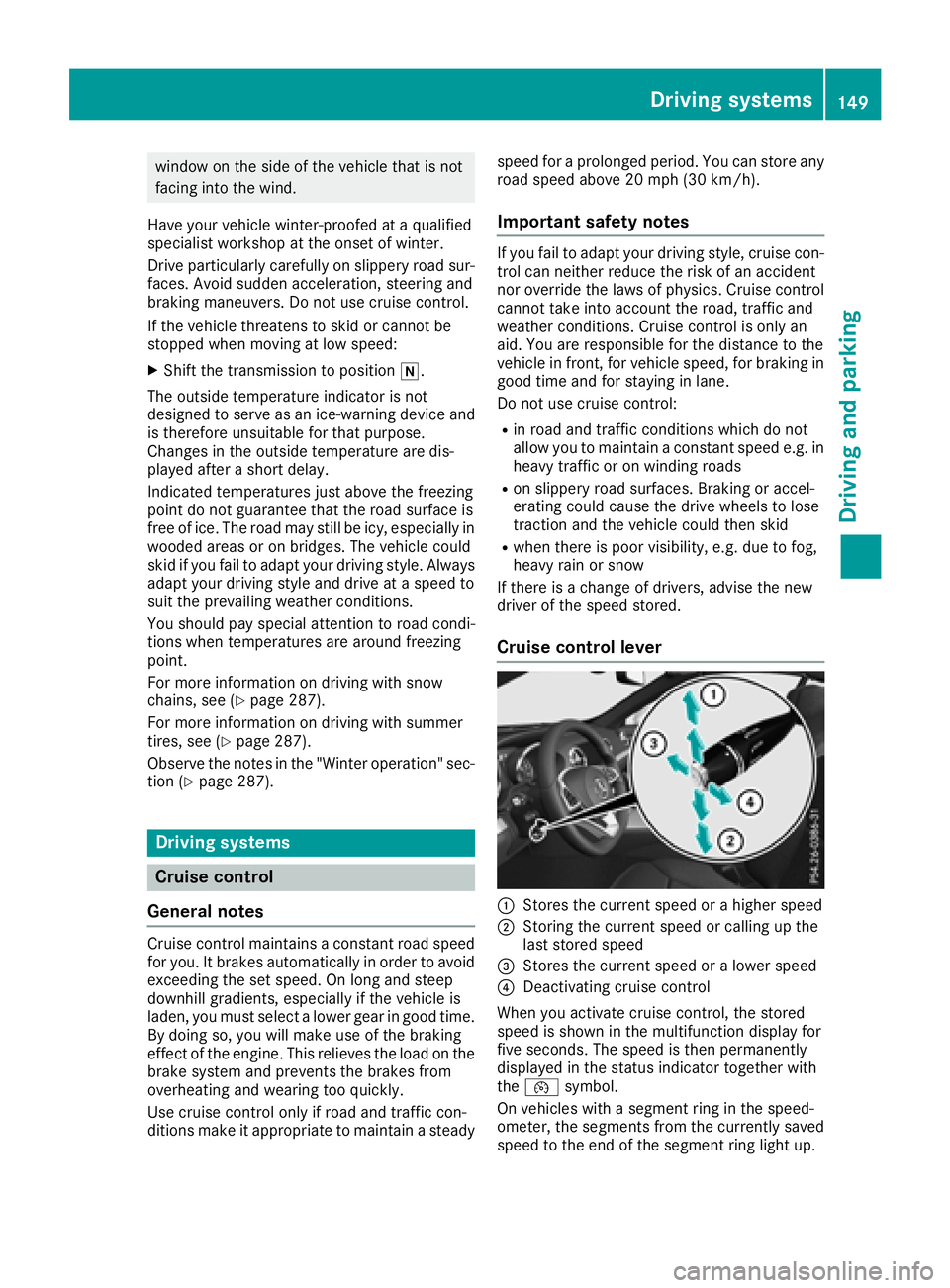
Cruise control lever
:Stores the current speed or a higher speed
;Storing the current speed or calling up the
last stored speed
=Stores the current speed or a lower speed
?Deactivating cruise control
When you activate cruise control, the stored
speed is shown in the multifunction display for
five seconds. The speed is then permanently
displayed in the status indicator together with
the ¯ symbol.
On vehicles with a segment ring in the speed-
ometer, the segments from the currently saved speed to the end of the segment ring light up.
Driving systems149
Driving and parking
Z
Page 152 of 322
Storing, maintaining and calling up a
speed
Storing and maintaining a speed
XAccelerate the vehicle to the desired speed.
XBriefly press the cruise control lever up:or
down ?.
XRemove your foot from the accelerator pedal.
Cruise control is activated. The vehicle auto-
matically maintains the stored speed.
You can store the current speed if you are driv-
ing faster than 20 mph (30 km/h).
iCruise control may be unable to maintain
the stored speed on uphill gradients. The
stored speed is resumed when the gradient
evens out. Cruise control maintains the
stored speed on downhill gradients by auto-
matically applying the brakes.
Storing or calling up a speed
GWARNING
If you call up the stored speed and it differs
from the current speed, the vehicle acceler-
ates or decelerates. If you do not know the
stored speed, the vehicle could accelerate or brake unexpectedly. There is a risk of an acci-
dent.
Pay attention to the road and traffic condi-
tions before calling up the stored speed. If you
do not know the stored speed, store the
desired speed again.
XBriefly pull the cruise control lever towards
you =.
XRemove your foot from the accelerator pedal.
The first time cruise control is activated, it
stores the current speed or regulates the
speed of the vehicle to the previously stored
speed.
Setting a speed
GWARNING
Keep in mind that it may take a brief moment until the vehicle has made the necessary
adjustments.
Increase or decrease the set vehicle speed to
a value that the prevailing road conditions and
legal speed limits permit. Otherwise, sudden
and unexpected acceleration or deceleration
of the vehicle could cause an accident and/orserious injury to you and others.
XTo adjust the set speed in 1 mph incre-
ments (1 km/h increments): briefly press
the cruise control lever up :to the pressure
point for a higher speed, or down ?for a
lower speed.
Every time the cruise control lever is pressed
up or down, the last speed stored is increased
or reduced.
XTo adjust the set speed in 5 mph incre-
ments (10 km/h increments): briefly press
the cruise control lever up :past the pres-
sure point for a higher speed, or down ?for
a lower speed.
Every time the cruise control lever is pressed
up or down, the last speed stored is increased or reduced.
iThe speed indicated in the speedometer
may differ slightly from the speed stored.
iCruise control is not deactivated if you
depress the accelerator pedal. For example, if you accelerate briefly to overtake, cruise con-
trol adjusts the vehicle's speed to the last
speed stored after you have finished overtak-
ing.
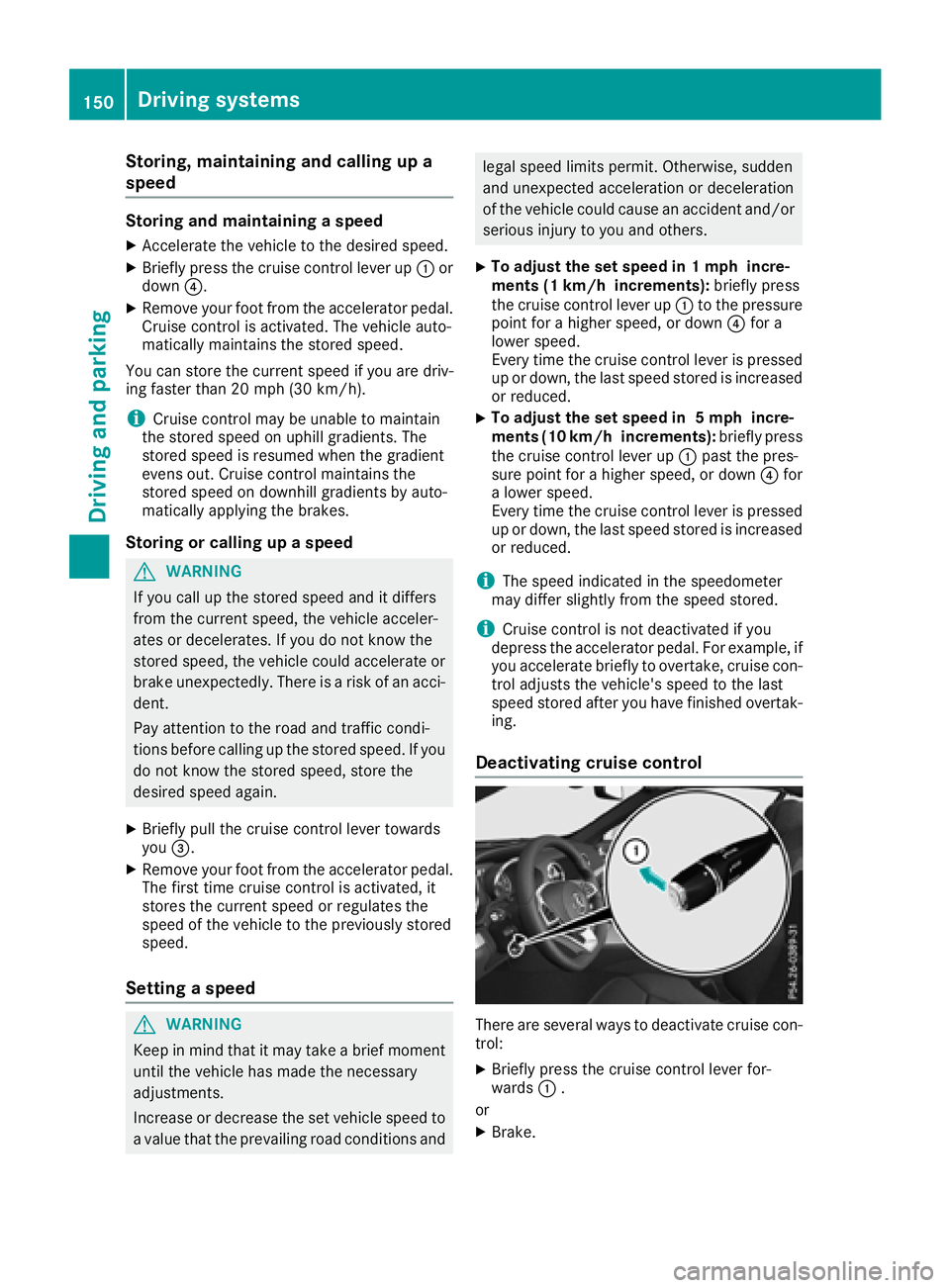
Deactivating cruise control
There are several ways to deactivate cruise con-
trol:
XBriefly press the cruise control lever for-
wards :.
or
XBrake.
150Driving systems
Driving and parking
Page 153 of 322
Cruise controlisautomatically deactivated if:
Ryou engage the electr icparking brake
Ryou are driving at less than 20 mph (30 km/h)
RESP®intervenes or you deactivate ESP®
RBrake Assist intervenes
Ryou move out of transmission position h
If cruise control isdeactivate d,you willhear a
warning tone. You willsee the Cruise Con‐
trol Offmessage inthe multifunction display
for approximate lyfive seconds.
iWhen you switch off the engine, the last
speed stored iscleared.
Distance Pilot DISTRONIC
General notes
Distance Pilot DI STRONIC regulates the speed
and automatically helps you maintain the dis-
tance to the veh icledetected infront. Vehicle s
are detected with the aid of the radar sensor
system. Distance Pilot DI STRONIC brakes auto-
matically to avoid excee ding the set speed or to
maintain the designated distance from the veh i-
cle infront.
You must select a lower gear ingood time on
long and steep downhillgradients, especially if
the veh icle isladen. By doing so, you willmake
use of the braking effect of the engine. This
relieves the load on the brake system and pre-
vents the brakes from overheating and wearing
too quic kly.
If Distance Pilot DI STRONIC detects that there is
a risk of a co llision, you will be warned visually
and acoustically. Without your intervention, Dis-
tance Pilot DI STRONIC cannot prevent a co lli-
sion. An intermittent warning tone willthen
sound and the distance warning lamp willlight
up inthe instrument cluster. Brake immediately
in order to increase the distance from the veh i-
cle infront, or take evasive action, pro videdit is
safe to doso.
For Distance Pilot DI STRONIC to assist you
when driving, the radar sensor system must be
operational.
Distance Pilot DI STRONIC operates inthe range
between 0 mph (0 km/h) an
d 120 mph
(200 km/h).
Do not u
se Distance Pilot DISTRONIC while driv-
ing on roads with steep gradients. Since Distance Pilot DISTRONIC transmits radar
waves, it can resemble the radar detectors of
the responsible authorities. You can refer to the
relevant chapter in the Operator's Manual if
questions are asked about this.
iUSA only:
This device has been approved by the FCC as
a "Vehicular Radar System". The radar sensor
is intended for use in an automotive radar
system only. Removing, tampering with, or
altering the device will void any warranties,
and is not permitted by the FCC. Do not tam-
per with, alter, or use in any non-approved
way.
Any unauthorized modification to this device
could void the user’s authority to operate the
equipment.
iCanada only: This device complies with
RSS-210 of Industry Canada. Operation is
subject to the following two conditions:
1. This device may not cause interference,
and
2. This device must accept any interference
received, including interference that may
cause undesired operation of the device.
Removal, tampering, or altering of the device
will void any warranties, and is not permitted.
Do not tamper with, alter, or use in any non-
approved way.
Any unauthorized modification to this device
could void the user's authority to operate the equipment.
Important safety notes
GWARNING
Distance Pilot DISTRONIC does not react to:
Rpeople or animals
Rstationary objects on the road, e.g. stopped
or parked vehicles
Roncoming vehicles and crossing traffic
As a result, Distance Pilot DISTRONIC may
neither give warnings nor intervene in such
situations. There is a risk of an accident.
Always pay careful attention to the traffic sit- uation and be ready to brake.
Driving systems151
Driving and parking
Z